Red Hat CloudForms for Lenovo
Product Guide
Red Hat CloudForms provides unified cloud management that enables organizations to rapidly transform their existing virtual infrastructures into highly scalable, private clouds as well as take advantage of public cloud resources. CloudForms enables customers to deploy global private clouds, accelerate service delivery, increase agility, improve service levels, and maximize resource efficiency.
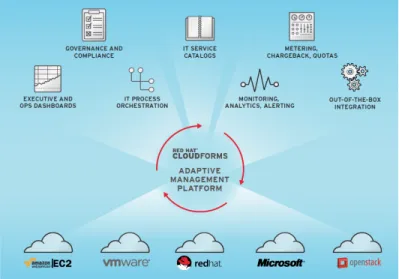
CloudForms is powered by a unique Adaptive Management Platform that is purpose-built for Infrastructure-as-a-Service (IaaS)-enabled enterprise clouds. This scalable, open, and extensible platform seamlessly integrates capabilities for unified management of private and hybrid clouds.
Figure 1. Red Hat CloudForms
Did you know?
With Red Hat CloudForms offerings that are available from Lenovo, Lenovo can be your trusted partner that offers "one stop shop" for the delivery of leading edge technologies and innovations from Lenovo and other leading IT vendors to satisfy the wide range of your IT infrastructure needs, including end user
devices, servers, storage, networking, operating systems and hypervisors, and management software. CloudForms can help transform existing Red Hat, VMware, and Microsoft virtual environments into private or hybrid clouds, with the ability to add new infrastructure platforms seamlessly to expand cloud models. CloudForms allows organizations to reduce execution time by automating key processes on Red Hat Enterprise Linux OpenStack Platform, including self-service provisioning, workflow processes with approvals, capacity and utilization, quota enforcement, and intelligent workload placement.
Features and benefits
Red Hat CloudForms delivers the insight, control, and automation that enterprises need to address the challenges of managing virtual environments. This technology enables enterprises with existing virtual infrastructures to improve visibility and control, and those initiating virtualization deployments to build and operate a well-managed virtual infrastructure.
Red Hat CloudForms offers the following features: Unified, flexible cloud management
CloudForms provides a unified and consistent set of management capabilities across the following platforms:
Virtual platforms from Red Hat, VMware, and Microsoft A cloud platform from OpenStack
The public cloud platform from Amazon
Transformation of existing virtual environments into clouds
With CloudForms, you can transform existing virtual environments into private clouds, hybrid clouds, or both. You can seamlessly add new infrastructure platforms to expand your cloud model and take advantage of better cost, performance, density, and innovation, or realize other benefits based on your needs.
Enhancements to the OpenStack management
CloudForms enhances the management of Red Hat Enterprise Linux OpenStack Platform with the following capabilities:
Configuration inventory Life-cycle management Policy state management Service catalog
Detailed reporting with dashboard views Chargeback and showback
Single view across all infrastructure platforms Public cloud integration and control (hybrid cloud)
With CloudForms, you can easily use Amazon EC2 as an extension of your datacenter. CloudForms lets you control who and what kind of workloads can run on Amazon. CloudForms provides
controlled life cycle management, quotas, and detailed chargeback information for Amazon-allocated workloads, aggregating that information with your enterprise’s virtual infrastructure landscape into a single, unified management console.
User self-service portal and automated provisioning
CloudForms supports web-based access to your specified service catalogs with role-delegated automated provisioning, quota enforcement, approval workflow, policies and rules, and chargeback across all virtualization and cloud platforms.
Resource orchestration and automation
Resources are automatically and optimally consumed via policy-based workload and resource orchestration, enabling high service availability, performance, and optimization. You can simulate what-if scenarios for proactive resource planning and continuous insights into consumption levels to allow detailed chargeback, showback, and policy creation.
Comprehensive control
CloudForms constantly controls your IT environment with unified monitoring, alerts, compliance rules, and automation across enterprise clouds and globally distributed, virtualized datacenters. CloudForms provides granular control of workload resources, configurations, capacity, and usage levels, with event timelines and change and drift tracking.
Capacity management
CloudForms dynamically and automatically provides the most efficient use of resources with the following capabilities:
Discover and track resource changes
Provision and de-provision resources based on policies and demand
Identify the current condition of resources and the best fit for new workloads across compute, storage, and network resources
Anticipate and plan for future resource needs based on capacity, trending, data, and analytics Red Hat CloudForms provides the following benefits:
Increases agility and service levels by delivering IaaS with self-service
Simplifies and accelerates service delivery with service catalogs, automated provisioning, and life cycle management
Continuously monitors and optimizes infrastructure resources and workloads for maximum utilization and efficiency
Provides cost transparency with metering, resource quotas, and chargeback
Enables proactive management, advanced decision support, and intelligent automation through predictive analytics
Provides comprehensive visibility and reporting for governance, compliance, and management insight
Enforces enterprise policies in real-time, providing cloud security, reliability, and availability Increases productivity and quality with IT process, task, and event automation
Components
Red Hat CloudForms consists of a single component, the CloudForms Management Engine. It provides the following feature sets:
Insight: Discovery, Monitoring, Utilization, Performance, Reporting, Analytics, Chargeback, and Trending.
Control: Security, Compliance, Alerting, and Policy-Based Resource and Configuration Enforcement.
Automate: IT Process, Task and Event, Provisioning, and Workload Management and Orchestration. Integrate: Systems Management, Tools and Processes, Event Consoles, Configuration
The CloudForms Management Engine includes the following components:
CloudForms Management Engine (CFME) Appliance: A secure, high performance, preconfigured virtual machine on which the virtual management database (VMDB) and CloudForms Management Engine server reside.
Virtual Management Database (VMDB): A database used by the CFME Appliance to store information about resources, users, and anything else required to manage a virtual infrastructure. It resides either on the CMFE Appliance or another instance that is accessible by the CFME Appliance. CloudForms Management Engine Server: The application that runs on the CFME Appliance and communicates with the SmartProxy and the VMDB via HTTPS.
CloudForms Management Engine Console: A web-based interface into the CFME Appliance. SmartProxy: A software agent that acts on behalf of the CFME Appliance to perform actions on hosts, providers, storage and virtual machines. It resides on the CFME Appliance or an ESX Server, and it runs a Smart State Analysis process. If not embedded in the CFME Appliance, the SmartProxy communicates with it via HTTPS.
Smart State Analysis is a process run by the SmartProxy that collects the details of a virtual machine or instance. Such details include accounts, drivers, network information, hardware, and security patches. This process is also run by the CFME server on hosts and clusters. The data is stored in the VMDB.
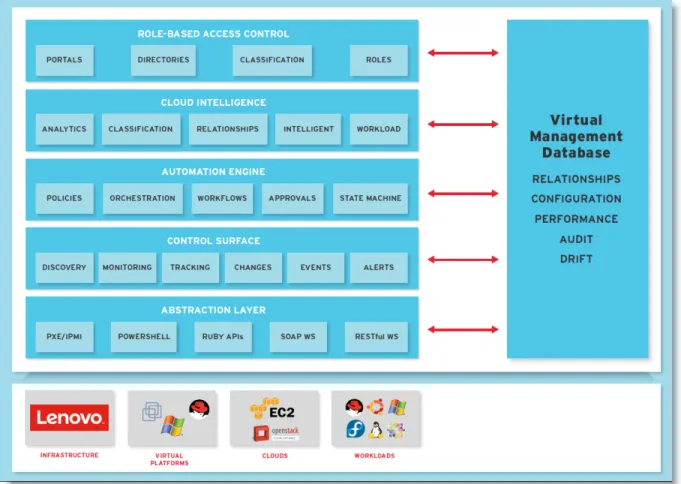
The following figure provides an overview of the capabilities of the CloudForms management platform.
For high availability of a CloudForms Management Engine environment, Red Hat recommends load balancing and isolating traffic by configuring multiple appliances. To balance the work, distribute it across multiple worker appliances. Worker appliances fulfill certain CFME server roles, but connect to a database that is external to the worker appliance. A database appliance hosts the database and has the database server role enabled. Highly available database appliance configuration for Red Hat CloudForms is achieved by configuring the CloudForms database for a replicated setup with one master server and one hot standby server using Red Hat cluster services.
CloudForms Management Engine infrastructure can be organized into zones to configure failover and to isolate traffic. Zones can be based on geographic location, network location, or function.
The following server roles are available:
Automation Engine processes automation tasks.
Capacity and Utilization Coordinator checks if it is time to collect data and queues a job for Capacity and Utilization Data Collector. The coordinator role is required to complete Capacity and Utilization data collection. If more than one CloudForms Management Engine server in a specific zone has this role, only one will be active at a time.
Capacity and Utilization Data Collector performs the actual collection of capacity and utilization data. This role has a dedicated worker, and there can be more than one CloudForms Management Engine server with this role in a zone.
Capacity and Utilization Data Processor processes all of the data collected, allowing the
CloudForms Management Engine to create charts. This role has a dedicated worker, and there can be more than one CloudForms Management Engine server with this role in a zone.
Database Operations enables the CloudForms Management Engine server to run database backups or garbage collection.
Database Synchronization enables the CloudForms Management Engine server's VMDB to replicate to a higher-level VMDB.
Event Monitor interacts with the providers and reflects the information in timelines. Event Monitor has two workers for each provider. One worker, the monitor, is responsible for maintaining a
connection to a provider, catching events, and putting them on the CloudForms Management Engine message queue for processing. The second worker, the handler, is a message queue worker
responsible for delivering the messages.
Provider Inventory is responsible for refreshing provider information including hosts, virtual machines, and clusters, and also is responsible for capturing datastore file lists. If more than one CloudForms Management Engine server in a specific zone has this role, only one will be active at a time.
Provider Operations sends stop, start, suspend, shutdown guest, clone, reconfigure, and
unregister commands to the provider, directly from the console or through a policy action if you have CloudForms Management Engine Control. More than one CloudForms Management Engine server can have this role in a zone.
Notifier forwards SNMP traps to a monitoring system or sends e-mails if CloudForms Management Engine Control or Automate feature sets are used. If more than one CloudForms Management Engine server in a specific zone has this role, only one will be active at a time.
Reporting specifies which CloudForms Management Engine servers can generate reports. You should have at least one of these in each zone.
RHN Mirror acts as a server containing a repository with the latest CloudForms Management Engine packages. This also configures other Appliances within the same region to point to the chosen RHN Mirror server for updates. This provides a low-bandwidth method to update environments with multiple appliances.
Scheduler sends messages to start all scheduled activities such as report generation and SmartState Analysis. This role also controls all system schedules such as capacity and utilization data gathering. One server in each zone must be assigned this role, otherwise scheduled
CloudForms Management Engine events will not occur. If more than one CloudForms Management Engine server in a specific zone has this role, only one will be active at a time.
SmartProxy can analyze virtual machines that are registered to a host and templates that are associated with a provider. To provide visibility to repositories, install SmartProxy on a host from the CloudForms Management Engine console. This SmartProxy can also analyze virtual machines on the host on which it is installed.
SmartState Analysis controls which CloudForms Management Engine servers can control
SmartState Analyses and process the data from the analysis. You should have at least one of these in each zone.
User Interface enables user access this CloudForms Management Engine server using the CloudForms Management Engine console. More than one CloudForms Management Engine server can have this role in a zone.
Web Services enables the CloudForms Management Engine to act as a Web Services provider. More than one CloudForms Management Engine server can have this role in a zone.
Note: Red Hat recommends that Database Operations, Event Monitor, Reporting, Scheduler, SmartState Analysis, User Interface, Provider Inventory, Provider Operations, and Web Services be enabled on at least one server in each zone. These roles are enabled by default on all servers.
Software requirements
Red Hat CloudForms Management Engine is delivered as a virtual appliance, composed of Red Hat Enterprise Linux (RHEL) 6.6, PostgreSQL 9.2.8, and CloudForms Management Engine (CFME) 5.4.x. The CloudForms appliance is supported in the following software environments:
VMware vCenter Server 5.0 and above
Red Hat Enterprise Virtualization Manager (RHEV-M) 3.3 and above Red Hat Enterprise Linux OpenStack 4.0 and above
The CloudForms appliance is managed via a web interface. The following web browsers are supported: Microsoft Internet Explorer 8 and above
Mozilla Firefox Extended Support Release Google Chrome for Business
Interoperability
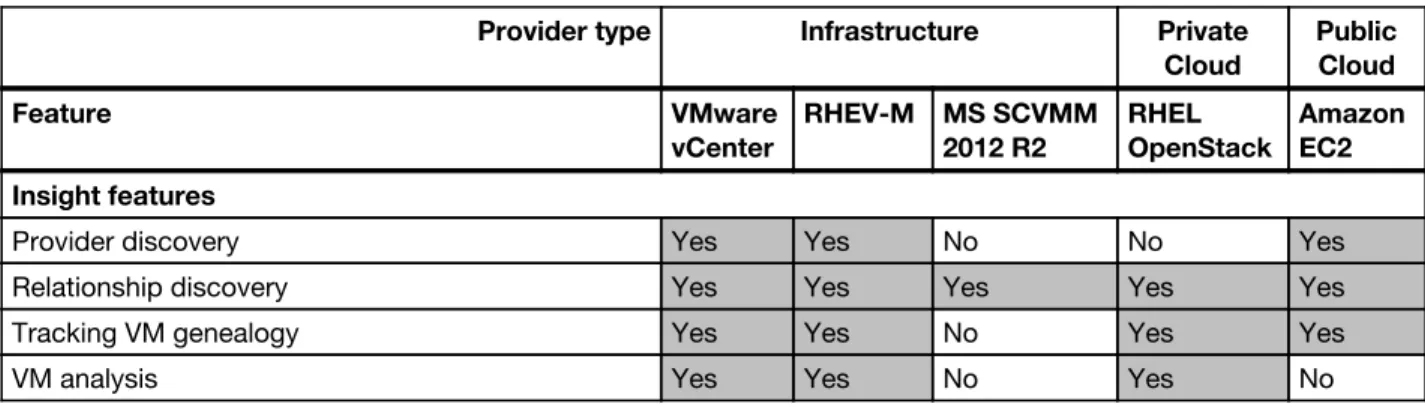
The following table lists the cloud management features that are supported by the Red Hat CloudForms Management Engine 5.4 for infrastructure and cloud providers.
Table 1. Cloud management features (Yes = Supported, No = Not supported, N/A = Not applicable)
Provider type Infrastructure Private
Cloud
Public Cloud
Feature VMware
vCenter
RHEV-M MS SCVMM 2012 R2
RHEL OpenStack
Amazon EC2 Insight features
Provider discovery Yes Yes No No Yes
Relationship discovery Yes Yes Yes Yes Yes
Tracking VM genealogy Yes Yes No Yes Yes
VM drift comparison Yes Yes No Yes Yes
Host drift comparison Yes Yes No N/A N/A
Capture infrastructure event timelines Yes Yes No N/A N/A
Capture cloud layer timelines N/A N/A N/A Yes N/A
Capture VM/Instance event timelines Yes Yes No Yes N/A
Capacity and utilization Yes Yes No Yes Yes
Optimization - bottleneck identification Yes Yes No N/A N/A
Right sizing Yes Yes No No No
Reporting Yes Yes Yes Yes Yes
Chargeback Yes Yes No Yes Yes
Insight Web Services integration Yes Yes No Yes Yes
Control features
Host compliance enforcement Yes Yes No N/A N/A
Host policy enforcement Yes Yes No N/A N/A
Host power operations Yes No No N/A N/A
Remote console VM access Yes Yes No Yes No
Snapshot creation and removal Yes No No N/A N/A
VM/Instance compliance enforcement Yes Yes No No Yes
VM/Instance policy enforcement Yes Yes No No Yes
VM/Instance power operations Yes Yes Yes Yes Yes
VM/Instance retirement Yes Yes No Yes Yes
Alerts – Real-time Yes No No Yes No
Alerts – VMware alarms Yes N/A N/A N/A N/A
Alerts – VM value changed Yes No No No No
Alerts – Reconfigured Yes No No No No
Control Web Services Yes Yes No Yes Yes
Automation features
Service catalogs Yes Yes Yes Yes Yes
VM reconfiguration Yes No No Via Inline
methods No
VM migration Yes No No Via Inline
methods No
Automation work flows Yes Yes No Yes Yes
Remote execution Yes Yes Yes Yes
Automate Web Services (Provisioning) integration Yes Yes No Yes Yes
Provider type Infrastructure Private
Cloud
Public Cloud
Feature VMware
vCenter
RHEV-M MS SCVMM 2012 R2
RHEL OpenStack
Amazon EC2
The following table lists the provisioning features that are supported by the CloudForms Management Engine 5.4 for infrastructure and cloud providers.
Table 2. Provisioning features (Yes = Supported, No = Not supported, N/A = Not applicable)
Provider Type Infrastructure Private
Cloud
Public Cloud
Feature VMware
vCenter
RHEV-M MS SCVMM
2012 R2
RHEL OpenStack
Amazon EC2
Provisioning host Yes No No N/A N/A
Provisioning VM/Instance using PXE Yes Yes No No No
Provisioning VM/Instance using ISO No Yes No No No
Cloning VM/Instance to VM/Instance Yes No No No No
Provisioning Template/Image to VM/Instance Yes Yes Yes Yes Yes
Provisioning VM/Instance to Template/Image Yes No No No No
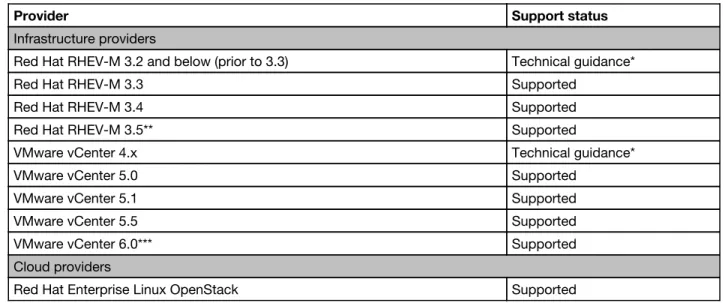
The following table lists infrastructure and cloud providers that are supported by the Smart State analysis. Table 3. Infrastructure and cloud providers supported by the Smart State analysis
Provider Support status
Infrastructure providers
Red Hat RHEV-M 3.2 and below (prior to 3.3) Technical guidance*
Red Hat RHEV-M 3.3 Supported
Red Hat RHEV-M 3.4 Supported
Red Hat RHEV-M 3.5** Supported
VMware vCenter 4.x Technical guidance*
VMware vCenter 5.0 Supported
VMware vCenter 5.1 Supported
VMware vCenter 5.5 Supported
VMware vCenter 6.0*** Supported
Cloud providers
Red Hat Enterprise Linux OpenStack Supported
* Technical guidance, if available, is provided from the end of the General Support phase and lasts for a fixed duration. This phase is intended for usage by customers operating in stable environments with systems that are operating under reasonably stable loads.
** SmartState Analysis is not available for Windows based virtual machines on RHEV-M 3.5. *** Supported with Virtual Disk Development Kit 5.5.
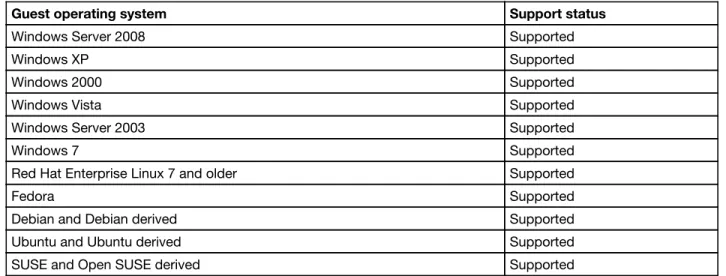
The following table lists guest operating systems that are supported by the SmartState Analysis. Table 4. Guest operating systems supported by the SmartState Analysis
Guest operating system Support status
Windows Server 2008 Supported
Windows XP Supported
Windows 2000 Supported
Windows Vista Supported
Windows Server 2003 Supported
Windows 7 Supported
Red Hat Enterprise Linux 7 and older Supported
Fedora Supported
Debian and Debian derived Supported
Ubuntu and Ubuntu derived Supported
SUSE and Open SUSE derived Supported
The following table lists guest file systems that are supported by the SmartState Analysis. Table 5. Guest file systems supported by the SmartState Analysis
Guest file system Support status
Ext3 Supported
Ext4 Supported
FAT32 Supported
ISO9660 (CDFS) Supported
NTFS Supported
XFS Supported
Ordering information
Red Hat CloudForms is available through software subscription offerings. All subscriptions include access to code download, fixes, updates, documentation, articles, and knowledge base, and allow clients to upgrade to a later release at no charge. All subscriptions include technical support from Red Hat. Each Red Hat CloudForms Software Subscription comes with 1-Year or 3-Year Standard or Premium Production Support. Standard support provides coverage within standard business hours while
Premium support provides 24x7 coverage for Severity 1 (Urgent) and Severity 2 (High) issues, and standard business hours coverage for other types of issues. Both Standard and Premium support levels offer web or phone request submission for an unlimited number of requests.
Note: Red Hat provides Production Support only for Red Hat products and provides no Production
Support for any underlying infrastructure or for any third-party products that may be running on any servers or virtual machines.
You must purchase the appropriate number of software subscriptions based on the number of socket-pairs for all managed nodes being managed by the Red Hat CloudForms software. A socket-pair is up to two sockets each occupied by a processor on a managed node. A two-socket entitlement may also be used to entitle up to two virtual machines in the public cloud.
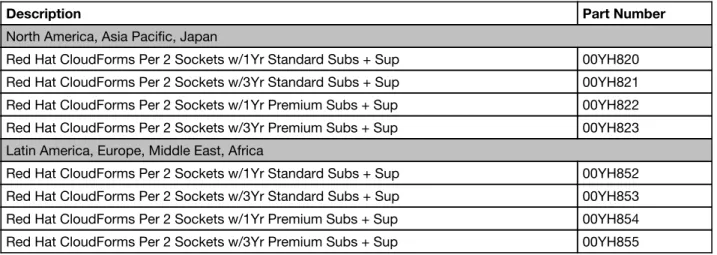
The following table lists the part numbers for ordering Red Hat CloudForms. Table 6. Ordering part numbers
Description Part Number
North America, Asia Pacific, Japan
Red Hat CloudForms Per 2 Sockets w/1Yr Standard Subs + Sup 00YH820 Red Hat CloudForms Per 2 Sockets w/3Yr Standard Subs + Sup 00YH821 Red Hat CloudForms Per 2 Sockets w/1Yr Premium Subs + Sup 00YH822 Red Hat CloudForms Per 2 Sockets w/3Yr Premium Subs + Sup 00YH823 Latin America, Europe, Middle East, Africa
Red Hat CloudForms Per 2 Sockets w/1Yr Standard Subs + Sup 00YH852 Red Hat CloudForms Per 2 Sockets w/3Yr Standard Subs + Sup 00YH853 Red Hat CloudForms Per 2 Sockets w/1Yr Premium Subs + Sup 00YH854 Red Hat CloudForms Per 2 Sockets w/3Yr Premium Subs + Sup 00YH855
The Red Hat CloudForms subscription part numbers include an activation card that has the unique product registration number needed to access maintenance and upgrades from Red Hat. Once registered, clients can download software images, installation manuals, and documentation directly from the Red Hat website:
http://www.redhat.com
Related publications and links
For more information, refer to the following resources:
Lenovo US Announcement Letter - Red Hat CloudForms
http://ibm.com/common/ssi/cgi-bin/ssialias?infotype=dd&subtype=ca&&htmlfid=897/ENUS215-488
Product documentation for Red Hat CloudForms available from the Red Hat web site:
https://access.redhat.com/documentation/en/red-hat-cloudforms/
Release Notes
Deployment Planning Guide
Installing CloudForms on Red Hat Enterprise Linux OpenStack Platform Installing CloudForms on Red Hat Enterprise Virtualization
Installing CloudForms on VMware vSphere Appliance Hardening Guide
User Guide Control Guide Insight Guide
Lifecycle and Automation Guide Settings and Operations Guide
High Availability with Red Hat CloudForms Using Multiple Appliances
https://access.redhat.com/articles/1289263
Implementing Highly Available CloudForms Appliances
Notices
Lenovo may not offer the products, services, or features discussed in this document in all countries. Consult your local Lenovo representative for information on the products and services currently available in your area. Any reference to a Lenovo product, program, or service is not intended to state or imply that only that Lenovo product, program, or service may be used. Any functionally equivalent product, program, or service that does not infringe any Lenovo intellectual property right may be used instead. However, it is the user's responsibility to evaluate and verify the operation of any other product, program, or service. Lenovo may have patents or pending patent applications covering subject matter described in this document. The furnishing of this document does not give you any license to these patents. You can send license inquiries, in writing, to:
Lenovo (United States), Inc. 1009 Think Place - Building One Morrisville, NC 27560
U.S.A.
Attention: Lenovo Director of Licensing
LENOVO PROVIDES THIS PUBLICATION ”AS IS” WITHOUT WARRANTY OF ANY KIND, EITHER EXPRESS OR IMPLIED, INCLUDING, BUT NOT LIMITED TO, THE IMPLIED WARRANTIES OF NON-INFRINGEMENT, MERCHANTABILITY OR FITNESS FOR A PARTICULAR PURPOSE. Some jurisdictions do not allow disclaimer of express or implied warranties in certain transactions, therefore, this statement may not apply to you.
This information could include technical inaccuracies or typographical errors. Changes are periodically made to the information herein; these changes will be incorporated in new editions of the publication. Lenovo may make improvements and/or changes in the product(s) and/or the program(s) described in this publication at any time without notice.
The products described in this document are not intended for use in implantation or other life support applications where malfunction may result in injury or death to persons. The information contained in this document does not affect or change Lenovo product specifications or warranties. Nothing in this document shall operate as an express or implied license or indemnity under the intellectual property rights of Lenovo or third parties. All information contained in this document was obtained in specific environments and is presented as an illustration. The result obtained in other operating environments may vary. Lenovo may use or distribute any of the information you supply in any way it believes appropriate without incurring any obligation to you.
Any references in this publication to non-Lenovo Web sites are provided for convenience only and do not in any manner serve as an endorsement of those Web sites. The materials at those Web sites are not part of the materials for this Lenovo product, and use of those Web sites is at your own risk. Any performance data contained herein was determined in a controlled environment. Therefore, the result obtained in other
operating environments may vary significantly. Some measurements may have been made on development-level systems and there is no guarantee that these measurements will be the same on generally available systems. Furthermore, some measurements may have been estimated through extrapolation. Actual results may vary. Users of this document should verify the applicable data for their specific environment.
© Copyright Lenovo 2015. All rights reserved.
This document was created or updated on Nov 24, 2015. Send us your comments in one of the following ways:
Use the online Contact us review form found at:
http://lenovopress.com/lp0041-red-hat-cloudforms-for-lenovo
This document is available online at http://lenovopress.com/LP0041.
Trademarks
Lenovo, the Lenovo logo, and For Those Who Do are trademarks or registered trademarks of Lenovo in the United States, other countries, or both. These and other Lenovo trademarked terms are marked on their first occurrence in this information with the appropriate symbol (® or TM), indicating US registered or common law trademarks owned by Lenovo at the time this information was published. Such trademarks may also be registered or common law trademarks in other countries. A current list of Lenovo trademarks is available on the Web at http://www.lenovo.com/legal/copytrade.html.
The following terms are trademarks of Lenovo in the United States, other countries, or both: Flex System
Lenovo® Lenovo(logo)® Lenovo XClarity System x® X5TM
The following terms are trademarks of other companies:
Intel, Intel Xeon, Intel logo, Intel Inside logo, and Intel Centrino logo are trademarks or registered trademarks of Intel Corporation or its subsidiaries in the United States and other countries.
Linux is a trademark of Linus Torvalds in the United States, other countries, or both.
Microsoft, Windows, and the Windows logo are trademarks of Microsoft Corporation in the United States, other countries, or both.
Other company, product, or service names may be trademarks or service marks of others.
TM