OVERVIEW
As networks become increasingly complex, managers can no longer afford to simply react to problems, but must position themselves to foresee performance issues by continuously monitoring critical systems.
Traditional network management systems (NMS) provide a mechanism to scrutinize network operation in great detail. However, these systems are difficult to implement and costly to maintain. The high overhead associated with commercial NMS systems has discouraged many managers from utilizing these solutions – leaving them with no tools to anticipate and trouble-shoot network issues. Switch Technologies, Inc. addresses this dilemma with its Simple Network Monitoring System (SNMS). The design philosophy of SNMS is to provide a service that is easy to purchase and easy to implement.
SNMS is an authenticated-access, on-site monitoring server administrated via easy to understand web pages. Integration into a network can literally take minutes and continued management is equally convenient.
The following pages describe the features of the SNMS solution.
Web-Based Interface-
The technician interacts with all features of this system via a normal web browser. Password authentication is required for access to the system. The web page can optionally be set to use https for additional security.
Current Device Status-
This page automatically re-freshes approximately every two minutes. The server contacts a customized list of devices to determine if they are running. If they cannot be contacted an alarm is set on the screen. An audible alarm can also be triggered.
Text page and/or e-mail alerts-
In conjunction with the device status system, the server can perform a device scan every five minutes on all or a sub-set of devices listed in the Device Status page. If a specified device fails, a text page can be sent to a text page enabled device and/or an e-mail can be sent to a custom list of recipients.
Failure logs-
The server can log a Failure History for all device failures for specified devices. This history is useful in the identification of intermittently failing devices.
Traffic charts-
The server contacts specified devices every five minutes and measures traffic across important interfaces. This feature is useful in the identification of traffic bottlenecks. Data is presented in four charts: Daily, Weekly,
Monthly and Annually. These charts enable both short and long term projections for network performance.
Port Reporter-
The Port Reporter is provided for analysis and inspection of the performance of all ports on a device. This report includes in and out bytes on each port, in and out errors on each port and a description of the port setting: full or half duplex and the port speed.
Open Port Scanner-
This facility requires that the port signature of a device be determined and stored in a device database. For example, a web-based mail server might have the following open ports: ssh (22), smtp (25), http (80) and pop3 (110.) Once in the database, the system performs port scans on a regular interval and compares the results with the database entry for the device. If a port (or service) is
down an alert can be sent via the text page/e-mail facility. If a new port is discovered an alert may also be sent. Since hackers usually open back-door ports on a hacked system this facility provides an early warning of any intrusions.
Password Encoder/Decoder-
The password encoder/decoder is a highly secure database that can be used to store current passwords for an unlimited number of devices. Passwords are stored on the system in an encrypted format so that if a hacker found the files they
remain unreadable without the decryption key.
Authenticated users can create, modify or read passwords via a web-based interface using a predetermined encryption key. Technicians do not need to remember each password – only the key. The key is sent in an encrypted form to prevent capture by network sniffers. This feature is useful for organizations that wish to migrate from the insecure practice of using common passwords for all the devices.
Hardware-
The system runs on a UNIX server. The system is fully hardened to protect against intrusion. The server is backed-up on a determined interval to a warm-backup hard drive. If a catastrophic failure occurs on the primary drive the system can be easily re-booted off the warm backup to its state as of the last backup. Some data will be lost, but the system can be up and running again in minutes.
A system status report is run and mailed to a specified list of users every evening. This report contains information about system performance. It also performs a dynamic intrusion test on key files, matching their MD5 signature against an on-line FingerPrints Database.
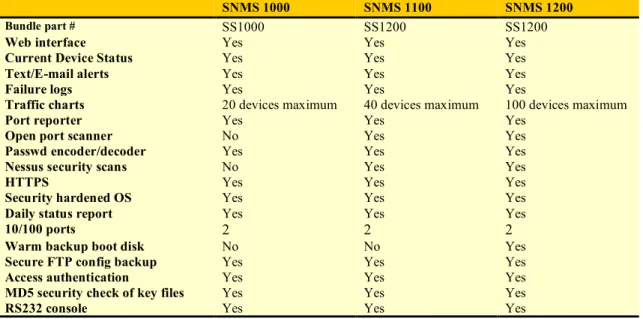
Simple Network Monitor System product bundles
Table 1. Simple Network Monitor System features and capabilities
SNMS 1000 SNMS 1100 SNMS 1200
Bundle part # SS1000 SS1200 SS1200
Web interface Yes Yes Yes
Current Device Status Yes Yes Yes
Text/E-mail alerts Yes Yes Yes
Failure logs Yes Yes Yes
Traffic charts 20 devices maximum 40 devices maximum 100 devices maximum
Port reporter Yes Yes Yes
Open port scanner No Yes Yes
Passwd encoder/decoder Yes Yes Yes
Nessus security scans No Yes Yes
HTTPS Yes Yes Yes
Security hardened OS Yes Yes Yes
Daily status report Yes Yes Yes
10/100 ports 2 2 2
Warm backup boot disk No No Yes
Secure FTP config backup Yes Yes Yes
Access authentication Yes Yes Yes
MD5 security check of key files Yes Yes Yes
RS232 console Yes Yes Yes
Product Specifications
Table 2. Simple Network Monitor System product specifications
Part Number Product Description
Interfaces
10Base-T/100Base-TX Port Two 10/100 full or half-duplex (auto-negotiation)
with RJ-45 UTP port
RS-232C Console DB-9 serial connection, female DCE interface for
out-of-band management Dimensions
Width Depth Height Weight
Environmental specifications
Operating temperature 10 to 35 degrees C
Operating humidity 8% to 80% (non-condensing)
Power specifications
Power supply 100-240 VAC@ 60-50 Hz, 3.6-1.8 A
Power consumption 240 watts
MTBF >50,000 hours
Certifications
Emissions US==FCC Class B
STI, Inc. is a leading network integration and support company.
Contact info: www.switchtechnologies.com