ISSN: 1992-8645 www.jatit.org E-ISSN: 1817-3195
FEATURE IDENTIFICATION OF AN INTERACTIVE
MULTI-USER MEETING TABLETOP BASED ON INTUITIVE
GESTURE RECOGNITION
1HALEEMA SADIA and 2ABDULLAH MOHD ZIN
Centre of Software Technology and Management (SOFTAM) Faculty of Information Science and Technology
Universiti Kebangsaan Malaysia
43600 UKM Bangi, Selangor Darul Ehsan, Malaysia
E-mail: [email protected], [email protected]
ABSTRACT
Multi-touch technology has shown a rapid rise in popularity over the last few years, being implemented in
many devices from interactive walls to interactive tables and from mobile phones to desktop monitors.It
has provided users with an extremely intuitive means of interaction with electronic devices through gesture
based self-sensing control.The advances in touch technology have led to an increased presence of
multi-touch interfaces in consumer products in recent years. However, very little research has been done in
developing interactive multi touch multi user project management system. The interactive multi-touch multi-user project management system based on tabletop surface helps users to execute their important meetings in a more productive and less intrusive manner. It also facilitates new ways to foster collaborative creation, permitting several users to work simultaneously on a single screen. This paper describes some of the features that are required for such an application. The feature identification process is carried out through comparative analysis and evaluation of scenario analysis. This paper also discusses some of the issues and challenges of multi-touch technology.
Keywords: Multi-user, Multi-touch Tabletop, Project management, Project planning
1.
INTRODUCTIONWith the introduction of multi-touch technology based display devices, a new way of human-computer interaction has been introduced. The idea behind the multi-touch technology is to create a more direct interaction with the applications by making the interface “invisible,” resulting in what some describe as a blurring of the line between the physical and virtual worlds. These supporting applications offer diverse ways of taking a creative approach to the question of how information can be presented to the end-user to maximize their understanding.
To elaborate this concept, this paper draws a picture of how multi-touch tabletops appear to have the potential to encourage collaboration and improve access to information and important
characteristics in project planning meeting.
Research has been done in integrating planning tools such as the AgilePlanner [1], CMate [2],
MemTable [3] and Digital Mysteries [4] with touch
tabletop surfaces, but it seems that no
comprehensive and significant research and development has been performed in delivering fully integrated project management platform with intuitive touch-based gesture recognition. So far there is no such multi touch tabletop application
that can provide planning tools for re-occurring
meetings but also provide resources for
collaboration and communication, estimation,
scheduling, cost control and budget management,
documenting meeting minutes, and time
management. The application provides each user
with a separate project management interface in front of everyone with multiple resource tools running on it. The application also allows group members to share knowledge with other members of the team by knowing their interface ID’s.
ISSN: 1992-8645 www.jatit.org E-ISSN: 1817-3195
2.
MULTI TOUCH TECHNOLOGYToday, building the Human-Computer Interface
(HCI) consumes 60-80 percent of the systems development effort. The importance of the human computer interface to user acceptance is well understood because users see the system through human direct interaction. Users care about what they enter into the system and more importantly, they care about what they get out of the system and how the entire experience of direct interaction feels. Human direct interaction is the extent to which a system can be used efficiently, effectively and satisfactorily by specified users to achieve specified goals in a specified context of use.
2.1 Natural User Interface
Natural User Interface (NUI) is the common
human-computer interface used by designers and developers of computer interfaces to refer to a user interface that is effectively invisible, or becomes invisible with successive learned direct interactions, to its users. Users can interact with natural user
interfaces using many different interaction
modalities, including multi-touch, motion tracking, voice, and stylus. This can be aided by NUI technology that allows users to carry out relatively natural motions, movements or gestures that they quickly discover control the computer application or manipulate the on-screen content. [5]
Multi-touch based NUI setups provide a strong
motivation and attraction for an application as it is gestures based and hence remove the abstractness between the real world and the application. The popular gestures for scaling, rotating and translating images with two fingers, commonly referred as manipulation gestures, are good examples of natural gestures for touch devices.
2.2 Adoption of multi touch tabletop technology
Müller-Tomfelde and Fjeld [6] explains the hype cycle points in their research to widespread adoption of tabletop systems within the next decade. The hype cycle visually illustrates the relative maturity of technologies within a certain domain. While the cycle reflects objective figures such as performance values or market penetration data, it also accounts for people’s attitudes toward
technologies and assumes that excessive
enthusiasm, or hype, precedes technological maturity.
According to the research, the ideal 'Hype Cycle' is divided into five phases as shown in
Figure 1:
1. The appearance of a new technology
triggers rising expectations; researchers and journalists investigate the technology and explain its potential.
2. Visibility and expectations peak, and the
technology become overrated due to excessive enthusiasm.
3. Failures and high prices in the market lead
to disillusionment, and expectations enter a trough.
4. Consolidated technologies are better
understood, and expectations start
increasing again.
5. Mainstream productivity reaches a plateau.
As interpreted by the ‘Tabletop Hype Cycle’,
the recent launch of touch-enabled products such as
Photo-Gallery Coffee Tables, collaborative
mapping Meeting Tables, Way-finding kiosk Systems in shopping malls, and interactive designing for learning purposes, brainstorming applications for a group work in schools and colleges, interactive tabletops for biology labs and patient analysis, interactive tabletops for users at museums and exhibitions, interactive playful games for kids and interactive advertisement tabletops at retail shops has generated much media attention and has highlighted the multi-touch solutions as the up-and-coming human interface. Many examples of applications have been demonstrated, aiming at the entertainment, gaming, hospitality, retail and service industries. Users are enjoying the diverse and individualistic lifestyles of all these interactive and creative applications.
2.3 Use of Multi touch Technology for Project
Planning
ISSN: 1992-8645 www.jatit.org E-ISSN: 1817-3195 re-occurring meetings, as it’s even hard to keep
track of information gathered in a previous meeting.
A possible solution to the collaboration problems is to set up a virtual planning meeting
system that shows a real-time scenario,
highlighting notes that are currently the focus of the discussion, and visualizing user interactions with the shared artifacts. Some researchers have come up with project planning tools, such as [7]
• MasePlanner (arnetminer.org),
• AgilePlanner (agileplanner.codeplex.com)
• iMindMap (thinkbuzan.com/imindmap)
• Smart Meeting (smarttech.com).
However, the meeting setups using a vertical screen and a single mouse/keyboard per site result in some drawbacks when supporting group collaborations. For example, a PC monitor is often too small to allow many collaborators to work together and to provide the group a readable workspace. PC projectors can be used to provide the group a readable workspace but even though, it’s difficult for the participants to collaborate among each other when everyone is sitting apart from each other around a table. Moreover, when using a conventional personal computer only a single keyboard and mouse interaction is allowed at one time. Thus, to conduct a project planning meeting, group collaborators have to change the mouse/keyboard control privileges frequently or assign access to mouse/keyboard to a specific meeting participant [1].
To avoid this kind of situation, interactive meeting tabletops along with planning tools, came into being as an effective and efficient platform for collaborative work. This encourages users to build collaboration among group members in a meeting in an interactive way of knowledge sharing. Project planning tools are now being integrated with touch surfaces to provide a fully digital collaborative planning environment.
3.
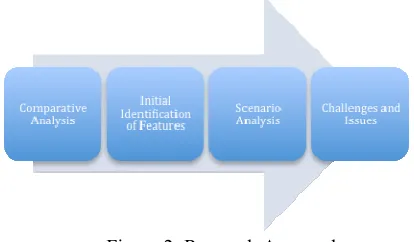
METHODOLOGYThe feature identification process is done in three stages as shown in Figure 2. The first stage is to carry out a comparative analysis against some of existing products. The comparative analysis resulted in identifying features that are required in the proposed application. But the analysis does not conclude why there is a need of this fully featured project management system in the real world. An important and difficult step of developing a
software product is determining what
[image:3.612.314.521.150.271.2]the customer actually wants from the system. To identify user’s need, evaluation of a user scenario is carried out. Finally, there is a need to identify some possible challenges for the proposed application.
Figure 2: Research Approach
4.
RESULTS4.1 List of Existing Products
In order to carry out comparative analysis, we first need to study some of existing products.
Concept mapping is one of the best techniques
where users externalize their conceptual and propositional knowledge of a domain in a way that can be readily understood by others and the tabletop is an ideal tool for this [8]. In the research,
we describe Cmate as a tabletop collaborative
concept mapping system. A user interface of this system maintains the collaboratively created group map as well as one layer per user showing their individual map contributions. This will serve three purposes: (i) to extract the vocabulary of concepts and links used in individual maps and make it available to the users, (ii) to be able to highlight in the group map which concepts and links were present in each individual map, and (iii) learners can identify where there is consensus and disagreement in their collaborative work. “Cmate” tool can also be used partially for group meetings where interface can help group members to merge their ideas in the form of propositions and easily
distinguish their personal work from the
collaborative map. But the tool does not support agile meetings, where users can save information, collected in a meeting for recursive meetings in future.
ISSN: 1992-8645 www.jatit.org E-ISSN: 1817-3195 incorporating an integrated annotation system,
generates a memory of all user interactions, and provides access to historical data on and off the table. The system supports co-located meeting capture with digital and physical tools: keyboards, image capture, paper-based note taking, audio recording, drawing on screen, and laptop screen sharing. MemTable is a good tool for agile group meetings. Users can obtain their previous records at the same meeting table. With referring to the past meeting information, they can successfully execute their next meeting. But the system lacks tool like “Cmate” to have a good presentation of collaborative work, rather than using paper-based notes.
‘Touch & Write’ [9], a novel rear-projection tabletop, combines infrared technology for the normal touching and moving with the digital pen technology for high resolution handwriting. It seamlessly integrates the paper world into the digital world. Editing, arranging and writing tasks can be easily performed in an intuitive way. LeCoOnt concept mapping software was used to test the full capability of the Touch & Write table. Touching actions are used for arranging the concepts and semantic zooming, while pen-actions are used for drawing, connecting concepts, and handwriting LeCoOnt, gives room for discussion and collaboration between members, encourages brainstorming ideas and creativity. It provides multi-purpose tools such as concept mapping tool, geographical system, documents, web pages, images and drawing. But the system does not support the feature of keeping records of previous meetings, a separate window interface for each user on the single screen and sharing information among the users.
Digital mysteries [4], is based on the mysteries paper-based learning technique. In the research, Mysteries, collaborative learning tool, was created for the development and assessment of students’ higher-level thinking in which their cognitive processes are made evident through their manipulation of data slips to solve a mystery. The principal goals of the final design were to (1) encourage students to undertake more extensive and explicit grouping of the slips; (2) help students do proper sequencing and webbing; (3) provide integrated scaffolding for low achieving groups; and (4) add support for reflection and make students more aware of the problem solving
strategies they have employed. Digital mysteries
tool was originally developed using paper slips that students manipulate on a traditional table and it focuses on the physical manipulation of the slips of
paper and the cognitive skills associated with these actions. It is more likely closed to the real based actions of creating paper slip notes. The system is good for multi-user collaborative work but it lacks the features of multi-purpose tools working on the same platform.
According to Wang and Maurer [1], group collaborations involve editing (writing and erasing) story cards, passing cards from one collaborator to another, rotating cards for proper orientation and sometimes tossing cards between two attendees who may be sitting far apart. Planning meetings conducted in the described way feel natural for agile teams. However, this attitude is challenged when teams are distributed across multiple sites. In a distributed agile planning meeting, the natural interactions visible in traditional collocated
meetings are hardly supported. Tabletop
AgilePlanner [1] utilizes digital tabletops featuring touch-sensitive horizontal screens to support collocated and distributed agile planning meetings. A possible solution to the collaboration problems is to set up a virtual meeting surface that shows a real-time scenario, highlights story cards that are currently the focus of the discussion, and visualizes user interactions with the shared artifacts. The survey indicated that most participants felt Tabletop AgilePlanner was "easy to use. Some of them commented that using digital tabletops to complete the tasks was "natural" or "interesting". They found that using a keyboard is more applicable than using handwriting input, although
the tabletop is tangible and handwriting
recognizable. Most participants expressed their interest in using finger or stylus to write on story cards but in real practice, they used keyboards.
Liu, Erdogmus, and Maurer[7] explains that both the Extreme Programming iteration planning activity Planning Game and the corresponding SCRUM activity Sprint Planning recommend a common project room to encourage instant feedback and face-to face communication. They elaborated in their research how the planning process can be thought of consisting of two main activities: Extreme Programming iteration planning activity and SCRUM activity, integrating with AgilePlanner. MASE’s data model is designed to support these two activities. Between iteration planning meetings, AgilePlanner users can access MASE in the usual way from a desktop station to perform off-line project management activities. The analysis shows that the existing planning tools are predominantly based on the traditional desktop metaphor. However, this metaphor does not
ISSN: 1992-8645 www.jatit.org E-ISSN: 1817-3195 interactions due to its underlying
one-user/one-computer design paradigm. As a result, these tools are not good fits for the practices that rely on high-bandwidth collaboration.
4.2 Common Features
Some of the common features for multi touch tabletop applications can be listed as follows:
• Separate interface window for each user
• Time scheduling
• Sharing contents among users
• Brainstorming and concept mapping:
• Meeting minutes/notes records
• Presentation capability
• Audio and video conferencing
• E-mail access
• Whiteboard
• Finance and budgeting
• Geographical information system
• Text editing
• Images/videos
• Document writing and reading
• Portable software
• Hardware dependant
4.3 Comparative Analysis
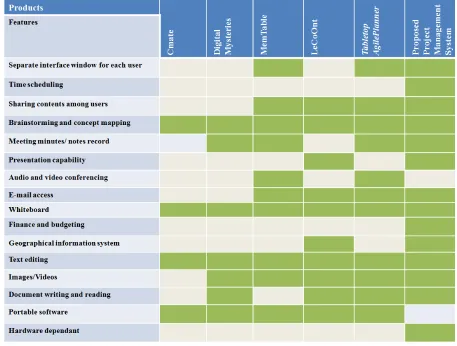
Comparison between the existing products and the proposed product based on the criteria listed in Section 4.2 are given in Table 1.
4.4 Initial Identification of features
Based on the comparative analysis, features required by a multi touch tabletop planning application can be stated as follows:
• Separate interface window for each user:
Digital planning tabletop with separate interface window for each user sitting on the multi-touch tabletop is introduced to encourage its users to build collaboration among group members in a meeting in an interactive way.
• Time scheduling: Calendar and date
duration calculator is used to do the estimation of the project milestones and to organize meeting agendas.
• Sharing contents among users: All the group
members can share the information contents of their interface window with others using window ID.
• Geographical information system: In the
proposed system, GIS will be responsible of locating the place and displaying the distance between the two locations provided.
• Text editing: Virtual Keyboard is provided
to do the text editing anywhere in the interface
• Brainstorming and concept mapping:
XMind tool is used for brainstorming and mind mapping. The program is intended to assist users in capturing ideas, organizing various charts, and share them with collaboration. It supports mind maps, Ishikawa diagrams, tree diagrams, organiza-tion charts, and spreadsheets.
• Meeting minutes/notes records: Meeting
minutes/notes, are the instant written record of a meeting. They are used to describe the events of the meeting, starting with a list of attendees, a statement of the issues considered by the participants, related responses or decisions for the issues and scheduled meetings are kept and the user is notified for new items in the list.
• Presentation capability: Users can conduct
presentations, i.e. show and annotate PowerPoint slides.
• Audio and video conferencing: Use of audio
or video conferencing is to enhance human presence in meetings. Video is advantageous when visual information is discussed, and may also be used in less direct collaborative situations, such as for providing a view of activities at a remote location.
• E-mail access: E-mail access is required if a
user wants to update a customer or stake holder about project information such as new or changed project information, meeting minutes and related new or revised documents.
• Finance and budgeting: Calculators such as
simple, scientific and exchange rate
calculator are used to do the budgeting of the project.
• Whiteboard: Free hand drawing tool is used
as whiteboard for making notes and sketching. People can work on text or
graphics simultaneously. These user
drawings are sometimes used for better understanding of any problem or issue rather than to explain them in words.
4.5 Scenario Analysis
ISSN: 1992-8645 www.jatit.org E-ISSN: 1817-3195
• A project manager in Malaysia has a regular
meeting with the product manager and the client. The product manager may comes from another office, say the US office. The client they are dealing with may be a foreign company, such as a Japanese company.
• In the meeting, they have to discuss the
scope and requirements of the project, resource allocation, time period, budgeting and have to schedule SCRUM activities.
• Since resources are limited, everyone has to
calculate how much they could not spend on resources based on the availability of resources.
• Deadline is set based on the feasibility of the
client.
• Client and product manager want to keep a
track of the work been done by having SCRUM activities according to the time of Japan, USA and Malaysia.
• For all this planning and management,
meeting members are using different tools: scientific and exchange rate calculator for budgeting, calendar and time conversion calculator to schedule SCRUM activities, time schedule and resources chart were created in VISIO, requirements and scope was noted down in Word document, meeting notes were recorded on each of their laptops separately, which they had to tally later.
• The use of the touch technology can help
them to plan their meetings in a more productive way by having all these tools as in one application on a digital table.
4.6 Features of the proposed application
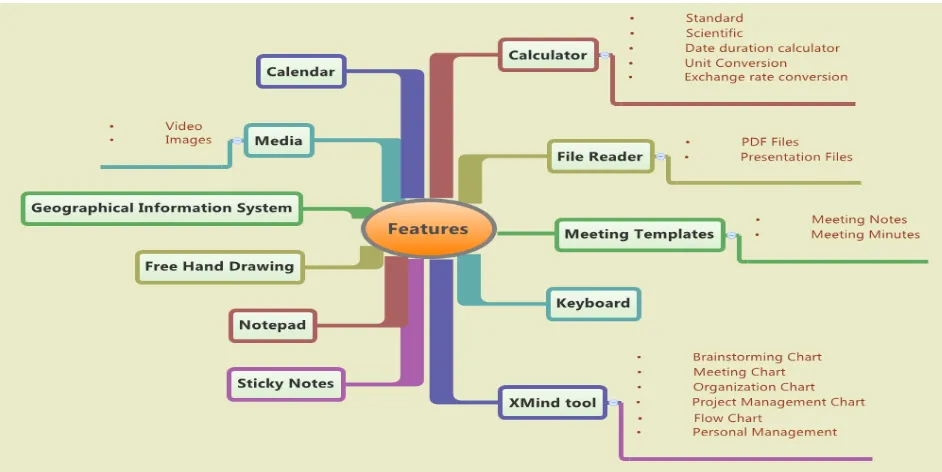
Based on the comparative analysis and scenario analysis, list of features that are needed for the proposed system is shown in Figure 3.
5 CHALLENGES AND ISSUES
After we have identified features to be included, one next task is to identify some challenges and issues that need to be considered when designing
and implementing multi-touch applications
especially for project planning meeting. It focuses on implications to user experience as well as screen based issues.
The challenges and issues are categorized into different categories as discussed below.
5.1 Tactile User Feedback
According to Stefan Bachl [10], the current touch screen does not provide tactile feedback when touched, compared to the press of a key on a physical keyboard. Tactile feedback is the sense of touch by applying forces, vibrations or motions to the user. He mentioned that a completely different approach employs the users’ mobile phones for distal tactile feedback through vibration. Without the tactile feedback provided by buttons, it can be easy to lose a sense of where you are on the display or of data you have entered, or you can accidentally enter data by just resting a finger on the screen. Therefore the use of adequate visual feedback, including the simple visualization of the detection of the users’ fingers, is essential when designing touch screen interfaces. Tactile user feedback of touch tabletop can improve performance by direct user interaction using natural intuitive gestures.
5.2 User Interface Design
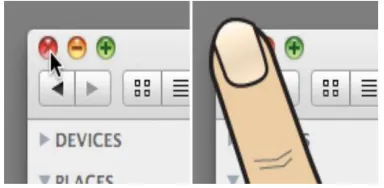
[image:6.612.324.516.434.528.2]One of important issues to be considered when designing the user interface is that finger is not as accurate as computer mouse. Study by Stefan Bachl [10] also shows that a computer mouse has a target zone of one pixel, whereas targeting a specific single pixel with a finger can become nearly impossible (Figure 4).
Figure 4: Accuracy And Conclusion Of Mouse (Left) Compared To Finger (Right)
He explained in his research that techniques [11], [12] should be considered when designing touch interface, as it helps users to target the right touch spot on the touch screen. Different accuracy and touch target size of finger and mouse emphasize that existing interfaces should not be reused or enabled for touch interaction without appropriate adaption. Lee and Zhai [13] have concluded and calculated an average width of an index finger and thumb for adult men and women which provide a better understanding of the dimensions that can be pursued in implementing touch interfaces.
ISSN: 1992-8645 www.jatit.org E-ISSN: 1817-3195 Bachl’s research [10], is to consider when
designing interfaces for multi-touch applications, and is partial occlusion of the screen caused by fingers, hands and arms especially, when users interact with a touch screen simultaneously. In contrast to the use of a computer mouse, users specifically occlude those parts of the interface they are interacting with when touching interface elements with their fingers. While this is also the case when typing on a keyboard, the problem is more severe on touch screens due to the additional lack of tactile feedback. The same challenge was also highlighted in the research by Perron and Laborie [14]. This problem was been resolved in
DiamondTouch [15]: multi-touch multi-user
tabletop, by providing the dedicated zones for each user on the multi-touch interface.
5.3 Input-based Challenges
The lack of tactile user feedback also affects the user experience of data input on multi-touch interfaces. Data entry is one of the most important characteristics of multi-touch technology that not
only affects visual appearance but also
performance, environmental factors and
simultaneous interaction [16]. Hinrichs, Hancock, Collins and Capendale [17] examines text entry methods for tabletop displays. They analyzed text-entry methods on the evaluation criteria of space requirements, collapsibility, rotatability, their compatibility with other direct-touch interaction techniques, and their support of mobility, shareability, duplicability, and simultaneous multi-person interaction.
According to their analysis, physical keyboards seem to be fairly unsuitable as a text-entry method for large table-top displays, they might be appropriate for applications on small tables where a limited number of people interact and rarely change their working positions. In this case, the performance benefits of physical keyboards may outweigh the environmental factors and the need to support simultaneous interaction. In a multi-person co-located environment, text entry via speech recognition can be awkward when simultaneous text entry is desired (since people would need to speak over one another). However, in situations where text would typically not be entered in parallel, its intuitiveness and the lack of space constraints may be desirable. For tabletop applications that only require small annotations from time to time, handwriting or mobile text-entry devices might be suitable, despite the performance costs.
Although their examination based on their evaluative criteria does not give clear answers, it shows tendencies and provides guidelines for evaluating existing and new text-entry methods for tabletop displays. The best and efficient way of data input on multi-touch interfaces is still a question mark but this examination at least gives an idea of important design constraints, informing innovative text-entry methods specifically tailored toward tabletop displays.
5.4 Hardware-based challenge
Applications that are built using the Microsoft Surface SDK [18] run on devices made for Surface, and on Windows 7 computers that supports touch.
Microsoft Surface SDK provides effortless
interaction with digital content through natural gestures. And these natural intuitive gestures interact directly with the content itself efficiently no matter how many users are interacting to the tabletop. Touch screen, in results, considerably respond to all users’ individual gestures while
interacting with the multi-touch multi-user
ISSN: 1992-8645 www.jatit.org E-ISSN: 1817-3195
Figure 5: Microsoft Surface Input Simulator
6. CONCLUSION
In this paper, we describe the development of multi-touch technology and the applications serviced by them, as well as the hype about it over the last three decades. We also introduce a prototype of project planning system based on multi-touch surface, as one of the most innovative and interactive system to compete in this fast growing technology. The purpose of proposed project planning system is to support collaborative activities in project planning meetings. To identify features for the proposed planning system, we
conducted a comparative analysis of the
competitive products with a proposed project planning system. To refine the features, we
conducted a scenario analysis. From the
comparative analysis and scenario analysis, we concluded few general challenges and issues of multi-touch technology that developers and designers need to face when developing or designing multi-touch application.
The approach that are used for analyzing and presenting features required for a system is highly informal in nature. We are currently working towards using a more formal approach such as by using the membrane computing formalism [19] to indicate interaction between various components in the system.
REFRENCES:
[1] Wang, X. and F. Maurer. Tabletop
AgilePlanner: A tabletop-based project
planning tool for agile software development
teams. in Horizontal Interactive Human
Computer Systems, 2008. TABLETOP 2008. 3rd IEEE International Workshop on. 2008. IEEE.
[2] Martínez Maldonado, R., J. Kay, and K.
Yacef. Collaborative concept mapping at the
tabletop. in ACM International Conference on
Interactive Tabletops and Surfaces. 2010. ACM.
[3] Hunter, S., et al. MemTable: an integrated
system for capture and recall of shared
histories in group workspaces. in Proceedings
of the 2011 annual conference on Human factors in computing systems. 2011. ACM.
[4] Kharrufa, A., D. Leat, and P. Olivier. Digital
mysteries: Designing for learning at the
tabletop. in ACM International Conference on
Interactive Tabletops and Surfaces. 2010. ACM.
[5] Group, N. Multi-Touch Technologies. 2009;
Available from: http://nuigroup.com/go.
[6] Muller-Tomfelde, C. and M. Fjeld, Tabletops:
Interactive Horizontal Displays for
Ubiquitous Computing. Computer, 2012.
45(2): p. 78-81.
[7] Lin, H. and H. Faste. Digital mind mapping:
innovations for real-time collaborative
thinking. in Proceedings of the 2011 annual
conference extended abstracts on Human factors in computing systems. 2011. ACM. [8] Martínez Maldonado, R., J. Kay, and K.
Yacef. Collaborative concept mapping at the
tabletop. in ACM International Conference on
Interactive Tabletops and Surfaces. 2010. ACM.
[9] Liwicki, M., et al. Touch & write: a
multi-touch table with pen-input. in Proceedings of
the 9th IAPR International Workshop on Document Analysis Systems. 2010. ACM.
[10] Bachl, S., et al. Challenges for designing the
user experience of multi-touch interfaces. in
Proc. Workshop on Engineering Patterns for Multi-Touch Interfaces. 2010.
[11] Baudisch, P. and G. Chu. Back-of-device
interaction allows creating very small touch
devices. in Proceedings of the SIGCHI
Conference on Human Factors in Computing Systems. 2009. ACM.
[12] Potter, R.L., L.J. Weldon, and B.
ISSN: 1992-8645 www.jatit.org E-ISSN: 1817-3195
touch screens: an experimental evaluation of
three strategies. in Proceedings of the SIGCHI
conference on Human factors in computing systems. 1988. ACM.
[13] Lee, S. and S. Zhai. The performance of touch
screen soft buttons. in Proceedings of the
SIGCHI Conference on Human Factors in Computing Systems. 2009. ACM.
[14] Perron, R. and F. Laborie. Augmented
tabletops, an incentive for distributed
collaboration. in Horizontal Interactive
Human-Computer Systems, 2006. TableTop 2006. First IEEE International Workshop on. 2006. IEEE.
[15] Dietz, P. and D. Leigh. DiamondTouch: a
multi-user touch technology. in Proceedings of
the 14th annual ACM symposium on User interface software and technology. 2001. ACM.
[16] Grégoire Lefebvre, E.B., Sophie Zijp-Rouzier,
Coupling gestures with tactile feedback: a
comparative user study. 2012.
[17] Hinrichs, U., et al. Examination of text-entry
methods for tabletop displays. in Horizontal
Interactive Human-Computer Systems, 2007.
TABLETOP'07. Second Annual IEEE
International Workshop on. 2007. IEEE.
[18] Microsoft Surface 2.0 SDK. Available from:
http://msdn.microsoft.com/en-us/library/ff727815.aspx.
ISSN: 1992-8645 www.jatit.org E-ISSN: 1817-3195
Figure 1: The Hype Cycle Of Tabletop Research, Technologies, And Products Over Three Decades.
[image:10.612.91.562.433.669.2]ISSN: 1992-8645 www.jatit.org E-ISSN: 1817-3195