Live Video Streaming in Android Wearable Devices
Saminath.V
*
Accenture, Bangalore
Abstract- Android is one of most popular open source operating system for smart devices like phones, tablet, set-top box, Android TV, Android Auto, and Android Wear. Most of the Smart devices has hardware capable of video processing and wireless streaming. This paper explains streaming of live camera content from Android Wearable Device like Watch to Handheld Mobile Phone/Tablet device. This Streaming content used for variety of Application in day to day life. Android Smart Device Consume and produce Live Video streaming and share video to another device. Bluetooth is more cost-efficient and power-efficient wireless communication layer to transfer media content between the devices. Bluetooth, making it ideal for small, light mobile devices, but not suitable for traditional media encoding and Real-time transmission due to limited Bandwidth, High degree of error rates, and the time-varying nature of the radio link. The media streaming over Bluetooth stances many challenges. This paper explains the protocol for media transmission content for Bluetooth, Camera and Bluetooth configuration, compressing technique on Wearable devices.
Index Terms- Mobile Ad-Hoc Networks, Android OS, Video Streaming, Android Wearable Device.
I. INTRODUCTION
Mobile multimedia content has central form of evidence for many solution. Most of the Smartphone equipped with hardware support for Video capture in real time, video processing and streaming in ad-hoc wireless communication network. Any Smart Device streams a real time video over multiple peer devices in network. Phones and smart device will be in same ad-hoc network by establishing a wireless link between the devices, it should be in communication range. By using android operation system develop the application for configure camera, capture live compress video, stream video to parried phone/smart device is simple.
Focal of this development is to provide a mobile Application using video streaming over BT network application with client-server architecture. General Application Android Wear technology is tailored made specifically for Google devices like Watch, Glasses. It comes with a new simplified interface with collection of fitness features. Smart watch has advanced health tracker application, it coaches and remind about workouts, speed, distance, and time information. Biometric tools/sensor in watch integrated with fitness Application. It monitors Heart rate and update average Heart Beat information in regular basis. The Android Wearable Device act as Client able to stream live camera content to Android Handheld Device like Mobile Phone/Tablet. Similar way Camera content from Mobile Phone/table to your watch. Bluetooth is wireless communication layer to transfer media content between the devices. The sensor information send to server along with media content information will provide more clarity on individual health conscious and tracking their fitness for extensive life cycle.
Bluetooth has three classes of connection scheme to form ad hoc networks, point-to-point, piconet and scatternet. Point-to-point connection between two devices with direct communication. Piconet is point -to-multipoint topology, one device acts as the master and the other devices play as a slave. In scatternet, slaves in one piconet can participate in another piconet as either a master or slave. This is most complex network scheme.
The recent research explains the various challenges for video streaming over Bluetooth links. Various components like Video Compression technique, Data lossy Control with protocols, Bluetooth socket programming explains the issues and give a clear picture on video streaming over Bluetooth. Each of the areas is one of the basic components in building a complete architecture for streaming video over bluetooth.
Figure-1 Block Diagram of Video Streaming
This paper is segmented into three parts. First portion explains specification of phone platform used for this development. In the second portion has architectural design used for media stream. The final portion covers the software development and protocol details.
II. HARDWARE PLATFORM
This development work on hardware platforms should run with Android platform. Samsung Galaxy Gear G700 is Android based Wearable device used for Capture image and stream media content via Bluetooth communication. Gear watch is light weight device which has 320x320 LCD display integrated with touch screen, 800MHz processor, Bluetooth and NFC communication interface, Hardware codec for image compress and decompress engine in-built, and runs with Android 4.2. Android phone used as server to receive media content and play the video’s in Surface View.
Figure-2 Samsung Watch Video Stream Screen
III. ARCHITECTURAL DESIGN
The Android Application is segmented into two major subsystems: First, the wearable client, it has Bluetooth wireless ad-hoc interface with Video streaming application for mobile phones for Android operating system. Wearable watch is a transmitter (camera, microphone) capture a video with the help of this application, user can share live information to receiver that might be parried with wireless and physically away. Second, the video streaming is based on peer-to-peer communication between mobile phones
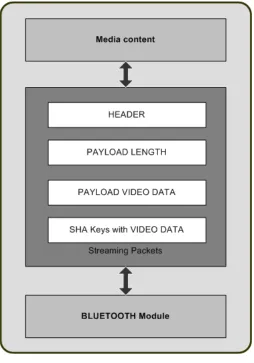
[image:3.612.182.436.257.620.2]Figure 3 shows protocol components for video streaming over Bluetooth links. The video compression is to remove redundant information form a digitized video sequence. Raw data must be compressed before transmission to achieve efficiency. Bandwidth of the bluetooth is limited to 500Kbps, it is very critical for video streaming. The media sever receives Messaging control protocol adapted with media bit-streams, or adjusts transmission parameters of intermediate layer based on the current link status and protocol requirements.It then sends the segmented packets to Bluetooth module for transmission. On the receiving side, the Bluetooth module receives media packets from air, reassembles them in the intermediate protocols, evaluate the media content information with other key parameters of the packet. The Image content is evaluate and sends message for re-transmission if required.
Figure-3 Payload of Video Streaming
The Media content is ready for transfer to parried device. Data packetized into custom protocol to avoid congestion and maximize video Quality with minimized packet loss.
A. Header Content: Header has information about the Data content, it is fixed constant data customized for this
B. Payload Length Content: Payload is the Valid Media content size information. It will be verified in receiving end. If any mismatch in payload length in receiving data, then packets are re-transmitted during video streaming.
C. Payload Content: This is actual Media content captured by Wearable device. The Payload data is transferred chunks of
packet and transmit to Phone. Size of the packet is 1024 byte for valid communication.
D. Payload Digest: Calculate the Payload data content with MD5 Algorithm. This data can be calculate in the server side and
find the Data loss or success content.
E. Acknowledgement: Final data stream in the packet is Data failure or success information. If data transmitted failed, resend
by the protocol.
Three major services involved in this design. Camera services, Bluetooth services, Protocol lightweight library service. The user interface sends notification for camera service to handle capture video encoder/decoder part. The user interference layer are send to the device layer with help of application layer. Message and Threads from the user interface layer are handled various physical device interaction and parallel activities. The interactions with the hardware are handles by the device layer. All the Application features of the phone necessary to handles, sending video streaming over bluetooth, and ports to send and receive data to and from the other Android phone. All three layers have its own interface that other layers can use to interact with it.
IV. SOFTWARE PLATFORM
The first programming step is to create a new Android Application Project in Android studio. It has Android Development Tools (ADT) configure with Android Wearable Device display Screen and other hardware configuration. The Project Wizard instruction has Application Name with Wear device selection of API 21: Android 4.4 (KitKat Wear) under Minimum SDK. The Blank Wear Activity creates with Android Wear screens with Rectangular (Android Wear Square) layout.
The primary object is Android device should have Bluetooth interface. This can be validate from the code. By creating BluetoothAdapter object using the function getDefaultAdapter() confirms the Bluetooth support in the Android device. If it returns NULL value, then the Android device does not support Bluetooth. If getDefaultAdapter return valid Bluetooth Adapter handler, then the Android supports Bluetooth. The next step is enable Bluetooth and find the parried device with our Bluetooth module, Gear Manager will helps to pair it. The Bluetooth Adapter’s getBondedDevices() function return Set of Bluetooth currently parried devices in collection. Each device scan and stored internal for further data communication. Establish connection between Android Wearable device and Android Phone. Create a Thread context to form a new Connection between two devices.
Thread uses Bluetooth Socket for communication port in each devices. Socket programing uses streaming of object for send and receive bytes. It create an InputStream and OutputStream from Bluetooth Socket. The InputStream is used for reading data coming from the Phone, and the OutputStream is used for sending data to the Wearable device. Presume that both the devices are already paired, and does not contain any logic to create pair relationships. The library access two thread types (ClientThread and ServerThread) depends on sending or receiving media content.
To create new camera instance, by opening a Camera with an id parameter. It defines the back facing camera or the front facing camera. Set the picture preview callback method and set the preview display method linked to Surface view layer of the camera instance. Get further information about its capabilities using theCamera.getParameters() method. Start preview method to start capture image and outputs of the image in surface view. For each frame image the callback is invoked. Inside preview callback image frame is compressed. The YUV Image class take the Image data, preview size information and compress into JPEG format. This image data convert to buffered stream data and stream to Bluetooth medium.
Buffered image data stored into Queues. Streaming packet created as per the Figure-3 mentioned. Header information has the Image type or compression type, each frame length in bytes format, image content stored into payload segment of the protocol layer. Payload size should be 1024 bytes only. If it exceeds then the packet will be transferred to next frame. Finally the image content send to MD5 algorithm to create two bytes of SHA key content. Various message communication used between two devices as stated in Table-1.
Table-1: Message Packet Information
DATA_UPDATE Media content received from Wearable device and
decoding started
DATA_RECEIVED 1024 byte Media Packet received completely. Verification
process initiated.
Return success or fail information
INVALID_HEADER Header information is invalid
SEND_DATA Android Phone send request to Wearable device, ready for
receive the media content
Figure-4 Experimental of Live Video Streaming
Experiments results for video streaming as in Figure-4. The streaming data from camera is played in real-time on an Android Watch and passed over bluetooth. The received video streaming data decoded and played in Android phone, it has minimum delay on video play. There should be End-to-End Latency on the image compress and decompression and bandwidth of the communication medium and constraint in data transfer in each frame size. But for this development image size 1.3 megapixel camera with camcorder. Without Message packet protocol image date is lost in Android phone. Android phone calculate the image loss by verify the SHA content on the protocol and request Android watch resend the lost image packet information to Phone.
V. CONCLUSION
Bluetooth is a stimulating technology for mobile devices and serves the purpose transferring messages in wireless network environment. Streaming of Video over Bluetooth network is challenge with bandwidth constrain. This paper explains the Bluetooth specification, physical configuration, profile, android function implementation, intermediate protocol configuration, lossless data communication between devices, packetizing, streaming media contents. Explained Data control protocol works with Ad-Hoc network protocol layer, reduce packet damages, easy track of packet transfer states. This is more open protocol used in this project, easy integration with phone/tablet devices. Camera service is integrate in this work for live streaming. Android Wearable device has less resolution camera, image size is less with high quality information. During the Media streaming each compress frame has less size which will help intern avoid image cost. Bluetooth is a popular, well-supported, and effective protocol for wireless communication, and can enhance mobile apps that capable stream video from Mobile wearable device.
REFERENCES
[1] Justin M. Bailey, “Live Video Streaming from Android-Enabled Devices to Web Browsers,” Graduate Theses and Dissertations., 2011. [2] Brian Wirsing, “Sending and Receiving Data via Bluetooth with an Android Device,” , March 26, 2014.
[3] Wang Xiaohang, “Video Streaming over Bluetooth: A Survey,” Institute for Infocomm Research (I2R) / School of Computing, NUS.
[4] Md. Muhaimin Rahman, Ashik-E-Rasul, “An Android Controlled Mobile Robot for Stereo Vision and Live Streaming with Robotic Arm,” International Conference on Mechanical, Industrial and Energy Engineering 2014.