Design and Development of Privacy Control Tool
for Web Browsers using Value Sensitive Design
Swarnangini Ghosh, Rajesh Shukla
Department of Computer Science and Engineering, Sagar Institute of Research & Technology, Bhopal
Abstract-A significant amount of information is available of us online due to the increased use of the Internet and online services. The purpose of this paper is to develop a Privacy Control Tool that gives users an instant privacy control as they browse through the Web. Privacy Control Tool is an extension designed for the Google Chrome browser that allows users to remove all the information automatically that browser has accumulated during their browsing activities, help them to identify tracking websites, disable third party cookies and block malicious websites. Privacy Control Tool for Chrome is developed using JavaScript and HTML, and it operates within the Chrome extension’s framework. It offers an unimpeded, resolute, and customizable user experience. Privacy Control Tool for Chrome is expected to increase visibility and accessibility of privacy features and online privacy concerns in general.
Keywords-Online Privacy Concern, Value Sensitive Design (VSD), Privacy Enhancing Technology (PET).
I. INTRODUCTION
The advancement of information technologies has improved the ability of organizations to accumulate, channelize, and distribute personal data. Different stakeholders which include computer professionals, government organizations, business houses and a common man are greatly affected by the sensitive issue of information privacy. Moreover, the innovations in technology have also tattered Information privacy. Unanticipated release, and subsequent use or misuse of personal information is of particular concern. Privacy is now of utmost concern to everyone and the need to protect it is being felt more than ever. The internet has improved the lives of most people and has had more positive impacts than negative. However, technology is growing at a fast pace, and so is the value of personal information. Online privacy is an area which continues to remain unsafe. The internet has not been designed with issues like security and privacy in mind and thus an effort is essential to study this problem and develop solutions before it is too late.
In recent days, privacy concern while surfing on the Web has augmented enormously. People have become more concerned about their online identity which can be traced through their Personally Identifiable Information when they are navigating a website [4]. These websites generate profile of users by capturing users’ browsing activities like the advertisements they hit, the various links they navigate to, the website they visit first and the different websites they browse eventually and other information. We have developed an extension for Google Chrome browser, which
is easy to install and use, and will provide users with persistent privacy control [6]. Privacy Control Tool (PCT) for Chrome allows the user to remove all the information automatically that browser has accumulated during the user’s browsing activity.
In the next section, we describe awareness amongst users for their online privacy. Section 3 describes background and motivation behind the development of this tool. Within Section 4, we describe detail work related to researching PCT with respect to functionality and usability. Section 5 describes the conceptual aspects of PCT. Section 6 details the specifics of the extension’s development and a set of privacy features that are offered to the users by the extension. Section 7 presents an evaluation of the extension. Finally, Section 8 gives conclusion and suggestions for future work in this area.
II. ONLINE PRIVACY CONCERNS
A key apprehension of users while surfing the Web is security of their online information. According to the survey conducted by Harris Poll and funded by Microsoft, 35% American citizens were very possessive about their online data and 65% consumers straightforwardly refused to submit their personal data to any organizations because of their privacy consciousness[8].
While navigating on the Web, there are chances that websites accumulate user’s information for creating their profile. These profiles can be used in two ways either to improve the user’s browsing experience by storing his preferences, actions and other online activities [3] or making benefit out of your profile by selling or sharing your Personally Identifiable Information to third party organizations which might be advertising firms or any such organizations. This unhealthy practice of data gathering posses a privacy threat as data is gathered without taking the user’s consent.
III. MOTIVATION AND BACKGROUND
Internet today. The type of information that is ok for sharing and with who may vary with different people and situations. In order to deal with such privacy challenges, there are many things one can do. We have tools or so- called Privacy Enhancing Technologies (PET) whose purpose is to help protecting the privacy of end-users, either by helping them to become more aware of privacy and information sharing or to avoid privacy risks and problems.
The users every activity during navigation on the Web is recorded on his computer system irrespective of the nature of activity. Once the collected information which may be in the form of browsing history, cache, cookies and other downloaded plug-ins is analyzed, the profile of the user and the other information like the names of websites visited, their frequency and many more such information can be calculated by the intruders [3].
A. Web browser as a User Interface
The browser acts as an access point to the Internet for most consumers. The robust, easy to find and simple browser privacy controls are crucial to empower users to safeguard their online privacy. The Web has become a challenge one of the most important ways people interact with their computers, linking people with an assorted background of contents, services, and applications. It also provides access to innovative and interesting contents readily, but also possesses the severe security threat by the attackers who develop malicious websites and target users through their web browsers. Thus the biggest challenge the web browsers face is to keep their users protected while offering an affluent platform for Web services.
The attackers get tempted by the browsers because of their widespread popularity, large user base, simplicity of use and extensive network-visible interface. Hence, they prefer browsers to track user activities while navigating a Web. It is a well-known fact that every browser has contained a loop hole at some or the other point that paved a chance to a malicious website creator evade the security policy of browser and negotiate the user’s machine. Even after these irregularities are overcome, many users tend to use older, susceptible versions which put their computers into danger when they visit malicious websites.
B. Privacy Preservation in web browsers
Centre for Democracy and Technology [12] has released an extensive report on privacy features of the major web browsers in the year 2010. According to the technical report, all five popular web browsers, namely Google Chrome, Internet Explorer, Mozilla Firefox, Safari and Opera have incorporated more privacy controls for giving their user a better and safer surfing experience. One can draw a conclusion from this report that no browser is secured 100% and have both potential and limitations to offer. There are different methods through which the user can be tracked because the features offered by these browsers are not activated automatically and most users are
ignorant about these features. The privacy features of web browsers include General Privacy Controls, Privacy Mode, Cookie Control and Object Control.
C. Browser Extensions
A browser extension allows developers to add new functionality to a browser or alter Web browsing experience. They can be written in a variety of languages and often have little to no user interface displayed. Extensions are bundled into a single file which can be downloaded and installed easily. These extensions are becoming increasingly popular day by day. The realization of our PCT extension was decided upon after careful consideration of how the system would work best for potential users. The conclusion fell on a browser extension as it was considered the most suitable for this kind of program. The choice of using a browser extension was also made because it was considered as the solution that would require the least effort from the user in order to have it work as desired.
IV. LITERATURE REVIEW OF PETS FOR WEB BROWSERS
All major web browsers have introduced a new feature called a private browsing mode in their browser interfaces which permit users to browse secretively. However, this mode can’t provide a comprehensive resolution to ensure privacy while surfing the Web [9]. This review aims at showing the techniques that users follow when they browse through different websites. Keeping this as the initial point, I provide an inclusive insight of the way Personally Identifiable Information obtained during a browsing session can be used as a weapon to trace users’ information. I also give information about various methods and existing tools used to handle these challenges.
A. Privacy controls for HTTP layer
HTTP headers [1] and cookies can be considered as two solutions which can be implemented by adopting different techniques like filtering, blocking or limiting utilization of cookies or sifting HTTP headers which are responsible for tracking the user’s personally identifiable information. Conversely, for cookies, there are many alternatives available to prevent them from tracking the user’s browsing activities. The cookies can be either disabled or manually deleted from the web browser at the end of each browsing session [7]. Many readymade tools or plug-ins can also be used to control the cookies [7].
B. Cookie Manager
browsers. With the help of these extensions the user can keep a close watch on the cookies by restricting their addition, deletion, or the sifting of tracking cookies, etc.
C. Private Browsing Mode
All major web browsers have introduced a new feature called a private browsing mode for their browser interfaces. The main objective of this navigation method is not to accumulate a trail of information on the user’s computer system so that no clue can be obtained with regard to the websites the user has visited and thus helps to hide the identity of the user from unauthorized third party tracking organizations [9]. On the whole, private browsing mode operates on the concept of not to accumulate certain information once the private browsing session has come to an end. Mainly, the information taken into account is the browsing history, the cookies set, database passwords, web browser cache, various certificates etc. However, how to implement this mode is totally dependent on the concerned web browser [9].
D. Do Not Track (DNT)
An advanced technology that intends to move forward the user’s command on Personally Identifiable Information and prevents its release to third party organizations when the user navigates through a website is called Do Not Track [14] technology. This technique assures a user that his web presence will remain intact and will not be misused by a remote entity while accessing the Web. The browser ensures an implementation of DNT through an activation of DNT option set in HTTP header and sends it to the concerned website. The support for this new feature is not made compulsory anywhere in the world and thus it is not a built-in feature of any browsers available as of today. This technology is yet to be supported by most of the web browsers. The “donottrack.us” website [13] facilitates a user to find out if the browser he uses supports this facility or not, and if by default DNT is activated in his browser.
E. Existing Privacy Tools
This section describes the major add-ons or extensions that are available free of charge to cope with the growing problem of online privacy and analyze some of these tools for their challenges mentioned in the preceding sections. I give a concise explanation emphasizing their characteristics, the browsers which they support, even after their popular acceptance by the users, the short comings they are still hidden with [4].
1) Beef Taco: This extension is exclusively designed for Mozilla Firefox which keeps track of a set of opt-out cookies which prevents you from being the target of the third party during your browsing activities. Internet Explorer, Safari and Chrome do not support this extension. It takes into accounts most of the companies, but it can’t guarantee incorporation of all the companies which are adopting these practices. Whenever you remove cookies, this add-on rewrites opt-out cookie on your machine. It is
not capable of preventing data collection through its self-rule but its ease is appreciated by the users [4].
2) Better Privacy: This add-on is developed to prohibit tracking through the flash cookies whenever the user accesses the Web. It can’t be implemented in Safari, IE or Chrome. As the browsing session ends, all or some flash cookies get deleted with or without informing the user. This add-on can’t delete other types of cookies as it is restricted to only the flash cookies. It is not only useful in tracking the flash cookies mainly incorporated through advertisements but also manages browsing history. The main problem with this add-on is; it is quite complicated to configure [4].
3) Browser Settings: Third party organizations mainly target the user’s browsing sessions through their tracking cookies. All major browsers have in-built settings to permit blocking of these cookies. These settings allow activating enable/disable third party cookie options. The cookies can be disabled completely or their access is restricted to a specific browsing session. Though these settings are incorporated into browsers to empower an individual user, understanding them appropriately, searching them and enabling them accordingly become a cumbersome task for the majority of users. Some users, on the other hand are against blocking the third party cookies mainly because websites and their services are interwoven.
4) Ghostery: The extension prohibits cookie tracking by remote companies. It maintains the database of third party firms responsible for tracking. When the user accesses the Web, it enables blocking of cookies in browser settings and thereby limits access to your cookies. However, the major problem with this extension is that it does not affect tracking the cookies belonging to some companies which are connected to Ghostery’s founder company which basically is an ad industry.
5) Opt-Out Protector (Network Advertising Initiative): This add-on preserves a set of opt-out cookies which protects you from being targeted by networks while navigating across the Web. The user needs to specify preferences at NAI opt-out page. At the end of each browsing session when you remove the cookies, the add-on rewrites them on your machine. It is designed only for Firefox browser. It helps the user to substantiate his opt-out status. The main limitation of this add-on is that it is beneficial only for NAI members. It does not restrict data collection and covers lesser firms than other add-ons as mentioned previously.
V. DESIGN PRINCIPLES OF PRIVACY CONTROL TOOL
tool, and recording the invaluable feedback of users for improving the present state of the tool.
A. Value Sensitive Design
Value Sensitive Design is a methodology which can be applied in the design process of artifacts related to advanced information technology that considers human moral values in an ethical and inclusive form all the way through the planning phase [5]. Value sensitive design approach is mainly valuable for this research because such methods highlight principles of ethical significance such as seclusion and reliance [5]. This design technique incorporates precise values, alternatives, keeps a record of those alternatives, and thereby facilitates implementation and amendments of technologies so as to use familiar substitutes for the suitable societal environment. Some of the remarkable work done in the domain of web browser using VSD includes information and cookie control of web browser, associating the value of informed approval. Other notable work in the context of VSD comprises of web browser’s security features, knowledge sharing support using groupware systems, and online safety protection of kids [8][2].
B. Threat Avoidance Theory and Control Agency Theory One key aspect perceives privacy as the authority of an individual over his own information. A large number of researchers of privacy emphasized on the perception of “to be in command of” when describing privacy. They envisaged privacy as the capability of the user to manage the dissemination of information about him. The control feature of privacy is also depicted through the studies carried out in an earlier decade, which speculated that whenever the user loses control over the dissemination of his personal data there are chances of privacy violation. In this context two theories, namely technology threat avoidance theory [11] by H. Liang et al. and control agency theory [15] proposed by Yamaguchi were taken into consideration. As the name depicts control agency theory emphasizes control of an individual over his data. On the other hand, technology threat avoidance theory proposes that when the user identifies a technology threat, he can measure the degree of its intensity and avoid it by applying an appropriate technological solution. While deciding about the selection of a particular tool the user needs to find the way to prevent the threat [11].
VI. DEVELOPMENT OF PRIVACY CONTROL TOOL
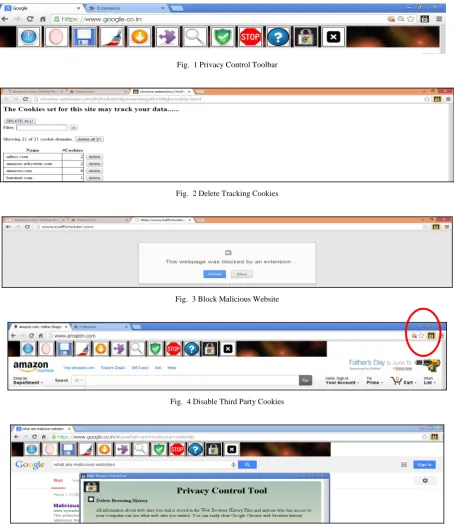
The methodologies of Value Sensitive Design and the principles of both the above mentioned theories are applied to the design of Privacy Control Tool. This tool strengthens users so that they can have better control over their online data. Privacy Control Tool for Chrome is comprised of two main components: the backend and the user interface. The extension’s backend consists of the code that runs behind the scene, hidden from the user. The user interface, on the other hand, is the combination of toolbar, a short cut menu
or a popup window, icons and desktop notifications with which the user interacts.
A. Backend
The backend of the extension is developed in JavaScript, HTML5 and Chrome APIs. The extension also uses the Document Object Model (DOM) parsing of the HTML responses. As outlined in the Google Chrome Extension Developer’s Guide [10], the extension’s backend code was designed to run in the background and to signal changes in the user interface when necessary. The three parts of the backend – Remove browsing data, Delete tracking cookies and Blocking malicious websites - are described here, and their effects on the user experience will be covered in the following sections [6].
1) Remove Browsing Data
The extension facilitates removal of various types of browsing data with a single click, and is much faster. Thus you can control access to your browsed data. This data includes browsing history, local storage, download history, cookies, plug-in data and cache. It covers the general case of websites that user visits as well as those websites which have been installed as hosted softwares [5].
2) Delete Tracking Cookies
A web browser sends information with the help of tracking cookies which are the piece of textual data stored on a personal computer. The cookie stores all the information about the user such as likings and also passes data across sites for commercial purposes. These cookies are deleted and settings of the third party cookies are disabled to give the user a safer browsing experience.
3) Blocking Malicious Websites
The web p ages which are mainly designed to do online identity theft and dissemination of malware for some illegal activities constitute malicious websites. These websites have embedded links with other online resources that could compromise the user’s machine with destructive applications such as malware, viruses, Trojans etc. Preventing a malicious website from getting loaded on the user’s computer will safeguard the user’s data from unauthorized theft.
B. User Interface
Fig. 1 Privacy Control Toolbar
Fig. 2 Delete Tracking Cookies
Fig. 3 Block Malicious Website
Fig. 4 Disable Third Party Cookies
Fig. 5 Help
VII. EVALUATION OF PRIVACY CONTROL TOOL
By following Value Sensitive Design methodology an iterative empirical investigation was conducted throughout the development of PCT. The main aim of the evaluation process was to find out whether PCT has achieved design goal as stated earlier and its usability for users. At the beginning of the design process a survey was conducted to understand the user’s perspective about privacy awareness, privacy measures used while surfing the Web and the need
for better privacy controls for web browsers. On the basis of the conclusions drawn from the survey findings, a conceptual design of PCT was structured.
Technologies, security measures used by web browsers and so on. These students were assumed to have gathered knowledge of these issues from their personal browsing activities. They were from the age group ranging from approximately 19 to 22 years old. The participants were mostly students whom we already knew. This small group of participants might not be the optimal variety or number of people to make statistically accurate conclusions on quantitative data, but will still give some indications of
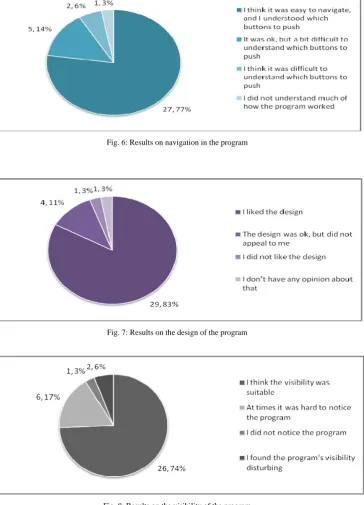
trends. Twenty five students would reveal the shortcomings of the program with respect to its usability. The students specified that the most significant feature of this tool is the convenience it presents. The data collected during the survey is represented graphically which fulfills the usability aspect of the Privacy Control Tool. The graphs given below clearly indicate that the opinion of most of the participants about PCT is positive revealing its efficiency
.
Fig. 6: Results on navigation in the program
Fig. 7: Results on the design of the program
VIII. CONCLUSIONS
This paper describes the design and development of Privacy Control Tool, which is developed as an extension for Google Chrome to enhance user experience while surfing the Web. The extension is based on the principles of Value Sensitive Design, which follows a threefold approach throughout the design process of an IT artifact. We also followed the concepts of control agency theory and threat avoidance theory to emphasize the user’s control on privacy. The design of the tool has been finalized through usability testing, where feedback from potential users have been an important factor in improving the functionality of the tool. The test results were then used for the final improvements and evaluation of the program. The test results and feedback showed good usability of the tool. Further, the degree of user involvement also appeared to be reasonable as the suggested design allows the user to interact more efficiently with the program than the other user interfaces did. This conclusion is also based on the fact that the participants did not show any signs of annoyance while interacting with the program during the tests. The potential of Privacy Control Tool as a working program is definitely presented based on the results. In further enhancement, we look forward to broaden these explorations, realize and perform repetitive empirical investigations to install this tool for other web browsers as well.
REFERENCES
[1] A. Barth, “HTTP state management mechanism”, RFC 6265, RFC Editor, 2011.
[2] A. Czeskis, I. Dermendjieva, H. Yapit, A. Borning, B. Friedman, B. Gill, and T. Kohno, “Parenting from the Pocket: Value Tensions and Technical Directions for Secure and Private Parent-Teen Mobile Safety”, in Proc. Sixth Symposium on Usable Privacy and Security Redmond, WA, 2010, pp. 1–15.
[3] A. Lambrecht and C.Tucker, “When does retargeting work? Timing information specificity” , SSRN eLibrary,2011.
[4] A. Ruiz-Martinez, “A survey on solutions and main free tools for privacy enhancing Web communications”, Journal of Network and Computer Applications, vol. 35, pp.1473-1492, 2012.
[5] B. Friedman, P.H. Jr. Kahn, and A. Borning,“Value Sensitive Design and Information Systems”, Early engagement and new technologies: Opening up the laboratory.
[6] C. Mar, “Privacy Bird for Chrome”, School of Computer Science, Carnegie Mellon University, Pittsburgh, Tech. Rep. 19-608, 2010. [7] C. Yue, M. Xie, and H. Wang, “An automatic http cookie
management system”, Computer Networks, vol. 54(13), pp. 2182– 2198, 2010.
[8] F. Bélanger, R. E. Crossler, J. S. Hiller, J. Park, and M. S. Hsiao, “POCKET: A tool for protecting children's privacy online”, Elsevier Decision Support Systems vol.54 pp. 1161–1173, 2013. [9] G. Aggarwal, E. Bursztein, C. Jackson, and D. Boneh , “ Analysis of
private browsing modes in modern browsers”, in Proc. world congress on privacy, security, trust and the management of e-business. USENIX Association, USENIX Security’10, 2010, pp. 1– 6.
[10] Google. (2013). Google Chrome Extensions: Developer’s Guide. [Online] Available:
http://code.google.com/chrome/extensions/devguide.html
[11] H. Liang, and Y. Xue, “Avoidance of information technology threats: a theoretical perspective”, MIS Quarterly, vol. 33 (1), pp. 71–90, 2009.
[12] J. Brookman, “Browser Privacy Features: A work in progress”, Center for Democracy and Technology, 2010.
Philosophy of Engineering and Technology, vol.16, pp. 55-95,2013. [13] J. Mayer, and A. Narayanan. (2014). “Do Not Track Us”. [Online].
Available: http://donottrack.us/
[14] J. Mayer, A. Narayanan, and S. Stamm. (2011). “Do Not Track: A Universal Third-Party Web Tracking Opt Out,” Mar. 2011, IETF draft (work in progress), draft-mayer-do-not-track-00.txt