Volume 4, No. 6, May 2013 (Special Issue)
International Journal of Advanced Research in Computer Science
REVIEW ARTICAL
Available Online at www.ijarcs.info
CONFERENCE PAPER
Wireless Network Security for IEEE 802.1 1A/B/G and Bluetooth
Mr.Rahul S. Joshi*, Mr.Chandrakant A. Atram and Prof.Dr.R.M.Tugnayat
1.2.3
.B.E-I.T(Final Year), H.O.D. of I.T.4
Jawaharlal Darda Institute Of Engineering & Technology, Yavatmal(MS),INDIA [email protected]*, [email protected]
Abstract: Wireless communications offer organizations and users many benefits, such as portability, flexibility, increased productivity, and lower installation costs. Wireless technologies cover a broad range of differing capabilities oriented toward different uses and needs. Wireless local area network (WLAN) devices, for instance, allow users to move their laptops from place to place within their offices without the need for wires and without losing network connectivity. Less wiring means greater flexibility, increased efficiency, and reduced wiring costs. Ad hoc networks, such as those enabled by Bluetooth, allow data synchronization with network systems and application sharing between devices. Bluetooth functionality also eliminates cables for printer and other peripheral device connections. Moreover, these technologies can offer dramatic cost savings and new capabilities to diverse applications ranging from retail settings to manufacturing shop floors to first responders. However, risks are inherent in any wireless technology
I. INTRODUCTION
The loss of confidentiality and integrity and the threat of denial of service (DoS) attacks are risks typically associated with wireless communications. Unauthorized users may gain access to an organization’s systems and information, corrupt the organization’s data, consume network bandwidth, degrade network performance, launch attacks that prevent authorized users from accessing the network, or use the organization’s resources to launch attacks on other networks. Specific threats and vulnerabilities to wireless networks include the following. All the vulnerabilities that exist in a conventional wired network apply to wireless technologies. Malicious entities may gain unauthorized access to an organization’s computer network through wireless connections, bypassing any firewall protections. a. Sensitive information that is transmitted without being
encrypted (or that is encrypted with weak cryptographic techniques) may be intercepted and disclosed.
b. DoS attacks may be directed at wireless connections or devices.
c. Malicious entities may steal the identity of legitimate users and masquerade as them on internal or external corporate networks
d. Malicious entities may be able to violate the privacy of legitimate users and be able to track their movements. e. Malicious entities may deploy unauthorized equipment
(e.g., client devices and access points) to surreptitiously gain access to sensitive information.
f. Malware may corrupt data on a wireless device and subsequently be introduced to a wired network connection.
g. Malicious entities may, through wireless connections, connect to other organizations for the purposes of launching attacks and concealing their activities.
II. OVERVIEW OF WIRELESS TECHNOLOGY
Wireless technologies, in the simplest sense, enable one or more devices to communicate without physical connections—without requiring network or peripheral cabling. The devices simply need to be within a certain
distance (known as the r a n g e ) of the wireless network infrastructure or wireless peer to communicate. Radio frequency (RF) transmissions are the means for transmitting data. Wireless technologies range from complex systems, such as cell phone networks and enterprise WLANs to simple devices such as wireless keyboards, mice, and microphones.
A. Wireless Networks:
There are many forms of wireless networks. A common way of categorizing wireless networks is to consider the relative range and complexity of each type of network[1]. For the purposes of this publication, the major categories of wireless networking architectures are as follows:
a. Wireless personal area network (WPAN): a
small-scale wireless network that requires little or no infrastructure and operates within a short range. A WPAN is typically used by a few devices in a single room instead of connecting the devices with cables. For example, WPANs can provide print services or enable a wireless keyboard or mouse to communicate with a computer. Section 2.4 contains additional information on WPANs.
b. Wireless local area networks (WLAN) are groups of
wireless networking nodes within a limited geographic area, such as an office building or building campus, that are capable of radio communications. WLANs are usually implemented as extensions to existing wired local area networks to provide enhanced user mobility. More information on WLANs is presented in Section 2.3.
c. Wireless metropolitan area networks (WMAN) can
provide connectivity to users located in multiple facilities generally within a few miles of each other. Many WMAN implementations provide wireless broadband access to customers in metropolitan areas.
d. Wireless wide area networks (WWAN) connect
individuals and devices over large geographic areas. WWANs are typically used for cellular voice and data communications, as well as satellite communications.
e. Common Wireless Network Components and
technologies and devices available on the market, a core set of wireless devices comprise most wireless networks.
B. Client Devices:
Client devices in wireless networks, also referred to as stations (STA), serve as wireless endpoint devices. Client devices enable end users to gain access and utilize resources provided by wireless networks. Common examples of client devices are laptop computers, personal digital assistants (PDA), mobile phones, and other consumer electronic devices with wireless capabilities.
C. Access Points:
An access point (AP) logically connects client devices (STAs) to one another and provides access to the distribution system (DS), if connected, which is typically an organization’s enterprise wired network. An AP generally consists of a wired network port (e.g., RJ-45 port) and at least one radio to provide wireless connectivity. IEEE 802.11 based APs typically have coverage areas of up to 300 feet (approximately 100 meters), which primarily depends on a number of characteristics of the device and operating environment. Wireless APs provide users with a mobile capability by allowing users to freely move within an AP’s coverage area while maintaining connectivity between the user’s client device and the AP. Appropriately configured APs can be linked together using wired infrastructure to allow users to “roam” between APs within a building or campus deployment. APs are most often associated with WLANs, but are also used in some WPAN implementations.
D. Wireless Bridges:
A wireless bridge links two wired networks generally operating at two different physical locations. Bridges are often used to connect two buildings or two networks where a wired link is not feasible or cost efficient. Wireless bridges are similar to APs, but generally only serve to provide point-to-point wireless links. However, some bridges also serve as APs; as an example, some APs use IEEE 802.11 b/g to provide client connectivity and IEEE 802.1 1a to support a bridge link. A sample use of a wireless bridge would be to connect two adjacent buildings to serve as a redundant backhaul link or serve as the primary backhaul link when wired connectivity is unavailable. Wireless bridges are typically used with WLANs.
E. Base Stations:
A base station or radio transceiver is similar to an AP, but serves a WMAN. A base station is typically a two-way radio installed at a fixed location to provide wireless access. A base station generally covers a much larger physical area than an IEEE 802.11 AP and can serve significantly more clients. The specific range and client support vary by base station vendor and technology.
III. GENERALWIRELESSNETWORK
TOPOLOGIES
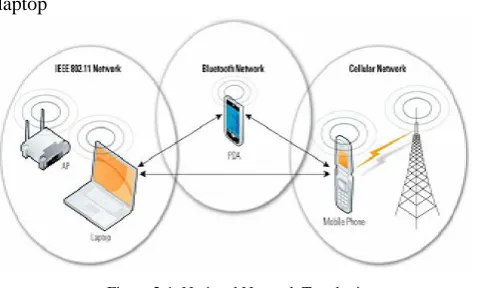
There are two types of general wireless network topologies, infrastructure and ad hoc. Infrastructure based networks encompass WLANs, cellular networks Ad hoc networks are designed to dynamically connect devices such as cell phones, laptops, and PDAs Whereas infrastructure
networks use a fixed network infrastructure, ad hoc networks maintain dynamic network configurations, relying on peer devices to manage network communication; no infrastructure-based devices are involved in the network. while simultaneously serving as part of an ad hoc network. The three mobile devices in Figure 2- 1—a mobile phone, a laptop
Figure 2-1. Notional Network Topologies
IV. WIRELESSPERSONALAREANETWORKS
WPANs are small-scale wireless networks that require little or no infrastructure. WPANs are typically used by a few devices in a single room to communicate without the need to physically connect devices with cables. A description of common WPAN technologies is included below.
A. Bluetooth:
The Bluetooth specification was developed to facilitate wireless communications between small portable devices and led to the development of the IEEE 802.15.1 standard. Examples include synchronizing a PDA with a computer, providing print services, enabling a wireless keyboard or mouse to communicate with a computer, and allowing a wireless headset or earpiece to be used with a cell phone. All Bluetooth technologies operate at 2.4 GHz ISM band utilizing Frequency Hopping Spread Spectrum (FHSS) technology. Bluetooth v1. 1 and v1.2 can achieve a maximum data rate of approximately 720 kilobits per second (Kbps); Bluetooth 2.0 + EDR can reach data rates of 3 Mbps.
B. Ultra-Wideband (UWB)
The standard defined in IEEE 802.15.3 is also known as High-Rate Ultrawideband (UWB). UWB is a low-cost, low power consumption standard that uses a wide range of GHz frequencies to avoid interference with other wireless transmissions. It can achieve data rates of up to 480 Mbps over short ranges and can support the full range of WPAN applications. One expected use of this technology is the ability to detect shapes through physical barriers such as walls and boxes, which could be useful for applications ranging from law enforcement to search and rescue operations.
C. ZigBee:
CONFERENCE PAPER
V. WIRELESSLOCALAREANETWORKS
WLANs are groups of wireless networking nodes within a limited geographic area, such as an office building or building campus, that are capable of radio communication. WLANs are usually implemented as an extension to existing wired local area networks to provide enhanced user mobility and network access. IEEE 802.11, also known as Wireless Fidelity (Wi-Fi)®, is the dominant family of WLAN standards, but other standards are also in use, such as High Performance Radio Local Area Network (HIPERLAN) from the European Telecommunications Standards Institute (ETSI).
A. IEEE 802.11a/b/g:
In 1997, IEEE ratified the IEEE 802.11 standard for WLANs. The IEEE 802.11 standard supports three transmission methods, including radio transmission within the 2.4 GHz Industrial, Scientific, and Medical (ISM) band. In 1999[19][20], IEEE ratified two amendments to the IEEE 802.11 standard—IEEE 802.11 a and IEEE 802.1 1b—that define radio transmission methods and modulation techniques, and WLAN equipment based on IEEE 802.1 1b quickly became the dominant wireless technology. IEEE 802.1 1b equipment transmits in the 2.4 GHz band, offering data rates of up to 11 Mbps. IEEE 802.1 1b was intended to provide performance, throughput, and security features comparable to wired LANs. IEEE 802.11 a operates in the 5 GHz Unlicensed National Information Infrastructure (UNII) frequency band, delivering data rates up to 54 Mbps.
Table: 1
Denial of Service Attacker prevents or prohibits the normal
use or management of networks or network devices.
Eavesdropping Attacker passively monitors network
communications for data, including authentication
credentials.
Man-in-the-Middle Attacker actively intercepts the path of
communications between two legitimate parties,
thereby obtaining authentication credentials and data. Attacker can then masquerade as a legitimate party.
Masquerading Attacker impersonates an authorized user
and gains certain unauthorized privileges.
Message Modification Attacker alters a legitimate message by
deleting, adding to, changing, or reordering it
Message Replay Attacker passively monitors transmissions
and retransmits messages, acting as if the attacker were a legitimate user.
Traffic Analysis Attacker passively monitors transmissions
to identify communication patterns and participants.
In 2003, IEEE released the IEEE 802.1 1g amendment, which specifies a radio transmission method that also uses the 2.4 GHz ISM band and can support data rates of up to 54 Mbps. Additionally, IEEE 802.1 1g-compliant products are backward compatible with IEEE 802.1 1b-compliant products. Table 2-1 compares the basic characteristics of IEEE 802.11, 802.11 a, 802.1 1b, and 802.11g. The typical ranges listed in the table will vary significantly in practice,
depending on the operating environment and the equipment used. Outdoor ranges, with high-gain directional antennas, can exceed 20 miles.
VI. SECURITYNEEDSFORWIRELESS
NETWORKS
Wireless technologies typically need to support several security objectives. The most common security objectives for wireless networks are as follows:
a. Confidentiality— ensurethat communication cannot
be read by unauthorized parties
b. Integrity— detect any intentional or unintentional
changes to data that occur in transit
c. Availability— ensure that devices and individuals
can access a network and its resources whenever needed
d. Access Control— restrict the rights of devices or
individuals to access a network or resources within a network. The security objectives for wireless and wired networks are the same, as are the major high-level categories of threats that they face.
VII. SECURITYCONTROLSFORWIRELESS
NETWORKS
To mitigate the risks posed by these threats, organizations need to adopt security measures and practices that help bring risks to a manageable level. Organizations need, for example, to perform security assessments prior to implementation to determine the specific threats and vulnerabilities that wireless networks will introduce into their environments. In performing the assessment, organizations should consider existing security policies, known threats and vulnerabilities, legislation and regulations, safety, reliability, system performance, the life-cycle costs of security measures, and technical requirements.Proprietary solutions are available that can be used to implement more robust security on legacy IEEE 802.1 1a/b/g WLANs. Commonly used types of security controls for wireless networks are as follows:
a. Encryption of communications. Using cryptography
to encrypt wireless communications prevents exposure of data through eavesdropping.
b. Cryptographic hashes for communications.
Calculating cryptographic hashes for wireless communications allows the device receiving the communications to verify that the received communications have not been altered in transit, either intentionally or unintentionally. This prevents masquerading and message modification attacks.
c. Device authentication and data origin
authentication. Authenticating wireless endpoints to each other prevents man-in-the-middle attacks and masquerading.
d. Replay protection. There are several options to
implement the detection of message replay, including adding incrementing counters, time stamps, and other temporal data to communications
e. Physical security. Limiting physical access within the range of the wireless network prevents some jamming and flooding attacks
Wireless IDPSs have the ability to detect misconfigured devices and rogue devices, and detect and possibly stop certain types of attacks. Wireless IDPSs are most commonly used for IEEE 802.1 1a/b/g WLANs, but they are also available for Bluetooth networks, and they can also detect rogue networks that use uncommon frequencies, such as those used in other countries, in an attempt to avoid detection.
VIII. SECURINGNON-IEEE802.11IWIRELESS
LOCALAREANETWORKS
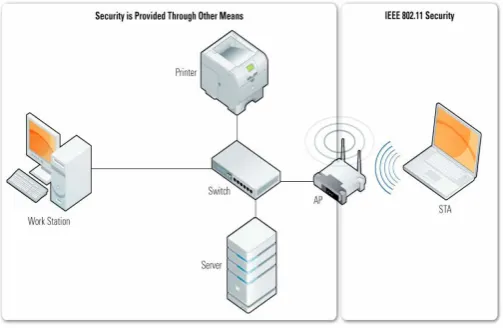
The legacy security features included in the IEEE 802.11 standard, and does not include security recommendations for IEEE 802.1 1i capable networks. It provides an overview of the security features available in non-IEEE 802.1 1i WLANs in order to illustrate limitations, outline guidance, and provide motivation for use of the enhanced security recommendations. The IEEE 802.11 specification identifies several services to provide a secure communications link. The security services are provided largely by the Wired Equivalent Privacy (WEP), WPA, and WPA2 to protect link-level data during wireless transmission between clients and AP. WEP, WPA, and WPA2 do not provide end-to-end security; the protocol only provides limited security for the wireless link between the IEEE 802.11 AP and STA as shown in Figure .
Figure WEP Security of an IEEE 802.11 Network
IX. SECURITYFEATURESOFIEEE802.11
WIRELESSLOCALAREANETWORKSPERTHE
STANDARD
Although WEP has a number of known security vulnerabilities, the protocol was designed by the IEEE to provide the following three basic security services:
a. Authentication—A primary goal of WEP was to
provide a security service to verify the identity of communicating client stations. This provides access control to the network by denying access to client stations that cannot authenticate properly.
b. Confidentiality—Confidentiality, or privacy, through
the use of encryption was a second goal of WEP. It was developed to provide the wireless networks with the same or similar privacy achieved by a wired network. The intent was to prevent information compromise from casual eavesdropping (passive attack).
c. Integrity— Another goal of WEP was to provide a
security service to ensure that messages are not modified in transit between wireless clients and APs in an active attack.
It is important to note that the standard did not address other security services such as audit, authorization, replay protection, key management, and nonrepudiation.
X. ENCRYPTION/PRIVACY
The WEP protocol, part of the IEEE 802.11 standard, uses the RC4 stream cipher algorithm to encrypt wireless communications, which protects transmitted data from disclosure to eavesdroppers. The standard for WEP specifies support for a 40-bit WEP key only; however, many vendors offer non-standard extensions to WEP that support key lengths of up to 104 or even 232 bits. WEP also uses a 24-bit value known as an initialization vector (IV) as a seed value for initializing the cryptographic key stream. For example, a 104-bit WEP key with a 24-bit IV becomes a 128-bit RC4 key. Ideally, larger key sizes translate to stronger protection, but the cryptographic technique used by WEP has known flaws that are not mitigated by longer keys, because the key flaws are a result of the weak implementation of the IV and RC4 symmetric-key, stream cipher algorithm. WEP is applied to all data above the IEEE 802.11 WLAN layers to protect traffic such as Transmission Control Protocol/Internet Protocol (TCP/IP), Internet Packet Exchange (IPX), and Hypertext Transfer Protocol (HTTP). WEP is illustrated conceptually in Figure
Figure. WEP Privacy Using RC4 Algorithm.
A. Wireless Network Security, Vulnerabilities, and
Threats:
As the number of organizations that deploy wireless networks continues to grow, it becomes even more important to understand the vulnerabilities and threats facing IEEE 802.11 WLANs and implement appropriate security measures. Many organizations, including retail stores, hospitals, airports, and business enterprises, plan to capitalize on the benefits of wireless technology. WLANs are typically divided into two general categories:
a. Passive Attack—An attack in which an unauthorized
party gains access to an asset and does not modify its content or actively attack or disrupt a WLAN. There are two types of passive attacks:
CONFERENCE PAPER
example of this attack is an attacker listening to transmissions on a WLAN between an AP and a client station.
c. Traffic analysis (also known as traffic flow
analysis)— The attacker gains intelligence by
monitoring the transmissions for patterns of communication. A considerable amount of information is contained in the flow of messages between communicating parties. This is a more subtle method than eavesdropping.
d. Active Attack—An attack whereby an unauthorized
party makes modifications to a message, data stream, or file. It is possible to detect this type of attack, but it may not be preventable. Active attacks may take the form of one of four types (or a combination thereof):
e. Masquerading—The attacker impersonates an
authorized user to gain access to certain unauthorized privileges.
f. Replay—The attacker monitors transmissions (passive
attack) and retransmits messages posing as the legitimate user.
g. Message modification—The attacker alters a
legitimate message by deleting, adding to, changing, or reordering the message.
h. Denial of service (DoS)—The attacker prevents or
prohibits the normal use or management of a WLAN.
B. Management Countermeasures:
An overarching security policy that addresses wireless technology is the cornerstone of management countermeasures, and is required to provide an adequate level of initial security. A security policy and the ability to enforce compliance are the foundations on which all other operational and technical countermeasures are rationalized and implemented. A WLAN security policy should include the following:
Identify users or groups of users that are authorized to use organization-sanctioned WLANs dentify what type of access or services will be provided by a deployed WLAN
Identify and describe the parties that are authorized and responsible for installing and configuring access points and other wireless equipment
Provide limitations on the service area of WLANs and outline the mechanisms required to provide adequate physical security for wireless networks and devices
Describe the type of information that may be sent over wireless links, including acceptable use guidelines
Describe conditions under which wireless devices are allowed to be used and operated
Describe limitations on how and when the wireless device may be used, such as specific locations
Provide guidelines on reporting losses of wireless devices and security incidents
Provide guidelines for the protection of wireless clients to minimize/reduce theft Define the frequency and scope of wireless security assessments Describe actions or measures to address staff infringement on defined policy.
C. Wireless Client Device Security:
a. Personal firewall. Resources on wireless networks have
a higher risk of attack because they generally do not have the same degree of protection as internal resources. Personal firewalls increase device security by offering some protection against certain attacks.
D. Host-based intrusion detection and prevention
systems (IDPS):
A host-based IDPS provides complementary security services to personal firewalls. Host-based IDS software monitors and analyzes the internal state of a client device. The host-based IDS provide alerts or other responses when a system is not functioning as expected . Some products review logs to ensure that the system is performing as expected and that applications are not functioning unexpectedly, such as software applications inexplicably accessing or altering other portions of the system. Host-based IDS software also monitors network communications and reports or possibly blocks suspicious activity. As with all security solutions, proper installation and configuration determines the level of security provided by host-based IDS solutions. Some vendors bundle multiple software security packages; however, it is important that specific host-based functionality be included in any implemented client security solution.
E. Antivirus:
Anti-virus software is needed to assist in preventing the spread of viruses and worms between networked devices. Mobile and wireless client devices should have anti-virus software installed and consistently updated to ensure that the newest updates and signatures are loaded on the client device. Organizations should ensure that anti-virus software installed on client devices is properly configured to automatically receive updates to provide the most up-to-date virus security possible for client devices.
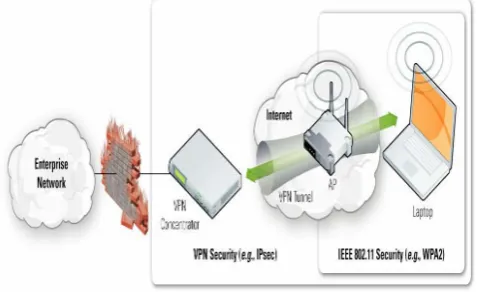
Figure. Vpn usage over an ieee 802.11 wlan
XI. CONCLUSION
As wireless devices are gaining popularity, their built in security systems are beginning to show definable and exploitable weaknesses. The 802.11b and WEP scheme is the most popular and the most maligned due to its inadvertently poor design. Other systems are most probably better or else their weaknesses are not yet discovered.
XII. REFERENCES
[1]. Anderson, Gustave et al, “A Secure Wireless Agent-based Testbed”, Proceedings of the Second IEEE International Information Assurance Workshop, 2004.
[2]. Baghaei, Nilufar and Hunt, Ray, “IEEE 802.11 Wireless
LAN Security Performance Using Multiple Clients”, Proceedings of the 12th IEEE International Conference on Networks, 2004.
[3]. Bargh, Mortaza et al, “Fast Authentication Methods for
Handovers Between IEEE 802.11
[4]. Wireless LANs”, Proceedings of the 2nd ACM
International Workshop on Wireless Mobile Applications and Services on WLAN Hotspots, 2004.
[5]. Becker, Bernd, Eisinger, Jochen, and Winterer, Peter,
“Securing Wireless Networks in a University Environment”, Proceedings of the Third IEEE International Conference on Pervasive Computing and Communications Workshops, 2005.
[6]. Carli, Marco, Neri, A., and Rossetti, A., “Integrated
Security Architecture for WLAN”, Proceedings of the
IEEE 10th International Conference on Telecommunications, 2003.
[7]. Chen, Jyh-Cheng, Jiang, Ming-Chia, and Liu, Yi-Wen,
“Wireless LAN Security and IEEE 802.11i”, IEEE
Wireless Communications, February 2005.Chen, Jyh-Cheng, Liu, Yi-Wen, and Wang, Yu-Ping, “Design and Implementation of WIRE1x”, Proceedings of Taiwan Area Network Conference, 2003.
[8]. Edney, Jon and Arbaugh, William A., Real 802.11
Security: Wi-Fi Protected Access and 802.11i, Addison-Wesley, 2004.
[9]. Fluhrer, Scott, Mantin, Itsik, and Shamir, Adi,
“Weaknesses in the Key Schedule Algorithm of RC4”, Proceedings of the 4th Annual Workshop on Selected Areas of Cryptography, 2001.
[10]. Gast, Matthew S., 802.11® Wireless Networks: The
Definitive Guide (2nd Edtion), O’Reilly Media, 2005.
[11]. He, Changhua, and Mitchell, John, “Analysis of the
802.11i 4-Way Handshake”, Proceedings of the 2004 ACM Workshop on Wireless Security, 2004.
[12]. IEEE Standard 802.11, 1999 Edition. Also available at
http://standards.ieee.org/getieee802/download/802.11-1999.pdf
[13]. IEEE Standard 802.11i, 2004 Edition. Also available at http://standards.ieee.org/getieee802/download/802.11i-2004.pdf
[14]. IEEE Standard 802.1X, 2004 Edition. Also available at