Design and Implementation of an Image to Speech Engine
N.Kotaiah & M.Suman
1Department of ECE 2 Assistant professor, Department of ECE Vignan’s Lara Institute of Technology and Science Vignan’s Lara Institute of Technology and Science
Guntur, A.P, India Guntur, A.P, India
Abstract
— In this paper, photo electric devices and computer software are used to identify the printed characters of Optical Character Recognition (OCR). This optical character recognition will converts the images that are hand written, typed and printed text into a machine encoded text. After the process of conversion the document is scanned on an image. In research process the obtained image is converted into audio output. So the optical character recognition is nothing but a machine process which includes cognitive computing, machine translation, text to speech key data and text times. This is mainly used in the field of character recognition, computer vision and artificial intelligence. If once the recognition process is completed in OCR then the code that is generated by character will be processed by using Raspberry Pi. This Raspberry Pi device will recognize the character by using python programming and TESSERACT algorithm. After recognition an audio output is listened. At last the entire format is used in the format of grid in virtual digital library’s design and construction. In this virtual library we can perform the analysis of document image analysis (DIA) by using pattern recognition of OCR.Keywords— Optical Character Recognition (OCR), Document Image Analysis(DIA), Raspberry PI, audio output, OCR based book reader, python programming.
I. Introduction
Generally, optical character recognition is nothing but a system that allow us to scan printed, type written or hand written text and it converr the scanned image into a computer process format that is word document. At first the basic OCR system is invented to convert the data available on paper into computer process. But at present OCR is used on GRID infrastructure which supports the characters of multiplie languages. By using GRID format in OCR, it elininates the problem of heterogenous character recognition. So in this paper a robust approach is proposed to extract the text and convert the text into speech. By using Raspberry PI we can test the device. The Raspberry PI is connected through internet by VLAN. By using command lines the software is installed. There are two commands used in Raspberry PI, one is to download the installaion script and second one is to convert into executable form which starts the script of installation work.
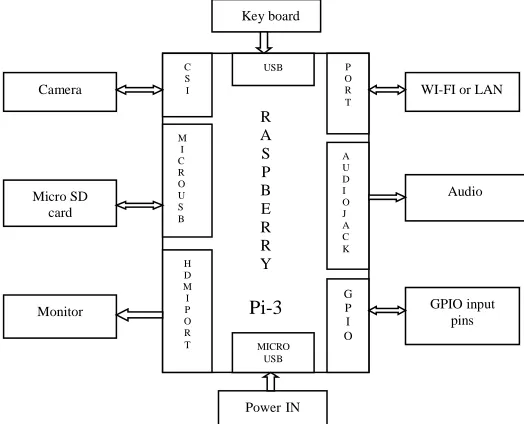
From figure (1) it can observe that the basic set up for image text to speech conversion. Here speech is more efficient and provides effective mode of communication. From this block diagram it can say that speech synthesis system is a computer based system that should able to read text and give voice
output. As well as speech synthesis is an artificial production of human speech.
In the text to speech module, the text which is recognised by OCR system will be the inputs of speech synthesis system and it is converted into speech which can be heard by using ear phone connected to laptap. This system helps the people to interact with computer by vocal interface. In this a deivce is used to scan and read the information that is text to speech device.
Extraction process is done after scanning the information. By using OCR technique, the numbers, alphabets which are in information will be converted into voice.
.
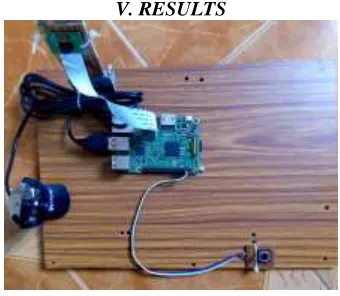
Now, a press push button switch is needed to take a picture which is shown in below figure (2). Basically, press push button switch are mechanical switches which are used to activate the switch. From system it knows that there are two modes in a switch they are normally open and normally closed. Depend upon the mode the switch acts.
Rrr R A S P B E R R Y Pi-3 C S I M I C R O U S B H D M I P O R T
USB P
O R T A U D I O J A C K G P I O MICRO USB Camera Micro SD card Monitor
WI-FI or LAN
Audio GPIO input pins Key board PowerIN
After a picture is taken then it is processed by Raspberry PI to listen the words which are spoken. The words which are spoken can be listened by using earphone which is inside the Raspi of audio jack. In this an adaptive technology is used to magnify the speech. At alst it can observe that optical recognition system gives good accuracy and provides low cost compared to past.
II. Optical Character Recognition Systems:
Background
Optical recognition system is a field of research in pattern recognition. Pattern recognition is the electronic translation of hand written or printed text into machine translated images. The techniques in OCR are taken from this pattern recognition and image processing. Basically, character recognition system provides force to make pattern recognition and analysis of this pattern recognition is done by using the fields of science and engineering. From past writing plays crucial role to transmit, collect and store information for the purpose of communication. At present the communication serves important role not only for human but also for machines. Now the communication serves important role not only for human but also for machines. Now the document processing is done to store the contents of paper documents. Various applications are provided by the OCR in the field of intensive research they are given as automatic processing of bulk amount of papers, transferring data into machines and web interface to paper documents. Here the human functions are replicated by machines and machines performs common tasks like reading.
III.Techniques of Optical Character Recognition
Systems
The main intent of pattern recognition system is to decide which pattern should be used in OCR system. Different characters are used in OCR system they are letters, number and special symbols like commas, question marks etc. Now by using the machine
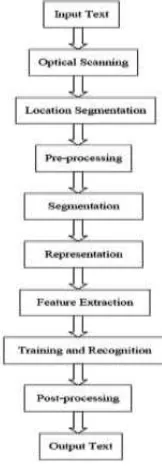
examples of characters of all different classes, teaching of machine is performed. Based on these examples the machine builds prototype or description of each class of characters. During recognition the unknown characters are compared to previously obtained descriptions and assigned to class that gives the best match. In most commercial systems for character recognition training process is performed in advance. Some systems however include facilities for training in the case of inclusion of new classes of characters. There are different techniques used in OCR system, but the below figure (3) shows the perfect process of OCR system. It consists of mainly six steps they are optical scanning, local segmentation, pre-processing, segmentation, and representation and feature extraction. Let us discuss each of this technique is detailed manner.
i)Optical Scanning
In optical character recognition system, optical scanning is the first component. While the process of scanning is performed on digital image then the original document is captured. As discussed earlier that in OCR the first component is optical scanner, this optical scanner provides the transport mechanism. Optical scanner consists of sensing devices, this device converts the light intensity into grey levels. After the process of scanning a document is printed which consist of black print on white back ground. Now a multilevel image in OCR system is converted into binary level and produces black and white images. The entire process involved in this system is known as threshold. As discussed earlier that it is performed on a scanner to Fig. 2. Press push button switch
save the space of memory. The result of threshold process is based upon the quality of bi-level image. But this threshold process is used under a particular condition that is when the gray levels below the threshold are black and the gray levels above the threshold are white. Fixed threshold is used in the process to get high contrast in document with uniform background. Now to obtain good results in OCR while scanning sophisticated methods are used. Local properties are used in the thresholding methods to obtain best results. But this mainly depends upon the multi-level scanning which occupies more space and produces computational capacity.
ii) Location Segmentation
The main intent of local segmentation is to determine the constituents of an image. The document consists of printed data which is obtained from the figures and graphics. Now it should locate the region for the above document. Let us discuss the process of local segmentation with an example. To perform the automatic mail sorting an address is located through envelopes and by using stamps and company logos the address is separated. When text is applied then the segmentation takes the isolation characters or words. In the same way in OCR algorithm, the words are segmented into isolated characters. For every component in the system uses segmentation to provide the isolation. It is very easy to implement on the system but the segmentation provides mainly three problems they are fragmented characters are obtained due to extraction process, next one is noise is obtained from text at the time of distinguishing and at last graphics and geometry are get misinterpreted.
iii) Pre-processing
Next technique is pre-processing, the pre-processing technique mainly depends upon the data acquisition type. This data acquisition type will subject the RAW data to number of processing steps. But this steps are usable in the analysis of character with descriptive stages. As discussed earlier that after the process of scanning an image is obtained which consists of noise. But based upon the scanner the characters get broken. Because of this poor recognition rates are obtained in the system. This poor recognition rates are eliminated by pre-processor from the smoothing digitized characters.
Basically, smoothing is the combination of both filling and thinning. Coming to filling, it deletes the gaps and holes which are obtained in digitized characters and next, the thinning reduces the width of a line. At last it can say that smoothing will moves a window across the binary image of a character and various rules are applied to the contents of window. But the processor is the combination of both smoothening and normalization. This uses normalization for the purpose of uniform size, slant and rotation. Absolute rotation is obtained by the angle. Finally to detect the skew rotated pages and lines of text are used.
iv) Segmentation
The pre-processing stage gives an output as clean character image. This image consists of sufficient amount of information high compression, and low noise. Now in this the main component is segmentation, in segmentation process the character image is segmented into sub components. The main purpose of segmentation is to obtain the characters directly through recognition on rate from the various lines. Coming to internal segmentation, it is applied on written characters which are obtained from the isolated lines and curves. Though various techniques are proposed in segmentation, it does not gives exact result.
v) Representation
One of the important component in OCR is representation. In any recognition system representation plays crucial role. In representation, the images are fed to the recognizer. To avoid the complexity and increase the accuracy a specified representation is required.
vi) Feature Extraction
The last component in the optical character recognition system is feature extraction. The main intent of feature extraction is to capture the characteristics symbols. In pattern recognition
system, it is very difficult to determine the feature extraction. By using actual raster image it can describe the character in straight forward way.
IV. Working principle
:
In this system first capture button is clicked. The time when capture button is clicked then the system captures the image and placed in front of web camera. This web camera is connected to the ARM micro controller through USB. By using optical character technology the image will be labeled according to the process of selected button. As it knows that OCR technology converts the scanned image into text, so that the computer program can be understood. In this OCR technology we use TESSERACT library. The data will be converted into audio by using F lite library. To detect the label of image camera is used. Now by using CV library label of image is separated and processed. At last the product is identified and it is named in pronunciation through voice. By using TESSERACT library the identified image is converted into text. If the identified image is converted into text then it is displayed on display unit. Here the display unit is connected to the controller and because of this the converted text is converted into voice and it is listened by using ear phones which is connected to the F lite library.
Basically, there are two modules in text-to-speech device. They are 1. Image processing module and 2.
Voice processing module. The main intent of image processing module is to capture the image using camera and convert that image into text. Next one is voice processing modules, the main intent of this module is to change the text into sound by using some physical characteristics. This process is observed from the below figure (5).
Block diagram of image text to speech:
From above figure (5) we can observe that there are two blocks. One is image processing module block and second one is voice processing module block. In OCR the image processing module coverts the .jpg to .txt and the voice processing module converts the .txt to speech. From system it knows that one of the important module in this system is OCR. Because OCR recognizes the characters automatically by using optical mechanism. Coming to the TESSERACT OCR, it is a type of OCR engine. In this OCR the flexibility and extensibility of machines are very active. The TESSERACT OCR consists of totally there are 149 languages and here these are going to identify the English alphabets. At first it is converted into a binary image to get good accuracy. One of the important tool in image manipulation is image magic software. By using this software it can processes the image binary conversion. Now the output is stored in a file that is text which is represented as (speech.txt). It is difficult to obtain the high accuracy in OCR engines. This is about text to speech conversion let us discuss about TESSERACT OCR implementation. It needs some supporting and condition in order to get the minimal defect.
TESSERACT OCR Implementation:
The input image captured by the Logitech (C270) web camera has a size of 3 MPI (720 X 340 pixels). Based on the specifications of TESSERACT OCR engine, the minimum character size that can be read is 20 pixels uppercase letters. Tesseract OCR accuracy will decrease with the font size of 14pt. Software Design processes the input image and converted into text format. The below figure (7) shows the block diagram of TESSERACT OCR.
Fig. 6. Block diagram of text-to-speech
The image is taken by the user via GPIO pin (23) that is connected to the button, using interrupt function. By using Raspberry PI program the picture is sharpened by using sharpness mode. The obtained image will be in the form of .jpg and this image has resolution up to 720×340 pixels. The main program provides functions to retrieve and process the input image, convert it into a sound signal. Picture will be taken as soon as push button switch is pressed then this Captured image is thresholded before feeding it to OCR to increase the accuracy. Overall flow of program is done as in flowchart.
Result:
Observed outcome of the project—
• Text is extracted from the image and converted to audio.
• Both capital and small letters are recognized by this system.
• along with letters it recognizes numbers also.
• The Range of reading distance is from 38-42cm.
• The font size of character is up to 12pt.
V. RESULTS
Fig. 7. Block diagram of TESSERACT OCR
Fig. 8. Raspberry PI output
VI. CONCLUSION
As discussed earlier that in optical character recognition system text-to-speech device is used. This device coverts the text image into sound with particular performance. The obtained result consists of tolerance which is less than the 2% and the average time processing less than three minutes for A4 paper size. This portable device, does require internet connection, and can be used independently by people. Through this method, we can make editing process of books or web pages easier.The proposed system ensures to reads the data present in the image for assisting blind persons. At last in Pre-processing part the text region is analyzed to extract the information.
VII. REFERENCES
[1]. Chen X, AL Yuille, Detecting and reading text in natural scenes, in Proc. Computer. Vision Pattern Recognition, 2004;
[2]. 2: II-366–II-373.2. Kumar S, R Gupta, et al. Text extraction and document image seg-mentation using matched wavelets and MRF model, IEEE Trans Image Process, August 2007; 16:2117– 2128.
[3]. K Kim, K Jung, et al. Texture-based approach for text detection in images using support vector machines and continuously adaptive mean shift Algorithm , IEEE Trans. Pattern Anal. Mach. Intell, December 2003; 25: 1631–1639.
[4]. N Giudice, G Legge, Blind navigation and the role of technology, in The Engineering Handbook of Smart Technology for Aging, Disability an Independence, AA Helal, M Mokhtari, B Abdulrazak, Eds. Hoboken, NJ, USA: Wiley, 2008.
[5]. Chen J Y, J Zhang, et al. Automatic detection and recognition of signs from natural scenes, IEEE Trans. Image Process., January 2004 ;13: 87–99.
[6]. D Dakopoulos, NG Bourbakis, Wearable obstacle avoidance electronic travel aids for blind: A survey, IEEE Trans. Syst., Man, Cybern, January 2010; 40: 25–35.
[7]. Portable Camera Based Assistive Text and Product Label Reading From Hand-Held Objects For Blind Persons. Chucai Yi, Student Member IEEE, Yingli Tian, Senior Member, IEEE, and Aries Arditi.
[8]. Digital Image Processing, 3rd edition, Rafael C Gonzalez, Richard E Woods.