Design and development of a speech-driven control for an in-car personal
navigation system
Ying Su, Tao Bai, and Catherine I. Watson
Department of Electrical and Computer Engineering University of Auckland, Auckland, New Zealand
Abstract
The paper outlines the development and design of a speech driven control for a personal in-car navigation system which runs on a standard Pocket PC. The modified system enables speech driven menu navigation, speech shortcut commands and interactive dialogues. The speech recognition method is presented, sources of inaccurate recognition are identified, and solutions are presented. Speech recognition accuracies of 96% and 88%, depending on the task, are achieved in an in-car environment. One draw back is the time taken to perform the recognition. The speech driven control module which interfaces with the in-car navigator is designed to be flexible. These features are discussed.
1 Introduction
This paper presents the design and development of a proto-type speech-driven control for a personal in-car navigation system. The navigation system is currently on the market, it is an as automatic navigation software application integrated into a Pocket PC operating environment. Like most software applications on a Personal Digital Assistance (PDA), it requires manual user control via the hardware interface of the device, which consists of the touch screen. This has obvious limitations for in-car use, and a hand-free speech driven solution to control the navigator is being investigated.
With the navigation system, the user is able to access automatically extracted map information, GPS localization, and navigation instructions via a graphical interface (GUI). The application also performs analysis of the trip and automatic routing to the destination address entered by the user, which helps improve the efficiency of travelling. Besides the navigation features, the application
also allows the user to customize the preference settings using the menus as part of the GUI.
In order to develop a prototype solution to enable speech-driven control for the in-car navigation system (hence forth called the Drive Router) there were two major functionality requirements; 1. the acquisition and recognition of user speech signals, and 2. the controlling the in-car navigation system according to the recognized speech commands. The control features specified in this prototype were speech-driven menu navigation, speech shortcut commands, and interactive dialogs.
The menu navigation feature allows the user to navigate through the different menus and preference setting screens of the GUI of the Drive Router by saying the names of the buttons on the GUI. The shortcut command triggers a transition that normally requires a series of GUI control actions. For example when the application is displaying the map screen, upon the recognition of the phrase “GPS status”, the GPS status screen will appear, this originally required the user to navigate through two menus to get it. Interactive dialog provides an efficient way for complex information retrieval. In this prototype, it is used to retrieve a destination address from the user.
2 Speech acquisition and recognition
2.1 Embedded speech recognition system
A large amount of effort has been gone into the development of robust speech recognition solutions. However, most solutions are designed to operate on a PC based platform. The Driver Router, runs on a pocket PC and is in an embedded system. An embedded system is one that has CPU and is programmable but is not a general-purpose Personal Computer. Few speech recognition solutions are suitable for an embedded environment due to the limited amount of memory and computation power. Typically, embedded system does not have large enough hardware capacity to process large recognition vocabulary [1] and store statistical parameters [2]. Other limitations specific to speech related applications include poor speech acquisition, mainly due to the quality of the microphone, and internal noise generated within the device. The quality of the received speech signal directly affects the recognition accuracy.
Some embedded speech recognition solutions, such as the IBM personal speech assistant [3], require additional hardware support to overcome the constraints. Some others, such as the one mentioned in [4], make use of wireless communication to delegate the responsibility of recognition processing to more powerful remote servers. Within the scope of this project, the Driver Router is designed to operate in a standard Pocket PC with no extra hardware or remote server support. Thus an embedded speech recognition solution developed in software is desired. Among the few speech recognition software solutions available for embedded systems, the ScanSoft Automatic Speech Recognition (ASR) Embedded Development System (EDS) is used for experimental and evaluation purposes in the development of the prototype.
2.2 The ScanSoft ASR system
The ScanSoft ASR EDS is designed for the development of software based speech enabled features into Windows based applications. In particular, it can be incorporated into a Microsoft Windows CE environment, which the Microsoft Pocket PC operating system is configured upon.
The speech acquisition and recognition system recommended by [5] (see Figure 1) comprised of
two major components, which are the AudioIn driver and the Vocon3200 Speech Recognition Engine. These components can be developed and configured using the Application Programming Interfaces (APIs) provided in the package, which are a range of functions in the C++ programming language, allowing the developer to construct and configure different modules of the system.
Configuration Modules Recognition Thread
Results Recogniser
Spelled-word Post Processor AudioIn Thread Speech Signal
Windows Multi-Media Library Audio Input Hardware
Context Grammar
Output Modules Grapheme
to Phoneme
Configuration Modules Recognition Thread
Results Recogniser
Spelled-word Post Processor AudioIn Thread Speech Signal
Windows Multi-Media Library Audio Input Hardware
Context Grammar
Output Modules Grapheme
to Phoneme
Figure 1: Speech acquisition and recognition using the ScanSoft ASR EDS. Produced based on
[5] and [6].
The AudioIn driver is in charge of streaming analogue audio signals from the audio input hardware and supplying the samples of the signals to the recognition thread of the Vocon3200 Speech recognition Engine.
The engine performs recognition on 16-bit digital speech signal samples taken at a sampling frequency of 16 kHz. The engine performs continuous recognition. The speech signal is recognized against a limited set of commands, each specified as a vocabulary item in text and converted to a phonetic transcription. The spoken command vocabulary and the grammar rules can be specified in the text grammar file. The phonetic transcriptions of the text commands can then be generated by a Grapheme to Phoneme object, which utilizes a language model for the conversion rules. The language model used is the standard American English Model.
ones. The recognition results generated on one utterance are the text vocabulary items associated with the most probable phonetic transcriptions selected by the Hidden Markov Model. Each result is also assigned a confidence level or confidence score, which indicates the likelihood of the match of result. The results with confidence levels above the Acceptance Threshold, which is defined by the developer, are then ready to be used by the consumer of the results. ScanSoft [5] claims that since the engine performs phoneme-based recognition and works with a standard language model to generate the phonetic transcriptions, it is able to perform speaker independent recognition without any training from the user.
The package also allows special development to perform recognition on spelling. Recognition by spelling imposes a big challenge because the utterance for a single letter is short and likely to be similar to other letters, hence leading to incorrect spelling recognition. The Spelled-word Post-Processor can be constructed using the package to improve spelling recognition accuracy. After the recognition engine is configured with a spelled-word specific grammar, a sequence of intermediate recognition results generated by the recognition thread can be fed into the post-processor. Each intermediate result corresponds to a character in the spelling and its confidence level. The post-processor then analyzes the results against a limited set of possible spelling defined in a data structure, namely a “spell tree”, and produces the final recognition results, which contains the possible spelled words, each with a corresponding error score.
2.3 Accuracy testing
2.3.1 Testing and results
A Pocket PC based test application was developed to facilitate testing of the performance of speech acquisition and recognition system developed using the ScanSoft package in the actual operating environment of the Drive Router. The AudioIn driver and the recognition engine were incorporated in the test application, which was then run on a HP Pocket PC, equipped with an integrated microphone. The recognition accuracy is tested in both a laboratory acoustic environment, with a Signal-to-Noise Ratio (SNR) of 49 dB, and an in-car environment, with a SNR of 21 dB. To
simulate the normal operating environment of the Drive Router, the in-car acoustic environment is setup with the Pocket PC placed 70cm away from the user. The noise in the environment mainly consists of engine noise and traffic noise.
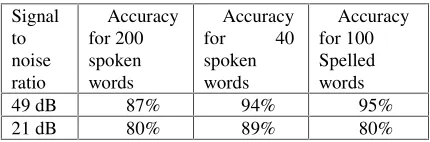
Two sets of vocabularies are used in the spoken word accuracy testing, one set being 200 words randomly chosen from an English dictionary, the other being 40 spoken commands to be used during the operation of the Drive Router, including all menu navigation and shortcut commands developed in this prototype. To test the spelled word recognition accuracy 100 words were spelt and matched to a spell tree consisting of 10000 road names in the Auckland region. The test results are summarised in Table 1. The results of special interests are the accuracy for recognizing the 40 speech commands and the spelled road names in the in-car environment, which are 89% and 80% respectively. These directly relate to the quality of the speech-enabled features of the Drive Router when used in practise.
Signal to noise ratio
Accuracy for 200 spoken words
Accuracy
for 40
spoken words
Accuracy for 100 Spelled words
49 dB 87% 94% 95%
[image:3.612.318.533.344.415.2]21 dB 80% 89% 80%
Table 1: Test results on the accuracy of the ScanSoft recognition system.
2.3.2 Sources of inaccurate recognition
The main sources of inaccurate recognition include phonetic similarities between the spoken words, spelled word recognition errors and noise.
Spelled word recognition performed by the ScanSoft system is essentially phoneme based and character based, since the recognition engine is used to recognize the characters by their phonemes and the spelled word post processor is used to search for the better matching character sequences. Therefore the recognition accuracy is affected by the phonetic similarities between the characters and the number of characters in the spelling. Like the similarities between some spoken words, it is difficult for the engine to distinguish phonetically similar characters. Examples of such characters are the famous “ E set” , including the letters ‘b’, ‘d’, ‘p’ and ‘t’ in the English alphabet [8]. With these characters, the engine is like to make substitution error, meaning one character being mistaken to another. Due to the short durations of the pronunciations of the characters are spelled with no obvious pauses in between, two consecutive characters are likely to be mistaken as one, resulting in deletion recognition errors. Finally signal inherited from the previous character or noise presented in the environment can be mistaken as additional characters, leading to insertion recognition errors.
Apart from recognition errors, there is always the possibility for spelling mistakes made by the user, which also include substitution, insertion and deletion errors. Insertion and deletion errors cause the length of the spelling to be different from the correct form, making it difficult for the spelled word post processor to match the input sequence with the correct spelling in the spell tree. From testing results, deletion errors are more likely to produce inaccurate recognition result, because less information is provided in the input sequence for processing.
Noise present in the environment can corrupt the information contained in the speech signal and introduce unwanted elements into the signal, which will be mistaken as part of the speech. It also affects the accuracy of detecting the trailing silence indicating the end of the utterance. As indicated in Table 1, the recognition performance is worse with a lower SNR. The test environment is created to consist mainly of random background noise in an in car environment. As commented in [9] speech recognition in an in-car environment is fragile and depends on driving conditions, further conversations between passengers significantly increase the level of confusion.
2.3.3 Representation of confidence level
As mentioned before, the ScanSoft recognition system associates a numerical confidence score with a spoken phrase recognition result to indicate how reliable the result is, and a numerical error score with a spelling recognition result to indicate how inaccurate the result is. Although it is clear that the higher the confidence score, the more reliable the spoken recognition result is, and the lower the error score, the more reliable the spelling recognition result is, the exact accuracy of the result and its relationship with the acoustic environment are not obvious from the raw scores. To suit the application, the raw score is converted to percentage accuracy that indicate the actually reliability of the result in specific to the in-car acoustic environment. The conversions are done using the following formulae:
%Spoken word accuracy = (100-cutoff_percentage) *(spoken_raw_score-spoken_cutoff_score) /
(spoken_max_score-spoken_cutoff_score) +cutoff_percentage
%Spelled word accuracy = (100-cutoff_percentage) *( spelled_cutoff_error - spelled_raw_error) /
(spelled_cutoff_error-spelled_min_error) +cutoff_percentage The cutoff_percentage parameter is defined by the developer so that a result with a percentage accuracy below which will be rejected. To maintain a reasonable sensitivity of recognition, the cut-off percentage is set to be 90 percent. The maximum spoken score, the minimum spelling error score and the cut-off scores are obtained from the accuracy testing result in the in-car environment. With the cut-off percentage being 90 percent, the cut-off score for spoken word recognition is the score that is less than the raw confidence score of the correct recognition result 90 percent of the time. On the other hand, the cut-off error for spelled word recognition is the error score which is larger than the raw error score of the correct result 90 percentage of the time. The new representation of accuracy makes further development easier, allowing efficient evaluation of the result and comparison of confidence level between spoken and spelling recognition results since they are using the same measurement standard.
3 Recognition improvement strategies
below 90 % in the in-car acoustic environment (see Section 2). Inaccurate recognition will lead to undesired control actions, which will affect the functionality and usability of the speech-enabled features. Some configuration requirements of the engine also impose challenges to achieve certain recognition features, which are important for the application. For example, to perform spelling recognition, the engine needs to be configured with a spelling specific grammar. This means with one configuration, an utterance can only be treated as either spelling or spoken phrases, but not both. Therefore, some strategies have been developed to improve the accuracy and flexibility of recognition.
3.1 Improving accuracy
3.1.1 State-dependent vocabulary
Throughout the operation of the Drive Router, the amount of possible speech commands can be large, and confusions are likely to be present in this large vocabulary. Instead of having the entire global speech command vocabulary active all the time, a state-dependent vocabulary configuration is used. With this approach, the vocabulary items activated and deployed by the engine at any point in time is limited to only the valid speech commands used by the Drive Router at the time. For example, when the Drive Router is in the map display state only the vocabulary items related to this state are activated and used for recognition, so these would include the phrases “ Zoom in” , “ Zoom out” , “ Show me the menu” , and “ GPS status” . With this smaller set of vocabulary, the chance of having similarities between the words is reduced. It also allows the commands to be chosen more easily, because phonetically similar phrases can now coexist in the vocabulary, as long as they are in different states. A reduced vocabulary size also helps reduce the setup time and processing time.
3.1.2 Result confirmation
Another strategy adopted is prompting for user confirmation if there are uncertainties in the results. If the engine has produced a list of recognition results with similar confidence levels on one utterance, an interactive dialog is used to inform the user of the possible options and ask the user to choose the correct one from the list.
3.1.3 Address recognition
The recognition accuracy also depends on the type of words to be recognized. As one of the desired control features, the system must be able to handle input of location names via speech when the user wants to specify the destination address of the journey. However a location name can be difficult to be recognized by its pronunciation, because it can be a foreign name or a proper name and its pronunciation is not as suggested by its written form. The pronunciation of such a location name cannot be estimated by the recognition engine, which relies on the grapheme to phoneme translation rules in a standard language model.
Another problem with recognizing a location name by pronunciation is the large vocabulary with lots of phonetically similar words. Therefore recognition by spelling is used for location name recognition. However, the engine is prone to make substitution, insertion and deletion mistakes for spelling recognition, and it is always possible for the user to make spelling mistakes. If address entering by speech solely relies on spelling, the usability of the feature will not be optimum. To improve address recognition accuracy we used a strategy which by fully utilized the possible input forms. Spelling of the location name was used as the dominant input form because it is more reliable. It is also taken into account that some location names do have conventional pronunciations and prompt the user for the pronunciation of the location name if the spelling recognition result has a low confidence level due to possible recognition errors or spelling mistakes made by the user.
In order to recognize the location name by pronunciation as a backup, the speech recognition engine needs to be configured with the valid location names as the spoken vocabulary. Although the user will be asked to provide the area name first, which can be used as an address search constraint, the resulting road names within an area can be over 10000. This figure is only for the Auckland region, and may be worse for a European or the American map. With this large vocabulary size, the problems include not only poor recognition accuracy, due to the chance of having similarities between the words, but also the resource consumption of setting up and processing the vocabulary for recognition.
Building a recognition context consisting of 10000 road names takes about 10 seconds processing time on a HP Pocket PC with a 200 MHz processor. Since the road name set is determined at run time, the delay is simply not acceptable for a user oriented application. To reduce the road name set, a partial spelling indexing method is used. With this approach, the spelling of the road name provided in the utterance is stored in a buffer. The first three characters of the spelling are extracted from the spelling and are used as an index string to extract from a subset of road names starting with the same letters. This subset is then configured as the spoken vocabulary for the engine before the user is prompted for the pronunciation of the road name. With the New Zealand map data used in the development of the prototype, using up to the first three letters of the spelling as index is sufficient to narrow the road name set down to less than 30 names. The validity of this approach is based on the assumption that the user does not make spelling mistakes in the initial part of the spelling.
3.1.4 Improved accuracy
With the accuracy improvement strategies, the accuracy testing for the in-car environment is repeated. For the state-dependent vocabulary configuration, the 40 speech commands used throughout the operation of Drive Router are divided into 8 states. Together with result confirmation, the recognition accuracy is increased by 7% to 96%, (see Table 1). With spoken location name as backup, the accuracy for spelled address recognition is increased by 8 % to 88% (see Table 1).
Our results compare favourably with [10] who got 91.3 % word accuracy rate and a 10.1% word error rate, and [11] who got a 7.4% word error rate. The vocabulary for both these studies were the digits. Unlike our study these speech recognition in-car studies were able to use large numbers of speakers to test the system, and the speech recognition platform was not an embedded system
3.2 Improving flexibility
As mention previously, some of the configuration requirements of the ScanSoft system discourage flexible processing of an utterance. Apart from processing an utterance as spoken and spelled words, the partial spelling indexing method requires one spelling to be processed more than once, first as the full spelling of the location name, then to extract the partial spelling. In order to enhance flexible utterance processing, an interactive recognition mode is introduced into the ScanSoft recognition system. With the interactive mode, an utterance is saved in a buffer. The engine is then configured multiple times to perform different types of processing on the utterance.
4 Control feature realization
By specification there were three major control features, including speech-driven menu navigation, speech shortcut commands, and interactive dialogs. In order to achieve portability of the control features and minimise the changes needed in the Drive Router to integrate with the speech control features, the solution was in favour of using the existing control mechanisms and data access interfaces in the Drive Router. Whenever manipulation to low level internal Drive Router data was necessary, additional interfaces were developed into the Drive Router to introduce a high level of abstraction and to avoid direct access to low level details.
4.1 Basic control mechanisms
4.1.1 Graphical user interface control
the main message loop of the receiving application, and are directed to the control component. The control component then responds to the event. With the knowledge of the identifiers of the available menu items in the Drive Router, the menu navigation control feature can be achieved using this mechanism. As the Drive Router uses the same system for GUI control, and the mechanism is applicable to any Windows-based applications, including PC based Windows, Windows CE and Pocket PC applications, adopting this mechanism allows the menu navigation feature to be portability and platform independent.
4.1.2 Accessing internal functions
Shortcut behaviour essentially requires automation of internal data processing and events triggering. The realization of these behaviours can be done by calling internal Drive Router functions. Since the Drive Router implementation is object-oriented, the functions can be accessed via an object of the class in which the functions are defined.
4.1.3 Sharing data
As one of the desired features, the user should be able to specify a destination address using speech. Within the Drive Router system, the address data can be extracted from its map data engine, and a set of current location results is kept internally. The Drive Router map data engine has a global interface available to any external module, but the current location result data structure was originally only used by the graphical user interface layer of the Drive Router, which accepts and analyzes manual input of address via the virtual key board. Since the speech interface is an additional plug-in to the system, it is desired that the address input from both input mechanisms valid at the same time. Therefore an interface is developed to allow access to the internal current location result data from an external module. The resulting system enables the Drive Router to have updated location input results from both the speech and manual address input interfaces.
4.2 Dialog management system
The dialog management system is designed as an advanced control component to achieve interactive dialogs between the Drive Router and the user. The design aims at achieving flexibility for
modification, expansion and maintenance of a dialog. Usability issues are also considered.
4.2.1 State-oriented design
An interactive dialog can be viewed as a sequence of question and answer pairs. Each pair is a task of getting a particular type of information from the user. The dialog can be very complex if there are a large number of tasks and the sequence of them depends on the information provided by the user, which is exactly the case for a dialog that handles user information intelligently. In recent years, the Extensible Markup Language (XML) has been frequently used in the development of interactive dialogs [12]. The language allows the dialog to be dynamically configured and provides a simple interface for the developer to modify the dialogs. However, an XML parser must be developed and run with the system to process the dialog specification described in the XML file, which introduces unnecessary overhead.
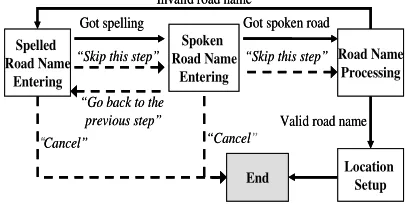
As a lightweight alternative to achieve a simple and flexible solution with the desired functionalities, the dialog was modelled as a finite state machine. Figure 2 shows simplified address entering dialog state diagram. Each state, represented by the boxes, performs a subtask of the dialog, which involves prompting for the type of information expected, getting the user response to the prompt, and determining the next desired state. The links between the tasks, represented by the arrows, are modelled as the state transitions, which depend on the current state and the user response. The transitions can be executed by the dialog management system, which oversees all the states. This model allows the order of tasks to be easily and dynamically arranged based on the user response, as well as allowing easy modification and expansion of the dialog, which simply involves the addition of new state objects and the possible transitions from the state.
“Go back to the previous step”
“Cancel” “Cancel”
Got spelling Got spoken road
Valid road name Invalid road name
End
“Skip this step” “Skip this step”
Spelled Road Name
Entering
Spoken Road Name
Entering
Road Name Processing
Location Setup
“Go back to the previous step”
“Cancel” “ Cancel”
Got spelling Got spoken road
Valid road name Invalid road name
End
“ Skip this step” “ Skip this step”
Spelled Road Name
Entering
Spoken Road Name
Entering
Road Name Processing
[image:7.612.325.528.570.672.2]Location Setup
4.2.2 Usability
There are two interaction styles a dialog can adopt. They are the system-driven style and the user-driven style. The system-driven style is necessary for an unconventional dialog, in which the user has little knowledge about what information is required [13]. The address entering dialog, which requires the user to provide spoken and spelled area and road names, can be categorized as such systems. The user-driven mode, on the other hand, allows the system to be user-friendly. For usability, every dialog is designed to have a multi-initiative style, which is the combination of the two [13]. The flow of the dialog is mainly driven by the system, as indicated by the solid arrows in Figure 2, with the addition of several transition commands, as indicated by the dotted arrows in Figure 2, to allow the user to have certain level of control of the flow and to change the current subject. With the development of the interactive recognition mode (see Section 3), which allows one utterance to be processed as different types of speech, the user is able to place a spoken transition command, even when the system is expecting the spelling of a location name.
Features have been added to improve the responsiveness of the dialogs. A timeout event is triggered when there is no response from the user for a certain period of time and the prompt is repeated as a reminder. Also when the user is asked to choose an item from a list of available options, such as the similar recognition results in a confirmation dialog, the user does not have to wait till the end of the list until they have a chance to respond. Any valid choice between the option prompts will be accepted and the dialog status will change accordingly.
5 Solution implementation
The prototype solution was programmed using C++. The language is chosen for its object oriented nature, and consequently allows easy modification and maintenance, as well as portability. Besides its natural integration with the Drive Router, the C++ is also supported by many platforms so that the solution is platform independent. The Microsoft Pocket PC 2003 Software Development Kit is used to configure the solution for the Microsoft Pocket PC operating environment. The development is
done using Microsoft Embedded Visual C++ 4.0 Integrated Development Environment.
5.1 Solution structure
Speech Recognition
Module
Speech Control Module
Control Target: SmartST Speech
Signal
Recognized Words
Vocabulary Current State Internal Data Control Actions Speech
Recognition Module
Speech Control Module
Control Target: SmartST Speech
Signal
Recognized Words
[image:8.612.319.544.97.175.2]Vocabulary Current State Internal Data Control Actions
Figure 3: Implementation structure
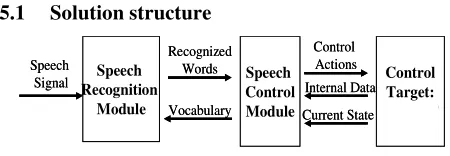
The solution is implemented in two modules, as illustrated in Figure 3. Each module has a set of APIs to allow external modules to interact with it and configure it. The speech recognition module is a wrapper of the ScanSoft speech acquisition and recognition system. Speech signals are captured and analyzed by the module and recognition results are produced. The interactive recognition mode is also implemented in the module, with a set of functions to allow external modules to activate or deactivate the mode and to decide what type of processing should be done on the utterance. The recognition results gathered in a customized result structure is sent to the speech control module in the form of a Windows message.
The speech control module controls the Control target (the Drive Router), according to the recognition results. The dialog management system residing in the control module enables interactive dialogs for result confirmation and address entering. The implementation also incorporates the state dependent vocabulary approach (see Section 3). The Drive Router was modified to notify the speech control module of its current state, the control module then configures the speech recognition module to activate the vocabulary items related to the valid commands in the state.
6 Testing on integrated system
consumption overhead with the speech enabled features is 4 Mb, mainly due to the recognition processing. The major performance limitation of the solution is the processing time. On average, the response time for menu navigation and shortcut commands is 2 seconds, and the maximum response time for address recognition can be up to 6 seconds. This is mainly due to the frequent reconfiguration of the recognition engine at run time. The most time consuming parts of the configuration is the destruction of the engine.
7 Discussion
The accuracy of speech recognition ultimately determines the functionality of the speech-driven control features. More tests need to be done on the performance of the ScanSoft recognition system, especially its ability to handle different speakers. Throughout the project, a lot of effort has gone into getting around the configuration constraints of the ScanSoft system to achieve the desired functionality and accuracy, e.g.. the state-dependent vocabulary approach and the interactive recognition mode. However, these approaches require frequent reconfiguration of the engine at run time, which significantly increases the response time. In order to achieve the desired functionalities and accuracy without compromising the performance, a fundamental solution is a more flexible speech recognition package.
Our investigation focused on the feasibility enabling the Driver Router to have speech-driven control. This we demonstrated, but we did not investigate improving the speech recognition via noise adaptation techniques, microphone placement and/or microphone arrays, Speaker adaptation. The studies [10] and [11] demonstrated that any combination or optimization of these will increase the speech recognition rates .
8 Conclusions
A prototype solution is developed to enable speech-driven control on the Drive Router navigation system. The solution included state-dependent vocabulary configuration, confirming uncertain results with the user, and using both the spelling and the pronunciation of a location name to improve the recognition of an address, and resulted in an accuracy of 96% for recognizing the spoken commands developed in the prototype and
88% for address recognition. Recognition flexibility was also achieved by the development of the interactive recognition mode. The cost of the accuracy and flexibility improvement is the increase in response time due to the constraints of the speech recognition system used.
The desired control features, including speech-driven menu navigation, shortcut commands and interactive dialog for result confirmation and address entering, are developed, with flexibility and usability taken into consideration.
9 References
[1] Dusan, S., Gadbois, G, and Flanagan, J. “ Multimodal Interaction on PDA’ s Integrating Speech and Pen Inputs” , Proceedings of EUROPSPEECH, Geneva, Switzerland, pp: 2225-2228, 2003
[2] Filali, K., Li, X., and Bilmes, J. "Data-Driven Vector Clustering for Low-Memory Footprint ASR", International Conference on Spoken Language Processing, Denver, Colorado, 2002
[3] Comerford, L., Frank, D., Gopalakrishnan, P., Gopinath, R., and Sedivy, J., “ The IBM Personal Speech Assistant” , Proc. of the ICASSP, 2001.
[4] Huang, X. et al., “ MIPAD: A Multimodal Interaction Prototype” , Proc. of the ICASSP, 2001.
[5] ScanSoft VoCon 3200Software Development Kit Version 2.0 Developer’ s Guide. (2004). ScanSoft Inc.
[6] Lopez, G. and Vanpoucke, P. (2004). “ ScanSoft AudioIn Component – AudioIn API” , Version 2.0. ScanSoft Inc. [7] Automatic Speech Recognition at CSLU. (2003). Center
for Spoken Language Understanding. Retrieved from
http://cslu.cse.ogi.edu/asr/ on 1st, September, 2005.
[8] Loizou, P., and Spanias, A., “ High-Performance Alphabet Recognition” , IEEE Transactions on Speech and Audio Processing, Vol 4, No.6, November 1996. [9] Hansen, J.H.L, Zhang, X.,Akbakac, M., Yapenal,U.,
Pellom, B, and Ward, W. “ Robust Speech Processing for In-Vehicle Voice Navigation Systems,” ICA-2004: Inter. Congress on Acoustics, vol. 4, pp. 2603-2606, Kyoto, Japan, April 2004.
[10] U. Yapanel, X. Zhang, J.H.L. Hansen, "High Performance Digit Recognition in Real Car Environments” , ICSLP-2002:Inter. Conf. on Spoken Language Processing, vol. 2, pp. 793-796, Denver, CO USA, Sept. 2002
[11] Delphin-Poulat, L. “ Robust speech recognition techniques evaluation for telephony server based in-car applications” , IEEE International Conference on Acoustics, Speech, and Signal Processing, Proceedings. (ICASSP '04). 65-8 vol.1, May 2004.
[12] Voice XML Forum. (2004). IEEE Industry Standard and Technology Organization. Retrieved from
http://www.voicexml.org/, on 2nd September, 2005.