OPTIMIZATION OF COMPUTER LABS USAGE IN
SCHOOLS:
A CASE STUDY OF SMART-SCHOOL
UPP FINAL REPORT
VOT 71660
FEBRUARY 15
TH. 2007
ABSTRACT
ABSTRAK
Perkembangan arahan multimedia berdasarkan komputer telah menghala kepada penggunaan aplikasi umum seperti pemprosesan perkataan sebagai satu kaedah yang berkesan dalam pembelajaran. Selain daripada itu, perkembangan Teknologi Komunikasi Internet (Internet Communication Technology – ICT) dan program pemangkin seperti Koridor Raya Multimedia (MSC) di mana sekolah pintar (smart school) sebagai salah satu agenda akan menjadikan bilik darjah sedia ada akan ditukar kepada makmal berdasarkan komputer peribadi. Bagi masa depan pelajar sekolah kaedah kawalan dan menyediakan persekitaran pembelajaran yang terbaik tidak boleh diambil ringan. Projek ini mebangunakan Smart Laboratory Real-Time Management
System (SLRTMS) untuk meningkatkan keberkesanan dalam pembelajaran,
pengurusan dan pengawasan pelajar dengan menggunakan pendekatan pelayan-pelanggan. Sistem yang dihasilkan akan meberikan faedah kepada pelajar dan juga pengendali (guru) kerana ia mempermudahkan tugas biasa dalam bilik darjah biasa berdasarkan komputer peribadi. Pelayan yang digunakan oleh pengendali (guru) sebagai peranti kawalan untuk pengajaran dan berkomunikasi menyediakan beberapa fungsi berikut: mengotomasikan kehadiran kelas; penyebaran kerja makmal dan pengumuman; melihat dan mengunci skrin komputer dan menghasilkan laporan pangkalan data. SLRTMS ialah sistem berdasarkan rangkaian setempat (Local Area
Network – LAN) dan menggunakan Windows 98 sebagai plantar dan
Acknowledgements
The research leader would like to acknowledge the contribution of the early programmer Beh Phaik Siew. This software is the result of a research supported by a seed grant from the Research Management Center of Universiti Teknologi Malaysia.
Great support from research members has enabled this project to be completed and delivered. The team members are :
1. Assoc. Prof Dr. Abd Samad Hj Ismail 2. Assoc Prof Mazleena Salleh
Table of Contents
Abstract Abstrak
Acknowledgements
CHAPTER 1 : INTRODUCTION 1.0 Introduction
1.1 Objective 1.2 Scope
1.3 Importance of the Project 1.4 Summary
CHAPTER 2 : LITERATURE REVIEW 2.0 Introduction
2.1 School Lab Management System Available Technolgies 2.1.1 SynchronEyes
2.1.2 NetSupport School 2.1.3 NetOp
2.2 Summary
CHAPTER 3 : METHODOLOGY 3.0 Introduction
3.1 Overview of the System 3.2 System Development
3.2.1 Conceptual Design 3.2.2 Logical Design 3.2.3 Physical Design 3.2.4 Functional Design 3.3 Summary
CHAPTER 4 : RESULTS AND DISCUSSION 4.0 Introduction
4.1 Discussion
CHAPTER 5 : CONCLUSION 5.0 Introduction
CHAPTER 1
INTRODUCTION
1.0 Introduction
In education, the value of electronic delivery systems has long been recognized by teachers and lecturers worldwide. With the explosion of Information and Communication Technology (ICT) and a catalyst program like Multimedia Super Corridor (MSC) where smart school is one of the agenda, conventional classroom has been transformed to a PC-based laboratory. Integrated control systems can simplify the teaching delivery in a computer laboratory.
There has been a virtual explosion of computer-based multimedia instructional applications for diverse subjects and interests. General-purpose applications, like word-processing and spreadsheet, have been adopted extensively in classroom environment as effective and efficient teaching and learning tools. To better adopting and managing the usage of these instructional applications and to impose some degree of supervision so that the students are not side tracked [5], the “traditional classrooms” are transforming to computer-based laboratories. ICT continues to enhance the classroom experience and empower teachers and students. The collaborative interaction and the flexibility in catering different learning abilities and paces of students are among the many benefits that ICT brings along into education.
reports. SLRTMS is a LAN-based system using Windows 98 as the platform and it’s development exploited the functionality of COM and DCOM and Microsoft Access as it database. This system provides a better interactive information environment and promotes a higher educational effectiveness.
1.1 Background to the Problem
Computers and content based software are mushrooming the schools. This is due to the education vision which is to utilize computers and IT in general to facilitate the learning and teaching in schools. Grants were given to selected schools to buy computers and its necessary infrastructure. The pilot run was done on smart schools where computers were intensively used in learning and teaching. This will later be adopted by all government sponsored schools. Teachers and school personnel start to that to manage a computer based classroom is not the same as to manage a conventional classroom. And to manually checked on the students and their activities on the computers by walking from one student to another is strenuous. Computers bring with them uninvited problems that can divert students attention and focus on the materials being delivered in the class. They may surf Internet and chat with someone from the other side of the globe.
Thus, there is a need to develop an application which is targeted to address the management aspect of it. The application developed in this project not only allows the teachers to use the computers as a teaching medium, but it also allows them to monitor students’ behavior in a computer lab.
1.2 Project Purpose
“Smart Laboratory Real-time Management System” (SLRTMS). A case study of smartschool was chosen due to its sufficient infrastructure and education content that exploit the use of computers and IT.
1.3 Objective
The following are the objectives of the project :
i) To produce an application where the instructor is able to control and monitor the computer usage of the student
ii) Enable discussion between lecturer and student
iii) Enable instructor to take attendance of the students effectively.
1.2 Scope
The project will adopt the following as the scope: i) The system employs client-server approach.
ii) The system was developed using .NET technology. iii) Features are grouped into package. The packages are :
a. Management b. Monitoring c. E-learning
1.3 Importance of the Project
manage the computer-based classroom so that teaching and learning can be made more efficient.
1.4 Summary
CHAPTER 2
LITERATURE REVIEW
2.0 Introduction
This section reviews some of the available software related to computer lab management systems. Their technology and features were studied.
2.1 School Lab Management System Available Technologies
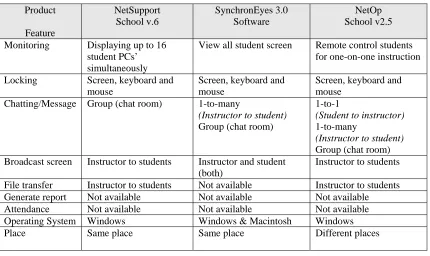
Three School Lab Management System products have been studied. They are
Table 1.1 : Common features in school lab management system Product Feature NetSupport School v.6 SynchronEyes 3.0 Software NetOp School v2.5 Monitoring Displaying up to 16
student PCs’ simultaneously
View all student screen Remote control students for one-on-one instruction Locking Screen, keyboard and
mouse
Screen, keyboard and mouse
Screen, keyboard and mouse
Chatting/Message Group (chat room) 1-to-many
(Instructor to student)
Group (chat room)
1-to-1
(Student to instructor)
1-to-many
(Instructor to student)
Group (chat room) Broadcast screen Instructor to students Instructor and student
(both)
Instructor to students File transfer Instructor to students Not available Instructor to students Generate report Not available Not available Not available Attendance Not available Not available Not available Operating System Windows Windows & Macintosh Windows Place Same place Same place Different places
2.1.1 SynchronEyes
SynchronEyes create a focused learning environment with SynchronEyes
computer-lab instruction software [9]. It has an intuitive interface that helps instructor provide one-to-one instruction in a computer lab.
2.1.2 NetSupport School
2.1.3 NetOp
NetOp includes a file transfer feature that is very useful when an instructor needs to distribute a file or even to collect assignments (in a form of files) from the students [4]. It can also open up a program file simultaneously on all the clients (students) workstations from a single instructor workstation.
In Malaysia school environment, attendance is compulsory. This is due to the fact that few important exams are scheduled throughout their primary and secondary educations. A continuous absenteeism may result in school drop-outs. SLRTMS provides an automatic attendance recording. This will help the teacher to monitor the students who regularly missed their classes. Locking in SLRTMS was designed with twofold purposes. First, to ensure that the students can concentrate during the instructional moments and second is to block them from misusing the computers. The former is helpful in helping the students to concentrate. Concentration during instructional moments are quite critical because the students have to listen to the instructions carefully. Listening skill is acknowledged as one of the basic skills that can actually influence the students academic performance [7]. So, this locking mechanism is actually a useful aid in helping the students to concentrate on their listening to the instructions. The later purpose is for misuse detection. If misuse is detected, a report will be generated. This report generation is a feature included in SLRTMS with an intention to help an instructor to analyze students behavior in lab. As a result, more attention can be given to these unfocused students.
2.2 Summary
CHAPTER 3
METHODOLOGY
3.0 Introduction
This chapter will describe the approach that we have taken to develop the system. It also describes the design and components of the system. The components included are the common features found in any School Lab Management Systems. We also implemented attendance system into SLRTMS.
3.1 Overview of the system
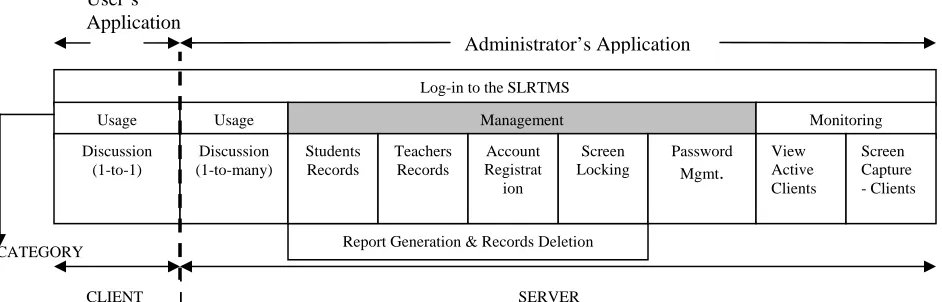
This Smart Laboratory Real-time Management System (SLRTMS) can be beneficial to the instructor as well as to the students. This system uses client-server approach. The server is used by the instructor as a control device for teaching and communicating. SLRTMS is a LAN-based system using Windows 98 as the platform and it’s development exploited the functionality of COM and DCOM and Microsoft Access as its database. This system also provides a better interactive information environment and promotes a higher educational effectiveness.
There are two applications involved in the development of SLRTMS. The Client Application (or the students) only has a discussion module. This is 1-to-1 discussion. It enables the students to communicate or post a query to the instructor.
response to all the students in the lab. Besides this, the instructor may choose to use this facility to broadcast a class assignment or announce any information related to the activities needed to be performed. It provides an alternative channel for discussion apart from the conventional discussion between instructor and students that normally being carried out in the event of teaching. Components enable an automatic class attendance, viewing and locking students’ computer screens, students and instructors record
management as well as generating database reports. A special module called Registration will register new students into the system. Upon registration, the student will be assigned a user id and a password.
Figure 3.1: SLRTMS Components
3.2 System Development
SLRTMS is a client-server system that exploits RAD (Rapid Development Application) methodology during its development
The Smart Lab Real Time Management System (SLRTMS) uses Object Oriented Analysis and Design (OOAD) as its development methodology. The primary reason to use OOAD is to prolong the software’s life and extends its functionality. This is made possible by reusing the already available classes in this current system and, for future extensibility:
1. add new modules to the current system CATEGORY
Log-in to the SLRTMS
Usage Usage
Discussion (1-to-1)
Discussion (1-to-many)
Management Monitoring
Students Records Teachers Records Screen Locking Password Mgmt. View Active Clients Screen Capture - Clients Account Registrat ion Administrator’s Application User’s Application
CLIENT SERVER
2. to communicate with other applications with little/no change to the current code.
Another motivation for using this methodology is to explore and implement OOAD into the newly improved feature of true Object Oriented Programming in Visual Basic .NET. Visual Basic has always been referred to as a ‘mediocre’ language by some programmers.
The main modeling language to express the system will be the Unified Modeling Language (UML) as a primary notation. UML is being used because of its flexibility and simplicity in addressing the system in design.
The tools and technologies used to design and implement SLRTMS are; 1. Rational Rose
a. Rational Rose is a popular design tool used to model systems using UML. The current version auto-generates classes for C++ and Java only.
2. Visual Basic .NET
a. Visual Basic is an exciting tool currently used by a majority group of programmers. The latest edition named Visual Basic .NET has lots of new features that is currently being used in developing the SLRTMS. 3. .NET Remoting
a. Because the SLRTMS is a client-server application that relies heavily on network resources, .NET Remoting via Httpchannel is used for communication means. .NET Remoting doesn’t encapsulate data in SOAP format, and transferring data in binaries is more faster.
3.2.1 Conceptual Design
The conceptual design of SLRTMS is as shown in Figure 3.1.It comprises of three actors that are administrator, instructor and student. The role of the administrator
manages the system such as students’ records and instructors’ records that include passwords.
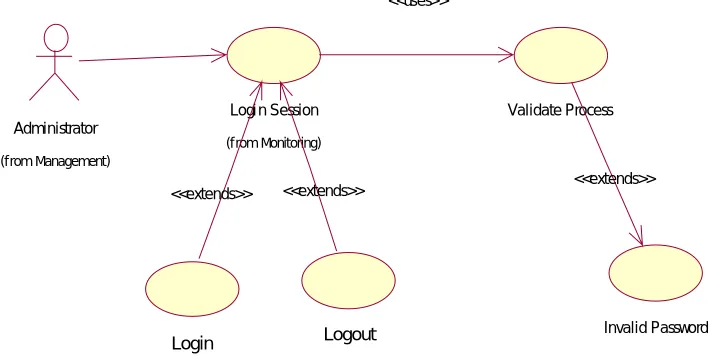
All the three actors need to register their accounts with the system before
proceeding to other functions. The access capability of functions by each user is specified during registration. The system itself or the administrator can set the user password at the time of the registration. For security reason users must modify the password once they are login to the system.
for the session, broadcast instructions or assignments, view students’ screen, lock students’ screen and update students report.
Monitoring
Management E-Learning Login
Figure 3.2: Basic package design of SLRTMS
SLRTMS is divided into separate packages to simplify the system’s functional
development. This abstract view of the system gives the users and developers an overall view of what the system can do.
Administrator
Create Groups Regi st er Users Create Classe s
Management Functions
Editing
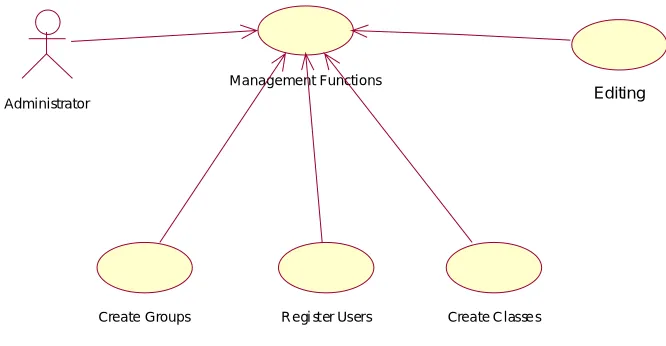
Figure 3.3: Use-case of the Management package
The management package serves four main functions. Create Groups as an administrator exclusive function to create groups for students. Register Users to register new
Login Session
Freeze PC Chat/Discussion Check PC Ali ve
<<uses>> Student Monitoring
(f rom <Use Case Name>)
<<extends>>
<<extends>> <<uses>>
Monitor Screen <<extends>> Administrator
(from Management)
<<extends>>
Figure 3.4: Monitoring Use-Case
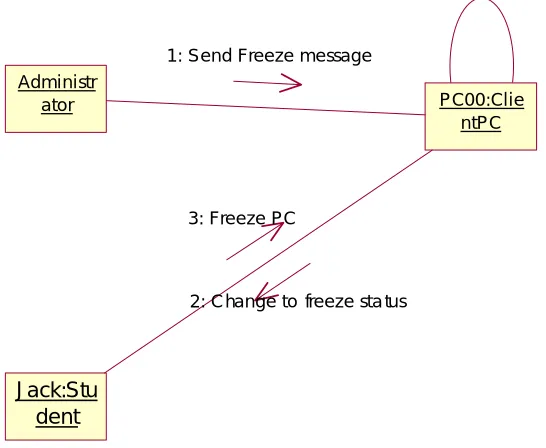
Check PC Alive checks the PC corresponding to the student using it for network activity by an ICMP call (ping) for every 5 minutes (relative to the time the student is logged on to reduce network traffic). The Monitor Screen function is a general function for the Student and Lecturer group to monitor each other's screen (with the latter true provided that permission is given). Freeze PC allowsthe Admins group to freeze student's PC for Class Demonstration purpose or as a simple 'punishment' for misusing their PCs.
P ri va te Ch a tti n g
A d m i n i stra to r
(f rom Managem ent )
S tu d e n t
Ch at /Di scu ssi o n
(f rom M onit oring)
< < ex te n d s> >
Fi l e Up l o a d s
L e ctu re r
Figure 3.5: E-learning Use-Case
The E-learning aspect of the system consists of Chat/Discussion Use-Case (from the Monitoring Use-Case Diagram), and File Uploads.
Administrator
(f rom Management)
Login Logout
Logi n Session
(f rom Monitoring)
<<extends>> <<extends>>
Invalid Password Validate Process
<<uses>>
<<extends>>
3.2.2 Logical Design
The logical design of SLRTMS comprises of possible scenarios using Sequence Diagrams and Collaboration Diagrams as notation.
Azlan:Administra tor
pc01:ClientPC
Calls PC object
Returns OK parameter
Figure 3.7: Check PC Alive Sequence Diagram
Azlan:Admini strator
pc01:Clie ntPC 1 : Cal ls PC objec t
2 : Ret urns OK p ara me ter
Figure 3.8: Check PC Alive Collaboration Diagram
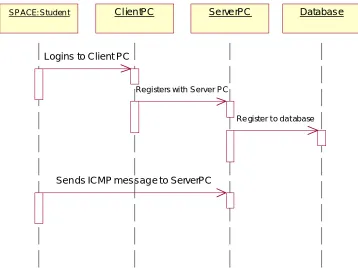
SPACE: Studen t Cl ien tPC Se rve rPC Database
Logins to Client PC
Registers with Server PC
Re gister t o dat abase
Sen ds ICMP messag e to ServerPC
Figure 3.9: Login Session Sequence Diagram
SPACE:St udent
ClientPC
Databas e
ServerPC 1: Logins to Client PC
2: Registe rs with Se rver PC
3: Register to database
4 : Sends ICMP me ssage to ServerPC
T e chnician:Admi n istrat or
PC00:ClientPC ServerPC
Send message requesting screenshot created
Sends screenshot bitmap to ServerPC
Admin watched desktop screen refreshed every ten seconds
Figure 3.11: Monitor Screen Sequence Diagram
T echnician:Ad ministrator
PC00:Clie ntPC
ServerPC
1: Send messag e req uesting scre enshot create d
2: Sends screenshot bitmap to ServerPC 3: Admin watched desktop screen refreshed every ten seconds
Administrator PC00:ClientPC Jack:Student
S end Freeze m essag e
Change to freeze status
Freeze PC
Figure 3.13: Freeze PC Sequence Diagram
Administr
ator PC00:Clie
ntPC
Jack:Stu dent
1: Send Freeze message
2: Change to freeze sta tus 3: Freeze PC
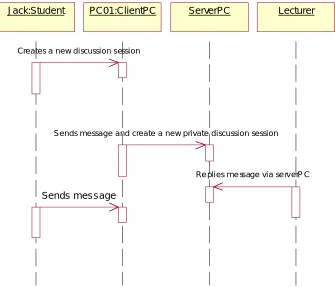
Jack:Student PC01:ClientPC ServerPC Lecturer
Creates a new discussion session
Sends message and create a new private discussion session
Re plies me ssage via se rv erP C
Sends message
Figure 3.15: Private Chat Sequence Diagram
Jack:Stu dent
PC01:Clie ntPC
ServerPC L ecturer
1: Cre ates a new discussion session 4: Sends message
2: Sends message and create a new private discussion session
3: Replies message via serverPC
Lecturer ServerPC Cl ie ntPC Jack:Student
Creates new public discussion session
Broadcast to all Client to create new session
Crea tes new se ssion
Se nds messa ges
Send messages
Broadcast to all
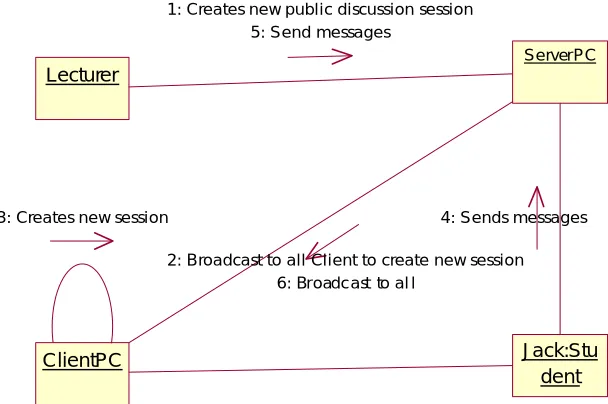
Figure 3.17: Public Discussion Sequence Diagram
Lecturer
ServerPC
ClientPC Jack:Stu
dent 3: Creates new session
1: Creates new public discussion session 5: Send messages
2: Broadcast to all Client to create new session 6: Broadc ast to al l
4: Sends messages
Ja ck:Student ClientPC ServerPC
Selects file to upload via/in ClientPC
Up loa ds fil es t o d irectorie s in serv erP C
Figure 3.19: Uploads Sequence Diagram
Jack:Stu dent
ClientPC
ServerPC
1: Selects file to upload via/in ClientPC
2: Uploads files to directories in serverPC
Administrator ServerPC
Matches ID and password against database
Logs i nto serverPC
Figure 3.21: Validate Password Sequence Diagram
Adm inistr ator
ServerPC
1: M atc hes I D a nd password a gainst da tab ase
2: Logs into serverPC
3.2.3 Physical Design
Below is the physical design of the system, SLRTMS.
Action Start Application
Input ID and password
Start Monitoring Class /Laboratory
Perform Functions
Logout
End Login
Password not accepted
Password accepted
End of class/shift
More functions
ClientPC currentStudent checkAlive() ServerPC currentAdmin whatClass() PC name Administrator Admins ID name password loginStatus currentPC verifyPassword() createGroup() receiveMessage() sendMessage() Student ID name password loginStatus currentPC currentClass currentSection verifyPassword() upload() monitorScreen() freezePC() receiveMessage() sendMessage() logout() Handles Lecturer currentClass currentSection upload() teaches
Figure 3.24: SLRTMS Class Diagram
3.2.4 Functional Design
System's main functional specification:
1. Screen Monitor
1.1 The administrator group should be able to view student's screen from his/her workstation.
2. Chat/Discussion
2.1 The admin group may initiate a discussion room for all students. 2.2 The admin group may start a private chat session with a student.
2.3 Students may chat with one another privately provided that permission is given from the admin group.
3. File Transfer
3.1 Lecturer's may upload files to students PC.
3.2 Student's may upload files to lecturers workstation.
3.3 Directories are automatically created for each lecturer and each class.
4. Create Group
4.1 Lecturers may create groups for students.
4.2 Students not belonging to any group will have 'NOGROUP as default. 4.3 Actions such as Discussions may be directed to specific groups.
5. Freeze PC
5.1 Admin group may freeze student's PC. 5.2 Admin group may freeze all student's PC. 5.3 Admin group may restore student's PC.
6. Create Class
6.1 Class may be created for every registered lecturer. 6.2 Registered lecturer may create more than one class.
7. Register User
3.3 Summary
CHAPTER 4
RESULTS AND DISCUSSION
4.0 Introduction
In short, the SLRTMS system’s workflow is as follows: 1. The instructor logs into the server.
2. Students log into the client workstation(at this time, the system automatically logs the student’s attendance). The client program will run in the system tray.
3. Student’s are allowed to;
a. Change their current password b. Join a class discussion
4. While in control of the server, instructors are able to;
a. Monitors the student’s screen via the Monitor Student function b. Freeze the student’s PC
c. Take part in a class discussion with the students.
d. View/print out the attendance sheet (automatically generated by the system)
5. Instructors are also able to add new students, subjects, and instructors using this system.
The above steps are summarized in the figure below.
Login to SLRTM S M onitor students M anagement Duties Logins at client PC M isc.
activities Logs out.
Logs out.
Instructors:
Students:
Workflow
Figure 4.2 : System Interface for Attendance
Figure 4.3 : Listing of registered students
Below is a screen capture showing how students and instructors can participate in a real-time discussion session.
Figure 4.4 : Chat Screen
Ahmad T armizi is present
Figure 2 : Attendance Report
4.2 Discussion
Below is the table which compares SLRTMS features with some commercially available on-the-shelf products (which has been discussed in Literature Review Chapter). We have added 2 extra features which are Attendance and Report.
Table 4.1 : Common features in school lab management system Product Feature NetSupport School v.6 SynchronEyes 3.0 Software NetOp School v2.5 SLRTMS (describes in the paper) Monitoring Displaying up to 16
student PCs’ simultaneously
View all student screen
Remote control students for one-on-one instruction
Capture real time screen (discrete) Locking Screen, keyboard
and mouse
Screen, keyboard and mouse
Screen, keyboard and mouse
Screen Chatting/Message Group (chat room) 1-to-many
(Instructor to student)
Group (chat room)
1-to-1
(Student to instructor)
1-to-many
(Instructor to student)
Group (chat room)
1-to-1
(Student to instructor)
One-to-many Instructor to student Broadcast screen Instructor to
students
Instructor and student (both)
Instructor to students Instructor to students
(in discussion context)
File transfer Instructor to students
Not available Instructor to students Not available Generate report Not available Not available Not available Available (**) Attendance Not available Not available Not available Available (**) Operating System Windows Windows &
Macintosh
Windows Windows Place Same place Same place Different places Same place
CHAPTER 5
CONCLUSION
5.0 Introduction
The report has presented the development and implementation of SLRTMS. SLRTMS is a client-server system using Windows 98 as the platform and exploited the functionality of COM/DCOM and Microsoft Access for it’s development. The system has the potential to improve the teaching delivery method which can be beneficial to the instructor as well as to the students. With this system class instructor can work more effectively. Instructor’s role can be focused to guide, support, encourage, suggest, and perhaps most revolutionary of all is to join in the learning process as a learning partner. For the students, they can communicate with the instructor without interrupting other students. SLRTMS not only revolutionizes the teaching style, but it also contributes to a better and greater interaction between an instructor and the students.
5.1 Future Work
References
[1] Beh Phaik Siew, Makmal Bestari : Sistem Pengawalan Penggunaan Komputer Makmal B. Sc. Computer Science, Universiti Teknologi Malaysia, Malaysia (2001).
[2] DCOM Technical Overview. November 1996. Microsoft Corporation. Available online at: http://msdn.microsoft.com/library/
[3] Fryer, W. A. School Computer Lab Management Software (2001). Available online at: http://www.wtvi.com/teks/exchange/ netop/default.htm
[4] NetOp School for Windows v2.5 Software for Networked Classrooms. Crosstech Corporation (2002). Available online at: http://www.crossteccorp.com/netopschool/ index.html
[5] NetOp School – A Cost Effective Solution. Review Special, Network Computing June 2001, pp 14 (2001). Available online at: http://www.networkcomputing.co.uk
[6] NetSupport School version.6 (2002). Available online at: http://www.netsupport-inc.com/nss5/nss.html
[7] Mohamed Fadzil Che Din. Virtec Journal 1(1), November 2001 Kajian Tinjauan Mendengar di kalangan Pelajar Sekolah-sekolah Menengah Selangor.
[8] Mohd Aizaini Maarof, Anazida Zainal, Rashidah Kadir and Firoz Yusuf Patel Dawoodi, CSCL: Collaborative Learning in Smart School Environment, COSTAM 2001, Universiti Sains Malaysia, Pulau Pinang, 8 – 10 Nov. 2001.