Available online: https://edupediapublications.org/journals/index.php/IJR/ P a g e | 2603
Comparative Study
Between HTML and HTML5: A Review
Harash Kumar
Assistant Professor Department of Computer Science,
Khalsa College, Chawinda Devi ,Amritsar, Punjab, India
Abstract—
In the field of web technology HTML is everywhere these days. HyperText Markup Language (HTML) is the main markup language for web pages. HTML elements are the basic building-blocks of webpages. HTML standard were and are created by World Wide Web consortium (W3C).HTML5 is the new and elegant standard for HTML that provides web users and developers enhanced functionality. The older versions of HTML are now replaced with HTML5. It is the fifth revision of the HTML standard. There are lots of differences which are given in HTML 5. It was brought to deliver rich content without the need for additional plug-ins and proprietary technologies. The new power of HTML5 supplies the user everything from animation to graphics, music to movies, and can also be used to build complicated web applications and also supports cross-platform. HTML5 standard initiates the development of real-time collaborations in web browsers, which leads to less work for web developers.Keywords—
WWW, Web pages, HTML, HTML5 features, accessibilityINTRODUCTION:-
Web technology is a standard that allows to develop Web applications with the help of predefined sets of classes, objects, methods and properties available in a markup language ,style sheet language , or programming language. The three core languages that make up the World Wide Web are HTML5, CSS, and JavaScript. HTML is the backbone of most webpages. Essentially, it is used to create the structure of how a specific website would look like, from the headings, to the paragraphs, the body, links, and even images. HTML standard were and are created by World Wide Web consortium (W3C). It is derived from a more general markup language called Standard Generalized Markup Language (SGML), which is an International Organization for Standardization (ISO) technology that defines markup languages.
HTML MAJOR VERSIONS
HTML 2.0Published in 1995, HTML 2.0 flushed out the RFC system, allowing detailed mechanical explanations of the system.
HTML 3.2
Published in 1997, HTML 3.2 performed major housecleaning on the structure of HTML. It removed mathematical formulas, reconciled code overlap, and adopted Netscape's Visual Markup Tags.
HTML 4.0
Published at the end of 1997, HTML 4.0 introduced 3 different versions and browser specific plugins. 4.0 Allowed custom experiences tailored to specific browsers.
XHTML
Released in 2000, XHTML fused HTML and XML into a language that was very precise, almost too precise. XHTML is widely considered a tedious and difficult language.
HTML 5.0
Available online: https://edupediapublications.org/journals/index.php/IJR/ P a g e | 2604
Introduction to HTML 5.0
HTML5 is markup language for structuring and presenting content for the World Wide Web, and is a core technology of the Internet originally proposed by Opera Software .It is the fifth revision of the HTML standard. Its core aims have been to improve the language with support for the latest multimedia while keeping it easily readable by humans and consistently understood by computers and devices (web browsers, parsers, etc.). HTML5 is a cooperation between the World Wide Web Consortium (W3C) and the Web Hypertext Application Technology Working Group (WHATWG).WHATWG was working with web forms and applications, and W3C was working with XHTML 2.0. In 2006, they decided to cooperate and create a new version of HTML.
Some rules for HTML5 were established: New features should be based on HTML, CSS, DOM, and JavaScript. Reduce the need for external plugins (like Flash).
Better error handling.
More markup to replace scripting. HTML5 should be device independent. The development process should be visible to the public.
With the development of HTML5 it has wide range of applications in multimedia direction . It can play audio and video and supports animations from the browser without the need of the proprietary technologies. The features of HTML5 would add up value for web designers and developers.
HTML5 supports cross platform, designed to display web pages on a PC, or a Tablet, a Smartphone, or a Smart TV (Fig-1). HTML5 is been a working draft and some browser designers and websites are already adopting HML5 elements. HTML5 also support location based services open formats such as Scalable Vector Graphics (SVG), open XML file formats and high quality graphics.
Fig 1. HTML 5 Cross platform
The basic advantage for the developers and browsers is that they would be able to do more without the need of mastering or licensing multiple proprietary technologies that can develop rich web pages, enhanced forms and web based applications.
HTML5 FEATURES
HTML5 provides new features that include
• Canvas – 2D/3D Graphics • Audio & Video
• Location based Services • Working Offline
• Web Workers • Drag & Drop • New Input Types • New Elements • Form Elements
Canvas
HTML5 <canvas> element is used to draw graphics via java script on web pages that incorporate video and animations. Canvas is only a container for graphics and script is to be used to render 2D/3D graphics. Canvas provides several methods for drawing paths, boxes, circles, text and images which makes graphics-heavy pages render fast.
Available online: https://edupediapublications.org/journals/index.php/IJR/ P a g e | 2605
SVG (Scalar Vector Graphics)
SVG defines vector-based graphics for the web. The clarity of SVG object do not change i.e., even if images are enlarged or compressed, quality of the image will not be lost .
SVG images can be searched, indexed, scripted, compressed and scalable. SVG images can be printed with high quality at any resolution and even they are zoomable
Fig 3. SVG Image before zoom
Fig 4.SVG after zoom
(Notice the quality of the image)
Audio & Video
Before HTML5 there is no standard for playing audio and video files on a webpage which generally requires a plug-in for different formats of audio and video[2] . HTML5 now provides a standard way to embed audio files and video files which includes non proprietary formats in the web page.
The tags <audio>, <video> and <source> tell the browser the associated information is to be
handled as an HTML5 compatible streams. These would let users view and listen the audio and video embedded on the page without the use of specific players.
<audio controls>
<source src="music.mp3" type="audio/mpeg">
Your browser does not support the audio element. </audio>
Fig 5. Output of Audio Tag
<video width="480" height="480" controls> <source src="movie.mp4" type="video/mp4">
</video>
Fig 6. Output of Video Tag
Location-based Services
GeoLocation API is designed to provide user’s location. It makes the information of mobile device’s geographic location available to a Web application. It offers support for mobile browsers and Location-based applications by enabling interaction with GPS and JavaScript extensions. This API in HTML5 identifies the location of user browsing any website provided user allows it.
Working Offline
Available online: https://edupediapublications.org/journals/index.php/IJR/ P a g e | 2606 Offline browsing, higher speed, reducing server
load etc. AppCache (Application Cache) allows applications to store data and programming
code locally so that the web applications can work as desktop applications.
Web Storage
HTML5 provides Web Storage feature that can store data within the user’s browser which is better than cookies used in older version. These support for client-side SQL database and offline application. Web Storage is more secure and faster. It is also possible to store large amounts of data, without affecting the website's performance offline. The data is stored in pairs of name/value, and a web page can only access data stored by it.
Web Workers
In a HTML page while executing scripts, the page becomes unresponsive until the script execution is completed. Web Workers are basically an API specification that lets users create background JavaScript threads to process CPU intensive tasks. These can’t be interrupted by other scripts or user interactions. Normally in browsers to handle all the JavaScript code a single thread is created and all of them are run on a single thread. Whether you are doing some calculation or updating page elements, it speeds up background tasks.
Drag and Drop
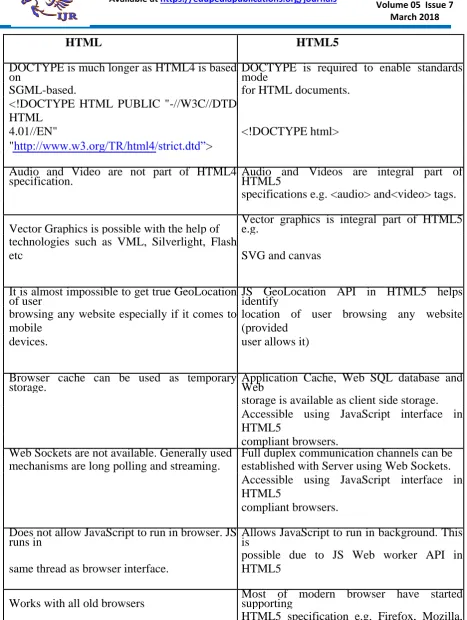
Available online: https://edupediapublications.org/journals/index.php/IJR/ P a g e | 2607 Table -1. Difference between HTML and HTML5
HTML HTML5
DOCTYPE is much longer as HTML4 is based
on DOCTYPE is required to enable standards mode SGML-based. for HTML documents.
<!DOCTYPE HTML PUBLIC "-//W3C//DTD HTML
4.01//EN" <!DOCTYPE html> "http://www.w3.org/TR/html4/strict.dtd”>
Audio and Video are not part of HTML4
specification. Audio and Videos are integral part of HTML5 specifications e.g. <audio> and<video> tags.
Vector Graphics is possible with the help of Vector graphics is integral part of HTML5 e.g. technologies such as VML, Silverlight, Flash
etc SVG and canvas
It is almost impossible to get true GeoLocation
of user JS GeoLocation API in HTML5 helps identify browsing any website especially if it comes to
mobile
location of user browsing any website (provided
devices. user allows it)
Browser cache can be used as temporary
storage. Application Cache, Web SQL database and Web storage is available as client side storage.
Accessible using JavaScript interface in HTML5
compliant browsers.
Web Sockets are not available. Generally used Full duplex communication channels can be mechanisms are long polling and streaming. established with Server using Web Sockets.
Accessible using JavaScript interface in HTML5
compliant browsers.
Does not allow JavaScript to run in browser. JS
runs in Allows JavaScript to run in background. This is
same thread as browser interface.
possible due to JS Web worker API in HTML5
Works with all old browsers Most of modern browser have started supporting
HTML5 specification e.g. Firefox, Mozilla, Opera,
Chrome, Safari etc.
Available online: https://edupediapublications.org/journals/index.php/IJR/ P a g e | 2608
Difference in HTML and HTML5
Tags:
<!DOCTYPE html> : In HTML 4.01, there are three different <!DOCTYPE> declarations but in HTML5 there is only one <!DOCTYPE html> Tag.
<strong>: In HTML 4.01, the <strong> tag defines strong emphasized text, but in HTML5 it defines important text.
<a >: In HTML 4.01, the <a> tag could be either a hyperlink or an anchor. In HTML5, the <a> tag is always a hyperlink, but if it has no href attribute, it is only a placeholder for a hyperlink.
<body> : In HTML5, all <body> specific attributes are removed, while in HTML 4.01 they were deprecated <acronym> : The <acronym> tag is not supported in HTML5. Use the <abbr> tag instead. The <acronym> tag was used to define acronyms in HTML 4.01.
<hr>: In HTML 4.01, the <hr> tag represented a horizontal rule. In HTML5, the <hr> tag defines a thematic break. The <hr> element is used to separate content (or define a change) in an HTML page.
<applet>: The <applet> tag is not supported in HTML5. Use the <object> tag instead.
Available online: https://edupediapublications.org/journals/index.php/IJR/ P a g e | 2609 New Semantic/Structural Elements
HTML5 offers new elements for better structure:
Removed Elements:
The following HTML elements are removed from HTML5:
<acronym>
<applet>
<basefont>
<big>
<center>
<dir>
<font>
<frame>
<frameset>
Tag Description <article> Defines an article
<aside> Defines content aside from the page content
<bdi>
Isolates a part of text that might be formatted in a different direction from other text outside it
<command> Defines a command button that a user can invoke <details> Defines additional details that the user can view or hide <summary> Defines a visible heading for a <details> element
<figure>
Specifies self-contained content, like illustrations, diagrams, photos, code listings, etc.
<figcaption> Defines a caption for a <figure> element <footer> Defines a footer for a document or section <header> Defines a header for a document or section
<hgroup> Groups a set of <h1> to <h6> elements when a heading has multiple levels <mark> Defines marked/highlighted text
<meter> Defines a scalar measurement within a known range (a gauge) <nav> Defines navigation links
<progress> Represents the progress of a task
<ruby> Defines a ruby annotation (for East Asian typography)
<rt>
Defines an explanation/pronunciation of characters (for East Asian typography)
<rp> Defines what to show in browsers that do not support ruby annotations <section> Defines a section in a document
<time> Defines a date/time
Available online: https://edupediapublications.org/journals/index.php/IJR/ P a g e | 2610
<strike>
<tt>
Conclusion:
HTML5 is an awesome technology and has the possibility to make the web even more predominant and extensive as it is today from desktop computers to mobile devices and in the future maybe even domestics appliances. HTML5 introduces new elements and features that allow developers to improve interoperability, handling elements in a precise way saving time and costs . With HTML5, streaming of audio and video without need of third party plug-in such as flash is possible. HTML5 allows storing data locally from client side. The data can be accessed to support the web application and it can even be accessed when the client is disconnected for a short period of time. In HTML5 we have new structural elements instead of traditional div tags to create page template, the final result will be a cleaner and more organized code.
REFERENCES :
[1] HTML5 Web Application Development by Example, J M Gustafson [2]Murach's HTML5 and CSS3 by Zak
Ruvalcaba and Anne Boehm [3]W3Schools.com
[4]Wenling Hu, Hao Yuan, Jiangong Wang, Liang Wang, The Research and Application of Power System Visualization Based on HTML, IEEE 2011.
[5]Chen Li-Li, Liu Zheng-Long, Design of Rich Client Web Architecture Based on HTML5, ICCIS, 2012
[6] http://www.html5arena.com [7] http://www.oshyn.com
[8] http://www.trendmicro.com/cloud-
content/us/pdfs/security- intelligence/reports/rpt_html5-attack-scenarios.pdf
[9] http://systemsintegration.searchsoa.com /SOA/kw;HTML+5/HTML+5/soa.htm [10] Kogent Learning Solutions(2012).
HTML 5 Black Book. DreamTech Press. [11] Sharma, Priyanka Bhardwaj, Manish
Bhardwaj, Differences between HTML and HTML 5, International Journal Of Computational Engineering Research (ijceronline.com) Vol. 2 Issue. 5
[12] Ch Rajesh, 2K S V Krishna Srikanth,
Department of IT, ANITS, Visakhapatnam, Research on HTML5 in Web Development, International Journal of Computer Science and Information Technologies, Vol. 5 (2) , 2014, 2408-2412