Available online: https://edupediapublications.org/journals/index.php/IJR/ P a g e | 15
Virtual Presence with 360° Camera
Nishanth C.1,Abhijeet Agarwal2 , N. Navyasri3,
A. Joshua Jafferson
41B-Tech,Department of ECE, SRM Institute Of Science and Technology
2B-Tech,Department of ECE, SRM Institute Of Science and Technology
3B-Tech,Department of ECE, SRM Institute Of Science and Technology
4Assistant Professor, Department of ECE, SRM Insitute Of science and technology
ABSTRACT :
Tele presence refers to a set of technologies which allow a person to feel as if they were present, to give the appearance that they were present, or to have an effect, at a location other than their true location. Tele presence requires that the senses of the user, or users, are provided with such stimuli as to give the feeling of being in that other location. Additionally, the user(s) may be given the ability to affect the remote location. In this case, the user's position, movements, actions, voice, etc. may be sensed, transmitted and duplicated in the remote location to bring about this effect. Therefore information may be travelling in both directions between the user and the remote location. Tele presence is a new technology that creates unique, "in-person" experiences between people, places, and events in their work and personal lives. It combines innovative video, audio, and interactive elements (both hardware and software) to create this experience over the network. Tele presence means "feeling like you are somewhere else". Some people have a very technical interpretation of this, where they insist that you must have head-mounted displays in order to have tele presence.
INTRODUCTION :
Objective of this project is to provide a sense
of shared presence or shared space among geographically separated members of a group. By combining two different technologies namely Telepresence and virtual reality. Both of these technologies in their separate forms didn’t survive the real world market. As Telepresence required a costly infrastructure and virtual reality didn’t find much application other than gaming and immersive virtual experience. When both together are combined it gives rise to cost effective immersive sense of presence. For the project we propose to build a holographic display that works on the principles of Pepper’s ghost effect with which we can build a life sized hologram display of a remotely located user. This user provides a video stream of himself using a camera over
the internet using Web Real-Time
International Journal of Research
Available at https://edupediapublications.org/journals
e-ISSN: 2348-6848 p-ISSN: 2348-795X Volume 05 Issue 07
March 2018
Available online: https://edupediapublications.org/journals/index.php/IJR/ P a g e | 16
share multimedia by controlling a computer at the conference hall (example: To be able to give a presentation from a remote location).
System Model Description:
Hardware:
Omnidirectional camera:
An omnidirectional camera is a camera with a 360-degree field of view in the horizontal plane, or with a visual field that covers
(approximately) the entire sphere.
Omnidirectional cameras are important in areas where large visual field coverage is needed, such as in panoramic photography and robotics. A camera normally has a field of view that ranges from a few degrees to, at most, 180°. This means that it captures, at most, light falling onto the camera focal point through a
hemisphere. In contrast, an ideal
omnidirectional camera captures light from all directions falling onto the focal point, covering a full sphere. The omnidirectional camera used in this project is Insta360 Air. It’s capable of capturing still images and video, and has a live-streaming function. In the project it is being used as a 360-degree webcam to capture the audience and their surroundings which are in front of the screen.
Projector:
A projector or image projector is an optical
device that projects an image (or moving images) onto a surface, commonly a projection screen. The most common type of projector used today is called a video projector. The newest types of projectors are hand held projectors that use lasers or LEDs to project
images. Their projections are hard to see if there is too much ambient light.
This project uses an Egate i9 LED projector. The projector forms the image of the person that is being virtually teleported on a screen. The image is then reflected by an acrylic sheet at a certain angle, which then appears as an hologram to the audience.
Software:
WebRTC:
WebRTC is a collection of communications
protocols and application programming
interfaces that enable real-time communication over peer-to-peer connections. This allows web browsers to not only request resources from backend servers, but also realtime information from browsers of other users. The Web Real-Time communication (WebRTC) framework provides the protocol building blocks to
support direct, interactive, real-time
communication using audio, video,
collaboration, games, etc., between two peers’ web-browsers. WebRTC leverages a set of plugin-free APIs that can be used in both desktop and mobile browsers, and is progressively becoming supported by all major modern browser 5vendors. Previously, external plugins were required in order to achieve
similar functionality as is offered
Available online: https://edupediapublications.org/journals/index.php/IJR/ P a g e | 17
Figure : WebRTC
Team Viewer:
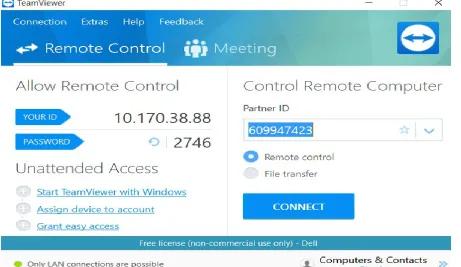
Team Viewer is a proprietary computer software package for remote control, desktop sharing, online meetings, web conferencing and file transfer between computers. In this project team viewer is used to establish remote desktop control. Remote desktop software captures the mouse and keyboard inputs from the local computer (client) and sends them to the remote computer (server). The remote computer in turn sends the display commands to the local computer. When applications with lots of graphics including video or 3D models
International Journal of Research
Available at https://edupediapublications.org/journals
e-ISSN: 2348-6848 p-ISSN: 2348-795X Volume 05 Issue 07
March 2018
Available online: https://edupediapublications.org/journals/index.php/IJR/ P a g e | 18
Figure : Team Viewer
Methodology:
Proposal:
This project consists of two separate rooms - The audience room and the speaker’s room. For our project we have used two laptops in each room. One pair of laptop is used to generate the hologram and the other pair is used for remote desktop application. The 360° camera and projector is connected to a laptop in the audience’s room. First peer to peer connection is established between both the
rooms. This is done by acquiring "Interactive Connectivity Establishment (ICE)" from the turn server in a pair of laptops. Then in the speaker’s room, the video and audio are captured live from a webcam and encoded. The audio and video are then encrypted before being sent to the other room. In the audience room the audio and video feed are received and decrypted. They are then decoded and displayed as a hologram. From the audience room video and audio feed from the 360° camera is captured live and processed in the same way.
Available online: https://edupediapublications.org/journals/index.php/IJR/ P a g e | 19
Figure : Flow Chart
RESULTS AND DISCUSSION:
1. Achieving a Hologram via the pepper ghost effect was accomplished through an acrylic transparent sheet.
2. Regulation and further controlling a remote desktop was achieved over LAN through Team Viewer application.
3. A suitable cost effective way for implementation connection between the two working rooms so that both video and audio gets exchanged,allowing telepresence using WebRTC was established.This when compared to hololens or holoporataion seems cost efficient
REFERENCES:
[1] [www.ietf.org/id/draft-ietf-rtcweb-rtp-usage-26.txt]
[2]