by Pedro Sostre
and Jennifer LeClaire
Web Analytics
FOR
DUMmIES
‰Web Analytics
FOR
DUMmIES
‰by Pedro Sostre
and Jennifer LeClaire
Web Analytics
FOR
DUMmIES
‰Web Analytics For Dummies®
Published by
Wiley Publishing, Inc.
111 River Street Hoboken, NJ 07030-5774
www.wiley.com
Copyright © 2007 by Wiley Publishing, Inc., Indianapolis, Indiana Published by Wiley Publishing, Inc., Indianapolis, Indiana Published simultaneously in Canada
No part of this publication may be reproduced, stored in a retrieval system or transmitted in any form or by any means, electronic, mechanical, photocopying, recording, scanning or otherwise, except as permit-ted under Sections 107 or 108 of the 1976 Unipermit-ted States Copyright Act, without either the prior written permission of the Publisher, or authorization through payment of the appropriate per-copy fee to the Copyright Clearance Center, 222 Rosewood Drive, Danvers, MA 01923, (978) 750-8400, fax (978) 646-8600. Requests to the Publisher for permission should be addressed to the Legal Department, Wiley Publishing, Inc., 10475 Crosspoint Blvd., Indianapolis, IN 46256, (317) 572-3447, fax (317) 572-4355, or online at
http://www.wiley.com/go/permissions.
Trademarks:Wiley, the Wiley Publishing logo, For Dummies, the Dummies Man logo, A Reference for the Rest of Us!, The Dummies Way, Dummies Daily, The Fun and Easy Way, Dummies.com, and related trade dress are trademarks or registered trademarks of John Wiley & Sons, Inc. and/or its affiliates in the United States and other countries, and may not be used without written permission. All other trademarks are the property of their respective owners. Wiley Publishing, Inc., is not associated with any product or vendor mentioned in this book.
LIMIT OF LIABILITY/DISCLAIMER OF WARRANTY: THE PUBLISHER AND THE AUTHOR MAKE NO REP-RESENTATIONS OR WARRANTIES WITH RESPECT TO THE ACCURACY OR COMPLETENESS OF THE CON-TENTS OF THIS WORK AND SPECIFICALLY DISCLAIM ALL WARRANTIES, INCLUDING WITHOUT LIMITATION WARRANTIES OF FITNESS FOR A PARTICULAR PURPOSE. NO WARRANTY MAY BE CREATED OR EXTENDED BY SALES OR PROMOTIONAL MATERIALS. THE ADVICE AND STRATEGIES CONTAINED HEREIN MAY NOT BE SUITABLE FOR EVERY SITUATION. THIS WORK IS SOLD WITH THE UNDER-STANDING THAT THE PUBLISHER IS NOT ENGAGED IN RENDERING LEGAL, ACCOUNTING, OR OTHER PROFESSIONAL SERVICES. IF PROFESSIONAL ASSISTANCE IS REQUIRED, THE SERVICES OF A COMPE-TENT PROFESSIONAL PERSON SHOULD BE SOUGHT. NEITHER THE PUBLISHER NOR THE AUTHOR SHALL BE LIABLE FOR DAMAGES ARISING HEREFROM. THE FACT THAT AN ORGANIZATION OR WEBSITE IS REFERRED TO IN THIS WORK AS A CITATION AND/OR A POTENTIAL SOURCE OF FURTHER INFORMATION DOES NOT MEAN THAT THE AUTHOR OR THE PUBLISHER ENDORSES THE INFORMA-TION THE ORGANIZAINFORMA-TION OR WEBSITE MAY PROVIDE OR RECOMMENDAINFORMA-TIONS IT MAY MAKE. FURTHER, READERS SHOULD BE AWARE THAT INTERNET WEBSITES LISTED IN THIS WORK MAY HAVE CHANGED OR DISAPPEARED BETWEEN WHEN THIS WORK WAS WRITTEN AND WHEN IT IS READ.
For general information on our other products and services, please contact our Customer Care Department within the U.S. at 800-762-2974, outside the U.S. at 317-572-3993, or fax 317-572-4002. For technical support, please visit www.wiley.com/techsupport.
Wiley also publishes its books in a variety of electronic formats. Some content that appears in print may not be available in electronic books.
Library of Congress Control Number: 2007920021 ISBN: 978-0-470-09824-0
Manufactured in the United States of America 10 9 8 7 6 5 4 3 2 1
About the Authors
An accomplished affiliate marketer with several successful Internet proper-ties relying heavily on Web analytics to stay on top of the charts, Pedro Sostre III is a New Media entrepreneur who understands how to blend art and business to reap financial rewards.
Pedro fell in love with the World Wide Web, its opportunities, and its chal-lenges in 1999. Since then he’s done everything from freelance design and marketing consulting to multimedia design for a major dot-com to launching his own Web development and consulting firm, Sostre & Associates. In the course of his career, he’s managed Web projects for companies like CBS Sportsline, BMW Motorcycles, Reebok, and Motorola, among others. Web analytics were an important factor in all of those projects.
Recognized as an Internet business and marketing guru, Pedro is a columnist for Revenuemagazine and is regularly quoted in media outlets, including Microsoft.com, Web Host Industry Review,and Internet advertising hot spot Adotas. Pedro’s coveted knowledge has also landed him invitations to judge design awards at Content Week. The Yahoo! Search Marketing Ambassador and Google Adwords Qualified Professional is also a regular presenter at industry events like eComExpo and the Affiliate Summit. You can find him online at www.sostreassoc.com.
Jennifer LeClairehas been chronicling e-commerce since its humble beginnings. She has witnessed the rise, fall, and resurrection of Dot-com Land. Jennifer’s tech news credits include NewsFactor, E-Commerce Times, Information Weekand Inc.com,among others. In fact, tens of millions of readers rely on Jennifer for straight-up business and technology news and insightful special reports each year.
Jennifer is also a veteran business news journalist, with credits including the Associated Press, The New York Times,and CBS and ABC News. Jennifer is a weekly guest technology analyst on CBS Radio’s KMOX, where she shares the real news behind technology headlines with millions of listeners nationwide. Jennifer is also an active blogger on AnalyticsInsider.com.
Jennifer is a member of the American Society of Authors and Journalists and the Public Relations Society of America. Jennifer’s personal Web site is www.jenniferleclaire.com. She also heads Revelation Media Networks, an integrated marketing communications firm.
Dedication
This book is dedicated to my leadership team at Sostre & Associates, Lisa Ramos and Chris Rivera. If it hadn’t been for the willingness of this dynamic duo to take on new levels of responsibility for the day-to-day operations of the firm, I would not have been able to dedicate myself to writing this book.
— Pedro Sostre
I would like to dedicate this book to the ECT News Network’s publisher, Ric Kern, and his hard-working editorial staff. These devoted tech news special-ists offered me tremendous support through the long process of dissecting Web analytics.
— Jennifer LeClaire
Authors’ Acknowledgments
Between the two of us, we’ve written plenty of articles, designed plenty of Web sites, and analyzed plenty of stats, but writing a book that applies those skills and that knowledge is an entirely different story. Blair Pottenger is the project editor of this book and deserves a hearty round of applause for his careful reading, incisive comments, and patience. Blair is a pro who shows no signs of cracking even under deadline pressure. Whatever you throw his way, he catches it and runs with it. Thanks, Blair!
We tried to make Teresa Artman’s copy editing job easy, but we appreciate her keen eye. She made us look good by ridding our pages of unclear techie stuff and a few typos along the way. With an entire new language called Web analytics to learn over a few short months, we’re convinced Teresa could copy edit books in any tongue.
Many thanks to Steve Hayes for launching this project and cultivating its first seeds. Steve held our hands through the beginning stages of developing the outline and sample chapter. His advice and experience in the publishing arena made this project an experience to remember (a good one!).
As for Paul Chaney, the technical editor, he had an unusually difficult job with this book because of the myriad of analytical concepts within its pages. His insights were invaluable.
Every single pair of eyes and hands who played a role in bringing this book to fruition should be congratulated. This is an important topic for online busi-nesses large and small and the editorial team deserves a place in the Web analytics hall of fame for deciding to make this complex topic understandable to even Web analytics newbies.
Publisher’s Acknowledgments
We’re proud of this book; please send us your comments through our online registration form located at www.dummies.com/register/.
Some of the people who helped bring this book to market include the following:
Acquisitions, Editorial, and Media Development
Project Editor:Blair J. Pottenger
Senior Acquisitions Editor:Steven Hayes
Senior Copy Editor:Teresa Artman
Technical Editor:Paul Chaney
Editorial Manager:Kevin Kirschner
Media Development Manager:
Laura VanWinkle
Editorial Assistant:Amanda Foxworth
Sr. Editorial Assistant:Cherie Case
Cartoons:Rich Tennant (www.the5thwave.com)
Composition Services
Project Coordinator:Erin Smith
Layout and Graphics:Carl Byers, Denny Hager, Joyce Haughey, Stephanie D. Jumper, Barbara Moore
Proofreaders:Aptara, John Greenough, Christy Pingleton
Indexer:Aptara
Anniversary Logo Design:Richard Pacifico
Publishing and Editorial for Technology Dummies
Richard Swadley,Vice President and Executive Group Publisher
Andy Cummings,Vice President and Publisher
Mary Bednarek,Executive Acquisitions Director
Mary C. Corder,Editorial Director
Publishing for Consumer Dummies
Diane Graves Steele,Vice President and Publisher
Joyce Pepple,Acquisitions Director
Composition Services
Gerry Fahey,Vice President of Production Services
Debbie Stailey,Director of Composition Services
Contents at a Glance
Introduction ...1
Part I: Getting Started with Web Analytics...7
Chapter 1: Understanding Web Analytics ...9
Chapter 2: Steering Clear of Common Terminology Confusion...21
Chapter 3: Getting Your Hands Dirty with Web Data ...33
Part II: Choosing the Right Web Analytics Solution...57
Chapter 4: Web Analytics Tools You Can Use ...59
Chapter 5: Investing in Web Analytics Tools ...75
Chapter 6: Discovering Niche Solutions ...97
Part III: Searching for Statistical Treasure...119
Chapter 7: Taking Out the Trash ...121
Chapter 8: Reviewing Site Referrers...135
Chapter 9: Getting to Know Your Visitors ...153
Chapter 10: Identifying Your Most Important Pages...167
Chapter 11: Key Performance Indicators Insights ...179
Part IV: Knowledge Is Power — Making Analytics
Work for You ...199
Chapter 12: Sifting through Search Data ...201
Chapter 13: Increasing Web Site Visibility...221
Chapter 14: Revisiting Your Online Advertising Strategy ...241
Chapter 15: Chronicling Your Web Analytics History...267
Chapter 16: Fine-Tuning Your Web Site ...281
Part V: The Part of Tens ...301
Chapter 17: Ten Web Analytics Myths, Mistakes, and Pitfalls ...303
Chapter 18: Ten Reasons Why Web Analytics Will Revolutionize E-Business ...315
Chapter 19: Ten Web Analytics Best Practices ...325
Appendix: Web Analytics Glossary ...335
Index ...343
Table of Contents
Introduction...1
About This Book...1
Foolish Assumptions ...2
How This Book Is Organized...3
Part I: Getting Started with Web Analytics...3
Part II: Choosing the Right Web Analytics Solution ...4
Part III: Searching for Statistical Treasure...4
Part IV: Knowledge Is Power — Making Analytics Work for You...4
Part V: The Part of Tens...5
Appendix ...5
Icons Used in This Book...5
Part I: Getting Started with Web Analytics ...7
Chapter 1: Understanding Web Analytics . . . .9
Web Analytics: Why Bother?...10
Who should use Web analytics? ...10
Why you should use Web analytics ...12
The importance of benchmarking...14
Web Analytics 101 ...14
Thinking like a journalist ...15
The language of Web analytics ...18
Chapter 2: Steering Clear of Common Terminology Confusion . . . .21
Hitting the Terminology Targets ...22
Hits: The most deceptive stat of all ...23
Pageviews: Getting closer to the truth ...24
Unique visitors: The undisputable facts ...25
The ABCs of Web Analytics...26
Mastering Internet Marketing Lingo ...29
Defining Actionable Data...30
Untangling Technical Terms ...31
Chapter 3: Getting Your Hands Dirty with Web Data . . . .33
Help! I Can’t Find My Stats! ...34
How to access your Web analytics tools...35
What if my host doesn’t offer analytics? ...42
Taking a Sneak Peek at the Data...42
Recording your monthly history ...42
Making note of peak days and times...45
Comprehending Conversion Rates ...53
Calculating that all-important metric ...53
Goal Setting 101 ...55
Part II: Choosing the Right Web Analytics Solution ...57
Chapter 4: Web Analytics Tools You Can Use . . . .59
Before You Begin . . . ...60
What’s my budget? ...60
What does your hosting company support? ...60
Surveying Server-Side Software ...62
The selling points of server-side analytics ...63
Server-side shortcomings exposed...65
Are server-side solutions right for me? ...66
Discovering Desktop Applications...66
Maintaining control with client-side analytics ...66
Client-side cons and desktop downsides ...68
Are client-side solutions right for me?...69
Hooked on Hosted Solutions ...69
On-demand: Let the vendor do the work ...69
Keep your cash flow flowing ...70
Anytime access ...70
Individual page tagging...71
One Web site, multiple servers...71
Hosted analytics pitfalls ...71
Are hosted solutions right for me? ...72
Getting the Best of All Worlds ...72
Leveraging synergies of multiple tool types ...73
Why you might want to use multiple vendors...73
Chapter 5: Investing in Web Analytics Tools . . . .75
Before You Begin ...76
Don’t Forget the Freebies ...76
What to expect from free analytics tools ...77
What not to expect from the freebies ...77
Finding free analytics tools ...78
Low-Cost Solutions, High-End Returns...84
Valuable capabilities for the value-conscious consumers ...85
Getting acquainted with low-cost vendors ...85
Enterprise Analytics for the Data Hungry...92
WebTrends Web Analytics 8...93
Omniture Site Catalyst 13 ...94
WebSideStory HBX ...94
Coremetrics Online Analytics ...95
Web Analytics For Dummies
xii
Chapter 6: Discovering Niche Solutions . . . .97
Web Analytics: A Boon for Bloggers ...98
Mint ...98
Measure Map...99
Bloglet ...100
Technorati ...100
103bees.com ...102
Read All about It: RSS Analytics ...103
FeedBurner...104
FeedFoundry ...105
Pheedo ...105
SimpleFeed ...106
Analytics in a Pod...108
Tracking with PodTractor ...108
RadioTail Ripple...109
Because You Are Paying Per Click ...110
CampaignTracker 2.0 ...111
BlackTrack...112
People Watch with Live Analytics Tools ...113
WhosOn ...114
VistorVille ...114
VisiStat ...116
Exploring A/B and Multivariate Testing Software ...117
Part III: Searching for Statistical Treasure ...119
Chapter 7: Taking Out the Trash . . . .121
Classifying Nonhuman Users ...122
Robots, spiders, and Web crawlers...122
The evil of e-mail harvesters...123
Uptime hosting monitoring services ...124
Gotta love link checkers and validators ...125
Recognizing RSS feed readers...126
Blog-monitoring services ...126
Why Eliminate Nonhuman Users?...127
The Danger of Referrer Spam ...129
Recognizing referrer spam ...129
Fighting Referrer Spam...130
Blacklist the spammers ...130
Use the rel = “no follow” solution...131
Rely on your analytics tools ...131
Ignoring Non–Mission-Critical Stats ...132
Who needs hit counts? ...132
Do you have the time? ...132
Basking in your international appeal ...133
xiii
Table of Contents
Who’s hosting my visitors? ...133
Authenticated users and anonymous users ...134
Downloadable files ...134
Favorites and bookmarks ...134
Miscellaneous miscellany...134
Chapter 8: Reviewing Site Referrers . . . .135
Revving Up for Referrers...136
Discovering Your Traffic Partners ...136
Identifying your referrers ...138
Classifying sources of Web traffic ...140
Searching for Statistical Treasure ...141
Which search engines list your site? ...142
Are you missing out on the search action? ...143
Which search engines send you traffic?...144
Beyond Search Engines: Where Else Is My Traffic Coming From? ...147
Measuring the value of link building campaigns ...149
Are my Web rings really working? ...150
Counting click-throughs from e-mail campaigns ...151
Chapter 9: Getting to Know Your Visitors . . . .153
Gleaning from Your Visitors’ Past ...154
Searching for Significance ...156
Determine popular search terms ...158
Find requests for products, services, and information you don’t yet offer ...158
Referring off-the-wall requests...159
Gleaning from Clickstreams and Labeling...159
Wow! My Site Has Multinational Appeal! ...162
Betting on Browser Data ...163
Monitoring browser usage ...163
Mulling over miscellaneous browser data ...165
Chapter 10: Identifying Your Most Important Pages . . . .167
It’s Not a Popularity Contest — Or Is It? ...168
Which Pages Drive Your Traffic? ...171
To Err Is Human, to Fix Is Divine ...173
Deciphering error codes...173
Unearthing unsightly errors...176
Working with Dynamic Pages ...177
Chapter 11: Key Performance Indicators Insights . . . .179
KPIs: When Not Just Any Data Will Do ...180
Calculating basics: Percentages and rates; averages; and ratios ...181
Keeping up with common KPIs...183
Web Analytics For Dummies
xiv
The Granddaddy List of KPIs...188
User and traffic growth KPIs ...188
Content-effectiveness KPIs...189
Internal search effectiveness ...191
Marketing-effectiveness KPIs ...192
Conversion KPIs ...194
Shopping cart KPIs ...195
Which KPIs Are Right for You? ...196
E-commerce sites ...196
Content sites ...197
Lead generation sites...197
Support sites ...198
Creating Your Own KPIs ...198
Part IV: Knowledge Is Power — Making Analytics
Work for You...199
Chapter 12: Sifting through Search Data . . . .201
Sifting Your Search Terms ...202
Accessing the search data...202
Reviewing your top search terms ...204
My Visitors Are Searching for What?! ...206
Pleasant surprises ...206
Searching for relevant terms...207
Profit thieves...207
Cashing In on Common Misspellings...208
Beyond Traffic to Conversions...209
TrafficAnalyzer ...210
Portent Interactive ...210
103bees.com ...212
Flip-Flopping the 80/20 Rule ...212
Monitoring Internal Site Searches...215
Driving sales, not traffic ...216
The bottom line from the top down...216
Before you begin . . ...217
Searching for Accuracy and Relevancy...218
Creating Targeted Landing Pages...218
Your Search Yielded Zero Results . . ...219
Chapter 13: Increasing Web Site Visibility . . . .221
Finding New Customers ...222
Scanning your search engines ...222
Improving your search rankings...223
Measuring your SEO efforts ...224
xv
Table of Contents
Extending your geographic reach ...229
Targeting high conversion categories ...230
Milking Multichannel Sales ...233
Reach Out and Touch Your Referrers...233
Like needles in the proverbial haystack...234
Pondering strategic alliances...235
Qualifying the leads ...236
Understanding Strategic Alliances...237
Affiliates ...237
Link exchanges ...238
Content sharing ...238
Co-registrations ...238
New people, partners, and opportunities ...240
Chapter 14: Revisiting Your Online Advertising Strategy . . . .241
Many Ad Types, Many Analytics Tools ...242
Tracking Efforts with Tracking URLs ...243
Tracking keywords with Google Analytics ...244
Tracking URLs cons...246
Adding Campaign Analytics to the Mix ...246
Openads points you to profits ...247
TrackPoint ad tracking ...247
Clickalyzer’s marketing co-ops ...248
Combating Click Fraud ...248
Need detectives on your case? ...249
CFAnalytics: Free and plenty of perks...250
AdWatcher adds it all up for you...250
WhosClickingWho?...250
Evaluating E-mail Marketing Campaigns ...251
WebTrends targets markets ...251
Reaching for relevancy ...252
E-mail marketing KPIs to monitor ...253
Tracking Offline Responses to Online Ads...255
Using coupon codes...256
Using unique URLs ...256
Using unique toll-free phone numbers ...256
Ferreting Out Ad Stats that Don’t Work...257
Comparing engine to engine ...257
Comparing keyword to keyword ...260
Unraveling Conversion Process Breakdowns...261
Understanding the conversion funnel ...262
Cueing in to conversion funnel issues ...262
Examining Google’s Conversion Funnel ...263
Employing Conversion Tracking Tools...264
Optimizing Your Ad Campaigns ...265
Web Analytics For Dummies
xvi
Chapter 15: Chronicling Your Web Analytics History . . . .267
Name, Rank, and Serial Number...268
Saving data on the server side ...269
Saving data with client-side solutions ...270
Saving data with hosted applications...270
Saved by the spreadsheet ...270
Benchmarking Your Conversion Rate...271
Oh, what difference does it make? ...273
Benchmarking against the masses ...273
Benchmarking Your KPIs...274
Benchmarking Times and Seasons ...275
Month-to-month monitoring ...275
Scoping history season-to-season...275
Another year goes by . . ...276
Identifying Hidden Trends ...277
Many Tools, Many Benchmarks ...278
Access Log Files: To Save or Not to Save? ...278
The case for dumping logfiles...279
The case for saving access logs ...280
Chapter 16: Fine-Tuning Your Web Site . . . .281
Understanding Optimization Strategies ...282
Search engine optimization...282
Calling on conversion design...283
Capturing customers with conversion content...284
Optimizing Your Home Page ...285
What Sends Visitors Running?...287
Optimizing Your Landing Pages ...288
Measuring landing page KPIs ...289
If visitors don’t love the landing page ...290
Optimizing Product Pages...291
Measuring product page KPIs...291
Perking up poorly producing product pages...292
Starting with a Clean Web Slate...293
Determining Why Your Customers Abandon You ...293
Reducing Shopping Cart Abandonment...295
Finding out why shopping carts are abandoned...296
Shopping cart KPIs to watch...296
Sealing the shopping cart deal ...297
Measuring the Effect of Site Changes ...299
Part V: The Part of Tens ...301
Chapter 17: Ten Web Analytics Myths, Mistakes, and Pitfalls . . . . .303
Averages Are the Analytics Answer...304
Monthly Visitor Trends Tell All ...304
xvii
Table of Contents
Pinpoint Precision Is Paramount...305
Unique Visitor Data Tells the Truth ...307
All Web Analytics Software Is Alike...307
But Numbers Never Lie . . . ...309
Make money with your metrics ...310
A Picture Speaks a Thousand Words ...310
Popular Search Terms Hold the Key to More Traffic...312
Funnel Vision Offers a Quick Fix ...313
Betting the Farm on Top 10 Lists ...313
Chapter 18: Ten Reasons Why Web Analytics Will
Revolutionize E-Business . . . .315
Truly Develop a User-Oriented Web site...316
Make the Most of Online Marketing...317
Save Money on Paid Search Campaigns...317
Cross-Sell and Up-Sell Your Customers ...318
Realize Real-Time Opportunities...319
Combating Controversial Click Fraud ...320
Closing the Delayed Conversion Loop ...320
Optimize Self-Support Functions ...321
Increase Results from E-Mail Campaigns ...322
Predict the Future Here and Now...323
Chapter 19: Ten Web Analytics Best Practices . . . .325
Define Metrics That Matter...326
Monitor Only Your Vital KPIs...327
Segment Your Visitors’ Behavior ...327
Know Your Navigation Report ...328
Keep Up With Keyword Campaigns ...329
Optimize Your Landing Pages...330
Calculate Visitor Conversion ...331
Save Your Historical Data...332
Make Changes Gradually...332
Commit to Continual Improvement ...333
Appendix: Web Analytics Glossary...335
Index...343
Web Analytics For Dummies
xviii
Introduction
W
hat would you pay for a book that could help you tap into the mind-sets of your Web site visitors, show you where you’re missing golden sales opportunities, and save you big bucks on online advertising initiatives? How about less than $30? (It’s quite the bargain for a wealth of knowledge, isn’t it?)Web Analytics For Dummiesis the book you’ve been waiting for. See, Web ana-lytics tools are essential, vital, and even critical for anyone who wants to improve his success on the World Wide Web. In fact, from entrepreneurs to mega corporations, the need for Web analytics has never been stronger. The truth is, what you don’t know about your Web site could be hurting your business.
Web Analytics For Dummiesis an introduction to the wonderful world of Web site statistics. The book will help you understand and unleash the power of Web analytics. It will take you on a journey with a colorful map that shows you the sign posts ahead as well as the right and left turns to lead you to greater profitability. Indeed, by the time you’re done reading this book, no one will be able to call you a dummy anymore. You’ll have confidence in your abilities to use these practical techniques that get results.
About This Book
This book takes the mystery out of Web metrics. You find out what you need to do to get the inside scoop on visitor behavior, measure your Web site’s performance against your business goals, and make adjustments to help you meet those objectives.
In this book, we show you how to
⻬Understand the language of Web analytics.
⻬Choose the right Web analytics software for your business.
⻬Get the lowdown on where your traffic is coming from and discover which site referrers you want to get cozier with.
⻬Fine-tune your Web site and reduce shopping cart abandonment. ⻬Avoid common data interpretation mistakes and implement proven best
practices.
And plenty more!
Foolish Assumptions
You know what they say about people who make assumptions, but because you bought this book, we have to presume a few things about your present circumstances — things such as
⻬You own a Web site, are planning very soon to build a Web site, or are in the business of helping other people improve their Web sites.
⻬You know how to use a Web browser.
⻬You know how to do some simple math: for example, calculating a percentage.
Of course, if you bought a book like this, we have to figure you know a little more than the basics about how to manage a Web site — or that you have access to someone who does. Because this book deals with statistics galore and how to use those stats to improve your site, we have to assume that you can take action on what you glean from this book. Specifically, you’ll proba-bly need to know how to
⻬Do vendor research (compare and contrast).
⻬Download and install software.
⻬Fix any Web site errors that your Web analytics software identifies.
⻬Make changes to your Web site.The Holy Grail of Web analytics is not merely accessing and interpreting the data but also using what you dis-cover to optimize your Web site and your Internet marketing campaigns.
We don’t get into coding in this book. This isn’t a primer on fixing errors or using HTML to make changes to your site. In order to get the most out of this book, however, you or someone you know needs to have some basic HTML skills so you can fine-tune your Web site. That may mean moving a picture from the top to the bottom of the screen or adding new content to certain pages. If you need more information about HTML, pick up a copy of HTML 4 For Dummies,4thEdition, by Ed Tittel and Natanya Pitts (Wiley).
2
Web Analytics For Dummies
How This Book Is Organized
This book isn’t anything like the boring reference books you relied on for your high school term papers, but it is organized like a reference book. In other words, you can start at any chapter and get the information that you need on the spot. You don’t necessarily have to read the chapters in order like you would a mystery novel.
This book is divided into several parts: the basics, choosing the tools you need to succeed, tips on searching for statistical treasure, how to make good with the knowledge you’ve acquired, and the Part of Tens. If you want to understand the differences between client-side, server-side, and hosted solutions, read Chapter 4. If you need some insight into key performance indicators (KPIs)— metrics that illustrate how well your site is performing against goals — read Chapter 11. If all you need is some quick info on how to determine who is sending traffic to your site, go right to Chapter 9. You get the idea.
With all that said, Web analytics is a complex topic, and each chapter sort of builds on the other as you strive to erect your Web-based empire. Yes, you can skip ahead to Chapter 5 and start the process of comparing and contrast-ing Web analytics vendors. If you don’t know the difference between the basic tool types, though, you might choose the wrong software. You can start with Chapter 3 and take a sneak peek at the data, but if you don’t speak the language of analytics, you might not have a clue what you’re really looking at. We recommend that you take the time to read the entire book from cover to cover, and then use it as an ongoing reference guide as needed. We believe that you’ll better understand how to set benchmarks, interpret the data prop-erly, and use the right data to guide you down the path of Web optimization.
Part I: Getting Started with Web Analytics
In this part, we give you the keys you need to start the Web analytics engine and keep it humming. Like a foreman setting out to build a skyscraper, this part of the book lays a strong foundation that will support your efforts as your Web site grows. Why is Web analytics important to your business? And for that matter, what is Web analytics? What’s the difference between a hit, a pageview, and a unique visitor? In this part, you’ll find out the basics of Web analytics: how it can benefit you, how to speak the language, and how to access your data and start recording some simple KPIs.3
Introduction
Part II: Choosing the Right Web
Analytics Solution
It’s been said there’s more than one way to skin a cat. (Gruesome thought, isn’t it?) Well, there’s also more than one way to capture Web analytics. In fact, as you’ll discover in this part, there are three ways to be exact. Each has its pros and cons — and all three together offer synergies that no individual tool offers alone. That’s why you need to know the difference between client-side, server-client-side, and hosted solutions.
But that’s not all you need to know as you assess tool types. There are dozens, even scores, of Web analytics vendors on the market. Some offer free tools. Others offer low-cost tools. And still others charge a small fortune for their ability to tell you just about anything you could ever possibly want to know about your visitors. You’ll find even niche solutions that measure RSS feeds and let you eavesdrop, so to speak, on visitor navigation — live.
Part III: Searching for Statistical Treasure
After you settle on a Web analytics tool that suits your specific needs, you can start searching for statistical treasure. First, though, you have to take out the trash:that is, the data generated from non-human users, referrer spam, and other data that block the view of your gold mine. In this part, you’ll dis-cover a dizzying array of KPIs. We’ll help you figure out which ones matter most to you. We’ll also roll into the real world of shopping cart abandonment — the four-letter word of e-commerce — and talk about conversion funnels. (Don’t worry, you’ll understand all this and more as you read Part III.)And your treasure hunt doesn’t end there. We also show you how to explore search engine and non-search engine traffic as you identify who you can thank for sending visitors your way. Then you’ll see how to analyze your data so you can get better acquainted with your visitors and the pages they love to return to again and again.
Part IV: Knowledge Is Power —
Making Analytics Work for You
If knowledge is power, Web analytics offers the thrust of a jet engine, taking you soaring above the clouds so you can see your site from 10,000 feet. Then it swoops down and lets you land on individual pages to see exactly what’s happening on ground level. In this part, you’ll read how to make Web analytics
4
Web Analytics For Dummies
work for you. It all starts with chronicling your Web analytics history. You don’t need to be a historian to appreciate this data. In fact, you might be sur-prised by some of the keyphrases that drive traffic — and it could open the door to a whole new set of customers and partners. Or, you might discover that it’s time to revisit your online advertising strategy. We give you actionable information to help you decide. Finally, we demonstrate some practical ways to fine-tune your Web site by using your data to guide page, section, and site redesigns that help reduce shopping cart abandonment. What more could a Web site owner dream of?
Part V: The Part of Tens
All For Dummiesbooks have The Part of Tens. In this part, you’ll find ten myths, mistakes, and pitfalls that you want to avoid at all costs. You’ll also discover a list of reasons why Web analytics will revolutionize e-business. Finally, we leave you with some Web analytics best practices that will help you avoid those myths, mistakes, and pitfalls in the first place. The rest is up to you.
Appendix
Don’t forget to check out the Appendix, where you’ll find a Web analytics glossary that will serve you well regardless of which vendor you choose.
Icons Used in This Book
Like all For Dummiesbooks, this book uses icons to highlight certain para-graphs and to alert you to especially useful information. Here’s the lowdown on what those icons mean:
A Tip icon means that we’re giving you a valuable tidbit of information that can help you on your journey or provide some extra insight into the concepts being discussed.
When you see the Remember icon, take note. These mean that we’re offering information that’s worth remembering.
5
Introduction
The Technical Stuff icon alerts you that you are about to enter the Geek Zone. If you’d rather not venture into that realm, simply skip it. If you want to know the every last detail, though, you’ll love these sections.
The Warning icon does just that — it warns you. This icon helps you avoid common mistakes, misconceptions, myths, and pitfalls. The bomb symbol sort of gets your attention, doesn’t it? Be sure to look for it so you don’t do more harm than good as you wade through the world of Web analytics.
6
Web Analytics For Dummies
Part I
Getting Started
with Web
In this part . . .
T
he basics of Web analytics are, well, anything but basic. Learning the ins and outs of Web analytics software may not be as daunting as understanding complex com-puter programming languages — but it’s not as easy as firing off a document in Microsoft Word, either. The Web analytics guru is one part statistician, one part psycho-logist, and one part prophet. The good news is you can glean valuable insights without being any one of the three.This part starts with the basics. We begin by explaining what Web analytics is, who should use it, and why you can’t afford not to use this seemingly all-knowing software in today’s competitive online environment. Whether you are a small but growing e-commerce vendor, a successful and growing affiliate marketer, a professional online lead generator, a media/content portal, blogger — or anyone else with any other type of Web site we didn’t mention — you’ll be fascinated to learn what Web analytics software reveals about your visitors.
The only catch is you’ll have to learn a new language — the language of Web analytics. That’s why we spell out the ABCs of analytics in clear terms you can understand. You’ll discover the difference between hits, pageviews, and unique visitors. You’ll learn to decipher commonly used acronyms like CRT, KPI, and PPC. You’ll even get familiar with some Internet marketing lingo. There is no industry standard terminology, so interpreting Web analytics can be confusing even when you think you speak the language fluently. But don’t worry, we’ve got you covered.
This part of the book also gives you an opportunity to get your hands dirty with Web data. We’ll show you how to find your stats, tell you what to do if your Web host doesn’t provide them, and walk you through some of the basics of analyzing your visitor behavior. Finally, we’ll help you set some goals to keep in mind as you begin to enter the world of Web analytics.
Chapter 1
Understanding Web Analytics
In This Chapter
䊳Appreciating the value of Web metrics
䊳Taking a behind-the-scenes look at your Web site
䊳Keeping up with the Joneses
䊳Investing your time and money wisely
A
long time ago, in a World Wide Web far, far away, Web counters— those rudimentary software programs that indicate the number of online visitors — were the only way to tally how many eyeballs viewed your Web site. You knew nothing about where those visitors came from, what brought them there, what they did while they were there, or when they left. You could experience the thrill of watching the Web counter jump from 100 to 1,000 in January but then drive yourself crazy trying to repeat the performance in February.Today, even free Web analytics tools— software that analyzes the behavior of site visitors — offer the nitty-gritty details about what, when, from where, and why visitors come to your site. And top-dollar solutions, with their ultra-sophisticated technologies, are getting so detailed that you may soon know what your visitor ate for breakfast. (Okay, not really, but an online grocer could at least collect data about what visitors like to eat by analyzing their clickstreams,the recorded paths that a visitor takes through your Web site.) So as far as the Web goes, George Orwell’s prophecies are true: Big Brother is indeed watching.
The overarching goal of monitoring your Web analytics is to make improve-ments to both your promotional initiatives and your Web site design. If you know how visitors find your site and then how they subsequently use your site, you can take measured steps to make the most of your promotional cam-paigns and your visual presentation. The bottom line is this: The easier it is for visitors to find your site — and the more comfortable they feel while they cruise around it — the better your chances to convert that traffic into paying customers and repeat visitors.
10
Part I: Getting Started with Web Analytics
This chapter gives you an overview of Web analytics, what these tools mea-sure, who should use them, why they are valuable in your quest to generate revenue, and what you could be losing by not paying attention to the wealth of visitor data that this software compiles.
Web Analytics: Why Bother?
Maybe you need a little more convincing. After all, there is an admitted learning curve with Web analytics programs, and you’re already undoubtedly busy enough just keeping your site updated, much less dissecting statistics, charts, and graphs. Why bother, you ask? The answer is clear: Understanding Web ana-lytics can unlock business strategies that pay dividends even while you sleep.
There are already millions and millions of Web sites, and that number grows day by day. An August 2006 Netcraft survey reveals more than 92 million Web sites are up. Netcraft is an Internet services company that provides security services and research data and analysis. That’s 4 million Web sites more than in July and 8 million more than in June. It’s more than likely that thousands — or even hundreds of thousands — of Web sites are competing for the same traffic you are. Web analytics can help you build strategies that make you stand out from the pack.
Who should use Web analytics?
Anyone who hopes to use the World Wide Web to generate income or leads should use Web analytics. Major e-commerce brands use Web analytics data to make real-time changes to their sites. Affiliate marketers use analytics to discern what programs are paying off as well as which ones merely take up space. Online lead generators tap Web analytics to measure how keywords are working, and information portals depend on these metrics to offer traffic figures to their advertisers.
Consider the following questions to determine whether you should invest in Web analytics software:
⻬Is my Web site a channel for revenue generation? ⻬Do I have high traffic counts but low conversions?
⻬Am I investing in paid-search campaigns through Google, Yahoo!, or some other search engine?
⻬Am I actively pursuing link building campaigns and link exchanges? ⻬Do I engage in e-mail marketing?
If you answered “yes” to any one of the preceding questions, you should begin to use Web analytics today. The truth is that your competition is already using Web analytics. You could be missing golden opportunities to turn the traffic you’ve worked so hard to generate into sales, subscribers, or members.
You can’t afford not to invest in this software. Neglecting Web analytics in today’s information-based society is akin to working in a retail store wearing a blindfold and earplugs. You might make some sales just because the doors are open, but you won’t know who your customers are, where they came from, or how long they stayed — you get the picture.
11
Chapter 1: Understanding Web Analytics
Browser blues?
When you look at the Browser section of yourWeb analytics report (as shown in the figure), you might be surprised to see how many browser brands there really are. Most people use Microsoft Internet Explorer or Mozilla Firefox, but many others are available, including Safari, Opera, and Netscape. What you need to know is that your Web analytics report lists these browsers, in part, so you can make sure your site design is optimized for the most common browser. Sometimes a Web site looks
much different on an Apple browser than it does on an open source browser or a Microsoft browser. In fact, the site can look skewed and jumbled on some browsers. Make sure that your designer tests the site on the most popular browsers so you can make the best possible impression.
You can read more about the browser section of your report in Chapter 9.
Why you should use Web analytics
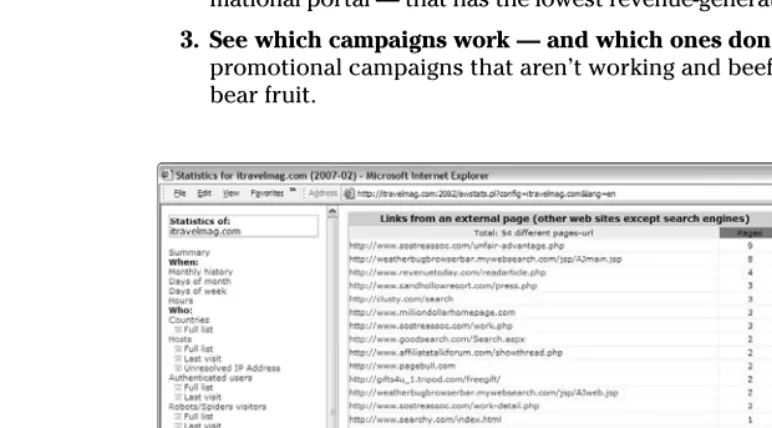
Here is a list of the top ten compelling reasons to use Web analytics:1. You can identify which site referrers generate the most traffic and rev-enue.The site referrer,or referring page,is the URL of the previous Web page from which a link was followed. This is a good way to identify which Web site owners you should foster relationships with, and which ones you can afford to forget about. See Figure 1-1 to see how your Referrer report looks in the free server-side analytics application AWStats.
2. You can determine what products have the highest browse-to-buy ratios.
That way, you can get rid of products — or content, in the case of an infor-mational portal — that has the lowest revenue-generating potential.
3. See which campaigns work — and which ones don’t. You can cut off promotional campaigns that aren’t working and beef up campaigns that bear fruit.
4. You can measure the impact of the online channel on your overall business.If your e-commerce Web site is generating more revenues than your bricks-and-mortar business, then it may be time to close up shop and concentrate all your efforts on the Web. If your Web site is generat-Figure 1-1:
Referrer report from AWStats.
ing more leads than other forms of advertising, then you may want to sink more into the former and less into the latter. By contrast, if your Web site is not making much of an impact on your business, then you need to consider some strategies to boost traffic or convert the traffic you already have. It could be poor design, poor content, or just poor marketing efforts. Your Web analytics program can give you some clues.
5. You can discover which visitor groups are most likely to become cus-tomers, subscribers, or members.Then you can adjust your marketing efforts accordingly.
6. You can analyze your visitor clickstreams.From this information, you can make changes to your site hierarchy(how you arrange your Web site) to improve your rate of conversion.Conversion occurs when you close the deal — when you convert a visitor to a buyer, subscriber, or member.
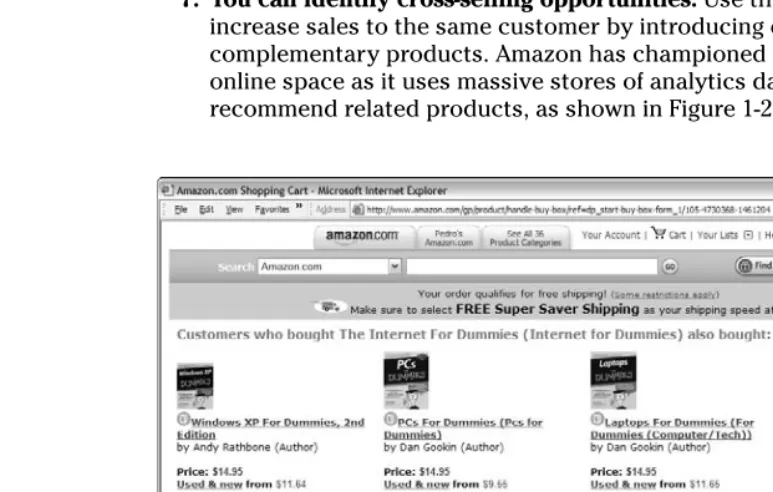
7. You can identify cross-selling opportunities.Use this information to increase sales to the same customer by introducing other similar or complementary products. Amazon has championed this concept in the online space as it uses massive stores of analytics data to identify and recommend related products, as shown in Figure 1-2.
Figure 1-2:
Amazon. com page, which rec-ommends related products.
13
Chapter 1: Understanding Web Analytics
8. You can determine the effect of adding new content to the site.If the new content you added causes visitors to stay on your site longer and/or increases your conversion rates, then your wordsmithing is to be congratulated. If the new content has the opposite effect, revert back to what you were doing — quick!
9. Track the keywords that visitors search for within your site.Then you can develop new product lines, services, or content based on those key-words.
10. Find errors in your site.With this information in hand, you can eradi-cate errors that could frustrate customers, such as broken links and pages that no longer exist.
Of course, there are many other benefits to keeping tabs on customer behav-ior, and in the end, careful attention to your analytics, and actions based on that data will result in converting more visitors into customers, subscribers, or members. When the right analytics tools are in place, you will have new information to work with daily, or even in real-time depending on how sophis-ticated your Web analytics software is.
The importance of benchmarking
You won’t know how far you’ve come if you don’t record where you were — benchmarking— and compare that with where you are now. Before you invest your time, energy, and money into generating more traffic, be sure to set spe-cific goals based on the available metrics. For example, if you want to
⻬Generate more international traffic:Record how many countries you reach.
⻬Boost your weekend traffic:Record the average daily visitors before you begin.
⻬Beef up your newsletter subscriptions:Tally your current sub-scribers now.
Benchmarking your starting point allows you to measure your specific goals. For more on benchmarking, see Chapter 15.
Web Analytics 101
Web analytics isn’t about gathering data for the sake of gathering data any more than a police detective collects clues for the sake of collecting clues. In both cases, the goal is to solve a mystery. Instead of detailing criminal activities at the scene of a crime, Web analytics details visitor activities on a Web site.
14
Part I: Getting Started with Web Analytics
There are two sides to your Web analytics story; the software and the human element:
⻬Web analytics softwarecollects data on Web site users’ behavior. ⻬The human elementinvolves sifting through data about a visitor’s
online experience to determine which site changes could improve that experience.
Maybe you’ve stumbled upon your Web analytics tools by accident and couldn’t make heads or tails of the charts, graphs, lists, and icons. Or maybe you never even knew about a way to go behind the scenes and examine a visi-tor’s pathway through your site.
Either way, if you aren’t sure what to measure or how to start thinking about Web metrics, you can’t benefit from the valuable clues that they provide. Taking a moment to review the basic language of Web analytics software can put you on a path to knowledge that leads to power.
Thinking like a journalist
You’ve probably heard the journalist’s rule to tell the reader who, what, when, where, and why. That’s just what Web analytics does at its most funda-mental level. The following sections outline the basics of what you can expect to glean from your Web analytics software.
Who
The Who category gives you the inside scoop. First, you can see what coun-tries visitors came from. This is where you see the worldin the World Wide Web. You might be surprised to discover that your visitors live in such far away places as Singapore, Algeria, or Switzerland. This category might also reveal the Internet service provider (ISP) of the visitor as well as whether the visit is from an authenticated user or a search engine spider.
⻬Authenticated usersare users who were required to log in, such as sub-scribers or members.
⻬Also known as Web crawlers, robots,or bots,a search engine spideris an automated script or program that browses the Web. Search engines use spiders to gather up-to-date data as they index the Web.
Benefit:Knowing who your visitors are can help you cater to their specific needs. If most of your users are members or subscribers, you can do member polling and make changes to your product, service, or content offerings accordingly. If most of your users are from Japan, you may consider translating your site into Japanese or making design changes that appeal to their cultural preferences. If most of your visitors are search engine spiders, you’ve got major issues! You need to launch some online and perhaps offline promotional
15
Chapter 1: Understanding Web Analytics
campaigns to get the word out. You can get some ideas of the different types of online strategies you could employ, along with tips on how to measure their effectiveness, in Chapter 16.
What
The What category tells you what the visitor did during his time on your site. You can discover how long the visitor stayed, what types of files he viewed (images, static pages, JavaScript files, and so on), what specific URLs were visited, and which operating systems and browsers were used to navigate your site.
Benefit: Knowing what the visitor did on your site can help you understand what his interests are. If a high percentage of your visitors spent most of their time on a handful of pages, then you can quickly discern what their interests are and add more of the same to your site. If most of your visitors are down-loading one white paper over all the others you’ve posted or reading certain articles more than others, you can safely assume that you’ve struck content gold. If your visitors are spending lots of time on your FAQ pages, you might conclude that they are confused and need better online customer support. The point is to pay attention to what visitors did on your site to look for trends — positive or negative — and make any necessary adjustments to your site.
When
The When category tells you just that — when visitors traveled across your virtual domain. You can see this data broken down by the number of unique visitors, how many visits as well as how many pages and how many hits were tracked each month, each day of the month, and each hour of the day (see Figure 1-3). You can also break this data down to determine which days of the week and which times of day see the most traffic.
Figure 1-3:
Visitor report broken down by time of day.
Benefit:Knowing when your visitors enter your site can help you track the effectiveness of special promotions or seasonal sales.
Where
The Where category tells you where the visitor came from. These are as site referrers.Referrers could be search engines, Web ring partners, link partners, affiliate marketers, or a host of others. You can read more about site referrers in Chapter 9.
Benefit:Knowing where your visitor came from helps you strategize link part-ner and paid-search campaigns. You can also learn more about your visitors by seeing what types of sites they frequent.
17
Chapter 1: Understanding Web Analytics
What’s up with error codes?
If you’re alarmed at the number of HTTP(HyperText Transfer Protocol) error codes you find in your Web analytics report (shown in the figure), don’t be. Common HTTP error codes include
⻬ Document Not Found: This error occurs if the file that a visitor is trying to access has been moved or deleted.
⻬ Too many users: This error usually means too many visitors were trying to access your site at the same time or that you have run out of bandwidth, in either case, you should speak with your Web host-ing company to determine what you can do to remedy these errors.
⻬ Internal server error: This error requires a little more investigation; it could be caused by any number of reasons. Although this metric is not included in your other charts and does not skew your over-all numbers, you need to identify and cor-rect these errors because you could be frustrating visitors, losing sales opportuni-ties, or both.
You can read more about identifying and cor-recting error codes in Chapter 10.
Why
The Why category tells what drew them to your site. That could include site referrers (such as search engines) or keywords and keyphrases that visitors used to find you in those search engines.
Benefit:Knowing why the visitor came — and what she was looking for — gives you the knowledge you need to make adjustments to your products, services, and content.
As you put on your journalist’s cap, be sure to do what any good journalist would do on a breaking news story: Take notes. Although your Web analytics software will chronicle and store your site’s data, you’ll want a quick refer-ence of the top visitors, keywords, and site referrers at the tip of your fingers so you can compare them with a glance to identify trends.
The language of Web analytics
As you venture into the world of Web analytics, you’ll quickly notice that it has a language of its own. You might even feel as if you’ve been submersed in a for-eign culture without a translator as you begin to hear words like hits, traffic, and sessionsthat have totally different meanings online than they do offline.
Like any new language, the best way to become fluent is to begin with the fundamentals. In Web analytics, those fundamentals — or core metrics — are found in the five Ws in the journalist’s toolbox. Specifically, the heart of Web analytics is captured in the following terms:
⻬Hits
⻬Pageviews
⻬Visits
⻬Unique visitors
⻬Referrers
⻬Keywords and keyphrases
Take a look at each one of these terms and what they mean in the big picture.
For more on the language and terminology of Web analytics, be sure to check out the Appendix at the end of this book.
Hits
People love to boast about this metric. A hit,or impression, is created when your Web server delivers a file to a visitor’s browser. PDF, sound files, Word documents, and images are a few examples of files that generate hits. A
18
Part I: Getting Started with Web Analytics
request for a page with five images would count as six hits: one hit for the page itself plus one hit for each of the five images. This has been a popular metric with sites hoping to score advertising, but it can be deceiving. See Chapter 2 for an in-depth look at common terminology confusion.
Pageviews
A pageviewis recorded each time a visitor views a Web page on your site. This metric reveals how well your site captured the interest of your visitor. Simple analytics programs divide the number of visitors by the number of pageviews to determine the average number of pages each visitor viewed. If that number is low, you might need to rethink your content, design, or hierarchy.
Visits
Sometimes called a sessionor user session,a visitdescribes the activity of an individual user on your site. You could also say that a visit is a series of views by the same visitor. It’s interesting to note that most analytics tools will end the session if the visitor remains idle for 30 minutes although that time limit can often be adjusted in your software’s options.
Unique visitors
The unique visitorsmetric represents the number of individual people who visit your Web site. Each individual is counted only once, so if a person visits your site five times in the reporting period, that behavior might count as five sessions but only as one unique visitor. Most analytics programs track unique visitors by their IP address,which is the unique string of numbers that identifies a computer or server on the Internet.
Some users are assigned dynamic IP addresses from the ISP. That means that their IP address changes daily, or sometimes even every few hours or min-utes. These types of users might skew your number of unique visitors slightly.
Site referrers
The site referrer,or referring page,is the URL of the previous Web page from which a link was followed. A referrer could be a search engine, a blog, a banner ad, an e-mail, an affiliate marketer, a Web ring, a link partner, or some other Web site. Your Web analytics program will record the exact URL of the site that referred traffic so you that can measure the success of your various traffic-building initiatives.
Keywords and keyphrases
Keywordsand keyphrasesare appropriately named because they hold the key to potentially significant traffic. People use these words to search for prod-ucts, services, and information on the Web. You can pay search engines to display your advertisement in the results of a user’s search based on the
19
Chapter 1: Understanding Web Analytics
keywords and keyphrases you choose. If you are selling helium balloons, for example, you might pay Google to display a link to your Web site when searchers enters the keyphrase helium balloonsinto that engine.
Don’t wait until the end of the month to view your Web analytics report. You could be losing valuable opportunities to convert customers — and you could be wasting your paid-search ad dollars. By monitoring your Web analytics software weekly — or even daily — you can reap the full potential of this intelligent tool.
20
Part I: Getting Started with Web Analytics
The Bandwidth report
Your Web host probably has a limit to theamount of bandwidth (the data that is trans-ferred to and from your Web site) that you can use in a given month. Web analytics tells you precisely how many bytes (a unit of measure-ment for data) your site is sending to and receiv-ing from users. The bottom line is this: The more traffic you get, the more bandwidth you need. If you run out of bandwidth, your visitors might not be able to view your Web site. Another metric
in the Bandwidth report (shown in the figure) is bytes per second (bps). This measures the aver-age transfer rate. If your transfer rate is set too low by your hosting provider, your Web pages might load very slowly — and your visitors might get impatient and leave.
You can read more about the bandwidth report in Chapter 3.
Chapter 2
Steering Clear of Common
Terminology Confusion
In This Chapter
䊳Revealing the truth about hits versus pageviews
䊳Mastering the language of Web analytics
䊳Getting to know your bots, crawlers, and spiders
䊳Avoiding costly terminology faux pas
W
hen you apply for a driver’s license, the state requires you to pass a written exam before you receive permission to hit the road. The Powers That Be give you a thick study guide that defines every sign, symbol, and flashing light on the highways and byways. The goal is to help you steer clear of accidents so you can get where you want to go safely — even in heavy rush hour traffic that can demand split-second decision making.Just like a vehicle, your Web analytics software has a dashboard, of sorts, that displays important information about your Web site. Instead of oil, tem-perature, and gas, though, it offers information on visitors, length of stay, and site referrers. The site referrer,or referring page,is the URL of the previous Web page from which a link was followed.
Of course, most Web analytics control panels are far more complex than even the highest-tech car dashboard. The more sophisticated the software, the more difficult it is to navigate the charts, graphs, and other data that unlocks the secrets to visitor behavior. If you don’t understand the terminology that describes the various Web measurements, you could be in for a bumpy ride as you make changes to your site based on misunderstandings of what the data really means — as well as what it doesn’t mean.
22
Part I: Getting Started with Web Analytics
of this chapter as your study guide that defines common signs, symbols, and flashing lights on the road to successful Web analytics interpretation. With definitions, synonyms, acronyms, and the like, you can be sure to choose the right tools and use them well.
For more definitions and descriptions of the language and terminology of Web analytics, be sure to check out the Appendix at the end of this book.
Hitting the Terminology Targets
In Chapter 1, we outline some of the most common Web analytics terms, such as hits, pageviews, visits,and site referrers.Those are the fundamentals of Web metrics, as shown in Figure 2-1, but understanding these terms will hardly make you fluent in the language of analytics. In fact, without a thorough understanding of Web analytics vocabulary, you could be throwing your dart at the wrong board.
Have you ever heard anyone brag about how many hits his Web site gets? A hit, or impression,is created when your Web server delivers a file to a visitor’s browser. Advertising-supported sites, such as online magazines, boast the loudest and longest about this metric, but using this as a target is deceptive at best. As for pageviews(a record of each time a visitor views a Web page on your site), well, this metric at least hits the target. However, if you want your measurement dart to hit the bulls-eye, you need to zero in on unique visitors, which is the actual number of individual users who came to the Web site.
UNIQUE VISITORS
PAGEVIEWS
HITS
Figure 2-1:
The Web analytic’s Terminology Pyramid.
23
Chapter 2: Steering Clear of Common Terminology Confusion
Hits: The most deceptive stat of all
Hits are the most deceptive stat of them all, and here’s why. Each page on your Web site includes photographs, text, graphics, sound files, PDFs, or some other file type. Thus, a request for a page with five images counts as six hits: one hit for the page itself plus one hit for each of the images. Thirty-thousand visitors could easily rack up a million hits in a hurry on a catalog-style site that serves up 30 or 40 photos per page.
If you are trying to impress advertisers with big online “circulation” numbers, you would be tempted to let them know your hits. Be careful, though, to not deceive yourself in the process. Breaking the million-hit barrier is something to celebrate, but the inflated figures could cause you to rest on your laurels while your competition continues to launch initiatives that bring more unique visitors to their sites. More visitors mean more opportunities to make a sale, woo a member, or generate a lead. From that perspective, hits ulti-mately don’t mean much.
Measuring the success of your Web site based on hits is like putting cheap gas in a luxury sports car: It could backfire. When you look at your Web ana-lytics dashboard, shown in Figure 2-2, concentrate on the number of unique visitors rather than the deceptive, inflated number of hits.
Searching for standards
Web analytics is a rare segment of the softwareindustry because no hard and fast industry standards currently exist. That’s not surprising, seeing as how it took several years for the industry to even settle on a name for itself. (Vendors toyed with monikers like e-metrics and Web metrics before deciding on Web analytics.) Surprisingly, debate is still ongoing as to what should be measured as well as little agreement on the best way to calculate the measurements or even what to call them. Sure, you’ll find some
24
Part I: Getting Started with Web Analytics
Pageviews: Getting closer to the truth
Pageviews can offer valuable information. A pageviewreveals how well your site captured the interest of your visitor. This metric becomes the foundation for tracking a visitor’s clickstream(the recorded path, page by page, of the pages a visitor requested while navigating through a Web site).However, industry experts disagree about what constitutes a pageview and how this metric should be interpreted and applied. The Interactive
Advertising Bureau (IAB; www.iab.net) defines a pageview as “when the page is actually seen by the user.” In the next breath, it notes that pageviews can only be estimated because you can’t discern whether the visitor actually viewed the page or merely clicked through it. The IAB recommends measur-ing page displays— when a page is successfully displayed on the visitor’s computer screen.
Any way you define it, pageviews still get closer to the truth about a Web site’s popularity. Pageviews clearly reveal the popularity of certain pages or sections of the Web site. If a shoe retailer’s boot section receives the most pageviews, it becomes obvious that either boots are coming back into style Figure 2-2:
Looking at a Web analytics dashboard.
25
Chapter 2: Steering Clear of Common Terminology Confusion
or that the retailer’s site offers competitive prices, selection, and so on. That allows the retailer to examine the market and tweak his offerings or advertis-ing to leverage the popularity of those products.
You might sell vacuums, but don’t look at your pageviews in one. In other words, put the pageview metrics in perspective. Dig a little deeper to dis-cover why certain pages are drawing visitors. Find out what referrers are sending traffic to those particular pages. A retailer might discover that he needs to increase promotion efforts for certain landing pages— the specific Web page where a visitor first arrives in response to a search or advertising campaign. An information portal might find out that current events drive traf-fic to special content sections and need a Subscribe Now button to convert that traffic.
Unique visitors: The undisputable facts
As we state earlier, tracking hits can make it seem like you have 5, 10, or even 50 times as much traffic as you really drive. Pageviews are good for determin-ing how popular your site content is after users find your site, but they still aren’t an accurate representation of how many people visit your site. By con-trast, unique visitorsrepresent the undisputable facts.The three faces of unique visitors
⻬ Anonymous:Not all unique visitors arecre-ated equal; some browse your Web site in relative obscurity. Your Web analytics soft-ware can tell you where they came from, which pages they visited, and some other standard metrics, but information related to their location or network is hidden. These anonymous visitors purposely hide behind proxies (computers that allow multiple users to surf the Internet using their IP address in order to hide the users’ real IP address and maintain privacy) that do the following: ⻬ Cloak their IP address. An IP address is a
unique numeric code assigned by the user’s Internet service provider (ISP).
and
⻬ Disable cookies. Cookies are small text files that allow a Web server to store information about a visitor and recognize them when they return.
⻬ Partially anonymous:Other visitors are par-tially anonymous. They might not be hiding, but they aren’t volunteering any personal information, either. If you don’t require them to log in or give them an incentive to ante up their personal data, they will remain in the Web analytics shadows.
⻬ Known:The “end all be all” are known vis-itors. Known visitors can be segmented into demographic segments. You can view their shopping history, and you can target them with special offers.
26
Part I: Getting Started with Web Analytics
Unique visitors are the purest measurement of Web site traffic because an individual visitor — regardless of how many times he returns to your site during a reporting period, how many pages he views, or how many images are on a page — counts as an individual user.
Search engine spiders— programs or automated scripts that crawl the Web to update search engine indexes — are not included when calculating unique users, pageviews, or hits by the majority of analytics applications. However, look out for smaller, less-