~ • : . . , r
... .. .. " .
.
.
....
. ' ... .... .... .1 , "~I.:. ..
.... :
.
. ~ . . . :.~ ,
,,¥:-VECTOR 4 CP/M
PROGRAMMER'S GUIDE
Version 1.0
Revision A
September 1, 1982
Copyright 1982 by Vector Graphic, Inc.
Copyright 1982 by Vector Graphic, Inc. All rights reserved.
DISCLAIMER
Vector Graphic makes no representations or warranties with respect to the contents of this manual itself, whether or not the product it describes is covered by a warranty or repair agreement. Further, Vector Graphic reserves the right to revise this publication and to make changes from time to time in the content hereof without obligation of Vector Graphic to notify any person of such revision o.l'; changes, except when an agreement to the contrary exists.
REYISION NUMBERS
The date and reVISIon of each page herein appears at the bottom of each page. The revision letter, such as A or B, changes if the manual has been improved but the product itself has not been significantly modified. The date and revision on the Title Page corresponds to that of the page most recently revised. When the product itself is modified significantly, the product will get a new revision number, as shown on the manual's Title Page, and the manual will revert to revision A, as if it were treating a brand new product. THIS MANUAL SHOULD ONLY BE USED WITH THE PRODUCT(S) IDENTIFIED ON THE TITLE PAGE.
• TRADEMARK
Audience
Scope
Organization
FOREWORD
The Vector 4 CP /M Progr~mer's Guide is designed for System Programmers.
The Vector 4 CP/M Programmer's Guide covers all aspects of the Vector 4 CP/M Operating System. It describes the command structure along with the numerous BDOS functions. It also lists all the BIOS Jump Routines.
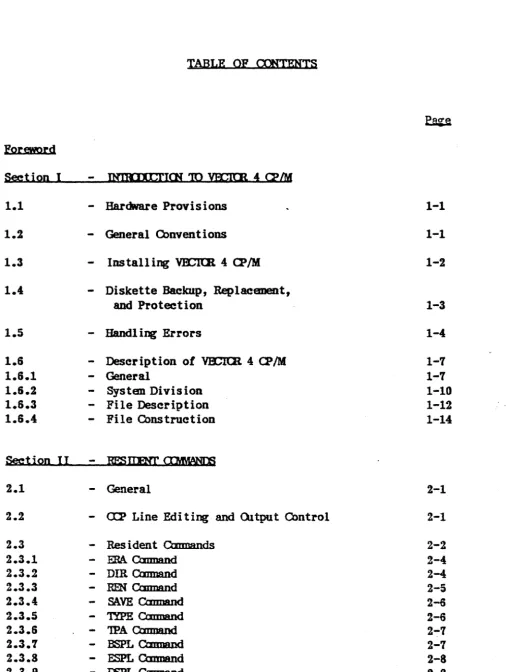
TABLE OF CDITENTS
~
Forewprd
Section I
-
INllUXCI'ICN '1Q ya;lm 4 O?IM1.1
-
Hardware Provisions 1-11.2
-
General O>nventions 1-11.3
-
Installing VECICR 4 O?/M 1-21.4
-
Diskette BaclaJp, Replaeanent,and Protection 1-3
1.5
-
Handl ing Errors 1-41.6
-
Description of Vl£ItR 4 O?/M 1-71.6.1
-
General 1-71.6.2
-
Systen Division 1-101.6.3
-
File Description 1-121.6.4
-
File Construction 1-14Section II
-
RFS ITJ:'NT Cll4\fANIli2.1
-
General 2-12.2
-
a:p Line Edi ting and Oltput Control 2-12.3
-
Res ident Omnands 2-22.3.1
-
ERA Omnand 2-42.3.2
-
DIR Omnand 2-42.3.3
-
RFN OmMnd 2-52.3.4
-
SAVE Qmnand 2-62.3.5
-
'lYPE Qmnand 2-62.3.6
-
'lPA Omnand 2~72.3.7
-
BSPL Omnand 2-72.3.8
-
ESPL Omnand 2-82.3.10
-
KSPL Cannand 2-92.3.11
-
am
Cannand 2-102.3.12
-
Primitive Resident Omnands 2-10Section III
-
'fRANSIFNT <Il'tMANIJi3.1
-
Introduction 3-13.2
-
Ut iIi ty Qmnands 3-43.2.1
-
GNSYS Omnand 3-43.2.2
-
a:NFIG Omnand 3-83.2.3
-
sc::mDm
Omnand 3-143.2.4
-
rnm
Omnand 3-143.2.5
-
:mAX Omnand 3-153.2.6
-
STAT Omnand 3-163.2.1
-
PIP Omnand 3-203.2.8
-
R:HM.T Omnand 3-253.2.9
-
DIS8Ol?Y Omnand 3-293.2.10
-
SIQCH Omnand 3-313.2.11
-
BtStam Omnand 3-323.3
-
Progrmming Omnands 3-333.3.1
-
SlPE Omnend 3-333.3.2
-
2'8tt Cmmand 3-343.3.3
-
I.O\D Qmnand 3-343.3.4
-
sm.nT Qmnand 3-353.3.5
-
XStB Omnand 3-363.3.6
-
mr
Omnand 3-313.3.7
-
BAlD Qmnand 3-373.3.8
-
IXM? Qmnand 3-373.3.9
-
GENLI5r Omnand 3-383.4
-
Test Omnands 3-413.4.1
-
DISKrEST Omnand 3-413.4.2
-
MetfiEST Omnand 3-413.4.3
-
ac
Omnand 3-423.4.4
-
O'OIE'n' Cmmand 3-433.4.5
-
&:NIP.Sr Omnand 3-433.4.6
-
PCRIES1' Omnand 3-433.4.1
-
KnlJIESl' Omnand 3-433.4.8
-
PRlNI'EST Qmnand 3-44Section IY
-
IJll) SYSIEW OO.TS4.1
-
Introduction 4-14.2
-
VlClUt 4 O!/M File Structure 4-34.3 File Cbntrol Blocks 4-6
4.4
-
Operating Systan calls 4-104.4.1
-
General 4-104.4.2
-
Functional Description 4-11SectioD
Y
5.1
-
Introduction 5-15.2
-
Olaracter I/O 5-35.3
-
Disk I/O 5-35.4
-
Bla; JtJJt) Calls 5-4ApPendix A
-
'VFX;1Q( 4 QJ/M Disk System Errors A-ILISf <F EXHIBI'l'S
3-1. PRINIER IlUVER TABLE 3-38
3-2. mD.AIM P.ARAME1ER TABI.B 3-52
4-1. GENERIC FXll:NSlm8 4-3
4-2. 4-5
4-3. FIrn CDnD:L
max
K'Rtft\T 4-64-4. BASE P.Arn RR'M.T AREAS 4-9
4-5. 1IXB FQCl"ICN 0JARr 4-63
VECTOR 4 CP 1M
PROGRAMMER'S GUIDE
SECTION I - INTRODUCTION TO VECTOR 4 CP/M
1.1 HARDWARE PROYJSlONS
A.. Djsk Driyes
There are two types of disk drives that are supported by the VECTOR 4 CP 1M
Operating System: the 5 1/4-inch floppy, and the 5
1/
4-inch hard disk.B.. Piskettes
The Vector 4 uses an industry standard 5 1/4-inch diskette with 16 'hard sectors'. This diskette has 16 sector holes and one additional index hole around the edge of the center hole. They are usually marked with the number '16' on the label. You can purchase them from computer stores or from other computer supply sources.
1.2 GENERAL CONVENTIONS
The following keyboard and entry conventions are used throughout the VECTOR 4 CP 1M Programmer's Guide.
Key Strokes
Return key = Control key
=
Escape key = Tab key =Spacebar
=
Backspace =Delete key =
Line Feed = Shift =
Options
=
Rev. A - 9-01-82
[RETURN]
[CTRL x] where x
=
any of the keys used in a control sequence; both keys are pressed together simultaneously.[ESC] [TAB] [SPACE]
[BACKSP ACE] [DEL]
[LF]
[SHIFT]
<option(s» where any option(s) are enclosed in
<
>.
VECTOR GRAPHIC, INC.
A command line within VECTOR 4 CP/M consists of several components:
•
Command•
Drive(s)•
FUename(s) and extension(s)•
Option(s), if- available•
[RETURN] to processfor instance, the command line to copy a fUe:
PIP A:=B:MEMORlTE.*[V] [B.ETURN]
which means Copy to Drive A all files from Drive B having a filename of
MEMORITE with any extension and Yem, the transfer of data. [RETURN]
represents the key which is pressed to process the command.
Note: All options within PIP, i.e., the tV' in the above command line, must have brackets around the option; the option to verify, (V] with brackets, must be part of the command line in order to verify the transfer of data (see Paragraph 3.2.7 for more information on the PIP command).
1.3 INS'l'ALI.lNQ VECTOR 4 CP/M
VECTOR 4 CP/M is shipped on a System diskette, and, in the case of a hard disk system, on the hard disk as well as on a diskette. It is extremely important to backup the System diskette immediately because it is possible that the hard disk could be damaged and the information contained on it destroyed.. It would therefore be impossible to generate another system on the hard disk if the System diskette has been destroyed or damaged, and no backup copy had been made.
4..
pjskette Copy..
To install or place the VECTOR 4 CP/M operating system onto a blank double-sided diskette enabling you to boot, or bring up, the system from that diskette, simply copy the VECTOR 4 CP/M System diskette toa 'personalized' diskette by using the DISK COpy program (see Paragraph 3.2.9).
VECTOR 4 CP/M
PROGRAMMER'S GUIDE
To install the operating system on a diskette already in use, copy the operating system by using the GENSYS program (see Paragraph 3.2.1-A.).
To install the operating system onto a blank diskette which is to be used for data (other than a System diskette), it is necessary to initialize the diskette first (a new diskette must first be 'initialized' by using the FORMAT (see Paragraph 3.2.8-B) program before transferring any program or data files to it). It is then possible to selectively add files to or erase files from that diskette as desired. To transfer or copy the desired files onto the diskette, use the SAVE command, the PIP utility, or a higher level language.
NOTE: Do l::LQI format the VECTOR 4 CP/M System diskette or any other diskette containing desired information. Formatting completely erases a diskette.
B.. Hard Disk Cggy
To generate an operating system on the 5 Mbyte hard disk system, see Paragraph 3.2.1-B.
1.4 DISKETIH BACKUP. REPLACEMENT, AND PROTECTION
As with any magnetic storage medium, the recording gradually deteriorates over time. Even if a diskette is not damaged, it will begin producing errors after a very long period of use.
A.. Backup
The best method for insuring against loss of diskette-based data is to maintain a backup diskette for each diskette you use. In the business world, this is considered dogma. Copy a diskette onto its backup whenever you cannot afford to lose the information stored since you last backed it up; this goes for programs as well as data. If you are operating business programs such as Inventory or Accounts Receivable, maintain a regular backup schedule, once a week In addition, a transaction journal, i.e., a printed copy of entries made each day into the system, is an excellent idea to build into business software as a 'last resort' backup.
VECTOR GRAPHIC, INC.
B.. Replacement
In addition to being backed up, replace frequently used diskettes by copying each to a fresh diskette every six months. A good suggestion is to use the backup diskette, which is fairly fresh, as the new front-line diskette, and to create a fresh backup. Do not wait until a frequently used diskette fails before you replace it with the backup. To create backup diskettes (i.e., to copy diskettes) use the DISK COpy utility.
c...
ProtectionWrite-protect tabs come in boxes of new diskettes; if you attach a tab over the write-protect cutout on a 5 l/4-inch diskette, the disk drive will not" allow you to erase or change any information on the diskette. The tab may be removed later, if required.
1.5 HANDLING ERRQRS
Bad sector disk errors refer to errors reported on the screen (when CP 1M is
running) as:
ERROR - drive:<error message>
indicating something is wrong with the diskette, the drive, or the disk controller board. There are several error situations which the Basic Disk Operating System (BDOS) intercepts during file processing. When one of these conditions is detected, the SDOS prints the message:
ERROR - drive:<error>
where <error> is the one of the following messages:
DISK RBADIWRlTE'uy;y}
1-4
The DISK READ/WRITE message will occur when the disk controller electronics has d'etected an error condition in reading or writing to the diskette ('xx' is a hex' code denoting the particular physical BIOS error detected by the physical disk driver; 'yy' corresponds to the BDOS physical and logical error codes). This condition is generally due to a malfunctioning in the disk controller or the result of an extremely worn diskette.
VECTOR 4 CP/M PROGRAMMER'S GUIDE
If your system reports this error more than once a month, it may require servicing or your media may need replacement. Recovery from this condition may be accomplished by responding to the next prompt:
PRESS [CTRL C] TO REBOOT OR. [RETURN] TO CONTINUE
If a [CTRL C) is entered, the current program will be aborted and control returned to the CCP *; if a [RETURN] is entered, the error will be ignored by the program and execution will continue normally. Pressing [RETURN] would only be used when copying a file (using PIP), when it is mandatory that as much of the file is recovered as possible. Note, however, that entering a [RETURN] may destroy diskette integrity if the operation is Ja directory write;' therefore, make sure an adequate backup has been made.
*
See Section 1.6.2 for a description of the CCP.NOTE: The following BDOS errors will display the particular error message and simply wait for user input to reboot; entering any key will cause a warm boot.
DRIVE
SELECT;The DRIVE SELECT message will occur when there is 'an attempt to access a drive that is not supported by the current hardware/software configuration. In this case, the drive which is out of range is displayed along with the error message. The system reboots following any input from the terminal.
DISK IS READ-ONLY
The DISK READ-ONLY message will occur when there is Jan attempt to write to a diskette which has been designated as lREAD/ONLYT using the STAT command, or has been set to 'READ-ONLY' by the BDOS. In general, the user should warm boot the system, using [eTRL C], whenever physically changing' a diskette. If a changed diskette is lto be read but not written to, the system allows the diskette to be changed without requiring a warm boot, but internally marks the drive as Read-Only. The status of the drive is sul;>sequently' changed back to 'Read/Write' following a warm boot. Upon displaying the READ-ONLY message, CP/M waits for an input from the terminal; an automatic warm boot will occur following any user input.
VECTOR GRAPmC, INC.
FILE IS READ-ONLY
The FILE READ-ONLY message will occur when there is 'an attempt to write to a fUe which has been declared as 'R/O' using the STAT command or by an applications program, or if the fUe is Jopened in READ-ONLY mode. The fUe may be returned to READ/WRITE status using the STAT command, if
necessary.
FILECQRBEBTLY OPEN
The FILE CURRENTLY OPEN message will occur if an attempt is made to access a fUe which is in use and locked by another user.
n,I,EGAL ED,E ACCE:JI
The ILLEGAL FILE ACCESS message will occur when an attempt is made to access a fUe that is not open.
ro,E ALREADY EXlSrs
The FILE ALREADY EXISTS message will occur when a user or program is trying to create, rename, or spool a specific fUe which already exists on disk ..
q,I.EGAL IT' IN PCB
The ILLEGAL
'?'
IN FCB message will occur when a question mark'?'
is used: within the FUe Control Block (FCB) in any fUe function other than SEARCH FIRST, SEARCH NEXT, and DELETE FU,E.meR OPEN IJST PULL
The FILE OPEN LIST FULL message will occur when an attempt is made to OPEN or CREATE a fUe and the System FUe List is full (32 files maximum -list is maintained by the operating system of open files in the system, the
task(s) which have the files open, and the mode in which the file is open).
RECORD LOCK IJST FULL
1-6
The RECORD LOCK LIST FULL message will occur when an attempt is made to LOCK a record and the Record Lock List is full (512 maximum - series of lists linked to the open file entries of the System FUe List describing which records are locked, and which task has them locked). NOTE: records can only be locked while in unlocked mode.
DRIVE NOT READY
VECTOR 4 CP/M PROGRAMMER'S GUIDE
The DRIVE NOT READY message will occur when an attempt is made to read from a drive and the disk is either not properly seated or there is no disk in the drive.
If any of the above errors occur, repeat the procedure that resulted in the error.
If the error occurs again, refer to the section below on recovery techniques. If
you consistently get such disk errors, switch to another of the suggested brands of diskettes. Try this before obtaining hardware service; if the errors persist, contact your service representative.
If you repeatedly get bad sector disk errors using lone particular diskette, then it is probably defective. This will sometimes happen with a new diskette when you are reformatting it or using it to back up another diskette. After several attempts, discard it or return it if possible. Whenever you repeat a disk operation after an error, always unload and reload the disRette, because it may be seated incorrectly.
If an old diskette repeatedly gives bad sector errors, first repeat the operation several times, unloading and reloading the disRette each time. If there is still a problem, check the center hole. If it is wrinkled, straighten it out with your fingers and then try again. If you still get bad sector errors, try copying the diskette to another diskette using the DISK COPY utility in CP 1M. If the error still occurs, try switching source and destination drives. Some combination of drives and repositioning of diskettes within drives will often result in a successful copy. If you cannot copy a diskette at all, then copy it file by file to another initialized diskette using the PIP utility. There may be one or two files which will not copy, but hopefully all the other files will copy over successfully.
When you get a bad sector error message, CP/M allows you to skip over the bad sector and continue the operation. This is not usually desireable because the bad data will cause other problems. However, if there is no other way to get the file off the diskette intact, simply bypass the error message by pressing the [RETURN] key immediately after the bad sector error message occurs. The disk operation will continue, ignoring the fact that a bad sector was transferred.
1.S DESCRIPTION OF VECTOR :I CP/M
..
1.6.1 General
VECTOR 4 CP/M is a high-performance operating1system which uses table driven
techniqu~s to allow field configuration to match a wide variety of disk capacities.
All of the fundamental file restrictions are removed, while maintaining upward compatibility fl'om previous versions. The directory size can be field configured to contain any reasonable number of entries, and each fUe is optionally tagged with READ-ONLY and READ/WRITE system attributes. Users of CP/M can physically separate groups of fUes by user areas, with facUities for fUe copy operations from one user area to another. Powerful relative-record random access functions are present in CP/M which provide direct access to any of the 65536 records of an eight megabyte fUe.
In the VECTOR 4 CP/M environment, the user is given a separate bank of memory to use ex~lusively. Within each drive, the user has access to 16 user areas (B
through 15). These user areas are accessed in the very same manner as accessing a different drive; i.e., to change drives, the -user simply enters which drive is required:
A>B:
which equates to moving from Drive A to Drive B. In the same way, the user can change user areas by entering which user are.a number is wanted; e.g.:
A>USBR 5
which IIloves the user from the current user area (usually User
B
since CP/M boots into User B) to User 5.Although a compu~er can only perform a single operation at a time, it operates at such high speed that it can service several tasks at one time (using the background' printing feature); this is done by switching between tasks, giving a portion of time (called a time slice) to both tasks. When that task's time slice is used up, the system willlsuspend the operation of that task and allow the other task to have a time slice. This time slice operation happens constantly between both tasks or tasks on the system; however, because a computer operates at very high speeds, this sharing of time is generally transparent to the user. A task may lose its time slice if, for any reason, it is waiting for an input or output process to complete, or
if it is waiting for a shared resource, such as a printer.
The purpose of VECTOR 4 CP/M is to execute commands and allow the user convenient access to all of the hardware and software resources provided by the computer. CP 1M provides rapid access to programs through a comprehensive fUe management package. The fUe system supports a named file structure, allowing dynamic allocation of file space as well" as sequential and random fUe access. Using this fUe system, a large number of distinct programs can be stored in both source and machine executable form.
VECTOR 4 CP/M PROGRAMMER'S GUIDE
The part of the operating system that switches (swaps) tasks is called the scheduler. The scheduler is responsible for saving all the registers, the stack pointer, and program counter of the current task into the Task Control Block (TCB). The scheduler will look for a task that is ready to run and, once found, wililreload all the registers with the values that were saved for that task when it was swapped out. If, while the scheduler is looking for a task that is ready to run, it finds a task that is waiting for an event to occur, the scheduler will check to see if the event has occur ed, and if it has, the task's status will "be set to ready.
When the Vector system is turned on, or powered up, the following banner and prompt will display on the screen:
lya;xm
4SIC EXtI
VrIYB1.111
SBC>
VECTOR 4 CP/M, once booted, will display the follo~ing messages on all terminals:
VECTOR 4 CP/M - VERSION 1.'
PRINTER 1 LOADED WITH
x
PRINTER 2 LOADED WITHx
A>
where 'xt is equivalent to one of the following printer driver messages, depending on what kind of printer is available and what printer configuration has been enabled (through the CONFIG P or CONFIG program):
A DRAFT DRIVER
A WORD PROCESSING DRIVER
NO DRIVER
AN UNKNOWN DRIVER
The following is a typical display after enabling the printer drivers:
VECTOR 4 CP
1M -
VERSION 1.,PRINTER 1 LOADED WITH A DRAFT DRIVER
PRINTER 2 LOADED WITH A WORD PROCESSING DRIVER
VECTOR GRAPmC, INC.
1.6.2 S$;tem Division
CP /M is logically divided into four distinct areas, the lower portion of memory is
reserved for system information: the Basic I/O System (BIOS), the Basic Disk Operating System (BDOS), the Console Command Processor (CCP), and the Transient Program Area (TP A).
The ~ provides the interface between the user's console and the remainder of the CP/M system. The user interacts with CP/M primarily through the CCP, which reads and interprets commands entered through the console. The CCP reads the console device and processes commands which include listing the file directory, printing the contents of files, and controlling the operation of transient programs, such as assemblers, editors, and debuggers. ,The CCP will also close and release any open user files when necessary. It is a distinct program which uses the BDOS and BIOS to provide a human-oriented interface to the information which is cataloged on the backup storage device.
In general, the CCP addresses one of several drives which are on-line (the standard system addresses up to four different disk drives). These disk drives are labeled A,
B, C, and D. A drive is 'logged-in' if the CCP is currently addressing that drive. In order to clearly indicate which drive is the currently logged drive, the CCP-always prompts the operator with the drive name followed by the symbol I>' (e.g., 'A>') indicating that the CCP is ready for another command. Upon initial start up, the CP/M system is brought in from Drive A and will display the following message:
VECTOR 4 CP/M VERSION 1 .. '
Following the system sign-on, CP/M automatically logs into Drive A, prompts the user with the fA>' prompt (indicating that CP/M is currently addressing Drive A), and w ai ts f or a command. The commands are implemented at two levels: resident commands and transient commands. Resident commands are a part of the CCP program itself, while transient commands are loaded into memory (the TPA) from disk and executed.
The
Bnos
provides disk management by controlling one or more disk drives containing independent file directories. The BnOS implements disk allocation strategies that provide fully dynamic file construction while minimizing! head movement across the disk during access. Any particular file may contain any number of records, not exceeding the size of any single disk. The BDOS has entry points which include the following primitive operations which can be programmatically accessed:SEARCH Look for a particular disH: file by name.
OPEN
CLOSB
RENAMB
READ
WRITE
Open a file for further operations.
Close a file after processing.
Change the name of a particular file.
Read a record from a particular file.
Write a record onto the disk.
VECTOR 4 CP/M PROGRAMMER'S GUIDE
SELECT Select a particular disR: drive for further operations.
The BIQ.S provides the primitive operations necessary to access the disk drives and to interface with standard peripherals (CRTs, Serial Terminals, and Printers). The BIOS is a hardware-dependent module which defines the exact low-level interface to a particular computer system which is necessary for peripheral device I/O; it also provides the user the interface to the multitasking environment within VECTOR 4 CP/M.
The..:r:eA, the last segment of CP/M, is' the area called the Transient Program Area. The TP A is an area of memory (i.e., the portion which is not used by the BDOS, BIOS, and CCP) where various non-resident operating system commands and user programs are executed. The TPA holds programs which are loaded from the disk under command of the CCP. During program editing, for example, the TP A holds the CP/M text editor machine code and data areas. Similarly, programs created under CP/M can be checked out by loading and executing these programs in the TP A. The user communicates with the CCP by entering command lines following each prompt. Each command line takes one of the following forms:
Command Command file! Command fUel file2 .Command file1 file2
where 'Command' is either a resident function, such as DIR or TYPE, or the filename of a transient command or program, such as PIP or CONFIG. If the command is a resident function of CP 1M, it is executed immediately; otherwise, the CCP searches the currently addressed disk for a file by the name '<Command).COM'. If the file is found, it is assumed to be a memory image of a program which executeS' in the TPA. The CCP loads the COM file from the disk into memory. The transient program receives control from the CCP and begins execution; the program is 'called' from the CCP and, therefore, will simply return to the CCP upon completion of its processing.
VECTOR GRAPmC, INC.
If the user 15 In a user area other than User 0, but the program being called is on
User
0,
the operating system will pull the program from User ~ into the current user area and begin execution. Data files created or edited within the current user area will be saved on that user area. If, however, the user wants to work within User 0 and is currently in another user area, the 'dot' command can be used to work within User 0, saving data files within User 0, while actually residing in the current user area. For example:A> USER 5 Change from User 0 to User 5
A>Dm Call the directory of Drive A, User 5
A>.DlR Call the directory of Drive A, User ~
This facility allows the user to work within different user areas and, depending on where the data files are to reside, store files in either area, without ever leaving the current user area (as in the example above, User 5).
It should be reiterated that the VECTOR 4 CP/M operating system is partitioned into distinct modules,including the BIOS portion which defines the hardware environment in which CP/M is executing. Therefore, the system can be easily updated to any standard environment.
Several CP/M modules and utilities have improvements that correspond to the enhanced file system. STAT and PIP both account for file attributes and user areas, while the CCP provides a 'log-in' function to change from one user area to another. The CCP also formats directory displays in a more convenient manner and accounts for both CRT and hard-eopy devices in its enhanced line editing functions.
1.6,,3 File Description
Nearly all of the commands reference a particular file or group of files. A file reference identifies a particular fUe or group of files on a particular disk attached to CP 1M. These file references can be either an 'unambiguous filename' (ufn) or an 'ambiguous filename' (afn). An unamabiguous file reference uniquely identifies a single file, while an ambiguous file reference may be satisfied by a number of different fUes, when using
'?'
or'*'
either in the filename or the extension.File references consist ·of two parts: . the filename and the extension. Although the extension is optional, it usually is generic; :that is, the extension '.ASM' is used to denote that the file is an assembly language source file, while the filename distinguishes each particular source file. The two names are separated by a period (.); e.g., ffffffff.eee where 'f' represents the filename of up to eight characters, and Te' represents the extension consisting of three characters.
VECTOR 4 CP/M PROGRAMMER'S GUIDE
The characters used in specifying an unambiguous file reference cannot contain any of the following special characters:
<>
• *' , • - .
•• - . , . [ ]
while all alphanumerics and remaining special characters are allowed.
An ambiguous file reference is used for directory search and pattern matching. The form of an ambiguous file reference is similar to an unambiguous reference, except the symbols '1' and ,*, may be interspersed throughout the filename and extension. In various commands throughout VECTOR 4 CP/M, the '?' matches any character of a filename in the '1' position, and the asterisk f*' matches any characters of a filename from that particular position on in the field; e.g., C*.COM would be equivalent to C????111.COM. Therefore, the ambiguous reference 'AB*.C?M' is satisified by the unambiguous filenames 'ABCD.COM' and 'ABCDEFGH.CAM'. Note that the ambigtJous reference f*.*' is equivalent to the ambiguous file reference '1111?111.?11', while 'ffffffff.*' is equivalent to 'ffffffff.??? and '*.eee' is
equivalent to '????1?11.eee'. However, 'ABC*.ASM' is equivalent to
'ABC?11?1.ASM' where 'ABC1.ASM' is equivalent to 'ABC1####.ASM', where fi'
=
a space, not a character.As an example, 'DIR
* .*'
is interpreted by the CCP as a command to list the names of all disk files in the directory, while 'DIR X.Y' searches only for a file by the exact name 'X.Y'. Similarly, the command 'DIR X?Y.C?M' causes a search forall unambiguous file names on the disk which satisfy this ambiguous reference. The following file names are valid unambiguous file references::
x
XYZ GAMMALY
XYZ.COM GAMMA.!As an added convenience, the user can generally specify the disk drive name along with the filename. In this case, the drive name is given as a letter (A through Z)
followed by a colon (:); e.g., A)B:<filename.ext). The specified drive is then 'logged-in' before the file operation occurs. Thus, the following are valid filenames with disk name prefixes: .
A:W.Y B:XYZ C:GAMMA Z:XYZ.COM B:X.A?M D:*.ASM
It should also be noted that all alphabetic lower case letters for drives and filenames are always translated to upper case when they are processed by the CCP.
Since it is possible for -the user to switch the currently logged disk by entering the disk drive name (A, B, C, or D) followed by a colon (:) when the CCP is waiting for console input, the following are possible examples in a sequence of prompts and commands: .
A)DIR (Lists all files on Drive A)
SAMPLE ASM
SAMPLE PRN
A>B: (Switches to Drive B)
B)DIR *.ASM (Lists all '.ASM' files on Drive B)
D~ ASM
SAMPLE! ASM
TBST3 ASM
B)A: (Switches back to Drive A)
A>DIR B: (Lists all fUes on Drive B)
1,6A Ene Constmction
CP /M files are constructed from basic building blocks called 'records'. A record is
a 128-byte block of data containing' either program object code, program data, or
tex~. A file is, therefore, simply a number of these records which are grouped together and given a name. Since a file can have a very large nu~ber of these records in it (up to 65,536 records in each fUe), CP/M must impose a higher level of internal structure to manage all of the records in a file. This is achieved by using a logical data block called an 'extent' consisting' of 128 records (16,384 bytes of data). Therefore, any CP/M file is comprised of at least one or more extents; these are used by CP/M to keep track of where all the records of a file are located on a disk.
Since there are many sectors on a disk, CP/M could store a 128-byte record in any number of places on the disk. In order to keep track of where these sectors are, the diskette is broken up into 'allocation blocks', the size depending' on the disk configuration (may be from 1K to 16K in length). Then, if a file needs more space to write more records' to, a full mew allocation block is assigned to it even though only 128 bytes (1 record) may actually be used. Each directory entry can have 8 or 16 allocation blocks assigned to it. The number of each allocation block assigned to- a directory entry is stored in one or two bytes within field 7 of the File Control Block (FCB). See Sections 4.2 and 4.3 I for a complete description of
FCB and allocation blocks.
VECTOR 4 CP/M
PROGRAMMER'S GUIDB
CP/M keeps a master list in memory of all of the assigned allocation blocks currently assigned to a fUe along with all the unused allocation blocks. Whenever a new allocation unit is required by a file, CP/M will take the next available allocation unit, delete it from the unused list, and add it to the FCB of the fUe. These lists are read into the BDOS from the diskette the first time the diskette is accessed after a warm boot. By assigning new allocation blocks to fUes as they get larger, and reclaiming allocation units as files get smaller or are erased altogether, CP/M can dynamically manage all of the file space on a diskette, and a file's data can be spread across the disk in randomly located sectors.
Th e .final step used by CP/M to keep track of the files on a diskette is the directory. CP/M stores the directory information in the beginning of the data storage area of the diskette. A directory entry. may contain multiple ex~ents. This depends on allocation block size and the total number of blocks a drive can accomodate. Therefore, a file with more than one ex~ent may have multiple directory entries. Hence, although a 'DIR' command is entered, only the first directory entry for each file is displayed. The format of the directory entry is the same as the FCB ex~ept for the following fields:
Field 1: User number
O-xx.
E5 means file is deleted Fields 9-11: e1 I, e2', e3' are set according to file type.Field 12: Gives max~um extent number. Field 13: Mod number equals ,.
Fields 32-35: Not used.
Therefore, whenever a file is accessed through CP/M, its FCB is brought into the TP A so that it can be accessed quickly and conveniently. Any changes or updates to a file by the user will automatically be updated to the FCB by CP/M.
Random access facilities are present in CP/M which allow immediate reference to any record of an eight megabyte fUe. Using CP/M's unique data organization, 1 data
blocks are only allocated when actually required and movement to a record position requires little search time. Sequential file access is upward compatible from earlier versions to the full eight megabytes, while random access compatibility stops at 512 Kbyte files. Due to CP/M's simpler and faster random access, application programmers are encouraged to alter their program to take full advantage of the facilities •.
..
VECTOR 4 CP/M PROGRAMMER'S GUIDE
SECTION
n -
RESIDENT COMMANDS2.1 INTRODUCTION
VECTOR 4 CP/M will execute two types of commands:· resident and transient. Resident commands are those commands whose instructions are permanently resident in the CCP and may be used at any time. Transient commands are those commands whose programs are stored on a disk, are then loaded into the TPA from the disk and executed. CP/M provides the user with several resident commands which may be interpreted and immediately executed by the- CCP when invoked by the user.
2.2 CCP LINE EDITING AND OUTPUT CONTROL
The CCP allows certain line editing and output functions while entering command lines.
[BACKSPACE] or
[DEL] Deletes the last character entered at the terminal.
[CTRL U]
[CTRL X]
[CTRL R]
[CTRL C]
[CTRL D]
[CTRL Z]
Rev. A - 9-01-82
Ignores the entir.e line entered at the terminal, keyboard entry continues on a clean command line.
Deletes the entire line enterered at the terminal, keybaord entry continues on same line.
Redisplays current command line, keyboard entry continues at the end of the redisplayed command line.
CP/M system reboot (warm start).
Clears the screen before executing any CCP command; must be entered before the command.
Ends input from the terminal (uSed in PIP).
· VECTOR GRAPmC, INC.
B..
OUTPUT CONTROL[CTRL P]
(CTRL X]
[CTRL 8]
Copies all subsequent console output to the currently assigned list device (see the STAT command). Output is sent to both the list device and the terminal until the next [CTRL P] is entered.
Sends a form feed to the currently assigned list device; :if no device is assigned, the [CTRL K] will 'be ignored.
Stops the terminal outpu~ temporarily; program execution and output continues when any ·key, except [CTRL Cl, is ente~ed at the terminal. This feature is used to stop output on high speed terminals, such as CRTs, in order to view a segment of output before continu~.
Note that the [CTRL}key sequences are executed by depressing the Control ([CTRL]) key and the desired letter key simultaneously. Further, CCP command lines can generally consist of up to 127 characters in length; ~ they are not acted upon until a [RETURN]· is entered.
2,3 RESIDENT COMMANDS
Resident commands are a part of the CCP program its~, while transient commands are loaded into the TP A from disk and executed. The resident commands consist of the following:
Erases specified files.
Dm
Lists file names in the directory.BEN Renames the specified file.
SAVE Saves memory contents in a file.
TYPE Types or displays the contents of a file to the terminal.
TPA Calls address l~SH in user's memory.
2-2: PIN 7100-0003 9-01-82 - Rev. A
~---.---BSPL
ESPL
DSPL
KSPL
BYE
Begins Spooler.
Ends Spooler.
VECTOR" CP/M
PROGRAMMER'S GUIDE
Activates Despooler to print a specified spooled file.
Aborts the Despooler.
Performs a cold boot process.
The following are Primitive Resident Commands. Originally they were available through the use of the system monitor program. They are now accessible through the CCP.
FILL Fills memory with constant
FIND Finds a code sequence in memory.
DISP Displays memory in hex and ASCn.
GOTO Starts execution at given address.
PROG Programs memory.
INP Inputs from CPU port.
OUT Outputs to port.
COMP Compares two blocks of memory.
MOVE Moves a block of memory.
CHEK Computes checksum of memory.
XCOM Mindless Terminal Emulator/loop back tester.
The file and device references described before can now be used to fully specify the structure or format of the resident commands •
•
VEcroll GILU-mc, INC.
2,3.1 ERA Command
The ERA (erase) command will remove files from the currently logged disk or another specified disk. The files which are erased are those which satisfy the ambiguous filename (afn). The following examples illustrate the use of the ERA command:
BRA
x.y
EllA
x..
ERA • .ASM
The file named 'X.Y' on the currently logged disk is removed from the disk directory, and the space is returned.
All files with a filename.. 'X' are removed from the current disk.
All files with the extension of 'ASM' are removed from the current disk.
ERA X!Y.CtM All files on the current disk Which satisfy the ambigilous reference X?Y.C?M are erased.
BRA •••. All files on the current disk are erased (in this case, the CCP prompts the user with the message 'ALL FILES (YIN)?' which requires a ty, response before fUes are actually erased).
ERA B:*.PRN All files on Drive B which have an extension of '.PRN' are, erased, independently of the currently logged disk.
2,3': DIR Command
The DIR (directory) command will cause the names of all fUes on the currently logged disk which satisfy the ambiguous filename (afn)
'*.*'
to be listed at the terminal (the command 'DIR' is equivalent to the command 'DIR*.*').
Following isa list of valid DIR commands:
Dm x.y
Lists the unambiguous fUe 'X.Y'.Dm
XtZ.C!M Lists all ambiguous fUes matching the specified reference ••
Dm
·.Y Lists all ambiguous fUes with an extension of fY'.VECTOR 4 CP/M
PROGRAMMER'S GUIDE
Similar to other CCP commands, the afn can be preceded by a drive name. The following DIR commands cause the selected drive to be addressed before the directory search takes place:
DIR B: Lists all files on Drive B.
DIR B:LY Lists the file 'X.Y' on Drive B.
DIR B:*.A?M Lists all ambiguous files matching the specified reference on Drive B.
If no files can be found on the selected disk. which satisfy the directory request, the message 'NOT FOUND' is displayed on the terminal.
2.3.3 RElf Command
The REN (rename) command will allow the user to change the names of files on disk. The command format is 'REN untl=unt2' where unil is the name of the new file and unf2 is the name of the old file. Following are examples of the REN command:
KEN LY=Q.R Renames the file 'Q.R' to 'X.Y'.
REN Y.COM=Y.MEM Renames the file 'Y.MEM' to 'Y .COM'.
The user can precede either ufn1 or ufn2 (or both) by an optional drive name. When one of the files is preceded by a drive name, then the other is assumed to exist on the same drive. If both files are preceded by drive names, the same drive must be specified in both cases. Following are examples of the REN command:
KEN A:X.ASM=Y.ASM Renames the file 'Y.ASM' to 'X.ASM' on Drive A.
KEN B:x..BAS--Z.BAS Renames the file 'X.BAS' to 'Z.BAS' on Drive B.
KEN A:A.ASM=B:A.BAK Renames the file 'A.BAK' on Drive B to 'A.ASM' on Drive A.
If the ufn! already exists, the message 'FILE EXISTS' will display and the change will not occur. If ufn2 does not exist on the specified disk, the message 'NOT FOUND' will display on the terminal.
VECTOR GRAPmC, INC.
2,3.4 SAVE Command
The SAVE command places 'n' pages (256-byte blocks) onto disk from the TP A and names this file with a specified ufn. In the CP 1M distribution system, the TP A starts at 19SH (hex,decimal), which is the second page of memory; therefore, if the user's program occupies the area from 18SH through 2FFH, the SAVE command ,must specify two (2) pages of memory. The machine code file can be subsequently loaded and ex~cuted. The SAVE command can also specify a disk drive in the afn portion of the command. Following are examples of the SA VE command:
SAVE 3 LCOM
SAVE . , C
SAVE. LY
SAVE l ' B:ZOT.COM
Copies 19SH through 3FFH to a fUe named'X.COM'.
Copies 18'H through 28FFH to/ a file named
'c'
(note that 28 is the page count in 28FFH and that28H
=
2x16+8=
4' decimal).Copies 1'SH through 4FFH to a fUe named 'X.Y'.
Copies 10 pages (19 SH through ,AFPH) to a file named tZOT.COM' on Drive B.
2.3.5
TYPE
CommandThe TYPE command displays the contents of a specified ASCII source fUe (ufn) on the currently logged disk at the terminal. This command expands tabs ([CTRL L] characters) assuming tab positions are set at every eighth column. The command can also reference a drive name before the ufn. Following are ex~mples of the TYPE command:
2-6
T!PB XYZ.MB\f
I
I
'l'!PE AIC.D'L
>
Types the specified file on the tenninal.I
T!PB XXLASI
_I
TYPE B:X.PRN • Types the specified fUe on the terminal from Drive B.
2.3.6 TPA Command
VECTOR " CP/M PROGRAMMER'S GUIDE
The TPA (Transient Program Area) :command will· 'jump' the user to address 1~0H in the user's memory and execute the program at that location; i.e., to go back into memory if, for instance, the user forgot to save the current file or unintentionally exited from a program. The command line format consists of either of the following: .
TPA
or
TP A drive:ffiename
WARNING: Not all programs may be re-entered sucee:sstu.U.y after esiting; consult
Jour program User's Manual or MaDU.facturer tor more information.
2.3.7 BSPL Command
The BSPL command will begin the spooler function and send all subsequent printer characters to a specified file. Following is the command format:
BSPL drive:fnename (must be ufn)
NOTB: Characters sent to printer via the BIOS will Wl1 be spooled; only characters sent through BOOS function 5 will be spooled (most programs use function 5 for printer output). BSPL will detach any attached list device before spooling.
After the command is entered, one of the following messages will display on the terminal giving the status of the spooler:
SPOOLER ACTIVATED Spooler has been successfully activated.
SPOOLER A~Y AC1TVE
ready •
Spooler has already been activated and is
•
VECTOR GRAPmc, INC.
FILB EXlSl'S
DIB. FULL
ILLEGAL FILENAME
d:DRIVE SELECT
Spooler is refusing' to work with an existing spooled fUe.
No room left in directory.
Filename specified either does not exist or has illegal characters in the entry.
Drive specified is bad, where 'd:t is the specified
drive in the command line.
2.3,8 ESPL Command
The ESPL command will close the spooler file and deactivate the spooler. The spooler will D.Q1 close after a warm boot, it will remain open; therefore, this command must be ex~cuted when the user no longer wants the printer information
to go to the spooler fUe. After the command is entered, one of the following messages will display on the terminal giving the status of the end-spooler attempt:
SPOOLER CLOSED Spooler has been closed successfully.
SPOOLER NOT ACTIVE Spooler has already been deactivated, or if the spooler gets an I/O error of some sort.
BAD WRITE Spooler encounters a disk I/O error when trying to write the last sector.
CLOSE ERROR Spooler encounters a problem writing to the directory or trying to spool to a deleted rUe.
%.3.9 DSPL Command
The DSPL command will despool a specified fUe to a specific print device. The format of the command line is as follows:
DSPL
n<
drive:fnenamewhere In' is the print device (either '1' or '2'),
'<I
will optionally turn on the 'auto-paging' function, and the fUename must be unambiguous. The despooler runs in 'background', i.e., the despooler may be printing to the list device and the user can continue with some other task, such as editing another fUe.VECTOR" CP/M PROGRAMMER'S GUIDE
After the command is entered, one of the following messages will display on the terminal giving the status of the despooler attempt:
DESPOOL ACTIVATED Despooler has been activated successfully.
DESPOOL ALREADY ACTIVE Despooler has been asked to work on more than one file at a time.
NO FILE
BAD FILE NAME
Despooler cannot find the specified file on that disk, or the file has not yet been spooled.
File is either blank or has an afn specification; . file must be 'an ufn.
INVALID PRINT DEVICE Printer number is invalid, or the printer is busy.
d:DRlVE SELECT
PRINTER BUSY
2.3,10 KSPL Command
Drive specified is bad, where'd:' is the specified drive in the command line.
Desired list device is in use by another task (user or despooler).
The KSPL command will abort, or prematurely stop, the operation of the despooler; the despooler will turn off normally once the specified file has been printed. After the command is entered, one of the following messages will display on the terminal giving the status of the abort attempt:
DESPOOL ABORTED Despooler has been aborted successfully.
DESPOOL NOT ACTIVE Despooler is not active so cannot be aborted.
NOTE: The Despooler will IlQl expand tabs or initialize pagination control; it will
send characters to the printer ex~ctly as they are in the file.
Rev. A - 9-01-82 PIN 7100-0003 2-9
---.~--VECTOR GRAPHIC, INC.
2.3.11 BYE Command
The BYE command will perform a cold boot procedure executing functions beyond a warm boot ([CTRL C) procedure. Following is a list of 'both warm boot and cold boot functions performed by the BYE command::
Warm
Boot
functions:• Release File and Record Resources (function 255)
• Reset Keyboard buffering and conversions (function 241, 242)
• Set Error mode to default (function 226 or 45)
• Execute warm boot Auto-Command
Cold Boot functions provided by
DYE
command;• Reset BDOS base (function 246)
• Clear Cross-Bank calls (function 245)
• Clear Auto-Paging (function 243)
• Release (detach) List Device (function 159)
• Execute Cold Boot Auto-Command
• Set Default Key Conversion (function 219)
• Enable [CTRL C] Warm Boot (function 217)
2.3.12 Primitive Resident Commands
These commands are functionally similar to the commands used by Vector Graphic system monitor programs. They have been added to the resident command structure within the CCP. The ·command line format is given for each command; 'however, if only the command is given with nothing following, prompt(s) for the missing information will be given.
A.. FILl. Command
VECTOR 4 CP 1M PROGRAMMER'S GUIDE
The FILL command will- place a single byte instruction or datum in the memory block between the start and end address. This can also be useful for setting memory to zero to make the end of a file or assembled program to stand out more clearly. For test purposes, single instructions can be executed continuously so that bus waveforms can more easily be interpreted; this is done by filling a block of memory with a repeated instruction sequence with a jUl,'np to the start of the block enabling the program to loop continuously.
*
The format of the command line consists of the following:FILL <Start Address (4 hex» <End Address (4 hex» <Data (2 hex»
NOTE: An error will 1 result if a FILL to "common RAM" (FCOOH-FFFFH) is
attempted.
B.. FIND Command
The FIND command willlsearch for a particular code sequence of up to 63.5 bytes in length in the range between the start and end address. This command is useful for locating a code sequence of jump address, tex~ strings, etc. For eXlJUIlple, if you want to change a control character (e.g., (CTRL CD in a program, you can try 'FE B3', which is 'CPl ~3t since this is a common way of testing input characters.
If you want to find all locations that call or jump to a particular address, C70~H for eX{lmple, simply search for 'B0C7'; however, there is no guarantee that each location displayed is valid object code-it may be part of a data table, ASCII string, or second and third bytes of a three-byte instruction. Wildcards are available with the FIND command and consist of '1' and t
X',
both equal to onenyble. The format of the command line consists of the following:
FIND <Start Address (4 hex» <End Address (4 hex» <Sequence (X(2 hex»>
c...
pJSP CommandThe DISP command will -display the memory contents between the start and end address as pairs of hex{ldecimal characters. The left character in each pair represents the four most significant bits of the memory location. The ASCn representation will also be displayed on the right. The display may be halted or interrupted by pressing [CTRL S] and continued by pressing any key except [CTRL C]. Pressing [CTRL C] will abort the display or entry. The format of the command line consists of the following:
DISP <Start Address (4 hex» <End Address (4 hex»
· VECTOR GRAPmC, INC.
Ila. GOTO Command
The GOTO command will cause a call to the specified start address to execute a program or user subroutine. The address contained on the stack is the CCP RETCOM, and if the user routine at the address ends in 'RET', program ex~ution will return to the CCP; pushing more registers on the stack than are popped will defeat the return feature with undesirable effects. The format of the command line consists of the following:;
GOTO <Start Address (4 hex»
E..
PROG CommandThe PROG command will display the content of the byte of memory in the specified start address in hex:followed by a hyphen. The user can keep the current value and advance to the nex~ byte by entering a [RETURN], or replace the existing contents by entering the appropriate hex byte. The current values for the memory segment will be displayed, and new values entered will replace the old values. A
[RETURN] w·ill cause the current memory location to be unaltered, while a [CTRL C] wiU 1 exit and save the contents. The format of the command line
consists of the following:
PROG <Start Address (4 has»
L.
IN'P
CommandThe INP command will cause the CPU to display the contents of a specified port (2-byte hex~ code). This command is useful in the checking of peripheral eqllipment. Those ports used by the terminal, cassette interface, etc. will contain a usable value; : all others will read 'FF' since the data bus will be floating· when the command is ex~uted. The format of the command line consists of the following:;
INP <Port (2 hex»
G..
OUT CommandThe OUT command will output a two-byte hex:value or data to a specified port. This command is useful for checking out peripheral equipment; e.g., if a printer is connected to I/O porf 6, the command line 'OUT ~6 41' will cause an 'A' to be printed ('41'
=
the hex code for the ASCn letter fA'). 'The format of the command line consists of the following:OUT <Port{2 hex» <Value (2 hex»
fk COMP Command
VECTOR .. CP/M PROGRAMMER'S GUIDE
The CaMP command will make a byte-by-byte comparison of the block of memory data between the source start and end address and a block of identical length starting at the destination start address. Only the differences will be printed out with the address and the byte of the first block and the address and byte of the second block. This command is useful to compare two versions of a program or to verify that PROMs have been programmed correctly. The format of the command line consists of the following:;
COMP <SBSA> <SBEA> <DBSA>
where:
SBSA
=
Source Block Start Address (4 hex) SBEA = Source Block End Address (4 hex)DBSA
=
Destination Block Start Address (4 hex>.l.. MOVE Command
The MOVE command will move the data contained in memory between the source start and end address to the memory location starting at the destination start address. This command is useful for moving a program from a temporary storage. location to its correct address. This command can be useful for bank programming· of PROMs, or for creating repeating instruction sequences for test purposes. The format of the command line consists of the following:
MOVE <SBSA) <SBEA) <DBSA>
where:
SBSA
=
Source Block Start Address (4 hex) SBEA=
Source Block End Address (4 hex)DBSA = Destination Block Start Address (4 hex)
~ CHEK Command
The CHEK command will compute and display the MOD 256 checksum of the memory contents within 'the specified start and end address range. This command is useful for checking proms or fUes to see if anything has changed. Any source file or program area of pure code (it does not write on itself) will have the same checksum as when it was loaded. While debugging assembly language programs, it is useful to be able to verify that a program being debugged has not written garbage in the source fUe or assembler.
VBcroll GRAPmc, INC.
The format of the command line consists of the following:;
CHEK <Start Address (4 hex»
<End
Address (4 hex»It.. XCOM Command
The XCOM Command will output anything typed at the keyboard through the serial port specified. Anything received from this· serial port will be displayed on the screen.
XCOM· <port) Port
=
4 or 6 (4 is det8Dlt value)VECTOR 4 CP/M PROGRAMMER'S GUIDE
SECTION
m -
TRANSIENT COMMANDS3.1 INTRODUCTION.
Transient commands are programs, sometimes referred to as command files. A transient command, or program, can be executed by simply entering the filename, the .COM extension does not need to be entered in the command line; e.g., PIP.COM is a transient command and can be executed by entering 'PIP' after the 'A)' prompt. Transient commands are loaded from the currently logged disk and executed in the TP A.
There are three logical divisions of transient commands: . the Utility commands, the . Prog'rammi"" commands, and the
::tm
commands. This division of commands is 1initiated in this manual for ease of use and understanding. The transient commands defined for execution under the CCP are shown below, while additional functions can easily be defined by the user (see the LOAD command definition).
GENSYS
CONFIG
SORTDm
EDm
ERAX
Rev. A - 9-01-82
Copies a VECTOR 4 CPIM operating system onto either initialized double-sided diskettes or a hard disk.
Creates a personalized system by setting up CP 1M for the printer, enabling automatic page feed, creating an 'auto boot' command, and setting logical drive assignments, printer driver selection, boot options, and other assorted user options.
Reads the directory from a specified disk, sorts the directory alphabetically, and writes the sorted directory back to the disk.
Lists the names of all files in an alphabetically sorted directory (other options for a directory listing are also available) to the terminal, ending with the remaining space left on disk •
..
Erases, or deletes, specified files from the currently logged disk; ERAX has several options available for file deletion.
. VECTOR GRAPHIC, INC.
STAT
PIP
FORMAT
DISKCOPY
STORE
llESTORE
SCOPB (SC)
ZSM
LOAD
3-2
Lists the number of bytes of storage remammg on the currently logged disk, provides statistical information about particular files, and displays or alters device assignment.
Copies programs and files between disks and user areas, and also transfers files to or from logical devices, such as a printer or communication lines.
Initializes a disk or diskette in order to 'save' or 'create' new fUes on the diskette; "every new diskette must be 'formatted' before use, except for backup procedures using the DISKCOPY utility.
Creates a copy or backup of single and double sided diskettes.
Creates a backup of a hard disk with files exceeding the capacity of one floppy diskette but consisting of 5 Mbytes or
less.
Retrieves the backup files created by STORE and returns them to the hard disk.
Accesses Vector's SCreen Oriented Program Editor, a program editor for Vector computers, to create and edit any CP/M ASCn file, either program tex~ files or data files, and offers horizontal scrolling, large file size (limited only to the size of the disk), full control character display, and elimination of non-printing characters in the text. See Vector's SCOPE REFERENCE MANUAL for detailed information on using SCOPE.
Loads the CP/M assembler and assembles a Z-80 assembly language text (source code) into a sequence of machine language instructions (object code) which can then be loaded into memory and executed. See the ZSM ASSEMBLER USER'S MANUAL for more detailed information •
•
Loads the file in Intel 'hex' machine code format and produces a file in machine executable form which can be loaded into the TP A (this loaded program becomes a new command under the CCP).
PIN 7100-0003 9-01-82 - Rev. A
SUBMIT
XSUB
DDT
RAID
DUMP
GENIJST
Test Commands
DISKTEST
MEMTEST
RECLAIM
CRC.
Rev. A - 9-01-82
V ~vTUU. Ii vr/l:'l1
PROGRAMMER'S GUIDE
Submits a file of commands for batch processing; also allows chained batch commands, since the last command in a SUB file can initiate another SUB file.
Extends the power of the SUBMIT facility to include line inputto programs, as well as the CCP, and, if needed, is included as the first command in a SUB file.
Loads the CP 1M debugger into the TPA and begins execution. Allows user dynamic interactive testing and debugging of programs generated in the CP 1M environment. See the CP 1M DYNAMIC DEBUGGING TOOL (DDT) USER'S GUIDE for more detailed information.
Allows access to Vector's RApid Interactive Debugger program which simUlates a program step by step taking each instruction of the program, executing it, and displaying the result of the operation. See Vector's RAID - RAPID INTERACTIVE DEBUGGER, REFERENCE MANUAL for more detailed information.
Allows acc ess at the console to the contents of a disk file in
hexadecimal form, listing sixteen bytes at a time, along with a relative offset address.
Creates the list device files (.LDn) for VECTOR 4 CP/Mby converting a hex file to a '.LDl' or '.LD2' file for use by the system.
Checks and determines whether a system failure is'due to a hardware or software problem; also used for obtaining required patterns for alignment of the floppy drive.
Checks common memory and each bank of memory listing' bank addresses and status.
A ttempts to recover a file with a bad sector and remaps the disk to prevent other programs from using the bad sector.
Runs a Cyclic Redundancy Check (CRC) on a specified program and produces a CRe value, which can be checked against the System disk listing for program comparisons.
VECTOR GRAPmC, INC.
CPUTEST Reads and writes address 1AAH with AAH.
SCNTEST Used for adjusting focus of CRT.
PORTEST Checks special port functions.
KYBDTEST Tests all physical keyboard codes