•
UNISYS
System V Operating
System
Programmer's
Reference Manual
Volume 3
Copyright © 1987 Unisys Corporation. Unisys is a trademark of Unisys Corporation.
Priced Item
This document is intended for software releases based on AT&T Release 3 of UNIX System V or a subsequent release of the System unless otherwise indicated.
NO WARRANTIES OF ANY NATURE ARE EXTENDED BY THIS DOCUMENT. Any product and related material disclosed herein are only fumished pursuant and subject to
the terms and conditions of a duly executed Program Product Ucense or Agreement to purchase or lease equipment. The only warranties made by Unisys, if any, with respect
to the products described in this document are set forth in such Ucense or Agreement. Unisys cannot accept any financial or other responsibility that may be the result of your use of the information in this document or software material, including direct, indirect. special or consequential damages.
You should be very careful to ensure that the use of this Information and/or software material complies with the laws, rules, and regulations of the jurisdictions with respect to which it is used.
The information contained herein is subject to change without notice. Revisions may be
issued to advise of such changes and/or additions.
PDP and VAX are trademarks of Digital Equipment Corp.
Diablo is a registered trademark of Xerox Corp. Xerox is a trademark of Xerox Corp. DOCUMENTER'S WORKBENCH is a trademark of AT&T. Teletype is a registered trademark of AT&T. UNIX is a registered trademark of AT&T in the USA and other countries.
HP is a registered trademark of Hewlett-Packard, Inc.
IBM is a registered trademark of International Business Machines Corp. TEKTRONIX and TEKTRONIX 4014 are registered trademarks of Tektronix, Inc. UNIVAC is a registered trademark of Unisys Corporation.
Versatec D1200A is a registered trademark of Versatec Corp. Wyse75 is a trademark of Wyse Technology.
Portions of this material 818 copyrighted C by AT&T Technologies and 818 reprinted with their pennission.
this documentation Is based In part on the fourth Berkeley Software DisIrtIuIIon, under license from the Regents of the UniYer8Ity of California. We acknowledge the following Individuals and InsIItutIons for their role In lis development:
Computer ScIence Division
0epaItment of ElecIricaI Eng'"-lng and Computer ScIence
Table
of Contents
(The following are contained in three volumes.)
1. Commands
intro(1) ... introduction to programming commands admin(1) ... create and administer
sees
files ar(1) ... archive and library maintainer for portable archives as(1) ... common assembler cb(1) ...e
program beautifier cc(1) ...e
compiler cdc(1) ... change the delta commentary of ansees
delta cflow(1) ... generatee
flowgraph comb(1) ... combinesees
deltas cpp(1) ... thee
language preprocessor cprs(1) ... compress a common object file ctags(18) ... create a tags file ctrace{1} ...e
program debugger cxref(1} ... generatee
program cross-reference delta(1) ... make a delta (change) to ansees
file dis(1) ... object code disassembler dump(1) ... dump selected parts of an object file gencc(1 M) ... createa
front-end to the cc command get(1) ... geta
version of ansees
file infocmp(1 M) ... compare or print out terminfo descriptions install{1 M) ... ' ... install commands Id(1) ... link editor for common object files lex(1) ... generate programs for simple lexical taskslint(1) a
e
program checkerlist(1) ... produce
e
source from a common filelorder(1) ... find relation for an object library m4(1) ... macro processor
make(1) maintain, update, and groups of programs
Table of Contents
mkstr(1 B) ... create error message file from
e
sourcenm(1) ... print name list of common object file prof(1) ... display profile data prs(1) ... print an
sees
file regcmp(1) ... regular expression compilermdel(1) ... remove a delta from an
sees
filesact(1) ... print current
sees
file editing activitysccsdiff(1) ... compare two versions of an
sees
filesdb(1) ... symbolic debugger size(1) ... print section sizes in bytes of common object files strip(1) ... strip symbol & line no. info. from a common object file tic(1 M) ... terminfo compiler tsort(1) ... topological sort
unget(1) ... undo a previous get of an
sees
fileval(1) ... validate
sees
file vc(1) ... version control what(1) ... identifysees
filesxstr(1 B) ... extract string from
e
programyacc(1) ... yet another compiler-compiler
2. System Calls
Table of Contents
Table of Contents
umount(2) ... unmount a file system uname(2) ... get name of current UNIX system unlink(2) ... remove directo~y entry ustat(2) ... get file system statistics utime(2) ... set file access and modification times wait(2) ... wait for child process to stop or terminate write (2) ... write on a file
3. Subroutines
Table of Contents
getpw(3C) ... get name from
UID
getpwent(3C) ... get password file entry gets (3S) ... get a string from a stream getut(3C) ... access utmp file entry hsearch (3C) ... manage hash search tables isnan(3C) ... test for floating point NaN (Not-A-Number) 13tol(3C) ... convert between 3-byte integers and long integers lockf(3C) ... record locking on files Isearch(3C) ... linear search and update malloc(3C) ... main memory allocator memory(3C) ... memory operations mktemp(3C) ... make a unique file name monitor(3C) ... prepare execution profile nlist(3C) ... get entries from name list perror(3C) ... system error messages popen(3S) ... initiate pipe to/from a process printf(3S) ... print formatted output putc(3S) ... put character or word on a stream putenv(3C) ... change or add value to environment putpwent(3C) ... write password file entry puts (3S) ... put a string on a stream qsort(3C) ... quicker sort rand (3 C) ... simple random-number generator scanf(3S) ... convert formatted input setbuf(3S) ... assign buffering to a stream setjmp(3C) ... non-local goto sleep(3C) ... suspend execution for interval sSignal (3C) ... software signals stdio(3S) ... standard buffered input/output package stdipc(3C) ... standard interprocess communication package string(3C) ... string operations strtod(3C) ... convert string to double-precision number strtol(3C) ... convert string to integer swab (3C) ... swap bytes system (3S) ... issue a shell command tmpfile(3S) ... create a temporary file tmpnam(3S) ... create a name for a temporary file tsearch(3C) ... manage binary search trees ttyname(3C) ... find name of a terminal
ttyslot(3C) ... find the slot in the utmp file of the current user
Table of Contents
Table of Contents
Table of Contents
mil (3F) ... Fortran Military Standard functions min(3F) ... Fortran minimum-value functions mod (3F) ... Fortran remaindering intrinsic functions rand (3F) ... random number generator round(3F) ... Fortran nearest integer functions
sign (3F) ... Fortran transfer-of-sign intrinsic function
signal(3F) ... specify Fortran action on receipt of a system signal
sin (3F) ... Fortran sine intrinsic function sinh(3F) ... Fortran hyperbolic sine intrinsic function sqrt(3F) ... Fortran square root intrinsic function strcmp(3F) ... string comparison intrinsic functions system(3F) ... issue a shell command from Fortran tan(3F) ... Fortran tangent intrinsic function tanh(3F) ... Fortran hyperbolic tangent intrinsic function
4. File Formats
Table of Contents
passwd(4) ... password file plot(4) ... graphics interface
profile (4) ... setting up an environment at login time
prsetup(4) ... international printer spooler reloc(4) ... relocation information for a common object file
rfmaste r (4) ... Remote File Sharing name server master file
sccsfile(4) ... format of SCCS file scnhdr(4) ... section header for a common object file scr _ dump(4) ... format of curses screen image file syms(4) ... common object file symbol table format system(4} ... system configuration information table
term (4) ... format of compiled term file terminfo(4) ... terminal capability data base timezone(4) ... set default system time zone unistd(4) ... file header for symbolic constants utmp(4} ... utmp and wtmp entry formats
5. Miscellaneous Facilities
intro(5) ... introduction to miscellany ascii(5) ... map of ASCII character set environ(5) ... user environment fcntl(5) ... file control options math (5) ... math functions and constants prof(5) ... profile within a function regexp(5) ... regular expression compile and match routines stat(5) ... data returned by stat system call term(5) ... conventional names for terminals
INTRO(4)
NAME
intro - introduction to file formats
DESCRIPTION
This section outlines the formats of various files. The C struc-ture declarations for the file formats 'are given where
applica-ble. Usually, the header files containing these structure
declarations can be found in the directories lusr/include or lusr/include/sys. For inclusion in C language programs,
how-ever, the syntax #include
<
filename.h > or #includeINTR()
(4)A.OUT(4)
NAME
a.out - common assembler and link editor output
SYNOPSIS
#include
<
a.out.h >DESCRIPTION
The file name a.out is the default output file name from the
link editor Id (1). The link editor will make
a.out
executable ifthere were no errors in linking. The output file of the
assem-bler as (1), also follows the common object file format of the
a.out
file although the default file name is different.A
common object file consists of a file header, aUNIX*
sys-tem header (if the file is link editor output), a table of section headers, relocation information, (optional) line numbers, a symbol table, and a string table. The order is given below.
File header.
UNIX
system header. Section 1 header.Section n header. Section 1 data.
Section n data.
Section 1 relocation.
Section n relocation. Section 1 line numbers.
Section n line numbers. Symbol table.
String table.
A.OUT(4)
The last three parts of an object file (line numbers, symbol table and string table) may be missing if the program was linked with the -s option of /d(1) or if they were removed by
strip (1). Also note that the relocation information will be
absent after linking unless the -r option of /d(1) was used. The string table exists only if the symbol table contains sym-bols with names longer than eight characters.
The sizes of each section (contained in the header, discussed below) are in bytes.
When an
a.out
file is loaded into memory for execution, three logical segments are set up: the text segment, the data seg-ment (initialized data followed by uninitialized, the latter actu-ally being initialized to all O's), and a stack.The
a.out
shared text executable file produced by /d(1) has the magic number in the first field of the UNIX system header. The headers (file header, UNIX system header, and section headers) are loaded at the beginning of the text segment and the text immediately follows the headers in the user address space. The first text address will equal the starting location of the text segment plus the size of the headers. and will varydepending upon the number of section headers in the
a.out
file. The text segment is not writable by the program; if other processes are executing the same
a.out
file, the processes will share a single text segment.A.OUT(4)
For relocatable files the value of a word in the text or data portions that is not a reference to an undefined external sym-bol is exactly the value that will appear in memory when the file is executed. If a word in the text involves a reference to an undefined external symbol, there will be a relocation entry for the word, the storage class of the symbol-table entry for the symbol will be marked as an .. external symbol", and the value and section number of the symbol-table entry will be undefined. When the file is processed by the link editor and the external symbol becomes defined, the value of the symbol will be added to the word in the file.
File Header
An example format of the filehdr header is
struct f 11 ehdr
I;
unsigned short unsigned short long long long f_magicj f_nscns; f_timdatj f_syq>tr; f_nsymsj unsigned short f_opthdrj unsigned short f_flags;
I'll mag i c nun'ber
*
II'll number of sections 'Ill
I'll time and date staq> "III
I'll file ptr to symtab "III
I'll # symtab entries "III
I'll sizeof(opt hdr) "III
I'll flags "III
UNIX System Header
An example format of the UNIX system header is
typedef struct aouthdr
I
short magic; short vstaq>; long tsize; long dsize; long bsizej long entry;
I'll magic nun'ber 'Ill
I'll version staq> "III
I'll text size in bytes, padded "III
I'll initialized data (.data) "III
I'll uninitialized data (.bss) "III
I'll entry point "III
long text_start; long data_start;
I'll base of text used for this file "III
I'll base of data used for this file "III
I
AOUTHDR;Section Header
A'()UT(4)
struct scnhdr
I;
char long long long long long longunsigned short unsigned short long
Relocation
s_name[SYMNMLEN);/* section name */ s-paddr;/* physical address */ s_vaddr;/* virtual address */ s_size;/* section size */
s_scnptr;/* file ptr to raw data */ s_relptrj/* file ptr to relocation */ s_lnnoptr;/* file ptr to line numbers */ s_nreloc;/* # reloc entries */
s_nlnno;/* # line number entries */ s_flags;/* flags */
Object files have one relocation entry for each relocatable reference in the text or data. If relocation information is present, it will be in the following example format:
struct reloc
long
long r_syrmdx; ushort r_type; } ;
/* (virtual) address of reference */
/* index into symbol table */
/* relocation type */
The start of the relocation information is s _relptr from the sec-tion header. If there is no relocasec-tion informasec-tion, sJelptr is O.
Symbol Table
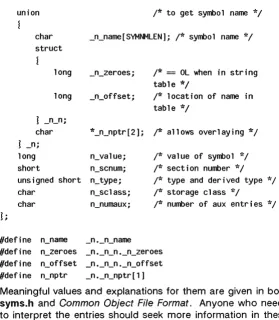
An example format of each symbol in the symbol table is
#define SYMNMLEN #define FILNMLEN #define DIMNUM
struct syment
1
union
8 14 4
/* to get a symbol name */
char struct
_n_name[SYMNMLEN];j* name of symbol */
long _n_zeroes; long _n_offset;
A.OUT(4)
_n_n; char *_n_nptr[2];
_n;
/* allows overlaying */
long n_value;
short n_senum;
unsigned short n_type; char
char
n_selass; n_numaux;
/* value of symbol */ /* section number */ /* type and derived type */ /* storage class */
/* number of aux entries */
#define n_name _n._n_name
#define n_zeroes _n._n_n._n_zeroes
#define n_offset _n._n_n._n_offset
#define n_nptr _n._n_nptr[1]
Some symbols require more information than a single entry; they are followed by auxiliary entries that are the same size as a symbol entry. An example format follows.
union auxent
1
struct
i
long x_tagndx; union
I
struet
I
unsigned shortx_lnno; unsigned shortx_size; x_lnszj
long x_fsize; x_misc;
union
struet
long x_lnnoptr; long x_endndx; x_fen;
struct
I
unsigned shortx_dimen[DIMNUM]; J x_aryj
x_fenarYi
unsigned short x_tvndx; x_sym;
struct
!
A.OUT(4)
struct
I
long x_scnlen;
unsigned short x_nreloc; unsigned short x_nlinno;
1
x_scn;struct
I
long x_tvfil1;
unsigned short x_tv 1 en;
unsigned short x_tvran[2];
I
x_tv;I;
Indexes of symbol table entries begin at zero. The start of the
symbol table is f _ symptr (from the file header) bytes from the beginning of the file. If the symbol table is stripped, f _ symptr
is O. The string table (if one exists) begins at f_symptr
+
(f_nsyms*
SYMESZ) bytes from the beginning of the file. SEE ALSOACCT(4)
NAME
acct - per-process accounting file format
SYNOPSIS
#include < sys/acct.h >
DESCRIPTION
Files produced as a result of calling aeet (2) have records in the form defined by
<
sys/acct.h>
I whose contents are:typedef ushort cOq)_t; /* "floating point" */ /* 13-bit fraction, 3-bit exponent */
struct acct char char ushort ushort dev_t time_t cOq)_t cOq)_t cOq)_t cOq)_t cOq)_t cOq)_t char
1; .
ac_flag; /* Accounting flag */ ac_stat; /* Exit status */ ac_uid; /* Accounting user 10 */ ac_gid; /* Accounting group 10 */ ac_tty;
1*
control typewriter */ ac_btime;/* Beginning time */ac_utime;/* acctng user time in clock ticks */ ac_stime;/* acctng system time in clock ticks */ ac_etime;/* acctng elapsed time in clock ticks */ ac_mem; /* memory usage in cl icks */
ac_io; /* chars trnsfrd by read/write */ ac_rw; /* number of block reads/writes */ ac_comm[8];/* command name */
extern struct acct extern struct i node
acctbuf;
*acctp; /* inode of accounting file */
#define #define #define AFORK ASU ACCTF
01/* has executed fork, but no exec */ 02/* used super-user privileges */ 0300/* record type: 00
=
acct */In ae_flag, the AFORK flag is turned on by each fork(2) and turned off by an exee (2). The ae _ eomm field is inherited from the parent process and is reset by any exee. Each time the system charges the process with a clock tick, it also adds to
ACCT(4)
(data size) + (text size) I (number of in-core processes using text)
The value of ac_mem / (ac_stime
+
ac_utime) can be viewed asan approximation to the mean process size, as modified by text-sharing.
The structure taeet.h, which resides with the source files of the accounting commands, represents the total accounting format used by the various accounting commands:
I'll
*
total accounting (for acct period), also for day'Ill
struct tacct
1;
uid_t ta_uid;
char ta_name[8];
float ta_cpu(2);
float ta_kcore[2];
float ta_con[2];
float ta_du;
long ta-pc;
uns i gned short ta_sc; uns i gned short ta_dc; uns i gned short ta_fee;
SEE ALSO
acct(2), exec(2), fork(2).
I'll userid 'Ill I'll login name 'Ill
I'll cum. cpu time, plnp (mins) 'Ill
!*
cum kcore-.minutes, plnp *1!*
cum. connect time, plnp, mins 'Ill I'll cum. disk usage *1I'll count of processes 'Ill I'll count of login sessions 'Ill I'll count of disk samples 'Ill I'll fee for special services 'Ill
acct(1 M) in the System Administrator's Reference Manual.
acctcom(1) in the User's Reference Manual.
BUGS
The ac_mem vaiue for a short-Uved command gives littie infor-mation about the actual size of the command, because
AR(4)
NAME
ar - common archive file format
SYNOPSIS
#include
<
ar.h >DESCRIPTION
The archive command ar(1) is used to combine several files
into one. Archives are used mainly as libraries to be searched by the link editor Jd(1).
Each archive begins with the archive magic string.
#define ARMAG "I<arch>\n" #define SARMAG 8
/* magic string */
/* length of magic string */
Each archive which contains common object files [see
a.out
(4)] includes an archive symbol table. This symbol table is used by the link editor Jd (1) to determine which archive members must be loaded during the link edit process. The archive symbol table (if it exists) is always the first file in the archive (but is never listed) and is automatically createdand/or updated by ar.
Following the archive magic string are the archive file members. Each file member is preceded by a file member header which is of the following format:
#define ARFMAG "'\n" /* header trailer string */
/* file member header */
char ar_name[16]; /*
'I'
terminated file member name */char ar_date[12]; /* file member date */
char ar_uid[6]; /* file member user identification */
char ar_gid[6]; /* file member group identification */
char ar_mode[8]; /* file member mode (octal) */
char ar _size[10]; /* file member size */
char ar_fmag[2]; /* header trailer string */
};
All information in the file member headers is in printable ASCII. The numeric information contained in the headers is stored as
AR(4)
Thus, if the archive contains printable files, the archive itself is printable.
The ar _name field is blank-padded and slash (/) terminated.
The ar date field is the modification date of the file at the time
of its insertion into the archive. Common format archives can be moved from system to system as long as the portable archive command ar(1) is used. Conversion tools such as
convert(1} exist to aid in the transportation of non-common format archives to this format.
Each archive file member begins on an even byte boundary; a newline is inserted between files if necessary. Nevertheless the size given reflects the actual size of the file exclusive of padding.
Notice there is no provision for empty areas in an archive file.
If the archive symbol table exists, the first file in the archive
has a zero length name (Le., ar_name[O]
= = '/').
Thecon-tents of this file are as follows:
The number of symbols. Length: 4 bytes.
The array of offsets into the archive file. Length: 4 bytes
*
"the number of symbols".The name string table. Length: ar _size - (4 bytes
*
(lithenumber of symbols"
+
1)).The number of symbols and the array of offsets are managed
with. sgetl and sputl. The string table contains exactly as
many null terminated strings as there are elements in the offsets array. Each offset from the array is associated with the corresponding name from the string table (in order). The names in the string table are all the defined global symbols found in the common object files in the archive. Each offset is the location of the archive header for the associated symbol.
SEE ALSO
ar(1), Id(1), strip(1), sputl(3X), a.out(4}.
WARNINGS
Strip (1) will remove all archive symbol entries from the header.
The archive symbol entries must be restored via the ts option
of the ar(1) command before the archive can be used with the
CHECKLIST (4)
NAME
checklist - list of file systems processed by fsck and ncheck
DESCRIPTION
checklist resides in directory fete and contains a list of, at
most, 15 special file names. Each special file name is con-tained on a separate line and corresponds to a file system. Each file system will then be automatically processed by the
fsck(1 M) command.
FILES
/etc/checklist
SEE ALSO
fsck(1 M) I ncheck(1 M) in the System Administrator's Reference
CHECKLIST(4)
C()RE(4)
NAME
core - format of core image file
DESCRIPTION
The UNIX system writes out a core image of a terminated pro-cess when any of various errors occur. See signa/(2) for the list of reasons; the most common are memory violations, ille-gal instructions, bus errors, and user-generated quit signals. The core image is called core and is written in the process's working directory (provided it can be; normal access controls apply). A process with an effective user ID different from the real user ID will not produce a core image.
The first section of the core image is a copy of the system's per-user data for the process, including the registers as they were at the time of the fault. The size of this section depends on the parameter usize, which is defined in
<
sys/param.h > . The remainder represents the actual contents of the user's core area when the core image was written. If the text seg-ment is read-only and shared, or separated from data space, it is not dumped.The format of the information in the first section is described by the user structure of the system, defined in
<
sys/user.h >. Not included in this file are the locations ofthe registers. These are outlined in
<
sys/reg.h > .SEE ALSO
sdb(1), setuid(2), signal(2).
CORE(4)
CPIO(4)
NAME
cpio - format of cpio archive
DESCRIPTION
The header structure, when the
-c
option of cpio (1) is not used, is:struct
1
Hdrjshort h_magic,
h_dev;
ushort h_ino,
h_mode, h_uid, h_gid;
short h_nlink,
h_rdev, h_mtime[2], h_namesize, h_filesize[2]j
char h_name[h_namesize rounded to word]j
When the -c option is used, the header information is
described by:
sscanf (Chdr , ',%60%60%60%60%60%60%60%60%1110%60%1110%5" , &Hdr.h_magic, &Hdr.h_dev, &Hdr.h_ino, &Hdr.h_mode, &Hdr.h_uid, &Hdr.h_gid, &Hdr.h_nlink, &Hdr.h_rdev, &Longtime, &Hdr.h_namesize,&Longfile,Hdr.h_name);
Longtime and Longfile are equivalent to Hdr.h _ mtime and
Hdr.h _filesize , respectively. The contents of each file are recorded in an element of the array of varying length struc-tures, archive I together with other items describing the file.
Every instance of h _magic contains the constant 070707
(octal). The items h_dev through h_mtime have meanings
explained in stat (2). The length of the null-terminated path name h _name, including the null byte, is given by h _ namesize.
The last record of the archive always contains the name
TRAILER!!!. Special files, directories, and the trailer are
recorded with h Jilesize equal to zero.
SEE ALSO stat(2).
CPI()(4)
DIR(4)
NAME
dir - format of directories
SYNOPSIS
#include
<
sys/dir.h >DESCRIPTION
A directory behaves exactly like an ordinary file, save that no user may write into a directory. The fact that
a
file is a direc-tory is indicated by a bit in the flag word of its i-node entry [see fS(4)].A
common structure of a directory entry as given in the include file is:#ifndef DIRSIZ
#define DIRSIZ 14
#endif
struct direct
{
ino t dJno;
char d_name[DIRSIZ]; };
By convention, the first two entries in each directory are for. and .•. The first is an entry for the directory itself. The second is for the parent directory. The meaning of •. is modi-fied for the root directory of the master file system; there is no parent, so .• has the same meaning as ..
SEE ALSO
DIR(4)
DIRENT(4)
NAME
dirent - file system independent directory entry
SYNOPSIS
#include
<
sys/dirent.h>
#include
<
sys/types.h >DESCRIPTION
Different file system types may have different directory entries. The dirent structure defines a file system indepen-dent directory entry, which contains information common to directory entries in different file system types. A set of these structures is returned by the getdents (2) system call.
An example dirent structure is defined below. struct dirent {
};
long off t
unsigned short char
dJno; d_off; d_reclen; d_name[1];
The d
Jno
is a number which is unique for each file in the file system. The field d_off is the offset of that directory entry in the actual file system directory. The field d_name is the beginning of the character array giving the name of the direc-tory entry. This name is null terminated and may have at most MAXNAMLEN characters. This results in file system independent directory entries being variable length entities. The value of d_reclen is the record length of this entry. This length is defined to be the number of bytes between the current entry and the next one, so that it will always result in the next entry being on a long boundary.FILES
/usr /include/sys/ dirent.h
DIRENT(4)
FILEHDR(4)
NAME
filehdr - file header for common object files
SYNOPSIS
#include
<
filehdr.h >DESCRIPTION
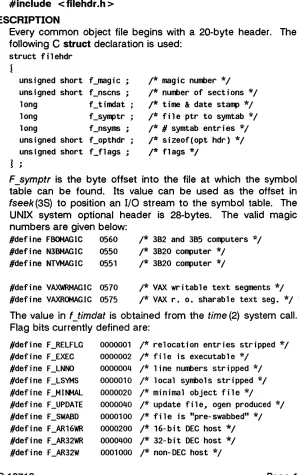
Every common object file begins with a 20-byte header. The following C struct declaration is used:
struct fi1ehdr
unsigned short f_magic ; /* mag i c nurmer * / unsigned short f_nscns ; /* nurmer of sections */ long f_timdat ; /* time & date stamp */ long f_symptr ; /* file ptr to symtab */ long f_nsyms ; /* # symtab entries */ unsigned short f_opthdr ; /* sizeof(opt hdr) */ unsigned short f_f1ags ; /* flags */
F _symptr is the byte offset into the file at which the symbol table can be found. Its value can be used as the offset in fseek (3S) to position an
I/O
stream to the symbol table. The UNIX system optional header is 28-bytes. The valid magic numbers are given below:#define FBOMAGIC 0560 /* 382 and 385 computers */
/* 3820 computer */
#define N3BMAGIC 0550
#define NTVMAGIC 0551 /* 3820 computer */
#define VAXWRMAGIC 0570 /* VAX writable text segments */ #define VAXROMAGIC 0575 /* VAX r. o. sharable text seg. */
The value in f _timdat is obtained from the time (2) system call. Flag bits currently defined are:
#define F_RElFlG #define F_EXEC #define F_lNNO #define F_lSYMS #define F_MINMAL #define F_UPDATE
0000001 /* relocation entries stripped */ 0000002 /* file is executable */
0000004 /* line numbers stripped */ 0000010 /* local syrmo1s stripped */
0000020 /* minimal object file */
FILEHDR(4)
#define F_PATCH #define F_BM3210 #define F_BM328 #define F_BM32MAU #define F_BM32RST
SEE ALSO
0002000 /* "patch" list in opt hdr */
0160000 /* WE32000 family 10 field */ 0020000 /* file contains WE 32100 code */
0040000 /* file reqs MAU to execute */ 0010000 /* contains restore work around
[385/382 only] */
NAME
fs: file system - format of system volume
SYNOPSIS
#include
<
sys/filsys.h > #include<
sys/types.h>
#include
<
sys/param.h>
DESCRIPTION
FS(4)
Every file system storage volume has a common format for certain vital information. Every such volume is divided into a certain number of S12-byte, or 1024-byte long sectors, depending upon your particular machine. Sector 0 is gen-erally unused and is available to contain a bootstrap program or other information.
Sector 1 is the block. An example format of a super-block is:
struct f i1 sys
l
ushort s_isize; /* size .in blocks of i-l ist */ daddr_t s_fsize; /* size in blocks of entire volume */ short s_nfree; /* number of addresses in s_free */ daddr_t s_free[NICFREE]j/* free block list */
short s_ninodej /* number of i-nodes in s_inode */ ino_t s_inode[NICINOO]j/* free i-node list */
char s_flockj /* lock during free list manip. */ char s_ilockj /* lock during i-list manipulation */ char s_fmodj /* super block modified flag */ char s_ronlYj /* mounted read-only flag */ time_t s_timej /* last super block update */ short s_dinfo[4]; /* device information */ daddr_t s_tfreej /* total free blocks*/
ino_t s_tinodej /* total free i-nodes */ char s_fname[6]j /* file system name */ char s_fpack[6]j /* file system pack name */ long s_fil1[12]j /* ADJUST to make sizeof filsys
long long
s_statej s_magicj
be 512 */
/* file system state */ /* magic number to denote new
file system */ long
Ij
FS(4)
#define FsMAGIC Oxfd187e20 /* s_magic number */
#define Fs1b 1 /* 512-byte block */ #define Fs2b 2 /* 1024-byte block */
#define FsOKAY Ox7c269d38 /* s_state: clean */ #d.efine FsACTlVE Ox5e72d81a /* s_state: active */ #define FsBAD Oxcb096f43 /* s_state: bad root */ #define FsBADBlK Oxbadbc14b /* s_state: bad
block corrupted it */
S_type
indicates the file system type. Currently, two types offile systems are supported: the original 512-byte logical block
and the improved 1024-byte logical block.
S Jrlagic
is used todistinguish the original 512-byte oriented file systems from the newer file systems. If this field is not equal to the magic number, fsMAGIC, the type is assumed to be fs1b, otherwise
the
s_type
field is used. In the following description, a block isthen determined by the type. For the original 512-byte oriented file system, a block is 512-bytes. For the 1024-byte oriented file system, a block is 1024-bytes or two sectors. The operating system takes care of all conversions from logical block numbers to physical sector numbers.
S_state
indicates the state of the file system. A cleanlyunmounted, not damaged file system is indicated by the FsOKAY state. After a file system has been mounted for update, the state changes to FsACTIVE. A special case is used for the root file system. If the root file system appears damaged at boot time, it is mounted but marked FsBAD. Lastly, after a file system has been unmounted, the state reverts to FsOKAY.
S
-.!size
is the address of the first data block after the i-list; theFS(4)
The free list for each volume is maintained as follows. The s _free array contains, in s _free [1], ... , s _free [s _ nfree-1] I up
to 49 numbers of free blocks. S _free [0] is the block number of the head of a chain of blocks constituting the free list. The first long in each free-chain block is the number (up to 50) of free-block numbers listed in the next 50 longs of this chain member. The first of these 50 blocks is the link to the next
member of the chain. To allocate a block: decrement
s_nfree, and the new block is s_free[s_nfree]. If the new block number is 0, there are no blocks left, so give an error. If
s _nfree became 0, read in the block named by the new block number, replace s_nfree by its first word, and copy the block numbers in the next 50 longs into the s _free array. To free a block, check if s _nfree is 50; if so, copy s _ nfree and the
s_free array into it, write it out, and set s_nfree to O. In any
event set s_free[s_nfree] to the freed block's number and
increment s nfree.
S
_tfree is the total free blocks available in the file system.S
-
nino de is the number of free i-numbers in the s inode-array. To allocate an i-node: if s_ninode is greater than 0, decrement it and return s_inode[s_ninode]. If it was 0, read the i-list and place the numbers of all free i-nodes (up to 100) into the s_inode array, then try again. To free an i-node,
pro-vided s _ninode is less than 100, place its number into
sjnode[s_ninode] and increment s_ninode. If s_ninode is already 100, do not bother to enter the freed i-node into any table. This list of i-nodes is only to speed up the allocation process; the information as to whether the i-node is really free or not is maintained in the i-node itself.
S
_tinode is the total free i-nodes available in the file system.S
_flock and s _ilock are flags maintained in the core copy of the file system while it is mounted and their values on disk are immaterial. The value of s _fmod on disk is likewise immaterial; it is used as a flag to indicate that the super-block has changed and should be copied to the disk during the next periodic update of file system information.S _ronly is a read-only flag to indicate write-protection.
FS(4)
since 00:00 Jan. 1, 1970 (GMT). During a reboot, the s_time
of the super-block for the root file system is used to set the system's idea of the time.
S Jname is the name of the file system and s _fpack is the name of the pack.
I-numbers begin at 1, and the storage for i-nodes begins in block 2. Also, i-nodes are 64 bytes long. I-node 1 is reserved for future use. I-node 2 is reserved for the root directory of the file system, but no other i-number has a built-in meaning. Each i-node represents one file. For the format of an i-node and its flags, see inode (4).
SEE ALSO
mount(2), inode(4).
fsck(1M), fsdb(1M), mkfs(1M) in the System Administrator's
FSPEC(4)
NAME
fspec - format specification in text files
DESCRIPTION
It is sometimes convenient to maintain text files on the UNIX system with non-standard tabs, (Le., tabs which are not set at every eighth column). Such files must generally be converted to a standard format, frequently by replacing all tabs with the appropriate number of spaces, before they can be processed by UNIX system commands. A format specification occurring in the first line of a text file specifies how tabs are to be expanded in the remainder of the file.
A format specification consists of a sequence of parameters separated by blanks and surrounded by the brackets
<:
and : >. Each parameter consists of a keyletter, possibly followed immediately by a value. The following parameters are recog-nized:ttabs The 1 parameter specifies the tab settings for the
file. The value of tabs must be one of the follow-ing:
1. a list of column numbers separated by
com-mas, indicating tabs set at the specified columns;
2. a • followed immediately by an integer n,
indicating tabs at intervals of
n
columns;3. a· followed by the name of a "canned" tab specification.
Standard tabs are specified by 1-8, or equivalently,
11,9,17,25,etc. The canned tabs which are recog-nized are defined by the tabs (1) command.
ssize The s parameter specifies a maximum line size.
The value of size must be an integer. Size check-ing is performed after tabs have been expanded, but before the margin is prepended.
mmargin The m parameter specifies a number of spaces to
be prepended to each line. The value of margin
FSPEC(4)
d The d parameter takes no value. Its presence
indi-cates that the line containing the format specifica-tion is to be deleted from the converted file.
e The e parameter takes no value. Its presence
indi-cates that the current format is to prevail only until another format specification is encountered in the file.
Default values, which are assumed for parameters not sup-plied, are t-8 and mO. If the s parameter is not specified, no size checking is performed. If the first line of a file does not contain a format specification] the above defaults are assumed for the entire file. The following is an example of a line containing a format specification:
*
<:t5,10,15 s72: >*
If a format specification can be disguised as a comment. it is not necessary to code the d parameter.
SEE ALSO
FSTAB(4)
NAME
fstab - file-system-table
DESCRIPTION
The /etc/fstab file contains information about file systems for use by mount (1 M) and mountall(1 M). Each entry in /etc/fstab has the following format:
column 1 block special file name of file system or
advertised remote resource
column 2
column 3
column 4
column 5+
mount-point directory
lI_rll if to be mounted read-only; lI-d[r]1I if remote
(optional) file system type string
ignored
White-space separates columns. Lines beginning with .. # .. are comments.
Empty lines are ignored.
A
file-system-table might read:/dev/dsk/c1 dOs2 /usr 851
K
/dev/dsk/c1d1s2/usr/src -r adv _resource /mnt -d
FILES
/etc/fstab
NOTE
The name of the file-system-table is machine specific. Other possible names could be /etc/mountable or /etc/mntnodes.
SEE ALSO
mount(1 M) I mountall{1 M) I rmountall{1 M) in the System
FSTAB(4)
GETTYDEFS(4)
NAME
gettydefs - speed and terminal settings used by getty
DESCRIPTION
The /etc/gettydefs file contains information used by getty (1 M) to set up the speed and terminal settings for a line. It sup-plies information on what the login prompt should look like. It also supplies the speed to try next if the user indicates the current speed is not correct by typing a <break> character.
Each entry in /etc/gettydefs has the following format:
label# initial-flags # final-flags # login-prompt #next-Iabel
Each entry is followed by a blank line. The various fields can contain quoted characters of the form \b, \n, \c, etc., as well as \nnn, where nnn is the octal value of the desired character. The various fields are:
label
initial-flags
final-flags
This is the 'string against which getty tries to match its second argument. It is often the speed, such as 1200, at which the terminal is supposed to run, but it need not be (see below).
These flags are the initial ioct/ (2) settings to which the terminal is to be set if a terminal type is not specified to getty. The flags that getty understands are the same as the ones listed in
/usr/include/sys/termi9.h [see termio (7)].
Normally only the speed flag is required in the
initial-flags. Getty automatically sets the
termi-nal to raw input mode and takes care of most
of the other flags. The initial-flag settings
remain in effect until getty executes login (1).
These flags take the same values as the
initial-flags and are set just prior to getty executes login. The speed flag is again required. The
composite flag SANE takes care of most of the other flags that need to be set so that the pro-cessor and terminal are communicating in a
rational fashion. The other two commonly
GETTYDEFS(4)
login-prompt This entire field is printed as the login-prompt.
next-label
Unlike the above fields where white space is ignored (a space, tab or new-line), they are included in the login-prompt field.
If this entry does not specify the desired speed, indicated by the user typing a < break> char-acter, then getty will search for the entry with
next-label as its label field and set up the
termi-nal for those settings. Usually, a series of speeds are linked together in this fashion, into a closed set; For instance, 2400 linked to 1200, which in turn is linked to 300, which finally is linked to 2400.
If getty is called without a second argument, then the first entry of
letc/gettydefs
is used, thus making the first entry ofletc/gettydefs
the default entry. It is also used if getty can not find the specified label. Ifletc/gettydefs
itself is missing, there is one entry built into the command which will bring up a terminal at 300 baud.It is strongly recommended that after making or modifying
letc/gettydefs.
it be run through getty with the check option to be ·sure there are no errors.FILES
I
etcl gettydefsSEE ALSO ioctl(2).
getty(1M). termio(7) in the System Administrator's Reference
Manual.
GPS(4)
NAME
gps - graphical primitive string, format of graphical files
DESCRIPTION
GPS is a format used to store graphical data. Several routines have been developed to edit and display GPS files on various devices. Also, higher level graphics programs such as plot [in
stat (1G)] and vtoc [in toc{1G)] produce GPS format output
files.
A GPS is composed of five types of graphical data or primi-tives.
GPS PRIMITIVES
lines The lines primitive has a variable number of points
from which zero or more connected line segments are produced. The first point given produces a
move to that location. (A move is a relocation of
the graphic cursor without drawing.) Successive points produce line segments from the previous
point. Parameters are available to set color,
weight, and style (see below).
arc The arc primitive has a variable number of points to
which a curve is fit. The first point produces a
move to that point. If only two points are included,
a line connecting the points will result; if three pOints a circular arc through the points is drawn; and
if
more than three, lines connect the points~ (In the future, a spline will be fit to the points if they number greater than three.) Parameters are avail-able to set color, weight, and style.text The text primitive draws characters.
It
requires asingle point which locates the center of the first character to be drawn. Parameters are color, font,
textsize, and textangle.
hardware The hardware primitive draws hardware characters or gives control commands to a hardware device. A single point locates the beginning location of the
hardware string.
GPS(4)
GPS PARAMETERS
color Color is an integer value set for arc, lines, and text
primitives.
weight Weight is an integer value set for arc and lines
primitives to indicate line thickness. The value 0 is narrow weight, 1 is bold, and 2 is medium weight.
style Style is an integer value set for lines and arc primi-tives to give one of the five different line styles that can be drawn on TEKTRONIX 4010 series storage tubes. They are:
o
solid1 dotted
2 dot dashed
3 dashed
4 long dashed
font An integer value set for text primitives to designate
the text font to be used in drawing a character string. (Currently font is expressed as a four-bit
weight value followed by a four-bit style value.)
textsize Textsize is an integer value used in text primitives to express the size of the characters to be drawn.
Textsize represents the height of characters in
absolute universe-units and is stored at one-fifth
this value in the size-orientation (so) word (see below).
textangle Textangle is· a signed integer value used in text
primitives to express rotation of the character string
around the beginning point. Textangle is
expressed in degrees from the positive x-axis and can be a positive or negative value. It is stored in the size-orientation (so) word as a value 256/360 of it's absolute value.
ORGANIZATION
GPS primitives are organized internally as follows:
lines arc text hardware comment
cw points sw cw points sw
cw pOint sw so [string]
cw point [string]
GPS(4)
cw Cw is the control word and begins all primitives. It
consists of four bits that contain a primitive-type code and twelve bits that contain the word-count for that primitive.
point(s) Point(s) is one or more pairs of integer coordinates.
Text and hardware primitives only require a single point. Point(s) are values within a Cartesian plane
or universe having 64K (-32K to
+
32K) points on each axis.sw Sw is the style-word and is used in lines, arc, and
text primitives. For all three, eight bits contain color
information. In arc and lines eight bits are divided as four bits weight and four bits style. In the text primitive eight bits of sw contain the font.
so So is the size-orientation word used in text
primi-tives. Eight bits contain text size and eight bits contain text rotation.
string String is a null-terminated character ·string. If the
string does not end on a word boundary, an addi-tional null is added to the GPS file to insure word-boundary alignment.
SEE ALSO
graphics(1G), stat (1 G), toc(1G) in the User's Reference
GPS(4)
NAME
group - group file
DESCRIPTION
group contains for each group the following information:
group name
encrypted password numerical group ID
comma-separated list of all users allowed in the group
This is an ASCII file. The fields are separated by colons; each group is separated from the next by a new-line. If the pass-word field is null. no passpass-word is demanded.
This file resides in directory fetc. Because of the encrypted passwords, it can and does have general read permission and can be used. for example, to map numerical group ID's to names.
FILES
/etc/group
SEE ALSO passwd(4).
passwd(1) in the User's Reference Manual.
(;ROUP(4)
INITTAB(4)
NAME
inittab - script for the in it process
DESCRIPTION
The inittab file supplies the script to init's role as a general process dispatcher. The process that constitutes the majority of init's process dispatching activities is the line process
/etc/getty that initiates individual terminal lines. Other
processes typically dispatched by init are daemons and the
shell.
The inittab file is composed of entries that are position depen-dent and have the following format:
id: rstate:action: process
Each entry is delimited by a newline, however, a backslash (\) preceding a newline indicates a continuation of the entry. Up to 512 characters per entry are permitted. Comments may be inserted in the process field using the sh (1) convention for
comments. Comments for lines that spawn gettys are
displayed by the who(1) command. It is expected that they
will contain some information about the line such as the loca-tion. There are no limits (other than maximum entry size) imposed on the number of entries within the inittab file. The entry fields are:
id This is one or two characters used to uniquely
iden-tify an entry.
rstate This defines the run-level in which this entry is to be
processed. Run-levels effectively correspond to a
configuration of processes in the system. That is, each process spawned by init is assigned a run-level
or run-levels in which it is allowed to exist. The run-levels are represented by a number ranging from 0
through 6. As an example, if the system is in run-level 1, only those entries having a 1 in the rstate
field will be processed. When init is requested to
change run-levels, all processes which do not have
an entry in the rstate field for the target run-level will
be sent the warning signal (SIGTERM) and allowed
a 20-second grace period before being forcibly ter-minated by a kill signal (SIGKILL). The rstate field
INITTAR(4)
action
selecting more than one run-level in any
combina-tion from 0-6. If no run-level is specified, then the process is assumed to be valid at all run-levels 0-6.
There are three other values, a, band c, which can appear in the rstate field, even though they are not
true run-levels. Entries which have these characters
in the rstate field are processed only when the telinit
[see init (1 M)] process requests them to be run
(regardless of the current run-level of the system). They differ from run-levels in that init can never enter run-level a, b or c. Also, a request for the exe-cution of any of these processes does not change
the current run-level. Furthermore, a process
started by an a, b or c command is not killed when
init changes levels. They are only killed if their line in /etc/inittab is marked off in the action field, their line is deleted entirely from /etc/inittab, or init goes
into the
SINGLE USER
state.Key words in this field tell init how to treat the
pro-cess specified in the process field. The actions
recognized by init are as follows:
respawn If the process does not exist then start
the process, do not wait for its termina-tion (continue scanning the inittab file), and when it dies restart the process. If the process currently exists then do nothing and continue scanning the init-tab file.
wait
once
Upon init's entering the run-level that
matches the entry's rstate, start the
process and wait for its termination. All
subsequent reads of the inittab file
while init is in the same run-level will cause init to ignore this entry.
Upon init's entering a run-level that
matches the entry's rstate, start the
INITTAB(4)
previous run-level change, the program will not be restarted.
boot The entry is to be processed only at
init's boot-time read of the inittab file. Init is to start the process, not wait for
its termination; and when it dies, not restart the process. In order for this instruction to be meaningful, the rstate should be the default or it must match
init's run-level at boot time. This action
is useful for an initialization function fol-lowing a hardware reboot of the sys-tem.
bootwait The entry is to be processed the first
time init goes from single-user to multi-user state after the system is booted. (If initdefault is set to 2, the process will run right after the boot.) Init starts the process, waits for its termination and, when it dies, does not restart the process.
powerfail Execute the process associated with
this entry only when init receives a
power fail signal [SIGPWR see
sig-na/(2)].
powerwait Execute the process associated with this entry only when init receives a
power fail signal (SIGPWR) and wait
until it terminates before continuing any processing of inittab.
off If the process associated with this entry
is currently running, send the warning
signal (SIGTERM) and wait 20 seconds
before forcibly terminating the process via the kill signal (SIGKILL). If the pro-cess is nonexistent, ignore the entry.
ondemand This instruction is really a synonym for
the respawn action. It is functionally
INITTAB(4)
different keyword in order to divorce its association with run-levels. This is used only with the a, b or c values described in the rstate field.
initdefault An entry with this action is only
scanned when init initially invoked. Init uses this entry, if it exists, to determine which run-level to enter initially. It does this by taking the highest run-level specified in the rstate field and using that as its initial state. If the rstate field is empty, this is interpreted as 0123456 and so init will enter run-level 6. Addi-tionally I if init does not find an
initde-fault entry in letc/inlttab, then it will request an initial run-level from the user at reboot time.
syslnit Entries of this type are executed before
init tries to access the console (i.e.,
before the Console Login: prompt). It is expected that this entry will be only used ~to initialize devices on which init might try to ask the run-level question. These entries are executed and waited for before continuing.
process This is a sh command to be executed. The entire
process field is prefixed with exec and passed to a forked sh as sh -c 'exec command'. For this rea-son, any legal sh syntax can appear in the process field. Comments can be inserted with the ;
Hcom-ment syntax.
FILES
/etc/inittab
:SEEALSO
exec(2), open(2), signal(2).
getty(1 M), init(1 M) in the System Administrator's Reference
Manual.
NAME
inode - format of an i-node
SYNOPSIS
#include
<
sys/types.h >#include
<
sys/ino.h>
DESCRIPTION
INODE(4)
An i-node for a plain file or directory in a file system could have the following structure defined by
<
sys/ino.h > ./* Inode structure as it appears on a disk block. * /
struct dinode
Ii
/* ushort short ushort ushort Off_t char time_t time_t time_t di_modei di_nlink; di_uidj dCgidj di_sizej di_addr[40]; di_atimej di_mtimej di_ctime;*
the 40 address bytes:*
*
*/
39 used; 13 addresses of 3 bytes each.
/* mode and type of file */ /* number of links to file */ /* owner's user id */
/* owner's group id */ /* number of bytes in file */ /* disk block addresses */ /* time last accessed */ /* time last modified */ /* time last file stat
change */
For the meaning of the defined types off _t and time t see
types (5).
SEE ALSO
IN()I)E(4)
IS()RT(4)
NAME
USER-DEFD. USER-DEFD_dict. USER-DEFD_fold
DESCRIPTION
Isort(1) (international sort) uses sorting sequences defined in language tables. If the -IU option is specified, isort uses the tables in the files listed above.
BUILDING ISORT TABLES
The following three tables are found in
/usr /spool/isort/TABLES: USER-DEFD
USER-DEFD_dict (used by isort with -d option) USER-DEFD _fold (used by isort with -f option)
The predefined tables for the languages listed in isort(1) are also found in /usr/spool/isort/TABLES. You may find them useful references for building your user-defined tables.
Following is an excerpt from the table USER-DEFD:
/*
0101*/
0101 0/*
'A'*/
/*
0102*/
0102 0/*
'B'*/
/*
0103*/
0103 0/*
'CI*/
/*
0104*/
0104 0/*
'D'*/
/*
0105*/
0105 0/*
IE'*/
The
"/*"
and"*P'
must be in the first and third positionsrespectively or isort will abort and return an illegal language file error.
ISORT(4)
The table in USER-DEFD establishes a collating sequence for all letters, numbers, and symbols, and distinguishes between
uppercase and lowercase letters. The table in
USER-DEFD _ dict treats only letters, digits, and spaces, by setting everything else to zero; it distinguishes between uppercase and lowercase. The table in USER-DEFD _fold treats uppercase and lowercase letters as identical by setting them to the same value.
The following rules must be observed as you edit the files to establish the desired collation order:
1) Octal 00 to 015 and octal 040 are reserved; no entry in
column 2 and 3 can be associated with these values.
2) The digits (0-9) should not be changed from their
assigned value of 060-071.
3) Uppercase and lowercase alphabetic characters should be
040 (octal) apart to facilitate building tables to fold lower-case to upperlower-case.
ISSUE(4)
NAME
issue - issue identification file
DESCRIPTION
The file fete/issue contains the issue or project identification to be printed as a login prompt. This is an ASCII file which is
read by program
getty
and then written to any terminalspawned or respawned from the lines file.
FILES
letc/issue
SEE ALSO
ISSUE(4)
NAME
Idfcn - common object file access routines
SYNOPSIS
#include
<
stdio.h > #include<
filehdr.h > #include<
Idfcn.h >DESCRIPTION
LI>FCN(4)
The common object file access routines are a collection of functions for reading common object files and archives con-taining common object files. Although the calling program must know the detailed structure of the parts of the object file that it processes, the routines effectively insulate the calling program from knowledge of the overall structure of the object file.
The interface between the calling program and the object file
access routines is based on the defined type LDFILE, defined
as struct Idfile. declared in the header file Idfcn.h. The pri-mary purpose of this structure is to provide uniform access to both simple object files and to object files that are members of an archive file.
The function /dopen (3X) allocates and initializes the LDFILE
structure and returns a pointer to the structure to the calling
program. The fields of the LDFILE structure may be
accessed individually through macros defined in Idfcn.hand contain the following information:
LDFILE *Idptr;
TYPE(ldptr) The file magic number used to distinguish
between archive members and simple object files.
IOPTR(ldptr) The file pointer returned by fopen and used
by the standard input/output functions.
OFFSET(ldptr) The file address of the beginning of the object file; the offset is non-zero if the object file is a member of an archive file.
LDFCN(4)
The object file access