An Integral Security Option Towards Unpredictable
Patterns Based On The Hotspot
1
A.MARY JUDITH, 2 P.KAMALA, 3N.KUMAR
1, 2
M.E Student, 3Assistant Professor
1, 2, 3
Vel Tech Multi Tech Dr.Rangarajan Dr.Sakunthala Engineering College,
Chennai, Tamil Nadu, India.
ABSTRACT- Blending evaluation of the
graphical user authentication scheme is
embossed in the form of Persuasive Cued
Click-Points. Major focal point is to develop a
graphical password which also encompass
with the security assessment, design and
execution. An important usability goal for
knowledge-based authentication systems is to
support users in selecting better passwords.
The password chosen here will not be
compromised with any known hotspots. As the
distribution of click-points is done in a random
manner, the hotspot formation is reduced. It’s
an integral security option towards
unpredictable patterns which is designed based
on the hotspot concept.
Key Terms - PCCP, hotspot, graphical
password and security.
1. INTRODUCTION
The aim of the project is to create a
Graphical password scheme which includes
usability, security evaluations and
implementation and integrated evaluation of
the password scheme in a graphical manner.
Text-based passwords suffered from security
and usability issues. To overcome these
shortcomings of alphanumeric passwords
various graphical password schemes have been
proposed.
In graphical authentication systems a password
consists of sequence of one or more images
where user can input password with the help of
mouse events like click, drag etc[1]. Picture
Superiority Effect Theory reveals the pictures
can be recognized and recalled easily by
human brain, enhancing the ability to
remember. Since, images are used providing
password space is quite large. Strong
passwords can be produced that are resistant to
guessing, dictionary attack, key-loggers,
shoulder-surfing and social engineering.
Graphical passwords have been used in
authentication for mobile phones, ATM
machines, E-transactions[9].
Persuasive Technology motivates and
influence people to behave in a de-sired
manner. An authentication system which
applies Persuasive Technology should guide
and encourage users to select stronger
passwords, but not impose system-generated
passwords [1][2]. To be effective, the users
the resulting passwords must be memorable.
As detailed below, PCCP accomplishes this by
making the task of selecting a weak password
more tedious and time- consuming. The
path-of-least resistance for users is to select a
stronger password (not comprised entirely of
known hotspots or following a predictable
pattern) [4]. The formation of hotspots across
users is minimized since click-points are more
randomly distributed. PCCP’s design follows
Fog’s Principle of Reduction by making the
desired task of choosing a strong password
easiest and the Principle of Suggestion by
embedding suggestions for a strong password
directly within the process of choosing a
password[2][3].
Passwords consist of a sequence of
five click-points on a given image. Users may
select any pixels in the image as click-points
for their password [2]. To log in, they repeat
the sequence of clicks in the correct order.
Hotspots are areas of the image that have
higher likelihood of being selected by users as
password click-points [5][11]. Users also tend
to select their click-points in predictable
patterns. By adding a persuasive feature to
CCP, PCCP encourages users to select less
predictable passwords, and makes it more
difficult to select passwords where all five
click-points are hotspots [2]. Specifically,
when users create a password, the images are
slightly shaded except for a viewport. The
viewport is positioned randomly, rather than
specifically to avoid known hotspots. The
viewport’s size is intended to offer a variety of
distinct points but still cover only an
acceptably small fraction of all possible points.
Users must select a click-point within this
highlighted viewport, unless they press the
shuffle button to randomly reposition the
viewport [2][3]. While users may shuffle as
often as desired, this significantly slows
password creation [7]. The viewport and
shuffle button appear only during password
creation. During later password entry, the
images are displayed normally, without
shading or the viewport, and users may click
anywhere on the images [5].
Patterns involve the spatial position of
click points relative to each other and do not
consider the background image. In earlier
work we performed this analysis on a subset of
the current data, focusing primarily on data
from lab studies. Password capture attacks
occur when attackers directly obtain
passwords or parts thereof by intercepting
user entered data, or by tricking users into
revealing their passwords[8][9].
Alternative to increasing the number
of images is to use larger images but crop
them differently for each user. Hotspot
analysis would be more difficult for attackers
because the coordinates of hotspots could not
be directly applied across accounts. Each user
receives a different pool of images. An
attacker would need to collect these data on a
per-user basis when launching an attack [9].
2. SYSTEM ANALYSIS
System Analysis is a combined process
dissecting the system responsibilities that are
and user requirements.
2.1 EXISTING SYSTEM
Textual password with a graphical
password is the core idea of the project. In the
older ages, the passwords were materialized in
the form of graphical passwords with X, Y as
co-ordinates on the images [8][9].
Randomization clicks on the images enable the
user to access the system is one of the major
drawback. The viewport is positioned
specifically to known hotspots that allow
attackers to improve guesses and could lead to
the formation of new hotspots. To overcome
this issue, a Persuasive cued click point comes
into the picture [9]. A picture will be framed
with multiple click points in turn, which will
have successive cued clicks on the image
[2][4].
2.1.1 DRAWBACKS
• Users will be provided an option of selecting the images to create the
authentication page which is not
included in the existing system.
• The viewport is positioned randomly rather than specifically to avoid
known hotspots.
2.2 PROPOSED SYSTEM
The user will be provided an option of
selecting the hotspots in an image. The
successive selection of hot spots will enable to
move to next images. For login into the
system, the user will be provided an option of
selecting the hotspot in 5 images then only
user will be allowed to access the
application. Images are stored in a secure
database through file stream data type. Users
will be provided an option of selecting the
images to create the authentication page [5].
Possibility of monitoring the hotspots by the
nearby user is possible. To avoid the same the
password with matrix formation is one of the
complex password schemes in the world.
2.2.1 ADVANTAGES
• An integrated evaluation of the password scheme is in a graphical manner.
• Users will be provided an option of
selecting the images to create the
authentication page.
3. SYSTEM DESIGN
System Design involves identification
of classes their relationship as well as their
collaboration. Classes are divided into entity
classes and control classes. The COMPUTER
AIDED SOFTWARE ENGINEERING
(CASE) tools that are available
commercially do not provide any assistance
in this transition. CASE tools take advantage
of Meta modeling that is helpful only after the
construction of the class diagram.
The FUSION method consists of some
object-oriented approaches like OBJECT
MODELING
TECHNIQUE (OMT), CLASS
RESPONSIBILITIES AND
COLLABORATORS (CRC), is used. Objector
used the term agents to represent some of
the hardware and software system. In
Fusion method, there is no requirement phase,
requirement document.
Any software project is worked out by both
the analyst and the designer. The analyst
creates the user case diagram. The designer
creates the class diagram. But the designer can
do this only after the analyst creates the use
case diagram. Once the design is over, it is
essential to decide which software is suitable
for the application.
3.1 ARCHITECTURAL DIAGRAM
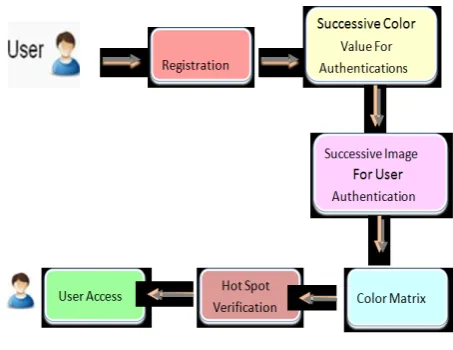
Fig 3.1 System Design
3.2 DESCRIPTION
In step one; the user as usual enters a
login with color password and graphical
password. The login page of the server
deploying. Step to remains the same as when
graphical passwords alone were used, i.e., no
change in the front login page is required to
deploy .Users see any difference in their
sign-in experience sign-in step one. After the user
provides a graphical password, the second step
of authentication begins. In each round of
graphical password verification, the server
transmits an image portfolio to the user, and
the user chooses out her preregistered images
[2][3]. After the user completes all rounds of
verification, if both the color password and all
graphical passwords were correct, she is
granted account access. Otherwise, access is
denied. Hotspot authentication agents serve as
intermediaries between client applications and
hotspots status listeners initiating login/logout
and monitoring the state of the client
application's connections to various hotspots
[6][7].
3.3 DATA FLOW DIAGRAM
The DATA FLOW DIAGRAM (DFD)
is a graphic tool used for expressing system
requirements in a graphical form. The DFD
also known as the “bubble chart” has the
purpose of clarifying system requirements and
identifying major transformations that to
become program in system design. The DFD
consist of series of bubbles joined by lines
[8][9]. The bubbles represent data
transformations and the lines represent data
flows in the system. A DFD describes what
that data flow in rather than how they are
processed. So it does not depend on hardware,
software, data structure or file organization.
4. SYSTEM IMPLEMENTATION
4.1 SYSTEM IMPLEMENTATION
Implementation is the stage of the
project when the theoretical design is turned
out into a working system. The most critical
stage in achieving a successful new system
and in giving the user, confidence that the new
system will work and be effective.
The implementation stage involves
careful planning, investigation of the existing
system and its constraints on implementation,
designing of methods to achieve change over
and evaluation of change over methods.
4.2 MODULE DESCRIPTION
• New User Registration Module
• Genuine Image Hot Spot Module
• Fake Image Hot Spot Module
• Matrix Formation Module
• Authentication Scheme Module
4.2.1 NEW USER REGISTRATION
MODULE
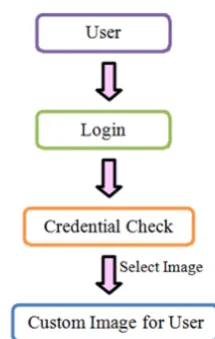
The user is permitted to provide the
basic authentication information like
Username, Password, and contact
information. After providing the user
information, the user is permitted to select the
images and provide appropriate ranking to
those images. Once the images were provided
with ranking, appropriate image points were
selected in the next module. In this module, we
are providing an option of providing custom
images for the user. Our system provides a
strongest check on the duplication of ranking
and multi selection of images without a
boundary limit [2][12].
Fig 4.2.1 New User Registration Module
4.2.2 GENUINE IMAGE HOT SPOT
MODULE
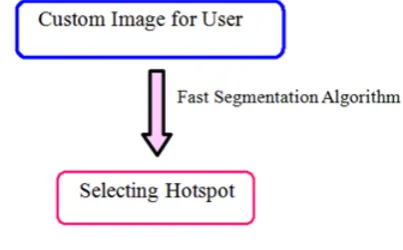
The users are provided an option of
selecting the hotspots in the hierarchy of the
images. Once the hotspot is identified, the
relevant point boundary of the hotspot is
identified with the help of fast segmentation
algorithm. Appropriate pixel values of box
shaped were taken to avoid discrepancy in
identifying the hotspot during authentication
page [5][6]. Once the first levels of images
were identified for the hotspot, the second
levels of images were placed for the hotspot. A
similar algorithm is implemented to scale up
the exact location of the hotspot. After that,
based on the image ranking for the user, the
hotspot on the next level of hierarchical
images was identified. This process becomes a
Fig 4.2.2 Genuine Hotspot Image Module
4.2.3 FAKE IMAGE HOT SPOT MODULE
Fake hotspots on the fake images are
placed in a hierarchical manner to deviate fake
users from the original image. The hotspots
will be placed with the help of segmentation
algorithm. Appropriate pixel values of box
shaped were taken to avoid discrepancy in
identifying the hotspot during authentication
page. The fake images with fake hotspot on
the images will increase the complexity of the
authentication scheme [10]. The process will
be followed as specified in the previous
modules.
Fig 4.2.3 Fake Image Hotspot Module
4.2.4 MATRIX FORMATION MODULE
A most complicated algorithm which
provides one of the world’s strongest
algorithm in the place of authenticating the
user [6][7]. Registering the user involves
Minimum length of the password that should
be 8 and it can be called as secret pass code.
The secret pass code should contain even
number of characters. This project contains
one mandatory as 8 session password which is
generated on the basis of secret pass code
during the login phase of the project. User will
enter his username an interface consisting of a
complex grid [5][6]. The Alphanumeric grid is
of size 6 x 6 and it consists of numbers and
alphabets. These were randomly placed on the
data grid and the interface will change every
time during user login.
Fig 4.2.4 Matrix Formation Module
4.2.5 AUTHENTICATION SCHEME
MODULE
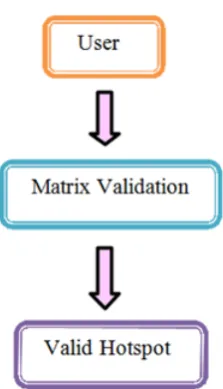
The user will be permitted to provide
their valid credentials to login into the system.
Before finalizing the validation of the user,
[7]. The users will be checked for the valid
hotspot of the images. Once the user crossed
the matrix validations the second check with
be the exact boundaries of valid checks [10].
Once the user provides valid data he will be
permitted to view his profile page. If more
than a stipulated time, the users have tried the
login. In that case, the user will be blocked
permanently.
Fig 4.2.5 Authentication Scheme Module
5. CONCLUSION
A common security goal in password
based authentication systems is to maximize
the effect to allow user choice while still
increasing the effective password space. Tools
such as PCCP’s viewport used during
password creation cannot be exploited during
an attack. Users could be further deterred at
some cost in usability from selecting obvious
click-points by limiting the number of shuffles
allowed during password creation or by
progressively slowing system response in
repositioning the viewport with every shuffle
past a certain threshold. The approaches are
presented a middle ground between insecure
but memorable user chosen passwords and
secure system generates random passwords
that are difficult to remember.
6.REFERENCES
[1] S.Chiasson, R.Biddle and P.Van Oorschot,
“A Second Look at the Usability of
Click-Based Graphical Passwords,” Proc. ACM
Symp. Usable Privacy and Security (SOUPS),
July 2007.
[2] S. Chiasson, A. Forget, R. Biddle, and P.
Van Oorschot, “Influencing Users towards
Better Passwords: Persuasive Cued Click-
Points,” Proc. British HCI Group Ann. Conf.
People and Computers: Culture, Creativity,
Interaction, Sept. 2008.
[3] S. Chiasson, A. Forget, E. Stobert, P. Van
Oorschot, and R. Biddle, “Multiple Password
Interference in Text and Click-Based
Graphical Passwords,” Proc. ACM Conf.
Computer and Comm.Security (CCS), Nov.
2009.
[4] E. Stobert, A. Forget, S. Chiasson, P. Van
Oorschot, and R. Biddle, “Exploring Usability
Effects of Increasing Security in Click-Based
Graphical Passwords,” Proc. Ann. Computer
Security Applications Conf. (ACSAC), 2010.
[5] S. Chiasson, A. Forget, R. Biddle, and P.C.
Van Oorschot, “User Interface Design Affects
Security: Patterns in Click-Based Graphical
Passwords,” Int’l J. Information Security,
[6] J. Yan, A. Blackwell, R. Anderson, and A.
Grant, “The Memorability and Security of
Passwords,” Security and Usability: Designing
Secure Systems That People Can Use, L.
Cranor and S. Garfinkel, eds., ch. 7, pp.
129-142, O’Reilly Media, 2005.
[7] S. Chiasson, P. Van Oorschot, and R.
Biddle, “Graphical Password Authentication
Using Cued Click Points,” Proc. European
Symp. Research in Computer Security
(ESORICS), pp. 359-374, Sept. 2007.
[8] Marwaha.P, "Visual cryptographic
steganography in images," Computing
Communication and Networking Technologies
(ICCCNT), 2010 International Conference on,
vol., no., pp.1-6, 29-31 July 2010.
[9] Chippy.T, R.Nagendran “Defenses against
Large Scale Online Password Guessing
Attacks by Using Persuasive Click Points”
International Journal of Communications and
Engineering Volume 03– No.3, Issue: 01
March2012.
[10] C.Singh, L.Singh, Chandrashekar Singh,
Lenandlar Singh Lecturer, University of
Guyana “Investigating the Combination of
Text and Graphical Passwords for a more
secure and usable experience” International
Journal of Network Security & Its
Applications (IJNSA), Vol.3, No.2, March
2011.
[11]P.C.Van Oorschot and J. Thorpe,
“Exploiting Predictability in Click-Based
Graphical Passwords,” J. Computer Security,
vol. 19, no. 4, pp. 669-702, 2011.
[12] A. Forget, S. Chiasson, and R. Biddle,
“Shoulder-Surfing Resistance with Eye-Gaze
Entry in Click-Based Graphical Passwords,”
Proc. ACM SIGCHI Conf. Human Factors in