273 Branchport Avenue Long Branch, N.J. 07740
(800) 631-2148 Thank you for using our products.
www.cooperwheelock.com
INSTALLATION INSTRUCTIONS CLASS A/B SPLITTER (FOR SP40S AND SPB-160/SPB-80/4)
Use this product according to this instruction manual. Please keep this instruction manual for future reference.
MODEL NUMBER:
109900 SP4Z-A/B
GENERAL:
The Class A/B Splitter (SP4Z-A/B) is designed to be used with Wheelock’s SP40S SAFEPATH4 panel and the SAFEPATH4 Audio Booster (SPB-160 and SPB-80/4)
panels. The SP4Z-A/B provides a means for expanding one supervised audio output zone to four Class B or two Class A zones. The SP4Z-A/B is UL Listed under
Standard 864, Control Units for Fire Protective Signaling Systems. They are for indoor use only.
One SP4Z-A/B can be connected to the SP40S panel. It is to be mounted inside the panel enclosure onto the standoffs on the SP40S board. Two SP4Z-A/B's can be connected to the SPB-160. One SP4Z-A/B can be connected to the SPB-80/4. It is to be mounted inside the SPB-160 or SPB-80/4 panel on the Splitter Mounting Bracket (SPMB-4Z - purchased separately) mounted over the 24VDC Power Supply (SPBPS). The SP4Z-A/B has a maximum power output per zone that cannot exceed what is listed in Table 1.
NOTE: All CAUTIONS and WARNINGS are identified by the symbol . All warnings are printed in bold capital letters.
WARNING: PLEASE READ THESE INSTRUCTIONS CAREFULLY BEFORE USING THIS PRODUCT. FAILURE TO COMPLY WITH ANY OF THE FOLLOWING INSTRUCTIONS, CAUTIONS AND WARNINGS COULD RESULT IN IMPROPER APPLICATION, INSTALLATION AND/OR OPERATION OF THESE PRODUCTS IN AN EMERGENCY SITUATION, WHICH COULD RESULT IN PROPERTY DAMAGE AND SERIOUS INJURY OR DEATH TO YOU AND/OR OTHERS.
SPECIFICATIONS:
Table 1: Specifications
Audio Output Voltage 25.0V 70.7V
Maximum Output Power Per Zone 40.0W 40.0W
Operating Voltage 24VDC
Standby/Alarm Current at 24VDC 15mA
Class A
Minimum Ground Fault Sensitivity 20 k Ohms
Class B Maximum Output Power Per Zone 40W 40W
WIRING INSTRUCTIONS:
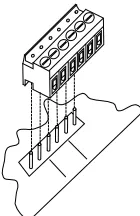
NOTE: The terminal blocks on the SP4Z-A/B are removable. To remove a terminal block, pull the block straight up from the circuit board as shown in Figure 1. Attach wires to the desired connections, then plug the terminal block back on the board being careful to match and align the pins.
Figure 1: Removable Terminal Block
MOUNTING INSTRUCTIONS: (SP40S)
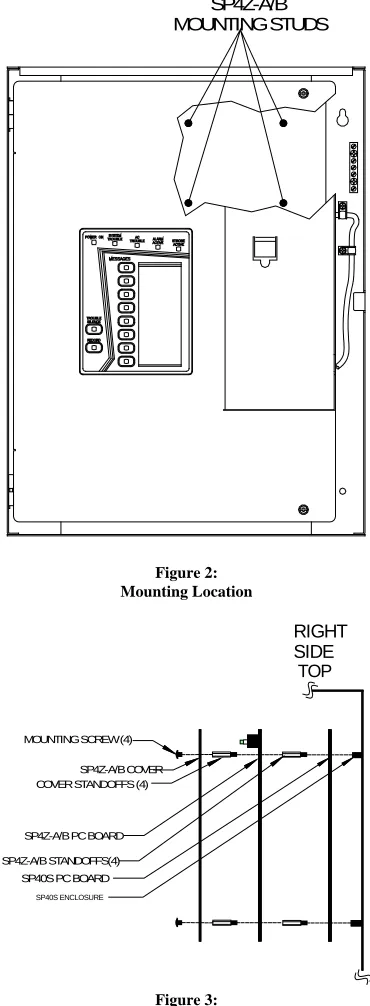
Figure 2 shows the mounting location of the SP4Z-A/B Splitter to the SP40S panel. Figure 3 shows the correct mounting procedure.
SP4Z-A/B
MOUNTING STUDS
Figure 2: Mounting Location
SP4Z-A/B STANDOFFS(4) SP4Z-A/B PC BOARD
COVER STANDOFFS (4) SP4Z-A/B COVER MOUNTING SCREW (4)
TOP
RIGHT
SIDE
SP40S PC BOARD
SP40S ENCLOSURE
Figure 3:
SP4Z-A/B Mounting in SP40S Enclosure
1. Install 4 standoffs through the SP40s board to the 4 mounting studs of the SP40S enclosure.
2. Position the SP4Z-A/B PC board with the terminal blocks pointing to the top of the SP40S enclosure and align the mounting holes on the PC board with the
mounting studs.
3. Screw the male end of the 4 cover standoffs through the SP4Z-A/B PC board and to the 4 standoff installed in Step 1. Tighten standoffs snug.
4. Attach wiring in accordance with the wiring section of this installation instruction.
MOUNTING INSTRUCTIONS: (SPB-160 and SPB-80/4)
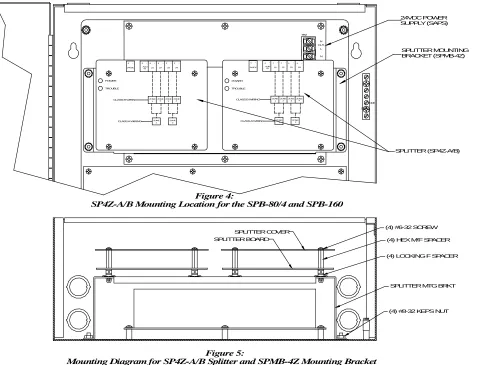
Figure 4 shows the mounting location of the SP4Z-A/B Splitter to the Splitter Mounting Bracket (SPMB-4Z - purchased separately). Figure 5 shows the correct mounting procedure. TB2 N L SPLITTER COVER SPLITTER BOARD
(4) #8-32 KEPS NUT (4) #6-32 SCREW
(4) HEX M/F SPACER
(4) LOCKING F SPACER
SPLITTER MTG BRKT SPLITTER (SP4Z-A/B) SPLITTER MOUNTING BRACKET (SPMB-4Z) 24VDC POWER SUPPLY (SAPS) Figure 4:
SP4Z-A/B Mounting Location for the SPB-80/4 and SPB-160
Figure 5:
Mounting Diagram for SP4Z-A/B Splitter and SPMB-4Z Mounting Bracket
TROUBLE
CLASS B WIRING
CLASS A WIRING ZONE 1 ZONE2 POWER
24VDC
+
-Z2 AUD IN Z3 Z4
ZONE 1 ZONE2 ZONE
3 ZONE4
TROUBLE POWER ZONE ZONE Z1 Z1 ZONE
CLASS A WIRING CLASS B WIRING 1
-24VDC + + AUD -IN + 2 ZONE ZONE ZONE ZONE 1
2 3 ZONE4 -+ -Z2 Z3 + - -Z4 + + - + - + - + - + -OUT N
1. Mount the Splitter Mounting Bracket (SPMB-4Z) to the SPB-160 or SPB-80/4 according to installation instructions (P84252).
2. Install the 4 nylon Locking Female Spacers to the mounting bracket by pushing them into place.
3. Position the SP4Z-A/B PC board with the terminal blocks pointing to the top of the Audio Booster enclosure and align the mounting holes on the PC board with the
mounting studs.
4. Screw the male end of the 4 Hex M/F Spacers through the SP4Z-A/B PC board and to the 4 Locking Female Spacers on the SPMB-4Z. Tighten standoffs snug plus
¼ turn.
5. Attach wiring in accordance with the wiring section of this installation instruction.
6. Align the SP4Z-A/B Cover with the holes in the cover spacers and mount the cover using the 4 mounting screws. Tighten the screws hand tight.
7. Repeat Steps 2 through 6 when installing second splitter in the SPB-160 Audio Booster.
NOTE: One SPMB-4Z mounting bracket can support two SP4Z-A/B splitters.
WIRING INSTRUCTIONS:
WARNING: SHUT OFF ALL POWER BEFORE STARTING THE INSTALLATION. ELECTRICAL SHOCK CAN CAUSE DEATH OR SERIOUS INJURY.
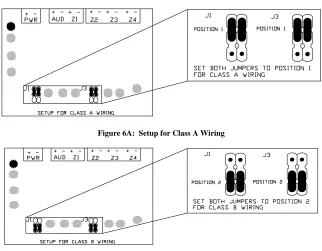
CAUTION: Do not move jumpers while the unit is powered on. Doing so may damage the Splitter.
Figure 6A: Setup for Class A Wiring
Figure 6B: Setup for Class B Wiring
1. See Figures 6C and 6D for wiring diagram.
NOTE: Unused zones must have a Listed 10K Ohm EOLR installed to prevent an open trouble condition.
NOTE: Cannot utilize Class A and Class B wiring on single splitter.
2. See Figure 8 or the Splitter cover silkscreen for terminal block wiring designations.
CLASS A WIRING:
+
-+
-+
-+
-24VDC
AUDIO AUD IN
24VDC
SP40S, SPB-160
OR SPB-80-4
SP4Z-A/B
+
-+
-+
-+
-Z1 Z2 Z3 Z4
ZONE TERMINATION (IF NOT USED)
UL LISTED 10K OHM EOLR UL LISTED 10K OHM EOLR
Figure 6C: Power Limited For Supervised Class A Wiring.
CLASS B WIRING:
+
-+
-+
-+
-24VDC
AUDIO AUD IN
24VDC
SP40S, SPB-160
OR SPB-80-4
SP4Z-A/B
+
-+
-+
-+
-Z1 Z2 Z3 Z4
UL LISTED 10K OHM EOLR
ZONE TERMINATION (IF NOT USED) UL LISTED 10K OHM EOLR
Figure 6D: Power Limited For Supervised Class B Wiring.
Place 24VDC Splitter power
wire run at least 1/4" above
the top of the SP-40S
circuit board.
SP-40S
PC BOARD
SPLITTER ZONE
OUTPUTS
Figure 7A:
Wiring Routes for Wiring the SP4Z-A/B to the SP40S
N
L IN
N
L OUT
BATTERY
BATTERY
SPLITTER ZONE
OUTPUTS
Place AUD1 and AUD2wire run at least 1/4" from the 24VDC wire run.
Place Splitter output wire run at least 1/4" above the top of the splitter circuit board.
Place 24VDC Splitter power wire run at least 1/4" above the top of the SPB-160 circuit board.
Run the Audio Output wiring along the right side and to the bottom of the enclosure, then along the bottom to the left side of the enclosure, up the left side and to the AUD IN terminals of the splitter.
24VDC
POWER SUPPLY
SPB-160
PC BOARD
N
TB7 TB5
TB2 TB1
TB6
L
DC IN
BAT
AUD2 OUT
AUD1 OUT
STB2 OUT
STB1 OUT
24V OUT
AUX RET AUX IN AUD RET AUD IN
TRANSFORMER
TB3
STB RET STB IN
24V OUT
EXP OUT
TB4
NO NC COM
NO NC COM AC TRB
TB8 NO NC COM TRB
NO NC COM
Figure 7B:
Wiring Routes for Wiring the SP4Z-A/B to the SPB-160 to the AUD1 and AUD2 Splitters.
N
L IN
N
L OUT
BATTERY
BATTERY
SPLITTER ZONE
OUTPUTS
Place AUD1 and AUD2wire run at least 1/4" from the 24VDC wire run.
Place Splitter output wire run at least 1/4" above the top of the splitter circuit board.
Place 24VDC Splitter power wire run at least 1/4" above the top of the SPB-80/4 circuit board.
Run the Audio Output wiring along the right side and to the bottom of the enclosure, then along the bottom to the left side of the enclosure, up the left side and to the AUD IN terminals of the splitter.
24VDC
POWER SUPPLY
SPB-80/4
PC BOARD
N
TB7 TB5
TB2 TB1
TB6
L
DC IN
BAT
AUD2 OUT
AUD1 OUT
STB2 OUT
STB1 OUT
24V OUT
AUX RET AUX IN AUD RET AUD IN
TRANSFORMER
TB3
STB RET STB IN
24V OUT
EXP OUT
TB4
NO NC COM
NO NC COM AC TRB
TB8 NO NC COM TRB
NO NC COM
Figure 7C:
WIRING SPECIFICATIONS:
Cable Size: Accepts #12 - #18 American Wire Gauge (AWG) for single wire connection or #16 - #18 AWG for double wire connections.
OPERATING INSTRUCTIONS:
TROUBLE
CLASS B WIRING
CLASS A WIRING ZONE
1
ZONE 2
POWER
24VDC
+
-Z2 AUD
IN Z3 Z4
ZONE 1
ZONE ZONE 3
ZONE 4 Z1
2
+ - + - + - + - +
-Figure 8: SP4Z-A/B Faceplate
TROUBLESHOOTING PROCEDURES:
Figure 9 Power and trouble LED's on the SP4Z-A/B Splitter PC board.
1. Insure that the green POWER LED is “ON”. If no LED's are lighted, check the 24VDC input power.
2. Verify wiring is correct.
3. Verify jumpers are correct.
4. If the yellow TROUBLE LED is “ON” an output circuit supervision trouble is indicated. Remove the SP4Z-A/B cover and observe the 8 yellow LED's as shown
in Figure 9 to determine the reason for the trouble.
5. For each SHORT LED “ON”, check the speaker output wiring for that zone for a short or a faulty speaker appliance.
6. For each OPEN LED “ON”, check the speaker wire run for that zone for an open or that the end of line resistor is missing. With the zone wiring removed from the
SP4Z-A/B, a resistance reading on the zone will indicate the 10K Ohm EOLR and the wire resistance if the circuit is correct.
7. If a zone output does not operate and the green POWER LED is “ON" while the yellow TROUBLE LED is “OFF”, the SP4Z-A/B splitter has malfunctioned.
Replace.
Z3 OPEN Z4 SHORT Z4 OPEN Z2 OPEN
Z1 OPEN PWR
TBL
TB1 TB2 TB3
Z1 SHORT Z2 SHORT Z3 SHORT
Figure 9:
ANY MATERIAL EXTRAPOLATED FROM THIS DOCUMENT OR FROM COOPER WHEELOCK MANUALS OR OTHER DOCUMENTS DESCRIBING THE PRODUCT FOR USE IN PROMOTIONAL OR ADVERTISING CLAIMS, OR FOR ANY OTHER USE, INCLUDING DESCRIPTION OF THE PRODUCT'S APPLICATION, OPERATION, INSTALLATION AND TESTING IS USED AT THE SOLE RISK OF THE USER AND COOPER WHEELOCK WILL NOT HAVE ANY LIABILITY FOR SUCH USE.
Limited Warranty
Cooper Wheelock, Inc. products must be used within their published specifications and must be PROPERLY specified, applied, installed, operated, maintained, and operationally tested in accordance with these instructions at the time of installation and at least twice a year or more often in accordance with local, state and federal codes, regulations and laws. Specification, application, installation, operation, maintenance, and testing must be performed by qualified personnel for proper operation in accordance with all of the latest National Fire Protection Association (NFPA), Underwriters' Laboratories (UL), Underwriters’ Laboratories of Canada (ULC), National Electrical Code (NEC), Occupational Safety and Health Administration (OSHA), local, state, county, province, district, federal and other applicable building and fire standards, guidelines, regulations, laws and codes including, but not limited to, all appendices and amendments and the requirements of the local authority having jurisdiction (AHJ). Cooper Wheelock, Inc. products when properly specified, applied, installed, operated, maintained, and operationally tested as provided above are warranted against mechanical and electrical defects for a period of three years from date of manufacture (as determined by date code). Correction of defects by Cooper Wheelock, Inc providing repairs or a replacement shall be at Cooper Wheelock, Inc.'s sole discretion and shall constitute fulfillment of all warranty obligations. The foregoing limited warranty shall immediately terminate in the event any part not furnished by Cooper Wheelock, Inc. is installed in the product. The foregoing limited
warranty specifically excludes any software required for the operation of or included in a product. COOPER WHEELOCK, INC. MAKES NO REPRESENTATION
OR WARRANTY OF ANY OTHER KIND, EXPRESS, IMPLIED OR STATUTORY WHETHER AS TO MERCHANTABILITY, FITNESS FOR A PARTICULAR PURPOSE OR ANY OTHER MATTER.
Users are solely responsible for determining whether a product is suitable for the user's purposes, or whether it will achieve the user's intended results. There is no warranty against damage resulting from misapplication, improper specification, abuse, accident, or other operating conditions beyond Cooper Wheelock, Inc.'s control.
Some Cooper Wheelock, Inc. products contain software. With respect to those products, Cooper Wheelock, Inc. does not warranty that the operation of the software will be uninterrupted or error-free or that the software will meet any other standard of performance, or that the functions or performance of the software will meet the user's requirements. Cooper Wheelock, Inc. shall not be liable for any delays, breakdowns, interruptions, loss, destruction, alteration, or other problems in the use of a product arising out of or caused by the software.
The liability of Cooper Wheelock, Inc. arising out of the supplying of a product, or its use, whether based on warranty, negligence, or otherwise, shall not in any case exceed the cost of correcting defects as stated in the limited warranty and upon expiration of the warranty period all such liability shall terminate. Cooper Wheelock, Inc. is not liable for labor costs incurred in removal, reinstallation, or for damage of any type whatsoever, including but not limited to, loss of profit or incidental or consequential damages. The foregoing shall constitute the sole remedy of the purchaser and the exclusive liability of Cooper Wheelock, Inc.
In no case will Cooper Wheelock, Inc.'s liability exceed the purchase price paid for a product.
Limitation of Liability
Cooper Wheelock, Inc.'s liability on any claim of any kind, including negligence, breach of warranty, or otherwise, for any loss or damage resulting from, arising out of, or connected with any contract, or from the manufacture, sale, delivery, resale, repair or use of any product shall be limited to the price applicable to the product or part thereof which gives rise to the claim. Cooper Wheelock, Inc.'s liability on any claim of any kind shall cease immediately upon the installation in the product of any part not furnished by Cooper Wheelock, Inc. In no event shall Cooper Wheelock, Inc. be liable for any claim of any kind unless it is proven that our product was a direct
cause of such claim. FURTHER, IN NO EVENT, INCLUDING IN THE CASE OF A CLAIM OF NEGLIGENCE, SHALL COOPER WHEELOCK, INC. BE
LIABLE FOR INCIDENTAL, INDIRECT, SPECIAL OR CONSEQUENTIAL DAMAGES. Some states do not allow the exclusion or limitation of incidental or consequential damages, so the preceding limitation may not apply to all purchasers.