
Cleveland State University
EngagedScholarship@CSU
ETD Archive
2008
Multiple Logs Analysis for Detecting Zero-Day
Backdoor Trojans
Sinchai Caravut
Cleveland State University
Follow this and additional works at:https://engagedscholarship.csuohio.edu/etdarchive Part of theComputer Sciences Commons
How does access to this work benefit you? Let us know!
This Thesis is brought to you for free and open access by EngagedScholarship@CSU. It has been accepted for inclusion in ETD Archive by an Recommended Citation
Caravut, Sinchai, "Multiple Logs Analysis for Detecting Zero-Day Backdoor Trojans" (2008).ETD Archive. 546.
MULTIPLE LOGS ANALYSIS FOR DETECTING
ZERO-DAY BACKDOOR TROJANS
SINCHAI CARAVUT
Bachelor of Engineering in Computer Engineering
King Mongkut’s Institute of Technology Ladkrabang
May, 2001
submitted in partial fulfillment of requirement for degree
MASTER OF COMPUTER AND INFORMATION SCIENCE
at the
CLEVELAND STATE UNIVERSITY
May, 2008
This thesis has been approved
for the Department of Computer and Information Science
and the College of Graduate Studies by
______________________________________
Dr. Chien-Hua (Mike) Lin
_______________________
Department & Date
______________________________________
Dr. Barbara A. Benander
_______________________
Department & Date
______________________________________
Dr. Victor Matos
MULTIPLE LOGS ANALYSIS FOR DETECTING
ZERO-DAY BACKDOOR TROJANS
SINCHAI CARAVUT
ABSTRACT
Trojan horses commonly known as “Trojans” are the computer threats that have been recently causing trouble on the internet because of their new propagation
techniques. Social engineering has become a popular strategy to deceive people to run the attacker’s malicious programs. Trojans use this technique to propagate themselves from a computer or a network to others, thus making them hard to prevent. The only way to keep computers and networks safe from them is by detecting them as soon as possible.
Because of their quiet behavior, it’s hard to detect by only IDS (Intrusion Detection System) log analysis; therefore, multiple log analysis is presented for detecting zero-day Trojans. Since there are many kinds of Trojans nowadays, for the first phase we will only concentrate on zero-day backdoor Trojans.
Basically, IDS logs, connection logs, process activity logs and system logs are considered for monitoring user activities and traffic behavior. We make the list of process activities from studying the behavior of many kinds of backdoor Trojans. For example,
most backdoor Trojans are downloaded from suspicious websites, which can be revealed from IDS logs and connection logs. Next, process activity logs and system logs can monitor applications’ behavior when users try to install backdoor Trojans such as opening unusual ports, hiding processes, modifying the registry for auto-startup, or disabling antivirus services. We look closer at IDS logs if infected machines try to connect to remote IRC servers for sending information every time they start or close or if they generate anomalous traffic such as port scanning or DDos (Distributed Denial of Service) used to attack neighbors. Because of thorough examination, multiple log analysis can create a powerful and accurate alarm for detecting zero-day backdoor Trojans.
TABLE OF CONTENTS
Page
ABSTRACT
iii
CHAPTER
I.
INTRODUCTION
1
II.
RELATED WORKS AND TOOLS
4
III.
THE TROJAN HORSE
7
IV.
THE MLAS ARCHITECTURE
15
V.
PROCESS ACTIVITIES, WEIGHT AND EVENT SCORE
21
VI.
MLAS APPLICATION DESIGN
26
VII.
IMPLEMENTATION, EXPERIMENT AND RESULTS
34
VIII.
CONCLUSIONS AND FUTURE WORK
49
REFERENCES
51
APPENDICES
APPENDIX A:
I.
Startup registry keys and startup folders
54
II.
Windows monitor tools’ configuration registry keys
55
III.
Browser Helper Object
56
V.
DLL injection
57
VI.
Rootkit
58
VII.
Keylogger
59
APPENDIX B: Application configuration and testing steps
I.
Application configuration
60
LIST OF TABLES
Table
Page
I.
Weight and meaning... 21
II.
Process activities and weight ... 22
III.
TABLE_AND_LOG_FILE_MAPPING... 31
IV.
TABLE_SCHEMA ... 31
V.
EVENT_LOG ... 31
VI.
TRAFFIC_LOG ... 32
VII.
ROOTKIT_REPORT ... 32
VIII.
DETECTING_LOG ... 32
IX.
BLACK_PORT_NUMBER ... 32
X.
MONITORING_SERVICE_NAME ... 32
XI.
BLACK_PORT_NUMBER ... 33
XII.
APPLICATION_PARAMETER ... 33
XIII.
DLL_INJECTION_LOG... 33
XIV.
IP_LIST ... 33
XV.
WEIGHT_OF_PROCESS_ACTIVITIES... 33
XVI.
Normal activities ...
Error! Bookmark not defined.
XVIII.
The ProRAT...
Error! Bookmark not defined.
XIX.
The Minimo ...
Error! Bookmark not defined.
XX.
The CIA ...
Error! Bookmark not defined.
XXI.
The BEAST...
Error! Bookmark not defined.
XXII.
The Assasin...
Error! Bookmark not defined.
XXIII.
Process activities and weight ... 43
XXIV.
Threshold score ... 46
XXV.
Object audit configuration ... 65
LIST OF FIGURES
Figure
Page
1.
An attacker distributes Trojan emails... 9
2.
A user receives a Trojan email, runs ... 9
3.
An infected machine opens a backdoor port so ... 10
4.
MLAS architecture ... 15
5.
Log Management System... 16
6.
Link Check System... 17
7.
Behavior Detection System... 18
8.
Weighting System... 19
9.
Report Generation System ... 20
10.
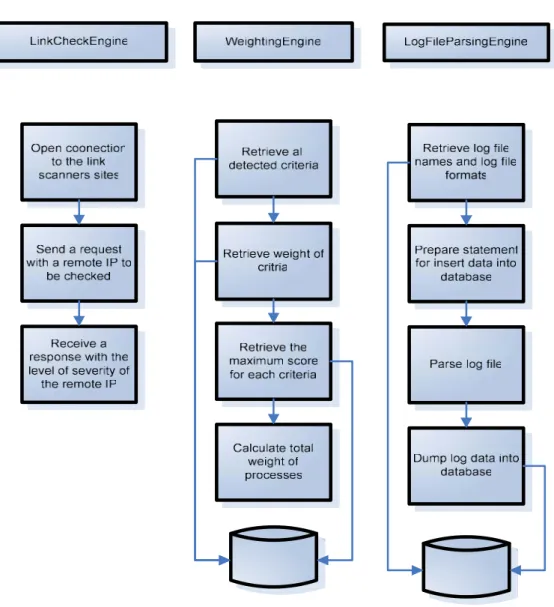
Process flow of LinkCheckEngine, WeightingEngine, and
LogFileParsingEngine... 28
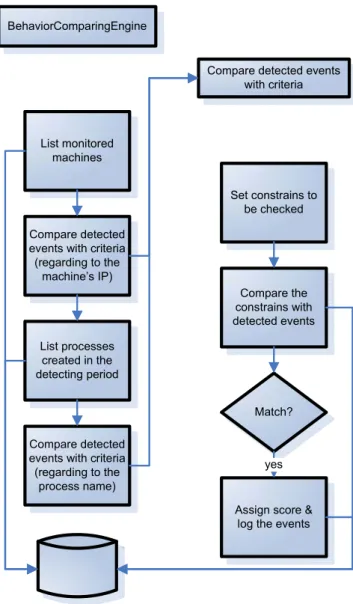
11.
Process flow of BehaviorComparingEngine... 29
12.
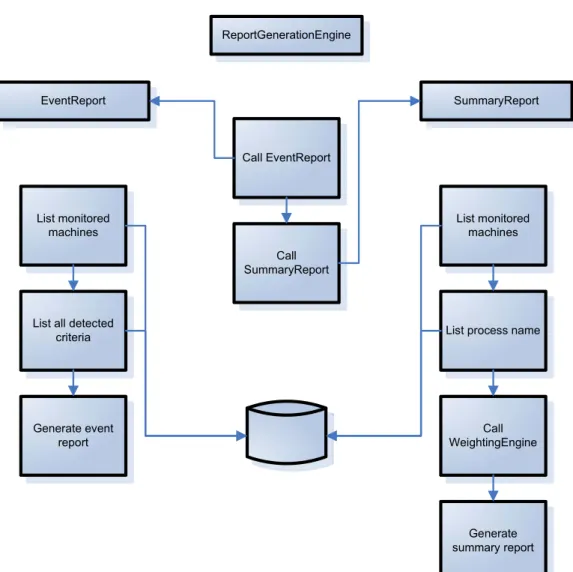
Process flow of ReportGenerationEngine ... 30
13.
MLAS network diagram ... 34
14.
Process activity-frequency graph of the normal activities case... 41
15.
Process name-weight graph... 42
17.
A malicious process is bloceked from a firewall [19]... 58
18.
A malicious process inject a DLL into ... 58
19.
BehaviorComparingEngine task schedule ... 60
20.
ReportGenerationEngine task schedule... 61
21.
Use simple file sharing option... 62
22.
Security tab... 63
23.
Audit tab ... 64
24.
User selection window... 64
25.
Object event audit tab ... 65
26.
Lasso's directory structure... 67
27.
Lasso's startup process ... 68
28.
Port Reporter's directory structure... 68
29.
Port Reporter's startup service... 69
30.
System Safety Monitor's general configuration ... 69
31.
System Safety Monitor's logging configuration ... 70
32.
System Safety Monitor's applications configuration... 70
33.
System Safety Monitor's rule configuration ... 71
34.
System Safety Monitor's directory structure... 71
35.
LogFileParsing's task schedule... 72
37.
Snort's startup process... 74
38.
Switch configuration... 75
39.
Port monitoring page ... 76
40.
setting installation path ... 77
41.
Setting autostart ... 77
42.
Setting notification... 78
43.
setting keylogger... 78
44.
Setting process termination ... 79
45.
Connecting to the VICTIM ... 79
46.
Controlling the VICTIM ... 80
47.
Controlling the VICTIM ... 80
CHAPTER I
INTRODUCTION
A Trojan horse or Trojan is a program that behaves like a normal program but, behind the scenes, it runs some malicious work. There are many types of Trojans, all of which have differences in behavior and level of severity. One of the most dangerous types of Trojans is the backdoor Trojan because compromised machines will be fully controlled by attackers as if they are administrators of those machines. Moreover, it can raise other harmful activities to neighbors such as unauthorized access, DDoS, and network scanning. When a backdoor Trojan is installed on a machine, it uses some technique to hide itself and opens communication port(s) for attackers who want to remotely access the machine at that time or later.
Trojans have been a danger for a long time and are still present in the Internet world [1]. Social engineering is a popular approach to propagate them on people [1]. Attackers send a backdoor Trojan or a malicious URL to peoples’ mailboxes and disguise it as an interesting thing from someone who can be trusted. Once the targeted people run that Trojan or open the given URL, a Trojan will be installed on their machines silently.
Because of this stealthy process, it’s a difficult task for administrators to prevent and detect Trojans by only intrusion detection system (IDS) especially zero-day Trojans— Trojans unknown to the public. It implicitly means we don’t have their signatures, so signature-based IDS cannot recognize them. Even though we already have anomaly-based IDS, which can detect malicious programs without using signature matching, this kind of IDS highly generates false positive alarms since the nature of network traffic and exploiting traffic are always changed.
In this paper, I present a new approach to detect zero-day backdoor Trojans by using a Multiple Logs Analysis System (MLAS). MLAS considers IDS logs, connection logs, process activity logs, system logs and more for monitoring activities of processes and data traffic generated by these processes. I set the list of process activities for comparing detected activities with backdoor Trojans and give weight for each of them. The list of process activities is set from investigating many backdoor Trojans’ behavior such as opening unusual ports, hiding processes and modifying registries. For example, when users access or download software from suspicious websites, the activities are logged into a connection log. Then MLAS checks those websites with online link scanners to see if they are malicious. Further, MLAS looks into machine logs— Windows event log and process activity log-- to find out what processes try to kill antivirus program or other system monitor tools and to detect more as mentioned in the list of process activities. Finally, MLAS look at the network intrusion detection system’s logs to check data traffic inside the network. It tries to detect any exploit generated by infected machines
which are used in this work. More information about the Trojan horse is covered in section 3 including backdoor Trojan characteristics. Section 4 introduces MLAS
architecture. The list of process activities, weight and event score are specified in section 5. For the next section, MLAS application design and process flow will be technically explained. Implementation, experimental results and result analysis are reported in section 7. Finally, in section 8, we summarize this paper and discuss further work.
CHAPTER II
RELATED WORKS AND TOOLS
LinkScanner Pro [2] is a product of Exploit Prevention Labs, which can analyze the website content and the embedded application behavior of given IP addresses or domain names. It checks not only inside the website but also URLs, to which the page can connect. LinkScanner Pro detects the malicious content, exploit software, social engineer or phishing with an up-to-date malware-definition database. It classifies websites into four categories. Each of them indicate the level of severity. MLAS uses these levels to score an activity in the weighting process.
McAfee SiteAdvisor [3] is another link-check application, which contains the same functionalities as LinkScanner. This application builds an automated robot system to check whether websites contain malicious software, social engineer, phishing or a bad history. This information will be kept in its database and the application will rank them into 3 levels of harmfulness. MLAS converts these levels into a score of an activity. The reasons that MLAS uses more than one link scanner are to assure the information about
Snort [4] is a widely used signature-based IDS, which can detect many attacks using pattern matching. It monitors all data traffic passed through a network and compares traffic behavior with signatures. If any traffic behavior matches with any signature inside a signature-definition database, it will generate alarms to administrators. MLAS get information from the alarms and send them into behavior detection processes for comparing process activities and scoring process activities.
Project Lasso [5] is a Windows event log collector. It converts the event log from binary format to text format and sends it across a network via syslog-ng protocol (TCP) to a syslog server. In MLAS, we use only a feature of converting the event log to txt format. This log data will be sent to a database via the MLAS log management system. Project Lasso is an open source application developed by LogLogic Inc.
Port Reporter [11] is an application used to record all connections created by processes on a local machine. The log file contains remote IPs, remote ports, local IPs, local ports and process names, which make a connection. This information is useful for the Behavior Comparing System to compare traffic activities if it meets one in the list of process activities. Also, the remote IPs are sent to the Link Check System for examining the dangers of remote servers.
Sophos Anti-Rootkit [12] is a rootkit scanner. It can detect and clean up hidden processes, hidden registries and hidden files in machines. Some Trojans use rootkit techniques to conceal themselves and Windows cannot see them without using special tool. Sophos Anti-Rootkit was introduced to find these hidden objects and send the object names to MLAS. Sophos Anti-Rootkit is a freeware developed by Sophos Inc.
management system product in the market. Oracle provides thin-client JDBC for Java, thus making it easy for Java development. Also, Snort has an interface communicating with Oracle in order to keep log data into the database. The version we used in MLAS is Oracle10gXE database server and client.
System safety monitor (SSM) [14] is a system monitor application. It monitors process activities, inter-process activities, DLL injection, low level access of hardware, etc. SSM allows user to create rules for controlling processes when they try to access resources of other processes, or to start or to terminate processes. MLAS use this application to detect keyloggers, DLL injection and process termination.
These powerful applications provide useful data to MLAS to detect processes run by backdoor Trojans. Port Reporter records all connections created by processes on a local machine and sends remote IPs to LinkScanner Pro and McAfee SiteAdvisor to check their content. Any anomalous network traffic will be captured by Snort. All
process activities can be found in Lasso logs and System Safety Monitor logs. For hidden objects, MLAS uses Sophos Anti-Rootkit to find them. Log data and results are kept in an Oracle database. For the next section, I will discuss how processes work together and what the architecture of MLAS is.
CHAPTER III
THE TROJAN HORSE
The word “Trojan horse” came from the story of the Trojan War. The war happened when the Greeks wanted to penetrate through the walls of Troy, which had been surrounded by many troops. The Greeks made a huge horse as a sign of
peacefulness and gave this gift to Troy, but inside the horse, there were many Greek troops waiting to attack Troy. Troy accepted the gift and brought it into the city. After the city celebrated their peacefulness and became drunk, the Greek troops inside the horse went outside and opened the gate allowing other troops to take over the city [16].
In the computer security term, we use the name of the Trojan horse to name the malicious programs, which have characteristics like the Greeks’ horse. The Trojan is a malicious application, which pretends to be a legitimate application. When users install the Trojan, the hidden code will be installed as well. The backdoor Trojan is a kind of Trojans but it has some different characteristics, such as opening backdoor ports to the system. Attackers can access the system by creating a remote connection and controlling
(RAT) [17]. For example, the common activities are
• Using the system to be a mail relay and sending spam in order to propagate themselves or something else
• Stealing users’ identity or private information such as credit card numbers, account numbers and SSN
• Monitoring users’ activities • Attacking neighbor
How do the backdoor Trojans work?
1. Attackers distribute Trojans in many ways such as spam email with an attached backdoor Trojan program
Figure 1 An attacker distributes Trojan emails
2. When users receive email and run the backdoor Trojan program, the Trojan will be installed on users’ machine, open backdoor port(s) and notify attacker via IRC, ICQ, MSN or email.
Figure 2 A user receives a Trojan email, runs the Trojan program and notifies to the attacker
ATTACKER DISTRIBUTE NOTIFY ATTACKER INCOMING TROJAN EMAIL
3. Attackers can remotely connect to the infected machine and control it
Figure 3 An infected machine opens a backdoor port so that the attacker can remotely connect to it to control it
Backdoor Trojans’ characteristics and activities [6], [7], [8], [9] 1. propagates itself by
• attaching Trojan’s executable files in spam emails.
• sending Trojan’s executable files via Internet Relay Chat (IRC), MSN or ICQ. • exploiting an existing vulnerability or through an open port such as
The Microsoft SQL Server 2000 or MSDE 2000 Audit
The Microsoft Windows DCOM RPC Interface Buffer Overrun Vulnerability
The Microsoft Windows Local Security Authority Service Remote Buffer Overflow
• inserting its code in other files or programs.
• enumerating all the shared drives and attempts to copy itself to the root folder of the shares.
• downloading code to machines when they visit malicious or compromised web pages.
• copying itself to the shared folders of some popular file-sharing networks such as Kazaa, Edonkey.
2. consists of a server component and a client component.
3. sends victim’s information via SMTP mail, IRC, ICQ pager, ICP Pager, Yahoo Messenger, AOL Instant Messenger, MSN Messenger, and a remote PHP page. 4. contains its own SMTP engine for constructing outgoing messages.
5. injects a companion backdoor dll into a system dll/exe process space such as csrss.exe, svchost.exe, iexplore.exe. This can avoid personal firewall detection.
6. launches the Internet Explorer process and attempt to access malicious web sites 7. hides Trojan’s files and services using a rootkit.
8. hides or unhide files, directories, keys, service names, or process names.
9. sets the file attributes of the dropped files to SHR: System, Hidden and Read only. 10.performs DoS attack.
11.uses the XCP software to hide the copy of the Trojan files and the created registry subkeys.
12.attempts to add the Trojan application as a trusted application into the firewall authorized application list or the Windows Firewall.
13.connects to IRC servers to wait commands.
14.normally distributes as a Win32 PE exe dropper that may be disguised as a JPG or BMP picture.
15.attempts to obtain access to the password cache.
16.a Trojan server process on victim machine make the connection to the client on port 80 using HTTP. In this way, it attempts to avoid personal firewall detection. 17.attempts to SPAM others by searching for email addresses in the Windows
Address Book, Internet Explorer's cache folder, and the %Temp% folder in order to spread the Trojan through email.
18.creates a registry run key to load the Trojan processes at Windows startup. 19.kills running processes such as Remote Access Connection Manager, Remote
Procedure Call, Remote Procedure Call Service, DCOM.
20.kills or disables firewall, antivirus programs, the windows update service and system monitoring tools.
21.decreases the security level.
22.appends the local hosts file (in an attempt to disable updating of many AV products). For example,
127.0.0.1 www.trendmicro.com 127.0.0.1 www.symantec.com 23.logs pressed keys when users type.
24.captures browser window titles and keystrokes typed into Windows with the following strings such as bank, cash, login.
25.clears CMOS. 26.views the screen.
27.causes Windows to shut down/reboot/log user off. 28.opens unusual/unexpected ports on machine. 29.manages the local file system.
30.runs system commands via CMD.EXE (command is passed in via HTML form). 31.inserts a script into HTML files on servers to give an individual with unauthorized
full access to CMD.EXE.
32.floods others to make networks slow down such as HTTP, ICMP, SYN, Ping, and UDP floods.
33.redirects attempts to access spoofed web pages. 34.adds new accounts.
35.serves as a HTTP proxy or an SMTP relay. 36.attempts to delete files generated by Trojans.
37.The following registry entry is added to install a BHO (Browser Helper Object) for generating extra pop-up ads, monitoring page navigation explorer
38.turns on the victim's Webcam.
39.adds configurable entry to the "load=" and "run=" lines in Win.ini, and "shell=" line of System.ini.
40.schedules tasks to run Trojan’s processes.
41.monitors the Internet Explorer for data submitted in web forms and log this information.
CHAPTER IV
THE MLAS ARCHITECTURE
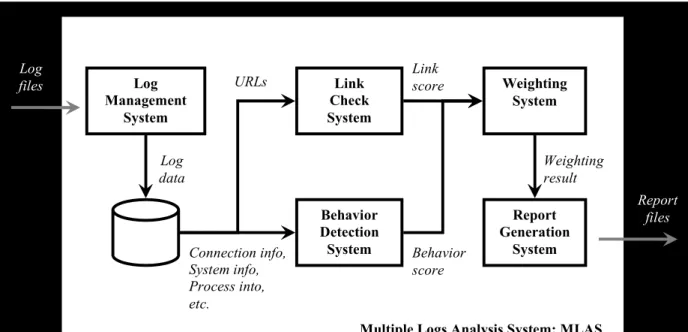
The MLAS Architecture
Figure 4 MLAS architecture Log Management System Behavior Detection System Link Check System Report Generation System Weighting System URLs Connection info, System info, Process into, etc. Link score Behavior score Weighting result Log files Report files
Multiple Logs Analysis System: MLAS
Log data
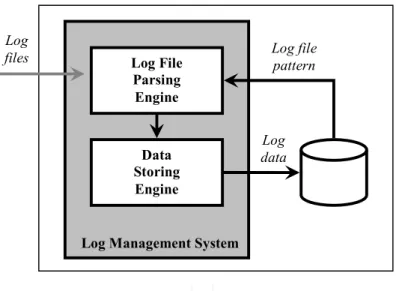
Log Management System (LMS)
Figure 5 Log Management System
The LMS manages log files received from many applications. The Log File Parsing Engine parses log files following a log file pattern. Then, the Data Storing Engine keeps this data in the database.
Log File Parsing Engine Data Storing Engine Log data Log files
Log Management System
Log file pattern
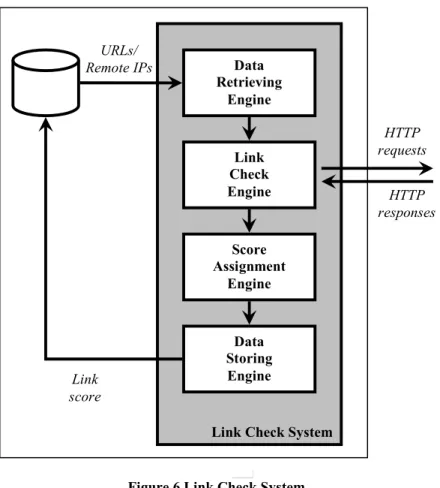
Link Check System (LCS)
Figure 6 Link Check System
The LCS checks URLs that user on target machine visited with link scanner agents outside MLAS. The Data Retrieving Engine retrieves URLs or remote IPs in the database. The Link Check Engine sends HTTP requests with parameter URLs to link scanner agents in order to check the level of harmfulness. When it receives responses, it sends this result to the Score Assignment Engine to assign score for each of URLs. Assigned scores will be stored in the database to be an input of the Weighting System.
Data Retrieving Engine Link Check Engine Link score
Link Check System
URLs/ Remote IPs Score Assignment Engine Data Storing Engine HTTP requests HTTP responses
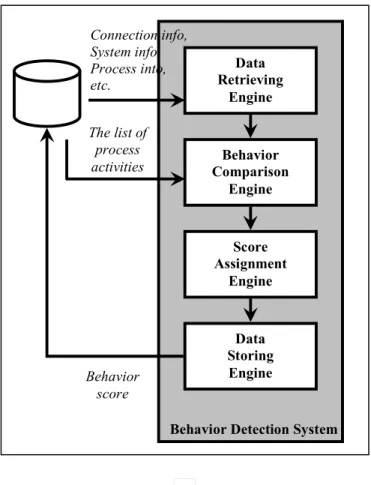
Behavior Detection System (BDS)
Figure 7 Behavior Detection System
The BDS detects behavior of processes, which run on the target machine, to match with process activities in the list. Connection logs, system logs, process activity logs and others are retrieved by the Data Retrieving Engine. The Behavior Comparison Engine compares this information with process activities in the list and scores for each of the activities. Then, it sends the result to the Weighting System. The scores of the
activities are assigned by the Score Assignment Engine. Results from this system will be stored in the database.
Data Retrieving Engine Behavior Comparison Engine Behavior score
Behavior Detection System
Connection info, System info, Process into, etc. Score Assignment Engine Data Storing Engine The list of process activities
Weighting System (WS)
Figure 8 Weighting System
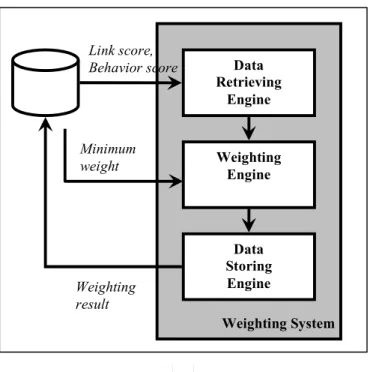
The WS makes the decision whether activities generated from the target machine are suspicious in that they might be infected by backdoor Trojans. The Weighting Engine receives the score from LCS and BDS and calculates weight of these data. If the total weight is more than the minimum weight that we set from experiments in the laboratory, MLAS assumes this machine is suspicious in that it might be infected by a backdoor Trojan; otherwise, it is not suspicious. Information about a suspicious machine is sent to the Report Generation System.
Data Retrieving Engine Weighting Engine Link score, Behavior score Weighting System Data Storing Engine Weighting result Minimum weight
Report Generation System (RGS)
Figure 9 Report Generation System
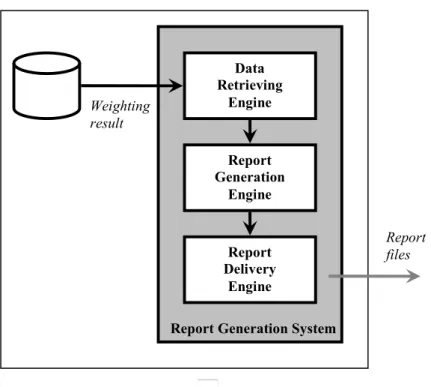
The RGS generates reports to administrators. The Report Generation Engine receives information from WS and creates reports. The reports contain the total weight of every process run on the target machine and detail of process activities, which are met with process activities in the list. These reports will be sent to administrators by the Report Delivery Engine.
Data Retrieving Engine Report Generation Engine Weighting result
Report Generation System Report
Delivery Engine
Report files
CHAPTER V
PROCESS ACTIVITIES, WEIGHT AND EVENT SCORE
Process activities and weight
From the backdoor Trojans’ characteristics and activities, I chose the important events to create the list of process activities. Each process activity was assigned weight by level of severity, which can harm a system or a network. The first time, I assigned weight following an assumption on how dangerous these process activities can be. After many testing, the weight of some process activities was changed as mentioned in the result analysis (chapter VII). Finally, the process activities and their weight ended up following the table process activities and weight.
The weights ranged from 1 to 3. The higher value is the higher level of severity. Table I Weight and meaning
Weight Meaning
1 a general activity that is a part of backdoor behavior.
2 a general activity that is a part of backdoor behavior and can generate serious situations to machines.
Score
A score will be assigned to measure how close a detected event matches to a process activity in the list. The range of score is from 0 to 10. The maximum score value determines that the detected event is very close to the process activity in the list. Events that have the score 0 will be ignored and not be recoded.
Table II Process activities and weight
Event Weight
1 An application saves its files into %WinDir% or %SysDir% rather than %Program Files%
Detection :
Windows Event Log> security log
2
2 An application adds its process into registry in part of automatic startup to run itself every time Windows start or copies the process into startup folder
More detail:
[Appendix A: 1. Startup registry keys and startup folder]
Detection :
Windows Event Log> security log
1
3 An application tries to change the configuration of Windows monitor tools or a Windows update component in the registry.
More detail:
[Appendix A: 2. Windows monitor tools’ configuration registry keys]
Detection :
Windows Event Log> security log
2
4 An application add some value into this registry to generate extra pop-up ads or monitor the navigation explorer page:
• HKEY_LOCAL_MACHINE\SOFTWARE\Microsoft\Win dows\CurrentVersion\Explorer\Browser Helper Objects
More Detail:
[appendix A: 3. Browser Helper Object]
Detection :
Windows Event Log> security log
2
5 An application tries to send machine’s information via SMTP mail, IRC, ICQ pager, ICP Pager, Yahoo Messenger, AOL Instant Messenger, MSN Messenger, and a remote PHP page.
More Detail:
[appendix A: 4. Ports and login servers for sending machine’s information]
Detection:
The Port reporter application’s log Snort’s log
6 An application tries to inject DLLs into system DLLs/processes, such as csrss.exe, svchost.exe, iexplore.exe
More Detail:
[appendix A: 5. DLL injection]
Detection :
Windows Event Log> security log
2
7 An application attempts to access malicious web sites while it’s installing or after installing
Detection:
The Port reporter application’s log
3
8 An application hides its files, directories, service names, or process names using rootkit
More Detail:
[appendix A: 6. Rootkit]
Detection :
The Sophos Anti-Rootkit application’s log
2
9 An application performs attacks to neighbors such as DoS attack, protocol floods, port scan.
Detection:
Snort’s log
3
10 An application connects to an IRC server for waiting command from an attacker.
Detection:
The Port reporter application’s log
3
11 An application attempts to access the password cache or any location where password information is contained.
Detection :
Windows Event Log> security log
3
12 An application creates SMTP connection and sends many emails in order to spread itself through spam emails by searching for email addresses in Outlook’s Address Book.
Detection :
Windows Event Log-> security log The Port reporter application’s log
13 An application tries to kill running system processes such as Remote Access Connection Manager, Remote Procedure Call, Remote Procedure Call Service, DCOM
Detection :
Windows Event Log> security log
2
14 An application kills or disables system monitoring tools such as the Windows firewall, the Windows update service and antivirus programs, or it decreases the security level of that machine.
Detection :
The System safety monitor’s log
3
15 An application appends the local hosts file with any security websites to loop to a localhost ip. For example, it appends this line “127.0.0.1 www.symantec.com”
Detection :
Windows Event Log> security log
2
16 An application logs keystrokes that a user typed into Windows.
More Detail:
[appendix A: 7. Keylogger]
Detection :
System safety monitor’s log
3
17 An application captures the screen
Detection :
-
2
18 An application opens unusual/unexpected ports on the machine.
More detail:
Considering ports as unusual ports is upon environment of a network. For example, in a web server farm network, port number 80 is a usual port. On the other hand, this port can be considered as an unusual port if it appears in a user network group.
In this work, MLAS will be implemented on a user network group, so server ports such as http, ftp, SMTP, etc. will be considered as unusual ports.
Detection :
Windows Event log ->security log The Port Reporter’s log
19 An application adds new accounts.
Detection :
Windows Event Log> security log
3
20 An application serves as a server such as an HTTP proxy or a SMTP relay.
Detection:
Windows Event log>security log
3
21 An application adds entries to
• the file Win.ini in the lines containing keywords "load=" and "run="
• the file System.ini in the lines containing a keyword "shell="
Detection :
Windows Event Log> security log
2
22 An application reads Windows system’s information
Detection :
Windows Event Log> security log
CHAPTER VI
MLAS APPLICATION DESIGN
Log file format Event report
File name format
MLAS_EVENT_REPORT[date].HTM Report format [IP1] [detected event1] [event1 detail] [detected event2] [event2 detail] [more events] [IP2] [detected event1] [event1 detail] [detected event2] [event2 detail] [more events] [more IPs]
Summary Report File name format
MLAS_SUMMARY_REPORT[date].HTM Report format
[IP1]
[process1]
[process1’s total weight] [process2]
[process2’s total weight]
[more processes]
[IP2]
[process1]
[process1’s total weight] [process2]
[process2’s total weight]
[more processes] [more IPs]
Process flow
List monitored machines
Compare detected events with criteria (regarding to the machine’s IP) List processes created in the detecting period Compare detected events with criteria (regarding to the
process name) BehaviorComparingEngine
Compare detected events with criteria Set constrains to be checked Compare the constrains with detected events Match?
Assign score & log the events
yes
EventReport
List all detected criteria List monitored machines Generate event report ReportGenerationEngine Call SummaryReport Call EventReport SummaryReport
List process name List monitored machines Call WeightingEngine Generate summary report
Database schema
Table III TABLE_AND_LOG_FILE_MAPPING
Column Name Data Ty pe Nullable Primary Key
TABLE_NAME VARCHAR2(100) No 1
FILE_NAME VARCHAR2(1000) No 2
SEPARATOR VARCHAR2(100) No -
BEGIN_AT_LINE NUMBER No -
DATE_FORMAT VARCHAR2(100) Yes -
Table IV TABLE_SCHEMA
Column Na me Data Type Nullable Primary Key
TABLE_NAME VARCHAR2(1000) No 1
ATTRIBUTE_NAME VARCHAR2(1000) No 2
ATTRIBUTE_ORDER NUMBER No -
ATTRIBUTE_TYPE VARCHAR2(1000) No - Table V EVENT_LOG
Column Na me Data Type Nullable Primary Key
ID NUMBER No 1
IP VARCHAR2(100) No 2
LOG_TYPE VARCHAR2(100) No -
LOG_TIME DATE No -
EVENT_ID VARCHAR2(100) Yes -
USER_NAME VARCHAR2(100) Yes -
GROUP_NAME VARCHAR2(100) Yes -
EVENT_TYPE VARCHAR2(100) Yes -
Table VI TRAFFIC_LOG
Column Name Data Ty pe Nullable Primary Key
ID NUMBER No 1
IP VARCHAR2(100) No 2
LOG_TIME DATE No -
PROTOCAL VARCHAR2(100) Yes -
LOCAL_PORT VARCHAR2(100) Yes -
LOCAL_IP VARCHAR2(100) Yes -
REMOTE_PORT VARCHAR2(100) Yes -
REMOTE_IP VARCHAR2(100) Yes -
PID VARCHAR2(100) Yes -
PROCESS_NAME VARCHAR2(100) Yes -
USER_NAME VARCHAR2(500) Yes -
Table VII ROOTKIT_REPORT
Column Na me Data Type Null able Primary Key
ID NUMBER No 1
IP VARCHAR2(100) No 2
REPORT_TIME DATE No -
HIDDEN_OBJECT_TYPE VARCHAR2(100) No - HIDDEN_OBJECT_NAME VARCHAR2(600) No -
Table VIII DETECTING_LOG
Column Na me Data Type Nullable Primary Key
ID NUMBER No 1
IP VARCHAR2(100) No 2
DETECTING_TIME DATE Yes -
PROCESS_ACTIVITY_NAME VARCHAR2(500) Yes -
SCORE NUMBER Yes -
FROM_LOG_TABLE VARCHAR2(500) Yes -
FROM_LOG_ID NUMBER Yes -
PROCESS_NAME VARCHAR2(1000) Yes - Table IX BLACK_PORT_NUMBER
Column Name Data Ty pe Nullable Primary Key
PORT_NUMBER VARCHAR2(50) No 1
Table X MONITORING_SERVICE_NAME
Column Name Data Ty pe Nullable Primary Key
Table XI BLACK_PORT_NUMBER
Column Name Data Ty pe Nullable Primary Key
PORT_NUMBER VARCHAR2(50) No 1
Table XII APPLICATION_PARAMETER
C ol umn Na me Da ta Ty pe Nul l abl e Primary Key
PARAMETER_NAME VARCHAR2(4000) No 1
DETECTING_PERIOD NUMBER No -
ENABLE NUMBER Yes -
Table XIII DLL_INJECTION_LOG
Co l umn Na me D ata Type Nul l abl e Primary Key
ID NUMBER No 1
IP VARCHAR2(100) No 2
LOG_TIME DATE Yes -
EVENT_TYPE VARCHAR2(10) Yes -
EVENT_ACTION VARCHAR2(10) Yes -
USER_NAME VARCHAR2(500) Yes -
PARENT VARCHAR2(500) Yes -
CHILD VARCHAR2(500) Yes -
RESULT VARCHAR2(500) Yes -
Table XIV IP_LIST
Co l umn Na me D ata Type Nul l abl e Primary Key
IP VARCHAR2(100) No 1
ENABLE NUMBER Yes -
Table XV WEIGHT_OF_PROCESS_ACTIVITIES
Co l umn Na me D ata Type Nul l abl e Primary Key
PROCESS_ACTIVITY_NAME VARCHAR2(200) No 1
CHAPTER VII
IMPLEMENTATION, EXPERIMENT AND RESULTS
Limitation
Applications run on the machines
The VICTIM machine and the NEIGHBOR machine • Enable security audit for these objects
A system32 directory following policy: audit this folder only for creating files
A program file directory following policy: audit this folder and sub for creating directory
A windows directory following policy: audit this folder only for creating files
Files hosts, system.ini, and win.ini following policy: audit this object only for writing data
• Run the Lasso for collecting Windows event log, which is binary data, to a text file.
• Run the Port Reporter for logging data traffic generated from local machine to remote machine.
• Run System Safety Monitor for real-time monitoring inter-process activities • Schedule the RootkitBuster to run everyday. It will scan a local machine to
find hidden files, hidden registry and hidden process. Then generate a log file • Schedule LogFileParsing, a module in LMS, to parse these log files and store
data into database. It will be run everyday. The NW MONITOR machine
• Install Snort (with oracle supported option) and run as NIDS. Its alerts will be logged into the database
The ATTACKER machine
• Contain backdoor Trojan clients and servers for exploit the victim machine. Below is the list of backdoor Trojans, which were tested in experiments.
Assasin 2.0 Final Beast 2.07 CIA 1.23 Pb1 Minimo Public 0.7 ProRat V1.9 SubSeven V.2.1.5
Application configuration and testing steps
Experimental results
4 1 F ig u re 1 4 P ro ce ss a ct iv it y -f re q u en cy g ra p h o f t h e n o rm a l a ct iv it ie s c a se
PROCESS ACTIVITIES-FREQUENCY in the Normal activities case
0 2 4 6 8 10 12 C1 C2 C3 C4 C5 C6 C7 C8 C9 C10 C11 C12 C13 C14 C15 C16 C17 C18 C19 C20 C21 C22 fr e q u e n c y
0 2 0 4 0 6 0 8 0 1 0 0 1 2 0 1 4 0 1 6 0 1 8 0 bi tto rr en t-6. 0. ex e in st al l_ ic q6 .e xe in st al l_ m es se ng er .e xe in st al le rs _r ea l6 .e xe go og le up da te rs et up .e xe in st al le rs _c i5 .tm p w lto ol ba rs et up .e xe bi tto rr en t.e xe dn a. ex e Th e S ub S ev en Th e P ro R A T Th e A ss as in Th e M in im o Th e B E A S T e Th C IA re al sc he d. ex e bt dn a. ex e go og le to ol ba rn ot ifi er .e xe ie xp lo re .e xe m sn m sg r.e xe m si m n. ex e pc ts sv c. ex e sd lo ad er .e xe sm c. ex e sf ct lc om .e xe tm pr ox y. ex e ex pl or er .e xe re ge di t.e xe a4 ..\ up da te .e xe a8 ..\ up da te .e xe ct fm on .e xe m si ex ec .e xe rd pc lip .e xe re gs vr 32 .e xe sv ch os t.e xe w m ia da p. ex e nu ll p ro c e s s n a m e w e ig h t
Results analysis Weighting
Table XVI Process activities and weight
PROCESS_ACTIVITY_NAME WEIGHT C1SavingFileIntoSystemFolder 2 C2RegisteringAsStartupProcess 1 C3ModifyingConfigOfWindowsMonitorTools 2 C4AddingBrowserHelper 2 C5SendingInfoViaChatApp 2 C6DLLInjection 2 C7CheckLink 3 C8HiddingItself 2 C9CheckAttackingNeighbors 3 C10ConnectingIRCServer 3 C11AccessingPasswordFile 3 C12Spamming 3 C14KillingOrDisablingSystemMonitoringTools 3 C15ModifyingHostsFile 2 C16LowLevelKeyboardAccess 3 C18OpeningPort 2 C19CreatingUserAccount 3 C20ServingAsServer 3 C21ModifyingWinIni_SystemIniFile 2 C22ReadSystemInformation 1
1. From the case Normal Activities we can see C2, C3, C6 and C18 are the general activities. We should give them less weight than others. At the first round of analysis, we give these process activities weight 1. In case of C3, C6 and C18, however, they can be the serious situations, which are harmful to the machine. We increase their weight to 2.
2. C7, C9, C10, C12, C14, C16 and C20 are identified as backdoor behaviors. These activities will not appear in the case Normal Activities whereas they will be detected sometimes in later Trojan test cases, so we give them weight 3.
3. C5 should be seen in the case Normal Activities because chat applications such as ICQ, MSN or AIM are popular programs, which many people use frequently. This process activity is hard to be detected because chat service providers’
servers, ports or login approaches are often changed upon application version and manual configuration of each user. In case of C8, we can detect some system files, system processes or system registries hiding themselves in order to protect them from innocent users who try to modify or delete them without enough knowledge. However, both process activities are the part of backdoor Trojan behavior. We assign their weight to 2.
4. From considering the process activities C1, C4, C11, C19 and C21, Trojans use these activities to install and escalate themselves to get more privilege. We assign their weight 3. However, in the case Normal Activities, these activities can be found in some kinds of applications; for example, installing toolbars is a cause of meeting C4, or the process “msiexec.exe”, which is used to install new programs that use Windows Installer package files, may have to access system objects such as Windows directory, system32 directory, win.ini and system.ini. Therefore, we change the weight of C1, C4 and C21 to 2
5. Finally, a machine’s system information is an important thing for knowing its platform, service pack version, host name, etc. Attackers want to know it before they exploit a system. However, this kind of activity can be detected in normal
applications especially in reading system information. So, we assign weight of C22 to 1 and C15 to 2 because of lower detecting frequency
Threshold of process weight The Normal activities case
The average of the normal process score: 820/30 = 27.3 The maximum process activities found in normal processes: 3 Top 3 process activities met in normal processes: C2, C3 and C18 The sum score of top 3 process activities: 50
The Trojan case
The average of the normal process score: 860/31 = 27.7 The maximum process activities found in normal processes: 3 Top 3 process activities met in normal processes: C1, C6 and C18 The sum weight of top 3 process activities: 60
The average of the backdoor Trojan process score: 810/6 = 135 The minimum process activities found in Trojan processes: 5
Top 5 process activities met in the backdoor Trojan processes: C1, C5, C6, C14 and C18
Result
For the maximum threshold value of the normal process, I consider the top 3 process activities in the normal activities case because when I tested the Trojan case, some of correlative processes of a Trojan process appeared and could deviate the process weight.
Table XVII Threshold score
Score range Result
Below 50 A normal process
51-109 A suspect process
Above 110 A backdoor Trojan process
If any machine contains a suspect process, they should be inspected closely. They may or may not be infected with a backdoor Trojan because MLAS contains a false positive alarm (more detail below). If any machine contains a process having a weight over 110, they are considered a victim of backdoor Trojans. In this case, administrators should quarantine them from the network and find the way to end them
Null process
Some process activities cannot be determined by the process name. For instance, attacking neighbors is detected by Snort. Because Snort doesn’t provide information about process names, which create the attacking connection, MLAS cannot identify the process names. In case of processes hiding themselves, Windows event log sometimes cannot see them, so we cannot determine the process name either.
activities can only be detected by looking at the level of the machine’s IP and. Then, when administrators consider the threshold of process weight, we should add this weight into the process weight as well
False positive alarm
From the result in the Normal activities case, regedit.exe, svchost.exe, msiexec.exe and null process name were considered as false positive alarms. Their weights were considered as suspect processes but actually this false positive was caused by special activities made by administrators or by the machine’s normal process behavior.
“regedit.exe” was created by administrators who wanted to check data inside Windows registry. This kind of activity can occur anytime when administrators notice something wrong in the system and want to check data inside the registry. So, if there are similar activities made by authorized users, the false positive alarm will occur and it can be ignored.
The process “svchost.exe” and “msiexec.exe” can create the false positive alarm because of their normal process behavior. The process svchost.exe is used to manage the local system and interoperate with other processes. Moreover, it has to open ports for receiving requests from other machines or processes. One solution we found for reducing a false positive alarm of this process is learning the process behavior about the opening ports frequently and safely. MLAS provides white-port tuning that allows administrators to tell the system what the safe ports are. The processes can open these ports without alerting process activity
C18.
The process msiexec.exe is a broker process used to install new programs that use Windows Installer package files (MSI). It accesses the system object instead of the real process. Because of this, its weight can be raised to the level of the suspect process. When administrators found this kind of process, they should take care of these processes separately.
Problems
1. The URL checking website, LinkScanner, has a limitation of the number of connections. So if MLAS send many requests over its limitation, the system will get a timeout error and have to wait until the scanner accept connections again.
2. The process activities C8 and C22 are difficult to be detected because there are many ways to achieve these activities. MLAS cannot cover every
approach, so from the experimental result, MLAS couldn’t detect C8 and C22. 3. Currently, there is no precise approach to detecting keyloggers. MLAS tries to
monitor accessing low level of keyboard to detect the process activities C16 even though it’s not the best way. From the experiment, MLAS can detect these process activities in some Trojans, but not all of them.
4. The System Safety Monitor software I tried, which is used in MLAS, is a trial version and will be expired if I don’t buy a license extension. I tried to test the free version of this application but it didn’t provide as many features as I needed.
CHAPTER VIII
CONCLUSIONS AND FUTURE WORK
MLAS is developed in order to detect backdoor Trojans at zero day or unknown backdoor Trojans. It uses the new technique called multiple logs analysis that analyzes log data collected by many monitoring tools. The Project Lasso collects security audit events and process activities from Windows Event Log. The System Safety Monitor records inter-process activities. Communication activities are captured by the Port Reporter and send remote IPs to LinkScanner and McAfee SiteAdvisor to check their harmfulness. The Sophos rootkit scanner is used to detect hidden processes and hidden files on a local machine. Also, Snort monitors traffic on a computer network and logs abnormal connections to the Oracle database server.
MLAS can detect the Trojan processes by looking at the total weight of process. A process having weight more than the threshold will be determined to be a Trojan process. From the experimental results, MLAS can detect each of six Trojan processes, which have the distinctive high process weight. Moreover, any suspect process will be
MLAS can be improved to deploy on many kinds of operating systems. Because nowadays the operating systems are varied widely, developing MLAS in the first phase is based on Windows XP and other operating systems that have the same architecture. If you want to deploy MLAS on other systems, it should be adapted in some of the process activity detection approaches such as the location of system objects and monitoring tools compatibility. Moreover, emerging of new tools can improve MLAS in case of process activity detection. This problem can be seen in MLAS. It cannot find a tools or a way to detect an event, which meets the process activities in the list. Or it can just detect the side effect of the event that can create the false decision. Finally, computer security
experience in auditing systems is necessary for MLAS as well. The better auditing can catch more events relating to process activities in the list.
The concept and framework of MLAS can be used to detect other kinds of malware on computer systems other than zero-day backdoor Trojans. It is able to study the malware’s behavior, create new list of process activities and find appropriate tools to detect process activities’ event. In the future, MLAS may become to a new powerful monitoring tool because of its effective framework and improved human knowledge.
REFERENCES
[1] United States Computer Emergency Readiness Team (US-CERT), QUARTERLY TRENDS AND ANALYSIS REPORT Volume 2, Issue 3, Sep 1, 2007
[2] Exploit Prevention Labs, LinkScanner Pro.
<http://linkscanner.explabs.com> [3] McAfee Inc., McAfee SiteAdvisor.
<http://www.siteadvisor.com> [4] Snort, Snort.
<http://www.snort.org> [5] LogLogic Inc., Project Lasso1
<http://www.loglogic.com> [6] McAfee Inc.
<http://www.mcafee.com> [7] Symantec Corporation
<http://www.symantec.com> [8] Trend Micro Inc.
<http://www.trendmicro.com> [9] Panda Security
<http://www.pandasecurity.com>
[10] Spywareinfo, BHO's- Browser Helper Objects. <http://www.spywareinfo.com/articles/bho> [11] Microsoft, Port Reporter
<http://www.microsoft.com> [12] Sophos Inc, Sophos Anti-Rootkit
<http://www.sophos.com> [13] Oracle Corporate, Oracle10gXE
<http://www.oracle.com>
[14] System Safety Limited, System Safety Monitor
<http://www.syssafety.com>
[16] TrojanHorseFacts.com, Greek Trojan Horse
[17] Blair, What is a backdoor Trojan?, Oct 3, 2007 <http://www.geekstogo.com>
[18] Song, DLL Injection Howto, Feb 2, 2007 <http://www.caisong.com>
[19] Nikolay Grebennikov, Using leak tests to evaluate firewall effectiveness, Dec 20, 2007
[20] James Butler and Sherri Sparks, Windows rootkits of 2005part one, Nov 4, 2005 < http://www.securityfocus.com/infocus/1850>
[21] Larry Seltzer, Rootkits: The Ultimate Stealth Attack, Apr 20, 2005 <http://www.pcmag.com/article2/0,1759,1790572,00.asp>
APPENDIX A:
1. Startup registry keys and startup folders
• HKEY_LOCAL_MACHINE\System\Currentcontrolset\Services to create a Trojan process as a service.
• HKEY_LOCAL_MACHINE\Software\Microsoft\Windows\CurrentVersion\ Run\ and
HKEY_LOCAL_MACHINE\Software\Microsoft\Windows\CurrentVersion\ RunOnce
to create Trojan processes as background services when the logon dialog box first appears, or at this stage of the boot process only once per boot.
• KEY_CURRENT_USER\Software\Microsoft\Windows\ CurrentVersion\Run
to run Trojan processes each time a new user logs in. • HKEY_LOCAL_MACHINE\Software\Microsoft\Windows\
CurrentVersion\Policies\Explorer\Run
to start Trojan processes when Windows starts up. • HKEY_LOCAL_MACHINE\Software\Microsoft\
WindowsNT\CurrentVersion\Winlogon\Notify
Windows will notify Trojan processes to be run when a logon event occurs. • HKEY_CLASSES_ROOT\Exefile\shell\open\command
Key name: (Default) Key value: "%1" %*
If value of “(Default)” key is changed to {%Trojan path% /exec:"%1" %*}, The Trojan will be automatically invoked when file type “exe” is called. Trojans can deal with other file type such as JPEG
(HKEY_CLASSES_ROOT\Jpegfile\Shell\Open\Command "(Default)" = %Trojan path% /exec:%interpreter%).
• C:\Documents and Settings\All Users\Start Menu\ Programs\Startup
A startup folder contains processes that the user wants to run at Windows startup.
2. Windows monitor tools’ configuration registry keys
• HKEY_LOCAL_MACHINE\Software\Microsoft\Security Center to modify configuration of a Windows security monitor tool.
• HKEY_LOCAL_MACHINE\Software\Microsoft\Windows\CurrentVersion\Wind owsUpdate\auto update
to modify configuration of a Windows update service.
• HKEY_LOCAL_MACHINE\Software\Policies\Microsoft\WindowsFirewall\Do mainProfile
to modify configuration of Windows Firewall application
• HKEY_LOCAL_MACHINE\System\CurrentControlSet\Services\SharedAccess\ Parameters\FirewallPolicy\StandardProfile\AuthorizedApplications\List
3. Browser Helper Object
A "Browser Helper Object (BHO)" is a DLL that works with Internet Explorer for some special purpose. BHOs can be installed on machines for being supplement toolbars of the Internet Explorer application. They may or may not require user interface or users’ permission for installing. So, they can reside in any machines without users’ awareness. Trojans use this kind of DLL to monitor and gather information of users when they’re surfing
4. Ports and login servers for sending machine’s information Destination port
• SMTP: TCP 25, 465
• MSN Messenger: TCP 1863 • Yahoo! Messenger: TCP 80 • ICQ: UDP 2000-4000, TCP 5190 • AOL Instant Messenger: TCP 5190 Login server
• AOL Instant Messenger: login.oscar.aol.com:443, login.oscar.aol.com, toc.oscar.aol.com and login.icq.com
• MSN Messenger: gateway.messenger.hotmail.com • ICQ: login.icq.com and http.proxy.icq.com
5. DLL injection
A Dynamically Linked Library (DLL) is a shared library, to which many processes can access. DLLs provide common functions that processes don’t have to reproduce for their own. When any processes want to use DLLs, they load the DLLs into their virtual address space and call functions inside the loaded DLLs
DLL injection is inserting code into a program’s memory space. It can be achieved by many approaches. The popular approach has the following steps:
• Start a process • Create a DLL
• Open a target process
• Load the DLL into reserved virtual address space of the target process • Create a remote thread inside the target process to run the loaded DLL
Figure 16 A process injects a DLL into a target process and creates a remote thread inside the target process [18]
For malicious applications, the objective of this activity is avoiding firewall detection. When a malicious process wants to communicate with an attacker, it creates a remote thread in a trusted process and uses this process name to bypass the firewall.
Figure 17 A malicious process is bloceked from a firewall [19]
Figure 18 A malicious process inject a DLL into a trusted process for bypass firewall detection [19]
6. Rootkit
A rootkit is a program or set of programs that an intruder uses to hide their presence on a computer system and to allow access to the computer system in the future. To accomplish its goal, a rootkit will alter the execution flow of the operating system or manipulate the data set that the operating system relies upon for auditing and bookkeeping [20].
How does the Rootkit work?
The Rootkit processes run in a low level mode, which can intercept
applications’ call to the operating system and modify the result sent back to the applications. For example, when an user runs the Task manager for monitor running processes, the task manager makes a system call to the operating system for retrieving a list of running processes. The Rootkit intercepts this system call and delete its own process name in the list returned to the Task manager. So, the user cannot see the Rootkit process. From this kind of activity, the Rootkit can hide its existence such as communication ports, files and registries [21].
7. Keylogger
The Keylogger is a program used to keep track of information that a user typed in any application and save it into a file, which is usually encrypted and hidden from the user. It can log any important information such as credit card numbers, username and password. It may be detected by checking low level access of keyboard of a process.
APPENDIX B: Application configuration and testing steps
1. Application configuration
The MLAS machine
The BehaviorComparingEngine task schedule
The ReportGenerationEngine task schedule
Figure 20 ReportGenerationEngine task schedule
The batch files
behaviorComparingEngineBatch.bat cd C:\MLAS\app
java BehaviorComparingEngine > app.log reportGenerationEngineBatch.bat
cd C:\MLAS\app
java ReportGenerationEngine
Oracle Database Server Database Setting
Oracle Database 10g Express Edition Release 10.2.0.1.0 - Product PL/SQL Release 10.2.0.1.0 - Production
CORE 10.2.0.1.0 Production
TNS for 32-bit Windows: Version 10.2.0.1.0 - Production NLSRTL Version 10.2.0.1.0 - Production
user: sinchai password: JfNkK852 user:snort
password: JfNkK852
The VICTIM machine and the NEIGHBOR machine Security audit
1. Explorer>Tools>View: deselects “Use simple file sharing”
2. [Audit Object]>Sharing and Security>Security
3. Advance>Audit
Figure 23 Audit tab
4. Add: Everyone
5. OK>selects or deselects desired events
Figure 25 Object event audit tab
6. set the configuration
Table XVIII Object audit configuration
Audited object Audit apply to Audited event
system32 this folder only create file
program file this folder and
subfolders
create dir
windows this folder only create file
hosts, system.ini, win.ini this object only write data append data write attr write atten attr change permission C:\WINDOWS\system32\config\SAM this object only All
HCU\Software\Microsoft\
Protected Storage System Provider
this key and subkeys
All Documents and Settings\Application Data\
Microsoft\Credentials
this folder and subfolders
All HCU\Software\Microsoft\Internet Explorer\
IntelliForms\Storage2
this key and subkeys
All C:\Documents and Settings\KARAWUT\
Application Data\Microsoft\Address Book
this folder and subfolders
read data HLM \software\microsoft\windows nt\
currentVersion
this key only query value HCU\Software\Microsoft\Windows\
CurrentVersion\Policies\System
this key only set value HLM\System\Currentcontrolset\Services\ this key only create subkey HLM\Software\Microsoft\Windows\
CurrentVersion\Run[Services]
this key only set value HLM\Software\Microsoft\Windows\
CurrentVersion\Run[Services]Once
this key only set value HLM\Software\Microsoft\Windows\
CurrentVersion\Run[Services]OnceEx
this key only set value HCU\Software\Microsoft\Windows\
CurrentVersion\Run
this key only set value HLM\Software\Microsoft\Windows\
CurrentVersion\Policies\Explorer\Run
this key only set value HLM\Software\Microsoft\Windows NT
CurrentVersion\Winlogon\Notify
this key only create subkey HCR\Exefile\shell\open\command\ this key only set value C:\Documents and Settings\All Users\Start
Menu\ Programs\Startup
this folder only write data, append data
HLM\Software\Microsoft\Security Center this key and subkeys
set value HLM\Software\Microsoft\Windows\
CurrentVersion\WindowsUpdate\auto update
this key set value
HLM\Software\Policies\Microsoft\ WindowsFirewall\DomainProfile
this key and subkeys
set value, create sub
HLM\System\CurrentControlSet\Services\ SharedAccess\Parameters\FirewallPolicy\ StandardProfile\AuthorizedApplications\List
this key only set value
HLM\SOFTWARE\Microsoft\Windows\ CurrentVersion\Explorer\
Browser Helper Objects
this key and subkeys
Project Lasso
The configuration file “Lasso.ini” SkipInitDLLScan,0
LogAppliance,127.0.0.1,514
RepositoryPath,C:\Program Files\Lasso\LassoRepository\ SpoolPath,C:\Program Files\Lasso\LassoRepository\Spool\ EventPollInterval,10
SpoolFileSize,0.01 # spool file size in % WatermarkWriteInterval,100 MaxTraceFileSize,1 MaxNumWorkerThreads,4 DllLoadInterval,3600 HighWaterMarks,ON #DefaultLassoShare,LassoShare=C:\LassoTemp CheckHostListInterval,3600 NewHostSkipHistorical,0 EnableShareDlls,1 CheckRemHostAvail,0 EnableAdminSharesIfDisabled,0 DebugLevel,31 LogLevel,7
DebugHostFileSize,10 # VICTIM#0 SIZE AccessReport,0
The configuration file Hostlist.ini localhost,security,system
The directory structure
The startup process
Figure 27 Lasso's startup process
The Port Reporter
The directory structure
The startup service
Figure 29 Port Reporter's startup service
System safety monitor
Application configuration General configuration
Logging configuration
Figure 31 System Safety Monitor's logging configuration
Rule configuration: everything is default except “Rules>Process control>Terminate other processes”
Figure 33 System Safety Monitor's rule configuration
The directory structure
LogFileParsing Command
java LogFileParsing > app.log Task schedule
Figure 35 LogFileParsing's task schedule
Batch files lasso.bat
del /Q C:\batchJob\logs\lasso.txt
copy /Y C:\"Program Files"\Lasso\LassoRepository\Spool\VICTIM#0.txt C:\batchJob\logs\lasso.txt
dllInjection.bat
cd C:\Program Files\System Safety Monitor\log
for /F "tokens=5 skip=5" %%A IN ('dir /O-D *.xml') DO ( copy /Y %%A C:\batchJob\logs\dllInjectionLog.xml copy /Y %%A C:\batchJob\oldLog\
del /Q %%A ) portReporter.bat del /Q C:\batchJob\logs\portReporter.txt copy /Y C:\WINDOWS\system32\LogFiles\PortReporter\pr-ports* C:\batchJob\logs\portReporter.txt del /Q C:\WINDOWS\system32\LogFiles\PortReporter\*
rootKitBuster.bat
del /Q C:\batchJob\logs\RootkitBuster.txt
del /Q C:\"Program Files"\RootkitBuster\TMRBLog\* cd C:\"Program Files"\RootkitBuster
RootkitBuster.exe /s /a
copy /Y C:\"Program Files"\RootkitBuster\TMRBLog\TMRB00001.TXT C:\batchJob\logs\RootkitBuster.txt
sophosRootkit.bat
del /Q C:\batchJob\logs\sophosRootkit.txt cd C:\Program Files\Sophos\Sophos Anti-Rootkit sarcli -log="C:\batchJob\logs\sophosRootkit.txt" logCollector.bat
cd C:\batchJob\app
java LogFileParsing > app.log
The NW MONITOR machine
Snort (with oracle supported option) Command
Configuration for Oracle supported
Figure 36 Snort's configuration for Oracle supported
The startup process
Backdoor Trojan Removal
In case of detecting unknown backdoor Trojan, Snort was removed the rule for detecting Trojans.
Switch
Switch configuration: Port monitoring
2. Testing steps
1. create a Trojan server on the machine ATTACKER
Figure 40 setting installation path
Figure 42 Setting notification
Figure 44 Setting process termination
3. Controls the VICTIM
Figure 46 Controlling the VICTIM
Figure 48 Retrieving the VICTIM's processes
4. Run test.bat on the machine VICTIM cd C:\Program Files\System Safety Monitor\log
for /F "tokens=5 skip=5" %%A IN ('dir /O-D *.xml') DO ( copy /Y %%A C:\batchJob\logs\dllInjectionLog.xml copy /Y %%A C:\batchJob\oldLog\
del /Q %%A ) del /Q C:\batchJob\logs\portReporter.txt copy /Y C:\WINDOWS\system32\LogFiles\PortReporter\pr-ports* C:\batchJob\logs\portReporter.txt del /Q C:\WINDOWS\system32\LogFiles\PortReporter\* del /Q C:\batchJob\logs\sophosRootkit.txt
cd C:\Program Files\Sophos\Sophos Anti-Rootkit sarcli -proc -log="C:\batchJob\logs\sophosRootkit.txt" del /Q C:\batchJob\logs\lasso.txt
copy /Y C:\"Program Files"\Lasso\LassoRepository\Spool\VICTIM#0.txt C:\batchJob\logs\lasso.txt
cd C:\batchJob\app
5. run behaviorComparingEngineBatch.bat on the machine MLAS 6. runs reportGenerationEngineBatch.bat on the machine
7. Two reports generated from ReportGenerationEngine will be in the same directory with ReportGenerationEngine
![Figure 16 A process injects a DLL into a target process and creates a remote thread inside the target process [18]](https://thumb-us.123doks.com/thumbv2/123dok_us/1077889.2643460/69.892.233.716.653.1021/figure-process-injects-target-process-creates-remote-process.webp)