213
RISK FACTORS IN SOFTWARE DEVELOPMENT
PHASES
Haneen Hijazi, Msc
Hashemite University, Jordan
Shihadeh Alqrainy, PhD
Hasan Muaidi, PhD
Thair Khdour, PhD
Albalqa Applied University, Jordan
Abstract
Each phase of the Software Development Life Cycle (SDLC) is
vulnerable to different types of risk factors. Identifying and understanding
these risks is a preliminary stage for managing risks successfully. This paper
presents a comprehensive theoretical study of the major risk factors threaten
each of SDLC phases. An exhaustive list of 100 risk factors was produced.
This list reflects the most frequently occurring risk factors that are common
to most software development projects.
Keywords:
Risk factor, SDLC, Requirements analysis
1.
Introduction
Software development process or the Software development lifecycle
(SDLC) is a structure imposed on the development of a software system,
according to this structure the software development process involves five
different phases: Requirements Analysis and Definition, Design,
Implementation and Unit Testing, Integration and System Testing, and the
Operation and Maintenance phase.
Software development process is a risky process; SDLC is vulnerable
to risks from the start of the project till the final acceptance of the software
product. Each phase of the SDLC is susceptible to different sets of threats
that might hinder the development process from being completed
successfully. In order to manage these risks properly, an adequate
understanding of the software development process’s problems, risks and
their causes are required. Hence, the first step in managing these risks is to
identify them.
Software Risk Identification is the process of identifying the items
that present a threat to the software project success. These items might
214
hinder the project from achieving its expected outcomes, what may likely
cause entire project failure. These items are usually called Software Risk
Factors (Bannerman, 2008).
Risk factors are the uncertain conditions and influences that will
affect the cost, duration and quality of the project negatively (Bannerman,
2008), and if ignored or not mitigated well they will present serious threats to
the software project (Dash & Dash, 2010). Risk factors are diversed in
nature. They can be technical, environmental, managerial and organizational
risk factors (Gupta, 2008).
Technical factors lies at the heart of many software failure causes,
they result from the improper application of the software engineering theory
principles and techniques (Dhlamini, Nhamu & Kachepa, 2009), uncertainty
in the task and procedure (Gupta, 2008), and the improper use of the
software/hardware technologies during the system development
(Sommerville, 2006).
Environmental factors are related to the environment where the
software will operate in (Gupta, 2008). Managerial factors are related to
managing people, time budget and other resources. Organizational factors
are related to the organizational environment where the software system is
being developed (Sommerville, 2006).
The paper starts with a brief summary of risk factors related work. A
framework for identifying risks in the different phases of the software
development process is highlighted. A brief description of each phase and
activity in the SDLC also discussed. Finally, the risk factors that threaten
each SDLC activity are described in more details and the conclusion as well.
2.
Related Work:
The current literature shows that many researchers have been
attracted to Identify software development risk factors. Some of these works
are listed below:
Boehm’s list (1991) consisted of the top ten primary risk factors in
software projects. His list was the first, prime, leading list of software risk
factors from which other’s lists were built on top of.
(Keil, Cule, Lyytinen & Schmidt, 1998) identified and prioritized
eleven risk factors. The authors found that there is a relation between the
importance of risks and their perceived level of control. A broad category to
identify risks was provided.
(Vallabh & Addison, 2002) reported on risk factors and controls from
the literature. These factors were presented to different project manager to
identify the importance of each risk factor, the frequency of occurrence for
each risk factor and control, and the effectiveness of each control against
each factor.
215
(Arshad, Mohamed & Nor, 2007) introduced a research model about
identifying and classifying risk. His work based on an empirical study that
targeted the public sector.
(Shahzad & Iqbal, 2007) identified the most important risk factors in
each phase of the SDLC in order to find the most frequently occurring risks
in the SDLC.
(Shahzad & Safvi, 2008) presented a list of risk factors and another
one of mitigation strategies to a representative set of students, academics,
and professionals in order to assign the correct mitigation strategy to each
specific factor.
As a consequence, the literature is rich in many existing lists of risk
factors but most of these lists are relatively short and general. This might be
due to organizational, technical, and environmental natural changes.
However, none of these researchers can deny that it is impossible to produce
a complete list of software risk factors, since they absolutely realized that
these risk factors change continuously with time and the appearance of new
tools and technologies. Moreover, none of these lists have investigated the
potential risk factors that might arise in the different SDLC phases. Thus,
most of the identified risks in these lists are common to all SDLC phases.
3. Risk Identification Framework:
Risk Identification is a critical step (Kwak & Stoddard, 2004), since
the success of the risk management depends mostly on identifying all
possible risks the project may face during its development (Shahzad, Ullah &
Khan, 2009). The result of the risk identification phase is a software risk
factors list (Gupta, 2008).
This section is organized into five major subsections. Each one
describes each phase in the SDLC with their activities and probable risk
factors. Section 3.1 presents the Requirements analysis and definition phase,
section 3.2 presents the Design phase, section 3.3 presents the
Implementation and Unit Testing Phase, section 3.4 presents the Integration
and System Testing Phase, section 3.5 presents the Operation and
Maintenance Phase. Lastly, a set of risk factors that are common to all SDLC
phases is listed in section 3.6.
3.1
Requirements analysis and definition phase
The requirements analysis and definition phase is the first phase in
the SDLC wherein all the system services, constraints and goals are defined
(Sommerville, 2006). The requirements analysis and definition phase
involves many activities; Feasibility study, requirements elicitation,
requirements analysis, requirements validation and requirements
documentation. The next subsections describe the requirements analysis and
216
definition phase activities. The risk factors for each activity are shown in
tables 1-5 respectively.
3.1.1 Feasibility Study Activity
The Feasibility study is a very important activity in the SDLC. In
some large projects it is considered as a separate phase preceding the
requirements analysis and definition phase. It is necessary in order to make a
judgment on whether the software system is possible and worthy to construct
or not (Board for Software Standardization and Control, 1995a). The main
two aspects to be considered in this study are the cost and time, which are the
main causes for project failure. Thus, the feasibility study helps in
identifying the main risk factors that may be faced while developing and
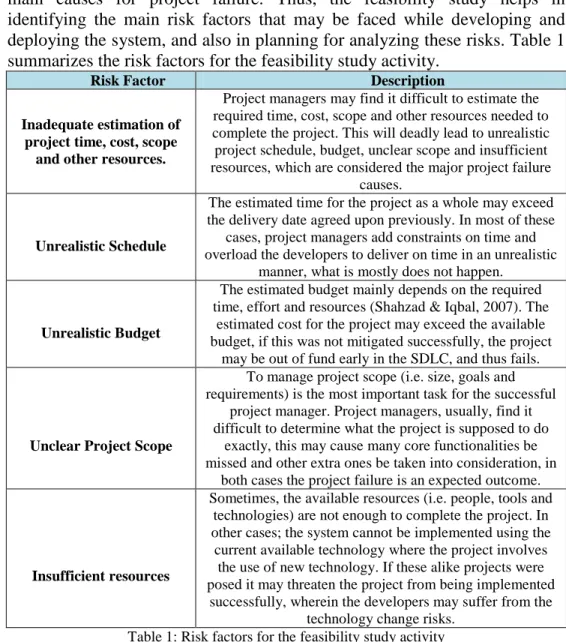
deploying the system, and also in planning for analyzing these risks. Table 1
summarizes the risk factors for the feasibility study activity.
Risk Factor Description
Inadequate estimation of project time, cost, scope
and other resources.
Project managers may find it difficult to estimate the required time, cost, scope and other resources needed to complete the project. This will deadly lead to unrealistic project schedule, budget, unclear scope and insufficient resources, which are considered the major project failure
causes.
Unrealistic Schedule
The estimated time for the project as a whole may exceed the delivery date agreed upon previously. In most of these
cases, project managers add constraints on time and overload the developers to deliver on time in an unrealistic
manner, what is mostly does not happen.
Unrealistic Budget
The estimated budget mainly depends on the required time, effort and resources (Shahzad & Iqbal, 2007). The
estimated cost for the project may exceed the available budget, if this was not mitigated successfully, the project
may be out of fund early in the SDLC, and thus fails.
Unclear Project Scope
To manage project scope (i.e. size, goals and requirements) is the most important task for the successful
project manager. Project managers, usually, find it difficult to determine what the project is supposed to do
exactly, this may cause many core functionalities be missed and other extra ones be taken into consideration, in
both cases the project failure is an expected outcome.
Insufficient resources
Sometimes, the available resources (i.e. people, tools and technologies) are not enough to complete the project. In other cases; the system cannot be implemented using the
current available technology where the project involves the use of new technology. If these alike projects were posed it may threaten the project from being implemented
successfully, wherein the developers may suffer from the technology change risks.
217
3.1.2 Requirements Elicitation Activity
In this activity, the application domain is analyzed, the services that the
system should provide and its performance and constrains are gathered,
reviewed, and articulated with the help of different system stakeholders
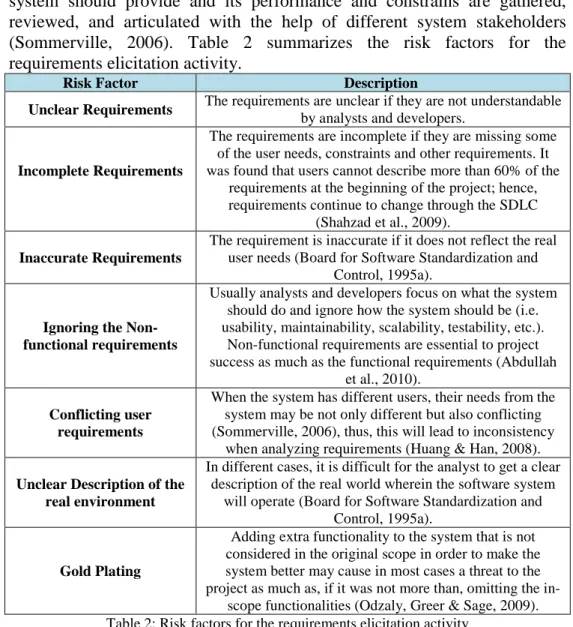
(Sommerville, 2006). Table 2 summarizes the risk factors for the
requirements elicitation activity.
Risk Factor Description
Unclear Requirements The requirements are unclear if they are not understandable by analysts and developers.
Incomplete Requirements
The requirements are incomplete if they are missing some of the user needs, constraints and other requirements. It was found that users cannot describe more than 60% of the
requirements at the beginning of the project; hence, requirements continue to change through the SDLC
(Shahzad et al., 2009).
Inaccurate Requirements
The requirement is inaccurate if it does not reflect the real user needs (Board for Software Standardization and
Control, 1995a).
Ignoring the Non-functional requirements
Usually analysts and developers focus on what the system should do and ignore how the system should be (i.e. usability, maintainability, scalability, testability, etc.).
Non-functional requirements are essential to project success as much as the functional requirements (Abdullah
et al., 2010).
Conflicting user requirements
When the system has different users, their needs from the system may be not only different but also conflicting (Sommerville, 2006), thus, this will lead to inconsistency
when analyzing requirements (Huang & Han, 2008).
Unclear Description of the real environment
In different cases, it is difficult for the analyst to get a clear description of the real world wherein the software system
will operate (Board for Software Standardization and Control, 1995a).
Gold Plating
Adding extra functionality to the system that is not considered in the original scope in order to make the system better may cause in most cases a threat to the project as much as, if it was not more than, omitting the
in-scope functionalities (Odzaly, Greer & Sage, 2009). Table 2: Risk factors for the requirements elicitation activity
3.1.3 Requirements Analysis Activity
This activity is concerned with analyzing, classifying, organizing,
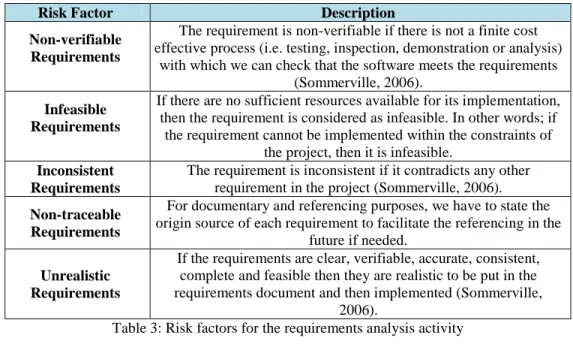
prioritizing and negotiating the stated requirements (Sommerville, 2006).
Table 3 summarizes the risk factors for requirements analysis activity.
218
Risk Factor Description
Non-verifiable Requirements
The requirement is non-verifiable if there is not a finite cost effective process (i.e. testing, inspection, demonstration or analysis)
with which we can check that the software meets the requirements (Sommerville, 2006).
Infeasible Requirements
If there are no sufficient resources available for its implementation, then the requirement is considered as infeasible. In other words; if
the requirement cannot be implemented within the constraints of the project, then it is infeasible.
Inconsistent Requirements
The requirement is inconsistent if it contradicts any other requirement in the project (Sommerville, 2006).
Non-traceable Requirements
For documentary and referencing purposes, we have to state the origin source of each requirement to facilitate the referencing in the
future if needed.
Unrealistic Requirements
If the requirements are clear, verifiable, accurate, consistent, complete and feasible then they are realistic to be put in the requirements document and then implemented (Sommerville,
2006).
Table 3: Risk factors for the requirements analysis activity
3.1.4 Requirements Validation Activity
Validating requirements aims to ensure that the stated requirements
actually define what the users want (Sommerville, 2006). Table 4
summarizes the risk factors for the requirements validation activity.
Risk Factor Description
Misunderstood domain-specific terminology
Application specialists and developers use domain-specific terminologies that are different and not understandable by
most end-users, this might lead to misunderstanding between both parties (Board for Software Standardization
and Control, 1995a).
Mis-expressing user requirements in natural
language
Natural language is a good, but not the best, way for expressing requirements, since many users may use different NLs and different conventions. Besides; many expressions, terms and needs cannot be expressed this way,
and need a more formal way for expressing and documenting.
Table 4: Risk factors for the requirements validation activity
3.1.5 Requirements Documentation Activity
Requirements documentation is the process of writing down the
requirements in a document (RD) that represents a mean of communication
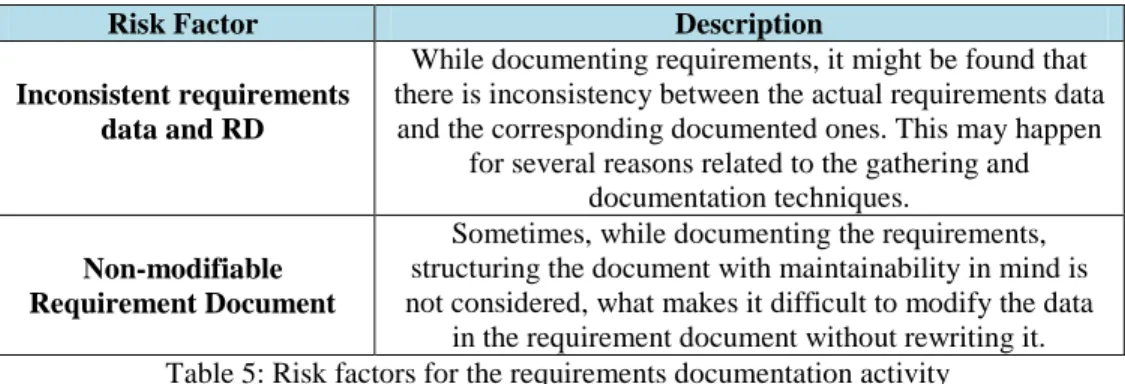
between different stakeholders (Sommerville, 2006). Table 5 summarizes the
risk factors for the requirements documentation activity.
219
Risk Factor Description
Inconsistent requirements data and RD
While documenting requirements, it might be found that there is inconsistency between the actual requirements data
and the corresponding documented ones. This may happen for several reasons related to the gathering and
documentation techniques.
Non-modifiable Requirement Document
Sometimes, while documenting the requirements, structuring the document with maintainability in mind is not considered, what makes it difficult to modify the data
in the requirement document without rewriting it. Table 5: Risk factors for the requirements documentation activity
3.2 Design phase
The design is the second phase in the SDLC, in which the overall
system architecture is established (Sommerville, 2006). This phase is the
solution phase wherein all the requirements defined in the requirements
document must be addressed (Board for Software Standardization and
Control, 1995b). In this phase the software system is described in terms of its
major components and relationships. This phase involves several activities:
examining the requirements document (RD), choosing the architectural
design method, choosing the programming language, constructing the
physical model, verifying, specifying, and documenting design activities.
The risk factors for each activity are shown in tables 6-12 respectively.
3.2.1 Examining the Requirements Document (RD) Activity
Examining the requirements document is usually carried out by
developers in order to ensure the understandability of the requirements listed
in the Requirements Document (Board for Software Standardization and
Control, 1995b). Table 6 summarizes the risk factors for examining the
requirements document activity.
Risk Factor Description
RD is not clear for developers
If developers were not involved in the requirements analysis and definition phase, then the requirements document may be not understandable by them. Hence, they will be unable to
start their design on a solid knowledge of the system requirements, and thus they may develop a design for a
system other than the intended one. Table 6: Risk factors for examining the requirements document activity
3.2.2 Choosing the Architectural Design Method Activity
The architectural design method is a systematic way of defining the
software components, in other words, it is the method that is used to
decompose the software system into its major components (Board for
Software Standardization and Control, 1995b). Many architectural design
methods exist in the literature (i.e. structured, object oriented, Jackson
220
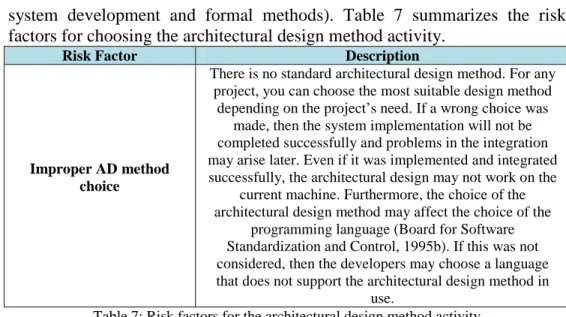
system development and formal methods). Table 7 summarizes the risk
factors for choosing the architectural design method activity.
Risk Factor Description
Improper AD method choice
There is no standard architectural design method. For any project, you can choose the most suitable design method
depending on the project’s need. If a wrong choice was made, then the system implementation will not be completed successfully and problems in the integration may arise later. Even if it was implemented and integrated successfully, the architectural design may not work on the
current machine. Furthermore, the choice of the architectural design method may affect the choice of the
programming language (Board for Software Standardization and Control, 1995b). If this was not considered, then the developers may choose a language that does not support the architectural design method in
use.
Table 7: Risk factors for the architectural design method activity
3.2.3 Choosing the Programming Language Activity
Choosing the programming language should be made early in the
design phase as soon as the architectural design method is chosen, since it
should support it. Table 8 summarizes the risk factors for choosing the
programming language activity.
Risk Factor Description
Improper choice of the PL
The improper choice of the programming language can affect the development process in many different aspects.
The wrong choice of programming language may not support the applied architectural design method (Board for
Software Standardization and Control, 1995b). It may reduce the system’s maintainability and portability too. Table 8: Risk factors for choosing the programming language activity
3.2.4 Constructing the Physical Model Activity
The physical model is a simplified description of a hierarchal
organized system, composed of symbols and built with recognized methods
and tools (Board for Software Standardization and Control, 1995b). Table 9
summarizes the risk factors for constructing the physical method activity.
Risk Factor Description
Too much complex system (Huang & Han, 2008)
If the software system to be developed was too much large and complex, then the developers well get lost and confused and do not know from where to start and how to
decompose the system into its main components.
Complicated Design
If the system was too much complex, and the developers do not have the enough skills and experience to manage this complexity, then they will create a complicated not
221
implemented, suffer from different difficulties.Large size components
Large size components, which may be further decomposed into other components, may also suffer from implementation difficulties and difficulties in determining
the functionality of a component and consequently in assigning functions to these components.
Unavailable expertise for reusability (Abdullah et al., 2010)
Reusability is not always the right choice, in such cases wherein the available expertise to maintain old components
in order to reuse them is not available (Board for Software Standardization and Control, 1995b), it is actually a risk, because it may hinder the project and delay its progress. In
such cases, developers tend to develop the components from the scratch, which also may delay the project’s
progress.
Less reusable components than expected
If an inaccurate estimate about the available reusable components was made in the analysis phase, then these components have to be developed from scratch. Thus time
schedule and budget may be under-estimated and the developers will be surprised that much of the code that was considered ready and available to reuse has to be re-written
from scratch what will cause project delay and budget over-run.
Table 9: Risk factors for constructing the physical method activity
3.2.5 Verifying Design Activity
Verifying design aims to make sure that the design of the system
under construction is a correct solution and meets the user requirements.
Table 10 summarizes the risk factors for verifying design activity.
Risk Factor Description
Difficulties in verifying design to requirements
In order to make sure that the design is a correct solution, the design must be verified against requirements to ensure that users’ needs are reflected in the design. This is the case
when the developer found it difficult to check whether the resulting design meets the users’ requirements.
Many feasible solutions
When verifying design, it might be discovered that many alternatives to the same design problem may exist. Which one to choose depends on the system itself and its nature (Board for Software Standardization and Control, 1995b).
Incorrect Design
When verifying the design, it might be found that the design does not match some, or even all, of the requirements. Worse, it might be different design another
than the intended one. Table 10: Risk factors for verifying design activity
3.2.6 Specifying Design Activity
It is the activity that identifies components, defines the data flow
between them, and states for each component its functions, data input, data
output, and resource utilization (Board for Software Standardization and
222
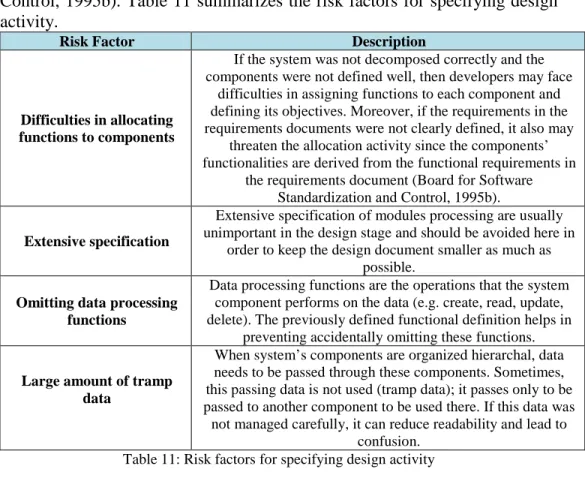
Control, 1995b). Table 11 summarizes the risk factors for specifying design
activity.
Risk Factor Description
Difficulties in allocating functions to components
If the system was not decomposed correctly and the components were not defined well, then developers may face
difficulties in assigning functions to each component and defining its objectives. Moreover, if the requirements in the requirements documents were not clearly defined, it also may
threaten the allocation activity since the components’ functionalities are derived from the functional requirements in
the requirements document (Board for Software Standardization and Control, 1995b).
Extensive specification
Extensive specification of modules processing are usually unimportant in the design stage and should be avoided here in
order to keep the design document smaller as much as possible.
Omitting data processing functions
Data processing functions are the operations that the system component performs on the data (e.g. create, read, update, delete). The previously defined functional definition helps in
preventing accidentally omitting these functions.
Large amount of tramp data
When system’s components are organized hierarchal, data needs to be passed through these components. Sometimes, this passing data is not used (tramp data); it passes only to be passed to another component to be used there. If this data was not managed carefully, it can reduce readability and lead to
confusion. Table 11: Risk factors for specifying design activity
3.2.7 Documenting Design Activity
In this activity, the main output of the design phase (i.e. design
document DD) is produced. It defines the framework of the solution that
helps leaders to control the project during the implementation and the
remaining (Sommerville, 2006). Table 12 summarizes the risk factors for
documenting design activity.
Risk Factor Description
Incomplete Design Document
The design document must be detailed enough to allow the programmers to work independently. If the design
document lacks these important details then the programmer may not work independently (Board for
Software Standardization and Control, 1995b).
Large Design Document
Although the design document must be detailed enough to ease the work of programmers, it should avoid extensive
unimportant specification, which cause the design document to become large and thus non-readable (Board
for Software Standardization and Control, 1995b).
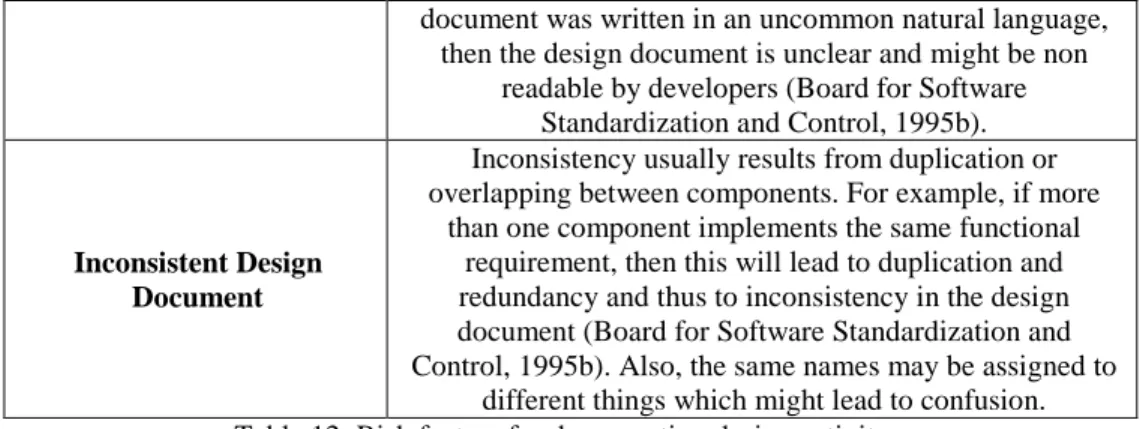
Unclear Design Document
If the components in the design document are not clearly defined; their inputs, outputs, functions and relationships
223
document was written in an uncommon natural language,then the design document is unclear and might be non readable by developers (Board for Software
Standardization and Control, 1995b).
Inconsistent Design Document
Inconsistency usually results from duplication or overlapping between components. For example, if more
than one component implements the same functional requirement, then this will lead to duplication and redundancy and thus to inconsistency in the design document (Board for Software Standardization and Control, 1995b). Also, the same names may be assigned to
different things which might lead to confusion. Table 12: Risk factors for documenting design activity
3.3 Implementation and Unit Testing Phase
Herein, the actual development of the system starts, where the
programming takes place in order to execute the previously defined design as
a set of programs or program units. This phase incorporates two main
activities; coding and units testing in an iterative manner (Somerville, 2006).
The risk factors for each activity are shown in tables 13-14 respectively.
3.3.1 Coding Activity
Coding is the process of writing design modules in the predefined
programming language; this includes developing the user interfaces. Then
each resultant source code module is tested in the unit testing activity (Board
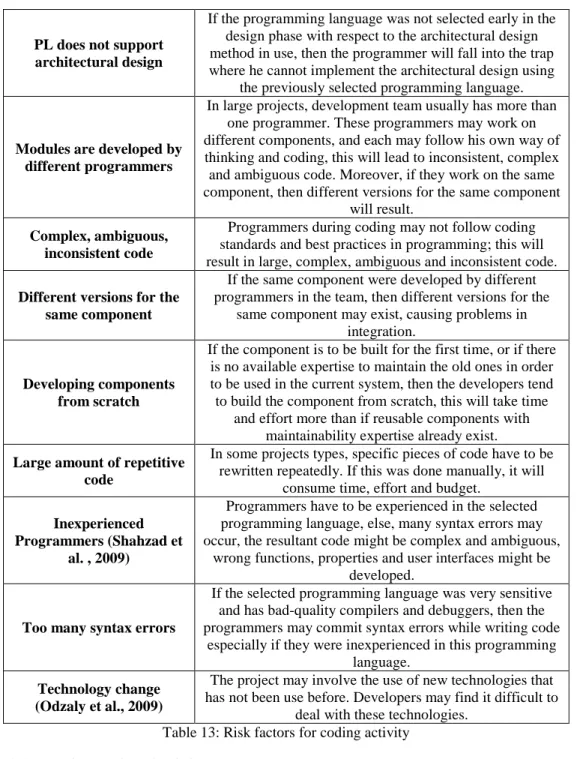
for Software Standardization and Control, 1995b). Table 13 summarizes the
risk factors for the coding activity.
Risk Factor Description
Non-readable Design Document
If the design document was large, unclear then it might be non-readable nor understandable by programmers, and thus
they will be unable to decide what to code.
Programmers cannot work independently
If the design document was incomplete, then programmers will not be able to work independently since they have to
make their own decisions to fill the gaps in the design document, which may affect the programmers working on
other components.
Developing the wrong user functions and properties
(Boehm,1991)
Implementing functions and properties depends largely on the design specification details listed in the design document. If the design document was non-readable,
inconsistent and incomplete then programmers may develop the wrong user functions and properties.
Developing the wrong user interface (Boehm,1991)
Designing a good user interface is a very important aspect; it helps make the system more understandable and usable, which results in a greater user acceptance. Otherwise, the project could fail. Developing the correct user interface requires a good understanding of user needs and detailed
224
PL does not supportarchitectural design
If the programming language was not selected early in the design phase with respect to the architectural design method in use, then the programmer will fall into the trap where he cannot implement the architectural design using
the previously selected programming language.
Modules are developed by different programmers
In large projects, development team usually has more than one programmer. These programmers may work on different components, and each may follow his own way of thinking and coding, this will lead to inconsistent, complex and ambiguous code. Moreover, if they work on the same component, then different versions for the same component
will result.
Complex, ambiguous, inconsistent code
Programmers during coding may not follow coding standards and best practices in programming; this will result in large, complex, ambiguous and inconsistent code.
Different versions for the same component
If the same component were developed by different programmers in the team, then different versions for the
same component may exist, causing problems in integration.
Developing components from scratch
If the component is to be built for the first time, or if there is no available expertise to maintain the old ones in order to be used in the current system, then the developers tend to build the component from scratch, this will take time
and effort more than if reusable components with maintainability expertise already exist.
Large amount of repetitive code
In some projects types, specific pieces of code have to be rewritten repeatedly. If this was done manually, it will
consume time, effort and budget.
Inexperienced Programmers (Shahzad et
al. , 2009)
Programmers have to be experienced in the selected programming language, else, many syntax errors may occur, the resultant code might be complex and ambiguous,
wrong functions, properties and user interfaces might be developed.
Too many syntax errors
If the selected programming language was very sensitive and has bad-quality compilers and debuggers, then the programmers may commit syntax errors while writing code
especially if they were inexperienced in this programming language.
Technology change (Odzaly et al., 2009)
The project may involve the use of new technologies that has not been use before. Developers may find it difficult to
deal with these technologies. Table 13: Risk factors for coding activity
3.3.2 Unit Testing Activity
Herein, each source code module is tested in order to verify that each
module meets its specifications and performs what it is supposed to do
before these modules are integrated and tested as a whole system
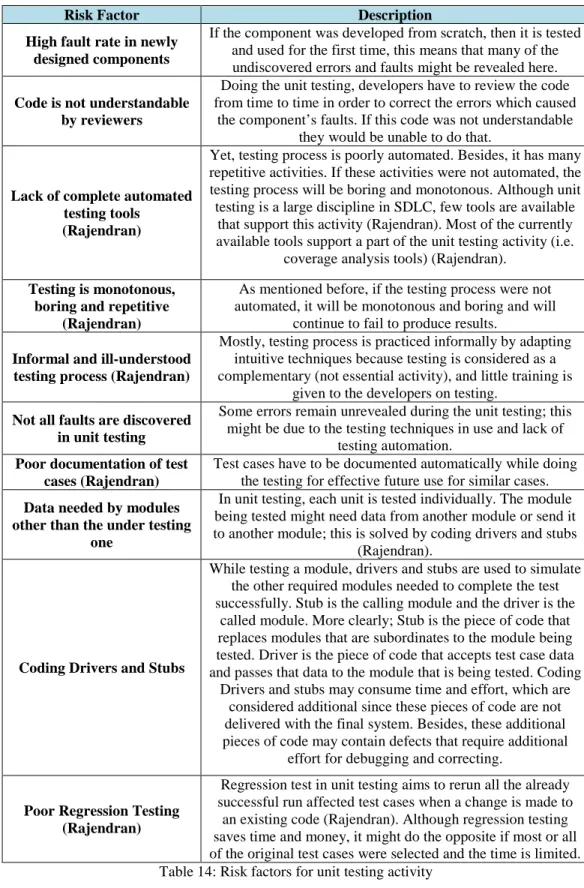
(Sommerville, 2006). Table 14 summarizes the risk factors for the unit
testing activity.
225
Risk Factor Description
High fault rate in newly designed components
If the component was developed from scratch, then it is tested and used for the first time, this means that many of the undiscovered errors and faults might be revealed here.
Code is not understandable by reviewers
Doing the unit testing, developers have to review the code from time to time in order to correct the errors which caused
the component’s faults. If this code was not understandable they would be unable to do that.
Lack of complete automated testing tools
(Rajendran)
Yet, testing process is poorly automated. Besides, it has many repetitive activities. If these activities were not automated, the testing process will be boring and monotonous. Although unit testing is a large discipline in SDLC, few tools are available
that support this activity (Rajendran). Most of the currently available tools support a part of the unit testing activity (i.e.
coverage analysis tools) (Rajendran).
Testing is monotonous, boring and repetitive
(Rajendran)
As mentioned before, if the testing process were not automated, it will be monotonous and boring and will
continue to fail to produce results.
Informal and ill-understood testing process (Rajendran)
Mostly, testing process is practiced informally by adapting intuitive techniques because testing is considered as a complementary (not essential activity), and little training is
given to the developers on testing.
Not all faults are discovered in unit testing
Some errors remain unrevealed during the unit testing; this might be due to the testing techniques in use and lack of
testing automation. Poor documentation of test
cases (Rajendran)
Test cases have to be documented automatically while doing the testing for effective future use for similar cases.
Data needed by modules other than the under testing
one
In unit testing, each unit is tested individually. The module being tested might need data from another module or send it to another module; this is solved by coding drivers and stubs
(Rajendran).
Coding Drivers and Stubs
While testing a module, drivers and stubs are used to simulate the other required modules needed to complete the test successfully. Stub is the calling module and the driver is the
called module. More clearly; Stub is the piece of code that replaces modules that are subordinates to the module being tested. Driver is the piece of code that accepts test case data and passes that data to the module that is being tested. Coding
Drivers and stubs may consume time and effort, which are considered additional since these pieces of code are not delivered with the final system. Besides, these additional pieces of code may contain defects that require additional
effort for debugging and correcting.
Poor Regression Testing (Rajendran)
Regression test in unit testing aims to rerun all the already successful run affected test cases when a change is made to an existing code (Rajendran). Although regression testing saves time and money, it might do the opposite if most or all of the original test cases were selected and the time is limited. Table 14: Risk factors for unit testing activity
226
3.4
Integration and System Testing Phase
In this phase, the complete software system is produced by
integrating and testing the unit tested modules (input) in an iterative manner.
Then the integrated system is introduced to the system testing (Sommerville,
2006). This phase incorporates three activities: integration, integration
testing, and system testing activity. The risk factors for each activity are
shown in tables 15-17 respectively.
3.4.1 Integration Activity
In this activity, the individual units resulting from coding and unit
testing are combined into a complete working system. Table 15 summarizes
the risk factors for the integration activity.
Risk Factor Description
Difficulties in ordering components’ integration
Integration should be done incrementally; else, errors that result from the integration could not be localized easily. Usually, developers get confused in which component to integrate first. The wrong ordering of integration may yields in the presence of bugs and errors, and the inability
to produce the desired functionality. (Board for Software Standardization and Control, 1995c)
Integrate the wrong version of components
While developing components, multiple versions for the same component may exist. If the wrong component was selected to be integrated, then the resultant system may not
produce the desired functionality, and may not perform as well as it is expected.
Omissions or oversights
If an important component was omitted during the integration process, some required system functionalities will be missed. Moreover, if it was forgotten to run a script
that is required for integration, this may lead to errors and incorrect results.
Table 15: Risk factors for integration activity
3.4.2
Integration Testing Activity
After integrating each component, a kind of testing known as
Integration Testing is performed in order to evaluate the interactions between
these components and to verify that they interface correctly. Table 16
summarizes the risk factors for the integration testing activity.
Risk Factor Description
A lot of bugs emerged during the integration
If integration was not done properly, wrong versions were integrated, and many omissions and oversights occurred,
many error and bugs may appear while testing the integrated system.
Data Loss across an interface
While exchanging data between modules through an interface, the data coming out from a module may not go the desired module. This might happen due to mismatch in the number or order of parameters between the calling and
227
Integration may notproduce the desired functionality
When combining sub-functions, modules and components this may not produce the desired functionality.
Difficulties in localizing errors
If the components were not integrated incrementally, it would be difficult for the developers to localize error, in other words, it would be difficult to determine exactly the
module where the bug exists.
Difficulties in repairing errors
After localizing errors in the integrated system, they need to be fixed. Any change may affect other modules, consequently, many errors and bugs could appear which
make it more difficult to localize and repair from these new errors.
Table 16: Risk factors for integration testing activity
3.4.3 System Testing Activity
Herein, the integrated software system is tested to ensure that the
software system meets the software requirements and system (Sommerville,
2006). Table 17 summarizes the risk factors for the system testing activity.
Risk Factor Description
Unqualified testing team
Testing team experience has a significant influence on the testing process. Unqualified testers may destroy the whole
process, since they might misuse the available tools, resources and techniques. Also, testing teams often lack skilled programmers, since testing is considered a trivial
activity and can be performed by anybody else.
Limited testing resources
Time, budget, tools and other testing resources can hinder the testing process; either in their unavailability or in their
misuse.
Inability to test in the operational environment
At times, the system cannot be tested in the real environment for different reasons like the difficulties in
delivery, installation with time and budget contention. Impossible complete
testing (Coverage Problem) (Kaner & Tech, 2003)
To be realistic, testers actually cannot test everything. Since there are many possible variables, combinations, sequences, HW/ SW configurations, and many possible
interactions for the user with the system.
Testers rely on process myths (Kaner & Tech,
2003)
Usually, testers trust the company’s claims about project requirements, process and resources and depend upon this
while doing their job. They design their tests early in the SDLC according to the early defined requirements and specifications. After all, the real needs of the customer
become clearer, while the system is designed and implemented according to the clear needs and specifications while the test designs remains according to the initial specifications. This will cause the testing cannot
cope with requirements changes. Moreover, they may misallocate resources due to these myths.
Testing cannot cope with requirements change
In most cases, users’ needs continuously change. Tests are designed according to the initial description of requirements and cannot change to cope with requirements
228
changes.Wasting time in Building testing tools
Testers sometimes distracted from testing in building testing tools, they waste time in Building testing tools instead of doing testing, what will negatively affects the
testing process.
The system being tested is not testable enough
If the implemented requirements were not verifiable and if quality assurance principles were not applied properly in
the SDLC to choose and implement easy-to-test components, then the system might be difficult to test. Table 17: Risk factors for system testing activity
3.5 Operation and Maintenance Phase
This is the final phase in the SDLC and normally the longest phase,
in which the software is delivered to the customer and deployed, tested for
user acceptance and maintained for any faults exist. This phase includes the
following activities: installation, operation, acceptance testing, and
maintenance (Sommerville, 2006). The risk factors for each activity are
shown in tables 18-21 respectively.
3.5.1 Installation Activity
In this activity, the software system is delivered to the customer,
deployed and put into practical use (Sommerville, 2006). Table 18
summarizes the risk factors for the installation activity.
Risk Factor Description
Problems in installation
If the deployers are not experienced enough, do not have the adequate knowledge of the system nature and how it works, If the system is complex and distributed and if the
real environment is challenging, it may be difficult to install the system or it might be installed incorrectly.
The effect on the environment
When installing the system, it may affect the environment it works in. Mostly, the user does not accept this. If this has
to happen, it must be insignificant.
Change in environment
When installing the system, deployers might get shocked for the system cannot be deployed correctly due to change
in environment, especially the hardware advancement (Shahzad et al., 2009). This change in environment is inevitable due to the fact that continuous development is
natural especially if it lasts a long time from the system analysis to delivery and installation.
Table 18: Risk factors for installation activity
3.5.2 Operation Activity
Herein, the software system is operated, and the end-users are trained
on its operation and services. Table 19 summarizes the risk factors for the
operation activity.
229
Risk Factor Description
New requirements emerge
While operating the system, end users might find that new requirements have to be implemented in order to meet the current actual user needs, business, environmental and
organizational changes.
Difficulties in using the system
It is common for the end-users to find it difficult to use any newly installed system. But if this lasts along, it might
threat the acceptability of the system. Table 19: Risk factors for operation activity
3.5.3 Acceptance Testing Activity
The delivered system is put into acceptance testing from the
end-users to verify that it meets the end-end-users requirements. Table 20 summarizes
the risk factors for the acceptance testing activity.
Risk Factor Description
User resistance to change (Huang & Han, 2008)
Recent research shows that end-users have a great impact on project success and project failure. Naturally, Human beings reject changes on the way they perform especially if
these changes were imposed externally. This rejection deadly affect their acceptance to the new system
negatively.
Missing capabilities
Doing the acceptance testing, end-users may find some of the required needs and capabilities they expected to find in
the newly installed system omitted (Board for Software Standardization and Control, 1995e).
Too many software faults
If not all faults were discovered and mitigated before system operation, they might be discovered later. The cost
of discovering and maintaining such faults exceeds it if it was discovered before.
Testers do not perform well
End users or user acceptance testers may do their job poorly due to problems in the operational environment,
unqualified management, lack of tools and testing resources, and lack of the involvement of different system
stakeholders.
Suspension and Resumption problems
Testers might find it difficult to decide whether to continue doing the acceptance testing or suspend when a problem is
discovered (Board for Software Standardization and Control, 1995e).
Insufficient data handling
When the system is put into real operation, it might be overloaded with large amounts of users’ data that cannot be
handled due to shortcomings in the system. Table 20: Risk factors for acceptance testing activity
3.5.4 Maintenance Activity
Any errors, faults, improvements revealed in the acceptance testing
are resolved in the maintenance activities. This may include fixing errors,
improving system implementation, enhancing its services and upgrading the
software (Sommerville, 2006). Software maintenance activity may involve
230
repeating previous phases; hence, it is the longest phase (Sommerville,
2006). Table 21 summarizes the risk factors for maintenance activity.
Risk Factor Description
The software engineer cannot reproduce the
problem
After customers report for a problem, software engineers have to try to reproduce the problem by asking end users questions that lead to the causes of the problem. If the problem was non-producible, or if customer description of
the problem was not detailed enough, then it will be difficult for the software engineers to point out to the
problem exactly and find solutions.
Problems in maintainability
The system might be difficult to change by its nature due to its rigid architecture or due to constraints forced by end-users or developers (Board for Software Standardization
and Control, 1995e).
Budget Contention
Since this phase is the longest in the SDLC and most of its activities need to be repeated. Often, the allocated budget
does not account for this. The cost of repeating these activities may exceed the available budget, causing the
operation and maintenance phase to be cut while the system is not accepted yet.
Table 21: Risk factors for maintenance activity
3.6 Risk Factors common to all SDLC phases
Some risks factors threaten all the phases of the SDLC, starting from
the initial inspection of the project to the final release. Table 22 summarizes
the risk factors that are common to all SDLC phases.
Risk Factor Description
Continually changing requirements (Wallace, Keil & Rai,
2004)
Since requirements cannot be fully described at the start of the project, it might change continually over the SDLC. If this factor was not successfully mitigated, time and budget may overrun, testing may not cope with this continually changes since test plans are designed early according to the
initial requirements.
Time contention
Time is the major risk factor that threats all SDLC phases, mainly the implementation and testing phases. Time contention may force the developers to discard some functionalities which might be core ones, neglect some nonfunctional requirements and other design quality issues
and do the testing poorly in order to go in progress and deliver on time.
Project Funding Loss (Shahzad et al. , 2009)
Project funding might be interrupted at any phase in the SDLC due to lack of commitment from the funding agencies. Once the funding is lost, the project cannot be
completed and it directly goes to fail.
Team Turnover (Shahzad, A. Al-Mudimigh
& Ullah, 2010)
In most organizations, experienced team member are looking for better job vacancies and leave their work if any
was found. This factor threats any project in any of its phases.
231
(Shahzad & Iqbal, 2007) disasters, viruses and intruders, developers run away withcodes, etc.
Miscommunication (Huang & Han, 2008)
Many troubles may appear if there was miscommunication between customers, managers and developers. The developer may not understand the user actual needs, and
the customers may under or overestimate their expectations.
Table 22: Risk factors common to all SDLC phases