QT Plus Quick Launch Overview Guide
About this Quick Launch Overview Guide
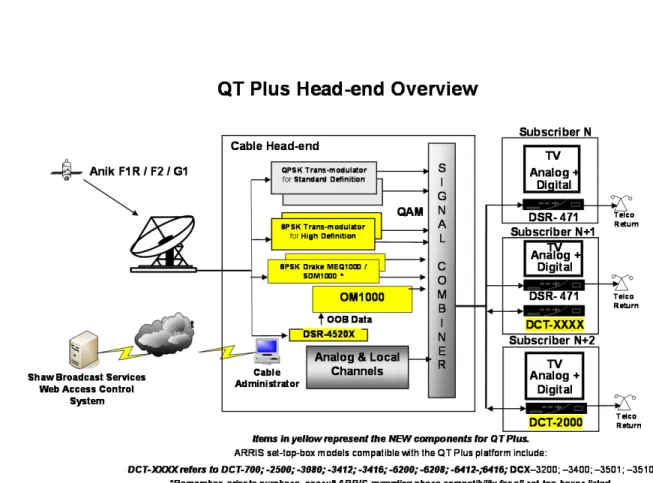
This quick launch overview contains information and direction that is intended to help you plan and implement Shaw Broadcast Services’ QT Plus product as shown in Figure 1.
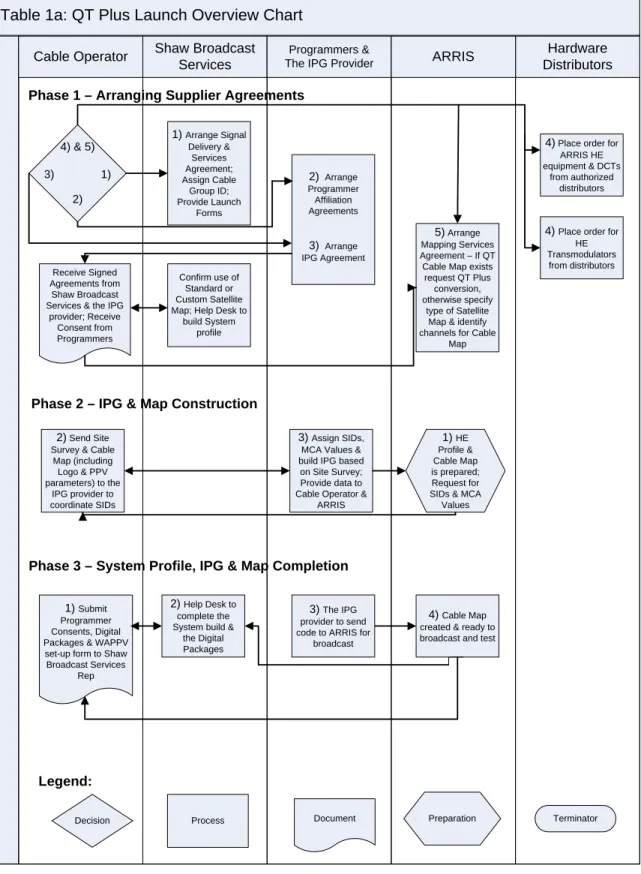
Table 1a & b provides you with an overview of the necessary phases that are involved and the parties responsible for each required action. To help you understand the flowchart a written description follows.
Table 1a: QT Plus Launch Overview Chart
Hardware Distributors Shaw Broadcast
Services
Programmers &
The IPG Provider ARRIS
Cable Operator
Phase 1 – Arranging Supplier Agreements
Phase 3 – System Profile, IPG & Map Completion Phase 2 – IPG & Map Construction
1) Arrange Signal Delivery & Services Agreement; Assign Cable Group ID; Provide Launch Forms 2) Arrange Programmer Affiliation Agreements 3) Arrange IPG Agreement 5) Arrange Mapping Services Agreement – If QT Cable Map exists
request QT Plus conversion, otherwise specify
type of Satellite Map & identify channels for Cable
Map 4) & 5) 3) 1) 2) Receive Signed Agreements from Shaw Broadcast Services & the IPG
provider; Receive Consent from Programmers
4) Place order for ARRIS HE equipment & DCTs
from authorized distributors
4) Place order for HE Transmodulators from distributors Confirm use of Standard or Custom Satellite Map; Help Desk to
build System profile
Legend:
Decision Process Document Preparation Terminator
1) HE Profile & Cable Map is prepared; Request for SIDs & MCA
Values
3) Assign SIDs, MCA Values & build IPG based
on Site Survey; Provide data to Cable Operator &
ARRIS
2) Send Site Survey & Cable
Map (including Logo & PPV parameters) to the IPG provider to coordinate SIDs 1) Submit Programmer Consents, Digital Packages & WAPPV set-up form to Shaw Broadcast Services
Rep
2) Help Desk to complete the System build &
the Digital Packages
4) Cable Map created & ready to broadcast and test
3) The IPG provider to send code to ARRIS for
Table 1b: QT Plus Launch Overview Chart
Hardware Distributors ARRIS
Programmers & The IPG Provider
Shaw Broadcast Services Cable Operator
Phase 4 – System Profile, IPG & Map Test & Verification
Legend:
Decision Process Document Preparation Terminator
3a) Cable operator notifies the IPG provider if
any changes are required, such as IPG IDs. 3b) Cable operator receives Programmer transport consent
for new signals and notifies the appropriate suppliers to implement the changes 3c) Cable operator notifies ARRIS if any changes are required, such as hiding or un-hiding channels 1) Install HE hardware & prepare test decoder; Request decoder activation to test & verify
Cable Map; Approve & notify
ALL suppliers
2) Activate HE DSR-4520X and
test decoder
Phase 5 – Rolling Out Your System
1) Request Web Access Tool training to authorize & manage decoders 2) Help Desk to schedule & execute Web Access Tool training 3) Help Desk to enable decoder management functionality 4) Commence decoder management
QT Plus Quick Launch Overview Description
Phase 1 – Arranging Supplier AgreementsNOTE: Once the decision has been made to launch QT Plus, it is important to concurrently contact each supplier involved and request the appropriate contract and launch documents from each supplier. It is strongly recommended that items 1 through 5 in Phase 1 be performed concurrently.
1 Arrange “Signal Delivery & Services Agreement” with Shaw Broadcast Services. - Obtain “Cable Group ID” & launch forms from the SBS Account Rep.
2. Arrange “Programmer Affiliation Agreement” with each programmer whose signals are required in the channel line-up.
- Affiliates are required to have transport consent for each signal and SBS requires proof before the signals are authorized.
- Submit the programmer’s transport consent forms to the SBS Account Rep as they are obtained.
3. Arrange “IPG Agreement” with the IPG provider and obtain their “Site Survey” document.
4. Place order for ARRIS HE equipment & Set-Top-Boxes (STBs) from authorized distributors. Place order for HE trans-modulators from preferred distributor.
5. Arrange “Mapping Services Agreement” with ARRIS.
- ARRIS requires the IPG provider agreement to be in place first. - If a QT cable map exists, request a QT Plus conversion, otherwise specify type of satellite map & identify channels for cable map. Note to Existing QT Cable Map Customers:
- If channel changes are required to an existing QT cable map, it is highly recommended to perform these changes after the map has been converted to a QT Plus map.
6. Confirm use of the “Standard Satellite Map” or the “Custom Satellite Map” and submit the “System Profile Set-up Form” to the SBS Account Rep.
Phase 2 – IPG & Map Construction
1a. ARRIS to prepare the HE profile & cable map.
1b. ARRIS to send a copy of the cable map to Cable operator to retrieve the missing “Source IDs” (SIDs) & “Multicast Addresses (MCA) Values” from the IPG
provider.
2. Cable operator to send site survey & cable map (including Logo & PPV parameters) to the IPG provider.
3. The IPG provider to assign SIDs (for outstanding channels) & MCA values and will build the IPG based on the site survey. The IPG provider will provide this data to Cable operator, who is to update ARRIS.
Phase 3 – System Profile, IPG & Map Completion
1. Cable operator continues to submit programmer transport consents & the SBS “Digital Signal Package Form” to the SBS Account Rep.
2. Shaw Broadcast Services’ Help Desk to complete the system profile build, including the digital signal packages & Web-Ahead PPV Channel set-up. 3. The IPG provider to send the customer IPG code to ARRIS for broadcast. 4. ARRIS to complete the cable map & prepare to broadcast the customer IPG
code & test.
Phase 4 – System Profile, IPG & Map Test & Verification
1a. Cable operator to install HE hardware & prepare test decoder.
1b. Request authorization of DSR-4520X from Shaw Broadcast Services’ Help Desk. 2. SBS Help Desk authorizes DSR-4520X & test decoder for Cable operator to test
& verify cable map.
3a. Cable operator notifies the IPG provider if any changes are required, such as IPG IDs.
3b. Cable operator receives Programmer transport consent for new signals and notifies the appropriate suppliers to implement the changes.
3c. Cable operator notifies ARRIS if any changes are required.
4. Cable operator to approve cable map & IPG, notifying all suppliers. Phase 5 – Rolling Out Your System
1. Cable operator to contact SBS Help Desk to request & schedule “Web Access Tool” training, for managing subscriber accounts, including decoder management and Web-Ahead PPV operation.