Video data provide compellingly easy access to be-havioral phenomena, enabling researchers to study events that are too quick to comprehend in a single viewing and helping them to develop reliable observational methods and apply them to complex interactive phenomena. Yet the use of video techniques in behavioral research has been limited by a variety of obstacles, including expen-sive hardware, the complexity of specialized editing tools, and problems of storage, portability, and access to archives of video data. The advent of digital video tech-nology has dramatically reduced the barriers to entry into video-based research techniques for data collection.
Once video data are collected, problems of transcrib-ing, edittranscrib-ing, stortranscrib-ing, and coordinating them remain. New software standards for representing video on computers promise to help in overcoming this final hurdle to the easy incorporation of video data into a variety of research par-adigms and presentations.
In the present article, we provide an introduction to the synchronized multimedia integration language (SMIL,
pronounced “smile”), an increasingly accepted cross-platform markup language for working with video and other multimedia information. We provide examples of how SMIL can be used to simplify common research tasks. We also present TransTool, a free Windows appli-cation that simplifies the transcription and indexing of video files and also generates SMIL output for use in video analysis and presentation. In addition to being a useful tool in and of itself, TransTool can serve as a proto-type that demonstrates how the combination of SMIL, embedded software for playing digital video, and rapid application development environments (such as Visual Basic) can be used to automate a large number of research tasks involving digital media.
WHAT IS SMIL?
SMIL is a markup language (like HTML) rather than a programming language (such as C or Java). It uses plain text to tag certain types of multimedia content, creating a set of commands that are recognized by media players such as RealPlayer, QuickTime Player, or Internet Ex-plorer. SMIL files do not themselves store media but only reference them (just as an HTML page references applets, images, and other elements). The function of a SMIL file is to specify exactly how, where, and when each media element should be used in a multimedia pre-sentation. Although multimedia f iles come in many forms, SMIL files are plain-text files, a fact that
facili-359 Copyright 2005 Psychonomic Society, Inc.
Preparation of the software tools reported in this article was sup-ported by NSF Grant REC-0089293. Correspondence concerning this article should be addressed to K. F. Miller, Combined Program in Edu-cation & Psychology, University of Michigan, 610 E. University, Ann Arbor, MI 48109 (e-mail: [email protected]).
Note—This article was accepted by the previous editor, Jonathan Vaughan.
Let SMIL be your umbrella: Software tools
for transcribing, coding, and presenting
digital video in behavioral research
SUJAI KUMARCentre for Research in Cognitive Systems, NIIT Ltd, New Delhi, India and
KEVIN MILLER
University of Michigan, Ann Arbor, Michigan
Video-based techniques have become central to many areas of social science research, although their use has been limited by the expense and complexity of tools for working with video information. New standards for the representation of digital video make the manipulation of video for observational re-search a far less time-consuming and expensive process than it once was. We provide an overview of SMIL, a cross-platform markup standard, and guidelines on how it can be used to edit, synchronize, cap-tion, and present video clips with no need to modify the original digital video files. We also present TransTool, a free Windows program that can generate SMIL files for playing video clips of interest along with captions and codes. TransTool can also be used as a transcribing and coding tool that synchronizes video and text such as transcripts. These tools greatly facilitate tasks such as creating video events with multilanguage transcripts, showing synchronized views of the same event, quickly extracting clips from longer video files, and incorporating video clips into presentations and web pages. Example SMIL files and the TransTool program can be downloaded from http://www.psych.uiuc.edu/~kmiller/smil.
360 KUMAR AND MILLER
tates their creation, modification, and incorporation into other programs.
SMIL is an XML-based standard of the World-Wide Web Consortium (W3C), designed to provide a common framework for the integration of different video and audio formats (Hoschka, 1997). SMIL provides a pre-sentation and timing model that can work with a variety of media formats, including several compressed video and audio formats (depending on the player used, these can include RealMedia, QuickTime, and MPEG). Back-ground information and the full specification can be found on the official SMIL Web site (W3C, 2003a).
All of the video presentation and editing tasks that will be discussed here could also be accomplished using a traditional video editing suite. SMIL has two major ad-vantages over solutions that rely on expensive hardware or software editing systems. The first is that there is a sig-nificant saving of time, processing power, and media storage, since SMIL files store only instructions rather than copies of the digital media themselves. With a tra-ditional video editing approach, changing captions or se-lecting clips would require editing and re-rendering to produce new files, whereas with SMIL only the text in-structions would have to change.
The second advantage is particularly significant for those developing a number of presentations for research purposes, such as multiple video stimuli for different conditions in an experiment. Rather than use complex application programming interfaces to work directly with raw digital video data, SMIL provides a convenient way to access and control what is shown with the help of just a few lines of text that can be generated from within any programming or scripting language.
SMIL also has an interesting implication for multi-media files that are accessible from the Internet. Cur-rently, video and audio files cannot be indexed by search engines, but SMIL files are text files that can be indexed. Thus, SMIL can provide a method for indexing multi-media information for retrieval from the Internet.
WORKING WITH SMIL: THE FOOL’S MATE EXAMPLE
This discussion of SMIL will be framed in terms of a simple example that shows what can be done with this language (all files, along with production details and other tips, can be accessed at http://www.psych.uiuc. edu/~kmiller/smil). We chose the RealMedia compressed format for this example because it provided the optimal
video quality for its size, but we could have used other formats as well (see the Appendix). The code listings in this article all conform to the SMIL standard as specified by W3C (2003a) and will play without modification in the RealOne player, which may be downloaded free of charge from http://www.real.com. Some minor modifi-cations of the syntax in these files are required in order to play them in the QuickTime Player. (These changes and tips on producing files that will play in both players are described in the Appendix).
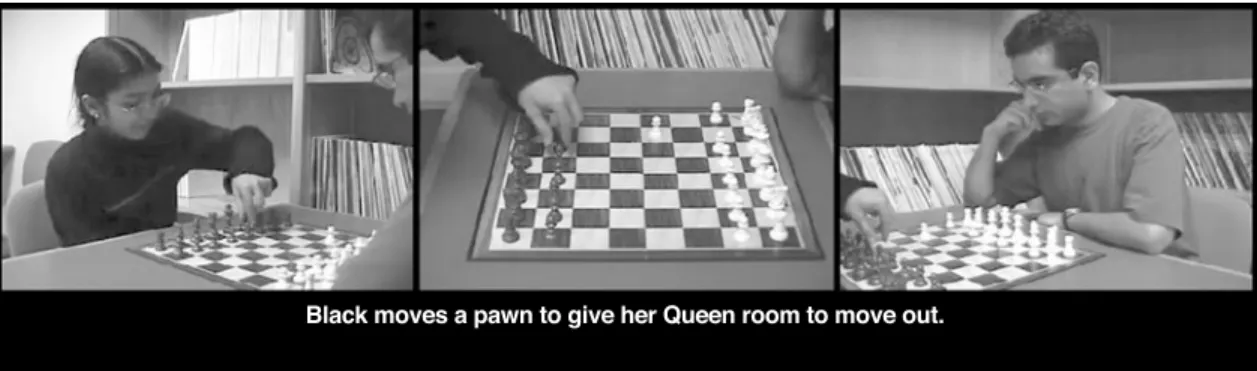
We videotaped a short chess game, illustrating the four-move fool’s mate. The event was videotaped with three cameras, one focusing on the board and one focus-ing on each player. Commentaries were also produced, in both written and spoken forms. In the following sections, we describe how these media sources can be synchro-nized and combined to produce increasingly sophisti-cated representations of this event.
PLAYING PART OF A CLIP
Figure 1 shows a very rudimentary SMIL file for play-ing a f ile called board.rm that shows the chessboard camera angle. The example shows the final move made by Black (the player using the black pieces), starting 16 sec into the clip and ending 11 sec later (27 sec into the clip). The file is a plain-text file that can be typed in any text editor (e.g., Notepad or Wordpad on Windows, SimpleText on Macintosh systems, and vi on Unix) and then saved with an extension of .smi or .smil.
SMIL files must begin and end with the smil and /smil tags, respectively. The body of the file (be-tween the body and /body tags) describes the content to be played and where and how it should be pre-sented. In this case, the single line of the body tells the player the type of content (video), where the content is to be found (in a file called board.rm in the default direc-tory), where in the file to begin playing (16 sec into the clip), and when to stop (27 sec into the clip). The total duration of this edited sequence would thus be 11 sec. As is often the case with SMIL, there are other means of achieving the same effect. In this case, one could replace clip-end"27s" with dur"11s" (the dur attribute spec-ifies the duration of the clip).
Although this is a very simple SMIL file, it could be called from a PowerPoint presentation or Web page to pres-ent a specific segmpres-ent from a longer video clip. Because compressed digital video is difficult to edit, the ability to extract a clip with just a few commands can come in handy.
Coordinating Perspectives
One of the most appealing applications of SMIL for behavioral science researchers is its ability to coordinate the presentation of multiple views of the same event. The ability to look at the same event from different points of view is critical to understanding complex interactional processes, such as those that go on in conversations, classrooms, and other social situations. The use of SMIL in coordinating different perspectives will be demon-strated with our three camera angles on the fool’s mate example.
In Figure 2, a powerful feature of SMIL is introduced: the ability to define playback regions. The general lay-out of the playback environment is described between the head and /head tags. Within an overall layout window that is 1,080 pixels wide and 240 pixels high, three regions are defined, each with a width of 360 pix-els and a height of 240 pixpix-els. All three are positioned at the top of the screen, and each is positioned at a differ-ent distance from the left so that they appear to be in a straight line from left to right.
The body of the SMIL file again specifies the clips to be played and their starting and ending points, but now each video tag also includes a regiondirective that
spec-ifies where the clip should be played (video_left, video_ center, and video_right, respectively).
The par and /par tags specify that the media el-ements contained within are to be played in parallel rather than sequentially. The durattribute within the par tag limits the length of the presentation to exactly 30 sec, irrespective of the lengths of the individual clips within it. One of the many advantages of this type of presenta-tion is that the video recordings need not be precisely timed to begin with, because we can use SMIL to start playing each of the clips at a different point (using the
clip-beginattribute) in order to maintain synchrony. Adding Voice-Overs
The next example shows how one can add voice-overs, transcripts, and commentary to any SMIL presentation. In Figure 3, we took the three-camera view (see Figure 2) and added the voice-over file as an audio media source (the rest of the SMIL file remains the same). This pre-sentation does not start the video clips until 5 sec of the audio track have already been played, so that the intro-ductory commentary can be presented. This delay is specified with the begin attribute, which tells the player the exact time after which the clip should begin to play
Figure 2. Playing multiple video clips simultaneously using SMIL.
362 KUMAR AND MILLER
(note that this is different from the clip-beginattribute, which specifies the starting point of playback, in sec-onds from the start of the clip). The types of audio files that can be played back will be determined by the media player that the user chooses.
Captioning in Multiple Languages
A particularly useful feature of SMIL is the ability to flexibly present any of a variety of captions in synchrony with video information. This is especially useful for re-searchers who wish to present examples in languages un-familiar to their viewers. The segments can be transcribed in the original language and the transcripts synchronized to the video (e.g., using TransTool, as described in the next section). The transcripts can then be translated into another language, independent of the video. As long as each statement in the original (synchronized) text file is replaced by its equivalent in the translation, the second-language captions will play in synchrony with the video. Transcripts or captions can be stored in a separate file in a plain-text format such as RealText or QuickTime Text (see University of Illinois, 2000, for an overview of the use of QuickTime Text). Figure 4 shows a very sim-ple RealText file that defines a text window 560 pixels wide and 100 pixels high and specifies a point in time when each line of text should be shown within that win-dow. The font and center tags specify basic dis-play information, but see RealNetworks (2002) for addi-tional text display options.
This RealText file can be played on its own in the Real-One player as a stand-alone window with timed text, but
its utility becomes apparent when it is combined with a video clip. The SMIL code depicted in Figure 5 plays back a RealText file as a media source, in synchrony with the other video and audio media presented in the previous example (Figure 3). Figure 6 shows a still image of what this file would be like when played back.
In order to display text as a caption or subtitle, a new region needs to be defined where the text track can be displayed. This is done by defining region ''text_subtitle'' in the layout section of the SMIL file. This region is po-sitioned 260 pixels from the left and 250 pixels from the top of the window; it is 560 pixels wide and 100 pixels high. The textstream tag in the main body of the SMIL f ile tells the player which text f ile should be played along with the video clips, and the region in which it is to be played. Multiple caption or transcript tracks can be presented by defining new regions and as-signing different RealText files to each of them. Putting It All Together
The final example shows how SMIL can be used to produce a unified presentation from multiple sources of video, audio, and text information, obviating the need to use a video editing program to produce presentation materials.
In Figure 7, a single video region is defined because we want the presentation to appear within a single frame. The seq and /seq tags ensure that all the media clips listed within will be played one after another in se-quence, creating a perfectly synchronized, edited pre-sentation. The outermost par and /par tags are
used to play the voice-over track in parallel with the edited video clips.
In order to give the viewer enough time to see each chess player, the presented event is longer than the actual event. Shots of a player sometimes continue after the other player has already begun his or her move. The pre-sentation then switches to show the other player’s move from the beginning. Thus, what took 30 sec in real time takes 36 sec in this video presentation.
Other Capabilities
SMIL supports several additional capabilities beyond those demonstrated here. Although the examples shown so far have dealt with the issue of creating static multimedia content, SMIL can be used to define transitions (such as fades and wipes), create animations, select different media elements on the basis of user settings (such as showing the
appropriate subtitles on the basis of the viewer’s default language, selecting among different video streams on the basis of the viewer’s bandwidth, among many other op-tions), provide hyperlinks within a presentation, and create interactive content that responds to user events such as mouse clicks and keyboard inputs. Further examples can be found at http://www.psych.uiuc. edu/~kmiller/smil, along with links to additional SMIL resources.
In the next section, we describe an application that demonstrates the ease with which video data can be ma-nipulated by a software program.
ANALYZING AND PRESENTING VIDEO DATA WITH TRANSTOOL
TransTool is a freeware Windows application that was developed by the Cognitive Development Laboratory of
Figure 5. Presenting text and audio commentaries using SMIL.
Figure 6. Sample screen shot of three coordinated views and subtitled text using SMIL.
364 KUMAR AND MILLER
the University of Illinois (Kumar, 2003) as a prototype for automating research tasks such as the transcription, coding, and presentation of digital video data. It is es-sentially a database application that links individual records with specific time points in a video clip and can then generate basic SMIL files synchronized with tran-scripts for presentation.
Recently, there has been an explosion of software tools for coding and/or transcribing video records. Some of these are part of comprehensive video analysis sys-tems, such as the free Transana program (University of Wisconsin, 2002) and the commercial packages Ob-server Video-Pro (Noldus Information Technology, 2003; Noldus, Trienes, Hendriksen, Jansen, & Jansen, 2000) and ObsWin (Martin, Oliver, & Hall, 2000). Most pack-ages are available for variants of the Windows operating system, although programs for DOS (e.g., Procoder by Tapp, 1996; see also Tapp & Walden, 1993) and the Macintosh operating system (e.g., vPrism by LessonLab, 2003, and MacSHAPA by the Institute of Aviation, Uni-versity of Illinois, 1997; see also Sanderson et al., 1994) are available. TransTool was designed to be a light-weight, stand-alone tool that would meet the most basic needs of researchers who analyze video clips. It provides a straightforward interface for transcribing and coding video files, and it can be used for generating some basic SMIL files. The transcription and coding functionalities demonstrate how media players can be precisely
con-trolled from within software programs, and the SMIL generation feature shows an example of how a database of transcript information can be used to automatically create captioned video presentations in different languages.
The application was designed with Visual Basic 6.0, a popular rapid application development environment. It has been tested with Windows 98, 2000, and XP running on Pentium II, III, and 4 processors with clock speeds of 200 MHz or faster. The program works with video files in the MPEG, MPEG4, and RealMedia formats and requires the RealOne player. The combination of Visual Basic and the RealPlayer ActiveX control allowed us to create a prototype application in very little time, since the methods and properties of the ActiveX control gave us complete and precise cuing and playback information for the video clip. In the next two sections, we describe how TransTool can be used for transcribing and coding a video clip and how the software can be used to generate SMIL presen-tations that can display the video along with the tran-script and the codes on the basis of the user’s choices. Transcribing Features
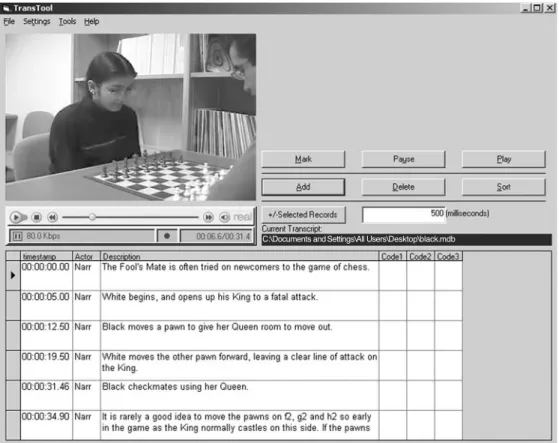
TransTool’s main window (see Figure 8) provides a video window and a data table with entries linked to the video clip by means of a time stamp. The video window is actually a RealPlayer window that has its own VCR-like controls for starting, stopping, pausing, and scrolling along any MPEG or RealMedia clip. When the program
starts, the user must first load a video clip using the File menu. A blank transcript is opened by default, but the user can open an existing transcript database file. Each row or record of the transcript file contains (1) a time stamp that corresponds to a precise time point in the video, (2) a column labeled “Actor,” (3) a column for transcribed text, and (4) other user-defined columns for codes or any other information the user wishes to syn-chronize with the video.
The buttons on the right are used to work with the video clip and the data table. The buttons in the upper set (1) mark the current record with the time stamp of the video clip’s current position, (2) play a video clip from the exact point specified in the current record, and (3) pause the video clip. The buttons in the lower set allow the user to manipulate the data table by adding, deleting, or sorting the records according to the time stamp. All the buttons have keyboard shortcuts that make it convenient for a transcriber to pause and play the video clip, cue it instantly to a specific time point, or re-play a clip repeatedly from a specific point (in order to catch hard-to-hear audio information).
The Menu bar at the top provides access to other TransTool functions. Apart from the basic loading and saving of media clips and transcripts, the File menu also allows users to import text data from other applications into new transcripts and to export existing transcripts as
tab-delimited text files that can be read by most spread-sheet and analysis packages.
Further details and a copy of the program are available on our website at http://www.psych.uiuc.edu/~kmiller/ dvguide/analysis_tools.htm.
Automatic SMIL Generation
TransTool can automatically generate two kinds of files from a transcript. The first is a RealText file (see Figure 4 for an example) that includes each record of the transcript along with the time stamp for that record. The second is a SMIL file that creates two regions—one for the video clip and the other for the RealText file created in the previous step—and specifies the parts of these two media sources that should be played back in synchrony. This SMIL file looks very much like the file shown in Figure 5. Both files as well as the original video clip are needed in order to create an integrated presentation.
SUMMARY AND CONCLUSIONS
SMIL provides a flexible and standards-based format for synchronizing multimedia sources. It can be used to coordinate the presentation of different views of the same event, present video synchronized with audio and text in-formation, and combine segments of different files to produce a single integrated presentation. Most important,
Figure 8. TransTool layout.
366 KUMAR AND MILLER
getting started with SMIL requires nothing more than a text editor and a player (most are available on line free of charge). Several graphical user-interface tools for au-thoring SMIL also exist (see W3C, 2003a, for a partial listing), but the language is easy enough to learn and the examples in this article should provide a reasonable set of templates for some common research needs.
TransTool is an example of how developers can utilize rapid application development tools (such as Visual Basic) or simple scripting languages (such as PHP or even the macro language within Microsoft Excel) to ma-nipulate digital video data in a sophisticated manner using SMIL. Researchers who want to use digital video for their analysis tasks can begin with a simple and free program such as TransTool for transcription, coding, and generation of basic SMIL files for presentation. Later, they can extend or customize TransTool to meet their evolving needs, or move on to one of the more compre-hensive systems mentioned previously.
SMIL and TransTool provide important new capabil-ities of organizing, annotating, and presenting multime-dia information. Coupled with inexpensive techniques for recording and storing video records, these capabili-ties make complex social interactions increasingly ac-cessible to researchers for analysis and presentation.
REFERENCES
Hoschka, P. (1997, March). Toward synchronized multimedia on the Web. World Wide Web Journal. Retrieved August 28, 2003 from http://www.w3j.com/6/s2.hoschka.html.
Institute of Aviation, University of Illinois (1997). MacSHAPA. Retrieved August 28, 2003 from http://www.aviation.uiuc.edu/insti-tute/acadprog/epjp/macshapa.html#Video.
Kumar, S. (2003). DVGuide: Analysis tools. Retrieved August 28, 2003 from http://www.psych.uiuc.edu/~kmiller/dvguide/analysis_tools. htm.
LessonLab (2003). vPrism. Retrieved August 28, 2003 from http:// www.lessonlab.com/vprism/.
Martin, N., Oliver, C., & Hall, S. (2000). ObsWin. Retrieved Au-gust 28, 2003 from http://www.antam.co.uk/obswin.htm.
Noldus Information Technology (2003). The Observer. Retrieved August 28, 2003 from http://www.noldus.com/observer.
Noldus, L. P. J. J., Trienes, R. J. H., Hendriksen, A. H. M., Jan-sen, H., & JanJan-sen, R. G. (2000). The Observer Video-Pro: New software for the collection, management, and presentation of time-structured data from videotapes and digital media files. Behavior Re-search Methods, Instruments, & Computers, 32, 197-206.
RealNetworks, Inc. (2002). RealNetworks production guide. Re-trieved August 28, 2003 from http://service.real.com/help/library/ guides/realone/ProductionGuide/HTML/realpgd.htm.
Sanderson, P. M., Scott, J. J. P., Johnston, T., Mainzer, J., Wata-nabe, L. M., & James, J. M. (1994). MacSHAPA and the enterprise of exploratory sequential data analysis (ESDA). International Jour-nal of Human–Computer Studies,41, 633-681.
Tapp, J. (1996). The Procoder home page. Retrieved August 28, 2003 from http://kc.vanderbilt.edu/~jont /procoder.html.
Tapp, J., & Walden, T. (1993). PROCODER: A professional tape control, coding, and analysis system for behavioral research using videotape. Behavior Research Methods, Instruments, & Computers, 25, 53-56.
University of Illinois (2000). Overview of QuickTime text. Retrieved August 28, 2003 from http://cita.rehab.uiuc.edu/quicktime/Qtext. html.
University of Wisconsin (2002). Transana. Retrieved August 28, 2003 from http://www.transana.org.
W3C (2003a). Synchronized multimedia. Retrieved August 28, 2003 from http://www.w3.org/AudioVideo.
W3C (2003b). Synchronized multimedia integration language (SMIL 2.0). Retrieved August 28, 2003 from http://www.w3.org/ TR/smil20.
APPENDIX
SMIL Modifications for Different Players Specifying the SMIL Version
If just the smil tag is used at the start of the SMIL file, then the default version is assumed to be SMIL 1.0. In order to use features specified in SMIL 2.0 (see W3C, 2003b), replace the smil tag with smil xmlns''http://www.w3.org/2001/SMIL20/Language'' . The xmlnsattribute specifies the XML name space to be used for the document.
QuickTime Player
In order to present the simplest possible SMIL files in this article, we used code that conforms to the stan-dard and plays correctly in the RealOne player. However, QuickTime Player (one of the more popular media players available) is not as flexible with some SMIL default values and needs to be modified in order to work correctly.
All clip-begin and clip-end times should be prefixed by ''npt.'' For example, one would write clip-begin''npt3s''
The npt prefix stands for normal play time(see http://www.w3.org/ TR/smil20/extended-media-object. html for more information). A SMIL file with this modification will be playable in both the RealOne and Quick-Time players.
QuickTime also allows several extensions to SMIL that can be accessed by setting the xmlnsattribute in-side the smil tag to smil xmlns:qt''http://www.apple.com/quicktime/resources/smilextensions'' . For more information, see http://www.apple.com/quicktime/authoring/qtsmil.html.
Internet Explorer
SMIL files do not play as stand-alone files in Internet Explorer the way they do in the RealOne and Quick-Time players. SMIL timing, animation, and transition modules are supported by Internet Explorer, but they have to be invoked from within HTML tags in a fairly complicated way. See http://msdn.microsoft.com/work-shop/author/behaviors/time.asp for further details.
(Manuscript received January 18, 2003; revision accepted for publication February 14, 2004.)