IMPORTANT NOTE
This procedure provides only the information required by Bodycad to design
and manufacture personalized restorations. The procedure described in this
document may differ from the procedure used for diagnostic purposes. The
physician is responsible for determining whether further tests are required for
diagnostic purposes. In this document, CT stands for Computed Tomography
or Computerized Axial Tomography.
Introduction and purpose
Through its mission, The Pursuit of Orthopaedic Perfection
TM, Bodycad aims
to bring to market personalized restorations designed from a virtual 3D model
of the patient’s anatomy. The 3D model of the bone is produced by Bodycad
Imager software, which employs 3D image segmentation from the patient’s
CT. More specifically, the present protocol provides healthcare professionals
with information on scanning requirements for the capture of patient CTs of the
lower extremities, for use by these algorithms.
It is important to closely follow this protocol, as this will produce a more
accurate 3D model and enhance the precision of the personalized restoration.
A high-quality image will provide the best results in terms of a high level of
accuracy. A PREPTech (a Bodycad Technician to support the design) will be
on standby to answer any questions you may have and provide any additional
information you may need.
To plan a Fine Osteotomy, Bodycad needs a full-length standing AP radiograph along with a CT scan of the lower extremities. This scan can be either a CT scan of the joints
(Hip-Knee-Ankle) or a CT scan of the full leg.
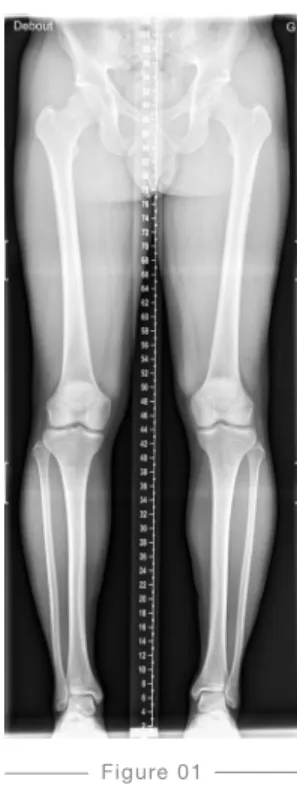
Full-length standing AP radiograph
+
PLANNING A FINE OSTEOTOMY
Images needed
5 cm
10 cm
15 cm
Position of the patient
— Any non-fixed metallic objects worn by the patient must be removed.
— The patient should be in a standing and weight-bearing position.
— The X-ray must include at least the anterior inferior iliac spine to the talus (full-length).
— The legs should be as parallel as possible, without rotation. — The knees should be in full extension, without rotation. — The patient’s patellae are placed forward. Malrotation must be avoided by aligning the patella to the front, centered between the femoral condyles.
— The patient’s weight should be evenly distributed between the legs.
— The arms are folded upward to the head.
— The patient must not move at any time during the scan. If the patient moves, the scan must be restarted. — Support handles may be required for some patients.
— Place a marker indicating the left or right side of the patient.
Exposure
— Use enough density to show the superimposed bones and to obtain well-defined cortical outlines. — The soft tissues must be shown.
Figure 01
Full-length standing AP radiograph
X-RAY SCANNING PROCEDURE
for the Bodycad Fine Osteotomy System
Position of the Patient
— The patient must be in a supine position, with feet first (FFS) into the gantry. — The patient must remain stationary.
— If the patient moves, the scan must be restarted.
— The legs should be as parallel as possible to the table horizontally, without rotation.
— The knees are in full extension, without rotation.
— The patient’s patellae are placed as forward as possible. Malrotation must be avoided by aligning the patella halfway between the femoral condyles.
— The arms are to be folded upward to the head.
— Support may be used in order to maintain the patient in the required position. — For example, you may provide ankle support to stabilize the leg or include lumbar
support to prevent back pain.
CT SCANNING PROCEDURE FOR JOINTS
(HIP-KNEE-ANKLE)
for the Bodycad Fine Osteotomy System
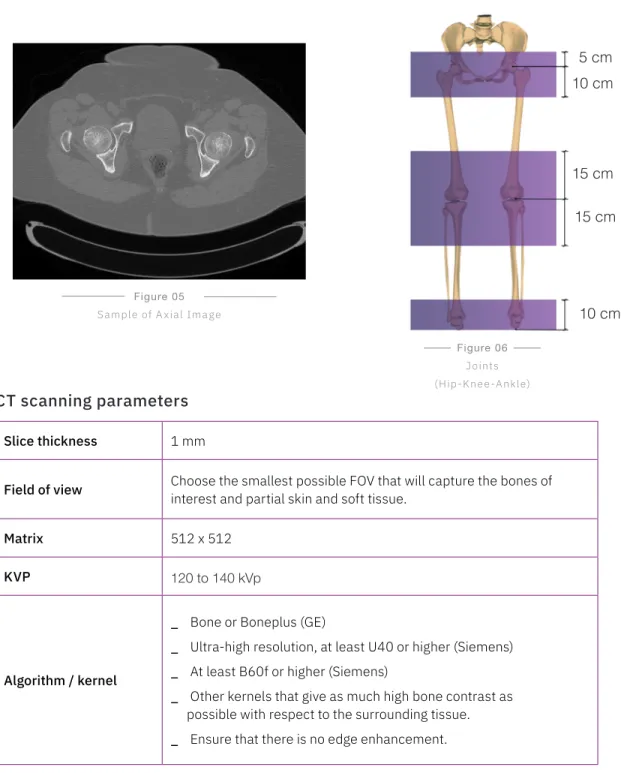
Region of interest
— Images must be acquired from 5 cm above the center of the femoral head to 10 cm below the center of the femoral head.
— Images must be acquired from 15 cm above the knee joint to 15 cm below the knee joint.
— Images must be acquired from 10 cm above the talus.
— Partial skin and soft tissue must be captured along with the bone regions.
Figure 05
Sample of A xial Image
Figure 06
Joints (Hip-Knee-Ankle)
CT scanning parameters
Slice thickness 1 mm
Field of view Choose the smallest possible FOV that will capture the bones of interest and partial skin and soft tissue.
Matrix 512 x 512
KVP 120 to 140 kVp
Algorithm / kernel
_ Bone or Boneplus (GE)
_ Ultra-high resolution, at least U40 or higher (Siemens)
_ At least B60f or higher (Siemens)
_ Other kernels that give as much high bone contrast as possible with respect to the surrounding tissue.
_ Ensure that there is no edge enhancement.
5 cm
10 cm
10 cm
15 cm
Position of the Patient
— The patient must be in a supine position, with feet first (FFS) into the gantry.
— The patient must remain stationary.
— If the patient moves, the scan must be restarted.
— The legs should be as parallel as possible to the table horizontally, without rotation.
— The knees are in full extension, without rotation.
— The patient’s patellae are placed as forward as possible. Malrotation must be avoided by aligning the patella halfway between the femoral condyles.
— The arms are to be folded upward to the head.
— Support may be used in order to maintain the patient in the required position.
— For example, you may provide ankle support to stabilize the leg or include lumbar support to prevent back pain.
— Refer to Figure 07 and Figure 08 for this patient position.
Figure 07
CT SCANNING PROCEDURE FOR THE FULL LEGS
for the Bodycad Fine Osteotomy System
Region of interest
— Images must be acquired from the anterior inferior iliac spine to the ankle and should include at least the talus. The entire foot can be included.
— Partial skin and soft tissue must be captured along with the bone regions.
— Images must be acquired from 5 cm above the center of the femoral head.
Figure 09
Sample of Axial Image Figure 10Full leg
CT Scanning Parameters
Slice Thickness 1 mm to 1.5mm
Field of View Choose the smallest possible FOV that will capture the bones of interest and partial skin and soft tissue.
Matrix 512 x 512
KVP 120 to 140 kVp
Algorithm / Kernel
_ Bone or Boneplus (GE)
_ Ultra-high resolution, at least U40 or higher (Siemens)
_ At least B60f or higher (Siemens)
_ Other kernels that give as much high bone contrast as possible with respect to the surrounding tissue.
_ Ensure that there is no edge enhancement.
Mas Automatic value from the machine
Data anonymization and privacy
Transmission of images
— Be sure that the required rights for transmitting data to Bodycad are respected.
— The patient name and ID must be kept in the transmitted data.
— The transmitted data will be anonymized by Bodycad before the whole process of personalized restoration begins. This anonymization follows the established Bodycad quality procedure and patient privacy guidelines.
Send the labelled CD or DVD to the following address:
Bodycad PREPTech Bodycad Laboratories Inc.
2035, Haut-Bord Street Quebec City (QC) G1N 4R7
Canada
Use our online tool for sending data:
preplink.bodycad.com
Online
File format and instructions :
— Use only DICOM format, without lossy compression.
— Provide the images with the parameters, the scout view, additional images, notes.
— Please contact your PREPTech for shipping instructions and/or account numbers.
© 2019 Bodycad. Bodycad, Bodycad OnCall, Bodycad Fine Osteotomy,
Bodycad PREP and Bodycad PREPTechs are trademarks of Bodycad, Inc. All rights reserved.