Module 2 Branching and Looping
Sunil Kumar B, Dept of CSE, NCET, Bengaluru. 1
Control Structures: are those statements that decide the order in which individual statements or instructions of a program are executed or evaluated.
Control Structures are broadly classified into:
1. Conditional statements: Specifies a condition to execute a group of statements in a program. The control structures, if, if-else, nested if, if else ladder and switch, belongs to this category.
2. Iterative statements: Executes one or more statements repeatedly until a condition is met. The control structures: while, do…while, and for loops, belong to this category.
3. Jump statements: Transfer of control from one part to another within the program. Ex. goto, break, continue and return.
Two-way selection
The basic decision statement in the computer is the two-way selection. The decision is described to the computer as a conditional statement that can be answered either true or false. If the answer is true, one or more action statements are executed. If the answer is false, then a different action or set of actions is executed.
Regardless of which set of action is executed, the program continues with the next statement after the selection. The flow chart for the two-way decision logic is shown in Fig.A
false true
Fig.A. Two-way decision logic Decision
statement
Module 2 Branching and Looping
Sunil Kumar B, Dept of CSE, NCET, Bengaluru. 2
if statements
The if statements executes a simple or compound statements, depending on whether or not an expression is true of false. The syntax to use if statements is:
if(conditional expression) statements; //simple statement if(conditional expression) { //compound statements statement 1; statement 1; statement 1; }
In the preceding syntaxes, a simple or compound statement (block of statements) is executed when the condition expression given in the if statement it turn out to be true. Otherwise, the program control passes to next statement. If the condition expression is false then the C compiler does not do anything.
Note that the condition expression given in parenthesis, must be evaluated as true(non-zero value) or false(zero values). In addition, a compound statement must be provided by opening and closing braces.
Examples:
if(7) // a non zero value returns true if(0) //zero value returns false if(i==0) //True if i=0 other wise False
if(i=0) //false because value of the expression is zero.
*Note:- For programming examples, please refer text books.
if-else statement
The if-else statement executes a simple or compound statement when the conditional expression provided in the if statement is true. It executes another simple or compound statement, followed by the else statement, when the conditional expression is false.
Syntax:
if(conditional expression) simple or compound statement 1 else
simple or compound statement 2
Module 2 Branching and Looping
Sunil Kumar B, Dept of CSE, NCET, Bengaluru. 3
Nested if statements (Multi-way selection)
For the else, the statements may be any statement, including, another else. When an if-else is included within an if-if-else, it is known as a nested if statement. The control of a program moves into the inner if statements when the outer if statement is evaluated to be true. Syntax: if(expression 1) { if(expression 2) { Statement 1 } else { Statement2 } else { Statement 3 }
(a) code (b)Logic Flow
Syntax:
if(conditional expression1) {
//Statement 1 to be executed in case the conditional expression1 is true if(conditional expression2)
{
// Statement 2 to be executed in case the conditional expression2 is true }
}
if-else ladder(Multi-way selection)
When more than one if-else statements are used in a sequence, it is called as if-else ladder. The syntax is:
if(conditional expression1) simple or compound statement else if(conditional expression2) simple or compound statement else if(conditional expression3)
Expr1
Expr2
Statement1 Statement3
Module 2 Branching and Looping
Sunil Kumar B, Dept of CSE, NCET, Bengaluru. 4
simple or compound statement ………….
else if(conditional expression n) simple or compound statement
*Note:- For programming examples, please refer text books.
Switch statements (Multi-way selection)
A switch statement is a conditional statement that tests a value against different values. If the value is matched, the corresponding group of statements is executed.
A switch statement begins with the switch keyword that followed by a value expression in the parenthesis( ). It is a combination of multiple case labels that must be separated by the break statement. Every case label contains a constant value that is matched against the value, which is specified in the switch expression. If the value is matched, the statements of that case label are executed.
In addition, we can specify the default label, which is executed when the value specified in the switch expression, does not match with the given case labels.
The syntax is: switch(expression) { case value 1: { statements break; } case value 2: { statements break; } sase value 3: { statements break; } …… default: { default statements break; } }
Module 2 Branching and Looping
Sunil Kumar B, Dept of CSE, NCET, Bengaluru. 5
Conditional operator (?:) or Ternary operator:
is used to check a condition and select a value depending on the value of the condition. The selected value will be assigned to a variable which has the following form:- variable = (condition)? value1 : value2;Ex:- big = (a > b)? a : b;
Repetition
Concept of a loop
The concept of a loop is shown in the flow chart in Fig.1. In this flow chart, the action is repeated over and over again. It never stops.
Since the loop in fig. never stops, the actions will be repeated forever. We want the loop to end when the work is done. To make sure it ends, we must have a condition that controls the loop. In other words, we must desing the loop so that before or after each iteration, it checks to see if it is done. If it is not done, it repeats one more time; if it is done, it exits the loop. This test is known as a loop control expression.
Fig.1. The concept of loop.
Pretest and Post-Test loops
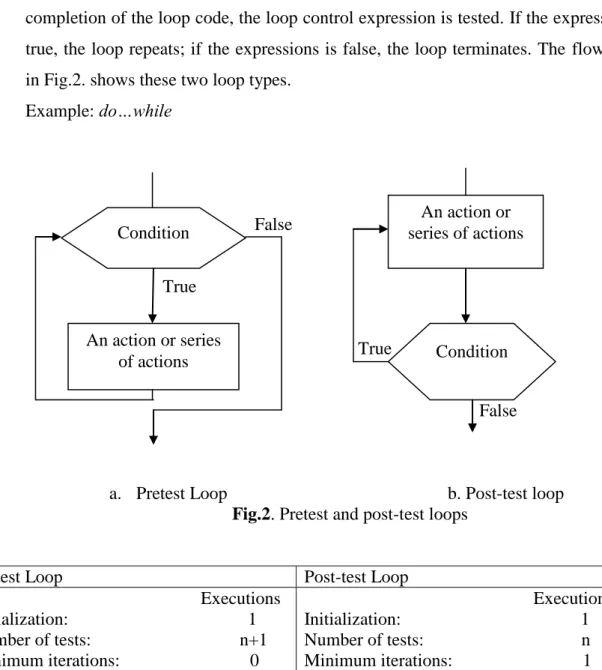
Programming languages allow us to check the loop control expressions either before or after each iteration of the loop. In other words, we can have either a pre- or a post-test terminating condition.
In a pretest loop, the condition is checked before we start and at the beginning of each iteration after the first. If the test condition is true, we execute the code; if the test condition is false, we terminate the loop.
Examples: for loop, while loop.
An action or a series of actions
Module 2 Branching and Looping
Sunil Kumar B, Dept of CSE, NCET, Bengaluru. 6
In a post-test loop, we always execute the code at least once. At the completion of the loop code, the loop control expression is tested. If the expression is true, the loop repeats; if the expressions is false, the loop terminates. The flowcharts in Fig.2. shows these two loop types.
Example: do…while False True True False
a. Pretest Loop b. Post-test loop
Fig.2. Pretest and post-test loops
Pretest Loop Post-test Loop
Executions Initialization: 1 Number of tests: n+1 Minimum iterations: 0 Executions Initialization: 1 Number of tests: n Minimum iterations: 1 n is the number of iterations.
Table 1. Loop comparision
Loops in C
C has three loop statements: the while, the for, and the do…while. The first two are pretest loops, and the do…while is a post-test loop. We can use all of them for event-controlled and counter-event-controlled loops. Fig.6. shows these loop constructs.
Condition An action or series of actions An action or series of actions Condition
Module 2 Branching and Looping
Sunil Kumar B, Dept of CSE, NCET, Bengaluru. 7
Pretest loop Pretest loop post-test loop
Fig.6. C loop constructs
1.The while loop
The while statement is the pretest loop. It uses an expression to control the loop. Since it is a pretest loop, it tests the expressions before every iterations of the loop. The basic syntax of the while statement is shown in the fig.7.
(a)Flowchart (b)Sample Code
Fig.7. The while statement
Note that the sample code in Fig.7 shows that the loop body is a single statement; that is, the body of the loop must be one, and only one, statement. If we want to include multiple statements in the body, we must put them in a compound statement(block). This concept is shown in the Fig.8. below.
Loop statements
while for do…while
expression s
statement
While (expression)
Module 2 Branching and Looping
Sunil Kumar B, Dept of CSE, NCET, Bengaluru. 8
False
.
Exit
(a)Flowchart (b) C language
Fig.8. Compound while statement
*Note:- For programming examples, please refer text books.
2.The for loop
The for statement is a pretest loop that uses three expressions. The first expression contains any initialization statements, the second contains the limit-test expression, and the third contains the updating expression. Fig.9 shows the flow chart and an expanded interpretation, for a sample for statement.
1. Expression 1 is executed when the for starts.
2. Expression 2 is the limit test expression. As shown in the expanded flowchart, it is executed before every iteration. Since the for is a pretest loop, the body is not executed if the limit condition is false at the start of the loop.
3. Expression 3 is the update expressions. This means that you cannot use statements, such as return, in the for statement itself.
4. Like the while statements, the for statements does not need a semicolon. expression Action Action Action While(expression) { }/*end while*/ Action Action Action
Module 2 Branching and Looping
Sunil Kumar B, Dept of CSE, NCET, Bengaluru. 9
False
Effd f df f
False
True True
(a)Flowchart (b) Expanded Flowchart
Fig.9. for statement
(a)Simple for statement (b)Compound for statement
*Note:- For programming examples, please refer text books.
Nested for
loops
Any statement, even another for loop, can be included in the body of a for statement. In other words, a for loop inside for loop is called nested for.
For(expr1;expr2;expr3) //Outer for loop
{
for(expr1;expr2;expr3) //Inner for loop
{
statements;
} //end of inner for } //end of outer for
*Note:- For programming examples, please refer text books.
expr3 expr1 expr2 statement expr1 expr2 statement expr3 for(expr1;expr2;expr3) for(expr1;expr2;expr3) { } Action Action
Module 2 Branching and Looping
Sunil Kumar B, Dept of CSE, NCET, Bengaluru. 10
2.1 Variations in for loop
1.In for loop, the expression “i<=n can be replaced by the expression “i<n+1”.
For example, consider
for(i=1; i<=5 ; i++) {
Printf(“%d”, i); //Output: 1 2 3 4 5 }
//can also be written as
for(i=0 ; i<6 ; i++) {
Printf(“%”,i); //Output:1 2 3 4 5 }
2. The initialization expression can be moved just before the loop and updation expression can be shifted to end of body loop. For ex.
for(i=1; i<=5 ; i++) i=1 {
Printf(“%d”, i); is same as for( ; i<=5 ; ) } {
Printf(“%d”, i); i++;
}
3. For loop should not end with semicolon.
For(i=1; i<=5 ; i++) {
Printf(“%d”, i) ; }
Observe that semicolon in the body of the loop is treated as NULL statement. So, for all the values of i=1,2,3,4,5 the NULL statement is executed which does nothing. Finally, i will be 6 and control comes out of for loop.
4. The initialization expression expr1, limit test expression expr2 and update expression expr3 are optional in the for loop. For ex.
for( ; ;) {
printf(“\n”);
}
Module 2 Branching and Looping
Sunil Kumar B, Dept of CSE, NCET, Bengaluru. 11
3. The do…while statement
The do…while statement is a post-test loop. Like the while and for loops, it also uses an expression to control the loop, but it tests this expression after the execution of the body. The format of the do….while statement is shown in Fig.10.
true
false
true
false
(a)Flowchart (b)Sample Code
Comparison of Loop Control Structures
for loop while loop do…while loop
1.A for loop is used to execute and repeat a statement block depending on a condition at the beginning of the loop.
Example
for(i=1; i<=10; i++) {
A while loop is used to execute and repeat a statement block depending on a condition which is evaluated at the beginning of the loop.
Example i=1;
A do…while loop is used to execute and repeat a
statement block depending on a condition which is evaluated at the end of the loop. Example i=1; statement expression do } while ( expression ); statement do { } while (expression ); Action Action Action expression Action Action Action
Module 2 Branching and Looping
Sunil Kumar B, Dept of CSE, NCET, Bengaluru. 12
s=s+i; p=p*i; } while(i<=10) { s=s+i; p=p*i; i++; } do { s=s+i; p=p*i; i++; } while(i<=10); 2. A variable value is
initialized at the beginning of the loop and is used in the condition.
A variable value is
initialized at the beginning or before the loop and is used in the condition.
A variable value is
initialized before the loop or assigned inside the loop and is used in the condition.
3. A statement to change the value of the condition or to increment the value of the variable is given at the beginning of the loop.
A statement to change the value of the condition or to increment the value of the variable is given at the inside of the loop.
A statement to change the value of the condition or to increment the value of the variable is given at the inside of the loop.
4.The statement block will not be executed when the value of the condition is
false.
The statement block will not be executed when the value of the condition is
false.
The statement block will not be executed when the value of the condition is
false, but the block is executed at least once irrespective of the value of the condition.
5.A for loop is commonly used by many programmers.
A while loop is also widely used by many programmers.
A do…while loop is used in some cases where the condition need to be checked at the end of the loop.
Jump statements
Jump statements are the statements that transfer control from one part of the program to another . The jump statements supported by C are follows:
break statements continue statements goto statements return statements
break statement/ Jump statements related to looping
The break statement is used to break any type of loop as well as switch statement. Breaking a loop means terminating the loop. It has the following form:
break;
Example:
Printf(“Press B to break, any other key to continue”); for(i=1 ; i<=80 ; i++)
Module 2 Branching and Looping
Sunil Kumar B, Dept of CSE, NCET, Bengaluru. 13
{
ch = getche(); if (ch == „B‟) break;
--- control is transferred to the end of block ---
}
continue statement/ Jump statements related to looping
The continue statement is used to transfer the control to the beginning of a statement block in a loop. In other words, a break statement breaks the entire loop, but a continue statement breaks the current iteration. That is, the continue statement breaks the current execution of a loop condition and then continue the loop with next condition.
If has the following form:
continue; Example:
for(i=1 ; i<=80 ; i++) {
ch = getche();
if (ch == „C‟ || ch == „c‟) control is transferred to the beginning of { the block.
printf(“C for continue is pressed”); continue;
}
--- }
goto statement
The goto statement is an unconditional transfer of control statement. It is used to transfer the control from one part of the program to another. The place to which the control is transferred is identified by a statement label. It has the following form:
goto label;
where label is the statement label which is available anywhere in the program. Example: ---; goto display; ---; ---; display; ---;
Module 2 Branching and Looping
Sunil Kumar B, Dept of CSE, NCET, Bengaluru. 14
exit( ) Function
The exit( ) function is used to transfer the control to the end of a program (i.e to terminate the program execution). It uses one argument in ( ) and the value is zero for normal termination or non-zero for abnormal termination. For example.
if (n<0) {
printf(“Factorial in not available for negative numbers”); exit(0);
}
Note that the program execution is terminated when the value of the variable n is negative. The compiler directive #include<stdlib> is used when this function is used in a program.
return:
It is used to return the control to the calling function with/without a value. For example, if a function is not returning any value, use the return keyword
return;
If a function is returning a value, then
return value;
Question Bank
1.
What is a two way selection statement? Explain with an example.2. With a suitable example program, demonstrate the working of if-else statement 3. What are multi-way selection/decision making statements? Explain them 4. What is nested if? Explain with a suitable program.
5. What is if-else ladder? Explain with a suitable program.
6. What is a switch? With syntax explain with an example program. 7. What is a loop? How loops are classified in C?
8. Explain the working of for, while and do_while loops with syntax and suitable example programs.
9. What is the difference between while and do_while? 10. Differentiate between for, while and do_while?
11. What are pre-test loops and post-test loops? Explain with examples.
12. What are jump statements? Explain the different types of jump statements available in C. 13. Explain the following jump statements. i.goto ii.break iii.continue.
14. Where and why break and continue statements are used in C? 15. What are Ternary operators? Explain them.
Module 2 Branching and Looping