White Paper
EMC Solutions
Abstract
This white paper provides a detailed reference architecture of Microsoft messaging and collaboration applications running on a VCE™ Vblock® System 340, enabled by a Cisco UCS B-series, with an EMC® VNX™ storage platform and VMware virtualization technologies. This solution eliminates lengthy infrastructure scoping, sizing, and testing, and reduces the total cost of ownership (TCO).
September 2015
CONVERGED INFRASTRUCTURE SOLUTION
FOR MICROSOFT SHAREPOINT, LYNC, AND
EXCHANGE ON VCE VBLOCK SYSTEM 340
Converged Infrastructure Solution for Microsoft SharePoint, Lync, and Exchange on VCE Vblock System 340
White Paper 2 Copyright © 2015 EMC Corporation. All Rights Reserved.
Published September 2015
EMC believes the information in this publication is accurate as of its publication date. The information is subject to change without notice.
The information in this publication is provided as is. EMC Corporation makes no representations or warranties of any kind with respect to the information in this publication, and specifically disclaims implied warranties of merchantability or fitness for a particular purpose. Use, copying, and distribution of any EMC software described in this publication requires an applicable software license.
EMC2, EMC, and the EMC logo are registered trademarks or trademarks of EMC Corporation in the United States and other countries. All other trademarks used herein are the property of their respective owners.
For the most up-to-date listing of EMC product names, see EMC Corporation Trademarks on EMC.com.
All trademarks used herein are the property of their respective owners. Part Number H14445
Table of contents
Executive summary ... 5 Business case ... 5 Solution overview ... 5 Document purpose ... 5 Audience... 6 Key results ... 6 Technology overview ... 7 Overview ... 7 Vblock System 340 ... 7 Compute components ... 8 Network components ... 9 Storage components ... 9 Virtualization components ... 10 Management components ... 10 VMware vSphere 5.5 ... 11Microsoft SharePoint Server 2013 SP1 ... 11
Microsoft Lync Server 2013 SP1 ... 11
Microsoft Exchange Server 2013 SP1 ... 11
Microsoft Windows Server 2012 R2 ... 11
Solution architecture and configuration ... 12
Overview ... 12
Solution architecture ... 12
Hardware resources ... 12
Software resources ... 13
VMware design ... 13
Virtual machine configuration ... 14
Application design ... 15
SharePoint 2013 ... 15
Workload profile ... 15
SharePoint Server 2013 server role design ... 16
SharePoint 2013 database server configuration ... 16
Storage design ... 16
Lync Server 2013 ... 17
Workload profile ... 17
Lync Server 2013 server role design ... 18
Storage design ... 19
Exchange Server 2013 ... 21
Converged Infrastructure Solution for Microsoft SharePoint, Lync, and Exchange on VCE Vblock System 340
White Paper 4
Exchange 2013 storage design and configuration ... 21
Test methodology ... 24
Overview ... 24
Application workloads simulation ... 24
Microsoft SharePoint 2013 VSTS generated custom workload ... 24
Microsoft Lync 2013 stress test tool ... 24
Microsoft Exchange Jetstress ... 25
Test scenarios ... 25
Test scenarios and results ... 27
Overview ... 27
SharePoint 2013 test results ... 27
Lync 2013 test results ... 28
Exchange 2013 test results ... 29
Conclusion ... 30 Summary ... 30 Findings ... 30 References ... 32 EMC ... 32 VCE ... 32 Microsoft ... 32
Executive summary
Today, large organizations want to do the following to address business challenges in their Microsoft messaging and collaboration environment:
• Increase efficiency and reduce costs by eliminating tactical tasks and focusing on business innovation by using data to drive business agility
• Maximize their return on investment by reducing infrastructure, operating, licensing, and maintenance costs
• Receive guaranteed quality of service with continuous access to the application data
EMC solutions for Microsoft messaging and collaboration applications on VCE™ Vblock® systems increase performance, capacity, and availability. They also greatly simplify the implementation of business-critical applications that are used in everyday operations, such as Microsoft Exchange 2013, SharePoint 2013, and Lync 2013 servers.
The Vblock System 300 series provides the virtualization and simplified management technology necessary to address these business challenges and allows organizations to minimize their total cost of ownership (TCO).
EMC solutions based on the Vblock System 340 series help organizations in the deployment of Microsoft applications by providing the following benefits:
• Fewer devices with simplified management • Lower power and cooling requirements and costs
• Fewer staff required to operate systems, freeing up resources to deploy the solutions
• Better control of user data
• Confidence in a fully-tested and integrated IT architecture
Extensive testing of mixed workload use cases and environments on the Vblock System 340 yielded exceptional performance. For this solution, the Vblock System 340, which includes an EMC VNX®5600 storage array, supports a scalable and cost-effective deployment on VMware 5.5 for Microsoft applications.
This white paper describes a solution that will help you meet the most stringent service level agreements (SLAs) for Microsoft Exchange, SharePoint, and Lync applications. The solution uses a proven, converged infrastructure with enhanced security, performance, and scalability.
Microsoft messaging and collaboration applications can be provided as a virtualized IT application or used as a service with cloud orchestration, both on-premises, for the best scalability and performance. In either way, the Vblock System 300 series with EMC VNX storage and VMware virtualization technologies provides enterprise-class organizations with the efficiency, agility, and cost-effective management to justify the investment.
Business case
Solution overview
Converged Infrastructure Solution for Microsoft SharePoint, Lync, and Exchange on VCE Vblock System 340
White Paper 6 This white paper describes:
• Design and configuration of virtualized Microsoft Windows servers
• Design recommendations and performance validation for Microsoft Exchange Server, SharePoint Server, and Lync Server storage
• Best practices for Microsoft messaging and collaboration applications on a Vblock System 340 from EMC
This document is intended for technical engineering staff, managers, solutions architects, and IT and storage administrators responsible for designing, creating, and managing a Microsoft messaging and collaboration environment, including the related infrastructure and data centers.
This solution shows how Vblock System 340 can provide excellent performance for a medium sized deployment of Microsoft messaging and collaboration applications, including Microsoft SharePoint, Lync, and Exchange. The solution provides enough bandwidth for future growth.
The key findings in this solution are as follows:
• Proven reference architecture—The solution showcases a proven reference architecture that supports mixed Microsoft messaging and collaboration applications using a Vblock System 340.
• Validated and tested performance—The combined application test results show that the designed architecture satisfies all recommended performance
guidelines provided by Microsoft Lync Server 2013, SharePoint Server 2013, and Exchange Server 2013.
The solution can easily support a specified workload of 8,000 users for these Microsoft messaging and collaboration applications:
• SharePoint Server 2013—An extreme workload profile with 25 percent concurrency in an AlwaysOn availability group protection configuration
• Lync Server 2013—A heavy workload profile with advanced fault tolerance and high availability
• Exchange Server 2013—A heavy workload for 8,000 Exchange users (1.2 GB mailbox, 150 messages/user/day) in a database availability group (DAG) with two copies of each database configuration
Audience
Technology overview
Vblock systems provide a complete integrated solution for virtualization, storage, computing, and networking. Vblock is an engineered, manufactured, managed, and supported converged infrastructure that is ready to be deployed in a customer’s data center.
Vblock enterprise-class capabilities include management, performance, security, multi-tenancy, high availability, and backup. Vblock can easily scale-out or scale-up to meet all of your customer's business growth needs and protect their IT investment. This solution, which is based on real-world test scenarios and user workloads, shows an easy and efficient way to use Microsoft messaging and collaboration applications that are deployed on a Vblock system. The solution eliminates lengthy infrastructure scoping, sizing, and testing, and reduces TCO.
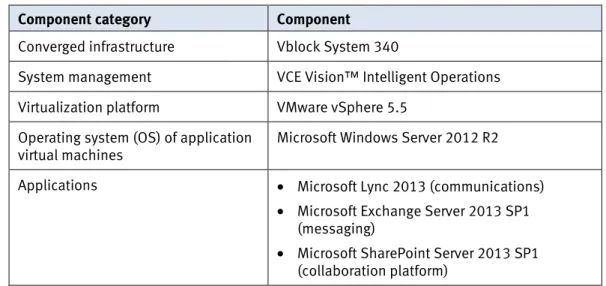
Table 1 lists the key components in the solution.
Table 1. Components
Component category Component
Converged infrastructure Vblock System 340
System management VCE Vision™ Intelligent Operations
Virtualization platform VMware vSphere 5.5
Operating system (OS) of application virtual machines
Microsoft Windows Server 2012 R2
Applications • Microsoft Lync 2013 (communications)
• Microsoft Exchange Server 2013 SP1 (messaging)
• Microsoft SharePoint Server 2013 SP1 (collaboration platform)
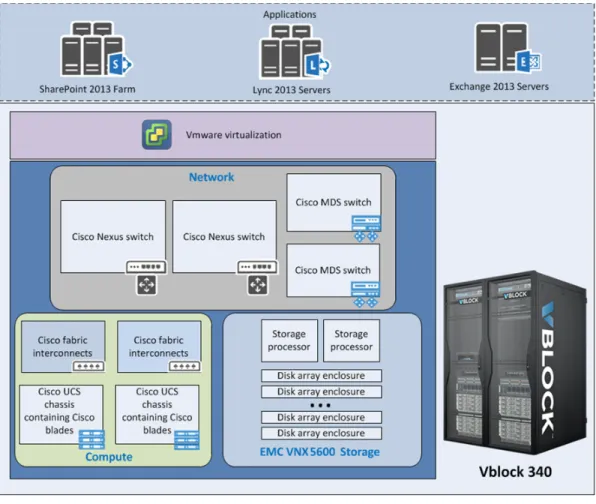
Figure 1 provides a high-level overview of the components in the Vblock System 340 architecture.
Overview
Converged Infrastructure Solution for Microsoft SharePoint, Lync, and Exchange on VCE Vblock System 340
White Paper 8
Figure 1. Vblock System 340 components
Compute components
The Cisco UCS data center platform combines x86-based servers (the B-series) and rack servers with networking and storage access into a single system. The platform innovations include the following:
• Standards-based, unified network fabric • Cisco Virtual Interface Card (VIC)
• Cisco UCS extended memory technology
The UCS B-series, two-socket blade servers, are based on the Intel Xeon processor E7 and E5 product families. They are designed for virtualized applications and deliver record-setting performance to a wide range of workloads.
Fabric extenders (FEX) within the Cisco UCS chassis connect to Cisco fabric
interconnects over a converged Ethernet. Up to eight 10 GbE ports on each Cisco UCS FEX connect northbound to the fabric interconnects, regardless of the number of blades in the chassis. These connections carry IP and storage traffic.
Each fabric interconnect has multiple ports reserved by VCE for 10 GbE ports. VCE reserved some of these ports to connect to upstream access switches within the Vblock System. These connections are formed into a port channel to the Cisco Nexus switch and carry IP traffic destined for the external network 10 GbE links. In a unified storage configuration, this port channel can also carry NAS traffic to the X-Blades within the storage layer.
Each fabric interconnect also has multiple ports reserved by VCE for Fibre Channel (FC) ports. The ports connect to Cisco storage-area network (SAN) switches. The connections carry FC traffic between the compute layer and the storage layer. In a unified storage configuration, port channels carry IP traffic to the X-Blades for NAS connectivity. For SAN connectivity, SAN port channels carrying FC traffic are
configured between the fabric interconnects and upstream Cisco MDS or Cisco Nexus switches.
Network components
The Cisco Nexus series switches in the network layer provide 10 or 40 GbE IP
connectivity between the Vblock System 340 and the external network. In the unified storage architecture, the switches also connect the fabric interconnects in the compute layer to the X-Blades in the storage layer.
In the segregated architecture, the Cisco MDS 9000 series switches in the network layer provide FC links between the Cisco fabric interconnects and the VNX storage. These FC connections provide block level devices to blades in the compute layer. In the unified network architecture, there are no Cisco MDS series storage switches. Cisco Nexus 5548UP switches or Cisco Nexus 5596UP switches provide FC connectivity.
Ports are reserved or identified for special Vblock System 340 services such as backup, replication, or aggregation uplink connectivity. The Vblock System 340 contains two Cisco Nexus 3048 switches to provide management network
connectivity to the different components of the Vblock System. These connections include the VNX service processors, Cisco UCS fabric interconnects, and Cisco Nexus 5500 UP switches or Cisco Nexus 9396PX switches, and power output unit (POU) management interfaces.
Storage components
The VNX series systems are fourth-generation storage platforms that offer a unique combination of flexible, scalable hardware design, and advanced software
capabilities that enable them to meet the diverse needs of today's organizations. VNX series platforms support block storage and unified storage. The platforms are optimized for VMware virtualized applications. They feature flash drives for extendable cache and high performance in the virtual storage pools. Automation features include self-optimized storage tiering, and application-centric replication. Regardless of the type of storage protocol implemented at startup (block or unified), the Vblock System 340 can include cabinet space, cabling, and power to support the hardware for block and unified storage protocols. This arrangement makes it easier to move from block storage to unified storage with minimal hardware changes.
Converged Infrastructure Solution for Microsoft SharePoint, Lync, and Exchange on VCE Vblock System 340
White Paper 10 For this solution, the Vblock System 340 includes the VNX5600 storage platform as
primary storage for the Microsoft applications. Virtualization components
VMware vSphere 5.5 is the virtualization platform that provides the foundation for management in the Vblock System 340. The core vSphere components are the vSphere hypervisor (ESXi) and VMware vCenter server and a single sign-on (SSO) for management.
The ESXi hypervisors are deployed in a cluster configuration and can scale up to 32 nodes per cluster. The cluster allows dynamic allocation of resources, such as CPU, memory, and storage. The cluster also provides workload mobility and flexibility with the use of VMware vMotion and vSphere Storage vMotion technology.
Management components
The second generation of the Advanced Management Platform (AMP-2) centralizes management of Vblock System components.
AMP-2 provides a single management point for Vblock Systems and provides the ability to:
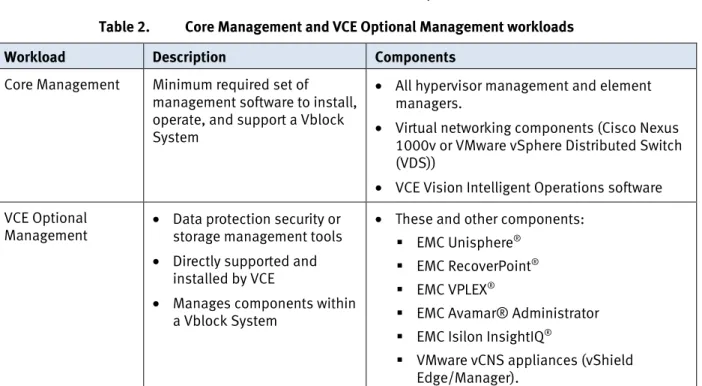
• Run the Core Management Workload and VCE Optional Management Workloads that are described in Table 2
• Monitor and manage Vblock System health, performance, and capacity • Provide network and fault isolation for management
• Eliminate resource overhead on Vblock Systems
Table 2. Core Management and VCE Optional Management workloads
Workload Description Components
Core Management Minimum required set of management software to install, operate, and support a Vblock System
• All hypervisor management and element managers.
• Virtual networking components (Cisco Nexus 1000v or VMware vSphere Distributed Switch (VDS))
• VCE Vision Intelligent Operations software VCE Optional
Management • Data protection security or storage management tools • Directly supported and
installed by VCE
• Manages components within a Vblock System
• These and other components: EMC Unisphere®
EMC RecoverPoint® EMC VPLEX®
EMC Avamar® Administrator EMC Isilon InsightIQ®
VMware vCNS appliances (vShield Edge/Manager).
VMware vSphere 5.5 transforms a computer’s physical resources by virtualizing the CPU, RAM, hard disk, and network controller. This transformation creates fully functional virtual machines that run isolated and encapsulated operating systems and applications, just like physical computers.
Microsoft SharePoint Server 2013 provides a business-collaboration platform for enterprise and commercial organizations. SharePoint enables organizations to share content and information through websites, blogs, wikis, and document libraries, and to manage this content and information collectively from start to finish. SharePoint Server 2013 with Service Pack 1 is fully supported to run under Windows Server 2012 R2.
Microsoft Lync Server 2013 is an enterprise real-time communications server, which provides the infrastructure for enterprise instant messaging, presence, and structured conferences connectivity.
Microsoft Exchange Server 2013 is an enterprise email and communication system that allows businesses and customers to collaborate and share information. Exchange Server 2013 is a redesign of Exchange Server 2010 and adds simplicity of scale, better hardware use, and failure isolation. Exchange Server 2013 uses DAGs and mailbox database copies, along with other features such as single item recovery, retention policies, and lagged database copies. These features provide high
availability, site resilience, and Exchange native data protection. Microsoft enhanced the high-availability platform, the Exchange Information Store service, and the Extensible Storage Engine (ESE) to provide greater availability, easier management, and reduced costs. Exchange Server 2013 with Service Pack 1 is fully supported and runs under Windows Server 2012 R2.
EMC enhances Exchange Server 2013 with the industry’s broadest choice of storage platforms, software, and services.
Windows Server 2012 R2 provides a wide range of enhanced features and
capabilities. They span server virtualization, storage, software-defined networking, server management and automation, web and application platforms, access and information protection, virtual desktop infrastructure, and more.
VMware vSphere 5.5 Microsoft SharePoint Server 2013 SP1 Microsoft Lync Server 2013 SP1 Microsoft Exchange Server 2013 SP1 Microsoft Windows Server 2012 R2
Converged Infrastructure Solution for Microsoft SharePoint, Lync, and Exchange on VCE Vblock System 340
White Paper 12
Solution architecture and configuration
This section provides an overview of the solution on Vblock System 340 with
VNX5600. EMC has designed and proven the solution to support mixed workloads of SharePoint Server 2013, Lync Server 2013, and Exchange Server 2013.
Figure 2 shows the architecture and the key components of the solution. We1 built the entire infrastructure on Vblock System 340 with VNX5600. VMware vSphere runs as the hypervisor on 15 Cisco B200 M3 blade servers and uses VNX5600 as the back-end storage.
We deployed all Microsoft application servers as virtual machines on a vSphere cluster.
Figure 2. Solution architecture and configuration
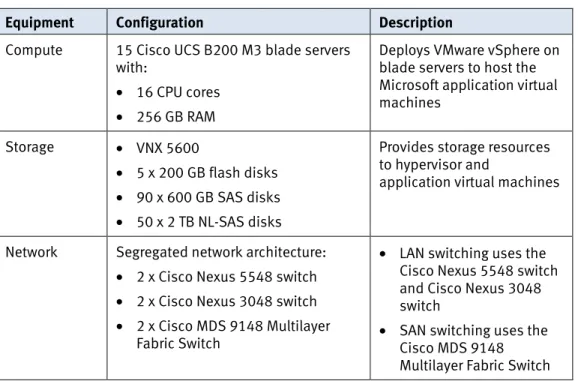
We validated this solution on a Vblock System 340 system with VNX5600. Table 3 summarizes the detailed configuration used in this solution.
1 In this guide, “we” refers to the EMC Solutions engineering team that validated the solution. Overview
Solution architecture
Hardware resources
Table 3. Hardware resources in this solution
Equipment Configuration Description
Compute 15 Cisco UCS B200 M3 blade servers
with:
• 16 CPU cores • 256 GB RAM
Deploys VMware vSphere on blade servers to host the Microsoft application virtual machines
Storage • VNX 5600
• 5 x 200 GB flash disks • 90 x 600 GB SAS disks • 50 x 2 TB NL-SAS disks
Provides storage resources to hypervisor and
application virtual machines
Network Segregated network architecture: • 2 x Cisco Nexus 5548 switch • 2 x Cisco Nexus 3048 switch • 2 x Cisco MDS 9148 Multilayer
Fabric Switch
• LAN switching uses the Cisco Nexus 5548 switch and Cisco Nexus 3048 switch
• SAN switching uses the Cisco MDS 9148 Multilayer Fabric Switch
Table 4 summarizes the software resources used in this solution.
Table 4. Software resources
Resource Version Purpose
VCE software Release
Certification Matrix for Vblock System 340
5.0.8 Tested and certified
software and firmware versions of each component in the Vblock system Microsoft
software Microsoft Windows Server 2012 Datacenter R2 Application virtual machine OS Microsoft
SharePoint Server
2013 Enterprise SP1 and the April 2015 cumulative package
SharePoint farm
Microsoft Lync
Server 2013 Enterprise SP1 Lync organization
Microsoft
Exchange Server 2013 SP1 Enterprise
Exchange mail system
In this solution, we deployed all three applications in one vSphere cluster with ESXi hosts and vSphere High Availability (HA) that are enabled to provide the best protection for each application. We configured VMware affinity rules to ensure that the virtual machines from the same Microsoft Windows cluster would never run on the same ESXi host. Table 5 shows the affinity rules we configured in this solution. Software resources
Converged Infrastructure Solution for Microsoft SharePoint, Lync, and Exchange on VCE Vblock System 340
White Paper 14
Table 5. VMware affinity rules set in this solution
Affinity rule Type Virtual machines Description
Affinity-SPS-BE Separate virtual
machines •• SPS-SQL-1 SPS-SQL-2
Runs virtual machines with similar server roles on different ESXi hosts
Affinity-Lync-BE Separate virtual
machines • Lync-DB-Principal • Lync DB Mirror • Lync DB Witness
Runs Lync back end virtual machines on different ESXi hosts
Affinity-Exchange-MBX Separate virtual machines •• Exchange MBX 1 Exchange MBX 2 • Exchange MBX 3 • Exchange MBX 4 • Exchange MBX 5 • Exchange MBX 6 • Exchange MBX 7 • Exchange MBX 8 Runs Exchange mailbox server virtual machines on different ESXi hosts
Affinity-Exchange-CAS
Separate virtual
machines •• Exchange CAS 1 Exchange CAS 2 • Exchange CAS 3 • Exchange CAS 4
Runs Exchange client access server virtual machines on different ESXi hosts
Table 6 provides a summary of the virtual machine configuration for each application.
Table 6. Virtual machines configuration
Virtual
machine Role Quantity vCPU
Memory (GB)
Boot disk VHDX (GB)
SharePoint Web server 3 4 12 100
SharePoint Application server (with crawler, query and other service
components)
2 12 12 100
SharePoint Application server (with query processing and index partition components)
2 4 12 100
SharePoint SQL server (AlwaysOn AG
enabled) 2 8 16 100
Lync Front end 3 4 32 100
Lync Back end 3 2 8 100
Exchange Mailbox server 8 8 64 300
Virtual machine configuration
Virtual
machine Role Quantity vCPU
Memory (GB)
Boot disk VHDX (GB)
Exchange Client access server 4 4 12 100
Note: This solution separates the mailbox server role and client access server role for flexibility and increased compute efficiency in virtualized environments. You can also combine these two server roles when necessary.
We configured the environment to support an application profile that consists of: • A medium Lync Server 2013 deployment of three Lync Server Enterprise Edition
front end servers with a dedicated back end high availability database • A medium SharePoint farm enabled as AlwaysOn AG on the SQL side
• A medium Exchange organization consisting of a DAG with two copies of each database
The SharePoint farm is designed for optimized performance, ease of manageability, and growth. This section describes the SharePoint Server 2013 design and
configuration in this solution. Workload profile
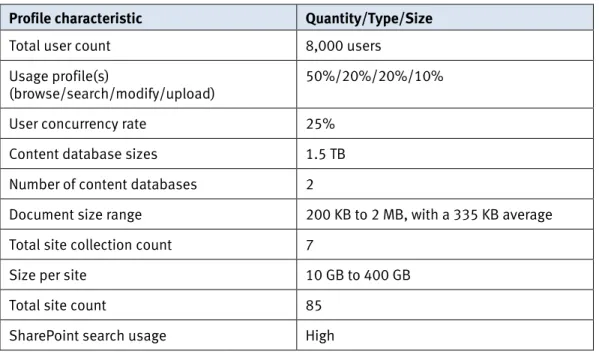
Table 7 lists the Microsoft SharePoint Server 2013 workload profile.
Table 7. Microsoft SharePoint Server 2013 workload profile
Profile characteristic Quantity/Type/Size
Total user count 8,000 users
Usage profile(s)
(browse/search/modify/upload)
50%/20%/20%/10%
User concurrency rate 25%
Content database sizes 1.5 TB
Number of content databases 2
Document size range 200 KB to 2 MB, with a 335 KB average
Total site collection count 7
Size per site 10 GB to 400 GB
Total site count 85
SharePoint search usage High
Note: To support Windows Server 2012 R2, you must apply Service Pack 1 for SharePoint Server 2013.
Application design
Converged Infrastructure Solution for Microsoft SharePoint, Lync, and Exchange on VCE Vblock System 340
White Paper 16 SharePoint Server 2013 server role design
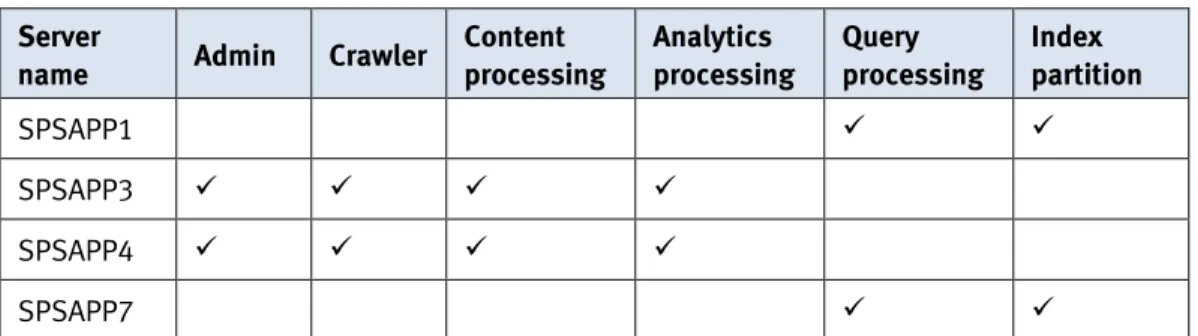
In this solution, as shown in Table 8, we deployed nine SharePoint servers in three different roles:
• Three SharePoint web front end servers joined a Microsoft network load balancing cluster to distribute requests and increase performance and reliability through redundancy.
• Four SharePoint application servers with search components support search functionality and other service applications, as shown in Table 8. We have two index replicas to achieve fault tolerance for the search index.
Table 8. SharePoint 2013 search topology
Server
name Admin Crawler
Content processing Analytics processing Query processing Index partition SPSAPP1 SPSAPP3 SPSAPP4 SPSAPP7
• Two SQL Server 2014 virtual machines host all the back end databases using the AlwaysOn AG feature to provide high availability.
SharePoint 2013 database server configuration
In this solution, we used the SQL Server AlwaysOn Availability Groups (AOAG) feature to provide back end high availability and disaster recovery features for content databases and service application databases. We deployed two SQL Server 2014 virtual machines acting as primary and secondary machines for the AOAG cluster. The SQL Server AOAG requires the base Windows server failover clustering features of virtual name and networking (name resolution and IPs) without the need for disk-based clustering.
Note: AOAG requires that the database recovery mode be “full” format. Use the full recovery model for the SharePoint content database and the services databases that are protected by AlwaysOn AG. To determine which SharePoint database can be protected by AlwaysOn AG, refer to Supported high availability and disaster recovery options for SharePoint databases (SharePoint 2013) on Microsoft TechNet.
As a best practice, we suggest allocating sufficient free space in the SQL Server log files and associated log volumes that service SharePoint databases. SharePoint can quickly fill log volumes where many writes occur in the SharePoint farm. Refer to
Configure SQL Server 2012 AlwaysOn Availability Groups for SharePoint 2013 on Microsoft TechNet for details.
Storage design
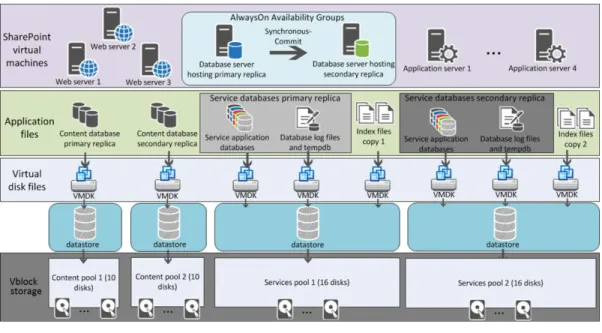
We created the Vblock datastore that hosted all virtual machine disk (VMDK) files from a thin LUN on the Vblock storage. All storage provisioned for SharePoint was for VMDK files. These datastores were contained on VNX thin LUNs.
Figure 3 shows the logical component design for the SharePoint Server 2013 in this solution.
Figure 3. SharePoint Server 2013 logical component design
Figure 4 shows the disk layout and storage pool configuration used in this solution.
Figure 4. SharePoint 2013 disk layout and storage pool configuration
For high availability, performance, and flexibility, ensure optimal storage sizing and virtual machine configuration for Lync servers. This section provides detailed information about Lync Server user requirements and design.
Workload profile
In this solution, the Lync Server 2013 deployment consists of three front end servers and two mirroring back end servers with a mirroring witness.
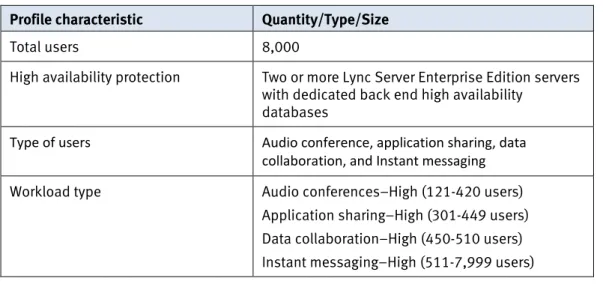
Table 9 shows the Lync Server user requirements for this solution. Lync Server 2013
Converged Infrastructure Solution for Microsoft SharePoint, Lync, and Exchange on VCE Vblock System 340
White Paper 18
Table 9. Lync server user requirements
Profile characteristic Quantity/Type/Size
Total users 8,000
High availability protection Two or more Lync Server Enterprise Edition servers with dedicated back end high availability
databases
Type of users Audio conference, application sharing, data collaboration, and Instant messaging
Workload type Audio conferences–High (121-420 users)
Application sharing–High (301-449 users) Data collaboration–High (450-510 users) Instant messaging–High (511-7,999 users) Note: The Lync Stress and Performance Tool has three load types—Low, Medium, and High. In this solution, we used the high load for simulation, and the user number of each test scenario is defined by the tool itself. For more information, refer to the Lync Server 2013 Stress and Performance Tool on Microsoft TechNet.
Lync Server 2013 server role design
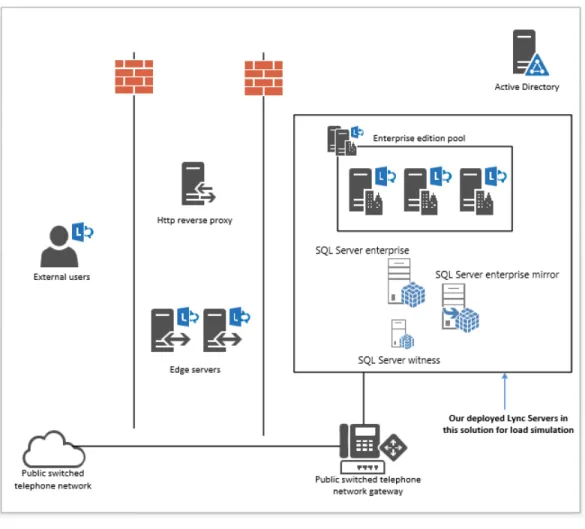
Based on the 8,000 user profile, we deployed one front-end pool containing three front-end servers and three SQL Servers instances (principal, mirror, and the witness). This design achieves advanced fault tolerance and full high availability. Single server failure will not cause any service disruption.
Note: The design of Lync servers can vary in deployment scenarios. For example, you could have more external users or a heavier workload. These differences can require design and resource changes, such as more server roles and more memory for servers.
Figure 5 shows the entire Lync system topology. For test purposes, we deployed only the front-end servers and three SQL Server database servers.
Figure 5. Lync system topology
Storage design
This solution uses two storage pools to store data used by Lync Server. Both of these pools are of RAID 10 (2+2) using four 10K 600 GB SAS disks. We used thin LUNs to store the Lync data.
Figure 6 shows the logical component design for the Lync Server 2013 in this solution.
Converged Infrastructure Solution for Microsoft SharePoint, Lync, and Exchange on VCE Vblock System 340
White Paper 20
Figure 6. Lync Server 2013 logical component design
Figure 7 shows the disk layout and storage pool configuration used in this solution.
We designed the Exchange organization for high availability, optimal resource usage, and ease of manageability. This section describes the Exchange Server 2013 design and configuration for this solution.
Workload profile
Table 10 details the Microsoft Exchange Server 2013 workload profile.
Table 10. Microsoft Exchange Server 2013 workload profile
Profile characteristic Quantity/Type/Size
Number of Exchange Server 2013 users 8,000 Number of Mailbox Server virtual machines 8
Number of DAGs and database copies 1 DAG with 2 copies Number of users per Mailbox Server 2,000 total mailboxes
(1,000 active and 1,000 passive during normal operating conditions)
User profile (in DAG configuration) 150 messages/user/day (0.101 IOPS)
Read/write ratio 3:2 in a DAG configuration
Mailbox size 1.2 GB
24 x 7 background database maintenance configuration
Enabled
Exchange 2013 storage design and configuration
In this solution, we deployed eight virtual machines running Jetstress. You can configure Jetstress to test the maximum I/O throughput available to the disk
subsystem within the required performance constraints of Exchange. For that reason, Jetstress is one of the best utilities to reveal the storage system characteristics and to demonstrate how well Exchange can perform on that storage.
Figure 8 shows the high-level architecture of the Exchange components and storage elements used in this solution. We used raw device mapping (RDM) in physical compatibility mode LUNs, which is required by the EMC ESI for VNX Pool Optimization utility, to store all Exchange Server database and log volumes.
When designing storage pools for deploying Exchange 2013, you can use different models—for example, one storage pool per Exchange Mailbox server or one storage pool per database copy.
In this solution, we configured a DAG on Exchange Server 2013 and each database has two copies. We configured dedicated storage pools for each database copy. This provides database copy isolation and, in many cases, can minimize the number of pools needed for deployment compared to the model of one storage pool per Exchange Mailbox Server. We also separated the Exchange database and log files into different storage pools.
Exchange Server 2013
Converged Infrastructure Solution for Microsoft SharePoint, Lync, and Exchange on VCE Vblock System 340
White Paper 22
Figure 8. Exchange 2013 storage elements on Vblock System 340
Figure 9 shows the storage layout for the target Exchange organization. The Exchange database pools and log pools use thin LUNs and contain both high-performance and high-capacity disks, with EMC FAST® VP enabled for storage tiering.
In Exchange deployments on VNX, pool-based thin LUNs with FAST VP provide a good balance between flexibility and performance. Using thin LUNs to store Exchange database data improves storage efficiency. After you add FAST VP solid state drives (SSDs), thin LUN metadata is promoted to the extreme performance tier to boost performance. FAST VP intelligently and automatically manages data relocation at a sub-LUN level, based on FAST VP relocation schedules.
EMC ESI for VNX Pool Optimization utility
When Jetstress creates databases for pre-deployment storage validation, it creates the first database and then copies it in parallel to the other databases, as defined in the configuration. If your design uses a single database per LUN, the first database might have better performance with lower latencies than the others. This is because more slices are allocated to the first LUN (where the first database resides) than to the others. Figure 10 shows how Exchange Jetstress creates databases. In the example, Jetstress creates database DB1 and then simultaneously copies it to the other databases.
Figure 10. Exchange Jetstress database initialization process
To ensure that all databases that reside on storage pool-based LUNs perform equally, use the ESI for VNX Pool Optimizationutility. This utility optimizes all the LUNs in the storage pool by warming up and pre-allocating the slices for each LUN, which enables the LUNs to perform uniformly.
The ESI for VNX Pool Optimization utility provisions and optimizes VNX storage pool thick and thin LUNs for maximum performance after LUN creation and before disk partitioning on the Exchange server. It is a best practice to use this tool when preparing the environment for Jetstress validation to ensure uniform, deterministic, high performance, and low latencies across all LUNs within a VNX storage pool. For more details about VNX storage pool optimization for Exchange workloads, refer
to Microsoft Exchange Server Best Practices and Design Guidelines for EMC Storage.
Converged Infrastructure Solution for Microsoft SharePoint, Lync, and Exchange on VCE Vblock System 340
White Paper 24
Test methodology
We used the following tools to simulate a client workload for SharePoint Server, Lync Server, and Exchange Server:
• Visual Studio Team System (VSTS)-generated custom workload • Lync 2013 Stress and Performance Tool
• Microsoft Exchange Jetstress
Microsoft SharePoint 2013 VSTS generated custom workload
To provide a realistic document archive scenario, document uniqueness was critical. We used two separate utilities—the first to create unique documents and the second to read these files from the disk and load them directly into targeted SharePoint web applications and document libraries.
Tool to create large numbers of documents
We created documents using the Bulk Loader command-line tool, which was written using the Microsoft .NET 4.0 Framework. This tool uses a dump file of Wikipedia content as input to create up to ten million unique documents to a disk location. Stock images are used to replace image references from the Wikipedia dumps. This tool is available as source code from the Microsoft Developer network article Bulk Loader - Create Unique Documents based on Wikipedia Dump File.
Tool to load documents into SharePoint
We added documents to SharePoint Server using the LoadBulk2SP command-line tool, which was written using C# and the Microsoft .NET 3.5 Framework to be
compatible with SharePoint Server. This tool takes the disk output files from the Bulk Loader tool as input and mimics the same folder and file structure directly into SharePoint Server. The tool uses the targeted web applications and document libraries specified in the application configuration. Using this tool, we loaded over 100 million 250 KB documents into SharePoint Server with a peak performance of 233 documents per second, and an overall average load rate of 137 documents per second. This tool is available as source code from the Microsoft Developer network article Load Bulk Content to SharePoint 2010.
VSTS test client and test mechanism
We used VSTS with custom code developed by EMC to simulate the SharePoint load. We built up the test environment with the VSTS team test tool that consists of a single controller and four agents.
Microsoft Lync 2013 stress test tool
To simulate the Lync client load in this solution, we used the Lync Server 2013 Stress and Performance Tool to generate and simulate user loads. This tool includes tools that simplify capacity planning for Lync Server 2013. Use this tool to:
• Simplify your hardware planning for Lync Server 2013
• Obtain increased knowledge and best practices for performance tuning • Measure the performance for your intended Lync Server 2013 deployments Overview
Application workloads simulation
Microsoft Exchange Jetstress
Verify the Exchange 2013 storage design for expected transactional IOPS before placing it in a production environment. To ensure that the environment functions appropriately, EMC recommends that you use the Microsoft Exchange Server Jetstress 2013 tool for the verification.
Jetstress simulates Exchange I/O at the database level by interacting directly with the Extensible Storage Engine (ESE) database technology without requiring Exchange to be installed. To simulate the Exchange I/O accurately, Jetstress uses the same ESE.dll file that Exchange uses in production.
You can configure Jetstress to test the maximum I/O throughput available to the disk subsystem within the required performance constraints of Exchange. Jetstress can accept a simulated profile of specific user counts and IOPS per user to verify that all of the hardware and software components within the I/O stack, from the operating system down to the physical disk drive, can maintain an acceptable performance level.
You can download Jetstress 2013 at Microsoft Exchange Server Jetstress 2013 Tool.
SharePoint test scenario
We ran the test with a full user load and used a common mix of user profiles to simulate different types of business organizations. As a systematic background workload, we scheduled an incremental crawl every 30 minutes to ensure that the index was up to date and the query results were accurate. Table 11 shows the user load profile in the test.
Table 11. SharePoint user load profile
User profile Details
Browse/Search/Modify/Upload 50/20/20/10
Lync test scenario
To simulate the Lync client load in this solution, we used the Lync 2013 Stress and Performance Tool to generate and simulate user loads. This tool includes tools that simplify capacity planning for Lync Server 2013.
We simulated 8,000 users with a High load. The test scenario includes: • Instant messaging (IM)–Provides an instant messaging platform with
conversation history
• Application sharing–Enables users to share Microsoft Office applications such as Microsoft Word, Microsoft Excel, and Microsoft OneNote
• Audio conference–Provides a user experience that is familiar to users of traditional audio bridge services, including Publish Switch Telephone Network (PSTN) dial-in services with touch-tone call control commands
• Data collaboration–Enables users to create whiteboards and polls, or share Microsoft PowerPoint slides
Table 12 shows the number of users in the scenario. Test scenarios
Converged Infrastructure Solution for Microsoft SharePoint, Lync, and Exchange on VCE Vblock System 340
White Paper 26
Table 12. Lync user load profile
User profile Load Level Number of users
Audio conferences High 121-420
Application sharing High 301-449
Data collaboration High 450-510
Instant messaging High 511-7,999
Exchange test scenario
We used Jetstress 2013 version 15.0.995.0 to simulate an I/O profile of 0.101 IOPS per user. For detailed information about the Exchange Server 2013 Mailbox IOPS profile definition, refer to the Microsoft TechNet topic Sizing Exchange Server 2013 Deployments.
Jetstress simulated 8,000 active users on four Mailbox servers to validate the performance under the worst (failover) situation, with all active databases mounted on one database pool and one log pool. The test situation doubles the pressure on the four Mailbox servers’ disk subsystem, compared to the normal working situation, in which eight Mailbox servers host 8,000 users (1,000 active users per server) on two database pools and two log pools.
Test scenarios and results
This section describes the performance validation of a virtualized environment, including SharePoint Server 2013, Lync Server 2013, and Exchange Server 2013 deployed on Vblock System 340. We validated the combined workload for the three applications.
Vblock systems provide agility and simplicity, and adapt to the varying applications, scale, and flexibility required for diverse operational models. In this solution, the Vblock System 340 system is engineered and sized to address a mixed 8,000-user workload of SharePoint 2013, Lync 2013, and Exchange 2013. Test results show good performance with the bandwidth for more user concurrency and future growth. Table 13 describes the key results of the combined test.
Table 13. Combined test key results
Application Equivalent user number Target user number
SharePoint Server 2013 9,672 8,000
Lync Server 2013 9,672 8,000
Exchange Server 2013 9,584 8,000
After running the test of all three applications together for two hours, we gathered the results in Table 14 from the performance monitor on each SharePoint server.
The test result shows that we can easily push more workload without bottlenecks.
Table 14. SharePoint 2013 test results
Key factor Value Target
Concurrent user number 2,418 2,000
Total user number (25% currency) 9,672 8,000
WFE CPU usage 46.8%/47.8%/40% < 70%
All test time < 1 second < 3 second
Content DB pool–primary-host disk latency 8 ms < 20 ms
Content DB pool–primary host IOPS 817.6 N/A
Service pool–primary-host disk latency 8 ms < 20 ms
Service pool–primary-host IOPS 135.8 N/A
Overview
SharePoint 2013 test results
Converged Infrastructure Solution for Microsoft SharePoint, Lync, and Exchange on VCE Vblock System 340
White Paper 28 After running the test for two hours, we gathered the results in Table 15 from the
performance monitor on each Lync server.
Table 15. Lync 2013 test results
Key factor Value Target
User number used in tool 8,000 8,000
Active endpoints in total 8742 (2911+2910+2921) > 8,000
Front end CPU usages (FE1/FE2/FE3) 29.1%/34.4%/37.2% < 80%
Front end available memory (32 GB total) (FE1/FE2/FE3)
25.82GB/26.15GB/26.20GB > 20% total memory
Front end host IOPS (FE1/FE2/FE3) 69.3/93.5/94.4 N/A
Front end host latency (FE1/FE2/FE3) All < 2ms < 10ms
Table 16 shows the principal database server performance.
Table 16. Principal database server performance
Key factor Value Target
Host IOPS 36.1 N/A
Disk latency 1 ms <10 ms
CPU usage < 5% < 80%
Available memory 28.01 GB > 20% total
memory Table 17 shows mirror database performance.
Table 17. Mirror database server performance
Key factor Value Target
Host IOPS 0.7 N/A
Disk latency < 1ms < 10ms
CPU usage < 5% < 80%
Available memory 28.71 GB > 20% total
memory Lync 2013 test
We validated the test by comparing the results of selected performance counters to the Microsoft-specified criteria. Table 18 shows the average I/O and the average latency on the four Mailbox servers. The performance of the Exchange organization exceeds the design target.
Table 18. Exchange Jetstress test results
Key performance factors Single Mailbox
server (2,000 users) Target values
Achieved transactional IOPS (I/O database reads/sec + I/O database writes/sec)
242 Number of mailboxes *
Exchange Server 2013 user IOPS profile
In this solution: 2,000 * 0.101 = 202
I/O database reads/sec 165 N/A (for analysis purpose)
I/O database writes/sec 77 N/A (for analysis purpose)
Total I/O (Database+Logs+ Background Database
Maintenance+Replication)/sec
298 N/A
I/O database reads average latency (ms)
17 ms Less than 20 ms
I/O log writes average latency (ms) 1 ms Less than 10 ms
Exchange 2013 test results
Converged Infrastructure Solution for Microsoft SharePoint, Lync, and Exchange on VCE Vblock System 340
White Paper 30
Conclusion
This Vblock System 340 solution shows how to optimize data management of Microsoft SharePoint, Lync, and Exchange environments by implementing a
converged infrastructure, with virtualization, networking, storage, and data protection in one integrated solution. The solution reduces service interruptions for critical applications that are used to share information. The solution also reduces the impact of planning errors or changes because you use virtual resources that are easily reassigned to meet business demands. This reduces overall data availability risks. IT directors will benefit from the reduced data availability risks and the continuous access to business data that converged infrastructure provides their email and collaboration customers. This solution maximizes use by providing a platform to consolidate and virtualize Exchange, SharePoint, Lync and other application workloads.
Business managers will value the efficiency in managing their Exchange, SharePoint, and Lync systems and the associated reduction of costs. This solution reduces data availability risks by mitigating planning errors and changes to critical communication applications and provides continuous access to messaging and collaboration data. Table 19 summarizes the key technical points that this solution addresses.
Table 19. Solution findings
Objective Key Results
Advanced converged
infrastructure • Vblock seamlessly integrates leading compute, network, storage, virtualization, and system management technologies.
• The system is pre-configured for optimal application performance, and ensures that every Vblock System is optimally sized.
• With the modular architecture, the Vblock System 340 provides for a simplified and dynamic scale-up of compute, network, and storage resources.
• All Vblock system components are fully redundant, with organized physical builds, cabling, and power for optimum energy efficiency and reliability.
Summary
Showcase the design to support mixed Microsoft workload on Vblock System 340 with VNX5600 with proven performance level
• This solution represents a well-performing, enterprise-class infrastructure that is cost-effective, scalable, and highly available.
• The test results show that the designed architecture satisfies all recommended performance guidelines provided by Microsoft for SharePoint Server 2013, Lync Server 2013, and Exchange Server 2013.
• SharePoint Server 2013 works well on Vblock System 340. The designed architecture can easily support 8,000 users with an AlwaysOn AG protection configuration.
• The Vblock System 340 successfully accommodates Lync Server 2013. The designed architecture can support 8,000 users with two SQL mirroring back end servers and a mirroring witness.
• Exchange Server 2013 is successfully deployed on Vblock System 340. The designed architecture can support 8,000 typical users in a failover situation of the two-copy Exchange 2013 DAG configuration, where four Exchange Mailbox servers, a single database pool, and a single log pool handled the entire workload.
Converged Infrastructure Solution for Microsoft SharePoint, Lync, and Exchange on VCE Vblock System 340
White Paper 32
References
The following documents, available on EMC.com, provide additional and relevant information. If you do not have access to a document, contact your EMC
representative:
• Microsoft SharePoint Server: Best Practices and Design Guidelines for EMC Storage
• Microsoft Exchange Server Best Practices and Design Guidelines for EMC Storage
• Microsoft SharePoint Server 2013 and Lync Server 2013 Enhanced by EMC VNX with SMB 3.0
• Microsoft SQL Server Best Practices and Design Guidelines for EMC Storage
• Microsoft SharePoint Server 2013 and Lync Server 2013 Enhanced by EMC VNX with SMB 3.0
The following document, available on the VCE website, provides additional and relevant information:
• VCE Vblock System 340 Gen 3.2 Architecture Overview
The following documents, available on Microsoft TechNet, provide additional and relevant information:
• SharePoint for IT Pros (SharePoint 2013)
• Skype for Business Server for IT Pros (Lync Server 2013) • Exchange for IT Pros (Exchange Server 2013)
EMC
VCE