Analysis and Evaluation of the Windows Event Log
for Forensic Purposes
CO42019 Honour Project
UNDERGRADUATE PROJECT DISSERTATION
Submitted in partial fulfilment of the requirements of Napier University for the degree of
Bachelor of Science with Honours in Networked Computing
Barrie Codona
Supervisor:
06007743
Prof. William Buchanan
BSc (Hons) Network Computing
Second
Marker:
Dr. Gordon Russell
Authorship Declaration
I, Barrie Codona, confirm that this dissertation and the work presented in it are my own achievement.
1. Where I have consulted the published work of others this is always clearly attributed.
2. Where I have quoted from the work of others the source is always given. With the exception of such quotations this dissertation is entirely my own work. 3. I have acknowledged all main sources of help.
4. If my research follows on from previous work or is part of a larger collaborative research project I have made clear exactly what was done by others and what I have contributed myself.
5. I have read and understand the penalties associated with plagiarism.
Signed
Name: Barrie Codona
Data Protection Declaration
Under the 1998 Data Protection Act, The University cannot disclose your grade to an unauthorised person. However, other students benefit from studying dissertations that have their grades attached.
Please sign your name below one of the options below to state your preference.
The University may make this dissertation, with indicative grade, available to others.
The University may make this dissertation available to others, but the grade may not be disclosed.
Abstract
The windows event log is used in digital forensic cases, but unfortunately it is flawed in many ways, and often cannot be seen as a verifiable method of determining events. In the past few years there have been a few highly publicised cases where the data that is contained within the event log is used to successfully secure a conviction. The aim of this dissertation is to develop a solution that addresses the flaws in the Windows event logging service. Through research carried out it had been found that it was possible to disable the event log service. This then allowed for important data to be modified, such as usernames, computer names, times and dates. It was also noted that an event log from one machine could successfully be transplanted into another without any problems. All of these vulnerabilities involved having access to, and being able to edit, the event log files.
Based upon the research done, an event logging application was developed using C# and the Microsoft .NET framework. It makes use of RSA and AES encryption and HMAC hash signatures to improve the integrity of the data. The application is divided up into three components, an event logger which monitors specific files and folders within a computer system and sends alerts to the data archiving system in an XML format, and an event viewer that presents the events in a readable format to the user.
The performances of the symmetric and asymmetric encryption were tested against each other. It had been found that the symmetric encryption was 800% faster than asymmetric encryption. Also the HMAC hash signatures were tested to see how long it would take to do a brute force attack on them. It was discovered that approximately 21,093 keys were processed every second, this was then compared to the key entropy and how a longer random key would be harder to break.
Table of Contents
Authorship Declaration….……….. 1
Data Protection Declaration……… 2
Abstract……….……… 3
Contents……….………..………. 4
List of Figures and Tables……….………….. 5
Acknowledgements………..……… 8
1. Introduction……… 9
1.1. Project Overview………. 9
1.2. Background………..……… 10
1.3. Aims and Objectives………..………... 11
1.4. Thesis Structure………... 11 2. Literature Review………..………..………..… 13 2.1. Introduction………..………..…. 13 2.2. Digital Forensics….………..………... 13 2.3. Anti-Forensics………..…… 15 2.4. Log Management……….…..……….. 17 2.5. Conclusions………..……… 19
3. Evaluation of the Windows Event Log………..….. 21
3.1. Introduction………..……… 21 3.2. Experiments………..…..………... 21 3.3. Experiment Results……….………. 23 3.4. Conclusions………..……..…. 28 4. Design………..……….…………..……… 30 4.1. Introduction……….……….………… 30
4.2. High Level Design………... 30
4.3. Event Logging……….……….………… 31
4.4. Data Archiving System…………..……….……….……….... 32
4.5. Encryption and Authentication……….……….……….. 33
4.6. Event Viewer………...………… 35
4.7. Pseudo Code………..……….. 36
4.7.1. Client Side Pseudo Code……….. 36
4.7.2. Server Side Pseudo Code…………..…..……….... 37
4.7.3. Event Viewer………..…….……… 37 4.8. Testing Design………..……...……….... 38 4.9. Conclusions………..………..………... 40 5. Implementation………..…..….……… 41 5.1. Introduction….……….……… 41 5.2. Event Logger.………..………. 41 5.2.1. Connecting to a server………...……….. 41 5.2.2. FileSystemWatcher……….……… 42 5.2.3. Capturing Events……….……… 42 5.2.4. HMAC………..………... 43 5.2.5. Encrypting………..……….…… 43 5.2.6. Sending To Server….………..….………..…. 44
5.3. Data Archiving System..………..….…………..……. 45
5.3.1. Listening for a Connection…..……….…… 45
5.3.4. Decrypting Messages……….………. 46 5.3.5. Saving to Disk……….………..………..…….… 47 5.4. Log Reader……….………….………..….…. 47 5.4.1. Opening File……….………... 47 5.4.2. Decoding XML………..……….………..….. 48 5.4.3. HMAC Checksum………..………..……….….. 49 5.5. Conclusions………...………..……….…… 49 6. Evaluation………..…….…………..………. 51 6.1. Introduction……….…………..………..…… 51 6.2. Initial Testing………..…..……….…….. 51 6.3. Maintenance………...……..……… 52 6.4. Experiment 1 – Performance……….….….…… 53 6.5. Experiment 2 – Accuracy………..……….. 59 6.6. Experiment 3 – Security……….………. 61 6.7. Experiment 4 – Conformance………..……… 65 6.8. Conclusions……….…………...……….……… 66
7. Conclusions and Further Work..………..……….….. 68
7.1. Conclusions……….. 68
7.2. Further Work..……….. 69
8. References………..………..………... 70
9. Appendices………..….………... 73
9.1. Appendix A: Diary Sheets
9.2. Appendix B: Preliminary Gantt Chart 9.3. Appendix C: Client Code
9.4. Appendix D: Server Code
9.5. Appendix E: Event Viewer Code 9.6. Appendix F: Tester Application 9.7. Appendix G: Processor Monitor
9.8. Appendix H: HMAC Brute Force Cracker 9.9. Appendix I: Windows Event Log Tests
Table of Figures
Figure 1: Log server protected by a firewall……….………..……..………. 10
Figure 2: Log architecture with time stamping machine………..….… 18
Figure 3: Copying the Windows security log……….…... 24
Figure 4: Replacing the Windows security log. ……….…………..………. 25
Figure 5: 32 bit time. ………...……….….……… 26
Figure 6: Modifying the 32 bit time. ……….……… 27
Figure 7: Event logger schematics. ………..……… 31
Figure 8: Client-Server prototype. ……… 33
Figure 9: Client generated XML string. ………..…….……… 34
Figure 10: Client XML string with HMAC. ……….……… 34
Figure 11: Server XML string. ……….……… 35
Figure 12: The event viewer interface. ………..……..……… 35
Figure 13: Client side pseudo code. ………..……… 36
Figure 14: Server side pseudo code. ……….……… 37
Figure 15: Event viewer pseudo code. ……….………… 37
Figure 16: Testing design. ………....……… 38
Figure 17: Generate a large number of files pseudo code. ……….……….… 39
Figure 18: Generate files with error checking. ………..…..… 39
Figure 19: Tester application. ………..………… 40
Figure 20: Connecting to a server. ………..……..………… 41
Figure 21: The FileSystemWatcher class. ………..…………..……… 42
Figure 22: Capturing events. ………..………..… 43
Figure 23: Generating an HMAC hash signature. …….……..……… 43
Figure 24: Encrypting data. ……….……… 44
Figure 25: Sending data to the server. ……….……… 44
Figure 26: Listening for a connection. ……….……… 45
Figure 27: Generating RSA key pair. ………..….……… 45
Figure 28: Receiving a message. ………..……… 46
Figure 29: Decrypting a message. ………..…..……… 46
Figure 30: Saving event data to disk. ……… 47
Figure 31: Reading a file. ……….……… 48
Figure 32: Dividing up an XML string. ……….……..……… 48
Figure 33: Checking the hash signature. ………..……… 59
Figure 34: Data flow. ……….………..…… 52
Figure 35: Updated Client-Server communications. ……… 53
Figure 36: Processor monitor application. ………..….……… 54
Figure 37: Generating 1,000 files with no encryption. ………..…..……… 54
Figure 38: Generating 5,000 files with no encryption. ………..……..……… 55
Figure 39: Generating 10,000 files with no encryption. ………..……… 55
Figure 40: Generating 20,000 files with no encryption. ………..……… 55
Figure 41: Generating 1,000 files with symmetric encryption………..……… 56
Figure 42: Generating 5,000 files with symmetric encryption………..……… 56
Figure 43: Generating 10,000 files with symmetric encryption………..………..… 57
Figure 44: Generating 20,000 files with symmetric encryption………..……..…… 57
Figure 45: Symmetric encryption comparison. ……….……… 58
Figure 46: Asymmetric encryption comparison. ………..………… 58
Figure 49: Event viewer application. ……….…..….……… 60
Figure 50: Custom event log. ……… 60
Figure 51: Client XML string without HMAC. ………..……….……… 61
Figure 52: Client XML string with HMAC. ………..…..……… 61
Figure 53: HMAC test data. ……….……… 61
Figure 54: HashCalc Screenshot. ……….……… 62
Figure 55: iFrame.in Hash Calculator. ……….……… 63
Figure 56: Three character HMAC test data. ……… 64
Figure 57: HMAC brute force application. ………...………… 64
Figure 58: Four character key HMAC test data. ………..……… 64
Figure 59: Found four character key. ……… 64
Figure 60: HMAC key entropy. ………..….……… 65
Acknowledgements
I would like to thank Professor William Buchanan, for his invaluable guidance and support throughout this project. In addition, I would like to thank Dr Gordon Russell for being part of the marking process.
1 Introduction
1.1 Project OverviewThe windows event log is used in digital forensic cases, but unfortunately it is flawed in many ways, and often cannot be seen as a verifiable method of determining events. In the past few years there have been a few highly publicised cases where the data that is contained within the event log is used to successfully secure a conviction.
Dr Harold Shipman used a database program for storing information about his patients. Whenever anything was added or modified in the database it automatically filled in the time and date. Dr Shipman used his knowledge of computers to rollback the system time and date so that he could enter false information about his patients and their medical conditions after he had killed them. What Dr Shipman was unaware of was that when the system time and date is altered it shows up in the Windows event log. This information was successfully used in court to prove that he had falsified his patient’s records after they had past away.
In America the collapse of Enron and WorldCom spurred the introduction of the Sarbanes-Oxley Act in 2002, this piece of US legislation places greater focus on the auditing process within an IT department. It expects that the IT staff will risk assess the auditing process and introduce controls that increase the security and integrity of this process. Although this piece of legislation only currently applies in America, the UK’s Financial Services Authority is in the process of implementing a similar piece of legislation here in the UK. It is currently being referred to as Europe-SOX or SOX-Lite and, just like its American big brother, it too places greater emphasis on the credibility of audit logs.
As previously mentioned these logs can be used in digital forensic cases to provide an insight into what the computer system has been used for, when it has been used and who was using it. Unfortunately the audit logs are not stored securely on the computer system. Anyone that has administrative privileges can turn off the logging service. They can subsequently edit the contents of the logs, delete the logs and they can replace the entire log with one from another machine. Physical access to the computer
system would also provide an attacker with the opportunity of removing the hard disc drives and either manipulating the data using another machine or simply destroying the drives. All of these evidence tampering techniques would make the digital investigation much harder and a more time consuming process.
1.2 Background
From as far back as the 1970’s computer professionals have identified the need for computer security in distributed systems that contain sensitive information; part of the security package that is built into operating systems is the ability to audit events that have occured on a computer system. For the Windows user, this consists of the Windows event log which is a customisable audit log. It was originally designed as a diagnostic tool to identify any problems with the operating system and it also allows the user some degree of control over what type of events are recorded. In a commercial environment the auditing will be defined as part of the company’s security policy. This will involve recording of events, via the use of domain controllers, when users are successfully logging on and off, and which host machines they are using. Although the domain controllers are used to capture the event data it is also possible to setup and store the log files on a separate log server. This server could be protected from network based attacks by using a firewall which only allows traffic from the domain controllers, see Figure 1.
Figure 1: Log server protected by a firewall
However, as previously mentioned, there are a number of flaws with the Windows event logging service. These flaws not only relate to the security of the information after it has been written to disc, but also to what information it is actually capturing, storing and how it is stored.
1.3 Aims and Objectives
The aim of this project is:
1. To develop a solution that addresses the flaws in the Windows event logging service.
To achieve the aim, the following objectives of this project are to:
1. Investigate current research that is occurring in the field of Event Log Management and Digital Forensics.
2. Produce an analysis of the weaknesses in the Windows event log. 3. Design a suitable piece of software using an appropriate methodology. 4. Evaluate using a proven methodology.
1.4 Thesis Structure
Chapter 1 Introduction. This chapter will present some background information and define the aims and objectives for the project.
Chapter 2 Literature Review. This chapter will investigate the current research that is occurring in the field of Event Log Management and Digital Forensics.
Chapter 3 Windows Event Log. This chapter provides an investigation into the Windows Event logging service.
Chapter 4 Design. This chapter will provide an overview of the proposed software prototype that is to be developed.
Chapter 5 Implementation. This chapter will introduce the prototyped software that has been developed and a series of tests that will be designed to ensure that the software fulfils the requirements.
Chapter 6 Evaluation. This chapter presents the tested results of the prototyped system that has been previously developed.
Chapter 7 Conclusions. This chapter will provide a critical analysis of the project, a discussion into further work, and a description of the type of environment where the development of this project would be
beneficial.
Chapter 8 References.
2 Literature
Review
2.1 IntroductionThe aim of this literature review is to present to the reader current techniques and research that is being utilised and developed in the Log Management field, and how Digital Forensics are used to analyse these log files. It will also take a look at some of the techniques that are being used to disrupt a forensic investigation.
By identifying these techniques, it is intended that this will have an influence on the design of the system that is to be developed with the aim of improving the overall security and credibility of the Windows Event Logging system.
2.2 Digital Forensics
Crimes involving computers have increased dramatically over the last 10 years. This is due to the cost of owning a computer and having an internet connection decreasing, therefore more people are buying computers and more people are subsequently using the internet to facilitate their crimes. The Parliamentary Office of Science and Technology (Postnote, 2006) define some types of computer crime as storing illegal images, copyright violations, phishing, denial of service attacks and creating viruses. In similarity to the physical world, when a crime is committed there is always some form of evidence left behind, this is where digital forensics comes in.
Digital forensics is the science of being able to extract digital evidence from computers and other electronic devices “to aid the legal process” (Brown, 2006). According to Rogers (2005) of Purdue University, this is achieved by “identification, collection, examination and analysis” of the data that is contained on storage devices with the aim of discovering incriminating digital information (Nair, 2006).
This section presents to the reader some of the techniques that are currently used during such an investigation and how the Windows event log would be used to assist an investigation by recreating a timeline of events.
There are several stages that take place during an investigation and according to Palmer (2001) these are identification, preparation, approach strategy, preservation, collection, examination, analysis, presentation and returning evidence
Spafford (2004) describe this model as “The Abstract Digital Forensics Model”. They also mention that this model is generally a good reflection of the forensic process, and that the four main stages are “preservation, collection, examination, and analysis”.
• Preservation. This is the first phase of a digital investigation preserves the crime scene (Spafford, 2004). It involves creating a mirror copy of any hard discs and removable media, and if the computer is in a running state, creating a dump of its memory. This will allow the recreation of an exact copy of the system in a lab environment.
• Collection. This stage involves creating a record of the actual physical scene and creating a copy of any digital data that may be available. Cohen (2006) describes the following as good practice. To remove all equipment and cables, label, and record details, and search the area for diaries, notebooks and papers (especially look for passwords or other similar notes). Ask the user for passwords and record these, and then submit the equipment for forensic examination. In addition, The National Institute of Standards and Technology (NIST, 2006) state that the data should be captured using procedures that preserve the integrity of the data.
• Examination. This stage, according to Baryamureeba (2004) is an in-depth systematic search of evidence, the examination of collected data through a combination of automated and manual methods (NIST, 2006). But may also include other items such as log files, data files containing specific phrases, timestamps, and so on (Gladyshev, 2004).
• Analysis. The NIST (2006) describe this stage as analysing the results of the examination, using legally justifiable methods and techniques, it is also the determination of the significance, reconstructing fragments of data and drawing conclusions based on evidence found (Spafford, 2004).
The purpose of this is to obtain information that answers the questions that were raised during the identification stage and to ensure that the information that is collected will stand up in a court of law.
2.2.6 Forensic Techniques
To assist the Forensic Investigation a technique called data mining is used, this is the process of sorting through large volumes of data looking for particular patterns of information and complex relationships (Panigrahi, 2006) that might be of relevance. In particular Liu (2005) points out that if an investigator finds a suspicious file, they will search for other files with similar MAC attributes.
Another process in a forensic investigation is to search for deleted files and to try and recover them. This is made easier by the way in which NTFS handle files, it uses a relational database called the Master File Table (MFT) to store information about every file and its attributes on a system. The MFT reserves 1,024 bytes for each record that is contained within it, this is highlighted by:
“One of the most interesting facts about the MFT is that it sometimes stores the actual file data along with all the system data relating to the file. Data stored inside the MFT is known as resident data”. Armour Forensics (2005)
Armour Forensics also point out that when a file that has resident data is deleted and the MFT entry is overwritten by a file that is bigger than 1,024 bytes, then old file leaves behind some residual data.
2.3 Anti-Forensics
Since Digital Forensics is the science of retrieving digital evidence, then Digital Anti-Forensics is the science of thwarting such an investigation, by using tools and techniques to conceal or destroy information so that others cannot access it (Murphy, 2006). This section will look at some of the techniques that are used in anti forensics and they could be used against the Windows event log. One of the immediately noticeable effects of evidence tampering is a more difficult and time-consuming investigation (Forte 2007).
Ryan Harris of Purdue University (2006) proposes that anti-forensic attacks are grouped into the four categories, each of these are then subdivided into both physical and digital groups. The categories that he suggests are evidence destruction, evidence hiding, evidence source elimination and evidence counterfeiting.
• Evidence Destruction. Destroying evidence according to Harris (2006) partially or completely obliterates the evidence thus rendering it useless to a forensic investigation. One of the techniques that can be used to do this is called zero-footprinting. These are techniques that seek to eliminate all residual traces of an attack in order to prevent computer forensic operators from obtaining any results (Forte, 2007).
• Evidence Hiding. Ryan Harris (2006) states that hiding evidence is the act of removing evidence from view so that it is less likely to be incorporated into the forensic process. The evidence is not destroyed or manipulated however; it is just made less visible to the investigator. This can be achieved by using techniques like steganography or cryptography. Kessler (2004) describes steganography as the art of covered, or hidden, writing. Its purpose is hide information from a third party. Cryptography on the other hand is the art of secret writing; it differs from steganography because it does not hide the fact that a secret communication is taking place between two parties.
• Evidence Source Elimination. Disabling the Windows event log or any auditing system would help to hinder an investigation as data about the activities would never have be recorded; Harris (2006) writes “There is no need to destroy evidence since it is never created”. This could be similar to a burglar wearing gloves so that he does not leave any finger prints at the scene of the crime. This forward planning of shutting off an auditing system would imply that there had been some degree of planning involved.
• Evidence Counterfeiting. This involves changing the data that is contained within the event log, either the timestamps, usernames and/or machine names. At the kernel level it could also involve changing the Modified Accessed Created and Entry modified (MACE) attributes of a file. Evidence counterfeiting is the act of creating a faked version of the evidence which is designed to appear to be something else (Harris, 2006).
2.4 Log Management
The Windows event log contains lots of different information about events that have happened on the system. Microsoft TechNet (2007) describes the event log as a service that logs event messages issued by programs and the operating system. Event Log reports contain information that can be useful in diagnosing problems.
“Because of the widespread deployment of networked servers, workstations, and other computing devices, and the ever-increasing number of threats against networks and systems, the number, volume, and variety of computer security logs has increased greatly. This has created the need for computer security log management, which is the process for generating, transmitting, storing, analyzing, and disposing of computer security log data.” Souppaya (2006)
Souppaya (2006) continue to describe some of the uses of audit logs, and that they can provide information about such things as detecting attacks, fraud, and inappropriate usage. With all these events happening on a network it is important to have some sort of method for being able to ensure their integrity, keep them secure and monitor them.
2.4.1 Log Correlation
This is a technique that is used to bring together of all the different types of logs that are generated, and by using the timestamps on each of the events, create a timeline of these events.
A problem identified by Forte (2005) and Souppaya (2006) is the time stamping of logs, when logs are generated they are time stamped using the internal clock of the host and these can be inaccurate and this will have a knock on effect to the logs. For proper correlation the time stamping needs to be accurate, however Forte (2005) mentions that there is a reliance on NTP and this may open up a series of noted vulnerabilities. Souppaya (2006) gives an example of how this would cause a problem, “timestamps might indicate that Event A happened 45 seconds before Event B, when Event A actually happened two minutes after Event B”.
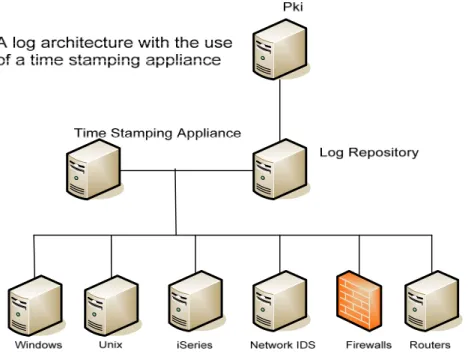
Forte (2005) suggests a solution to this problem, see Figure 2; it involves the use of a single time stamping device that is attached to the network. Whenever an event is passed to the log repository it is stamped by the time stamping device, this dramatically increases the accuracy and credibility of the events. It also makes use of a Public Key Infrastructure (PKI) server. A Certificate Authority (CA) is a company that is used to hold a users public key, which is then used to authenticate them as being who they say they are. Here the PKI server authenticates the nodes so that fake events cannot be injected into the log repository.
Figure 2: Log architecture with time stamping machine (Forte, 2005).
Forte (2005) does mention that although this would be easily implemented in an environment it would be expensive to do so. However this does present the idea of a central log server that would be used to store all the events from all the audit logs on a network.
A noted problem with this is that the log files use different formats (Souppaya, 2006) and as such need to be converted into a unified format. Some of the different formats are comma-separated or tab-separated text files, databases, syslog, simple setwork management protocol (SNMP), extensible markup language (XML), and binary files. Some logs are designed for humans to read, while others are not; some logs use standard formats, while others use proprietary formats (Souppaya, 2006).
A centralised log server brings with it many advantages, Westphal (2001) points out some of these advantages, centralised management of log files, maximised disk space usage, easier access for auditing purposes and a more secure method of retention. As well, adding encryption and check summing on top of a remote logging server adds yet another layer of security on these log files, which is always an advantage. The problem with this solution is that the data is venerable while it is travelling along the network to the log repository. Dario Forte, of Milan University, explains:
“Log file integrity can be violated in several ways. An attacker might take advantage of a non-encrypted transmission channel between the acquisition and destination points to intercept and modify the transiting log. He might also spoof the IP sending the logs, making the log machine think it is receiving log entries and files that actually come from a different source.” Forte (2005).
The general consensus is that a centralised log management system should be used to store, not only Windows event logs, but all the logs that are generated by all the devices on the network, and that this log server should be connected to an authentication server.
Alles (2004) have identified that a major problem is corporate fraud that is due to deliberate fraud between managers as this poses the greatest challenge to any audit system, there really is not any point in the best encryption and the best authentication servers if a corrupt manager can walk into the room where the logging server is being stored and gain access to the hard drive. So they recommend a black-box log file, something that is similar to a flight data recorder that you would find in an aeroplane and that the black box needs to be kept offsite and away from anyone that may want to gain access to it.
2.5 Conclusions
This chapter has presented some of the techniques that forensic investigators are currently using to reconstruct a timeline of events using event logs. It has also highlighted some of the methods that are used to defeat such a forensic investigation. Finally it has highlighted some of the ways in which audit logs are currently being
stored on servers, and some of the problems that can be associated with it, in particular the time-stamping.
Digital Forensic Investigators have the time consuming task of having to sift through Terabytes of data, looking for the smallest piece of information that could make or break a case. Unfortunately for them there is also a myriad of software out there that is designed to make their jobs harder, users can change the time stamps on file, and they can securely wipe data off their systems using software that makes several passes of writing random information where their file used to be. Using techniques like steganography illegal images can be hidden behind other seemingly acceptable pictures and files can also be encrypted on a system.
One thing that forensic investigators do have is the ability to create a timeline of events, to try and piece together what the accused person has been using a computer for. Sometimes this can be compromised too, the user may have just reinstalled the operating system, thus wiping most of the information from the hard drive, some data may still reside in the slack space that has not yet been written too, but there is the probability that the operating system has written over old event logs.
In a business environment logs are generally stored on a log server; this simplifies the task of having to review events that would have previously been located on several different devices. Although the log server may be locked away in a secure room somewhere in the building, someone will have access to that room, and they will be able to access the server and they will be able to modify or delete the logs that are stored on it, thus it would be better if they could be stored off-site.
It was pointed out that the time stamping of the events can be unreliable, so a central time stamping system needs to be used. It has also been suggested that the logs should be stored off site and by a company in a ‘write once read many’ environment and that they would not give physical access to the servers, and that the data on these servers contains a checksum to help validate the integrity of the logs and finally the logs should also be encrypted before they are sent to the log file storage company.
3
Evaluation of the Windows Event Log
3.1 IntroductionOne of the objectives of this project is to “Produce an analysis of the weaknesses in the Windows event log.” This chapter provides an investigation into the weaknesses of the Windows Event logging service; experiments are carried out that highlight just how severe some of these weaknesses are. Usernames, computer names, times and dates can all be changed, thus, concealing whatever information is desired.
By identifying these weaknesses at this stage, it will allow for a system to be developed that directly addresses these problems, and as such should help to provide a more authenticated event logging mechanism.
To carry out these tests virtualisation was used to provide a manageable test environment. VMWare (http://www.vmware.com) with a total of four virtual machines was used, two of them were Windows 2003 Servers and two of them were Windows XP Clients. Server A and Server B were both configured as Domain Controllers, DNS Servers and File Servers within the same domain. Clients A and B were both joined to the domain. Two user accounts were created User A and User B; these will be the accounts that are to be used in the testing. The two virtual servers had a Hex Editor installed on them, this would allow for the viewing and possible manipulation of the Event Log files.
3.2 Experiments
The following experiments range from being fairly simple tasks to moderately complex, the purpose of these experiments to be able to identify he weaknesses of the Event Log. These are:
Experiment 1 - Stopping and Restarting the Event Log. This experiment will show how it is possible for a user with administrative privileges to be able to stop and start the event logging service; although this may seem basic the technique involved is of fundamental importance to the rest of the experiments as the event log file is read only when the service is running.
Experiment 2 - Copying the Event Log. This experiment will demonstrate how it is possible to be able to take a copy of the Event Log while it is still running. This shows how it is possible to generate an event log file that can then either be edited or copied across to another machine.
Experiment 3 - Swapping the Event Log from one computer to another. This experiment will investigate if it is possible to be able to replace the Event Log on Server A with that of Server B, and if it is possible does it produce any errors. This i
Experiment 4 - Modify the ‘logon ID’. This experiment will involve using a Hex Editor to modify the binary data that is contained within the Event Log, specifically the Logon ID that represents a specific user, for example try to replace User A with User B. This could be used by someone who intends on framing another person or covering their tracks.
Experiment 5 - How the event log stores the time. This experiment will take a closer look at how and where the Event Log stores the time that an event happened at. It will also analyse the format that is used. This leads onto the next experiment.
Experiment 6 - Modify the 32-bit time. This experiment will attempt to change the timestamp, using a Hex Editor, which has been applied to a specific event. If it is possible then this could be used to disrupt the timeline of events that have happened and as such would slow down a digital forensic investigation.
Experiment 7 - Automatically replacing the ‘SecEvent.Evt’ file. This experiment will look at the possibility of writing a script that could be used to automatically replace the Event Log, the purpose of this to be able to prove that it is possible automate this process and to identify what happens on the system.
Experiment 8 - Master File Table. This section will take a closer look at how NTFS stores files on a computer system. With this information an attempt will be made to try and modify the event log by directly accessing its data on the hard disk while the Event Logging Service is still running. The purpose of this is to be able to by-pass the need to have to top the event log service.
3.3 Experiment Results
A summary of the results of the above tests are contained within this section. The actual test data can be found in Appendix I.
Experiment 1 - Stopping and Restarting the Event Log. It was found that stopping and restarting the event logging service was a fairly simple task for a user with administrative privileges, there are two possible techniques both of which provide the same outcome. The first and easiest way is to navigate to Services Management Console which is located within the administrative tools folder of the control panel. Double click Event Log from the list of available services and set the ‘startup type’ to disabled, then restart the server. Another method is to adjust the startup value setting in the registry, namely ‘HKEY_LOCAL_MACHINE\SYSTEM\CurrentControlSet \Services\Eventlog’ from 0x2 to 0x4. As with the previous method, this will not take effect until the server has been restarted.
When the server has restarted, an error will be displayed informing the user that ‘at least one service or driver failed during system startup’. This is normal and will only be displayed once at the logon screen while the service is disabled. The process of restarting the service through the Service Management Console is merely a matter of changing the ‘startup type’ back to automatic, clicking apply and then clicking start. The service will restart without having to restart the server. It can also be restarted by changing the startup value in the registry back to 0x2, and to save having to reboot the machine it can then be started by typing the following in a command prompt window “net start eventlog”.
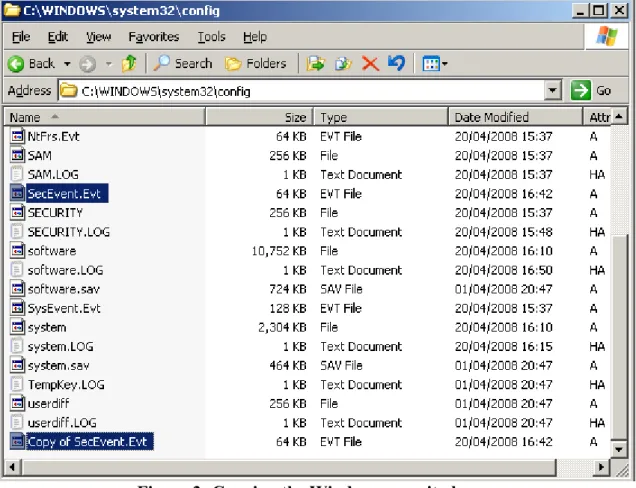
Experiment 2 - Copying the Event Log. To simply make a copy of the Security Log, navigate to ‘C:\Windows\System 32\Config\’ and then right click and select copy on ‘SecEvent.Evt’, this can then simply be pasted into the same directory. It will then create an exact duplicate of the Security Event file called ‘Copy of SecEvent.Evt’. This can be done while the event logging service is still running. Figure 3 shows this.
Figure 3: Copying the Windows security log.
With the results of this experiment combined with the results of previous one, it is now possible to attempt to replace the event log from one machine with that of another.
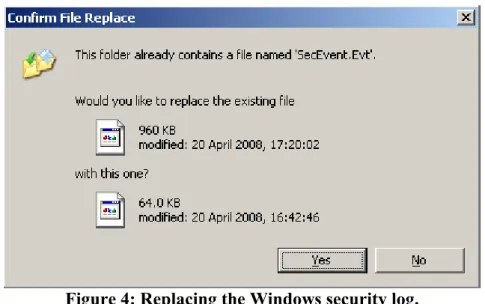
Experiment 3 - Swapping the Event Log from one computer to another. For this experiment a combination of the first two experiments was used, the Event Logging Service on Server B was set to disabled and the machine was restarted. The event log on Server B was then replaced with the one that had been copied from Server A and the event logging service restarted. Figure 4 shows this.
Figure 4: Replacing the Windows security log.
Server B successfully managed to accept the transplanted Security Event Log from Server A without producing any errors. This shows that it is possible to conceal events that have happened by simply copying a file to replace the original.
Experiment 4 - Modify the ‘logon ID’. This experiment used a Hex Editor called ‘Hex Workshop’ called (http://www.hexworkshop.com) to view and modify the contents of the Security Log file. The data contained within the log file was in a fairly readable format, it is 8 bit ASCII that has been padded out to 16 bit. Thus the word ‘Hello’ is represented in the file as ‘H.e.l.l.o.’.
First to be modified was the username, this was changed to a different one with the same number of characters in it, and then the computer name was modified, once again keeping the number of characters the same. When the event service was restarted it successfully showed that the both the username and computer name had successfully been modified.
This is highly significant as it shows that data contained within the event log can be modified and these changes will be accepted by the system. Furthermore, it also shows that it is possible for a perpetrator to either conceal their tracks or frame someone else.
Experiment 5 - How the event log stores the time. This experiment involved the use of a Hex Editor to analyse the content of the Security Event Log. Trial and error was used to locate the bits that held the date and time stamp, the Hex Editor used has a
‘Data Inspector’ window which translates the currently selected hexadecimal value into various different 16-bit, 32-bit and 64-bit values. Importantly it displays the value in 32-bit time.
An event was selected from the Event Viewer and a note of the time and date was taken, then using the Hex Editor, the file was manually searched until the value was found within the file. The value was reset to ‘0000 0000’, this was then interpreted as being ’00:00:00 01/01/1970’, so from this the original hexadecimal value is taken to be the number of seconds that have elapsed since 1st January 1970, which is also known as “Unix Time” (Wikipedia, 2008).
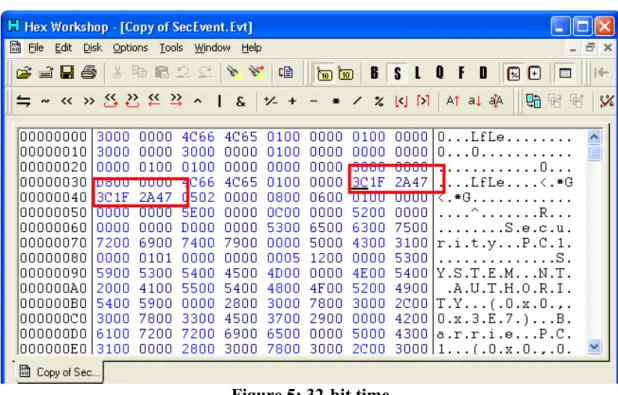
There are a total of 64-bits that are used for the timestamp; these are two groupings of 32-bits both with the exact same value. For example ‘18:47:24 01/11/2007’ is represented in hexadecimal as ‘3C1F 2A47’, Figure 5 shows that in the event log this is stored as ‘3C1F 2A47 3C1F 2A47’, note that it’s the same value repeated.
Figure 5: 32-bit time
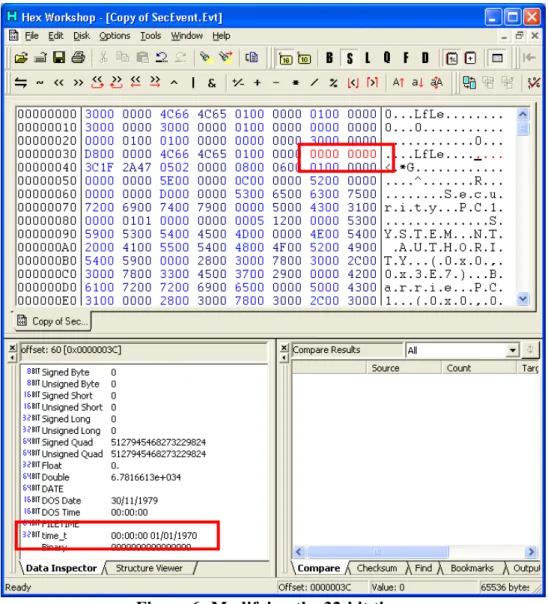
Experiment 6 - Modify the 32-bit time. This experiment was a continuation of the last one; essentially it was done to see if the Event Log would produce any errors if a timestamp in a file had been modified. It had been noted that to adjust the time by 1 second, the left most bit needed to be incremented by one. For example ‘3C1F 2A47’ is equal to ‘18:47:24 01/11/2007’ and to increase this by 1 second the new hexadecimal value would have to be ‘3D1F 2A47’. When this was applied to the
Security Log and then restarted the Event Viewer did in fact display the time as expected without any errors. Figure 6 shows the first 32-bits being reset to ‘00000000’. Once again this experiment shows that the system is content working with event logs that have been modified.
Figure 6: Modifying the 32-bit time.
Experiment 7 – Automatically replacing the ‘SecEvent.Evt’ file. For this experiment a console application was developed that would use the second technique for stopping and restarting the Event Logging Service. When the program is run checks the state of the ‘startup’ registry key, if the value is 0x2 it sets it to 0x4, it then creates an entry pointing to itself in the run once registry key, then it restarts the computer. When the machine restarts the program is automatically run, once again it checks the value of the event log ‘startup’ registry key, it should still be set to 0x4 and
in which case the program automatically replaces the Security Event Log with a predetermined file and then restarts the service.
Experiment 8 – Master File Table. For this experiment a program called Directory Snoop was used in conjunction with the Hex Editor. Directory Snoop (http://www.briggsoft.com/dsnoop.htm) is an application that allows for the inspection of the NTFS Master File Table. Which, as previously discussed in the Literature Review chapter, is a relation database that contains information about every file on the local disk? Directory Snoop was used to find the actual sectors of the local disk that was allocated to the Security Log. This sector was then opened up with the Hex Editor and some changes were made to the timestamp data. Upon viewing this information with the Directory Snoop it showed that the changes had actually been made, however when the Event Viewer was opened up it did not show these changes. This implied that that when the Event Log Service is first started it reads the contents of the event logs from disk into memory and does not read them again until it is restarted.
The server was then restarted to force the event log to reread the modified sectors, once again the Event Viewer was opened, however the changes had not taken effect. Directory Snoop was again used to check the sectors that had been modified and it showed that they had been restored to their original values. The Event Logging Service must have completely written the contents of its array in memory back to disk.
3.5 Conclusions
From the above experiments multiple vulnerabilities have been identified, it is possible to change the time that events happened at, usernames can be modified, the event log can be copied and pasted into another machine. The most surprising points learned was that there is no security in the event log at all, no hashing to see if it had been modified and nothing to stop an event log from one machine being used on another.
Being able to modify the event log only involved having access to the Security Event Log file and then modifying the data contained within. Thus, if the Event Log files
could be monitored for any copying, writing or deleting then it could be said that it would be possible to highlight a possible attack on the integrity of its data. Also, being able to monitor the status of the Event Logging Service, using the system registry, would highlight if it had been changed from automatic to disabled. The design of the system will be based upon these findings. It will disallow any physical access to the event logs and will also produce a hash signature that will highlight if any changes have been made.
4 Design
4.1 IntroductionOne of the objectives of this project is to design a suitable software solution that is based upon research done. This chapter aims to deliver a prototype system that is based upon the findings in the previous Literature Review and Windows Event Log chapters. The main influence in the design of this system has to be that of the black-box concept that was previously discussed, in theory this would be a secure off-site data storage facility that would provide the ability to write custom event logs, without having access to be able to modify or delete them, essentially a write once environment. Each event will also have a hash signature attached to, so that if anyone attempts to modify them this will be highlighted.
4.2 High-Level Design
This application will consist of three separate components, an event logger, a data archiving system and a separate event viewer. The event logger will reside on the computer system that is to be monitored. When it is first started it will prompt the user to enter a key that will be used for generating a hash signature. It will watch for changes that happen to the file system, files being created modified, deleted and renamed. When one of these events happens it will create a hash signature for it. It is then encrypted and sent to the data archiving system.
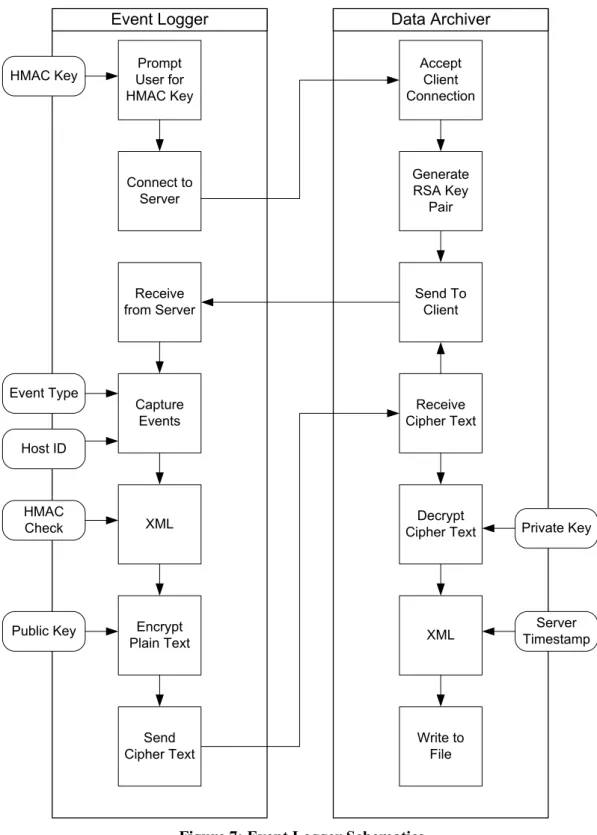
The data archiving system receives the data from the event logger and decrypts it. It then applies a time stamp to the data before it is written to an event log. The event log is then read by the event viewer, it displays all the information about the selected event to the user in a format that is easily readable. It also allows the user to enter the key that was used for generating the original hash signature. The event viewer will then use this key to generate a new signature based upon the contents of the log file and compare it to the signature that is held on file for this particular event. So long as the data within the log file has not been modified the signatures will match. This will authenticate the message as being genuine. Figure 7 shows the communications that take place between the event logger and data archiving systems.
Prompt User for HMAC Key Send Cipher Text Encrypt Plain Text XML Capture Events Receive from Server Connect to Server Accept Client Connection Write to File XML Decrypt Cipher Text Receive Cipher Text Send To Client Generate RSA Key Pair
Event Logger Data Archiver
HMAC Key Event Type HMAC Check Public Key Private Key Host ID Server Timestamp
Figure 7: Event Logger Schematics
4.3 Event Logging
One flaw of the Windows Event Log is that it does not keep track of which users are accessing which data files and to see if they have been modified by that user. This
presents a problem that should also be addressed by the design of the software for this report. Instead of just monitoring the Event Log files, which are only accessed by the system when the server is started or stopped, it is proposed that the software being developed should be able to either monitor the entire system or specific directories.
The performance of the system could be compromised by an excessively large amount files to keep track of, however, the more data that is produced then a more accurate investigation can be performed.
The .NET Framework provides the ‘FileSystemWatcher’ class which is able to monitor if files have been accessed, modified, deleted or renamed, MSDN (2008). It can be set to monitor specific files within a specified directory or the entire system. Making this event driven will also make the program more efficient as far as processing is concerned.
As previously discussed in the Literature Review chapter, the formatting of the data that is contained within the log file is important. Firstly, for digital forensic purposes, the data that is captured and stored needs to be done in a manner that does not alter the original data. Secondly, the data should be in a format that is easily accessible to a variety of different applications.
Based upon these specifications the data that is being stored will be contained within the XML format. This essentially places every piece of information within its own opening and closing tags. For example, <name>Barrie</name>. The information that will be captured will consist of:
• The time and date that the event took place.
• The user that performed the action.
• What kind of action has been performed.
• And the path of the file.
4.4 Data Archiving System
To achieve the black-box concept, this will involve a client-server architecture, where the client is the machine that is capturing the events and the server or Data Archiving
Both will have to be able to pass a number of pieces of information between each other.
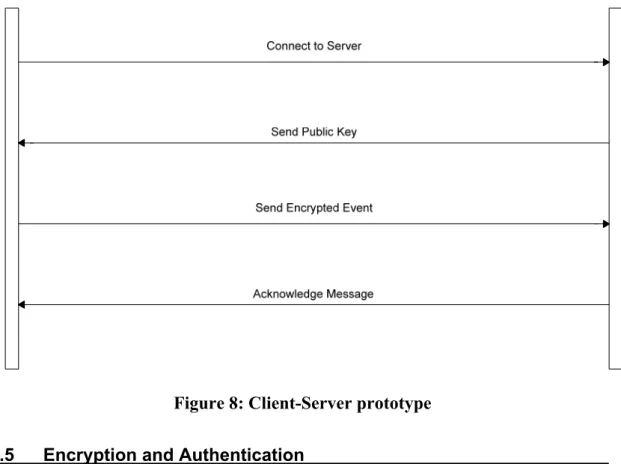
1. The Server is listening for a connection. 2. The Client connects to the Server.
3. The Server generates a random RSA key pair. 4. The Server sends its public key to the Client.
5. The Client receives the Servers public key and stores it in memory. 6. The Client sends events to the server.
Figure 8 shows the communication that takes place between the Client and Server. When the Server has received an encrypted event from the Client it will decrypt the message, and then add an additional timestamp, this will then be written to file.
Figure 8: Client-Server prototype 4.5 Encryption and Authentication
There are two main types of encryption, symmetric and asymmetric, as a brief overview, asymmetric encryption uses two separate keys is more secure than symmetric, which only uses one key, but it is dramatically slower and is generally
only used for encrypting small amounts of information, this is due to the large calculations that are involved.
Two prototype systems will be developed, one that uses asymmetric encryption to secure all communications between the client and server. The other will use symmetric encryption to encrypt the bulk of the communications, but will transfer the shared key using asymmetric encryption, this system will be faster but it should be interesting to see if it makes any detrimental impact on the system.
To authenticate the messages HMAC will be used. RFC2104 (1997) describes HMAC as a mechanism for message authentication using cryptographic hash functions. When the original event is generated and had its timestamp and user tags added, it will then go through a process of having a unique HMAC checksum generated for each event. This will then be tagged onto the end of the event before it gets sent to the Server. Figure 9 shows this.
<clientTime>………</clientTime> <user> ………</user> <changeType>………</changeType> <fullPath>………</fullPath>
Figure 9: Client generated XML string
The previous diagram illustrated the event information before it has been passed through the HMAC checking process, Figure 10 below shows the same event that has been checked and had its HMAC tags added.
<clientTime>………</clientTime> <user> ………</user> <changeType>………</changeType> <fullPath>………</fullPath> <hmacCheck>………</hmacCheck>
Figure 10: Client XML string with HMAC
Figure 11 shows the event information that has been received by the Data Archiving System where it has also been time stamped. This is how it will look when it is stored in the event log on the Data Archiving System.
<serverTime>………</serverTime> <clientTime>………</clientTime> <user> ………</user> <changeType>………</changeType> <fullPath>………</fullPath> <hmacCheck>………</hmacCheck>
Figure 11: Server XML string 4.5 Event Viewer
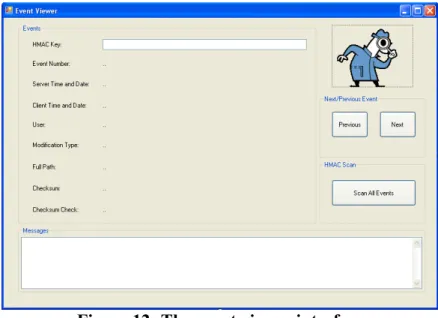
The Event Viewer Application will be used to view the contents of the event log that has been generated and stored on the Server. If will display the contents of each Event, for example the different Client and Server timestamps that have been generated. It will also display details about the event that have taken place, namely what files have been modified, changed, deleted or renamed. As well, it will also display the HMAC checksum that was originally generated and will also recalculate a new checksum value based solely upon the information in the Event Log. This will then be compared to the original. So long as the user inputs the same key that was originally used, this check will alert the user if the data has been changed. Figure 12 shows the graphical user interface that has been designed for the application.
Figure 12: The event viewer interface
This will allow the user to be able to access and view each of the Events that’s are stored in the Event Log, it will work by reading the Event Log file into an array and then allow the user to access each element of the array, as each ‘record’ is accessed the application will use the XML tags to sort the data into its correct field. The
application will also provide the ability to search through all the events looking or any that fail the checksum check.
4.6 Pseudo Code
Pseudo code is used in software development to give a description in a readable form of the basic functions of a program. The purpose of this is to make it more readable for humans, so they can understand what the program is doing, without overcomplicating the code and introducing complex algorithms.
4.6.1 Client Side Pseudo Code
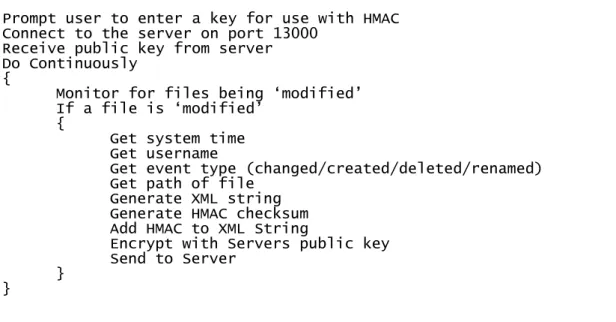
Figure 13 is the pseudo code that the client application will use. As it can be seen the client attempts to connect to the Data Archiving System using port 13000. This port has been selected as it outside of the range of commonly used ports. After the connection has been established the client receives the public key from the Data Archiving System. This key is then used to encrypt all the data that is sent to the Data Archiving System.
Figure 13: Client side pseudo code Prompt user to enter a key for use with HMAC Connect to the server on port 13000
Receive public key from server Do Continuously
{
Monitor for files being ‘modified’ If a file is ‘modified’
{
Get system time
Get username
Get event type (changed/created/deleted/renamed) Get path of file
Generate XML string Generate HMAC checksum
Add HMAC to XML String
Encrypt with Servers public key
Send to Server
} }
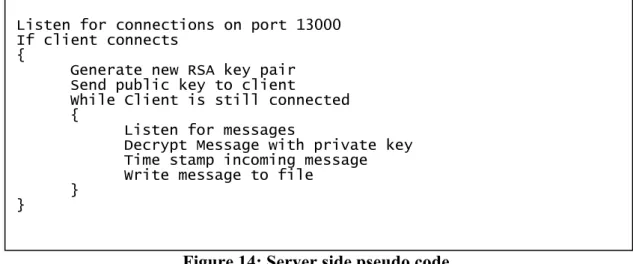
The data Archiving System listens for a connection using port 13000, after a connection has been established it generates a random RSA key pair, one public and one private key. The public key is sent to the client machine and the private key is kept and used for decrypting all the data that is sent to it. The data received is then saved to disk. It continues this process until the client application disconnects, Figure 14 shows this.
Figure 14: Server side pseudo code Listen for connections on port 13000
If client connects {
Generate new RSA key pair Send public key to client
While Client is still connected {
Listen for messages
Decrypt Message with private key Time stamp incoming message
Write message to file }
}
4.6.3 Event Viewer Pseudo Code
Figure 15 shows the pseudo code for the event viewer, initially it reads the contents of the event log into an array as a complete XML string. It then extracts the information from the XML string as it needs it. Based up the HMAC key that has been entered by the user, it also calculates what the HMAC value should be for that particular XML string and informs the user if it matches the HMAC signature that is contained within the XML string.
Figure 15: Event viewer pseudo code Read Event Log File into Array
Extract data from XML tags and populate fields If user clicks ‘next’ or ‘previous’
{
Display next or previous event accordingly Calculate checksum based on inputted key }
4.7 Testing Design
The system will be tested to ensure that its performance does not impede its ability to detect and log events, and that the accuracy of the data being collected is correct, and that the data being captured, transmitted and stored is being done so in a secure and authenticated manner.
The previous tests that were done with the Windows Event Log will be rerun with the new application running, the purpose is to see if it can highlight if the Event Log has been modified. As well as this the application will be stress tested to see what its limits are. Figure 16 shows the tests that will be carried out.
Testing Type Description
Performance How long to encrypt/decrypt? How much space will the log use?
Accuracy How many events will it successfully capture? Is there a limit on the size of the directory path? Security Does HMAC work?
Can HMAC withstand a brute force attack?
Figure 16: Testing design 4.8 Test Suite Design
An application that will automate part of the testing process, using scripts, has been developed. Its primary objective is to generate a substantial number of events that will be captured by the event logging application. This will allow the capabilities of the application to be measured and depending upon the results changes can be made to suite.
As previously mentioned the .NET FileSystemWatcher class is used to capture events that are happening to files within specified directories. The testing application will allow for the creation, modification, renaming and deleting of a variable number of files within a predetermined directory. An option of the testing application will be to automatically modify some of the Windows Event Log files while it is also generating large amounts of events.
Figure 17 shows the pseudo code of the process that the application will go through for generating a large numbers of files. Using a For Loop it will continue to create files a predetermined number of times. Each of these files will also be uniquely numbered in their filename.
Repeat the following ‘x’ number of times {
Create a new file called ‘Sample’x’.txt’ in the test directory
}
Figure 17: Generate a large number of files pseudo code
To provide some degree of error checking this can be slightly modified to perform a check to see if the file already exists. Figure 18 shows how the application will use the unique filename numbering to check if the file exists. This technique will also be used for automatically deleting and modifying the files.
Figure 18: Generate files with error checking Repeat the following ‘x’ number of times
{
If file ‘Sample’x’.txt does not exist {
Create a new file called ‘Sample’x’.txt’ in the test directory
} }
Figure 19 is a screenshot of the application; it provides an option for the tester to specify the number of events that they would like to generate, this can be any number. There are four main buttons that will be used for most of the testing, one for generating the text files, one for modifying the contents of the text files, one for renaming the text files and one for deleting the text files.
The tester application also has a display window that outputs messages to the tester, this is used for informing the user when it has started and completed any tasks, it also informs the user when the ‘file counter’ has been changed and what value it is at.
Figure 19: Tester application 4.9 Conclusion
This chapter has identified the main components of software that will be developed as part of this project. All the components of the system will be created using C# and the .NET framework, as they provide Event logging, Performance monitoring and encryption classes, which this application makes extensive use of.
Based upon the research that was done in the Literature Review and Evaluation of the Windows Event Log chapters it was decided that the application would use client-server architecture. The client would be the event logger and the client-server would be the data archiving system. All the communications that take place will be encrypted and all the event s that are generated will be hashed.
Also, a method for testing the performance, security and accuracy of the system was proposed. A program that would assist in the testing of the application was also designed; its main purpose is to generate a larger number of events in a very short period of time. This is to simulate the level of traffic that would be present on a corporate sever.
5 Implementation
5.1 IntroductionThe three components, the event logger, the data archiving system and event viewer, that have been developed were created using C# and the .NET framework that is provided by Microsoft. These were chosen for their rapid deployment ability, and they fully support such things as XML, encryption and socket programming.
5.2 Event Logger
The event logging application will be resident on the client machine, its purpose is to monitor the file system for files within specified directories being modified. After it has captured these events it then constructs an XML sting that conatins all the ddetials of the event, this than has a hash signature tagged onto it. The whole string gets encrypted and sent to the data archiving system.
5.2.1 Connecting to Server
Figure 20 shows the code that is used for the Client to be able to establish a TCP connection to the server. The code allows for IP Addresses, Domain Names and local machine names to be entered for the server, it resolves them by using DNS.
Figure 20: Connecting to a Server Console.Write("Connecting to server... ");
Byte[] data = new byte[10240];
IPHostEntry host = Dns.GetHostEntry("localhost"); IPAddress ipAddr = host.AddressList[0];
// Specify the port to connect too.
IPEndPoint ipep = new IPEndPoint(ipAddr, 13000);
// Specify the path to watch.
Socket server = new
Socket(AddressFamily.InterNetwork,SocketType.Stream, ProtocolType.Tcp); try { server.Connect(ipep); } catch (SocketException e) { Console.WriteLine("Failed!"); Console.WriteLine(e.ToString()); Console.ReadLine(); return; }
5.2.2 FileSystemWatcher
The ‘FileSystemWatcher’ class is part of the ‘System.IO’ namespace provided by .NET versions 1.1 though to the current 3.5. According to MSDN it listens to the file system change notifications and raises events when a directory, or file in a directory, changes. In Figure 21 The FileSystemWatcher is set to watch all files that are contained in the ‘C:\Test\’ directory. Multiple instances of FileSystemWatcher can also be run to monitor other directories, that way multiple directories can monitored using a single application.
// Create a new FileSystemWatcher and set its properties.
FileSystemWatcher watcher = new FileSystemWatcher();
Specify the path to watch. //
watcher.Path = "c:\\Test\\";
ilter
watcher.NotifyFilter = NotifyF s.LastAccess |
yName;
leSystemEventHandler(OnChanged);
ts = true; NotifyFilters.LastWrite
| NotifyFilters.FileName | NotifyFilters.Director Specify the file and/or extension to watch. //
watcher.Filter = "*.*";
ries = true; watcher.IncludeSubdirecto
Add event handlers. //
watcher.Changed += new Fi
watcher.Created += new FileSystemEventHandler(OnChanged); watcher.Deleted += new FileSystemEventHandler(OnChanged); watcher.Renamed += new RenamedEventHandler(OnRenamed);
Specify the buffer size, default is 8192 (8K). //
watcher.InternalBufferSize = 102400; Begin Watching.
//
watcher.EnableRaisingEven
Figure 21: The FileSystemWatcher class 5.2.3 Capturing Events
When a ‘Renamed’ event occurs it is passed to the above ‘OnRenamed’ class, this then wraps the various elements of the event in XML tags, this creates an ‘Event Message’ and includes such things as the clients time and date, the user and details about the event and the file that was renamed. This is a similar process when a file is changed. After this stage the Event Message is passed though to the HMAC section, where a hash signature value will be generated for it. Figure 22 shows this.
public static void OnRenamed(object source, RenamedEventArgs e) {
// Specify what is done when a file is renamed.
string message = "<clientTime>" + DateTime.Now + "</clientTime><user>" + GlobalClass.user + "</user><c + e.ChangeType + "</changeType><fullPath>" + e.FullPath + "</fullPath>";
// Pass the ‘mes
hangeType>"
sage’ to the next stage. sendmsg(message);
}
Figure 22: Capturing Events 5.2.4 HMAC
Figure 23 shows the code that is used to generate the HMAC checksum. The ‘key’ is taken from a user input when the application is first launched; it is then passed into the following code along with the events that have been generated by the ‘FileSystemWatcher’ class. The resulting checksum value is then wrapped in XML tags and attached to the end of the captured events string.
Figure 23: Generating an HMAC hash signature
// Declare a new instance of Ascii Ecnoding called ‘encoding’.
System.Text.ASCIIEncoding encoding = new System.Text.ASCIIEncoding(); // Convert the HMAC key to a byte value.
byte[] keyByte = encoding.GetBytes(key); // Create a new instance of HMAC with SHA1.
HMACSHA1 hmac = new HMACSHA1(keyByte);
// Convert the message to a byte value.
byte[] messageBytes = encoding.GetBytes(chkMessage); // Compute the hash signature.
byte[] hashmessage = hmac.ComputeHash(messageBytes); // Update the value of the ‘chkMessage’ string.
chkMessage = chkMessage + "<hmacCheck>" + ByteToString(hashmessage) + "</hmacCheck>";
5.2.5 Encrypting
Figure 24 shows the code that is used to encrypt the Event Message, the code for it is from a program by Mathew Schlabaugh (CodeProject, 2008). The cipher text is generated by breaking down the plain text into blocks that are smaller than the key that is used to encode them. The smaller blocks are then encoded with the Servers public key, this then makes them ready to be sent to the server.
Figure 24: Encrypting Data
// The following code is from ‘Public Key RSA Encryption // in C# .NET’ by Mathew John Schlabaugh.
// Available from the http://www.codeproject.com // Specify the size of the key to be used in bits.
int dwKeySize = 1024;
// Decalre a new instance of the RSACryptoServiceProvider.
RSACryptoServiceProvider RSAProvider = new
RSACryptoServiceProvider(dwKeySize); // Read the Servers public key from XML. RSAProvider.FromXmlString(justPublicKey); // Convert keysize from bits to bytes.
int keySize = dwKeySize / 8; // Convert message to bytes.
byte[] bytes = Encoding.UTF32.GetBytes(chkMessage);
// Define a size that will be used for calculating a block size.
int maxLength = keySize - 42;
int dataLength = bytes.Length;
int iterations = dataLength / maxLength;
StringBuilder stringBuilder = new StringBuilder();
for (int i = 0; i <= iterations; i++) {
// Break the message apart.
byte[] tempBytes = new byte[(dataLength - maxLength * i > maxLength) ? maxLength : dataLength - maxLength * i];
// Copy the smaller message into memory.
Buffer.BlockCopy(bytes, maxLength * i, tempBytes, 0, tempBytes.Length);
// Encrypt the smaller message/section.
byte[] encryptedBytes = RSAProvider.Encrypt(tempBytes, true); // Add the encrypted secion to the StringBuilder.
stringBuilder.Append(Convert.ToBase64String(encryptedBytes)); }
5.2.6 Sending to Server
For the client to be able to send any data to the data archiving system it will have to converted into packet and then placed onto the TCP stream. Figure 25 shows this.
Figure 25: Sending Data to a Server // Send the encrypted message to the Server.
server.Send(Encoding.ASCII.GetBytes(encryptedMessage)); // Specify the packet size.
Byte[] data = new byte[10240];
// Receive the acknowledgement from the Server.
in