Please cite as: Clayton, J. (2006, September 5-7). Learning Objects: Seeking simple solutions for students and staff: A New Zealand experience. In D. Whitelock & S. Wheeler (Eds.), ALT-C: The Next Generation: Research Proceedings of the 13th Association for Learning Technology Conference (pp. 153-163).Heriot-Watt University, Edinburg, Scotland, UK.
Learning objects: Seeking simple solutions for students and staff:
A New Zealand experience
Abstract
This paper is a narrative story describing how the Open Source Learning Object Repository (OSLOR) project worked through the process of defining, describing and sharing learning objects. The OSLOR team wase conscious that for learning object repositories to fully function simple, self explanatory solutions had to be explored and implemented so
participants would not be overwhelmed by the need to acquire advanced software application or library cataloguing skills. The paper anticipates the definitions, descriptions and sharing solutions described will be open to debate and refinement, it recognizes they are not the final answer. However, the team hope the paper generates an ongoing debate on the future of learning objects and there use within New Zealand institutions and elsewhere.
Introduction
In 2004 the Waikato Institute of Technology received a significant grant from the e-Learning Collaborative Development Fund, administered by the Tertiary Education Commission of New Zealand, to investigate and deploy an open source learning object repository to meet the needs of the diverse cultural populations of Aotearoa/ New Zealand. One of the key outcomes of the project is to be the identification and deployment of a number of learning objects to test the selected systems robustness and ease of access. From the beginning of the project it was accepted the debate on the definition of a “learning object” was widespread, inconclusive and ongoing. However, the project team recognised there was general agreement that Learning Objects (LOs) should be reusable, durable, affordable, searchable, retrievable and be stored for others to use. This paper explores how the project team explored, reviewed and decided upon simple solutions for the definition, description and sharing of learning objects.
Defining a learning object
Background
team the definitions of a learning object could range from a single piece of digital material, a combination of digital materials to form a module, or an entire course. It was critical the team clearly identified what it considered to be learning objects.
Assets
At the start of the journey the project team found that in some cases the "metaphor" of LEGO was used to explain underlying concepts of LOs (Long, 2006). In short, small blocks of instruction (learning objects) could be clipped together to create a structured event (learning activity or sequence). You could, if you wanted, re-use the small block in other structures. For example a map of New Zealand could be used as a resource to indicate the physical
relationships of a student’s personal location with other towns or cities in New Zealand. The map itself could be re-used to indicate the location of rivers, streams and lakes or
alternatively be used to describe geographical features such as wet lands, plains, hill country and mountains. These thoughts of re-use of discrete pieces of digital material appear to be based upon computer science object-orientated design (Downes, 2001), and because of this they had been labelled with the computer term of an asset.
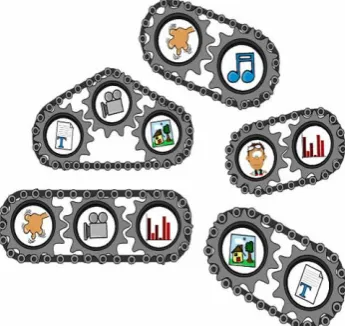
Figure 1 Assets: The cogs
However, we asked ourselves, can the map (the asset) on it’s own be considered to be a learning object? The project team argued the map should, indeed must, be associated with other pieces of content, for example a key, to make it useful in learning. The team concluded the reusable assets should not be considered to be learning objects; they should be regarded as the prime content “cogs” of learning objects (see Figure 1 on the left).
Knowledge Objects
Let us examine our map of New Zealand once again. Firstly, by thelinking of one asset, a graduated key showing town and city population sizes, with a second asset, the map of New Zealand, we have created digital content to illustrate population settlement patterns in New Zealand. Alternatively, we could link one asset, the map of New Zealand, with a second asset, a coloured key showing altitude. In this scenario we have created content that is design
specifically to enhance student understanding of the physical features of New Zealand. In both scenarios we have created digital content designed for a specific purpose. It could be argued Gibbons, Nelson, & Richards, (2000) would classify these linked assets as
Figure 2: Knowledge objects: The chain links
However, are the maps of New Zealand and associated keys, the knowledge objects, on their own a learning object? The project team discussed the issue and to them knowledge objects should, indeed must, be linked with specific student activities for them to be useful. For example, in the scenarios described above, there might be included student activities, such as, identify the four largest urban areas or significant physical features, in New Zealand. In short, knowledge objects are designed for a specific purpose and on their own are incomplete. If assets are the cogs of learning objects, knowledge objects could be the links in a chain that hold them together (see Figure 2 on the left).
Information objects
In the previous section it was argued knowledge objects were created for a specific purpose and they were the links in the chain to hold assets together. Let us examine our map of New Zealand again. By linking one knowledge object, (a combination of the granules map and key), with a second knowledge object, (a combination of the assets a textual explanation using map keys and a list of student identification activities), we have created a learning event engaging students in understanding their physical location in the world and the principles of using maps and keys. Alternatively we could link one knowledge object, (a combination of the granules map and key), with a second knowledge object, (a combination of a textual explanation of the concepts of "urban and rural" and a list of student interpretive activities), we have created a learning event engaging students in exploring the concept of population density. In can be argued in each scenario we have created events designed to engage students in specific cognitive tasks. In essence by linking two or more knowledge objects together we are creating an activity to inform students of a specific principle, process, procedure or concept. Although a number of writers have addressed the concept of assets (Long, 2006) and instructional objects (Gibbons et al., 2000) there is limited literature on how the creation of digital collections described above can be labelled. The team decided these digital collections should be labelled information objects; they are however conscious a heated debate will occur on this definition. In essence the resulting object created by the combining of two or more knowledge objects to create a learning event, to inform students of a specific principle, process, procedure or concept, was called an information object.
Figure 3: Information
objects: The chain driving understanding (see Figure 3 on the left).
A simple solution
In the previous sections it was argued assets were the cogs of LOs, knowledge objects were the links in the chain of LOs and information objects were the chain of LOs. Let us examine our map for the final time. By linking one information object, (informing students of the concept of population density), with an assessment activity, (identification of major urban areas of New Zealand), to monitor student progress against an identified learning objective, students will understand the concept of population density and be able to identify four regions of high density. We have then created a learning activity clearly linked to a specific learning outcome and we are able to firstly, measure and report on student achievement and progress and secondly we are able to identify areas of strength to build upon or areas of weakness to address. The team argued we had finally created a learning object; again the team is conscious a heated debate will occur on this definition. In essence the team had created a definition they could now work with to identify LOs to be deployed and distributed in their learning object repository.
Summary
It has been argued in this section the term Learning Object has it’s roots nourished from two disciplines, education and computer science.
In computer science, the reuse of discrete sections of code (components or objects) in multiple settings is highly valued. This is referred to as object-oriented programming.
In education, a learning objective is a brief statement of the desired outcome of a learning activity.
From the OSLOR teams perspective it appeared confusion resulted if only one discipline was used as the basis for defining a learning object for educational purposes, a holistic approach is needed.
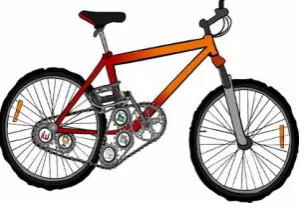
Figure 4: Learning Objects: The bicycle
To the OSLOR project team the characteristics of learning objects are firstly, it is a learning activity with strong internal cohesion (it measures one and only one learning objective) and secondly, it is an
independent entity with weak coupling, (the measurement of progress is not dependent on other learning activities). Learning objects are the pedals wheels and frame controlling student achievement progress and reporting (see Figure 4 on the left).
Describing a learning object
OSLOR teams perspective, to be of use, the learning objects created needed to be easily located, readily retrieved and repurposed were necessary. The project team was aware any learning object deployed needed to be labeled in such a way that a search engine could scan the labels, or fields, and locate and display the location to the searcher. The team soon realized we were once again faced with the combination of two disciplines; the discipline of computer science, the technical functionalities of search engines, and librarianship, the cataloguing and description of educational material.
Metadata
Labeling digital material is an information set, or record, described as metadata, which is essentially "data about data" or "information about information" (IMS Global Learning Consortium, 1999). The IEEE Learning Technology Standards Committee (cited in (IMS Global Learning Consortium, 1999) model for meta-data definitions relies on a hierarchical structure based on the metaphor of a tree. The top, or first, layer, is the "root" element. This root element may contain elements and if a element itself contains additional sub-elements they are called a "branch." Sub-sub-elements that do not contain any sub-sub-elements are called "leaves." Each element identified in this hierarchy has a specific definition, data type, and allowable value. In essence the metadata record describes the characteristics of the learning object. It describes who created the object, when the object was created, what the learning object is designed to achieve, what level it is aimed at, how can people access and use it and any digital characteristics of the object . (The relationship between the root, branches, and leaves is depicted in the figure 5 below).
(IMS Global Learning Consortium, 1999)
http://www.imsproject.org/metadata/mdbestv1p1.html#Meta-datasystem
The project team reviewed these elements and soon realized, as Wayne (2005) did, there was a danger the requirements and complexity of identifying and completing the metadata record, could consume the energies of the entire project. We needed to reduce the complexity.
Creating metadata
who would be responsible for entering the metadata record. The project team were conscious metadata was used for three basic purposes, to locate relevant objects, to interpret stored information and to integrate data (Saravani & Clayton, 2005). They also realized there were three ways of creating the metadata record. Firstly, it could be entered by the creator of the resource, secondly, by a metadata specialist and finally a collaborative activity between the creator and the metadata specialist (Paulsen & Maxwell, 2005).
The Dublin Core initiative has the goal of developing a common set of elements that describe Internet and other information resources (Smith, 1999). It consists of 15 basic elements, title, creator, subject/keyword, description, publisher, contributor, date, type, format, identifier, source, language, relation, coverage and rights (Paulsen & Maxwell, 2005). While the 15 elements are very basic and might not satisfy all needs (Zealand, 2000) it appeared to be a suitable foundation for the purposes of describing learning objects for use within the OSLOR environment. They appeared simple enough for the creator of the resource to enter simple data while providing enough information for metadata specialists to extended the record where appropriate.
A simple solution?
The project team reviewed the elements contained within Dublin Core and, to integrate within the New Zealand educational context, added contextual fields to represent the compulsory school and tertiary sectors.
The following are the proposed metadata fields to be used when creating a learning object for the OSLOR project.
Compulsory fields
Title (Dublin Core field)
Creator name (Dublin Core field)
Description (Dublin Core field)
Language (Dublin Core field)
Format (Dublin Core field)
Learning resource type (Educational)
Context (Educational)
Level (Educational)
Optional fields
Category (Moodle field we can use)
Keywords (Dublin Core field)
Size (Dublin Core field)
Rights (Dublin Core field)
Learning time (Educational)
Contextual Fields (New Zealand specific) Primary (Years 1-6)
http://oslor.elearning.ac.nz/moodle/mod/resource/view.php?id=136
Sharing learning objects
How many times have we attended presentations, conferences or workshops and been impressed by innovative practices and information presented? How many times have we, as educators, reviewed a lesson presented by a college and wished we had the ability to discover, and potentially re-use, the digital resources used within the lesson? Simple technical
solutions, for example attachments to e-mails, have been used to distribute digital information between educationalists for some time, hence the conference ritual of sharing business cards. More complex solutions, for example learning object repositories such as Merlot, CAREO and CLOE to name only three of many, have also been advocated for many years (Learning Objects Group, 2003). While both the solutions outlined have merit and are workable the OSLOR team had a further issue, in that any solution proposed for the sharing of LOs had to be integrated into the open source learning management system Moodle selected in a previous TEC funded project (Clayton & Gower, 2005). The team was also aware the issues of sharing LOs are surrounded by the complexities of intellectual property, scope of distribution, access, storage and payment. To create a simple solution to address all these issues is fraught with difficulty, and the OSLOR team’s solution was to promote open access and freedom of material. In essence, any LOs used in the project were contributed on the understanding that they could be freely accessed and distributed. How the OSLOR team approached the issues of storage, retrieval and distribution is outlined below.
The Moodle Glossary tool
The OSLOR team had previously been involved with developments of the open source LMS Moodle (Clayton & Gower, 2005) and had for some time been impressed with the
functionality and versatility of the “glossary” tool. Within the glossary tool we found we could categorize digital materials into logical blocks, we could use the search functionality in a number of ways and we could add attachments. Since the operational code was open to modification we could also modify this tool to meet our particular needs. The team decided at an early stage to modify this tool to allow for the storage, discovery and sharing of learning objects. The first modifications were based on the search functionalities of the tool. We modified the tool to allow for key word search through a normal search engine. We then altered the tabs on the tool to browse by alphabet, category, level, date or poster see figure 6 below.
Figure 6: The glossary: A potential display and searching application
The process: Creator
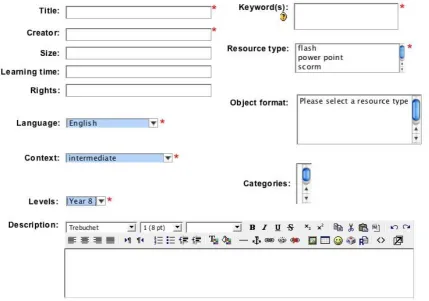
the “add a new entry” functionality of the glossary too (see figure 6 above). This functionality generated a form for the creator to complete. This form contained the critical metadata fields the team had previously identified and at the end of the form the creator could attach his / her learning object (either as an individual item or a SCORM resource). To ease the complexity of completing the required metadata for the LOs the form combined both text box and drop down fields (see figure 7 below). By combining text box and drop down field the team was anticipating individual creators would not require complex technical or library cataloguing skills and they would be able to complete a comprehensive record easily.
Figure 7: The metadata form generated
The process: User
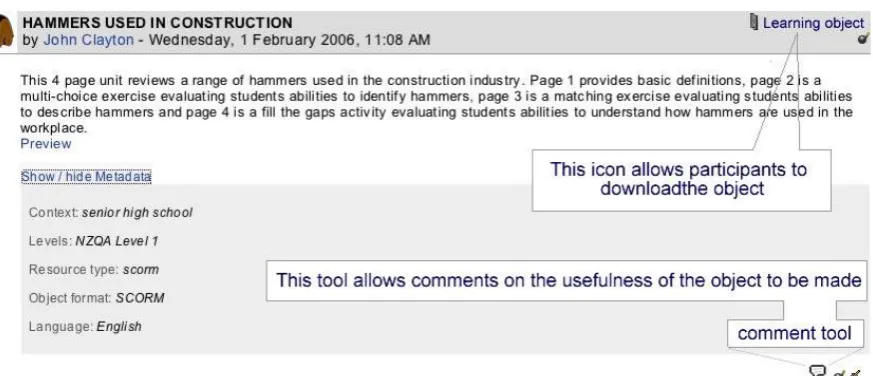
When the user opens the glossary tool they have a range of search options available to them they can use the text box to search by key word or they can use the tabs to search by alphabet, category, level, date or poster. When a suitable object is located a window will display
Figure 8: The LO description within the glossary tool
Limitations
While the glossary tool incorporates a number of features that meet the OSLOR teams desire to seek simple solutions, once again the team recognizes there is room for significant debate and refinement. For example there are potential storage issues as multiple copies of the object are deployed. There are issues of version control if the object is refined, updated or amended, in short, can the user be confident they are accessing the latest version of the object? There are issues of levels of contribution and acknowledgement of that contribution. There is also the currently unaddressed issue of reward (i.e. payment) for material used. However, to meet the tight deadlines of the project contract, the team felt it critical it demonstrated potential and allowed debate to surface rather than try and present an authoritative solution. The OSLOR team is currently addressing these issues and reports on the potential solutions will be produced at a future date.
Conclusions
This paper reflects the OSLOR team’s focus on creating a learning object repository,
populated with relevant material, within a limited time frame. It has taken the reader through a journey of how the OSLOR project team explored the task of defining, describing and sharing learning objects in an open source application. The team is conscious the solutions proposed are simplistic, will be the subject of intense debate, will change as the project matures and could not fully meet the needs of a truly global audience. However, the team believes it has provided New Zealanders an opportunity to begin the debate on, firstly, how learning objects can be discovered, secondly, when and in what ways learning objects can be shared and, finally, an how learning objects should be managed. The team is conscious the simple solutions it has suggested in this report need to be rigorously tested. They need to be acceptable to the users who wish to deploy learning objects, to the creators who wish to share their work with others and to information technology specialists involved in the development of an appropriate infrastructure. It is only by this ongoing debate and a process of trial and error, trial and success that a functional system will be created. The solutions and ideas generated by this testing and debate will be the basis for further developments, refinements and additions. These further simple solutions will be available in further reports.
Acknowledgements
References
Christiansen, J., & Anderson, J. (2004). Feasibility of Course Development Based on
Learning Objects: Research Analysis of Three Case Studies. International Journal of Instructional Technology and Distance Learning, 1(3), 3-21.
Clayton, J., & Gower, B. (2005). Open Source Courseware Initiative New Zealand. Final report to the Tertiary Education Commission (e-Learning Collaborative Development Fund). Hamilton: Waikato Institute of Technology.
de Salas, K., & Ellis, L. (2006). The Development and Implementation of Learning Objects in a Higher Education Setting. Interdisciplinary Journal of Knowledge and Learning Objects, 2, 1-22.
Downes, S. (2001). Learning Objects: Resources For Distance Education Worldwide. International Review of Research in Open and Distance Learning, 2(1), http://www.irrodl.org/content/v2.1/downes.html.
Gibbons, A. S., Nelson, J., & Richards, R. (2000). The nature and origin of instructional objects. In D. A. Wiley (Ed.), The Instructional Use of Learning Objects: Online Version.
IEEE Learning Technology Standards Committee. (2005). The Learning Object Metadata standard. Retrieved 23 January, 2005, from
http://ieeeltsc.org/wg12LOM/lomDescription/view?searchterm=learning%20object IMS Global Learning Consortium. (1999, 5 May 2000). IMS Learner Resource Meta-data
Best Practices and Implementation Guide v1.1 Revision: August 1999. Retrieved 23 January, 2006, from http://www.imsproject.org/metadata/mdbestv1p1.html#Meta-datasystem
Learning Objects Group. (2003). Learning Objects Portal: Repositories. Retrieved 10 February, 2006, from http://ilearn.senecac.on.ca/lop/repositories/repositories.htm Long, P. (2006). Learning objects in motion. Retrieved January 23, 2006, from
http://www.campus-technology.com/article.asp?id=7479
Martinez, M. (2000). Designing learning objects to mass customize and personalize learning. In D. A. Wiley (Ed.), The Instructional Use of Learning Objects: Online Version. Merrill, D. (1998). Knowledge Objects. CBT Solutions, March/April, 1-11.
Paulsen, C., & Maxwell, J. (2005). The contribution of metadata to e-learning. In J. Clayton & B. Gower (Eds.), Open Source Courseware Initiative New Zealand. Final report to the Tertiary Education Commission (e-Learning Collaborative Development Fund) (pp. pp139-151). Hamilton: Waikato Institute of Technology.
Polsani, P. (2003). Use and abuse of reusable learning objects. Journal of Digital Information, 3(4), Article No. 164, 2003-2002-2019.
Saravani, S., & Clayton, J. (2005, 7 - 9 September). Meatdata - its contribution to e-learning. Paper presented at the Teriary Information Technology Conference, Waiariki
Polytechnic, Rotorua, New Zealand.
Smith, A. (1999). Metadata: Dublin Core for Dummies. Retrieved 9th February, 2006, from http://www.vuw.ac.nz/staff/alastair_smith/technophile/TPh9908.html
Wayne, L. (2005, November 2005). Iinstitutionalise metadata before it institutionalises you. Retrieved February 1, 2006, from
http://www.fgdc.gov/metadata/documents/InstitutionalizeMeta_Nov2005.doc
Zealand, N. L. o. N. (2000). Metadata Standards Framework for National Library of New Zealand. Retrieved 9th February, 2006, from