Remote Update of Database Through Mobile
Device
Akshay Aggarwal Shantanu Kharia
UG Student UG Student
Department of Information Technology Department of Information Technology Vellore Institute of Technology, India Vellore Institute of Technology, India
Deepshi Mediratta
UG Student
Department of Information Technology Vellore Institute of Technology, India
Abstract
This paper proposes a novel method to access and update a database through a mobile device without using Internet Connection. The main objective of this technique is to help the users who don’t have access to Internet in their mobile device and want to access and/or update a database. This technique is demonstrated through a fully operational backend combination of software suites. The implementation is tested with Samsung Mobile devices which exhibited satisfactory results as discussed in the paper. Keywords: Database update, Distributed Systems, Middleware and agent technologies, Mobile computing systems and services, Remote update of database, Update of database using mobile device.
________________________________________________________________________________________________________
I.
INTRODUCTION
Unable to update database remotely due to lack of Internet connectivity leads to problems in carrying out work with ease. Most of the update related problems occur because either of lack of internet connectivity, or lack of time to use the portal, or inability to update the database manually. We have made an attempt to find a solution to the same problem. In this interface we have used software suites such as SMS Enabler (Software that helps us to retrieve the messages of our mobile device on a system and save it wherever we want.), Email2DB (which helps us to retrieve the saved messages and update a database automatically).
The interface allows the user to update the database just by sending a text message in a predefined format. The message is sent on a specific number and saved in a file or sent to an email. The interface then runs and divides the message into different fields and stores the data accordingly. After sorting the data the interface updates the concerned database accordingly.
Let us take an example to illustrate the functioning of the interface. The current procedure to update attendance in a university requires faculty members to update the database using a web portal. This requires an active internet connection to access the portal and thus, update the database. With the help of proposed methodology, faculty members do not need an active internet connection at their end. To do this, faculty sends a text message to a predefined number consisting of registration numbers of all the students who are present/absent, as the need may be. The message is then received by SMS Enabler (Software suite) and is sent to an e-mail address. Email2DB (software suite) will process the mail and parse the message into different fields according to the database attributes. After having segregated the fields, the same software suite then updates the database.
The proposed system was developed keeping in mind the example stated above. However, the method can be adapted for other scenarios that involve the same problem, as well.
II.
CURRENTLY EXISTING TECHNOLOGIES
While the current technology requires the faculty members to update and manage the database in person, the concept of remote updating of database is not new. The same is being used in a variety of applications that have the necessity of the database being managed from a remote location. Example Space Exploration, Semi-autonomous driving, etc.
The RJs (Radio Jockeys) use the dedicated line feature to receive the text messages on their system from which they are able to read the same. Example- Any talk show that requires users to send messages as way of communication with the host. Also, finales of various reality shows also use the same technology, added with the concept of parsing the string to count the TV viewers’ votes in audience poll round.
Remote Update of Database Through Mobile Device
(IJSTE/ Volume 2 / Issue 3 / 005)
We can quite comfortably say that while the technology is not new, the same has not been explored widely in this particular area. The application has a presence in market already but it exists just for commercial setups. The concept of application for a non-commercial setup like the one proposed in this document is quite new.
III.
IMPLEMENTATION
The proposed system consists of a database, a dedicated line and a mobile device. It updates the students’ attendance through a text message sent from a mobile device. The mobile numbers of the faculties are already registered in the database. The faculties send a message, in pre-defined format, from the registered mobile number.
The maximum character limit for a single text message is 160 characters. In the assumption as stated below, the first three fields use up 18 characters. The registration numbers use up 11 characters each. The remaining 142 characters, at the rate of 11 character block, allow for only 12 registration numbers to be accommodated in a single message.
Assumptions: A.
1) Message Format:
02042015; P; 1024; 12BIT0248; 12BIT0038; 12BIT0121; <Date; P/A; Class_No; Reg_No1; Reg_No2; Reg_No3;>
2) Assuming that not more than 12 students will be absent on a Single day. 3) Maximum number of Registration numbers sent using this method =12.
4) If more than 12 students are absent then the attendance cannot be updated through this service. 5) The server, on which the retrieved messages will be stored, should always be connected to Internet.
Following is the methodology adopted, with the workflow being explained as per the software suites being used for handling individual operations.
SMS Enabler: B.
SMS Enabler is the software used to receive/send a text message from/to the user. This utility also allows us to save and text message to Email, database, file, and web server.
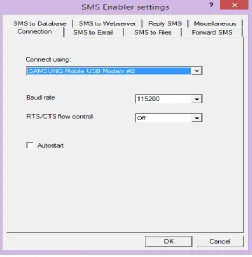
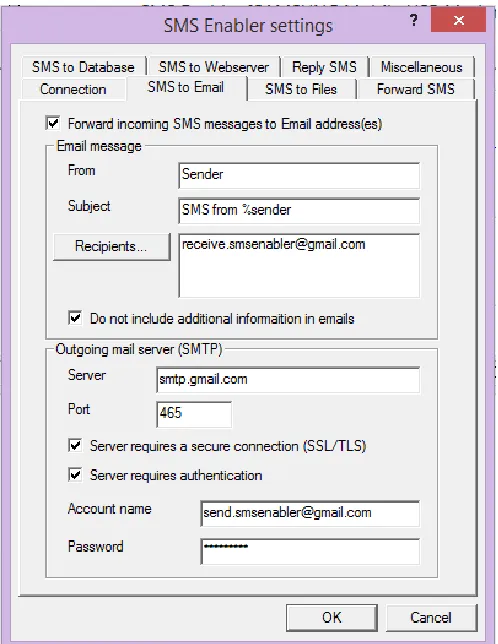
To use SMS Enabler, the user needs to first change its settings according to the Mobile device or Modem being used (Fig.1). After this, the user has to configure the software to save the message at a particular place, i.e. on Email/database/file/web server (Fig.2). In the example case, the authors have sent the SMS to Email. The software is now configured and thus, ready to use. Now when the user sends a text message, SMS Enabler sends it to the Email Id used for Configuring SMS Enabler (Fig.3).
Fig. 2: Configuring SMS Enabler to receive and send message to Email.
Fig. 3: Email Sent to Registered Email.
Email2DB: C.
Remote Update of Database Through Mobile Device
(IJSTE/ Volume 2 / Issue 3 / 005)
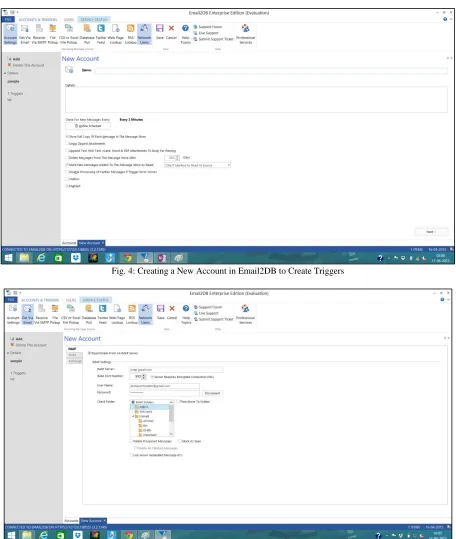
Fig. 4: Creating a New Account in Email2DB to Create Triggers
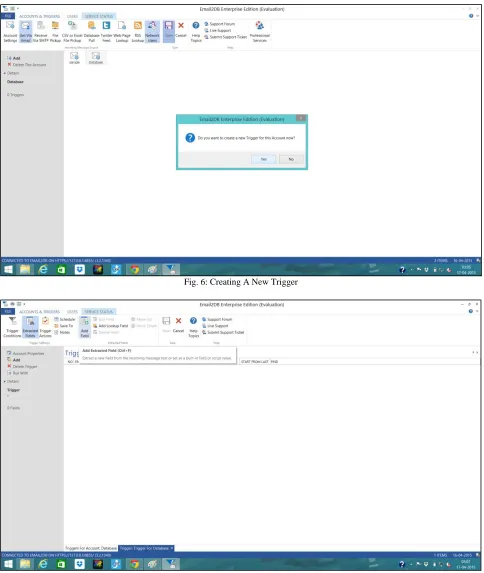
Fig. 6: Creating A New Trigger
Fig. 7: Adding Extracted Fields
Remote Update of Database Through Mobile Device
(IJSTE/ Volume 2 / Issue 3 / 005)
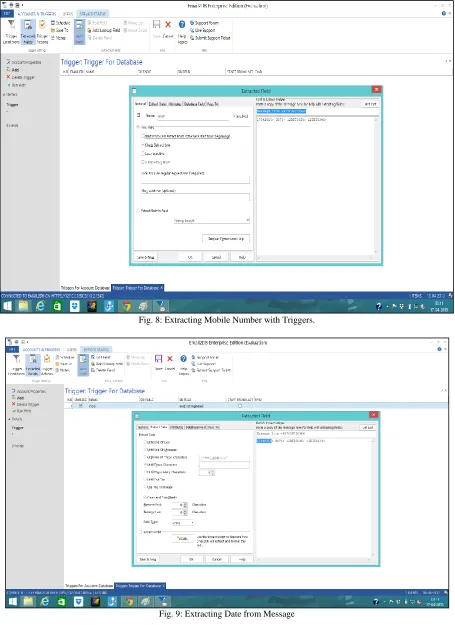
Fig. 8: Extracting Mobile Number with Triggers.
Fig. 10: Extracting The Characters ‘P’ Or ‘A’ From the Message Line
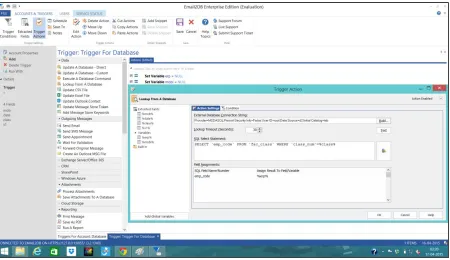
The final extraction step deals with extraction of registration number(s) (Fig. 11). To ensure security, a check is required to verify if the extracted mobile number belongs to the same faculty member whose class number is mentioned. This is done so that there’s no error updating of some other faculty’s class (Fig. 12). The following SQL Query is used for the same-
SELECT ‘mob’ FROM ‘fac_det’ WHERE ‘emp_code’=%erp%
The resultant number is stored in the variable and is checked against the number that was extracted from the subject line. The verification part is done using an if..Else condition.
Remote Update of Database Through Mobile Device
(IJSTE/ Volume 2 / Issue 3 / 005)
Fig. 12: Validating the Extracted Faculty Number with Database
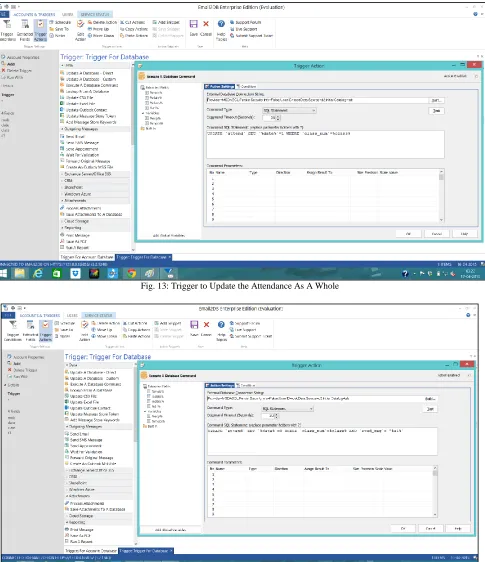
The third field, i.e. P/A field, specifies if the registration number(s) followed are to be marked as present (P), or absent (A). In case, the students whose registration number(s) have been extracted are to be marked as absent, the process first sets the whole class as present, and then sets the individual registration number(s) as absent. To set the whole class as present, the following SQL Query is used-
UPDATE ‘attend’ SET %date%=1 WHERE ‘class_num=%class%
If they are to be marked as present, the following Query is used to set the whole class as absent- UPDATE ‘attend’ SET %date%=0 WHERE ‘class_num=%class%
The above two queries start with marking the whole class as present/ absent, depending upon whether the field value was either ‘A’ or ‘P’. The above queries are enclosed in an If…Else loop (Fig. 13). The individual register numbers shall be marked as absent/present in next trigger(s).
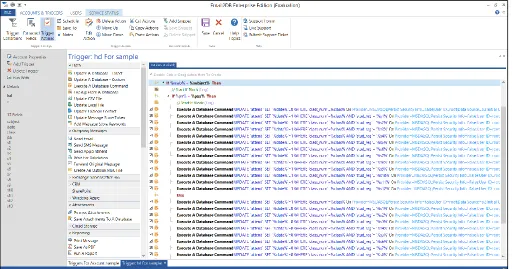
Having marked the attendance (present/absent) for whole class, marking individual present/absent cases uses the following SQL Query (Fig. 14)
UPDATE ‘attend’ SET %date%=0 WHERE ‘class_num=%class% AND ‘stud_reg’=%s1%
The above Query sets the registration number stored in s1 variable as absent. In case, the registration number is to be marked as present, the following SQL Query is used-
UPDATE ‘attend’ SET %date%=1 WHERE ‘class_num=%class% AND ‘stud_reg’=%s1%
Fig. 13: Trigger to Update the Attendance As A Whole
Remote Update of Database Through Mobile Device
(IJSTE/ Volume 2 / Issue 3 / 005)
Fig. 15: Updating Attendance for Multiple Students.
IV.
CONCLUSION & FURTHER SCOPE
Hereby, it is concluded that the user can use this system to update the database without requirement of internet connection at user end. The process was demonstrated by the example of update of database through a text message, fulfilling our intention to not use internet to update attendance.
The proposed solution is important as it directly updates the database and eliminates the need for internet connectivity to perform the task in the application.
The project possesses the following capabilities:
1) Receive details from user without internet connectivity. 2) Authentication of user and data. (Authentication algorithm) 3) Avoids duplication of data. (Redundancy check).
4) Economical and flexible for users to avoid delay in the task. Future scope of the paper:
1) System Integration can be improved and all the software parts can be bundled into single software. 2) Modifications in the process of updating the database can be done.
3) System can be modified so that it can be used in industries also.
REFERENCES
[1] Determining the visibility to a remote database client, Thomas M. Rothwein, John L. Coker (2001, May 15), Patent US 6,233,617 B1 [Online]. Available:
https://www.google.com/patents/US6233617
[2] Apparatus and method for instant messaging collaboration, Tim J. Beauchamp et al. (2013, March 19), Patent US 8,402,095 B2 [Online]. Available: https://www.google.com/patents/US8402095
[3] System and method for updating a remote database in a network, Mason Ng et al. (2000, October 10), Patent US 6,131,096 [Online]. Available:
https://www.google.com/patents/US6131096
[4] Documentation, SMS Enabler. Available: https://smsenabler.com/documentation.html