R E S E A R C H
Open Access
Implementing an augmented reality-enabled
wayfinding system through studying user
experience and requirements in complex
environments
Mi Jeong Kim
1*, Xiangyu Wang
1,2, Sooyeon Han
3and Ying Wang
2Abstract
Background:Wayfinding is an exceedingly complicated cognitive process, especially in complex environments such as hospitals, shopping centers and airports. Inhabitants of such large environments can become lost very easily if they are unfamiliar with the environment. Although they may eventually be able to discover the route to a specific destination, interacting with conventional wayfinding aids, such as consulting a map, understanding signs, and asking people for directions, can be very time-consuming.
Methods:The research presented in this paper developed a customized instrument (questionnaire) with factors identified as influencing the cognitive process of wayfinding, and conducted an explorative study to investigate user experience and requirements of wayfinding in complex environments; in this paper, a hospital was chosen as the context.
Results:The results demonstrate that current wayfinding aids are insufficient to support a person's natural navigational behaviors in the environment. Augmented Reality (AR), which is an innovative concept of enabling digital information to be superimposed onto a real view in real time and context, has great potential to supplement current wayfinding aids. Therefore, we also conceived, developed and implemented an AR-based wayfinding system based on the user requirements identified by the aforementioned instrument.
Conclusion:The AR-based wayfinding system was partially validated through case studies, which concluded that AR significantly reduced the time and cognition workload of human wayfinding behaviors.
Keywords:Wayfinding; Navigation; Augmented reality; User experience; Time and cognitive workload
Background
Wayfinding is a multifaceted, spatial problem-solving process of assimilating spatial information, understand-ing maps, makunderstand-ing decisions and executunderstand-ing these deci-sions (Passini 1984; Passini 1996). In other words, the wayfinding process comprises knowing where you are, knowing your destination, following the best route to your destination, recognizing your destination upon ar-rival, and finding your way back out (Carpman & Grant 1993). Previous research (Passini 1992) proved that
wayfinding in complex environments often causes new-comers—and occasionally frequent visitors—uncertainty and stress, even with the assistance of wayfinding aids. Maps, landmarks and signs on walls are frequently con-fusing, and not presented in appropriate positions or a logical sequence (Passini 1992); for example, signs are sometimes missing in vital sections along a route. It is often overly time-consuming to interact with the con-ventional wayfinding aids such as consulting a map, interpreting the signs, and asking people for directions. In general, spatial planners and information designers are responsible for designing wayfinding aids and the in-teractions with them; thus, many studies have focused on how to improve the wayfinding aids themselves. * Correspondence:[email protected]
1
Department of Housing and Interior Design, Kyung Hee University, Seoul 130-701, Republic of Korea
Full list of author information is available at the end of the article
Simply providing signs alone for inhabitants' use failed to overcome the problem of wayfinding (Miller et al. 1990; Rooke et al. 2010); thus, many researches began to focus on the support provided by wayfinding aids and technologies (Chumkamon et al. 2008; Chen P 2999; Wright et al. 2010). The aim of this research is to study the user experience and requirements of wayfinding in complex environments through a well-devised question-naire, the results of which were then used to inform the development and implementation of an innovative Aug-mented Reality (AR)-based wayfinding system. This paper first identified the factors that influence wayfind-ing from extensive literature, and developed a custom-ized questionnaire as a measuring instrument of user experience and requirements in wayfinding. Based on the results, we implemented a LLA (Longitude, Latitude and Altitude)-based AR indoor wayfinding system. AR superimposes virtual information onto the real world, allowing the routing information to be displayed with mobile AR, fulfilling the concept of AR-based wayfinding, which integrates the mechanism of natural human behav-ior with AR in an appropriate and seamless way. Case studies were presented to explore the benefits of AR in wayfinding.
Related works
The majority of previous wayfinding research has fo-cused on outdoor open spaces or horizontal traveling; however, some researchers emphasized inter-story and vertical traveling in complex multi-story buildings. Cer-tain research has attempted to discover critical factors that affect the performance of wayfinding. For example, Weisman (Weisman 1981) described three major environ-mental factors that affect the ease of orientation and way-finding: differentiation, visual access, and layout complexity. Miller and Lewis (Miller et al. 1990) established effective wayfinding guidance for healthcare facilities that catego-rized the factors affecting wayfinding into people, environ-ment, and information factors. Pearson (Pearson et al. 1999) emphasized factors that influence the accessibility of information systems: ease of use, location, interface, and in-formation. Much research categorized environmental and information factors from the viewpoint of space designers, which resulted in wayfinding checklists focusing on how the environment and information should be designed. It is clear from what has been highlighted so far that wayfinding should be approached from the integrated views of the users, spatial planners and information designers.
Some works have promoted the adoption of new tech-nologies for wayfinding aids. Chumkamon (Chumkamon et al. 2008) proposed a navigation method using Radio Frequency Identification (RFID) triggers that activate an audio message when a user walks past an RFID tag em-bedded in a footpath block, and argued its potential to
support blind people and tourists under normal condi-tions, and firefighters in a smoke-filled building. How-ever, delay problems exist due to the cold start cycle of GPRS (General packet radio service) modems. Willis (2005) designed an RFID tag grid with spatial coordi-nates and information describing the pre-defined sur-roundings, thus being independent of server-based databases and wireless connections. Long (1996) uses an infrared (IR) system for the indoor version positioning system in the Cyberguide project. He uses TV remote control units as active beacons, and a special IR receiver tuned to the carrier frequency of those beacons. How-ever, the location awareness of this IR system is based on users’ explicit behavior, and it is also very expensive in a large-scale setting. Fingerprinting techniques are also combined with wireless local area networks to cal-culate the location information (Bahl 2000). Krishnan (Krishnan 2004) used a small number of stationary emit-ters and sniffers employed in a novel way to locate standard wireless clients in an enterprise. All these tech-nologies are not commonly used because of high costs or specific requirements for hardware. Additionally, the technologies lack a user-friendly display of routing
infor-mation, which would massively reduce users’ cognitive
workloads in wayfinding tasks.
As Passini identified in his research, a considerable number of decisions are made during a short period of time in wayfinding. However, selecting the right environ-mental information (cues) is very confusing in complex buildings (Dogu 2000). Research shows many people be-come lost in hospitals because their mental map con-flicts with actual on-site information and they are overloaded with information about irrelevant elements (Estates 2005). Augmented Reality (AR) supports infor-mation accessing by adding digital inforinfor-mation to the real world scene by enabling a hybrid representation on a single display (Azuma 1997). Thus, AR will signifi-cantly assist people to identify decision execution cues with a simple pop out advice on the screen, thereby massively reducing the workload of identifying specific places where they should conduct behavior actions. In
Lawton’s theory (Lawton 1996), there are two main
strategies for wayfinding in indoor environments— orien-tation strategy and route strategy. Orienorien-tation strategy mainly relies on specific references in the surroundings to identify the location. Route strategy is focused on
fol-lowing a specific route in users’ cognitive processes.
strategy by overlaying the routing information in the real world. Thus, users can easily identify the locations where they should conduct wayfinding behaviors in order to follow routing information to reach their destination.
Methods
User experience of wayfinding
In particular, the user is the ultimate reference for way-finding; all factors should therefore be judged by user experience (UX). Little research has been undertaken to evaluate wayfinding performance from a UX viewpoint. Wayfinding can be affected by three major types of fac-tors: human factors, environmental factors and informa-tion factors. Human factors are related to psychological and physical ability, such as people’s familiarity with the environment, sensory acuity, emotional state, and so forth. Environmental factors include issues concerning the layout of a setting and the environmental communi-cation for wayfinding. The information factors are asso-ciated with the quality of wayfinding aids. Little research has studied how those factors are experienced by people wayfinding in the real environment. We developed a customized wayfinding questionnaire and investigated the reasons people become lost in a large and complex hospital. From the viewpoint of UX, the wayfinding process can be categorized as follows: understanding en-vironmental factors, identifying information factors, and linking the environmental factors with the information factors.
UX-based questionnaire
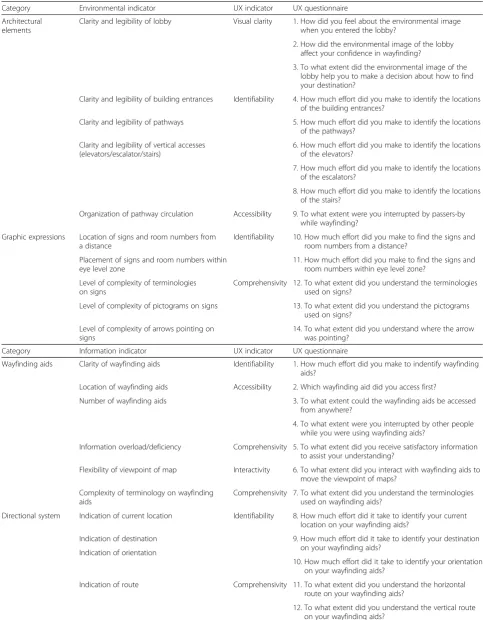
Wayfinding problems are intimately linked to the config-uration of the environmental layout, including its form and organization of architectural elements, the circula-tion it provides, and its content such as building signs and room numbers. People finding their way in complex settings go through perception and cognition processes to identify what the setting contains, to understand how it is organized, and to form a mental map of the setting. In order to develop a UX-based questionnaire, we ex-tracted firstly the environmental indicators based on the literature review, and connected each indicator to a UX indicator as shown in Table 1.
Above all, visual clarity of a location, in this case a lobby, is significantly important to the wayfinding be-cause it should not interrupt the recognition of naviga-tion cues. A failure to generate a clear environmental image of the lobby would make it difficult for people to find cues to navigate properly in the building. Identifia-bility is associated with the details of legible settings. Identifiability of physical settings can only be sustained if all architectural elements and graphic expressions have features that can be distinguished from others. Accessi-bility of the pathway circulation is a crucial point to be
considered to allow easy wayfinding. Additionally, provision of comprehensive graphic expressions is a sig-nificant factor. In terms of the reliability of graphic ex-pressions, wayfinders must be able to follow a series of signs located at reassuring intervals. The second cat-egory, information factors, deals with the issues around providing information to assist with wayfinding such as maps, directories, interactive kiosks and so forth. We categorize wayfinding aids, including detailed wayfinding information, as information factors. The important is-sues posed by the researches for wayfinding aids and technologies were the matter of design and operation style, and directional system of wayfinding aids. Four in-dicators stood out from a UX perspective: identifiability, accessibility, comprehensivity, and interactivity. Although people generally use wayfinding aids, the information pro-vided often cannot be easily and quickly identified and understood. If people experience problems in identifying and understanding directional information provided by the wayfinding aids, it is possible that they might make in-correct decisions. Interactivity represents the user’s inter-action with the wayfinding aids. The third category focused on how people link the environmental factors with the information factors through wayfinding aids. Considering how complex the process is, the confliction of the information offered by wayfinding aids with the ac-tual environment can be inferred. First, factors influencing the spatio-cognitive operations were extracted from envir-onmental and information factors, then, questions were developed to measure user experience.
Experiment: UX of wayfinding in a hospital
Table 1User experience of environmental/information/linking environmental factors and information factors
Category Environmental indicator UX indicator UX questionnaire
Architectural elements
Clarity and legibility of lobby Visual clarity 1. How did you feel about the environmental image when you entered the lobby?
2. How did the environmental image of the lobby affect your confidence in wayfinding?
3. To what extent did the environmental image of the lobby help you to make a decision about how to find your destination?
Clarity and legibility of building entrances Identifiability 4. How much effort did you make to identify the locations of the building entrances?
Clarity and legibility of pathways 5. How much effort did you make to identify the locations of the pathways?
Clarity and legibility of vertical accesses (elevators/escalator/stairs)
6. How much effort did you make to identify the locations of the elevators?
7. How much effort did you make to identify the locations of the escalators?
8. How much effort did you make to identify the locations of the stairs?
Organization of pathway circulation Accessibility 9. To what extent were you interrupted by passers-by while wayfinding?
Graphic expressions Location of signs and room numbers from a distance
Identifiability 10. How much effort did you make to find the signs and room numbers from a distance?
Placement of signs and room numbers within eye level zone
11. How much effort did you make to find the signs and room numbers within eye level zone?
Level of complexity of terminologies on signs
Comprehensivity 12. To what extent did you understand the terminologies used on signs?
Level of complexity of pictograms on signs 13. To what extent did you understand the pictograms used on signs?
Level of complexity of arrows pointing on signs
14. To what extent did you understand where the arrow was pointing?
Category Information indicator UX indicator UX questionnaire
Wayfinding aids Clarity of wayfinding aids Identifiability 1. How much effort did you make to indentify wayfinding aids?
Location of wayfinding aids Accessibility 2. Which wayfinding aid did you access first?
Number of wayfinding aids 3. To what extent could the wayfinding aids be accessed from anywhere?
4. To what extent were you interrupted by other people while you were using wayfinding aids?
Information overload/deficiency Comprehensivity 5. To what extent did you receive satisfactory information to assist your understanding?
Flexibility of viewpoint of map Interactivity 6. To what extent did you interact with wayfinding aids to move the viewpoint of maps?
Complexity of terminology on wayfinding aids
Comprehensivity 7. To what extent did you understand the terminologies used on wayfinding aids?
Directional system Indication of current location Identifiability 8. How much effort did it take to identify your current location on your wayfinding aids?
Indication of destination 9. How much effort did it take to identify your destination on your wayfinding aids?
Indication of orientation
10. How much effort did it take to identify your orientation on your wayfinding aids?
Indication of route Comprehensivity 11. To what extent did you understand the horizontal route on your wayfinding aids?
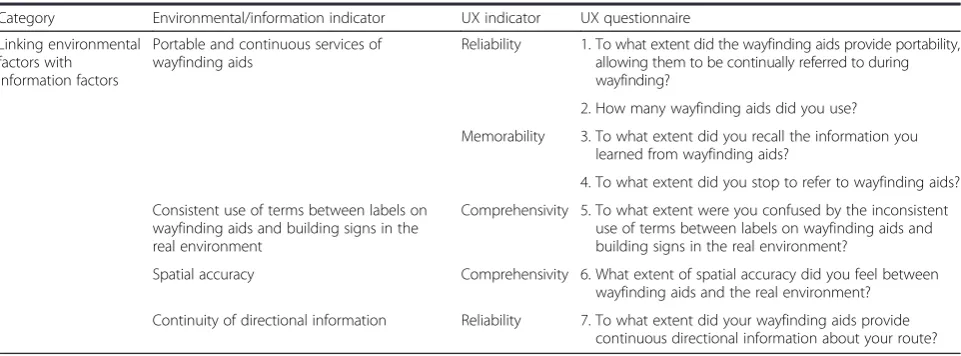
linking the environmental factors with the information factors (6 questions). The questionnaire was couched in simple terms, so there was no problem with the partici-pants’understanding of the questions.
Participants’responses were rated along the five point Likert scale, for example, with a score of one (1) repre-senting‘not at all’and a score of five points (5) meaning
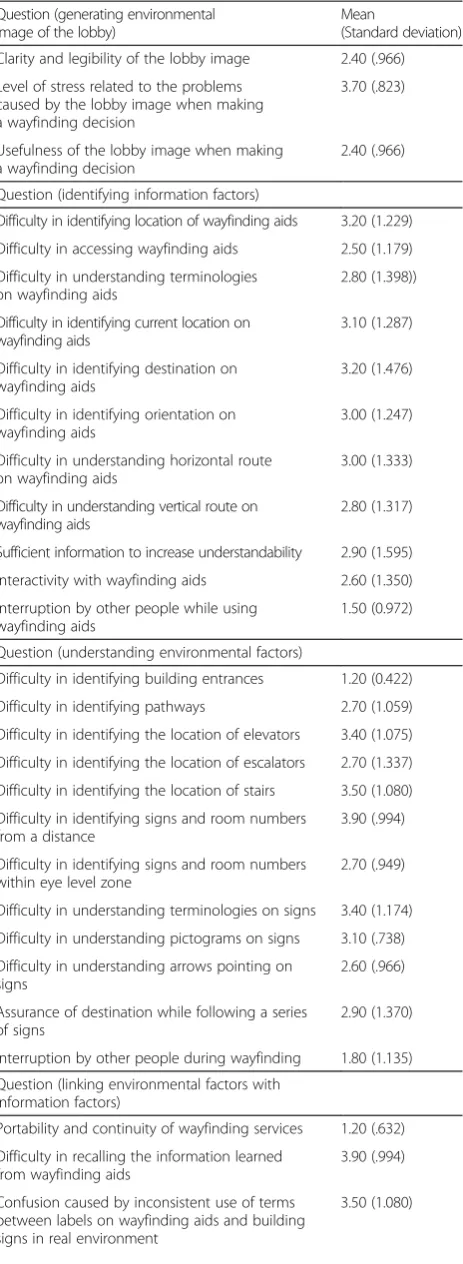
‘very much’. Thus, we interpreted a response as ‘high’ when it was over three points (3). The result of Cronbach's alpha test for internal consistency was 0.866, which indi-cates high reliability of the questionnaire. Through the questionnaire survey in the experiment, as shown in the shaded rows of Table 2, it was noted that participants had difficulties in the following situations:
Attempting to generate a clear environmental image of the lobby, causing some stress and confusion
Identifying the location of wayfinding aids, and further, the current location, destination, orientation and horizontal route on the wayfinding aids
Identifying the locations of elevators and stairs, signs and room numbers from a distance, understanding terminologies and pictograms on signs, and being assured of the destination while following a series of signs
Securing continuous wayfinding services, recalling the information learned from wayfinding aids, and matching the spatial accuracy between wayfinding aids and the real-world environment.
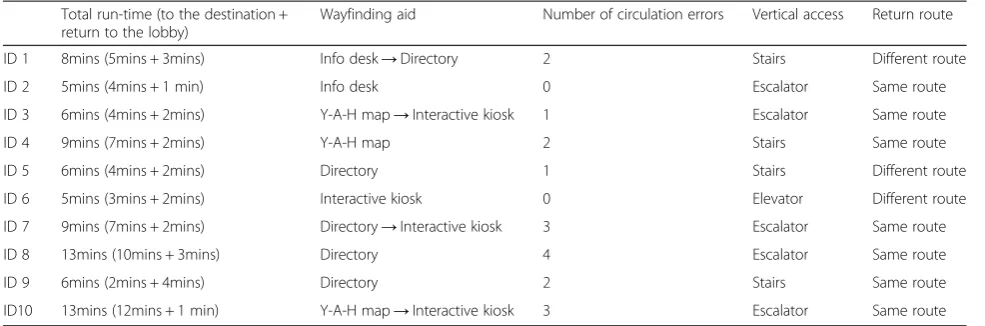
Observation of wayfinding enables researchers to in-terpret aspects of participants’behaviors that might not be captured by the standardized questionnaire. The data from the observation were analyzed both quantitatively and qualitatively. The focuses of the observation were participants’ behavior types, location, duration, circula-tion, vertical access, travel route, and overall use pattern
of environmental factors and information factors, as shown in Table 3. The shortest time for the wayfinding task was 5 minutes. One participant went directly to a destination without any off-route travels. Meanwhile, an-other participant, who took 13 minutes to complete the task, repeated his circulation four times in attempts to correct his direction. This result indicates the usefulness of direct and intuitive directional information such as animated routes and arrows compared to relying on par-ticipants’arbitrary decisions and interpretation of maps. Above all, counting the number of participants’ circula-tion errors was very useful for quantitatively presenting their off-route travels.
Through the observation, the following user behaviors were noticed:
Participants who relied on y-a-h maps or directories took longer to perform the wayfinding and made more circulation errors compared to those who used interactive kiosks.
Participants faced difficulties in recalling the information they had learned from the wayfinding aids; thus, the return journey to the lobby was not an easy one for most.
Participants spent significant time finding, accessing, and identifying wayfinding aids.
Significance
Through the experiment, it was found that people experi-ence difficulties in identifying the locations of wayfinding aids, understanding terminologies and pictograms on signs, and being assured of the destination while following a series of signs. Above all, they faced difficulties in recal-ling information they had learned from the wayfinding aids. The findings raise several issues to be considered for wayfinding services and devices: ease in locating wayfind-ing aids, securwayfind-ing continuous wayfindwayfind-ing services, and
Table 1User experience of environmental/information/linking environmental factors and information factors(Continued)
Category Environmental/information indicator UX indicator UX questionnaire
Linking environmental factors with
information factors
Portable and continuous services of wayfinding aids
Reliability 1. To what extent did the wayfinding aids provide portability, allowing them to be continually referred to during wayfinding?
2. How many wayfinding aids did you use?
Memorability 3. To what extent did you recall the information you learned from wayfinding aids?
4. To what extent did you stop to refer to wayfinding aids?
Consistent use of terms between labels on wayfinding aids and building signs in the real environment
Comprehensivity 5. To what extent were you confused by the inconsistent use of terms between labels on wayfinding aids and building signs in the real environment?
Spatial accuracy Comprehensivity 6. What extent of spatial accuracy did you feel between wayfinding aids and the real environment?
ease of use of the wayfinding aids. To enable mobility and ubiquity of the wayfinding services, mobile devices can be considered for the purpose of achieving continuous and portable wayfinding services. Mobile devices for wayfind-ing services include digital technologies, where the
selec-tion of an appropriate mode for human–computer
interaction (HCI) is important for user performance and satisfaction (Perry et al. 2004). Porteus and Brownsell (2000) argued that the role of the interface in a system is crucial because the efficient design and operation of the user interface is the primary way of ensuring that the user keeps control of the technology and their surroundings. A current paradigm in HCI is to develop novel user inter-faces with natural interaction that takes advantage of both human's and computer's perceptual capabilities (Kim & Maher 2008). To overcome the limitations of conventional wayfinding aids, mobile devices with a real-time feed into AR can be considered because AR can be characterized by augmented visualization and intuitive interaction tech-niques such as natural language, tangible interaction and gesture recognition (Kim & Maher 2008). Augmented vi-sion in AR can be one of the natural forms of communica-tion and is, therefore, an obvious target for a user interface. Although AR cannot modify environmental fac-tors directly, it can provide contextually aware information for wayfinding such as augmented routes and color notes to distinguish destination or key points. When these features are employed with mobile devices, they can supplement environmental factors such as signs and room numbers that are off the eye level zone, and diffi-cult medical terminologies on signs. Augmented infor-mation superimposed over the real-world environment can mitigate many problems in identifying and under-standing spatial accuracy between the real-world envir-onment and wayfinding aids.
Results
Prototyping an AR-based wayfinding testbed
Based on Song's (Song 2006) work with RFID technology to identify the location of construction materials, this re-search proposes an AR-based wayfinding system that inte-grates AR and RFID technology in order to significantly assist the facility management task in on-site work. The proposed AR-based wayfinding testbed retrieves and de-termines location information based on the BIM model
Table 2Results of the questionnaire survey
Question (generating environmental image of the lobby)
Mean
(Standard deviation)
Clarity and legibility of the lobby image 2.40 (.966)
Level of stress related to the problems caused by the lobby image when making a wayfinding decision
3.70 (.823)
Usefulness of the lobby image when making a wayfinding decision
2.40 (.966)
Question (identifying information factors)
Difficulty in identifying location of wayfinding aids 3.20 (1.229)
Difficulty in accessing wayfinding aids 2.50 (1.179)
Difficulty in understanding terminologies on wayfinding aids
2.80 (1.398))
Difficulty in identifying current location on wayfinding aids
3.10 (1.287)
Difficulty in identifying destination on wayfinding aids
3.20 (1.476)
Difficulty in identifying orientation on wayfinding aids
3.00 (1.247)
Difficulty in understanding horizontal route on wayfinding aids
3.00 (1.333)
Difficulty in understanding vertical route on wayfinding aids
2.80 (1.317)
Sufficient information to increase understandability 2.90 (1.595)
Interactivity with wayfinding aids 2.60 (1.350)
Interruption by other people while using wayfinding aids
1.50 (0.972)
Question (understanding environmental factors)
Difficulty in identifying building entrances 1.20 (0.422)
Difficulty in identifying pathways 2.70 (1.059)
Difficulty in identifying the location of elevators 3.40 (1.075)
Difficulty in identifying the location of escalators 2.70 (1.337)
Difficulty in identifying the location of stairs 3.50 (1.080)
Difficulty in identifying signs and room numbers from a distance
3.90 (.994)
Difficulty in identifying signs and room numbers within eye level zone
2.70 (.949)
Difficulty in understanding terminologies on signs 3.40 (1.174)
Difficulty in understanding pictograms on signs 3.10 (.738)
Difficulty in understanding arrows pointing on signs
2.60 (.966)
Assurance of destination while following a series of signs
2.90 (1.370)
Interruption by other people during wayfinding 1.80 (1.135)
Question (linking environmental factors with information factors)
Portability and continuity of wayfinding services 1.20 (.632)
Difficulty in recalling the information learned from wayfinding aids
3.90 (.994)
Confusion caused by inconsistent use of terms between labels on wayfinding aids and building signs in real environment
3.50 (1.080)
Table 2Results of the questionnaire survey(Continued)
Spatial accuracy between wayfinding aids and real environment
2.70 (1.337)
Continuity of directional information 2.60 (1.265)
The number of pauses to refer to wayfinding aids 2.90 (1.287)
Overall satisfaction of wayfinding supported by wayfinding aids
and schema. Building Information Modeling (BIM) is a conceptual approach to building design and construction that comprises all the graphic and linguistic data for build-ing design and detailbuild-ing, which facilitates exchange of building information between design, construction and other disciplines (Sacks 2010). The proposed research is conducted using AR and BIM technologies in order to conveniently retrieve location information.
The AR-based wayfinding system was devised and spe-cified based on the following principles and findings from the aforementioned study:
Easy to identify the current location, destination, orientation, and horizontal and vertical routes
Easy to identify the locations of elevators and stairs, and room numbers from a distance
Being reassured of the destination while following a series of signs
Securing continuous wayfinding services and recalling the information
Matching the spatial accuracy between wayfinding aids and the real-world environment by providing augmented visualization
Being manipulated intuitively by supporting human cognitive processes effectively
Being accessible and portable through mobile devices such as iPhones and iPads by enabling context-awareness in situations
The AR-based wayfinding system was developed on a mobile device that has a built-in compass for retrieving the orientation, i.e. the direction the user is facing, and a built-in camera for scanning 2D barcodes. The proposed testbed would be targeted at complex buildings such as airports, shopping malls and hospitals. The algorithm to save location information into 2D barcodes, the method of retrieving location information, and the arrangement of markers will be stated in the following sections.
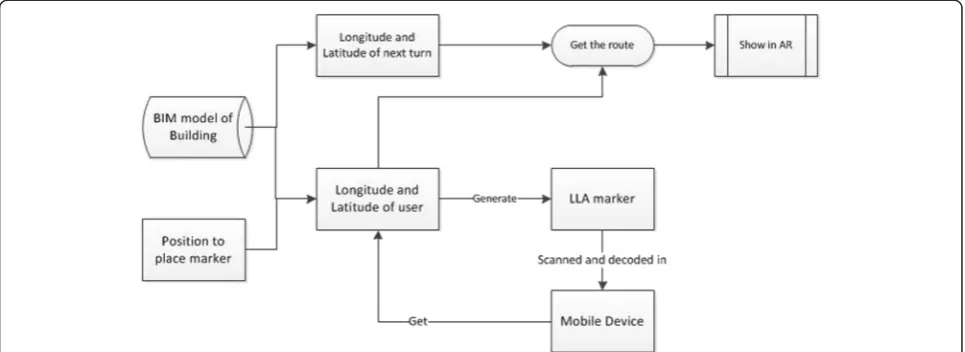
Figure 1 depicts the overall methodology of the AR-based wayfinding mechanism. Tracking is the essential element. Superior tracking ability could stabilize the vir-tual counterparts in real space, while poor tracking abil-ity typically incurs image flipping.
The state-of-the-art tracking techniques include, but are not limited to, (1) marker tracking, (2) markerless tracking and (3) extensible tracking. More accessible de-vices such as iPhones or iPads were used to view the tracked scene. Despite the variety of tracking means, the kernel of tracking is almost the same, namely the recog-nition of salient graphical clues such as lines, contours, points and colors. With these clues, the computer is able to calibrate their spatial positions relative to the camera, generate the tracking coordinators, and know where-abouts the virtual model should be placed. All the above three tracking techniques were used in the case illustra-tions. Marker tracking is based on coded markers that can be configured to an arbitrary number and size. These markers provide robust tracking due to maximum contrast and an integrated error correction mechanism that allows detection even in relatively low-quality im-ages, and from flat angles. The system determines the identity of the marker through the inner pattern of the dark squares. In order to allow tracking, the full marker must always be visible. Planar Markerless Tracking uses arbitrary images or so-called reference images/patterns/ patches as reference to the real world. In order to be suitable for the system as tracking references, they must be sufficiently well textured and contain enough features for the internal image processing and tracking algo-rithms. The advantage of Planar Markerless Tracking is that, in general, arbitrary images can be used. Addition-ally, once initialized, the complete image does not have to be visible to the camera all the time and can be oc-cluded. Planar markerless tracking is suitable for live camera situations and does not work well with still im-ages as the image source. Extensible Tracking allows the
Table 3Quantitative data from the observation
Total run-time (to the destination + return to the lobby)
Wayfinding aid Number of circulation errors Vertical access Return route
ID 1 8mins (5mins + 3mins) Info desk→Directory 2 Stairs Different route
ID 2 5mins (4mins + 1 min) Info desk 0 Escalator Same route
ID 3 6mins (4mins + 2mins) Y-A-H map→Interactive kiosk 1 Escalator Same route
ID 4 9mins (7mins + 2mins) Y-A-H map 2 Stairs Same route
ID 5 6mins (4mins + 2mins) Directory 1 Stairs Different route
ID 6 5mins (3mins + 2mins) Interactive kiosk 0 Elevator Different route
ID 7 9mins (7mins + 2mins) Directory→Interactive kiosk 3 Escalator Same route
ID 8 13mins (10mins + 3mins) Directory 4 Escalator Same route
ID 9 6mins (2mins + 4mins) Directory 2 Stairs Same route
generation of a 3D map of the environment "on the fly". This means that a 3D map of the environment is created based on the position provided by a starting tracking system and then constantly extended while tracking. The starting tracking system is used for as long as it is avail-able. If the starting tracking system is lost, the 3D map is used for tracking until the starting tracking system is available again. The 3D map can also be used for re-localization after the tracking has been lost entirely. 3D Extensible Tracking is well suited if you want to use a cer-tain tracking system (e.g. Marker Tracking or 3D Marker-less Tracking) but you need to move around a bit and do not want to have to pay too much attention to not losing the tracking target, but instead concentrate on your main task. This is very useful in scenarios such as AR-supported maintenance.
Longitude-, latitude- and altitude-based wayfinding algorithm
A 2D barcode decoding algorithm called “LLA marker”
are programmed to obtain location information in the format of Longitude, Latitude and Altitude. This is the common coordinate method of the Geographic Coordin-ate System, which enables every location on the Earth to be specified by a set of numbers. Latitude and longitude are the two numbers representing the horizontal pos-ition, and altitude represents the vertical position. As shown in Fig. 2a, the latitude (abbreviation: Lat., φ, or phi) of a point on the Earth's surface is the angle be-tween the equatorial plane and a line that passes through that point and is normal to the surface of a ref-erence ellipsoid that approximates the shape of the Earth. The longitude (abbreviation: Long., λ, or lambda) of a point on the Earth's surface is the angle east or west from a reference meridian to another meridian that
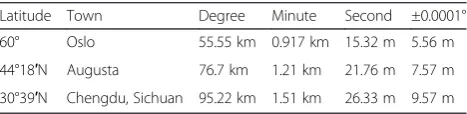
passes through that point. All meridians are halves of great ellipses (often improperly called great circles), which converge at the north and south poles. Longitude is a geographic coordinate that specifies the east–west position of a point on the Earth's surface. Latitude is used together with longitude to specify the precise loca-tion of features on the surface of the Earth. Latitude and longitude together with a specification of height consti-tute a geographic coordinate system as defined in the specification of the ISO 19111 standard. Table 4 contains several examples of the latitude of randomly selected locations.
In order to allow precisely accurate indoor overlays and enable us to create indoor navigation aids, we devised the concept of Latitude Longitude Altitude -Markers (LLA -Markers) for the purpose of AR-based wayfinding. On iPhone or Android devices, the LLA Marker detection works seamlessly. If a valid marker is found, the location of the smartphone will be adjusted according to the encoded latitude and longitude coordi-nates of the marker, while the GPS sensors of the smart-phone are ignored. This fixed location will remain until a different marker is found or the user returns a differ-ent tracking XML on an evdiffer-ent. LLA Markers are accur-ate to approx. 20 cm (40 cm in Altitude). However, the amount of time needed to obtain accurate latitude and longitude positions of a particular location is problem-atic. The easiest method is to use Google Maps to over-lay an indoor blueprint and retrieve locations from there. Users can employ the interface, as shown in Fig. 2b, to either click on the map or type in latitude/longi-tude/altitude to create an LLA Marker. The marker can be resized according to need. In general, a size of about 2– 4 inches (5 cm–10 cm) is acceptable. It should be noted that the altitude value is currently not being considered.
Arrangement and location information of markers
Initially, locations where a turn is necessary will be chosen to attach markers. Wherever the user needs to turn left or right, or change floors, markers will be set. The size of the markers will vary from 5 cm x 5 cm to 15 cm x15 cm, and will be attached to the wall or inserted into the floor pattern. A floor plan or BIM model of a specific building is required in order to cal-culate the definitive latitude and longitude of each marker place. The drawback is the amount of time needed to obtain accurate latitude and longitude posi-tions of a specific location. Two methods are availa-ble—absolute latitude and longitude or relative latitude and latitude. Absolute latitude and longitude involves using Google Maps to overlay a blueprint onto the inter-ior and retrieve locations from it. Users can employ the interface to either click on the map or type in latitude/ longitude/altitude to create an LLA Marker. It is difficult to identify the specific point in the virtual world that in-contestably matches the location in the real world. As a manual task, deviation is unavoidable. Thus, in place of this, we consider the relative coordinating system, with BIM technology. We obtain the floor plan or a 3D model of the building and choose an initial point as coordinate (0, 0, 0), and then calculate the specific coordinates of each marker place with the parameters in the 3D model. This will result in higher precision because a basic reference is chosen and the coordinates of the markers’locations is de-rived based on 3D model parameters.
Using augmented reality to display routing information Considering the characteristics of integrating virtual in-formation with the reality of AR, the proposed AR sys-tem offers more information than traditional wayfinding applications such as Google Maps, with which users are only able to view the routing information in a 2D map with a round dot. In traditional wayfinding applications, users have to compare the landmark and direction with those in the virtual map. This often leads to confusion about the direction. In popular AR-based wayfinding ap-plications such as Junaio, Layar, Wikitude and Enkin, routing information is available in front of the users’ eyes, displaying on the road or ground. Arrows, text or 3D models are registered on the real objects. For in-stance, if you are facing north but the destination is to the east of you, arrows will not show on the ground until you turn to face east. In order to clarify the direction in-formation, a small round compass is added in the bottom right hand corner, representing the correct direction as a small dot. Figure 3a shows a user scanning the reference marker at the entrance of a storage room, and Fig. 3b shows a green arrow displaying on the iPhone screen with valve ID and the estimated distance from the entrance to the target. The target has an RFID tag on it so that AR can continuously retrieve the accurate location of the tar-get in real time and within short updating intervals.
Case illustration
Users can traverse the environment in which they are inter-ested, either physically or virtually. The case illustration seeks to investigate the multimodal design and develop-ment of a mobile system that fuses AR with location-based information visualization and interaction techniques, to create an integrated platform for dynamic wayfinding. There is a focus on the implementation of mobile AR tech-nology for navigational purpose, as well as a BIM-vision-based distance estimation function using trackers. The case
illustration investigates how mobile AR, as an
Table 4Examples of longitudinal length equivalents at selected latitudes
Latitude Town Degree Minute Second ±0.0001°
60° Oslo 55.55 km 0.917 km 15.32 m 5.56 m
44°18′N Augusta 76.7 km 1.21 km 21.76 m 7.57 m
30°39′N Chengdu, Sichuan 95.22 km 1.51 km 26.33 m 9.57 m
interaction technique, impacts the navigation experi-ence of users. The system provides a quick and easy method, not only for people to locate their destinations, but also to gain additional information about the loca-tion to which they are heading.
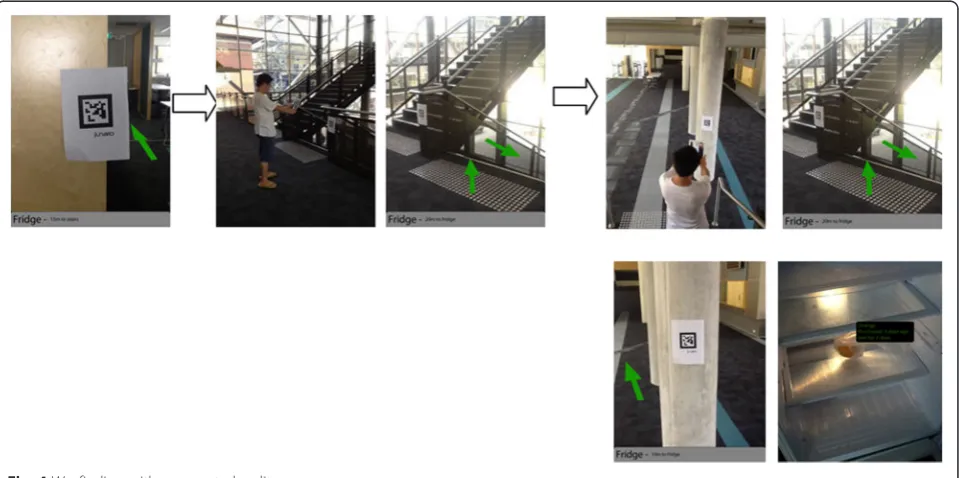
The case illustration demonstrates how the developed AR system supports wayfinding to a refrigerator in the building and accessing status information on the pro-duce inside. Figure 4 depicts the route that the user is following to reach a location, from an upstairs office to a refrigerator downstairs. This AR system could be used in more complicated scenarios; for example, finding a café in a hospital or finding a specific bed in a particular ward starting from the hospital entrance. Consider a person walking in a hospital, which is an unknown
environment for her/him. The person has no prior infor-mation about the practical arrangement of the hospital or where to find a specific kitchen. As soon as the per-son enters the hospital, s/he can be notified about the objects and kitchens s/he points at with an iPad or iPhone. The intension is that the person could take an interactive tour of the environment from anywhere, search for specific points of interest, and navigate all the way to her/his destination. The system is devised for maps, tours and locations in a 3D and interactive view. Interactive and personal wayfinding themes can also be devised for guidance by text, audio, video, etc. in terms of location information, such as the features of interest of a particular place. AR can augment the effectiveness of navigation devices; information can be displayed on
Fig. 3AR-based wayfinding:ascanning a quick reference marker to identify current location;ba virtual arrow indicator shows direction and distance
an iPad or iPhone indicating destination directions and distance, as well as alerts to potential hazards in the user's path. AR applications can enhance a user's experi-ence when traveling by providing real time information displays about a location and its features, including com-ments made by previous visitors to the site. For example, users could be empowered to create tags and take geo-tagged notes on the objects they see in the environment.
The route from the departure point, which in this case is the upstairs office, to the destination—the refrigerator
in the downstairs kitchen—has several intermediate
milestones that are recognized by the tracking markers, represented as green arrows, on the wall, column or stairs (see Fig. 4). The user wishes to enter a particular kitchen and, while walking, the user is notified about a specific flight of stairs that is recognized by the BIM model in the system. The user walks several paces and, at this stage, the AR system recognizes that the kitchen is located downstairs. The user walks to and then down the stairs, which are tagged from the upper level floor to the lower level floor (see Fig. 4). The virtual arrow on the iPad points downwards, informing the user about a path to the lower level. After the user arrives at the lower level, another arrow on the iPad points forwards towards the kitchen where the refrigerator is located. After a few wayfinding steps, the user has achieved the goal of reaching the refrigerator. The user then opens the refrigerator, and floating virtual tags appear adjacent to the produce displaying information such as the expir-ation date, quantity remaining etc. All produce was ei-ther barcoded or tagged with RFID when it was placed in the refrigerator. Whenever the refrigerator is opened, the status information of each type of produce is dis-played. This provides straightforward information to users about expired products or products that are close to their expiry dates to support decision making.
Discussion
This paper presents the technical details and applica-tions of an AR system developed by two of the authors as a case example. This is an initial usability test of the system to check if the proposed system works properly as intended. Based on the result, the system will be fur-ther elaborated. The system is employed with the re-frigerator example to support wayfinding and access to status information of produce in the refrigerator. The augmented green arrows explicitly indicate the direction the user should take to reach a destination. The user merely needs to scan each tracking marker with an iPad to retrieve the arrow to the next milestone. Further, all incoming food to the refrigerator will be barcode scanned by an iPhone/iPad and relevant information corded for future use. For example, on opening the re-frigerator, all products that have been pre-tracked could
have a virtual label floating beside them, indicating the expiration date, quantity remaining, etc. All these aug-mented labels can be easily viewed with an iPhone/iPad; furthermore, the information can be modified so that the next person can pick up any comments left in the AR data by previous people.
While using the AR system, a number of observations were made associated with the case illustration and re-ported as follows:
The digital compass in an iPad is susceptible to vibrations while walking at a natural pace. Users have to stop moving periodically to allow the compass to settle in order to obtain correct information.
The reference marks on the real locations are sometimes incorrectly aligned with the marker positional information in the BIM model.
There is latency in retrieving marker information and coordinates via Wifi from the BIM model on the server.
The waypoint markers are very difficult to see in extremes of bright and low light. We plan to increase the thickness of the waypoint markers to two or three pixels thick, making it significantly easier to see.
The waypoint data are attached to the diamond; however, this can sometimes clutter the screen.
Increasing the size of the arrow proved to be a subtle but effective cue to indicate to users that they are close to a waypoint.
As with most wearable computer systems, power management proved to be a major concern for our system.
Conclusion
into what aspects of wayfinding aids should be consid-ered in order to enhance the UX of wayfinding. We have demonstrated a free-style navigational aid for a person navigating on foot by utilizing augmented visualization and mobility.
The integration of AR with context-aware computing transforms a dumb AR system delivering a static piece of information linked to an object or location, to an in-telligent AR utilizing context to deliver dynamic links. Further work is necessary to better understand the form and content of the presented information in order to optimize visual cues. A delicate balance must be maintained between presenting enough information and obscuring the user's view of the physical world. In future work, we plan to extend the hardware system to allow extra peripherals, such as handheld input devices, to be attached so that the user can interact with the virtual world they are walking around in. The AR software will also be enhanced so that maps, text information, and other graphics could appear on the display. This research proposed a technological framework of mobile AR wayfinding aids and its implementation. This research can lay the groundwork for evolving knowledge about wayfinding to provide an understanding of the UX of wayfinding. The knowledge and lessons that we have learned from the experiment can be sources of inspiration for future studies on intelligent wayfinding devices.
Competing interests
The authors declare that they have no competing interests.
Authors’contributions
All authors contributed equally and significantly in writing this article. All authors read and approved the final manuscript.
Acknowledgements
This work was supported by the National Research Foundation of Korea Grant funded by the Korean Government (NRF-2013R1A1A3A04008324).
Author details
1Department of Housing and Interior Design, Kyung Hee University, Seoul
130-701, Republic of Korea.2School of Built Environment, Curtin University, Bentley WA 6102, Australia.3Architecture, College of Environment Design, University of California, Berkeley CA 94720, U.S.A.
Received: 2 March 2015 Accepted: 12 June 2015
References
Passini, R. (1984). Spatial representations, a wayfinding perspective.Journal of
Environmental Psychology, 4(2), 153–164.
Passini, R. (1996). Wayfinding design: logic, application and some thoughts on universality.Design Studies, 17(3), 319–331.
Carpman, JR, & Grant, MA. (1993).Design that cares: planning health facilities for
patients and visitors:. Chicago, Ill: American Hospital Pub.
Passini R. Wayfinding in architecture: Van Nostrand Reinhold Nova York; 1992. McGraw-Hill Book CO. New York, USA.
Miller C, Lewis D. Wayfinding: Effective wayfinding and signing systems, Guidance for healthcare facilities: UK National Health Service(NHS) Estates. Stationery Office Books, London, England; 1990.
Rooke, CN, Koskela, LJ, & Tzortzopoulos, P. (2010).Achieving a Lean Wayfinding System in Complex Hospital Environment: Design and Through-Life Management (pp. 232–242). Haifa, Israel: 18th Annual Conference of the International Group for Lean Construction.
Chumkamon S, Keeratiwintakorn P. (2008). A Blind Navigation System Using RFID for Indoor Environments. 5th International Conference on Electrical Engineering/ Electronics, Computer, Telecommunications and Information Technology, ECTI-CON. IEEE, New York, USA. p. 765–768.
Chen P, Truc N. (2008). Computer-aided visual communication for way-finding in emergency in indoor environment. The 25th International Symposium on Automation and Robotics in Construction. Technika, Vilnius, Lithuania. p. 440–446.
Wright, P, Soroka, A, Belt, S, Pham, DT, Dimov, S, De Roure, D, et al. (2010). Using audio to support animated route information in a hospital touch-screen kiosk.Computers in human behavior. 26(4), 753–759.
Weisman J. (1981). Evaluating Architectural Legibility: Way-Finding in the Built Envir-onment. Environment and Behavior.13(2), 189–205
Pearson, J, Jones, R, Cawsey, A, McGregor, S, Barrett, A, Gilmour, H, et al. (1999). The Accessibility of Information Systems for Patients: Use of Touchscreen
Information Systems by 345 Patients with Cancer in Scotland(pp. 594–598).
Washington, DC: AMIA(American Medical Informatics Association). Willis, SH. (2005).RFID Information Grid for Blind Navigation and Wayfinding. Osaka,
Japan: 9th IEEE International Symposium on Wearable Computers. p. 34–37. Long S. (1996). Rapid prototyping of mobile context-aware applications: The
cyberguide case study. the 2nd annual international conference on Mobile computing and networking - MobiCom '96. ACM, New York, USA. p. 97–107. Bahl P. (2000). RADAR: An in-building RF-based user location and tracking system.
Nineteenth Annual Joint Conference of the IEEE Computer and Communications Societies (Cat No00CH37064). IEEE, New York, USA. p. 775–784.
Krishnan P. (2004). A system for LEASE: Location estimation assisted by stationary emitters for indoor RF wireless networks. the IEEE INFOCOM. IEEE, New York, USA. p. 1001-1011.
Dogu, U. (2000). Spatial factors affecting wayfinding and orientation.Environment
and Behavior, 32(6), 731–755.
Estates N. (2005). Wayfinding: effective wayfinding and signing systems: guidance for healthcare facilities HTM 65'signs'. Stationery Office Books, London, England. Azuma, RT. (1997). Survey of Augmented Reality Presence.Teleoperators and
Virtual Environments, 6(4), 355–385.
Lawton, CA. (1996). Strategies for indoor wayfinding: The role of orientation.
Journal of Environmental Psychology, 16(2), 137–145.
Perry, M, Dowdall, A, Lines, L, & Hone, K. (2004). Multimodal and ubiquitous computing systems: supporting independent-living older users.IEEE Transactions
on Information Technology in Biomedicine., 8(3), 258–270.
Porteus, J, & Brownsell, S. (2000).Exploring Technologies for Independent Living for
Older People: A Report on the Anchor Trust/BT Telecare Re. Oxon, UK: Anchor Trust.
Kim, MJ, & Maher, ML. (2008). The Impact of Tangible User Interfaces on Designers' Spatial Cognition.Human-Computer Interaction, 23, 101–137. Song, J. (2006). Tracking the location of materials on construction job sites.
Journal of Construction Engineering and Management, 132(9), 911–918.
Sacks, R. (2010). The Rosewood experiment–Building information modeling and interoperability for architectural precast facades.Automation in Construction, 19(4), 419–432.
Submit your manuscript to a
journal and benefi t from:
7 Convenient online submission
7 Rigorous peer review
7 Immediate publication on acceptance
7 Open access: articles freely available online
7 High visibility within the fi eld
7 Retaining the copyright to your article