Foobaz: Variable Name Feedback for Student Code
at Scale
Elena L. Glassman, Lyla Fischer, Jeremy Scott, Robert C. Miller
MIT CSAIL
Cambridge, MA USA
{elg, fischerl, jks, rcm
}@mit.edu
ABSTRACT
Current traditional feedback methods, such as hand-grading student code for substance and style, are labor intensive and do not scale. We created a user interface that addresses feed-back at scale for a particular and important aspect of code quality: variable names. We built this user interface on top of an existing back-end that distinguishes variables by their behavior in the program. Therefore our interface not only allows teachers to comment on poor variable names, they can comment on names that mislead the reader about the variable’s role in the program. We ran two user studies in which 10 teachers and 6 students created and received feed-back, respectively. The interface helped teachers give person-alized variable name feedback on thousands of student so-lutions from an edX introductory programming MOOC. In the second study, students composed solutions to the same programming assignments and immediately received person-alized quizzes composed by teachers in the previous user study.
ACM Classification Keywords
H.5.m. Information Interfaces and Presentation (e.g., HCI): Miscellaneous
Author Keywords
computer science education; variable naming; user interface design; learning at scale
INTRODUCTION
Current traditional feedback methods for solutions to pro-gramming assignments include hand-grading student code for substance and style. Unfortunately, those methods are la-bor intensive, potentially inconsistent across graders, and do not scale to the sizes associated with Massive Open Online Courses (MOOCs). The scaling difficulty is particularly im-portant when considering that some residential course enroll-ments at prominent universities, like UC Berkeley’s CS61A, are rising above the thousand-student mark [9]. Some Com-puter Science teachers, such as MIT’s John Guttag and Ana Permission to make digital or hard copies of all or part of this work for personal or classroom use is granted without fee provided that copies are not made or distributed for profit or commercial advantage and that copies bear this notice and the full citation on the first page. Copyrights for components of this work owned by others than the author(s) must be honored. Abstracting with credit is permitted. To copy otherwise, or republish, to post on servers or to redistribute to lists, requires prior specific permission and/or a fee. Request permissions from [email protected].
UIST ’15, November 08–11, 2015, Charlotte, NC, USA.
Copyright © is held by the owner/author(s). Publication rights licensed to ACM. ACM 978-1-4503-3779-3/15/11$15.00
DOI: http://dx.doi.org/10.1145/2807442.2807495
Bell, are simultaneously teaching hundreds of students in res-idential programming courses and thousands of online stu-dents in MOOC versions.
Variable naming is a specific, important aspect of writing readable, maintainable code, and many teachers want to give feedback on it. The quality of a name is most easily judged when its role within the surrounding code is known. How-ever, at scale, teachers cannot read every solution. Program-ming education at scale opens up new challenges for process-ing and presentprocess-ing thousands of solutions so that teachers can more easily view them. Teachers also cannot write comments on each solution. This difficulty motivates the creation of tools that help teachers give customized feedback to subsets of students for whom that feedback is relevant.
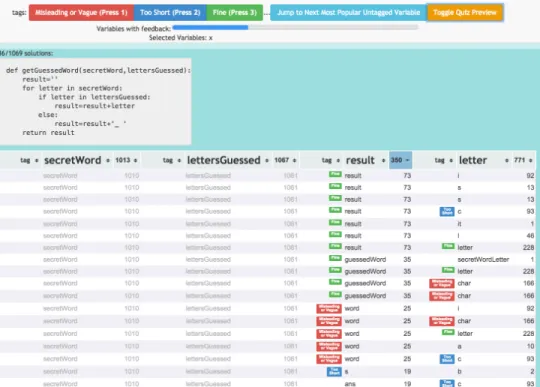
We introduce Foobaz, a user interface for giving tailored feed-back on student variable names at scale. Foobaz enables teachers to explore and comment on the quality of student-chosen variable names, given the role the variables play in students’ code (see Figure 1). A variable’s role is a function of the sequence of values that the variable contains during program execution. The variety of student-chosen variable names for each role makes evaluating every one prohibitive. Using Foobaz, the teacher can label a small subset of good and bad names for each role.
Foobaz then uses these labeled variable names to create ped-agogically valuable active learning exercises in the format of multiple choice quizzes. These quizzes are a form of feed-back for many more students than just those whose variable names receive a teacher’s label. The quizzes also allow stu-dents to see examples of good and bad alternatives, rather than just receive a label on one of their own names.
Foobaz personalizes teacher quizzes for each student, so that students can consider good and bad names for variables that exist in their own solutions. Personalized quizzes render the student’s original code submission with a specific variable re-placed by an arbitrary symbol. The quiz presents the student with several variable names as candidate replacements for the symbol, one of which may be the student’s original choice. The student selects appropriate labels for the variable names before checking their labels against teacher labels and com-ments.
In two user studies, we demonstrate the capabilities and work-flow enabled by this novel interface for both teachers and stu-dents. In the first study, we show that the interface helped teachers give personalized variable name feedback on
thou-Figure 1. The Foobaz teacher interface. The teacher is presented with a scrollable list of normalized solutions, each followed by a table of alternative variable names. Each column of the table represents the variables occurring in the solution. Each table’s rows contain unique sets of student-chosen names for the variables in the solution. Some names shown here have been labeled by the teacher as “misleading or vague,” “too short,” or “fine.”
sands of student solutions from an introductory programming MOOC on edX. In the second study, students composed solu-tions to the same programming exercises and we capture their reactions to the quizzes generated with Foobaz by teachers in the first study.
This paper makes the following contributions:
• a technique for displaying clusters of code with only a slice of each cluster exposed, revealing the features that are rel-evant to the task. In this application, the relrel-evant features are variable names and roles.
• a workflow for generating personalized active learning ex-ercises, emulating how a teacher might socratically discuss good and bad choices with a student while they review the student’s solution together.
• a working system which implements the above technique and method for datasets from both MOOCs and large resi-dential classes on introductory Python programming.
• two lab studies which evaluate both the teachers’ and stu-dents’ experience of the workflow.
In the sections that follow, we will survey related work and provide background on variable name design. We will then describe the Foobaz interface and how it was informed by a user-centered iterative design process. We present the results of our two user studies in detail and discuss the design impli-cations. Finally, we describe how this interface can be gen-eralized to other kinds of feedback on thousands of student solutions.
RELATED WORK AND BACKGROUND
Foobaz builds upon past systems for enabling grading at scale, particularly in the context of teaching students how to program well. We also provide background on the principles of good variable naming.
User Interfaces for Grading at Scale
The powergrading paradigm [1] enables teachers to assign grades or write feedback to many similar answers at once. Their interface focused on powergrading for short-answer questions from the U.S. Citizenship exam. After machine learning clustered answers, the frontend allowed teachers to read, grade, or provide feedback on similar answers simul-taneously. When compared against a baseline interface, the teachers assigned grades to students substantially faster, gave more feedback to students, and developed a “high-level view of students’ understanding and misconceptions” [2].
OverCode [4] took steps toward enabling powergrading in the domain of programming education. The system enabled teachers to visualize and explore the thousands of student submissions to simple exercises in an introductory program-ming MOOC. OverCode used static and dynamic analysis to cluster similar solutions on the basis of variable behavior, and then presented these “stacks” to the teacher. It was found that the system enabled teachers to more quickly understand the different strategies and misconceptions used by students. Foobaz builds upon the OverCode pipeline, using the stacks and common variables it produces as the basis for delivering feedback on variable names at scale.
Foobaz presents a significant departure from OverCode. The Foobaz system uses the OverCode program analysis backend to bring to the fore what OverCode intentionally hid: variable names. In order to create the new user interface, we devel-oped a technique for visualizing the variation of names within clusters. The feedback mechanism is also distinct. OverCode helped teachers write general feedback for the entire class, while Foobaz creates personalized feedback quizzes for each student.
Two more recently published systems help teachers give pro-gramming students subjective feedback on coding style: Au-toStyle [10] and ACES [11]. AuAu-toStyle is designed for au-tomatically composing code style feedback to programming students at scale. Style, in this system, refers to the effec-tive use of programming idioms; it does not allow for feed-back on variable names, indentation, or punctuation. ACES relies on static analysis, Abstract Syntax Trees, and unsuper-vised learning to streamline the process of grading on style. The analysis backend recommends feedback for each new submission based on past solutions and teacher annotations. However, in its user interface, the teacher still reviews sub-missions one at a time, ultimately limiting its ability to scale. Variable Name Design
Designing names for variables is an art more than a science. Donald Knuth compares a good programmer to an essayist who, “with thesaurus in hand, chooses the names of variables carefully and explains what each variable means” [8]. With-out modifying execution, names can express to the human reader the type and purpose of an object, as well as suggest the kinds of operators used to manipulate it [7].
The freedom that programmers have when naming classes, functions, and variables allows them to name variables poorly. At best, bad variable names are the subject of hu-mor, i.e., “26 Variable Names for Busy Developers: a, b, c, d, e...” [6]. Various naming conventions, like Hungarian notation, have evolved to help developers use their freedom wisely. The Google C++ Style Guide authors assert that their most important consistency rules govern naming, which are arbitrary but consistent in order to increase human readabil-ity [5].
Programmers can develop their own heuristics for good vari-able names through the experiential learning process of build-ing, debuggbuild-ing, and sharing increasingly large programs with others and their future selves. During interviews, one profes-sor explained an elaborate set of guidelines that she person-ally developed and teaches to her students, e.g., all method names must be verbs [Finale Doshi, personal communica-tion].
Variable Names in Classrooms
Bad variable names can throw roadblocks into the paths of already struggling beginners. Introductory programming stu-dents will, for example, iterate over the elements of an array but name the iterator as if it is an index, and vice versa [Gut-tag, personal communication]. It could be an innocent mis-take that lengthens debugging time or indicative of a flawed
mental model. Rapid feedback on variable names may re-mind students why naming matters, correct their flawed men-tal models, and expose them to examples of teacher-endorsed naming conventions and styles [3].
USER INTERFACE
Consider an introductory programming MOOC where thou-sands of students submit correct solutions to a programming exercise. Imagine that many of these solutions include a vari-able that takes on the same sequence of values, like a running sum of the elements in an input argument. While most stu-dents decide to name this variableresult, others decide to give it obscure or less descriptive names likep,val1.
The quality of a variable’s name is most easily judged when the teacher understands its algorithmic role and relationship to other variable names within the surrounding code. At scale, this can be difficult and frustrating, because while variable roles can be repetitive across many solutions (e.g., a partic-ular running sum), their names can be unpredictable (result, val1,s). Instead of browsing student submissions in a linear fashion, it would be better if the teacher could provide feed-back on the basis of variable roles.
In Foobaz, teachers can browsestacksof student submissions. A stack is a set of solutions whose code is identical after normalizing formatting and variable names, removing com-ments, and ignoring the exact order of statements. Within a stack, the teacher can browse the different sets of variable names that students chose, label some of them as, e.g., “too short” or “misleading,” and add comments.
Teacher labels and comments are used to provide students with tailored feedback in the form of personalized quizzes on variable names. By providing feedback on only a few variable names, personalized quizzes are generated that are potentially relevant to thousands of students. Foobaz is dis-tinct from powergrading systems: instead of grading as many names as possible, the system produces personalized quizzes that have excellent examples of good and bad variable names students would not otherwise get to see and learn from. Producing Stacks and Common Variables
Foobaz enables feedback at scale because teachers can browse solutions on the basis ofstacks of similar solutions andcommon variables. These groupings are automatically produced by the OverCode analysis pipeline, which starts by executing each student’s solution on a single test case and tracking the sequences of values that variables take on. Com-mon variables are identified as those that behave the same way (i.e., take on the same sequence of values) across multi-ple solutions. Raw solutions are then normalized by renam-ing instances of common variables with their most popular names, as well as removing comments and extra whitespace. Normalized solutions that have the same set of lines can be grouped together into astack, with a single representative on top for the teacher to read.
The stacking performed by the system directly reduces the number of implementations that a teacher needs to analyze in order to provide feedback to the majority of the class.
Furthermore, Foobaz is sensitive tovariable roles, meaning that variables that behave the same across different stacks are linked together as a single common variable. The result is that feedback provided for a variable in one stack is propagated to variables that play out the same behavior inotherstacks. Rating Variable Names
The Foobaz interface lets the teacher rate variable names in the context of their role in the program. Figure 1 shows the teacher’s view while they perform this task.
The teacher is presented with a scrollable list of stacks. Each stack is represented as normalized stack code followed by a table of alternative variable names. Since some of the tables are taller than the screen, the normalized stack code is pinned to the screen in such a way that it remains visible until the next stack is scrolled into view.
Each column of the table represents the common variables occurring in the stack, where each common variable’s most popular name serves as the column header. Each row of the table represents a unique set of variable names used in a solu-tion (e.g.,secretWord,lettersGuessed,guessedWord,char). We showsetsof variable name choices, rather than indepen-dent columns of variable names, because we found in early pilot testing that variable names can at times make more sense when seen as a group, rather than as individual naming deci-sions. This helps give teachers the context and confidence to assign quality judgments.
As the teacher brushes over the names of a common vari-able in the tvari-able, its occurrences in the normalized code are highlighted, so they can develop an understanding of the vari-able’s role in the solution. The teacher can then go down the list of student-chosen names, rating as many of them as they desire using three different labels: “misleading or vague,” “too short,” or “fine.” These labels were based on early pi-lot testing with beginner programmers but future iterations of Foobaz may support teacher-added labels. Next to each name, they can also see how frequently it was given to that common variable across all solutions in the dataset, and can sort the en-tire table by this frequency. In order to draw teachers’ atten-tion to student-chosen variable names, variables with names that match one of given parameter names provided with the homework prompt are greyed out. The long tail of infre-quently used names can be a place where both the best and worst examples of names can be found.
It is important to note that each common variable is likely to occur in multiple stacks. When the teacher selects a particular name, or set of names, for a common variable, occurrences in other stacks are highlighted as well. When they assign a label to a name, the label is propagated to all uses of the name for that common variable, across all the stacks. This has the effect of “filling down” the teacher’s annotations. As teachers scroll down, they see that much of their feedback has been propagated for them, letting them focus on the remaining best and worst examples they might find.
A progress bar at the top of the page indicates the coverage of their feedback across all variable names. Since teachers were motivated by the progress bar to maximize their coverage, we
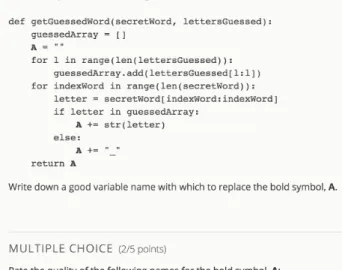
Figure 2. A personalized quiz as seen by the student, delivered by an edX-based system maintained by a large university. Students are shown their own code, with a variable name replaced by an arbitrary symbol, followed by variable names for the student to consider and label using the same labels that were available to the teacher. After the student has submitted their own judgments, the teacher’s labels are revealed, along with their explanatory comments.
provided a button which would select and scroll into view the next most popular, yet unlabeled name for a common vari-able. Also included to maximize efficiency, the interface sup-ports navigation through the variable names in the table using arrow keys. Teachers can also press hotkeys to rate variables instead of clicking on one of the three quality judgments, e.g., press 2 to rate a variable name as “too short.”
Making Quizzes
Each quiz is an active learning exercise that asks the student to think about good and bad names for a common variable. Quizzes begin by showing a solution with that common vari-able’s name replaced by an arbitrary symbol everywhere it occurs. In a personalized quiz, the solution is the student’s own, as shown in Figure 2. The quiz presents the student with several variable names as candidate replacements for the symbol, one of which may be the student’s original choice. The student labels these names before checking their labels against the teacher’s. If a student’s solution includes a partic-ular common variable, then that student can receive a person-alized version of the quiz about that variable.
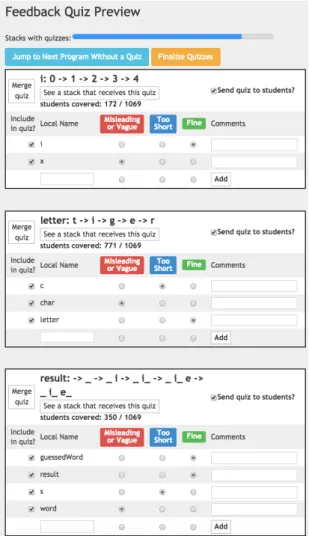
As teachers rate variables by attaching labels to them, quizzes are created with these names as their good and bad examples. Using the Toggle Quiz Preview button, teachers can see a pre-view of the quizzes (Figure 3) alongside the scrollable list of stacks and watch the quizzes grow as they rate more names.
Figure 3. The quiz preview pane of the Foobaz teacher interface. Vari-able behavior was logged by running all solutions on a common test case. This particular teacher created quizzes for the common variableithat iterates through indices of a list, the common variableletter, which iter-ates through the characters in an input string, and the common variable
result, which accumulates one of the acceptable return values, ‘i e.’
Problem Description Source Solutions
iterPower 6.00x (edX) 3875
hangman 6.00x (edX) 1118
computeDerivative 6.00x (edX) 1433
dotProduct 6.0001 (residential) 229
Figure 4. Number of solutions in datasets.
Problem Misleading Too short Good Total names or Vague
iterPower 3 3 15 929
hangman 7 4 10 763
compDeriv 6 5 10 670
dotProduct 11 3 17 180
Figure 5. Subjects in Study 1, on average, labeled a small fraction of the total names, covering all three provided name categories.
They can hide the quiz preview to reduce visual clutter while they explore all the stacks, common variables, and interesting alternative names.
If two different common variables perform the same concep-tual role in student solutions but do not go through the ex-act same sequence of values, then the teacher can use the “Merge” button to combine the quizzes about each common variable into a single quiz. This quiz becomes relevant to stu-dents who have either common variable in their own solution and can be sent out to both groups.
Ultimately, the teachers’ goal is to provide pedagogically valuable personalized quizzes to as many of the hundreds or thousands of students in the course as possible. Analogous to the progress bar for variable names, the quiz preview pane includes a progress bar for the number of stacks of solutions that will receive at least one quiz. Like the previously dis-cussed button for selecting the next most popular unlabeled name, the quiz preview pane also includes a button for jump-ing to the next largest stack of student solutions that do not yet have any quizzes. If the teacher deems one of their au-tomatically populated quizzes to be not pedagogically valu-able, then they can uncheck the option to send that quiz back to students. To provide more illustrative examples that might not have been produced in student solutions, teachers can add their own custom good and bad variable name examples and write explanations in the comment field associated with each alternative name.
EVALUATION
We evaluate Foobaz’s teacher and student-facing interfaces with two consecutive user studies, one for each population. In order to evaluate Foobaz’s scalability, the solutions seen by teachers were collected from MOOCs with thousands of students and a residential college class of several hundred stu-dents.
Datasets
We evaluated Foobaz on sets of correct solutions to four dif-ferent programming exercises, ranging in size from a couple hundred to several thousand solutions, collected from 6.00x, an introductory programming course in Python that was of-fered on edX in the fall of 2012, and 6.0001, a residential introductory programming course in Python offered at MIT in the fall of 2014 (see Figure 4). The four exercises, re-ferred to here as iterPower, hangman, dotProduct, andcomputeDerivative, are representative of typical exercises that students solve in the early weeks of an introduc-tory programming course. They have varying levels of com-plexity and ask students to perform loop computation over three fundamental Python data types, integers, strings, and lists.
Teacher Study
During the initial briefing, teachers were informed that they would be looking at solutions that had already passed an au-tograder and instructed to focus only on variable names, ig-noring other aspects of code style, structure, and correctness. Teachers were invited to look over a page in a browser with
all solutions concatenated in a random order into a flat list of boxed, syntax-highlighted code. We chose this design as our baseline to emulate existing methods of reviewing student functions.
Using this baseline interface, teachers were asked first to rate as many good and bad variable names as possible, with an eye toward maximizing coverage of names (Task Part 1). Next, the teachers were shown an example of a quiz and were asked to compose their own by listing variable names and labeling them as good or bad with whatever short descriptors and ex-planatory comments they wished (Task Part 2). Participants were given 5 minutes for each task, and then asked to fill out a survey about their experience. (The answers to two of these surveys were lost so we only report survey results from 8 of the 10 participants.)
Participants learned about the Foobaz interface by watching a tutorial video. This training process took between 10 and 15 minutes depending on the dataset shown in the video. Partici-pants were encouraged to hold their questions to the end, and answer them by interacting with the interface.
Participants performed both Task Part 1 and 2 on a third dataset of solutions in the Foobaz teacher interface. Partic-ipants were asked to spend 5 minutes to perform each task, though some decided to spend more time. They filled out the same surveys about their experience again, followed by a fi-nal survey about which features of the Foobaz interface they found helpful.
Apparatus
In all sessions, we used a laptop with a 15.4-inch 2880x1800 pixel Retina screen. All participants’ interactions with the system were logged with timestamps using Meteor collec-tions.
Participants
We recruited 10 participants (6 female) with ages between 20 and 29 (µ=23.1,σ=2.7) through computer science-specific and campus-specific mailing lists and Facebook groups. All participants self-reported that they had been a grader, lab as-sistant, or teaching assistant for a Python course.
Results
Problems with Baseline. When asked to comment on good and bad variable names based on the baseline interface, most teachers immediately began scrolling through solutions one by one, taking notes as they went, fully aware that they would only be able to skim a small, random fraction of the total number of solutions. The sheer volume of solutions was over-whelming to some.
Results of the post-baseline survey reinforce critical usabil-ity issues with the status quo that Foobaz was designed to address. In these survey responses, teachers expressed an appreciation for the simplicity, readability, and searchability of the baseline interface but wished that the endless stream of often very similar solutions could be summarized or “de-duped” before they had to read through them. One teacher requested that variables be automatically identified, so that all references to a variable can be highlighted. This may have
been a direct consequence of the fact that it was not possi-ble to search for all the occurrences of the variapossi-ble namei without the browser also highlighting all thei’s within the rest of the names and keywords, e.g., theiin “if.” Another teacher requested an automated count of common variable names. These teachers anticipated three critical features of the Foobaz interface: deduplication, variable name counts, and highlighting all occurrences of selected names.
Two teachers commented on the importance of understand-ing the role a variable takes on within the program. One teacher writes, “Many times the variable names meant some-thing but I still had to read the code to make sure that it meant what I thought it meant in the context of the code.” The sec-ond teacher observed, “Whether a variable name is good or bad depends a lot on its function within the code, and since each code block has a somewhat unique structure, I felt like I should be creating separate categories for good vs. bad vari-ables names, e.g., ‘for the derivative result,’ ‘for a counter in a loop through poly,’ etc.” This is exactly what the Foobaz interface is designed to support.
Power-law Distribution of Names The approximately power-law-type distribution of stacks of code from the thou-sands of edX solutions has already been reported in prior work, such as Figure 12 in [4]. In Foobaz, the distribu-tion of unique combinadistribu-tions of variable names and behaviors does not differ significantly from a power-law distribution; the Kolmogorov-Smirnov test for a difference between the best-fitting power-law distribution and each dataset all gave p-values of at least 0.44 (i.e., not significantly different), with the best-fitting exponent of the distribution between 1.79 and 2.13. Within each stack, the names for any particular variable appear to follow the same distribution.
There is no ground truth for which variable names are “bad,” but we can report the counts of variables that the users chose to label and the counts of unique names for the top com-mon variables in each problem. In the 3875iterPower solutions, there were 179 different names given to a variable representing the base being exponentiated and 64 different names for a variable representing the exponent. In the 1393 computeDerivativesolutions, there were 176 different names given for the variable containing the result and 39 dif-ferent names for the most commonly used iterator variable. In the 1118hangmansolutions, there were 50 names given to the variable that iteratively takes on the characters of the ‘se-cret word’ input argument and 99 names given to the variable containing the string most commonly returned by solutions as the answer.
Figure 5 shows the fraction of names that subjects labeled in Study 1, and the distribution of those names across vari-ous categories of quality. In spite of the unknown underlying distribution of good and bad variable names, the subjects are finding and labeling variables across all available categories in order to make quizzes.
Efficiency of Foobaz. The efficiency of using Foobaz to create feedback came up repeatedly in teachers’ survey re-sponses. Teachers appreciated the feeling of doing the task
“at scale.” One teacher noted that it felt like, “with each ac-tion, I was helping a large number of students” without “re-peating or wasting effort too much.” While using the button that highlights and scrolls the next most popular, untagged variable name into view, a teacher told the experimenter, “I love this button!” The arrow key-based navigation through tables of variable names was appreciated as well. At least one teacher commented that “seeing variable names grouped by their role made the process much more efficient.”
The efficiency gains of the interface were hampered by, at times, a noticeably sluggish interface response time to some queries that scaled with the size of the dataset. This sluggish-ness can be cut down by reducing the many unnecessarily repeated calculations made in the current implementation. Quiz Composition. In both interfaces, teachers appreciated the potential pedagogical value of making quizzes: “I liked that with the [quiz] I made, students can actually learn about good alternatives. ... [T]hey can change their variable names after putting extra thought into it.” A teacher expressed appre-ciation that, using the Foobaz interface, they could generate quizzes based on actual submitted code as well as their own comments.
Coverage. Immediately after using the baseline interface, teachers did not strongly agree or disagree with the statement “I was able to give specific, personalized feedback to many students” (µ = 3, σ = 1.4 on a 7-point Likert scale with 1: strong disagreement and 7: strong agreement). Teachers slightly disagreed with the statement “I saw a large percent-age of these students’ variable names” (µ=2.6,σ=1.2) and slightly agreed with the statement “This interface helped me provide feedback to many students” (µ=3.6,σ=2.0). After using the Foobaz interface, the mean level of agreement with these statements jumped to 5.5 (σ=1.7), 6.3 (σ=0.46), and 6.6 (σ=0.5).
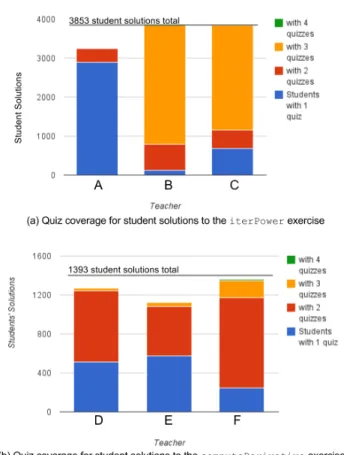
Figure 6 shows that most solutions in the edX datasets re-ceived at least one or two quizzes. Solutions in Figure 6 have multiple common variables on which they could poten-tially be quizzed (3, 3, and 4 on average in subfigures (a), (b), and (c), respectively). One teacher used Foobaz to create quizzes for a much smaller dataset, collected from the resi-dential class of only several hundred students. They achieved a similar percentage of coverage (87% of student solutions re-ceived at least one quiz) in a similar amount of time, showing that the Foobaz workflow and output appears relatively invari-ant to the size of the dataset. Figure 7 illustrates that, within minutes of their first interaction with the system, teachers can label a significant portion of student-chosen variable names in a dataset, though their progress trails off as they encounter the long tail of names for particular roles and transition to creating better quizzes.
Combined with Figure 5, Figure 6 also shows that, by only labeling approximately 20 variable names in each of the edX datasets with thousands of student solutions, teachers cover at least 85% of the class with personalized feedback quizzes. Even though Figure 7 shows that the coverage of individ-ual variable names with feedback is high, it matters less for
Foobaz than in powergrading systems. What matters more is the coverage of students with quizzes that have excellent ex-amples of good and bad variable names students would not otherwise get to see and learn from.
Student Study
We ran a second study on the student side of the workflow in order to (1) find out if the teachers’ efforts in the previous study produces quizzes that are relevant to these new students and (2) better understand student reactions to this novel form of feedback. In order to do this, we targeted beginner pro-gramming students and invited them into the lab to receive personalized quizzes generated by the teachers in our previ-ous study.
Before the start of the study, quizzes composed by teachers using Foobaz in the first user study were rendered using the edX framework, ready to be personalized. Since pilot testing with beginner programming students indicated that six alter-native variable names in a quiz is too many, teachers’ quizzes were randomly subsampled to include a maximum of five al-ternative names for students to consider.
Students came into the lab for one hour and composed solu-tions to one of the four exercises. After receiving each so-lution, the experimenter mentally executed the solution and compared the behavior of its variables to the variable behav-ior covered by the teachers’ quizzes. If there was a match to one or more teachers’ quizzes, one quiz was randomly se-lected. The experimenter made a copy of the student’s code and replaced every instance of the variable to be quizzed on by an arbitrary symbol, e.g., a bold letter A. The experimenter then appended the quiz to the modified copy of the student’s solution and delivered it to the student as a personalized quiz. If there was no match to one or more teachers’ quizzes, then the student received a generic quiz, about a variable name in a solution other than their own.
After the student completed their personalized quizzes, they took a survey about their experience. Students who were able to complete the coding exercise and quizzes with significant time left in their session repeated this process for a second programming assignment.
Apparatus
In all sessions, we used laptops with 15.4-inch or 13.3-inch screens. All participants’ interactions with the system were logged using the edX platform infrastructure.
Participants
We recruited 6 participants (4 female) who were either un-dergraduate or graduate students, through computer science-specific and campus-science-specific mailing lists, Facebook groups, and word of mouth advertising. Their ages were between 18 and 27 (µ = 20.4, σ = 3.2). Four of the participants had taken one or two introductory programming courses on Coursera or at their high school or college campus. The re-maining two participants had taken three or four classes that involved learning programming languages or computer sci-ence concepts, and had some experisci-ence with Python.
Figure 6. Quiz coverage of student solutions across three datasets.
Figure 7. Variables in iterPower solutions labeled by each teacher.
Results
Six students took a total of 12 quizzes, 11 of which were able to be personalized, even though their solutions were, in some cases, significantly different from the prior student solutions seen by teachers during quiz creation. Correspondingly, in the surveys that followed, students agreed with the statement “This quiz felt relevant to me” at an average level of 5.4 (σ= 1.0) on a 7-point scale. One student’s solution did not receive a personalized quiz because its variables behaved in ways that no teacher in the previous study considered. That student was able to understand the new solution and take the quiz, though it had little relation to their own solution.
Students were asked in the post-quiz surveys about what they learned from the exercise. One student replied, “Possible variable names are pretty much synonyms, but the more de-tailed/specific ones are better.” Another wrote, “It’s worth-while to pick good variable names.” Students’ average level of agreement with the statement “The quiz made me think about what makes variable names good or bad” was 6.2 (σ=0.9) on a 7-point scale. Mean levels of agreement with statements about the quizzes being confusing or tedious were 2.9 (σ = 1.5) and 3.4 (σ = 1.2), respectively, on a 7-point scale.
Some students observed that this was a very subjective qual-ity of their code to be quizzed on, but all students were able to understand and complete the quizzes they were assigned. Some students disagreed with the instructor-provided ratings. When this occurred and the teacher left no explanation, stu-dents had at least one of three reactions: (1) They tried to imagine what the teacher was thinking. (2) They expressed displeasure at the lack of explanation. (3) They decided that they still disagreed with the teacher’s judgment. Students did pick up on the teachers’ preferred naming conventions through the quizzes. As evidence for this, two students cor-rectly wondered aloud whether a different teacher made each of the quizzes they saw during their session. Given the sub-jectivity of the task, it may be necessary to grade only on par-ticipation, rather than absolute agreement with the teacher. Students were not informed that quizzes were populated largely by fellow student variable names, but one student vol-unteered their appreciation for a “wide spectrum” of variable names to consider. However, randomly sampling teachers’ quizzes down to 5 variable names created some student con-fusion when there were no positive naming examples in the resulting quiz. This is evidence that sampling should be con-strained to include both good and bad examples and the user interface should provide some additional guidance to remind teachers that students highly value a balance of examples, each paired with an explanatory comment.
LIMITATIONS
The first study establishes the usability, learnability, and effi-cacy of the main Foobaz interface for teachers. The second study is intended to show that students can understand and use the personalized quizzes that Foobaz produces. However, this evaluation of the student experience does not yet show pedagogical benefit. To measure learning benefits, we plan
to deploy the tool in a large Python programming course this fall.
FUTURE WORK
This is a step on a clear path toward user interfaces that al-low teachers to give meaningful feedback to students at scale about a variety of at least partially subjective but important aspects of code. We believe that the approach we take in de-signing Foobaz is generalizable to other aspects of program-ming style. Just as we establish the equivalency of variables based on their behavior during test cases, one could establish the behavior equivalency of larger or more abstract entities, such as student-written lines of code, sets of lines of code, or entire functions. We consider this a class of problems that Foobaz, and similar systems built after it, can tackle. In future iterations of the Foobaz interface, constraints and af-fordances will be added to encourage teachers to leave more explanations for their assessments, accompanied by better support for reusing common comments. We will also allow teachers to augment or overwrite existing labels, e.g., “too short,” to match their own preferences. Finally, based on us-age logs and Likert scale ratings on the helpfulness of various features, we will simplify the interface by removing unappre-ciated features and improve average response times by elimi-nating redundant computation.
CONCLUSION
We have designed and studied both the teacher and student sides of a novel interface and workflow for providing feed-back on student variable names at scale. We hope it will serve as an example and a design pattern for future work on user in-terfaces for teaching programming to thousands of students at once.
ACKNOWLEDGMENTS
We would like to thank the past and present staff of 6.0001, MIT’s Introduction to Computer Science and Programming in Python, for their feedback and support. We also appreciate the financial support from MIT’s Amar Bose Teaching Fel-lowship and Quanta Computer through the Qmulus Project. REFERENCES
1. Sumit Basu, Chuck Jacobs, and Lucy Vanderwende. 2013. Powergrading: a Clustering Approach to Amplify Human Effort for Short Answer Grading.TACL1 (2013), 391–402.
2. Michael Brooks, Sumit Basu, Charles Jacobs, and Lucy Vanderwende. 2014. Divide and correct: using clusters to grade short answers at scale. InLearning at Scale. 89–98.
3. John C Chen, Dexter C Whittinghill, and Jennifer A Kadlowec. 2006. Using rapid feedback to enhance student learning and satisfaction. InFrontiers in Education Conference, 36th Annual. IEEE, 13–18. 4. Elena L. Glassman, Jeremy Scott, Rishabh Singh,
Philip J. Guo, and Robert C. Miller. 2015. OverCode: Visualizing Variation in Student Solutions to
Programming Problems at Scale.ACM Trans.
Comput.-Hum. Interact.22, 2, Article 7 (March 2015), 35 pages.DOI:http://dx.doi.org/10.1145/2699751 5. GoogleStyle 2015. Google C++ Style Guide. (2015).
https://google-styleguide.googlecode.com/svn/ trunk/cppguide.html.
6. @HackerNewsOnion. 2014. 26 Variable Names For Busy Developers. Tweet. (10 December 2014). Retrieved April 13, 2015 fromhttps://twitter.com/ hackernewsonion/status/542754658465226752. 7. Derek M. Jones. 2008. Operand names influence
operator precedence decisions. (February 2008). 8. Donald Knuth. 2000. Literate Programming. (June
2000). Retrieved April 8, 2015 from http://www.literateprogramming.com/.
9. Alex Mabanta, Chloe Hunt, Shannon Najmabadi, and Kai Ridenoure. 2013. How big is UC Berkeleys biggest class? (2013).http://www.dailycal.org/2013/09/03/ how-big-is-uc-berkeleys-biggest-class/.
10. Joseph Bahman Moghadam, Rohan Roy Choudhury, HeZheng Yin, and Armando Fox. 2015. AutoStyle: Toward Coding Style Feedback at Scale. InProceedings of the Second (2015) ACM Conference on Learning @ Scale (L@S ’15). ACM, New York, NY, USA, 261–266. DOI:http://dx.doi.org/10.1145/2724660.2728672 11. Stephanie Rogers, Dan Garcia, John F. Canny, Steven
Tang, and Daniel Kang. 2014.ACES: Automatic Evaluation of Coding Style. Master’s thesis. EECS Department, University of California, Berkeley. http://www.eecs.berkeley.edu/Pubs/TechRpts/ 2014/EECS-2014-77.html