U-Learning Model Design Based on Ubiquitous Environment
Joung-Souk Sung
Department of Computer Engineering, BaekSeok Culture University [email protected]
Abstract
The purpose of this research is for the establishment of Ubiquitous learning (U-learning) based synchronous, asynchronous and hybrid mode. This paper proposed the implementation of learning between student and teacher of service provider in u-space, which is not limited to traditional e-learning system. Student-focused testing services include: excellent test paper creation/deletion/registration; 7 phase framework; database development; and PDA page design. This system allows students to be supported with an electronic input, authentication, distribution, monitor, gathering, grading and inquiring phase and supports learning session dependent multicasting. The devices used include PDAs, mobile phones, portable computers and tablet PDAs. This system is to become a more capable student learning environment so that student can get student’s learning done more efficiently. The development of a ubiquitous learning environment combines the advantages of an adaptive learning environment with the benefits of ubiquitous computing and the flexibility of mobile devices.
Keywords: Ubiquitous learning environment, input window, authentication, distribution, monitoring,
gathering, grading, inquiring, synchronous mode, asynchronous, hybrid
1. Introduction
Various e-learning systems have been developed in the past decade; the majority of these systems are implemented either with client-server architecture or are centralized server based. The client-server and centralized server approaches are metaphors of student-teacher and repository centric which reflect real world learning scenarios in which teachers act as the content producers while students act as the content consumers[10][17].
M-learning is often thought of as a form of e-learning, but it would be more correctly defined as a part, or sub-level, of e-learning. They believe m-learning is a new stage in the progress of e-learning and that it resides within its boundaries[9]. M-learning is not only wireless or Internet based e-learning but should include the anytime/any place concept without permanent connection to physical networks. The advantages of m-learning compared to e-learning include: flexibility, cost, size, ease of use and timely application. The devices used include PDAs, mobile phones, portable computers and tablet PDAs[9].
The ubiquitous learning environment provides an interoperable, pervasive, and seamless learning architecture to connect, integrate, and share three major dimensions of learning resources: learning collaborators, learning contents, and learning services[5] [14] [21]. Ubiquitous learning is characterized by providing intuitive ways for identifying right collaborators, right contents and right services in the right place at the right time based on students surrounding context such as where and when the students are (time and space), what the learning resources and services available for the students, and who are the learning
collaborators that match the students’ needs [6] [7] [13]. As a result, the effectiveness and efficiency of ubiquitous learning heavily relies on the surrounding context of students[4].
Ubiquitous learning is more than just the latest educational idea or method. At its core the term conveys a vision of learning which is connected across all the stages on which we play out our lives. Learning occurs not just in classrooms, but in the home, the workplace, the playground, the library, museum, and in our daily interactions with others[2]. Ubiquitous learning is an extension of the idea of ubiquitous computing, a term which describes the pervasive presence of computers in our learning. Ubiquitous learning is a new educational paradigm made possible in part by the affordances of multi-media. Indeed, educational institutions at every level have proven quite effective at adapting these new resources to their conventional practices and contents.
This system is an environment supporting student learning using digital media in a geographically distributed environment. Student test plays an important role of within the U-learning, so learning system must be designed to satisfy several key requirements. These key requirements are derived from multimedia application development platform base which is interfaced with computer engineering, computer network technology, CSCW (Computer-Supported Cooperative Work) technology[20], and education engineering[18]. This environment proposed the implementation of student learning between students within campus/at home and teacher of content producer in u-space, which is not limited to traditional learning system. Indeed it seeks to enhance it by providing the audio/video/chatting for asynchronous and on-going interaction. It needs to be properly guided or monitored in order to produce the preferred results.
In case of a synchronous mode, this system designed to include audio/video/chatting control to conduct on-line examinations monitoring. The primary aim of synchronous mode is to provide students with an interactive environment to supplement classroom experience. In case of an asynchronous mode, the system is designed to include a test paper editor to conduct on-line examination test paper. It may also be used for complete course training, including examination from a remote site.
A student is free to take the examination at any time within a specified time frame. Student-focused testing services include: excellent test paper creation/deletion/registration; 7 phase framework development (input, authentication, distribution, monitor, gathering, grading and inquiring phase); database development; and PDA page design. This system is to become a more capable student learning environment so that student can get student’s learning done more efficiently.
2. Ubiquitous Environment
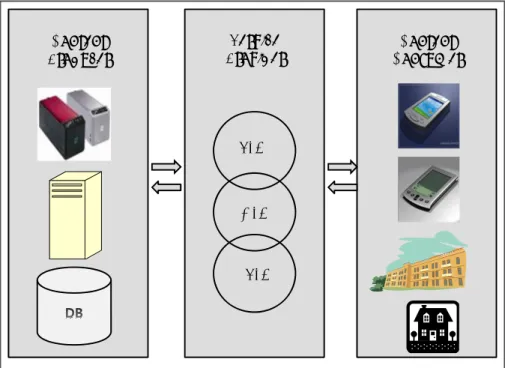
This system is an environment supporting student learning using digital media in a geographically distributed environment. This system is defined with the following elements: Content Producer System, Service Provider System, and Content Consumer System. Figure 1 shows the configuration of the u-learning on ubiquitous learning environment. Various devices such as PDA and mobile phones are equipped with different hardware and software constraints. Hardware constraints can be used to describe device hardware capabilities such as platform, CPU speed, memory size, screen size and resolution. Software constraints can be used to describe device software capabilities such as operating system, browser, playable media type and resolution[17].
Components of the ubiquitous ULE(learning environment) include[9]:
Microprocessors with memory will be embedded in every object/device. The information each microprocessor will hold will be about the object. When a student approaches, the sensor detects their presence and will start relaying information to the student's PDA.
Server Module will include the Server, the Educational Strategies Unit and a Database. The server manages the network resources. The Educational Strategies Unit allows for the application of strategies to reinforce and aid student understanding through interaction and feedback. It analyses student responses to short quiz questions and returns more information or information in a different form when needed. DB stores all the data about the objects/devices, the users and the interactions that occur.
Wireless technology will be in the form of Bluetooth and WiFi. The Bluetooth has weak signal strength, uses little power and covers a relatively short distance. Its low power consumption and ability to communicate with many devices is extremely beneficial when using handheld devices. The WiFi has a range and speed which surpasses that of Bluetooth. It is compatible with any brand of Access Point and client hardware built to the WiFi standard.
Sensors will be used to detect any changes in surroundings. These will be placed adjacent to the objects/devices and will be used to recognise the presence of students. The sensors used will include proximity, to detect movement, and light, to detect changes in light intensity. The Server Module tracks and locates each student within the u-space by the use of sensors. When a student approaches an object, sensors wirelessly access the intranet and ULE Server Module and transmit information about the object.
Content
Producer ProviderService ConsumerContent
SLM
ASLM HLM
Figure 1. Configuration of the u-learning on ULE
Content Producer (CP) presents information in an interactive and informative way. CP is an ULE server might include: test information table, teacher information table, test paper form table, student information table, examination table and subject table. The development of learning content based on such technology as graphics, image, voice, and video has become the resource for student learning service. CP provides a various function: creating and modifying a database structure, and adding, editing, deleting, and retrieving records through querying, and, working with multiple tables in both queries and reports. CP is also include generating links, creating tables, capturing data using HTML forms, accessing JAVA and JAVA scripts. Structured presentation of test paper form is determined by teacher. The instructional objectives, process, and methodologies are used to the test paper. A test paper is highly refined student-centered a test paper methodology ensures understanding of subject concepts and features.
The teacher prepares a test paper using the various tools (MS_WORD, HTML, PowerPoint, Authorware, etc) to create, edit and format a document and a test paper is kept in the ULE server. CP also provides an editor form make anyone facilitating. It is possible to compose test material using the document editor. The material is converted to hypertext markup language automatically. In case of asynchronous mode, CP provides a subject learning content, feedback, and learning phase on demand from the student. Proper links has to be provided as the reference materials. Links and references to internal and external sites can also be provided.
2.2. Service Provider
Service Provider (SP) consists of various mode: synchronous learning mode, asynchronous learning mode, and hybrid learning mode. SP proposed the implementation of student learning system between student within campus/at home and teacher in u-space, which is not limited to traditional educational system. SP supports the creation and deletion of the service object for media use, media sharing between remote students. Media Services limit the service by hardware constraint. In testing time, the system supports audio/video/chatting control for effective communication of the students with the teacher.
2.3. Content Consumer
Content Consumer (CC) is in charge of data transportation among PDA in distributed environment. CC creates the network connection, which altogether form a collaboration work, destroys and performs the functions controlling the QOS by detaching the network load. CC simulates multiple-point connection using stream and multiple applications share the same network connection. CC offers students the opportunity to increase the effect of their implements using the latest in multimedia technology, equipment and testing.
3. U-Learning Module
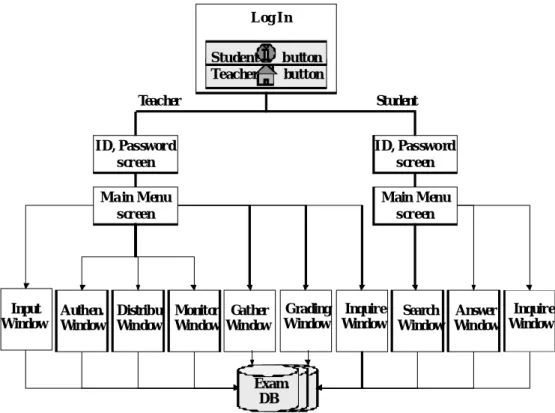
In this paper, we will focus on three aspects, PDA-supported student learning, test process phase. This module presents an input, authentication, distribution, monitoring, gathering, grading and inquiring phase to develop an inspecting and participating technology in an U-learning environment. This module is seek for the technology of face-to-face contact between the teacher and students. Figure 2 shows the U-test process phase.
The main characteristics of ubiquitous learning are shown as follows [23].
Permanency: Students can never lose their work unless it is purposefully deleted. In addition, all the learning processes are recorded continuously in everyday.
Accessibility: Students have access to their documents, data, or videos from anywhere. That information is provided based on their requests. Therefore, the learning involved is self-directed.
Immediacy: Wherever students are, they can get any information immediately. Therefore students can solve problems quickly. Otherwise, the student may record the questions and look for the answer later.
Interactivity: Students can interact with experts, teachers, or peers in the form of synchronies or asynchronous communication. Hence, the experts are more reachable and the knowledge is more available.
Situation of instructional activities: The learning could be embedded in our daily life. The problems encountered as well as the knowledge required are all presented in the nature and authentic forms. It helps students notice the features of problem situations that make particular actions relevant.
Adaptability: Students can get the right information at the right place with the right way. Moreover, ubiquitous learning can be CSCL environments that focus on the socio-cognitive[1] process of social knowledge building and sharing.
Figure 2. U-test process phase
3.1. Input Window Log I n Student button Teacher button I D, Pas sword s creen I D, Pas swo rd s creen Ma in Menu s creen Input Window Authen. Window Monitor Window Search Window Distribu. Window Answer Window Gather Window Main Menu s creen Exam. DB Grading Window Inquire Window Inquire Window Teacher Student
In input phase, there are two types of screen which have been identified depending on the user. If you have already taken the Self-Test and wish to view your answers, please click here. To answer the self-test questions below, fill-in your email address in the first field and then select the most appropriate answer below each question. When you are finished, click the Submit Answers button. If you wish to start over, click the Reset Fields button. You will not be able to submit your self-test answers without a valid email address[16].
In this module, session control controls access to whole session. Session control not only restricts access, it facilities access. It can also allow participants in a session to find others and bring them into the session. Session control deals with session start/termination, join/invitation/leave, and late comers. It may also allows sub-sessions and permits to join another sessions. Session control has an object with a various information for each session and it also supports multi-casting with this information.
3.2. AuthenticationWindow
Authentication was guaranteed because only enrolled students received a student name and password. A login and a password identify each student. Student response data are automatically collated and processed via Java- scripts that reside on the ULE server. This module provides a reliable and robust method of student response data collection. This module prepares allowing access to the student learning environment by authorised students only.
It also applies to attendance check by teacher. Initial logins and passwords were provided by the teacher/student. Students simply chose which learning subject they preferred to evaluate. The teacher sends an invitation message to the proper students who have joined the learning environments. Each student participates in the U-learning session using his name and password[21].
3.3. Distribution Window
The teacher distributes the test paper to the students, and a test starts. The DB is accessible only to the teacher. This module has an object with a various information for each learning session and it also supports multicasting with this information. This module controls the creation and deletion of the service object for media use, media share between remote student. And it also limit the service by hardware constraint.
3.4. Monitoring Window
This module monitors student activity through Audio/Video. It is also controls the learning session starts, terminates, joins and invites. After the learning or test is activated, questions and answers are done interactively in the learning session and learning can be taken either an online or an oral. Questions and answers facilitate interaction between the student and the teacher. This interaction is accomplished through three media: video, audio and chatting. In synchronous learning, the conversation is almost supported by the voice exchange. It also controls the person who can talk and the person who can change the information.
This module was guaranteed student responses. Once the student starts taking test, the module automatically calculates the total time taken to complete it. Test papers are encrypted to prevent illegal access. The list of valid response/invalid response is stored in a database on the ULE server. Each response has pointers to both the unfilled and completed learning. If the response entered by a student is valid, the unfilled learning is presented to the student. Once the response is submit by the student, the data are then collated and stored in a database. In case online test, after finishing the learning, students press test answer paper submission button. In case oral test on completion, the tester automatically sends the student responses to the teacher.
3.6. Grading Window
This module concentrates on outputs of learning; grades, attrition rates, and levels of student satisfaction. In hybrid mode, grade is immediately presented with his or her score, a brief explanation of the answers, and a link to the place in the course where that topic was covered. This module creates and manipulates a database and become familiar with functions such as sort, fill and query. This module treats its database elements as objects, database design concepts are presented in an object-referenced context. It is also focus on creating and modifying tables, adding, deleting, displaying and sorting data, querying the database, and generating simple reports.
3.7. Inquiring Window
In synchronous/asynchronous mode, grade is stored in a database to show student progress and achievement degree. Grade is posted a notice using PDA. Teachers learn to use the toolbar to connect to the Internet from within Excel. Using PDA, student can always inquire a subject grade that presented a graph. Student also can see simple charts/maps to visually represent data.
In synchronous mode, floor control controls the student who can talk, and other student who can change the information. Mechanism of the floor control consists of brain-storming, priority, mediated, token-passing and time-out. In floor control module, it provides explicit floor control and brain-storming.
4. U-learning Mode
In the system, there are three types of a learning mode which have been identified depending on the educational activities and on the location and time of interactions (synchronous, asynchronous, hybrid). Synchronous mode supports real-time interactions by not only interface with simple text forms by but also interface with audio/video resources. Synchronous mode also supports a floor control for question/answer and button for the convenient interactive learning. This system also supports list box and button for user interface during an examination. In the following we will focus on the synchronous mode proposed by the system.
4.1. Synchronous Learning Mode (SLM)
SLM is based on a client/server model, which refers to industry standard systems. SLM consists of U-learning server, teacher client, and student client. ULE Server supports a DB.
Two client applications run under windows XP on PDA connected to the server. Client environment basically consists of four modules for student synchronous learning services: Teacher test information manager, Teacher test monitor, Student information searcher, and Student test manager.
Teacher test information manager: The teacher prepares a test paper using the various an editor and a test paper is kept in the ULE server. There is the teacher test information manager that five buttons of top are test paper frame, model paper frame, test paper registration, test paper delete and test start button. The list box of center is registered learning subject list. This window means that the system is intuitive and easy for students to use.
Teacher test monitor: This module controls the use of audio and video resource to recognize teacher/ students and also assigns who is the turn of speak, decides and manages appropriate resource assignment according to request of resources.
In teacher test monitor client window, explanation of each window is as follows:
1) The floor control window controls the floor among participants, and it consists of video image windows as many as the number of students who participate in the learning session. 2) The video window is used for monitoring the video of remote participants, and it displays the video image of the participant who has the floor controls.
3) The shared window is a window shared by all the participants, and the delivery carried out by the teacher is notified to every participant.
Student information searcher:There is the student information searcher that two buttons of top are test connection and test wait button. First, after input the server site, press the test connection button. The list box of center is a list of registered learning subject. Secondly, after select the desiring subject list, press the test wait button.
Student test manager: Test answers will be stored in a database to show student progress and adequate completion. This module has the test paper, which is distributed at the beginning. Test answer paper is not shared and each participant draws. There is a test answer paper window. Four buttons of top are test answer paper submission, open question, test paper see and message question.
4.2. Asynchronous Learning Mode (ASLM)
ASLM would contribute to change PDAs with their major areas in stand-alone mode and non-interactive application. ASLM is an adaptation of the concept of demand on testing. Critical attributes of ASLM environments are time and place independence and the asynchronous nature of the PDA-mediated communication[20].
These attributes mean that students and teachers need not be online at the same time or place in order to be able to communicate with one another. Thus, PDA-based student learning could be made available to students during specific time periods for students to complete at their leisure. With easy network access, students could complete the learning from a laboratory, or remotely from their home or place of work. Test paper form was presented with an additional form containing radio-button questions.
4.3. Hybrid Learning Mode (HLM)
In order to develop an effective Web-based interactive learning that accomplishes the goals of providing learning over the Web, it is necessary to understand key instructional features that will contribute to the development and deployment of the HLM. The process includes research and implementations of technologies for forms and testing feedback, Shockwave
simulation models, Java and other advanced client/server features. Embedded Java, persistent connections and built-in browser multimedia capabilities are example technologies that may prove useful in future simulations.
The quiz is randomly generated from a database of questions and is different every time the student takes the quiz. After submitting student answers, the student is immediately presented with his or her score, a brief explanation of the answers, and a link to the place in the course where that topic was covered. Feedback and remediation are immediate providing excellent response and reinforcement. The program presents them from returning to the same quiz and retaking it.
The examination database was written in SQL and partially converted to Java. Eventually the program will be entirely converted to Java for ease of future expandability and possible cross-platform server deployment. Interactively, student control enhances testing and facilitates demand on learning and reference. Web based interactive testing uses time and spaces more efficiently than many current self-testing methods in use. HLM uses the wireless network to deliver self-testing directly to the student’s PDA. Students must take a test with results posted back to a database in order to advance to further places by the specified path.
It also uses the principles of cooperative learning to allow student to share in the negotiation of meaning derived from their quiz of content and practical testing. It also enables both teachers and students to interact in real-time or non-real-time in remote sites for interactive hypermedia-based learning. After the asynchronous learning phase, students will be able to ask questions, via an audio channel, turn taking being controlled by the teacher client. Student will also learn to use toolbar to connect to the PDA and browse Web sites of relate. Using HLM technology, student will learn to enrich references by creating live links to a related file or Web site.
5. Conclusion
In this paper, we describe the development of a ULE model that uses ubiquitous environment and the concept of u-learning. We focus on U-learning as an application domain of learning. The students with PDA store and share the useful expressions that are linked to any place in everyday life. Then, the system provides each student the right expressions at the right place. Each student interacts with many embedded devices. In the ubiquitous classroom, students move around u-space and interact with the various devices.
A ubiquitous computing environment enables people learning at any time and any place. But the fundamental issue is how to provide students right information at the right time in the right way. This paper tackles the issues of right time and right place learning in a ubiquitous computing environment. Learning is an aspect of living not of place. We have always been able to learn in diverse settings other than the formal classroom, and often in a more pleasant, memorable, and useful way. Nevertheless, ubiquitous learning serves to remind us of the need to continually re-examine how learning occurs and to attend to the affordances of new technologies[24 ].
The purpose of this research is for the establishment of U-learning environment based synchronous, asynchronous and hybrid mode. This paper proposed the implementation of learning between student and teacher of service provider in u-space, which is not limited to traditional learning system. As a number of classroom with network drops continue to increase, u-learning system becomes the most viable solution. This system is suitable for distributed multimedia learning environment because it provides of audio and video functioning. The system have a various communication type, a question and an answer,
multi-learning session, high degree of efficiency, high degree of cooperative, low degree of periodical cost and time constraint.
This system allows students to be supported with an electronic input, authentication, distribution, monitor, gathering, grading and inquiring phase and supports learning session dependent multicasting. The system is to provide an easy to use interface, so that the students are motivated to use it for their learning. We also developed a set of requirements that must be supported by audio and video servers in order to perform an effective student U-learning. Also, the systems has many other advantages, which enable learning, PDA service, high degree of data management, synchronous/asynchronous/hybrid mode and management of attendance[8].
We considered our U-learning system, usability and applicability, and concluded that it can be used for the multimedia PDA in U-learning environment. We are also arguing for a better match between theoretical frameworks and methodology in U-learning research. While these are certainly important considerations, we believed that long-term penetration would be achieved by the potential of offering asynchronous learning that are free from time and place constraints[11][12].
The development of a ubiquitous learning environment combines the advantages of an adaptive learning environment with the benefits of ubiquitous computing and the flexibility of mobile devices[3]. Students have the freedom to learn within a learning environment which offers adaptability to their individual needs and learning styles, as well as the flexibility of pervasive and unobtrusive computer systems. An ongoing version of this research was evaluated and would be tailed to the student’s perspectives to come up with the enhanced version of this system.
References
[1] A. Martens, “Support cognitive processes in intelligent tutoring systems “, Proc. Of the International Conf. on Cognitive Modeling”, Bamberg, Germany, 2003.
[2] C. Bertram Bruce, “ Ubiquitous Learning”
[3] C. Henda, and J. Mohamed, “PERSO: Towards an adaptive e-Learning System”, International Journal of Interactive Learning Research, 2004, 15(4), pp 433-447.
[4] C. Po-Sheng, K. Yen-Hung, H. Yueh-Ming, C. Tzung-Shi, “A Meaningful Learning Based u-Learning Learning Model”.
[5] C. Y. Chang & J. P. Sheu, “Design and Implementation of Ad Hoc Classroom and e-Schoolbag Systems for Ubiquitous Learning”, Paper presented at the IEEE International Workshop on Wireless and Mobile Technologies in Education, August. 29-30, 2002.
[6] G. Zhang, Q. Jin & M. Lin, “ A Framework of Social Interaction Support for Ubiquitous Learning”, Paper presented at the 19th International Conference of Advanced Information Networking and Applications, March 28-30, 2005.
[7] H. Ogata, & Y. Yano, “ Context-Aware Support for Computer-Supported Ubiquitous Learning”, Paper presented at the 2nd IEEE International Workshop on Wireless and Mobile Technologies in Education, March 23-25, 2004.
[8] J.S. Sung and D.H. Lim, “Adaptive Tutoring and Training System Based on Intelligent Agent”, IJMUE,2006,1(3)
[9] J. Vick & H. J. Jun, “ Ubiquitous learning environment: An adaptive teaching system using ubiquitous technology”
[10] K. Cat and H. Peter, “Designing agents for feedback using the documents produced in learning”, International Journal on E-Learning, 4(1), 2005, pp. 21-38.
[11] K. Edwards, M. Newman, J. Sedivy, T. Smith, D. Balfanz, D. K. Smetters, C. Wong & S. Izadi, “Using Speakeasy for Ad Hoc Peer-to-Peer Collaboration”, Paper presented at ACM 2002 Conference on Computer Supported Cooperative Work (CSCW 2002), November 16-20, 2002.
[12] L. Teresita and S. Raymund, “Learner agents as learner modeling: Design and analysis”, IEEE International Conf. On Advanced Learning Technologies, 2003.
[13] M. Takahata, K.Shiraki, T. Sakane & Y. Takebayashi, “ Sound Feedback for Powerful Karate Training”, Paper presented at the International Conference on New Interfaces for Musical Expression, June 3-5, 2004. [14] N. Haruo, P. H. Kiyoharu, K. Yasufumi, & M. Shiho, “ Designing Ubiquitous and Universal Learning
Situations: Integrating Textbooks and Mobile Devices”, Paper presented at the 19th Annual conference on Distance Teaching and Learning, 2003, August 13-15, 2003.
[15] O. Xinyou ZHAO Toshio, “A Device-Independent System Architecture for Adaptive Mobile Learning”. [16] R. Jeff, L. Neal, R. Charles, L. Candace, Sidner and G. Abigail, “ Building a Bridge between Intelligent
Tutoring and Collaborative Dialogue Systems”, Tenth International Conference on AI in Education, 2001, pp. 592-594.
[17] S. J. H. Yang, “Context Aware Ubiquitous Learning Environments for Peer-to-Peer Collaborative Learning, Educational Technology & Society, 9 (1), 188-201, 2006.
[18] S. J. H. Yang, Lan,., B. C. W. Wu, B. J. D. & A. C. N. Chang, “ Context Aware Service Oriented Architecture for Web Based Learning”, International Journal of Advance learning Technology, 2 (4), retrieved October 25, 2005 from http://www.actapress.com/Content_Of_Journal.aspx?JournalID=63.
[19] V. Aleven, B.M. McLaren, I. Roll, and K. Koedinger, “ Toward Tutoring Help Seeking: Applying Cognitive Modeling to Meta-Cognitive Skills”, Proc. Of Intelligent Tutoring Systems (ITS), 2004.
[20] W. Carine, B. Loris, P. Sylvie and B. Nicolas, “The Baghera project: A multi-agent architecture for human learning”, available at http://julita.usask.ca/Madmuc/Baghera.rtf, 2001.
[21] Z. Cheng, S. Shengguo, M. Kansen, T. Huang, & H. Aiguo, “ A Personalized Ubiquitous Education Support Environment by Comparing Learning Instructional”, Paper presented at the 19th International Conference on Advanced Information Networking and Applications, March, 28-30, 2005.
[22] Z. Yiying, G. Lei, and D. Nicolas, “ AGILE: An Architecture for Agent-Based Collaboration and Interactive Virtual Environments”.
[23] Chen et al., Curtis et al., 2002, In Young Scientific Research(2) no. 15700516 from Japan Socity for the Promotion of Science.
Authors
Joung-Souk Sung
Received a Ph D. degree in computer engineering from Sungkyunkwan University, Korea, 1999. In 1998, she joined the faculty of BaekSeok College, Korea where she is currently a professor in Department of Computer Information. Her research interests include Multimedia System, Distance Education & e-Learning LMS System, LCMS, Intelligent Agent System, Digital Contents Authoring & multimedia source production, HRD & Continuing Education, and Human Computer Interface.