Turning Web Applications into Mashup
Components: Issues, Models, and Solutions
Florian Daniel1 and Maristella Matera2 1
University of Trento
Via Sommarive 14, 38100 Povo (TN), Italy [email protected]
2
Politecnico di Milano - DEI Via Ponzio 34/5, 20133 Milano, Italy
Abstract. Sometimes it looks like development for Web 2.0 is com-pletely detached from the “traditional” world of web engineering. It is true that Web 2.0 introduced new and powerful instruments such as tags, micro formats, RESTful services, and light-weight programming models, which ease web development. However, it is also true that they didn’t really substitute conventional practices such as component-based devel-opment and conceptual modeling.
Traditional web engineering is still needed, especially when it comes to developing components for mashups, i.e., components such as web ser-vices or UI components that are meant to be combined, possibly by web users who are not skilled programmers. We argue that mashup compo-nents do not substantially differ from common web applications and that, hence, they might benefit from traditional web engineering methods and instruments. As a bridge toward Web 2.0, in this paper we show how, thanks to the adoption of suitable models and abstractions, generic web applications can comfortably be turned into mashup components.
1
Introduction
Skilled web users who develop own applications online, so-called mashup ap-plications, are a reality of today’s Web. Mashups are simple web applications (most of the times even consisting of only one page) that result from the inte-gration of content, presentation, and application functionality stemming from disparate web sources [1], i.e., mashups result from the integration of compo-nents available on the Web. Typically, a mashup application creates new value out of the components it integrates, in that it combines them in a novel manner thereby providing functionality that was not there before. For example, the hous-ingmaps.com application allows one to view the location of housing offers from the Craigslist in Google Maps, a truly value-adding feature for people searching an accommodation in a place they are not yet familiar with.
While the value-adding combination of components is important for the suc-cess of a mashup application, it is also true that a mashup application can only
be as good as its constituent parts, thecomponents. That is, without high-quality components (e.g., UI components or web services) even the best idea won’t suc-ceed: users easily get annoyed by low-quality contents, weak usability, or, simply, useless applications.
In order to ease the task of developing mashups, a variety of mashup tools such as Yahoo Pipes [2], Google Mashup Editor [3], Intel Mash Maker [4, 5], Microsoft Popfly [6] or IBM QEDWiki (now part of IBM Mashup Center [7]) have emerged, and they indeed facilitate the mashing up of components via simple, graphical or textual user interfaces, sets of predefined components, abstractions of technicalities, and similar. Some of these tools (e.g., Popfly) also provide the user with support for the creation of own components to be added into the spectrum of predefined components. Newly created components are then immediately available in the development environment, and users can mash them up just like any other component of the platform.
If we however have a look atprogrammableweb.com, one of the most renowned web sites of the mashup community, we can easily see (in the APIs section) that themost popular components (APIs) are for instance Google Maps, Flickr, YouTube, and the like. All names that guarantee best web engineering solutions and high-quality content. User-made components do not even show up in the main statistics, very likely due to the fact that most of them are rather toy components or, however, components of low quality or utility.
We argue that successful components are among the most important ingredi-ents in the development of mashups (besides a well-designed composition logic, an aspect that we do not discuss in this paper). The development of components should therefore follow sound principles and techniques, like the ones already in use in web application engineering. In this paper, we show how generic web applications, developed with any traditional practice and technology, can be wrapped, componentized, and made available for the composition of mashups (in form of so-calledUI components [8]). The conceived solution especially tar-gets mashup tools or platforms that provide mashup composers with mashup-specific abstractions and development and runtime environments. We developed the ideas of this paper in the context of mashArt, a platform for the hosted de-velopment, execution, and analysis of lightweight compositions on the Web (our evolution of [8]), but the ideas proposed are simple and generic enough to be used straightforwardly in other mashup environments too.
1.1 Reference development scenario
Besides concerns such as IT security and privacy preservation, IT support for compliance with generic laws, regulations, best practices or the like is more and more attracting industry investments. In particular, business monitoring applica-tions and violation root-cause analyses are gaining momentum. In this context, a company’s compliance expert wants to mash up a business compliance manage-ment (BCM) application that allows him to correlate company-internal policies (representing rules and regulations the company is subject to) with business pro-cess execution and compliance analysis data and, in case of violations, to easily
WebML data model WebML hypertext model Web application
Wrap with mashArt component model UI component Visually mash up components Other UI components or services Implement as AJAX application Mashup application WebML data model WebML hypertext model Web application
Wrap and transform into mashArt component UI component Mash up components and execute Other UI components or services Generate WebML application mashArt application mashArt annotation
Design WebML application + mashArt annotation UI Policy Browser application (web application) develops Policy component (UI component) Visual editor or manual composition (mashup tool) The Web BCM application (mashup) IT specialist (component developer) Compliance expert (mashup composer) componentizes publishes discovers mashes up uses Compliance expert (mashup user) Services
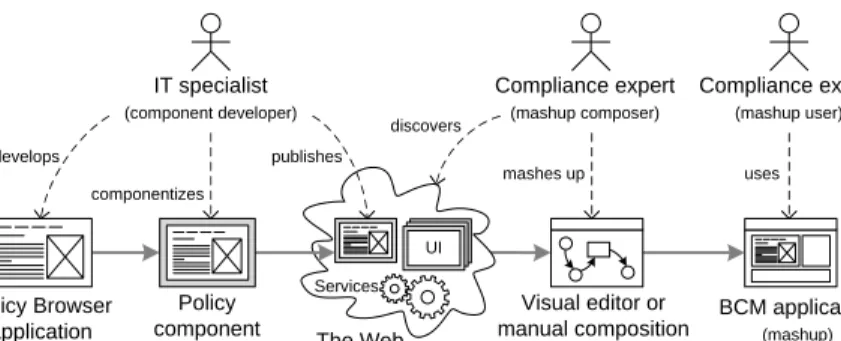
Fig. 1.Mashup scenario: developing, componentizing, and mashing up a component
identify the root cause of the problem (e.g., a business process). In order to populate the enterprise mashup system with the necessary components, the IT specialist wants to develop the necessary components for the mashup platform. The overall scenario is depicted in Figure 1, where we focus on the develop-ment of thePolicy component that will allow the compliance expert to browse the company-internal policies. The IT specialist (component developer) develops thePolicy Browserapplication (web application) with his preferred development tool and following his choice of methodology. Then he componentizes the ap-plication (UI component) and publishes it on the Web (or only internally to the company). The compliance expert (in the role of mashup composer) then discovers the components he is interested in, mashes them up (with amashup tool), and runs the BCM application (in the role ofmashup user).1
1.2 Research challenges and contributions
In this paper, we focus on the component developer in the above scenario and specifically aim at assisting him in the development of the web application, its componentization for mashups, and its publication. In this context, this paper provides the following contributions, which are also the main research challenges in developing reusable components for the Web:
– We define a UI component model and adescription language that abstract from implementation details and capture those features that characterize mashup components that come with an own UI (unlike web services or RSS/Atom feeds).
– We provide a simplemicro format [9] for annotating generic, HTML-based web applications with instructions on how to componentize the application according to our UI component model.
– We provide for thecomponentizationof applications by means of a generally applicable wrapping logic, based on the interpretation of descriptors and annotations.
1
We here assume that the compliance expert acts as both mashup composer and mashup user, though in general these are conceptually distinct roles.
– We show how componentized applications can be used as constituent el-ements in generic compositions together with components, such as SOAP and RESTful services, RSS/Atom feeds, and other UI components.
We next introduce the design principles that we think should drive the devel-opment of mashup components (Section 2), and propose our component model for mashup components (Section 3). In Section 4, we discuss how to componen-tize web applications and introduce our component description language and our micro format for component annotation. In the same section, we show how annotated applications can be wrapped in practice and also provide some com-ponent design guidelines. Finally, in Section 5 we discuss related works, and in Section 6 we conclude the paper.
2
Mashup components: development principles
From the development of our own mashup platform [8], we learned some prin-ciples that good mashups and mashup components should follow in order to succeed. Here we summarize the most important ones:
– Developers, not users: Developing good components is as tricky as develop-ing good applications. Therefore, we stress the importance that component developers be skilled web programmers, while users may assume the roles of both mashup composer and mashup user (see Figure 1).
– Complexity inside components: Components may provide complex features, but they should not expose that complexity to the composer or the user. The interfaces the composers (APIs) and the users (UIs) need to deal with should be as appropriate and simple as possible. The internal complexity of components is up to the component developer.
– Design for integration: A component typically runs in an integrated fashion in choreography with other components. Components that come with their own UI (in this paper we concentrate on this kind of components) should therefore be able to run inside a DIV, SPAN, or IFRAME HTML element without impacting other components or the mashup application (e.g., due to code collision problems).
– Stand-alone usability: A component’s executability and benefit should not depend on whether the component is integrated into a mashup application or not. Components should be executable even without any mashup platform available. This increases the return on investment of the component and also facilitates development (e.g., a component can be partly tested even without being mashed up).
– Standard technologies: In order to guarantee maximum compatibility and interoperability, a component should not rely on proprietary technologies. Especially for the development of components, we advocate the use of stan-dard technologies (mashup tools, on the other hand, may also use proprietary technologies, as they typically do not aim at re-usability).
User interface Event Operation mashArt component 0..N 0..N 0..N Name Name Reference 0..N output mandatory input Name Binding URL Type 0..N 0..N optional input 0..N 0..N mandatory input constant input optional input 0..N Constructor 0..N constant input Parameter Name Type Value <?xml version=“1.0” encoding=“utf-8” ?> <mdl version=“0.1“>
<component name=“Policy” binding=“component/UI” stateful=”yes” url=“http://mashart.org/ registry/234/PolicyBrowser/”> <event name=“PolicySelected”>
<output name=“policy” type=“xsd:string” /> </event>
<operation name=“ShowPolicy” ref=“showPolicy”> <input name=“policy” type=“xsd:string”></input> </operation>
<operation name=“ShowProcess” ref=“showProcess”> <input name=“proc” type=“xsd:string”></input> </operation>
<constructor>
<input name=“NumVisible” type=“xsd:integer”>5</input> <input name=“StartPolicy” type=“xsd:string” optional=”yes”></input> </constructor>
</component> </mdl>
(a) UML class diagram of the UI component model. (b) MDL descriptor of the Policy component. 1
1
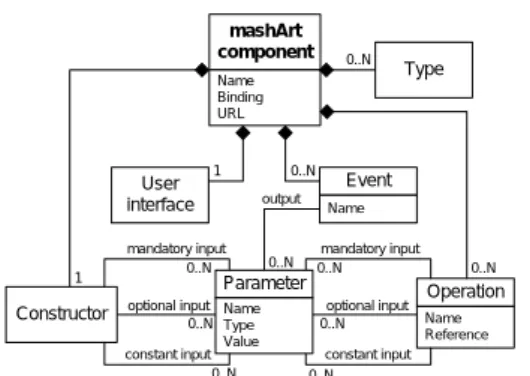
Fig. 2.The mashArt UI component model with an example of component descriptor
– Abstract interface descriptions: Similarly to WSDL for web services, com-ponent interfaces and their features should be described abstractly and hide their internal details from the composer and the user. Internally, components may then be implemented via multiple technologies and protocols.
We regard these principles as particularly important for the development of mashup components. The solutions proposed in the next sections aim at putting them into practice.
3
A model for mashup components
Mashups are typically characterized by the integration of a variety of differ-ent compondiffer-ents available on the Web. Among the most promindiffer-ent compondiffer-ent technologies we find, for example, SOAP/WSDL and RESTful web services, RSS/Atom feeds, and XML data sources. Most of these components rely on stan-dard languages, technologies, or communication protocols. Yet, when it comes to more complexUI components, i.e., mashup components that are standalone ap-plications with their own data, application, and presentation layer, no commonly accepted standard has emerged so far. We believe that a common high-level model for UI components might boost the spreading of mashup applications. Next we therefore present a component model that adequately captures the nec-essary features.
In Figure 2(a) we show the UML class diagram of our mashArt model for UI components. The main elements of the model are the user interface, events, and operations. The three elements allow us to explain our idea of UI component:
– User interface/state: The user interface (UI) of the component is the com-ponent’s graphical front-end that is rendered to the user. In this paper, we focus on components with standard HTML interfaces rendered in a browser, though technologies like Flash or Java Swing could be used as well. The
UI enables the user’s interaction with the component. In response to the user’s actions, the component may change its state (e.g., by navigating to another page of the application). For instance, our Policy component could provide the user with the details of a given policy upon selection of the policy from a list. The UI shown to the user can be interpreted as the state of the interaction (e.g., before selection vs. after selection).
– Events: By interacting with the component, the user provides inputs that are interpreted by the component. User actions are commonly based on low-level events, such as mouse clicks, mouse moves, key strokes, and similar, that depend on the input device used to interact with the UI (e.g., the mouse or the keyboard). For the purpose of integration, however, UI components should abstract from such low-level events and publish only “meaningful” events to other components, i.e., events that provide information about the semantics of the interaction (we call themcomponent events). Each time a user action, based on one or more low-level events, significantly changes the state of a component, a respective component event should be generated. In the case of thePolicycomponent, the selection of a policy from the list should, for example, launch a component event (e.g.,PolicySelected) informing other components about which policy has been selected.
– Operations: Not only the user should be able to change the internal state of a component. If a mashup comprises multiple components, these must typically be synchronized upon a user interaction with one of them, e.g., to align displayed content. Synchronization of components is one of the main features that characterize mashup applications (differently from traditional portals, which aggregate multiple portlets without however providing for their synchronization). Via operations, a UI component allows external ac-tors (e.g., other components) to trigger state changes. That is, operations allow the mashup application to propagate a user interaction from one com-ponent to other comcom-ponents by mapping events to operations, thus providing for the synchronization of component states. One particular operation, the constructor, is in charge of setting up the component at startup.
The synchronization of components is event-based. Events generate outputs (parameters), operations consume them. We propose to useparameters that are simple name-value pairs, in line with the structure of the query string in standard URLs. At the UI layer, synchronization does not require the transportation of large amounts of data from one component to another (this is typically handled by web services at the application or data layer). Component events with simple synchronization information (e.g., the name or the identifier of a policy) suffice to align the state of components that are able to understand the meaning of the event and its parameters. Custom data types might also be specified.
4
Componentizing web applications
The above component model proposes the idea of “web application in the small”, and abstracts the features of common web applications into the concepts of
Area Policy details Area Goals Rules Rule [Policy2Rule] Policies Policy [Goal2Policy] H Goals Goal Goal Goal details A Area ProcessesByPolicy Processes Process [Policy2Process] Policy Selected policy Policy OID Name Description Process OID Name Description Rule OID Name Expression Goal OID Goal 1:N 1:1 1:N 1:1 1:N 0:N (a) ER schema of
the Policy browser (b) WebML hypertext schema of the Policy browser. The gray annotation represents the logic of the Policy component to be developed.
Area PoliciesByProcess Policies Policy [Process2Policy] Process [Process.OID=OID] implied [Process.Name=proc] implied Process OID OID OID OID ShowPolicy(policy) ShowProcess(proc) PolicySelected(policy) PolicySelected(policy) OID Policy [Policy.OID=OID] implied [Policy.Name=policy] implied Policy details OID OID OID OID
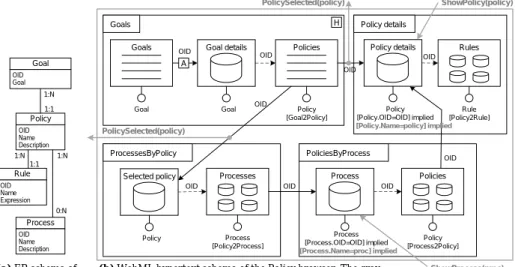
Fig. 3.WebML model of thePolicyapplication to be componentized
state, events, and operations. In this section, we show how this abstraction can be leveraged to componentize a web application in a way that reconciles the application’s standalone operation and it’s use as mashup component. In par-ticular, we propose three ingredients: (i) an abstract component descriptor in the mashArt Description Language (MDL), (ii) a micro format (the mashArt Event Annotation - MEA) for the annotation of the application with event in-formation, and (iii) a generic wrapper structure able to support the runtime componentization of the application according to (i) and (ii).
We show the different concepts at work in the componentization of thePolicy Browserapplication, which consists of a set of HTML pages. To easily describe the structure and logic of the application and to effectively highlight the concepts and constructs necessary for its componentization, in this paper we show the model of the application expressed according to the WebML notation [10] .
Figure 3(a) illustrates the WebML data schema that specifies the organiza-tion of the contents published by the Policy Browser application. Each policy consists of one or morerules and can be related to one or more business pro-cesses. Policies are classified according to the compliance goals regarding given legislations, laws, best practices, and similar.
Figure 3(b) shows the structure of the hypertext interface that allows one to browse the policies; the gray annotations represent the componentization logic, which we explain later. The schema specifies the pages that compose the appli-cation (the containers), the content units that publish content extracted from the application data source (the boxes inside the containers), and the links that enable both the user navigation (the arrows) and the transport of parameters (the labels) needed for the computation of units and pages.
The navigation starts from the home page Goals(identified by theHlabel), where the user sees a list of goals (Goalsunit) and, for each selected goal (Goal
details), a list of related policies (Policies unit). For each policy in the list, the user can navigate to the pagePolicy details, which shows the data of the selected policy (Policy detailsunit) and all the policy rules associated with it (Rulesunit). The user can also follow a link leading to the pageProcessesByPolicy, which shows a short description of the selected policy (Selected policy) plus a summary of all the processes (Processes) related with that policy. The selection of a process leads the user to the page PoliciesByProcess, which shows the process details (Processunit) and the description of all the policies (Policies unit) related with that process. By selecting a policy, the user then reaches thePolicy detailspage. Such WebML hypertext schema describes the structure of the web application as it is perceived by the human users of the application. Componentizing this application instead means providing a programming interface (API), which can be used by a mashup application to programmatically interact with it.
4.1 The mashArt Description Language (MDL)
In order to instantiate the component model described in Section 3, we use MDL, an abstract and technology-agnostic description language for UI components, which is similar to WSDL for web services. Given an application that we want to componentize, MDL allows us to define a new component, to describe which are the events and operations that characterize the component, and to define data types and the constructor. There is no explicit language construct for the state of the component, which therefore is handled internally by the component in terms of the UI it manages. However, MDL allows us to describe state changes in the form of events and operations. MDL is an extension of UISDL [8].
The gray annotations of the schema in Figure 3(b) highlight the events and operations of the Policy component we would like to derive form the Policy Browserapplication. We suppose that the selection of a policy from thePolicies unit in the Goals page corresponds to the eventPolicySelected that carries the parameterpolicy(i.e., the name of a policy). This event will be used to synchro-nize the state of other components in the final BCM mashup (e.g., the process browser), so that all components show related data. The two links departing from thePolicies index unit are both sources for this event: their navigation by a user implies the selection of a policy and, hence, launches the event.
OurPolicycomponent also exposes two operations. The operation ShowPro-cesssets the name of the process to be shown to the value of the parameterproc. The effect of this operation is the computation and rendering of the page Policies-ByProcesswith data about the selected process and its related policies. As repre-sented in Figure 3(b), this corresponds to a navigation to the page PoliciesByPro-cess, with the name of the process defined by the value of the proc parameter. When the operationShowProcessis enacted, the “implied” (optional) selector2 “Process.Name=proc” replaces the other implied selector “Process.OID=OID”,
2 In WebML, each unit inside a page is characterized by anentity of the data schema
plus aselector. The selector is a parameterized condition identifying the entity
which is instead based on the process OID transported by the user-navigated link entering the page. The operationShowPolicysets the name of the policy to be shown. Similarly to the previous operation, it enacts the computation and rendering of the pagePolicy detailswith the data about the policy identified by thepolicy parameter.
Figure 2(b) shows the MDL descriptor capturing this component logic. The XML snipped defines a UI component (binding attribute) named Policy, which is stateful and can be accessed via the URL in theurlattribute. We do not need any custom data types. The descriptor specifies the eventPolicySelectedwith its parameterpolicy and the two operations ShowProcessand ShowPolicy. Finally, the constructor specifies two parameters that allow the mashup composer to set up the number of policies visible at the same time and the start policy.
The descriptor in Figure 2(b) fully specifies the external behavior of our component. Of particular importance to the integration of a component is the ref attribute of operations: it tells us how to invoke operations. From the spec-ification in Figure 2(b), we know that the operation ShowProcess is invoked via the following URL: http://mashart.org/registry/234/PolicyBrowser/
ShowProcess?proc=name. With the descriptor only, we are however not yet able
to derive how to intercept low-level events and how to translate them into compo-nent events. As described in the next section, for this purpose we have introduced a novel technique, the mashArt Event Annotation, for annotating the HTML of the application pages.
4.2 The mashArt Event Annotation (MEA)
Operations are triggered from the outside when needed, events must be instead raised in response to internal state changes. The generation of component events is tightly coupled with user interactions, that is, with the actions performed by the user during the component execution. A runtime mapping of low-level UI events onto component events is needed, in order to filter out those low-level events that raise component events, while discarding other low-level events.
We specify this mapping in the mashArt Event Annotation (MEA) micro format, which allows us to associate component events with low-level events by means of three simple annotations that can be added to HTML elements in form ofattributes. Candidate HTML elements are all those elements that are able to generate low-level JavaScript (JS) events, such as click, mouse down, etc.). Table 1 summarizes the purpose of the three attributes, and gives examples about how they can be used to specify thePolicySelectedevent introduced above.
The event name attribute, if specified and nonempty, gives a name to the component event that can be raised by the HTML element carrying the attribute. There might be multiple HTML elements raising the same event, i.e., an event with the same name (e.g., the policy might be selected by navigating a catalog of policies or by selecting it from a list of “Recently violated policies”). It is the responsibility of the developer to assure that a same event is used with the same meaning throughout the whole application.
Table 1.Annotation elements of the mashArt Event Annotation (MEA) micro format
Attribute Purpose and description
event name Defines a component event and binds it to an HTML element. For
instance, the markup <A href=”...” event name=”PolicySelected”>
Privacy Policy </A>specifies an HTML link that, if navigated, may
raise thePolicySelectedevent.
event bindingBinds a component event to a JavaScript event. For example, we can
ex-plicitly bind thePolicySelectedevent to a click as follows:<A href=”...”
event name=”PolicySelected”event binding=”onClick”>Privacy Policy
</A>. Events are identified through the name of their JavaScript event
handlers (e.g., onClick for a click). Multiple bindings can be specified
by separating the respective JS event handlers with commas.
event par Specifies event parameters. A single event parameter is specified
as follows: <A href=”...” event name=”PolicySelected” event binding
=”onClick”event par=”policy=PrivacyPolicy”>Privacy Policy</A>.
Multiple parameter can be specified by separating them with &
sym-bols.
Theevent binding attribute allows the developer annotating the application to specify which JS event actually triggers the component event. That is, the event binding attribute specifies a binding of component events to native JS events. If no binding is specified for a given component event, the JS click event is used asdefault binding. This decision stems from the fact that in most cases we can associate events (and operations) with teh selection of hypertext links by means of mouse clicks.
Events may carry parameters that publish details about the specific event instance that is being raised. For example, ourPolicySelectedevent will typically carry the name (or any other useful parameter) of the selected policy. Ifmultiple parameters are required, this can be easily specified inside theevent parattribute using the standard URL parameter convention:paramter1=value1¶meter2= value2.... If an event can be raised by multiple HTML elements, it is the respon-sibility of the developer to guarantee that each event consistently carries the same parameters.
The generation of component events that do not derive from user interac-tions, and instead are based on somecomponent-internal logic (e.g., a timer or asynchronous AJAX events), can be set up via hidden HTML elements. It is enough to annotate the element as described above, and, when the component event needs to be fired, to simulate the necessary low-level JS event on the hidden element.
It is important to note that the values for event parameters can be generated dynamically by the application to be componentized the same way it generates on-the-fly hyperlinks. It suffices to fill the value of theevent par attribute. The values ofevent name andevent bindingtypically do not change during runtime, though this might be done as well.
opt
User HTML element Wrapper Execution framework
instantiate wrapper (DIV id, MDL) render element
Interact with element
launch JS event
get event name and binding
[event name not null and binding = JS event]
launch component event get event parameters
event name and binding
event parameters apply component CSS to DIV
alt
[else]
[source element = hyperlink and JS event = click] get source element of event
load HTML into DIV
load new HTML into DIV get href href Inte rpretatio n of low-level ev ents into co m p o nent events S tartup
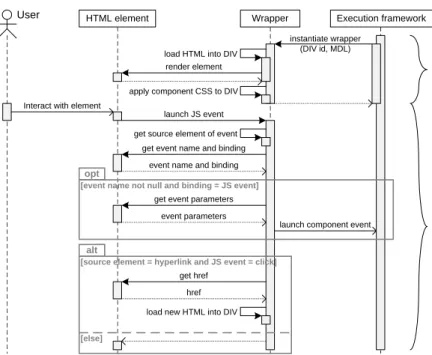
Fig. 4.Sequence diagram illustrating the wrapping logic for annotated applications
4.3 The runtime componentization logic
Once we have the MDL descriptor of the application and the application is an-notated accordingly, we are ready to componentize, i.e., wrap, the application. The result of this process is typically a JavaScript object/function (other tech-nologies, such as Flash or JavaFX, could be used as well) that provides program-matic access to the application, i.e., an API. The API renders the component’s UI, generates events, enacts operations, and allows for the “instantiation” of the component inside an HTMLDIV,SPAN, orIFRAMEelement (in the following we focus onDIVsonly). Given the MDL descriptor and suitable event annotations, the wrapping logic is simple and generic, as illustrated in Figure 4.
We distinguish between a startup phase and an event interpretation phase. Duringstartup, the execution framework (either the mashup application or any mashup platform) instantiates the wrapper by passing the identifier of the HTML DIV element that will host the UI of the component along with the MDL de-scriptor of the component. The wrapper loads the application into theDIVand applies the component’s CSS rules.
Theinterpretation of events is triggered by the user or by the internal logic of the component by generating a low-level JS event. Upon interception of such an event, the wrapper identifies the source element of the event and tries to access the event name and event binding attributes possibly annotated for the source element. If an event name can be retrieved and the binding of the event corresponds to the low-level event that has been raised, the wrapper gets the possible event parameters and launches the component event to the framework;
The original Policy browser application run as standalone application
The mashup application integrating the Policy browser as component The mashArt editor
Fig. 5.The componentizedPolicy Browserapplication running in the BCM mashup
otherwise, no action is performed. In order to support navigations, if a hyperlink element has been clicked, the wrapper loads the destination page into theDIV.
As discussed above, for the enactment of operations (state changes) the wrap-per interprets the owrap-perations as application URLs that can be invoked. Therefore, if an operation needs to be executed, the wrapper simply packs the possible in-put parameters into the query string of the operation and performs the HTTP request. The response of the operation is rendered inside theDIVelement.
Theimplementation of the outlined wrapper logic in JavaScript implies an-swering some technical questions. We here list the most important issues, along with the solutions we have adopted: In order to enable users to browse an ap-plication inside a DIV element, we intercept all JS events and check for page loading events. If such events occur, we take over control, load the new page via AJAX, and render it in theDIV. In order to intercept events, we set generic event handlers for the events we are looking for in the DIV. From a captured event we can derive the source element and its possible annotation. In order to load a page from a remote web server (JavaScript’s sandbox mechanism does not allow direct access), we run a proxy servlet on our own server, which accesses the remote page on behalf of the wrapper, a common practice in AJAX applica-tions. In order to handle CSS files when instantiating a component, we load the component’s CSS file and associate its formatting instructions to theDIV that hosts the component. In order to avoid the collision of JavaScript code among components, the wrapper, and the mashup application, we pack each component into an own object and instantiate it inside an isolated scope.
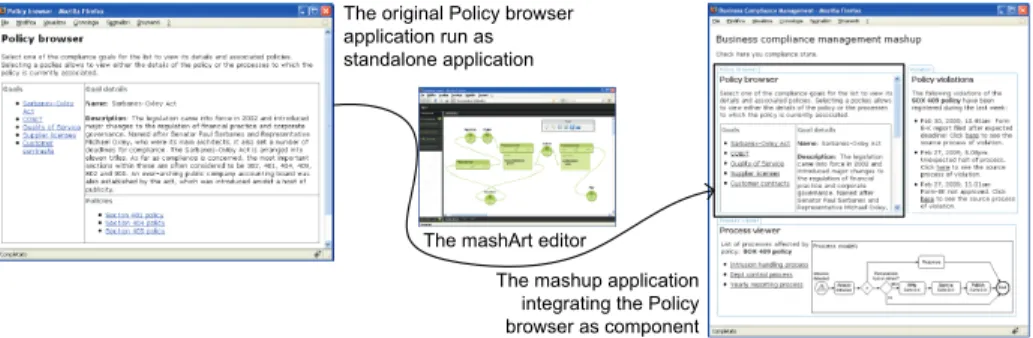
Figure 5 shows at the left hand side the Policy Browserapplication running in a browser. After componentization of the application for our mashArt plat-form, at the right hand side the figure shows the final result: the BCM mashup, which uses thePolicycomponent to synchronize other two components displaying compliance violations and affected process models.
4.4 Component development guidelines
The above approach shows how to componentize a web application starting from its HTML markup. In order for an application to support an easy and effective componentization, it is good that application developers follow a few rules of
thumb when developing applications: Thelayout of the application should sup-port graceful transformations, e.g., by discarding fixed-size tables or by providing for the dynamic arrangement of layout elements (floating). The use offrames is prohibited, if the developer aims at wide use of the final component.CSS style rules should focus on the main characteristics of the application’s appearance and foresee the cascaded integration of the component’s rules with the ones of the mashup application. For instance, absolute positioning of elements is depre-cated, and background colors, border colors, and similar should be inherited from the component’s container. Finally, JavaScript code (e.g., for dynamic HTML features) should be designed with integration in mind. For example, if HTML elements are to be accessed, it is good to access them via their identifiers and not via their element type, as, once integrated into a mashup application, other elements of the same type will be used by other components as well.
Actually, these guidelines apply the same way to the development of generic web applications. However, in the case of applications that are componentized, their violation might even stronger degrade the usability of the final component.
5
Related works
The current scenario in the development of mashup environments is mainly char-acterized by two main challenges [11]: (i) the definition of mechanisms to solve composition issues, such as the interoperability of heterogeneous components or their dynamic configuration and composition, and (ii) the provision of easy-to-use composition environments. All the most emergent mashup environments [2, 3, 7, 6, 5] have proposed solutions in this direction. However, very often they as-sume the existence of ready-to-use components, thus neglecting the ensemble of issues related to the development of quality components.
Some works concentrate on the provision of domain-specific, ready-to-use mashup components (see for example [12]) allowing developers to extend their applications with otherwise complicated or costly services. Some other works go in the direction of enabling the configuration ofvisualization widgets inside very specific programming environments (see for example [13]). The resulting contributions address the needs of very specific domains. In general, as can be observed in the most widely used mashup tools, there is a lack of support for the (easy) creation of components; more specifically, the componentization of web applications, as proposed in this paper, is largely uncovered.
Very few environments provide facilities for the creation of mashup com-ponents. For example, Microsoft Popfly [6] includes the so-called Popfly block creator, an environment for the definition of components (blocks in the Popfly terminology). Besides describing the block logic (properties and exposed oper-ations) in an XML-based format, the creation of a new block requires writing ad hoc JavaScript code implementing the component logic. This could prevent developers (especially those not acquainted with JavaScript) to build own blocks. Based on a different paradigm, Intel MashMaker [4, 5] also offers support for component creation. Users are enabled to personalize arbitrary web sites, by
adding on the flywidgetsthat provide visualizations of data extracted from other web sites. The approach is based on the concept ofextractors, which, based on XPath expressions formulated by developers, enable the extraction of structured data from a web page, from RDF data, or from the HTML code. Once extractors have been defined or selected from a shared repository (extractors can be shared among multiple users), MashMaker is able to suggest several ways in which data can be integrated in the currently visited page, for example in the form oflinked data (a preview of the source page is shown if a link to that page is included in the current page), or by using visualization widgets (simple text, images, dynamic maps, etc.). Visualization widgets can be selected from a shared server-side repository; alternatively users can create their own widgets, by defining web pages in (X)HTML and JavaScript. Each widget is then described through an XML-based configuration file that specifies information about the widget, including links to the HTML files providing for the widget’s visualization.
With respect to the Popfly solution, MashMaker proposes a more intuitive paradigm (from the users’ perspective) for the creation of components. However, both environments ask the developer to become familiar with their proprietary environments and languages. Also, the adopted description languages are based on models that work well only within their mashup platform. The solution pro-posed in this paper tries to overcome these shortcomings.
6
Conclusion
In this paper, we have shown that the development of mashup components does not mandatorily require mashup- or platform-specific implementations or com-plex, low-level concepts web developers are not familiar with. In some cases, it suffices to equip an HTML web application with an abstract component descrip-tor (MDL) and a set of event annotations (MEA), in order to allow everyone to wrap the application and use it as a component. The combined use of MDL and MEA allows one to derive a proper API toward a full-fledged application, unlike other approaches that rather focus on the extraction of data (e.g., MashMaker). The wrapper logic described in this paper is very general and can be easily implemented for a variety of mashup tools and platforms. In order to wrap an unlimited number of applications, it is enough to implement the wrapper once. Annotated applications can then be reused by multiple mashups, a feature that adds value to the original applications. The benefit for component developers is that they can use their preferred IDEs, web development tools, or programming languages and only need to abstractly describe and annotate their applications. The described technique intrinsically helps them to respect our principles for good mashup components.
A point to be highlighted is that conceptual modeling methods can easily be extended to allow component developers to annotate the conceptual models instead of the HTML code of an application. MEA annotations and MDL de-scriptors can then be generated from the models, along with the actual code of the application. This elevates the componentization concerns to a higher level of
abstraction – the one provided by the adopted conceptual model – and further speeds up component development. For instance, our first experiments show that generating MDL and MEA from WebML schemas is feasible.
It is important to note that the proposed approach also works if no annotation or description is provided at all. We can still wrap the application and integrate it into a composite application, without however supporting events and operations. Ad hoc events and operations can be managed by the mashup developer by extending the generic wrapper with additional code adding the necessary logic to the wrapped application from the outside.
As a next step, on the one hand we plan to develop an environment for the creation of mashup components as described in this paper, so as to guide the developer (or the skilled web user) in the description and annotation of existing web applications. On the other hand, we need to investigate further how to enable data passing of complex data structures (e.g., an XML file) and how to solve interoperability problems that might arise when integrating UI components with web services. We are however confident that the ideas introduced in this paper will accommodate the necessary extensions.
References
1. Yu, J., Benatallah, B., Casati, F., Daniel, F.: Understanding UI Integration: A
survey of problems, technologies. Internet Computing12(2008) 44–52
2. Yahoo!: Pipes. http://pipes.yahoo.com/pipes/(2009)
3. Google: Google Mashup Editor. http://code.google.com/intl/it/gme/(2009)
4. Ennals, R., Garofalakis, M.N.: MashMaker: Mashups for the Masses. In Chan, C.Y., Ooi, B.C., Zhou, A., eds.: SIGMOD Conference, ACM (2007) 1116–1118
5. Intel: MahMaker. http://mashmaker.intel.com/web/(2009)
6. Microsoft: Popfly.http://www.popfly.com/(2009)
7. IBM: Mashup Center.http://www-01.ibm.com/software/info/mashup-center/
(2009)
8. Yu, J., Benatallah, B., Saint-Paul, R., Casati, F., Daniel, F., Matera, M.: A Frame-work for Rapid Integration of Presentation Components. In: Proc. of WWW’07, ACM Press (2007) 923 – 932
9. Microformats.org: Microformats.http://microformats.org/about/(2009)
10. Ceri, S., Fraternali, P., Bongio, A., Brambilla, M., Comai, S., Matera, M.: De-signing Data-Intensive Web Applications. Morgan Kaufmann Publishers Inc., San Francisco, CA, USA (2002)
11. Makela, E., Viljanen, K., Alm, O., Tuominen, J., Valkeapaa, O., Kauppinen, T., Kurki, J., Sinkkila, R., Kansala, T., Lindroos, R., Suominen, O., Ruotsalo, T., Hyvonen, E.: Enabling the Semantic Web with Ready-to-Use Mash-Up Compo-nents. In: Proc. of “First Industrial Results of Semantic Technologies”. (2007) 12. Benslimane, D., Dustdar, S., Sheth, A.: Services Mashups: The New Generation
of Web Applications. IEEE Internet Computing12(2008) 13–15
13. Tummarello, G., Morbidoni, C., Nucci, M., Panzarino, O.: Brainlets: ”instant” Semantic Web applications. In: Proc. of the 2nd Workshop on Scripting for the Semantic Web. (2006)