Multimedia for Language Learning
byGeza Kovacs
S.B., Massachusetts Institute of Technology, 2012
Submitted to the Department of Electrical and Computer Science on May 24, 2013 in partial fulfillment of the Requirements for the Degree of
Master of Engineering in Electrical Engineering and Computer Science at the Massachusetts Institute of Technology
June 2013
Copyright 2013 Geza Kovacs. All rights reserved.
The author hereby grants to M.I.T. permission to reproduce and
to distribute publicly paper and electronic copies of this thesis document in whole and in part in any medium now known or hereafter created.
Author: ______________________________________________________________________ Geza Kovacs Department of Electrical Engineering and Computer Science May 24, 2013
Certified By: __________________________________________________________________ Robert C. Miller Professor of Electrical Engineering and Computer Science Thesis Supervisor May 24, 2013
Accepted By: _________________________________________________________________ Prof. Dennis M. Freeman Chairman, Masters of Engineering Thesis Committee
Multimedia for Language Learning
byGeza Kovacs
Submitted to the Department of Electrical and Computer Science on May 24, 2013 in partial fulfillment of the Requirements for the Degree of Master of Engineering in Electrical Engineering
and Computer Science.
Abstract
Students studying foreign languages often wish to enjoy authentic foreign-language content - for example, foreign-language videos and comics. Existing means of presenting this content,
however, are suboptimal from the perspective of language learning. We have developed a pair of tools that aim to help learners acquire the foreign language while enjoying authentic, foreign-language material. One tool is Smart Subtitles, which help learners learn vocabulary while watching videos. Our user evaluations have shown that Smart Subtitles help learners learn vocabulary more effectively than a popular approach for learning from video (dual subtitles). The other tool is a grammar visualization which illustrates the grammatical structure of sentences. This grammar visualization can be embedded into a number of language-learning applications. This includes a foreign-language manga reader we have built, which aims to help learners learn vocabulary, grammar and pronunciation while reading comics and manga. Our study for the grammar visualization shows that it helps monolinguals arrive at more accurate translations if we have an oracle taking the best translation of all, though there was no significant
improvement in the average translation quality.
Thesis Supervisor: Robert C. Miller Title: Professor
Table of Contents
Abstract... 2
Table of Contents ... 3
Chapter 1: Introduction ... 5
Chapter 2: Related Work ... 9
2.1 Existing Ways to View Foreign-Language Videos ... 9
2.2 Custom Visualizations aimed towards Language Acquisition ...11
2.3 Inserting words into Subtitles ...13
2.4 Grammar Visualizations ...14
2.5 Webpage Reading Assistance ...16
Chapter 3: Smart Subtitles ...20
3.1 Interface ...20
3.1.1 Navigation Features ...20
3.1.2 Vocabulary Learning Features ...23
3.1.3 Excluded Features ...26
3.2 Implementation ...27
3.2.1 Obtaining Subtitles for Videos ...27
3.2.2 Extracting Subtitles from Hard-Subtitled Videos ...30
3.2.3 Getting Words, Definitions, and Romanizations ...46
3.2.4 Translation-sense Disambiguation ...47 3.3 User Study ...51 3.3.1 Materials ...51 3.3.2 Participants ...51 3.3.3 Research Questions ...51 3.3.4 Study Procedure ...52 3.3.5 Results ...53
Chapter 4: Grammar Visualization ...60
4.1 User Interface ...60
4.1.2 Applications: Reading Assistant ...62
4.2 Implementation ...63
4.2.1 Obtaining Phrase Structures ...63
4.2.2 Phrase Translation ...65 4.2.3 Voice Synthesis ...66 4.3 User Study ...66 4.3.1 Participants ...66 4.3.2 Materials ...66 4.3.3 Conditions ...67 4.3.4 Procedure ...68 4.3.5 Results ...70 Chapter 5: Discussion ...74
Chapter 6: Future Work and Conclusion ...77
Bibliography ...79
Appendicies ...82
Appendix 1: Questionnaire ...82
Chapter 1: Introduction
Students studying foreign languages often wish to enjoy authentic foreign-language content. For example, many students cite a desire to be able to watch anime and manga in its original form as their motivation for starting to study Japanese. However, the standard presentations of content are not accommodating towards language learners. For example, if a learner were watching anime, and did not recognize a word in the dialog, the learner’s would normally have to listen carefully to the word, and look it up in a dictionary. This is a time-consuming process which detracts from the enjoyability of watching the content. Alternatively, the learner could simply watch or read a version that has already been translated to their native language to enjoy the content. However, they would not learn the foreign language this way.
We have produced a suite of tools to help people learn from authentic foreign language material. One is Smart Subtitles, shown in Figure 1.1, which is a video viewer aimed to help
foreign-language learners learn vocabulary while watching foreign-foreign-language videos. It includes various features aimed at helping learners learn vocabulary from dialogs, and to navigate the video to help them review lines of dialog.
Figure 1.1: The interface for Smart Subtitles. As can be seen from the bubbles, the interface provides features for both dialog navigation as well as vocabulary learning.
This thesis also describes algorithms developed to support the Smart Subtitles system. This includes an algorithm to extract subtitle texts out of videos, as well as a translation-sense disambiguation algorithm to determine the best translation of a word in the context of a sentence.
Our user evaluation for Smart Subtitles consisted of having users watch a pair of Chinese-language video clips, one with Smart Subtitles, and another with dual Chinese-English subtitles. After each viewing, we administered a vocabulary quiz. We found that users learned more vocabulary using our system, with no decrease in perceived enjoyability or comprehension.
The other system is a visualization to help learners understand the grammatical structure of a sentence, shown in Figure 1.2. The general usage aims are to help language learners learn
Figure 1.2: The grammar visualization displayed for a sentence.
This visualization can be embedded into a number of language-learning applications. This includes a foreign-language manga reader we have built, which aims to help people learn vocabulary, grammar, and pronunciation while reading comics and manga.
Figure 1.3: Our foreign-language manga viewer.
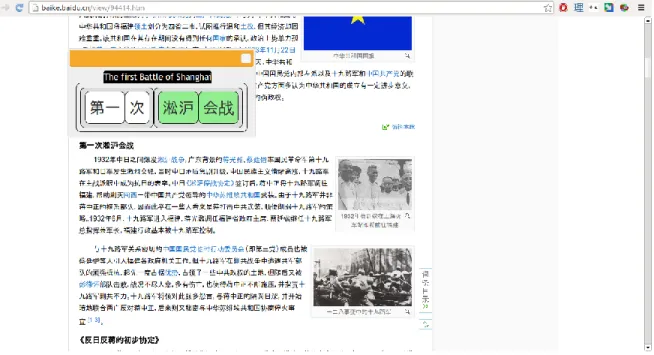
Another application we embedded our grammar visualization into is a foreign-language webpage reading assistant, which is a browser extension that allows users to click on any foreign-language sentence on a webpage, and have the grammar visualization appear, as seen in Figure 1.4.
Figure 1.4: Grammar visualization browser extension shows users the grammar visualization upon clicking on a foreign-language sentence in the webpage.
The evaluation of our grammar visualization focused on its ability to help novices (Mechanical Turk users who did not know Chinese, and whose native language was English) improve their comprehension of foreign-language sentences, relative to simply giving them a machine translation. Here, we measured comprehension by the quality of the translation that they are able to produce - thus making this a post-editing task. We observed a slight improvement in average translation quality when using our grammar visualization, relative to simply asking the users to correct the raw machine translation, or presenting them a visualization without the structural information, though the difference was not statistically significant. That said, if we take the highest-quality translation produced for each sentence in each category, then there is a significant improvement over the standard postediting condition. This suggests that our visualization can potentially improve users’ comprehension of sentences.
This work’s primary contributions show that:
● We can augment multimedia that is tailored towards entertainment purposes to make it educational material suitable for intermediate-level language learners.
● Our grammatical structure visualization can potentially scaffold even complete novices into comprehending and learning from foreign-language material.
Chapter 2: Related Work
2.1 Existing Ways to View Foreign-Language Videos
Videos in foreign languages are adapted for foreign audiences in many ways, which are illustrated in Figure 2.1:
One approach is dubbing, where the original foreign-language voice track is removed, and is replaced with a voice track in the viewer’s native language. Because the foreign language is no longer present in the dubbed version, this medium is ineffective for foreign language learning.
Another approach is to provide subtitles with the video. In this approach, the foreign-language audio is retained as-is, and the native-language translation is provided in textual format,
generally as a line presented at the bottom of the screen. Thus, the learner will hear the foreign language, but will not see its written form - therefore, they will need to pay attention to the audio. Subtitles have had mixed reactions in the context of language learning - some studies have found them to be beneficial for vocabulary acquisition, compared to watching videos without them [1]. That said, other studies have found them to provide no benefit to language learners in learning vocabulary [4]. Additionally, the presence of subtitles are considered to detract
attention from the foreign-language audio and pronunciation [2]. The mixed results that studies have found on the effects of subtitles on language learning suggests that their effectiveness depends on factors such as the experience level of the learners [6].
In addition to subtitling and dubbing, which are the most commonly used in the context of foreign media consumption for enjoyment, there are some additional presentation forms that have been experimented with in the context of language acquisition:
With a transcript (also referred to as a caption), the video is shown along with the text in the language of the audio (in this case, the foreign language). Transcripts are generally used to assist hearing-impaired viewers; however, they can also be beneficial to language learners for comprehension, particularly if they have better reading ability in the foreign language than listening comprehension ability [1]. However, transcripts are only beneficial to more advanced learners whose language competence is already near the level of the video [6].
With reverse subtitles, the video has an audio track and a single subtitle, just as with regular subtitles. However, the key distinction is that this time, the audio is in the native language, and the subtitle shows the foreign language. This takes advantage of the fact that subtitle reading is a semi-automatic behavior [5], meaning that the presence of text on the screen tends to attract people’s eyes to it, causing them to read it. Therefore, this should attract attention to the foreign-language text. The presentation of the foreign foreign-language in written form may also be helpful with certain learners whose reading comprehension ability is stronger than their listening
comprehension. That said, because the foreign language is presented only in written form, the learner may not end up learning the pronunciation, particularly with a language with a non-phonetic writing system, such as Chinese.
With dual subtitles, the audio track for the video is kept as the original, foreign language. However, in addition to the subtitle displaying the foreign-language, they also display the
viewer’s native language as well. In this way, a learner can both read the written representation, as well as hear the spoken representation of the dialog, and will still have the translation
available. Thus, of these options, dual subtitles provide the most information to the learner. Indeed, dual subtitles have been found to be at least as effective for vocabulary acquisition as either captions or subtitles alone [3]
Figure 2.1: An overview of the existing ways one might present a Chinese-language video to learners whose native language is English.
2.2 Custom Visualizations aimed towards Language Acquisition
The interfaces we previously listed are general-purpose: given a video that has audio and subtitle streams in the appropriate languages, one can produce any of these subtitling conditions using an appropriate video player software, such as KMPlayer [7].
There are additionally other visualizations which are designed to help language learners enjoy multimedia. However, these currently have to be generated in a time-consuming manner using video editing tools.
For example, karaoke videos often highlight the word that is currently being said, and display a romanization for languages such as Chinese which do not use the Latin script, as shown in Figure 2.2.
Figure 2.2: A translation, romanizations, and word-level karaoke highlights are presented in this video to assist non-native speakers. [11]
Both the word-level translations and romanized pronunciations shown in these example instructional videos provided inspiration for developing our own video-viewing interface.
2.3 Inserting words into Subtitles
GliFlix [30], shown in Figure 2.4, augments video subtitles for language learning. It begins with subtitles, and inserts translations to the foreign language for the most common words that appear in the dialog. They attain larger rates of vocabulary acquisition compared to regular subtitles (though not dual subtitles) in user studies. Because GliFlix presents the foreign vocabulary in the order of the viewer’s native language, this approach is likely ineffective for other language-learning tasks such as learning pronunciation and grammar. The system we will present takes the opposite approach to GliFlix. Instead of starting with a subtitle and inserting foreign-language vocabulary into it, we start with a transcript and attempt to help people
understand it. We believe that our approach is preferable, not only because it focuses attention on the foreign language, but also because it is usable without a human-generated translation to English.
2.4 Grammar Visualizations
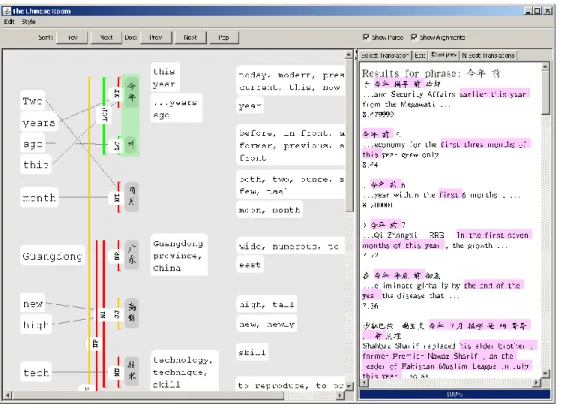
The Chinese Room [21], shown in Figure 2.5, is targeted towards helping monolinguals comprehend machine translations. It visualizes sentences by showing a word-by-word
alignment between the machine translation and the original sentence. However, this system has the disadvantage that visualizing a single sentence consumes the entire screen. Therefore, it is not suitable for usage as a drop-in replacement for the original foreign-language text, as it requires a context switch into a dedicated window to visualize an individual sentence. Many of its features, such as its visualization of the constituent parse tree, also require training and a background in NLP to comprehend. Indeed, they found that users with NLP experience performed better than ordinary users with their tool. Nevertheless, their user study found that users who had been trained to use the system demonstrated a gain in average translation quality relative to a baseline of simply post-editing a machine translation, at the expense of more than doubling edit times. However, the quality of the generated translations still lagged significantly behind translations generated by bilinguals.
users to select one of a number of possible translations for a given phrase, and uses this information to generate a machine translation. Because users are not actually generating the translation themselves, but are rather supplying information to the machine-translation system, this is not a general-purpose post-editing system. Additionally, because the system is based around applying syntactic rules to translate sentences, it can only be used with rule-based machine translation systems, whereas most state-of-the-art systems, such as Google or Microsoft’s, are statistical machine translation system. Unfortunately, no user study was performed on the quality of translations generated by users using this system.
Figure 2.6: DerivTool visualizing the rule-based derivation of a machine translation for a sentence.
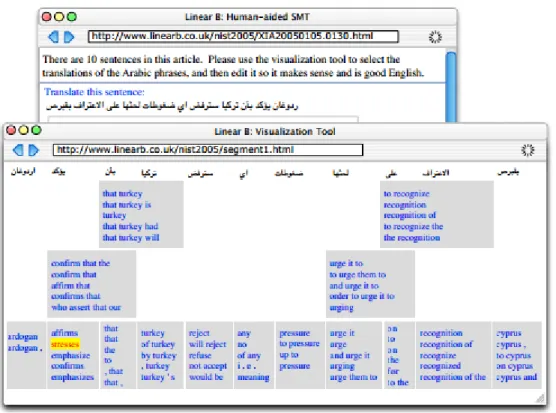
Linear B [29], shown in Figure 2.7, shows machine translations available for various spans of a sentence. It places the translations as spans underneath, in sections corresponding to the parts of the sentence that they translate. This visualization is perhaps the most intuitive to
non-experts of the ones discussed here, though it nevertheless still has the issue of requiring high levels of screen space. Unfortunately, while the paper proposes user studies for this interface, it does not actually report results.
Figure 2.7: Linear B visualizing a sentence.
2.5 Webpage Reading Assistance
A number of tools are available to help users comprehend or learn from foreign-language webpages. One is Froggy GX [32], shown in Figure 2.8, which helps non-native English readers skim English webpages. The target user level for Froggy GX is much higher than the ones we are aiming for; these users are assumed to already know English grammar, and simply need the tool to improve their skimming speed and compensate for occasional vocabulary deficits. Indeed, the participants in the user studies for Froggy GX had over a decade of experience learning English on average.
Figure 2.8: Froggy GX presents non-native English readers with translations and vocabulary to help them read.
Rikaikun [31], shown in Figure 2.9, is a Chrome extension that gives Japanese learners definitions for words as they hover over them in webpages. It is therefore particularly useful for learners who understand Japanese grammar, but encounter vocabulary or characters that they do not understand. That said, the system does not have any interface features geared towards visualizing or learning grammar.
Figure 2.9: Screenshot of the Rikaikun Chrome extension showing a word-level gloss on the Mainichi page.
This approach of providing word-level translations is quite prevalent among language-learning services. One such service is Duolingo [33], shown in Figure 2.10, where learners are often asked to translate sentences, and can get individual word-level translations by hovering over the word.
A common feature shared by all these approaches that rely on learners making grammatical inferences from word-level translations is that the sentences that are used for teaching must be relatively simple. Otherwise, the learner will not be able to comprehend the sentence and how the words relate to the overall meaning. Our grammar visualization addresses this issue by explicitly breaking down complicated sentences into short, simple phrases, on which the grammatical inference problem of relating words to phrases is less difficult for learners.
Chapter 3: Smart Subtitles
3.1 Interface
We developed a video viewing tool, Smart Subtitles, which displays subtitles to language learners to enhance the learning experience. It does so by providing support for dialog-level navigation operations, as well as vocabulary-learning features, which are shown in Figure 3.1. Smart Subtitles can be automatically generated for any video, provided that a caption is available.
3.1.1 Navigation Features
The navigation features of our interface were developed based on foreign language learners’ video viewing patterns. In various informal interviews conducted with fellow language learners who enjoyed watching subtitled foreign-language videos for learning purposes, they reported that they often reverse-seeked to the beginning of the current line of dialog to review the portion that had just been said. Therefore, we aimed to make this process as seamless as possible. In our interface, clicking on a section of the dialog will seek the video to the start of that dialog, as shown in Figure 3.2.
Figure 3.1: The interface for Smart Subtitles. As can be seen from the bubbles, the interface provides features for both dialog navigation as well as vocabulary learning.
Another activity that some language learners reported doing was attempting to locate the line of dialog where a particular word or phrase had been said. Therefore, we enable easy seeking through the video based on dialog. The transcript is prominently shown, and can be navigated by pressing the up/down keys, or scrolling. It is also possible to search the video transcript for occurrences of particular words, as shown in Figure 3.3.
Figure 3.3: Smart Subtitles allows the user to scroll through a full transcript of the video to navigate the video. Additionally, the transcript can be searched for particular words or phrases,
to locate their occurrences in the video.
3.1.2 Vocabulary Learning Features
The vocabulary learning features of our interface are aimed towards the use case where the viewer encounters an unknown word, and would like to look up its definition. The interface allows a user to hover over any word, and it will show the definition.
In addition, for languages such as Japanese and Chinese, which have non-phonetic writing systems, the interface also shows the phonetic representations for learners. For Chinese, it
shows pinyin, the standard romanization system for Chinese, as shown in Figure 3.4. For Japanese, it shows hiragana, the Japanese phonetic writing system, as shown in Figure 3.6.
Figure 3.4: Smart Subtitles showing pinyin for words.
For Chinese, when displaying pinyin, the pinyin is colorized according to the tone, to help make it more visually salient and memorable. The color scheme for tone colorization is based on the one used in the Chinese through Tone and Color series [8]:
Figure 3.6: Smart Subtitles showing hiragana, the Japanese phonetic writing system, for words. In this case, the さいごに displayed above the 最後に indicates that this word should be pronounced “saigoni”. The software additionally has an option to display in romanized form, but
we display hiragana by default as it is the phonetic form that is generally presented, both in authentic materials, such as Japanese children’s books, in and foreign-language-learning
materials
Finally, it may be the case that some sections of the dialog are idiomatic expressions that word-level translations will not be sufficient to comprehend. For example, just as English has idioms like “kick the bucket”, Chinese and Japanese have 成語 (set expressions). An example is 弱肉 強食, literally, weak-food-strong-eat, meaning “survival of the fittest”. The full meaning of these set expressions cannot readily be determined from a word-level translation. Additionally, there may be certain grammatical patterns or grammatical particles whose meanings the learner has not yet learned, making such phrases difficult for learners to comprehend.
To address these cases where the word-level translations will not be enough for the learner to comprehend the dialog, we include an option for the learner to get a full translation for the
phrase, by pressing a button, as shown in Figure 3.7. The phrase-level translation can be obtained from a subtitle track in the viewer’s native language if it was supplied, as in the case when we have a video with Chinese audio and we have both English and Chinese subtitles available. Alternatively, if we only have a transcript available, and not a subtitle in the viewer’s native language, we rely on a machine translation service to obtain a phrase-level translation. Either Microsoft’s or Google’s translation service can be used. A later version of our interface, described in Chapter 4, describes an alternative way to address the unknown-grammar problem.
Figure 3.7: If the user clicks on the 翻译 (translate) button, a full translation for the current line of dialog will be displayed.
3.1.3 Excluded Features
We also developed various additional features, but opted to disable them based on negative user feedback during pilot testing.
One excluded feature was pausing the video automatically when the user hovered over a word. This was intended to give viewers additional time to read the definition. However, users
remarked that it was distracting to have the video playback be interrupted, and seemed to significantly reduce their usage of the vocab-hover feature when this was enabled.
Another excluded feature was the integration of speech synthesis into the vocabulary hover feature. Namely, after a second of hovering over a given word while the video was paused, the pronunciation would be provided. This was intended to assist learners who might not yet be sufficiently familiar with the phonetic writing systems (pinyin or hiragana) of the foreign language, and could not discern the pronunciation from the audio, due to fast or incoherent speech.
However, users remarked that the automatic audio playback feature was distracting and redundant given the pinyin display, and so we disabled it.
3.2 Implementation
Our system needs 2 sets of text-format subtitles: one in the original language of the video, and one in the viewer’s language. We first describe systems we implemented to obtain these text-format subtitles from common video sources. Then, we will describe the process of generating the word-level annotations from the text-format subtitles.
3.2.1 Obtaining Subtitles for Videos
Subtitles for videos are available in a number of formats. They can be divided into the 3 categories: text-based subtitles, bitmap-based subtitles, and hard subtitles.
Text-based subtitles
Text-based subtitles, also often referred to as soft subtitles, consist of text, with an associated timestamp for when they should appear on the screen. Factors such as rich-text formatting and positioning of subtitles are controlled by keywords provided in headers or particular tags. Examples of these formats include the SRT (SubRip) and WebVTT (Web Video Text Tracks) [13] formats. Text-based subtitles are the most convenient subtitle format from the perspective of computer-based processing, because the text content of them is directly machine-readable. Generally, text-based subtitles are available for download from online video-streaming sites, such as Amara or Viki.
In the SRT subtitle format, every block of 3 lines in the subtitle represents a line of dialog. The first line is the subtitle number, the second line is the start and end time of when this line will be displayed in the subtitle, and the third line is the text itself which will be displayed. An example is shown in Figure 3.8.
1
00:00:20,000 --> 00:00:24,400
Altocumulus clouds occur between six thousand 2
and twenty thousand feet above ground level.
Figure 3.8: Example of an SRT format subtitle. This example displays the line “Altocumulus clouds occur between six thousand” from 20 thru 24 seconds in the video, and the line “and
twenty thousand feet above ground level.” from 25 through 28 seconds in the video. The WebVTT format is similar to SRT, except that it requires a line “WebVTT” as the first line in the file, does not require the initial subtitle numbers, and it permits a limited set of HTML tags within the subtitle for formatting purposes. These tags include formatting tags, such as the <i> tag to indicate that <i>Laughs</i> should be italicized, as well as tags to provide semantic information, such as the <v> tag to indicate the current voice / speaker. An example is shown in Figure 3.9.
WEBVTT
00:18.000 --> 00:20.000
<v Roger Bingham>And with me is Neil deGrasse Tyson 00:20.000 --> 00:22.000
<v Roger Bingham>Astrophysicist, Director of the Hayden Planetarium 00:22.000 --> 00:24.000
<v Roger Bingham>at the AMNH. 00:24.000 --> 00:26.000
<v Roger Bingham>Thank you for walking down here. 00:27.000 --> 00:30.000
<v Roger Bingham>And I want to do a follow-up on the last conversation we did.
00:30.000 --> 00:31.500 align:end size:50% <v Roger Bingham>When we e-mailed—
00:30.500 --> 00:32.500 align:start size:50%
<v Neil deGrasse Tyson>Didn't we talk about enough in that conversation? 00:32.000 --> 00:35.500 align:end size:50%
<v Roger Bingham>No! No no no no; 'cos 'cos obviously 'cos 00:32.500 --> 00:33.500 align:start size:50%
<v Neil deGrasse Tyson><i>Laughs</i> 00:35.500 --> 00:38.000
A final type of widely-used text-based subtitle are Closed Captions, which are often included in broadcast television. However, they are transmitted over-the-air and are generally converted into one of the above textual subtitle representations when captured by video capture cards.
Bitmap Formats
Bitmap formats do not include the machine-readable representation of the subtitle text. Rather, they are pre-rendered versions of the text which are overlayed onto the video when playing. Thus, they consist of a time-range associated with a bitmap image. Bitmap formats are the standard format used in DVDs, because it allows DVD producers to provide subtitles with arbitrary formatting in any language, while allowing the DVD player manufacturers to avoid providing fonts covering every possible character used in every possible writing system, in every possible font style that a DVD producer might require.
The particular bitmap-based subtitle format used in DVDs is called VobSub. It consists of an index file that indicates the timestamp at which each new subtitle should be displayed, as well as the offset in the subtitle-bitmap file at which the bitmap that should be displayed at that time is located. Figure 3.11 shows an example index file.
# VobSub index file, v7 (do not modify this line!) #
size: 720x480
palette: 000000, 000000, 000000, 000000, 000000, 000000, 000000, 000000, 000000, 000000, 000000, 000000, 000000, cccccc, 000000, 000000
# ON: displays only forced subtitles, OFF: shows everything forced subs: OFF
# Language index in use langidx: 0
id: en, index: 0
timestamp: 00:00:00:022, filepos: 000000000 timestamp: 00:04:59:732, filepos: 000000800 timestamp: 00:05:01:029, filepos: 000001000 timestamp: 00:07:05:792, filepos: 000001800 timestamp: 00:07:05:814, filepos: 000002000 timestamp: 00:14:02:508, filepos: 000002800
Of course, because the text of bitmap-based subtitles cannot be readily read from the index file, our system needs a pre-processing step in which it extracts the textual content from these subtitles. In practice, this is implemented as a separate program which converts the extracted index and bitmap files to an SRT-format subtitle. For each bitmap associated with each timestamp this program first applies OCR (Optical Character Recognition), a process which extracts text from images, to extract out the text. Then, it combines the text with the timestamps indicated in the index file to generate an SRT-format subtitle. Our implementation uses
Microsoft OneNote [42] as the OCR engine, via the Office Automation API [43]. We chose OneNote due to its high OCR accuracy on Chinese-language subtitles. However, the free Tesseract [44] OCR engine can also be used instead.
Hard Subtitles
Yet another way that subtitles may be provided is via hard subtitles. Hard subtitles include the subtitle as part of the video stream. This approach has the advantage that it has no software requirements whatsoever to be used - any player that can play video, will also be able to display the hard subtitles (since they are part of the video). Of course, this approach has the
disadvantage that they are non-removable. Additionally, hard subtitles are the most difficult to get machine-readable text out of, because the subtitle must first be isolated from the
background video, before we can apply OCR to obtain the text. That said, hard subtitles are ubiquitous, particularly online - videos of Chinese-language dramas on video-streaming sites such as Youku are almost always accompanied by a hard-subtitled set of subtitles. Thus, in order to allow our system to be used on these types of videos as well, we have devised an algorithm which can nevertheless identify the subtitle from hard-subtitled videos and extract it out, which is described in the following section.
3.2.2 Extracting Subtitles from Hard-Subtitled Videos
Summary
Subtitle extraction from hard-subtitled videos is a challenging task. It aims to extract text from the video, which is in an unknown font, in an unknown color, at an unknown region of the screen.
Extracting the subtitles from a hard-subtitled video consists of the following general steps:
1) Identify the frames in which a subtitle actually appears
2) For the sets of frames on which a subtitle is displayed, isolate out the regions with text 3) Apply OCR to get the text.
These general stages are not as clearly separated in practice as we have described. For example, if in the 1st stage we mistakenly select a frame in which a subtitle doesn’t exist, the failure of the OCR process in the 3rd stage will allow us to correct this error.
Manual Process
There exist a few tools which assist with the hard-sub-extraction procedure, though they require human intervention to be used, and therefore cannot be directly compared to our
fully-algorithmic approach. One such tool is SubRip (the same tool after which the SRT format is named).
The screenshots used in the following overview of the hard-subtitle extraction process via SubRip are from [40].
When using SubRip to extract subtitles out of hard-subbed videos, the user first specifies a box in which the subtitles are expected to appear, then scans through the video until he finds a frame where a subtitle appears, as shown in Figure 3.12.
Figure 3.12: Using SubRip to seek to a region of the video that contains subtitles, and marking the region where the subtitle appears.
Next, the user specifies the color of the subtitle. This eliminates pixels which are not of that color or similar to it, as shown in Figure 3.13.
Figure 3.13: Using SubRip to specify the subtitle color.
Finally, the user specifies the boundaries of the particular lines in the subtitle. This eliminates extraneous pixels which happen to be of the same color, but are outside the subtitle boundary, as shown in Figure 3.14.
Figure 3.14: Using Subrip to specify the boundary of the subtitle.
After this process, we have isolated the subtitle text from the rest of the video in this frame. We now have an image on which we can apply OCR, as shown in Figure 3.15. SubRip’s
implementation uses a template-based matching system which is font-specific, and does not work on languages using non-Llatin scripts, such as Chinese or Japanese. However, one could, in principle modify it to use a general-purpose OCR engine such as OneNote’s.
Figure 3.15: Image following SubRip’s subtitle isolation process, on which OCR can then be applied.
Thus, as we can see, the process of doing subtitle extraction from hard-subbed videos using tools such as SubRip requires high amounts of manual intervention, and so we opted to develop a system which will automate many of these processes.
Our Implementation
Our implementation makes a few assumptions about subtitles which we have found generally hold true in the Chinese-language hard-subbed material we have observed:
1) Subtitles in the same video are of the same color, with some variance due to compression artifacts.
2) Subtitles in the same video appear on the same line.
3) Subtitles appear somewhere in the bottom vertical quarter of the screen.
4) Subtitles are horizontally centered. This approach will not work unmodified with subtitles that are left-aligned.
5) Subtitles do not move around and are not animated, and will remain static on-screen for a second or more to give the viewer time to read them.
6) Characters in the subtitle generally have the same height. This is a Chinese-specific assumption, as Chinese characters are generally of uniform size.
7) Characters in the subtitle have lots of corners. This is also a Chinese-specific assumption, owing to the graphical complexity of Chinese characters.
The steps that our implementation uses to extract the subtitles are:
1) Determine a small region of the video in which some part of the subtitle is most likely to be present
2) Determine the color of the subtitle
3) Determine the vertical span of the subtitle line
4) Eliminate connected components spanning outside the subtitle (disabled feature) 5) Determine the horizontal span of the subtitle line
6) Restrict to pixels which remain static across frames
Figure 3.12: The result of applying a corner detector to the top image. As we can see, Chinese characters have many corners, which make the corner detector an effective means of detecting where the Chinese characters are. Extracting out the white-colored pixels that are near corners
results in the bottom image, which the OCR engine is able to extract text out of. Finding a region of the video where subtitles are likely present
The first step our tool makes is to determine a small region of the video where subtitles are definitely believed to be present. This will be used in later stages to determine the color of the subtitle, and the frames in which subtitles are present. The size of the region we aim to find is 1/32 of the vertical size of the video, and 1/4 of its horizontal size.
To find this region, the algorithm first vertically crops the video to the bottom quarter, making use of our assumption that the subtitles are somewhere towards the bottom. It also horizontally crops the video to the middle quarter, making use of our assumption that subtitles are
horizontally centered. The, it runs a corner detector across the frames of the video. The corner detection is done via the Harris corner detector [45], implemented in OpenCV [46]. As shown in Figure 3.12, the corner detector has high values at regions where Chinese characters are present, due to their graphically complex nature. Then, for each of the frames, the algorithm splits it vertically into 8 regions, and in each of these regions it computes the sum over the corner detection values. It then selects the region where this value is maximized across all frames. Thus, at the end of this process, we have determined the 1/32 vertical region in which we believe a subtitle is most likely to be present.
Determining the color of the Subtitle
Next, we determine what the color of the subtitle will be. We do this by considering the 1/32 by 1/4 region in which the subtitle is believed to occur. Within this region, over all frames, we consider all pixels near the regions where the corner detector output high values (which we believe to be the pixels at which the Chinese characters are), and tally the colors of these pixels. We ignore black or near-black color values, because the interior of subtitles are almost always in a light color, and we wished to avoid getting the color of the subtitle outline or background instead of the subtitle itself. Colors are rounded to the nearest 12-bit value, meaning that there are 16 possible values for each of the red, green, and blue color channels. We round colors to these values, as opposed to considering them in their original 24-bit colorspace, because compression artifacts and slight gradient effects within the subtitle will result in the color value being slightly different between pixels.
Determining the vertical span of the subtitle line
One might assume that, once we have determined the subtitle color, we can simply extract out the pixels that roughly match that color to isolate out the subtitle. However, this will result in high levels of noise, particularly if parts of the background match the subtitle color. For example, for the image in Figure 3.12, extracting out the pixels which roughly match the subtitle color results in an image with extraneous artifacts:
Figure 3.13: Simply extracting out the pixels which match the subtitle color results in an image with extraneous artifacts.
For a more extreme set of examples, we can consider the image in Figure 3.14, where the results of simply extracting out pixels which roughly match the subtitle color will clearly not be OCR-able:
Figure 3.14: Simply extracting out the pixels which match the subtitle color results in an image with extraneous artifacts.
If we also apply our near-corners criterion in addition to the color restriction, we can eliminate some of the noise, but not all of it, as shown in Figure 3.15.
Figure 3.15: Restricting pixels to those that both match the subtitle color and are near corners reduces extraneous artifacts, but does not always eliminate them.
Top: original image Middle: corner detection results
Bottom: pixels which match the subtitle color and are near corners
To reduce the amount of noise further, we therefore wish to make use of additional cues based on knowing that subtitles have uniform height, which the subtitle text does not extend above or below. To do so, we must first determine what the height of the subtitle is.
Let us define hot pixels, or pixels where we believe a subtitle is likely present, as pixels that match the subtitle color and are near corners. Our algorithm works by first restricting attention to those frames in the video where a subtitle is likely to be present. These are the 1/2 of frames that contain the most number of hot pixels, as we assume that subtitles are present in less than half of the frames. Next, we find the vertical section of the subtitle that maximizes the ratio of total number of hot pixels encompassed to the height of the area. We add a small bonus for each additional percentage of the height introduced, to ensure that the selected region will encompass as large a portion of the subtitle as possible. At this point, we have identified the vertical region in which the subtitle is present, so we eliminate the hot pixels which fall outside this vertical span.
Eliminate connected components which extend outside the subtitle boundary (disabled feature) Another observation we can make is that individual letters in the subtitle also often have some form of shadow or border that separates them from the background. Therefore, if we are considering a blob of subtitle-colored pixels, if it extends outside the vertical region in which the subtitle is supposed to be in, then it probably is not a letter but rather part of the background.
These “blobs” of continuous-color regions are generally referred to as connected components, shown in Figure 3.16. We can efficiently find connected components using connected
component labelling algorithms [47].
Figure 3.16: An illustration of connected components. The bottom image displays each connected component present in the top image in a unique color.
After finding the connected components, we consider the topmost and bottommost portions of each connected component, and if it falls outside the subtitle boundary, then we assume that the connected component is not a letter, and therefore eliminate all pixels that are present in it.
That said, this approach crucially depends on there existing a distinct outline of a different color around the subtitle. We found that in certain videos, this is not present, resulting in this stage eliminating parts of the letter, as displayed in Figure 3.17:
Figure 3.17: The 亻 part of 你 was eliminated as part of the connected component-based elimination process, which will cause an OCR error later on. (尔 is a different character from 你) Therefore, because of the errors it introduces when subtitles lack a border, and the fact that this noise can be eliminated in later stages as well, we opted to disable this connected-component based feature in our final algorithm.
Determine the Horizontal Span of the Subtitle Line
At this point, we have identified the vertical strip in which the subtitle is located, as well as the subtitle color, and have eliminated pixels falling outside the subtitle’s vertical region. Now, we can eliminate some additional extraneous pixels that might be at the sides by identifying where the subtitle is horizontally located, as shown in Figure 3.18. To do this, we take advantage of our assumption that the subtitles are horizontally centered, and apply the same methodology as we did for identifying the vertical subtitle span. We start at the middle, expanding equally
of hot pixels encompassed to the width of the area. As before, we give a small bonus for each additional percentage of width introduced, to ensure that the selected region will encompass as large a portion of the subtitle as possible. At this point, we can eliminate the hot pixels that fall outside this horizontal region.
Figure 3.18: Determining the horizontal span of the subtitle further eliminates some extraneous pixels.
Top: original frame
Middle: hot pixels that fall within the detected vertical subtitle boundary Bottom: hot pixels that fall within the vertical and horizontal subtitle boundaries Restrict to Pixels which remain static across frames
The noise-reduction algorithms we have described thus far mostly operate within the same frame, with the exception of determining the subtitle color and vertical position, which is
computed over multiple frames. However, we can additionally take advantage of the fact that a subtitle will remain on-screen for at least a second so that a reader will have time to read it, over which multiple frames will occur. At 30 frames per second, this would be over 30 frames. Thus, since the background in videos may change, but the pixels for the subtitle itself will remain constant, this is an additional cue that we can use to further eliminate extraneous pixels, as shown in Figure 3.19.
Figure 3.19: An example of why it is useful to consider multiple frames: these 2 frames both have the same text, but the second frame will have less extraneous noise after applying the noise-removal steps we described above. The pixels shared by both frames are the pixels that
make up the subtitle text.
First, we wish to group together frames which we believe have the same subtitle text showing in them. To do so, we compute between each pair of frames a similarity metric: the number of hot pixels which remain preserved between the frames, divided by the maximum of the number of hot pixels in either of the two frames. This is therefore a metric between 0 and 1; if the value is above 0.5, we consider the two frames to have the same subtitle text. By computing this metric on each consecutive frame, we can determine where the subtitle transitions occur, and thereby group together the subtitles which are common. Note that we did not have any explicit step in determining whether a frame actually contains subtitles in the first place. We will act as though they do for the time being, and eliminate those groups that don’t contain a subtitle in later stages.
Now that we have grouped together frames containing the same subtitle text, we now wish to determine a representative image from these which will yield good results when OCR-ed. Since our OCR process is slow, it is unfortunately not feasible to simply try to OCR each frame and eliminate the bad frames based on the OCR output.
One might attempt to simply take the intersection of all of them, leaving only the pixels that are shared in common. However, as we showed earlier, some of our heuristics eliminate pixels which actually are part of the subtitles in certain conditions, so taking an intersection will lead to suboptimal results, as shown in Figure 3.20.
Figure 3.20: This figure illustrates why we should not simply take an intersection over all frames to determine the final set of pixels which we will use for OCR. On the first image, applying our
subtitle-isolation heuristics in isolation results in a good set of pixels that can be OCR-ed to obtain the subtitle. However, our subtitle-isolation heuristics perform poorly on a later frame (third image), so simply taking the pixels which are in common across all frames will result in a
set of pixels which are unusable for OCR.
The approach we opted for is to take the average of the pixel values. This is done after converting to greyscale and inverting the color, since the OneNote OCR engine appear to function best on black-on-white, as it is the usual color scheme of scanned, printed documents. However, this results in the various noise artifacts that appeared in only a handful of images still appearing faintly in the final image, which we found to cause issues at the OCR stage.
Therefore, as a final post-processing step before passing the image to the OCR engine, we eliminate any hot pixels which only appeared in less than 1/4 of all of the frames, convert the color scheme to black-on-white, and increase the contrast ratio, as shown in Figure 3.21.
Figure 3.21: The end result of applying our algorithm on a set of frames. The final output is OCR-able.
Run OCR on the remaining frames to extract out the text content of the subtitles
At this point, we have a characteristic image containing the text in each of our groups of frames. Now, we run OCR (Optical Character Recognition) on each of them to extract out the text content from the images. A number of OCR engines are available, including Tesseract [44], an open-source engine. However, we choose to use OneNote [42] because it is the most
affordable engine which has good recognition results on Chinese and Japanese subtitle text.
Eliminate Duplicates and False Positives, and output Final Subtitles
Now, we have the OCR output for each of the frame groups, which we need to do some post-processing on before we can output it into an SRT-format subtitle. First, we take the frame groups for which the OCR system was unable to detect text, and eliminate them (we assume that these were sections of the video where no subtitle was shown). Then, we take adjacent frame groups, and compare whether the OCR output was identical; if so, we merge them. Finally, we output the text and timestamps as part of the SRT file.
Evaluation
To evaluate this system, we tested the hard-sub extraction process on a 4 hard-subbed Chinese videos. As we did not have access to reference subtitles for these videos, and generating them manually would be prohibitively expensive, our observations will be mostly qualitative. Results
depend heavily on the video resolution and font. The system generally tended to work better on higher-resolution videos, and videos whose fonts tended to be thicker.
On one of the videos, the subtitle-color detection portion of the algorithm detected the wrong subtitle color, selecting the color of the grey subtitle outline rather than the white interior.
Because the incorrect subtitle color was detected, the resulting subtitles were entirely incorrect. For videos such as these, the option to manually override the algorithm for certain critical sections, such as the color selection, would be helpful.
On the remaining videos, the detection of the subtitle color and region was correct. Most errors resulted from OneNote reporting that no text was detected on images that had extraneous noise, such as the one in Figure 3.22. This issue could potentially be resolved if we were able to
customize the OCR engine to aim for a higher recall score, and attempt to recognize noisy characters. This issue was the most common of all, and occurred on roughly 10-30% of the dialogs, depending heavily on the video. Videos with white subtitles and white backgrounds, such as snow and actors wearing white clothing, tended to have the most noise.
Figure 3.22: OneNote’s OCR engine will often not produce any output for images that have extraneous noise
Our system would also sometimes eliminate thin parts of characters that were in straight sections, far from corners. This likewise leads to OneNote not producing any OCR output. This issue occurred primarily in low-resolution videos. Addressing this issue may require us to adjust parameters to ensure the algorithm features related to corner proximity are independent of subtitle thickness and video resolution.
Figure 3.23: In the second character, the middle-bottom strokes were apparently too far from corners, and were eliminated, leading to an OCR error
The level error rate was quite low in the dialogs we looked at. Generally, character-level errors were restricted to a handful of characters which were repeatedly misrecognized. For example, in one video, 天, a common character meaning sky or day, was repeatedly
misrecognized as 夭. This is, of course, an issue of the OCR system, which we cannot address.
Our assumption of a uniformly colored, horizontally centered subtitle location did not always hold outside the main video dialogs. For example, the subtitle used in opening themes was often in a different location and color from that used in the main video, as shown in Figure 3.24. The opening themes also sometimes had heavily stylized or animated characters that did not lend themselves to being OCR-ed, as shown in Figure 3.25. These same issues tended to also occur during musical asides, where the subtitles displayed lyrics of background music, as shown in Figure 3.26.
Figure 3.24: This opening theme violates our assumption of uniform subtitle color and size.
Figure 3.25: In this opening theme, the subtitle is animated karaoke-style, and is not static.
Figure 3.26: In this musical aside, the subtitle is not centered.
That said, since the main dialogs provide language learners with the most material in the context of learning from video are the main dialogs, extracting lyrics from opening themes and musical asides is a lower-priority goal. Although our subtitle extraction system has shortcomings, we believe it can be a useful tool for obtaining text-format subtitles for usage with the Smart Subtitles system.
3.2.3 Getting Words, Definitions, and Romanizations
Listing Words
Subtitles provide us with the text of each line of dialog. For many languages, such as English, going from these sentences to the list of words it includes is quite simple, since words are delimited by spaces and punctuation. However, there are a few corner cases such as words like “Mr.” that must be handled separately. This process of getting the words in a sentence is known as tokenization, and it can be done by a tokenizer, such as the one included in the Natural Language Toolkit (NLTK) [15]. Thus, using a tokenizer, I can input a sentence such as:
Mr. Brown ate at Joe’s, but didn’t like it.
And this will output a list of words and punctuation which occur in the sentence, which are referred to as tokens:
[‘Mr.’, ‘Brown’, ‘ate’, ‘at’, ‘Joe’s’, ‘,’, ‘but’, ‘didn’t’, ‘like’, ‘it’]
A particular issue which occurs with Chinese and Japanese is that the boundaries between words are not indicated in writing (whereas in languages such as English, spaces indicate the boundary between words). Thus, since our vocabulary-hover feature requires us to know what the words themselves are, we need a means to determine what the boundaries between the words are. For this purpose, we use statistical word segmenters for Chinese and Japanese - in particular, we use the Stanford Word Segmenter [14] for Chinese, and JUMAN [17] for
Japanese.
Getting Definitions and Romanizations
For languages such as Chinese that lack conjugation, the process of obtaining definitions and romanizations for words is simple: we simply look them up in a bilingual dictionary. The dictionary we use for Chinese is CC-CEDICT [19]. This dictionary provides both a list of definitions, as well as the pinyin for each word.
The process of listing definitions is more difficult for languages that have extensive conjugation, such as Japanese. In particular, bilingual dictionaries (such as WWWJDIC [20], which is the dictionary we use for Japanese) will only include information about the infinitive (unconjugated) forms of verbs and adjectives. However, the words which result from segmentation will be fully conjugated, as opposed to being in the infinitive form. For example, the Japanese word
meaning “ate” is 食べた [tabeta], though this word does not appear in the dictionary; only the infinitive form “eat” 食べる [taberu] is present. In order to provide a definition, we need to perform stemming, which is the process of deriving the infinitive form a conjugated word.
Rather than implementing our own stemming algorithm for Japanese, we adapted the one that is implemented in the Rikaikun Chrome extension [31].
For other languages, such as German, instead of implementing additional stemming algorithms for each language, we instead observed that Wiktionary [41] for these languages tends to already list the conjugated forms of words with a reference back to the original, and therefore we simply generated dictionaries and stemming tables by scraping this information from Wiktionary.
3.2.4 Translation-sense Disambiguation
去 [qu4] Definitions: 1. to go 2. to go to (a place) 3. to cause to go or send (sb) 4. to remove 5. to get rid of6. (when used either before or after a verb) to go in order to do sth 7. to be apart from in space or time
8. (after a verb of motion indicates movement away from the speaker) 9. (used after certain verbs to indicate detachment or separation) 10. (of a time or an event etc) just passed or elapsed/
Figure 3.27: The word 去 has many possible translations to English. Which of them is the best translation? This is the problem of Translation-sense Disambiguation.
Figure 3.28: Translation-sense disambiguation can be used to determine which of the dictionary definitions should be placed at front (the remaining definitions follow and are greyed-out). Smart Subtitles show word-level translations for words, however the correct translation for an individual word, also known as its translation sense, depends on the context in which it appears. Determining the correct translation for a given word in context is the problem of Translation-Sense Disambiguation. As there were no software packages readily available that perform this task for Chinese, we decided to implement our own.
Below, we will describe an overview of the translation-sense disambiguation algorithm we developed and its evaluation. Refer to [39] for additional details on its implementation, training, evaluation, and related work on translation-sense disambiguation.
Algorithm Description
For each Chinese word with multiple possible translations to English, we trained an SVM (support vector machine) classifier to determine the correct translation sense. The classifier takes as input a sentence and a word that appears in it, and outputs the index of the correct dictionary definition for the particular context.
The classifiers were trained on training data that labelled words in a Chinese sentence with a reference English translation from the CC-EDICT dictionary [23]. This data was generated from a bilingual corpus [22] via a procedure described in [39].
The features extracted from the sentence for use in translation sense classification are numeric features based off co-occurrences of words, their distances in the sentence, and part of speech tags. They are described in further detail below.
This feature considers the set of Chinese words that co-occur with the word in the training set sentences. Co-occurring words are words that occurred in any sentence that contained the word we’re doing translation-sense disambiguation for. The feature vector is only those sets of words that co-occurred in the training sentences, as opposed to the complete vocabulary, to limit the dimensionality. To extract this feature, we look at whether any of the words in the surrounding sentence includes the feature words. This feature is boolean: 1 if the word is present, 0 otherwise. It does not consider the number of times the word appears.
Feature: Distance between Word and Feature Word
The word co-occurrence feature does not take into account how far the feature word was from the word being classified. Presumably, feature words that tend to occur closer to the word being classified are stronger signals. This feature takes the distance into account by considering the number of words between the word and feature word, and dividing by the number of words in the sentence. If the word does not co-occur, it gets a score of 1, as though it had been the maximal distance away from the word.
Feature: Fraction of Words in Sentence that is the Feature Word
The word co-occurrence feature does not take into account the number of occurrences of the feature word, or the length of the sentence. Presumably, the more occurrences of a feature word relative to the sentence length, the stronger a signal it is. This takes occurrence count into account by having the value for the feature not be a boolean, but rather the fraction of words in the sentence that was that feature word, which is a real value between 0 and 1.
Feature: Co-occurrence with Highly Co-occurring Words
We found upon implementing the features above that the feature vectors tended to be very sparse in the test case examples, simply because most of the words that co-occurred in the training set sentences didn’t directly also occur in the test set sentences. However, words that are used in the similar contexts to the feature words may have occurred in the test set
sentences. We defined a notion of word usage similarity by the number of co-occurrences in the training set:
word_similarity (word1, word2) = #of sentences in which words 1 and 2 both occurred / #of sentences in which either word 1 or 2 occurred
Clearly, word_similarity for any pair of words ranges between 0 and 1; if word1 and word2 are equal or always used in the same sentences, word_similarity is 1; if they are never used in the same sentence, word_similarity is 0.
To incorporate this notion of word similarity into our features, we have the value of the word similarity be the sum over the word similarities in the sentence.
score (feature) = sum_{w in sentence} word_similarity(w, feature) / len(sentence)
Feature: Part-of-Speech tags
We were also able to derive part-of-speech tags from the Stanford part-of-speech tagger for Chinese [5], which we used as features. Specifically, our features were the part-of-speech tag of the word that was being classified, as well as the part-of-speech tag of the surrounding words
Algorithm Effectivness
We evaluated our algorithm by comparing its ability to determine the correct translation sense, against a baseline heuristic of choosing the most frequently used translation sense. The test data on which we evaluated were 4285 Chinese words that occurred in sentences, which were labelled with a reference translation sense from the CC-EDICT dictionary via a procedure described in [39].
Choosing the most frequent translation sense for each word resulted in the reference translation senses for 45% of the words. Our algorithm performed better than this baseline, correctly
determining the translation senses for 55% of words.
While our algorithm arrived at the reference translation sense for only 55% of the translation sense correctly, many of the errors were simply due to unnecessary definition distinctions made by the bilingual dictionary. For example, CC-EDICT listed both “TV” and “television” as separate translations for 电视, even though the definitions can be interchangeably used. We observed
performance relative to our baseline heuristic on words where there was a more meaningful distinction between definitions [39]. Therefore, we believe that our translation-sense
disambiguation system is suitable for use in the Smart Subtitles system.
3.3 User Study
Our user evaluations for Smart Subtitles was a within-subjects user study that compared vocabulary learning with this system, to the amount of vocabulary learning when using parallel English-Chinese subtitles. Specifically, we wished to compare the effectiveness of our system in teaching vocabulary to learners, compared to dual subtitles (which are believed to be the
current optimal means of vocabulary acquisition during video viewing [3]).
3.3.1 Materials
The video we showed was the first 5 minutes, and the next 5 minutes of the drama 我是老师 (I am a Teacher). This particular video was chosen because the vocabulary usage, grammar, and pronunciations were standard, modern spoken Chinese (as opposed to historical dramas, which are filled with archaic vocabulary and expressions from literary Chinese). Additionally, the content of these video clips - various conversations in a classroom and household setting - was everyday, ordinary settings, so while there was still much unfamiliar vocabulary in both clips, cultural unfamiliarity with the video content would not be a barrier to comprehension. The Chinese and English subtitles were extracted from a DVD and OCR-ed to produce SRT-format subtitles.
3.3.2 Participants
Our study participants were 8 students from the Chinese 3 class at MIT. This was the third semester of Chinese at MIT, and our study was conducted at the end of the semester, so participants had approximately 1.5 years of Chinese learning experience. 4 of our participants were male, and 4 were female.
3.3.3 Research Questions
The questions our study seeked to answer were:
2 Will viewing times differ between the tools? 3 Will comprehension differ between the tools? 4 Will enjoyability differ between the tools?
5 Which of the features of Smart Subtitles will users find helpful and actually end up using?
3.3.4 Study Procedure
Each user was randomly assigned to either of 2 possible groups, depending on which of the tools they would use to watch the clip. The tool for Smart Subtitles was the video player we described above. The tool for parallel subtitles was KMPlayer [7], a video player which is recommended on various language-learning forums for watching videos [9]. Then, we followed the following procedure:
1 Fill out a questionnaire asking about prior exposure to Chinese
2 Explain to users that they would be shown 2 different clips and would be tested on vocabulary after watching each of them
3
a Group 1: A 1-minute phase where participants were shown the controls for KMPlayer (pause, seek), then they viewed the first 5-minute video clip with parallel subtitles
b Group 2: A 1-minute phase where participants were shown the controls for Smart Subtitles (hover for definitions, show phrase-level translation, click/scroll to navigate dialogs), then they viewed the first 5-minute video clip with Smart Subtitles
4 Complete a vocabulary quiz asking them the definitions of 18 words which had appeared in the video clip. [See Appendix 1]
5 Answer the following set of qualitative questions about the video viewing experience, with a rating between 1-7:
a How easy did you find it to learn new words while watching this video? b How well did you understand this video?
c How enjoyable did you find the experience of watching this video with this tool? 6 Write a summary describing the clip that you just watched
a Group 1: A 1-minute phase where participants were shown the controls for Smart Subtitles (hover for definitions, show phrase-level translation, click/scroll to navigate dialogs), then they viewed the second 5-minute video clip with Smart Subtitles
b Group 2: A 1-minute phase where participants were shown the controls for KMPlayer (pause, seek), then they viewed the second 5-minute video clip with parallel subtitles
8 Complete a vocabulary quiz asking them the definitions of 18 words which had appeared in the video clip. [See Appendix 1]
9 Answer the following set of qualitative questions about the video viewing experience, with a rating between 1-7:
a How easy did you find it to learn new words while watching this video? b How well did you understand this video?
c How enjoyable did you find the experience of watching this video with this tool? 10 Write a summary describing the clip that you just watched
3.3.5 Results
The answers we concluded from our study were:
1 Learners learn more vocabulary with Smart Subtitles than using dual subtitles (approximately 2-3 times more on average)
2 Viewing times do not significantly differ between Smart Subtitles and dual subtitles 3 Viewers’ perceived comprehension of the clips do not differ significantly Smart Subtitles
and dual subtitles
4 Watching the video clip with Smart Subtitles was considered just as enjoyable as with dual subtitles
5 Users made extensive use of both the word-level translations and the dialog-navigation features of Smart Subtitles, and described these as helpful.