1 INTRODUCTION
GIS software has been used in an extremely wide range of applications: from archaeological site mapping, to managing land assets, to storm runoff prediction, and global zoological analysis. One of the main reasons why it has been possible to employ GIS software in such a diverse range of applications is because of the customisation capabilities that software developers incorporate into their products. These allow application developers to create specific customisations of generic software systems. This inherent flexibility has been one of the major factors in the success of GIS.
This chapter begins with a short history of GIS customisation and the various approaches adopted to customising GIS software systems. The process of GIS customisation is then described in detail, including some consideration of costs. This is followed by a look at the role of software
engineering in GIS customisation. Next, examples of
the main GIS customisation tools are described. Finally, the conclusion draws the main points together and briefly looks towards the future. In the early days of GIS-relevant software development (the 1960s and 1970s) all of the
software systems produced were specific-purpose and highly tailored to each application. These monolithic (sometimes called ‘stovepipe’) systems were unique islands of information processing functionality incapable of exchanging data with other systems (see also Batty, Chapter 21; Sondheim et al, Chapter 24). This situation arose for several reasons.
● Each system had to be developed from scratch because there were no other systems or common pools of routines to adapt or extend.
● The market was very small and there was no incentive to develop generic systems which could be extended or adapted, and then sold to other users.
25
GIS customisation
D J MAGUIRE
Customisation is the process of adapting a generic system to an individual specification. It is generally considered one of the most expensive non-personnel components of a GIS implementation. Because of the limited size and diversity of the GIS market, many GIS software developers have adopted the approach of developing a generic suite of multi-purpose software routines, together with some type of customisation programming capability. This has allowed core GIS software developers to concentrate effort on engineering robust and reliable generic routines. The task of creating specific-purpose, end-user (or vertical application) customisations is usually seen as the domain of application developers.
In the case of desktop and professional level GIS the process of customisation typically involves modification of a standard graphical user interface and extension of the ‘out of the box’ tools by writing application programs. More sophisticated users may be allowed access to the underlying core GIS capabilities and database. They may be able to extend the core class libraries or reuse objects within their own programs.
Traditionally, GIS software developers have had to develop their own programming languages. However, with the wider incorporation within GIS of industry standard programming environments – such as Visual Basic, Visual C++, and Java – this is changing.
● There was limited expertise within the developer community about what constituted a generic application.
● The hardware and software development tool limitations of the day necessitated that each application be highly optimised to give the best possible performance.
As technology developed and the expertise and market size grew, the effects of each of these limitations was ameliorated. In the 1980s GIS software developers began to create generic GIS software systems capable of customisation and then deployment in multiple application areas. The first example of a successful generic GIS software system was ARC/INFO, from Environmental Systems Research Institute Inc. (ESRI), released in 1981. In the first few releases, however, the capabilities for user customisation were limited. It was not until the release of the ARC Macro Language (AML) as part of ARC/INFO 4.0 in 1987 that the software was really capable of being customised by end-users. In the late 1980s and early 1990s virtually all major GIS software vendors adopted this approach of developing a generic suite of multi-purpose software routines, together with some type of customisation programming capability. This has allowed core GIS software developers to concentrate effort on engineering robust and reliable generic routines. The task of creating specific-purpose, end-user customisations is usually seen as the domain of application developers. These application developers may belong to the core software developer’s
organisation, a user organisation, or some
independent third-party organisation. This approach to software and product development has significant implications for the cost of implementing GIS in organisations and also the levels of technical expertise required by users, as the following discussion will demonstrate.
More recently, with the late 1990s developments in technology (Batty, Chapter 21) and the
cumulative increase in expertise and market size, the trend has been more towards systems designed for specific endusers with only limited capabilities for applications development (Elshaw Thrall and Thrall, Chapter 23). Currently, this is more evident at the lower end of the market. The typology in Figure 1 shows how mass market end-user products – such as ESRI’s BusinessMAP, MapLinx’s MapLinx, and AutoRoute from Microsoft – have extremely limited
customisation capabilities. Desktop mapping and GIS software systems, such as ESRI’s ArcView and MapInfo’s MapInfo, tend to have enduser-orientated customisation capabilities. These typically allow users to change the user interface and add their own macros and programs. Professional, or high end GIS software systems, such as ESRI’s ARC/INFO and Spatial Database Engine, Intergraph’s MGE and Smallworld’s Smallworld GIS, allow customisation to a greater or lesser extent.
Customisation offers both advantages and disadvantages for GIS users and developers. The main advantages for users are that they get systems which incorporate their process-specific business rules and closely match their requirements. As far as developers are concerned, developing a combination of a generic system and a customisation capability is a cost-effective solution for small- to medium-sized markets. It is only in large market sectors that there is a business case to produce a specific-purpose ready-to-run application which does not require customisation capabilities. On the down side, there are some disadvantages of this approach to delivering GIS software solutions. For users, customisation is an expensive and time-consuming exercise (Newell 1993) requiring a considerable degree of input and expertise (e.g. to specify user requirements, perform acceptance testing, and sign off completed customisations). A further problem is that customisations created with high level, user-orientated development languages are inevitably
Fig 1. Typology of GIS software based on customisation capability and price. Note that price is approximately inversely proportional to market size.
Price
Customisation capability Professional GIS and spatial database servers
Desktop mapping and GIS
Consumer mapping and GIS
slower than core programs created with a low level, system-orientated language such as C++. Until a given sector (or vertical market) increases to a size sufficient to justify a low level specific-purpose application this will remain the case.
The alternative is bespoke applications development which offers the advantages of an optimised, very specific system with few
compromises. Set against this is the fact that these bespoke systems tend to be very expensive (both to build and, more importantly, to maintain), they are very risky projects (because they often start from a low level), and the completed application often cannot be easily adapted, either as the project requirements change or as new projects arise. Furthermore, users with bespoke systems cannot benefit from the continuing general development of commercial-off-the-shelf (COTS) systems for multiple users. These arguments lie behind the decision by most major government and military agencies around the world to move away from proprietary or bespoke systems towards increasing use of COTS solutions: that is, solutions which incorporate as much commercially produced software as possible (see also Bernhardsen, Chapter 41; Meyers, Chapter 57).
2 THE PROCESS OF CUSTOMISATION
Customisation is the process of adapting a system to an individual specification. GIS can be customised in several different ways. In order to explain this it is necessary to describe in general terms the
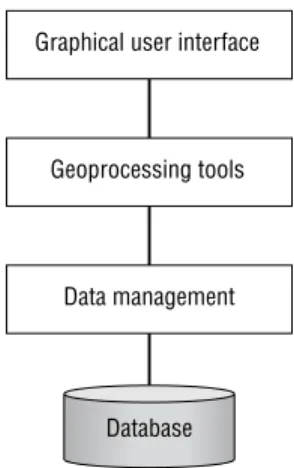
architecture of modern GIS software systems. Figure 2 shows in schematic form a generalised architecture for a desktop or professional GIS software system (see also Elshaw Thrall and Thrall, Chapter 23). Users normally interact with the GIS software via a typically graphical, menu driven, icon-based graphical user interface (GUI).
Selections from the GUI make calls to geoprocessing tools (i.e. tools for proximity analysis, overlay processing, or data display). The tools in turn make calls to the data management functions responsible for organising and managing data stored in a database. This three-tier architecture has been widely used (at least conceptually) by many software developers in order to facilitate organisation and management of software development.
It is possible to configure GIS software systems at all three levels. At the GUI level this typically
involves configuring the form and appearance of the interface (e.g. adding/removing menu choices and buttons, changing the pattern of icons, and personalising the colour scheme and other
characteristics of windows). This is normally carried out using an interactive graphical customisation environment (for an example see Figure 5). At the Tools level customisation involves creating macros to automate frequently required processes and adding new functionality (such as new spatial analysis functions or data translators). This type of customisation can more properly be referred to as programming. More advanced users and software developers are also interested in customising the data management routines within a GIS software system, perhaps to add new datasets to create a new spatial database schema or connect to an external tabular database. These are only a few of the ways in which general-purpose GIS software systems can be customised to create specific-purpose,
user-orientated applications.
The above description of the architecture of GIS software systems and the customisation capabilities is useful for explaining the various options available. In practice, however, most of the larger GIS software systems allow users and developers to customise the software at two levels: the application and the core or object code level. In some cases this may be carried out using two programming environments, in others only a single environment is preferred. For example, ESRI’s ARC/INFO can be customised at the application (also called ‘user’ level) by working with the integral fourth generation programming
Fig 2. Architecture of a typical desktop or professional GIS software system.
Database Graphical user interface
Geoprocessing tools
language, AML. Additionally, GIS can be
customised at the much lower software development library level using a third generation programming language such as C. In fact the ARC/INFO product is assembled internally by ESRI software
development staff who embed the software development library objects in C programs. In contrast, the Smallworld GIS has a single customisation environment, Magik, which is used both internally by Smallworld staff and externally for application customisation by users and developers.
The two level approach adopted by ESRI has the advantages that endusers can use a high level, user-oriented development environment and that they are not exposed to low level programming concepts. The single level approach selected by Smallworld has the advantages that users can gain access to all of the GIS functions and that there is only one development environment for the company to maintain.
3 COSTS OF CUSTOMISATION
It is widely recognised that, along with data capture, customisation is usually the most expensive element of an operational GIS (Antennucci et al 1991; Korte 1996; Smith and Tomlinson 1992).
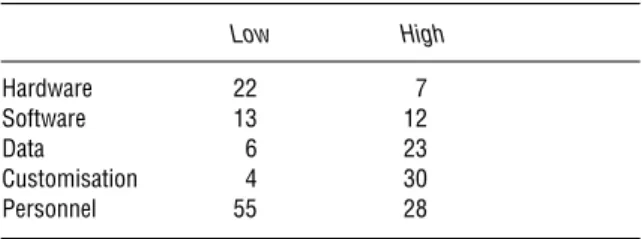
Table 1 is a generalisation of the approximate breakdown of costs between the various elements of typical GIS implementations based on the author’s experience of implementing GIS in over 150 organisations. The ‘Low’ figures are for a system comprising two server seats (UNIX or Windows NT workstations) and eight clients (desktop PCs). This type of configuration might be found in a small commercial or local government organisation. The ‘High’ figures are for a corporate implementation comprising 35 UNIX or NT workstations and a UNIX GIS server. This type of configuration might be found in a medium–large local government or utility site. Both configurations run a mixture of desktop and professional GIS software.
Many new users mistakenly believe that hardware and software are the major costs of establishing a GIS. In fact, staff costs are the most expensive. One explanation for this apparent discrepancy is that in many public (and even some private) agencies personnel costs are not included in assessment of GIS implementation costs. It is also often stated by GIS commentators that data are the most expensive component of a GIS (Rhind, Chapter 56). In general data do often comprise a significant proportion of costs. In Table 1 it is assumed that in the Low case the data are purchased and in the High case they are part purchased, part specially
captured. If all the data had to be captured for the projects then the figures for data would be several percentage points higher.
4 THE SOFTWARE ENGINEERING APPROACH
TO GIS CUSTOMISATION
4.1 GIS software engineering
All GIS implementations, including those involving customisation, have in common the fact that they must meet user requirements and be delivered on time, in budget, and in accordance with quality standards. These goals will be greatly facilitated if a rigorous software engineering approach is adopted and if the process of software development is split up into a series of independent steps which are carried out in sequence. In this so-called software development lifecycle, also referred to as the ‘waterfall model’, each step is well defined and leads to the creation of a definite product (often a piece of paper), thus allowing the correctness of each step to be checked. More recently, software engineers have questioned the waterfall methodology and have proposed the use of prototyping as an alternative or extension to this approach. These two approaches will be discussed in turn below.
Excellent introductions to software engineering are provided by Bell et al (1992), Flaatten et al (1992) and Gilb (1996). For more critical discussion see
Maguire (1994) and Brooks (1995). 4.2 The waterfall model
In the waterfall model (Figure 3), the first stage in the software development lifecycle is to establish user requirements. Essentially, this involves a
Table 1 Breakdown of the percentage costs of typical small desktop (low) and large professional or enterprise (high) operational GIS. Low High Hardware 22 7 Software 13 12 Data 6 23 Customisation 4 30 Personnel 55 28
dialogue between one or more representatives from the user and application developer groups. Initially ideas will be loose and vague in part, but over time they will become clearly defined. This is arguably the most important and sometimes difficult stage of application development.
User requirements need to be formally specified if they are to be of use as a description of the
application to be developed. They also form the basis of an acceptance test which will determine if the system meets its requirements. Formal specification is all about describing what an application will do rather than how it will do it; the latter should be left to the discretion of the programmer.
The design stage involves the application developer creating conceptual, logical, and physical designs of the system. These stages progressively refine the application design from being
implementation-independent to being system-specific. In GIS application development the design stage will typically address the user interface, the geoprocessing tools required, and the data management capabilities employed. There are various tools available to assist in this process. These include data flow modelling and various database diagramming techniques such as entity-relation modelling and the object modelling
technique (OMT: Date 1995; Rumbaugh et al 1991). There is now almost universal agreement amongst software developers that applications (indeed all software systems) should be designed and implemented using structured programming techniques (Worboys, Chapter 26). There is also a belief that an application should be created as a series of independent modules. Modular software
development is preferred because it supports software reuse and cooperative development, maintenance, testing, and debugging.
Implementation is all about coding, testing, and debugging the design. In the past this is what people have thought of as ‘programming’. The
implementation stage usually concludes with a period of acceptance testing and bug fixing before final sign-off by users.
The last stage is the operation and maintenance of an application. This will typically involve a period of user training, system enhancement, bug fixing, and system use. During system use, new user requirements will inevitably arise. This initiates the sequence again (through a ‘change order’ to the original contract) and so the cycle continues.
In recent years several commentators have
questioned the waterfall approach (Flaatten et al 1992). In particular, they have pointed out the length of time it can take to go through the lifecycle using this top-down methodology. Also at issue is the fact that many users do not really understand large specification documents. GIS applications are very visual and until potential users see an application interface they often do not really appreciate what it is and how it will work. They may ‘sign off’ the document but still be surprised when they see the first release. A further issue is that over long periods user requirements and technology can change, particularly in a fast moving area like GIS. This problem is compounded by the fact that GIS is still relatively new for many users. It is also the case that as new users understand the technology better their ideas and aspirations change, often leading to new and enhanced requirements. Changing the requirements and incorporating new elements into the design has proven to be very expensive for systems based on the waterfall approach (typically the later they are incorporated, the more expensive they become).
4.3 The prototyping approach
Prototyping involves creating working designs of a system rather than designs on paper. Functional requirements documents are still required, however, since they form the basis of a contract document and a series of milestones defining acceptance criteria and a payment schedule. These prototypes are demonstrated and evaluated, and form the basis of future prototypes. The prototyping approach allows closer user involvement in system creation, focusing effort on producing user-oriented systems
Fig 3. The waterfall approach to software development.
Operate and maintain Implement
Design Specify Establish requirements
and catering for users’ evolving knowledge. As Figure 4 shows, prototyping is an incremental process. Some suggest that it can be represented in the form of a spiral with major issues and decisions taken in the early stages and progressively more detail covered in subsequent iterations.
An important issue associated with prototyping is whether prototypes should be discarded or used as the starting point for the next iteration. Unless evolving systems are built on firm foundations which do not compromise system integrity, there is a danger that the final system will be weak. The increasing use of object-oriented approaches to software development, with support for extensibility and modular replacement/development, has helped to minimise this problem.
Many of the modern application development tools are particularly suited to the prototyping approach. Development environments based on the object-oriented paradigm and those which support interactive graphical development are useful for rapid application development based on prototyping (e.g. Visual Basic, described below, and Delphi). Other advantages of prototyping include the availability of early results and deliverables, as well as reduced costs because of the greater likelihood of developing the application that users actually want.
On the downside, prototyping is less helpful for providing fixed prices for development, nor is it appropriate for some small jobs (although some organisations still prefer this approach). In situations where the application is well understood
and relatively simple, prototyping is generally regarded as inefficient. Experience suggests that it is very difficult to persuade users to discard prototypes even though their underlying architectures may not be suitable for supporting the large mission-critical developments which must be accommodated over the long term.
4.4 Discussion
On balance most technical GIS people would agree that all GIS application development projects require a clear implementation plan which identifies a sequence of well-defined tasks. Whether the classical waterfall approach is adopted, or whether prototyping is used, is open to discussion by the user and developer. Prototyping seems most useful in the areas of user interface design, performance
estimation, and functional requirements analysis.
5 GIS APPLICATION DEVELOPMENT TOOLS
The earlier sections of this chapter have examined various approaches to GIS application development. This section looks at the practicalities of
implementing an application and the tools and techniques which are available for GIS customisation. The application customisation capabilities of three software systems are discussed. Unfortunately, given the author’s background these are all ESRI software systems. It must be
emphasised, however, that the principles are common to virtually all GIS software products. First, the customisation capabilities of ARC/INFO, a high end professional GIS, will be discussed. Next, ArcView, a general purpose desktop GIS software product, will be described. Finally, the customisation capabilities of MapObjects, a highly customisable object-based developer product, will be addressed. 5.1 ARC/INFO
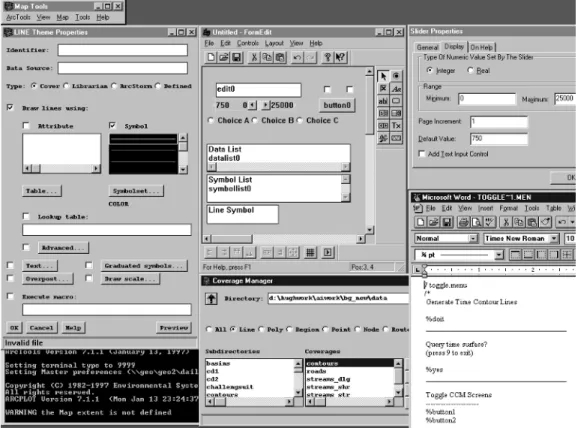
ARC/INFO is an example of a high end or professional level, general-purpose GIS software system. Figure 5 shows the interactive graphical application development environment of ARC/INFO. This example shows the software running in a Microsoft Windows environment on a Windows NT workstation. The functionality is similar but the look and feel of the development environment is slightly
Fig 4. The prototyping approach to software development.
Operate and maintain Specify Design Implement Requirements
different on UNIX systems (reflecting the different windowing standards of the two operating systems). The display shows a series of windows depicting some of the productivity tools available to help application developers create custom applications. The ‘LINE Theme Properties’ menu is a complete menu which will be part of the final application (it is a generic menu which will be used to set the
symbolisation characteristics of themes or data layers). The ‘Untitled – FormEdit’ menu and the ‘Slider Properties’ menu are parts of ARC/INFO’s interactive graphical menu-builder called FormEdit. The ‘Untitled – FormEdit’ window is a widget palette showing the types of widgets which users can place (drag and drop) on menus. The right-hand window of the two shows the property sheet for a slider bar; the second widget down on the left in the FormEdit window is a slider bar (it contains the numbers 750, 0 and 25 000). Changes made using FormEdit can be run immediately in the application to determine their impact and to assist debugging. This greatly facilitates the application development
process. In the bottom left-hand corner of Figure 5 is a text dialogue window in which messages and text dialogue will appear (in this instance the person doing the customisation has opted for white text on a black background). In the bottom right of the screen there is a Text Editor window which is used to edit programs and menu descriptions in ASCII format. These programs are typically attached to menu buttons and executed when a user presses the button in the interface. In this case Microsoft Word is being employed as an editor but the developer could choose any text editor. In the bottom centre there is a file browser window (labelled ‘Coverage Manager’). This is used to navigate through the file system in order to locate workspaces and specific files.
Figure 5 has been designed to show the main types of tools available to developers. The figure is not a direct example of how an application developer would actually customise a GIS. Usually only a selection of the windows are open at any one time. Most application developers prefer instead to close or iconise windows until they are needed.
Normally menus would be developed using FormEdit and programs would be created with the Text Editor. Both of these are really part of the same run time environment in which the final applications will operate. This allows menus and programs to be tested and debugged interactively before they are released as part of a complete application (perhaps comprising 20–100 menus and 50–500 programs, along with additional elements like ‘help’ files, documentation, and an install script).
Application developers use this type of
environment to create a menu-driven interface for an application. Business rules and process tasks are included as AML programs which are called from the interface. Once an application has been created the menus and code are saved in persistent computer files. Typically, a master program will be called at application start-up. This will then call other programs and menus depending on user selections from the interface and answers to prompts issued by the application. AML is an interpreted language and programs do not need to be compiled into machine object code prior to execution.
5.2 ArcView
A second example of a GIS development environment is provided by ESRI’s ArcView desktop GIS. ArcView GIS has been designed and developed to provide stand alone and corporate-wide (using client-server network connectivity) integration of spatial data. ArcView is an object-oriented GIS with an object-object-oriented customisation language (Avenue – itself based on C++).
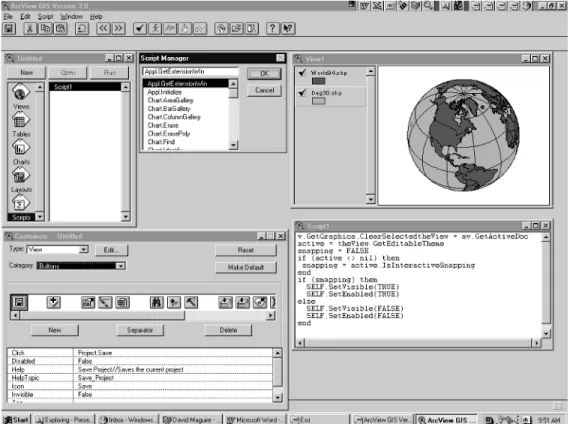
Within ArcView’s application customisation environment there are various programmer resources which support application development and
customisation (Figure 6). This ArcView screen shows six PC windows: the ArcView application itself (ArcView GIS Version 3.0); the Project window (Untitled); a View (View1) containing a World Country Theme (World94.shp) and a Degree Lines Theme (Deg30.shp); the Document Designer (Customize: Untitled); the Script Editor (Script 1); and the Script Manager. These have been designed to be easy to use so that endusers can develop their own applications. Scripts can be created using the integral editor or they can be entered from text files.
They are organised using the Script Manager. Users can attach the scripts to controls in the GUI of each document using the Document Designer (the window labelled ‘Customize: Untitled’). This is also used to control the appearance and
functionality available within the GUI. Scripts contain requests (messages) to other objects which return an object. Typically scripts are made accessible to users by being placed behind a menu choice or button in the GUI. In event-driven systems such as ArcView, scripts can be run whenever an event occurs (such as resizing of a window, arrival of new data from an external source, or when a user clicks on a button). ArcView additionally has a form interface builder (not shown) used to create multi-widget screen forms.
Like ARC/INFO, Avenue is an interpreted development language and any applications created can be immediately run by the user. Stand-alone applications can be developed and delivered to other users by wrapping the scripts and user interface amendments together as an ArcView Extension (an application which operates within and extends the standard COTS ArcView application).
5.3 MapObjects
ESRI’s MapObjects is a collection of GIS objects which conform to Microsoft’s Object Linking and Embedding (OLE) / Component Object Model (COM) or ActiveX software specification. Software developers can create applications which embed MapObjects (and other non-GIS objects which conform to the COM specification) within programs written with any industry standard OLE/COM compliant software development environment (e.g. Visual Basic, Visual C++, Visual J++ or Delphi).
Figure 7 shows the Visual Basic application development environment. All elements of the display are part of Visual Basic with the exception of the additional map icon on the bottom right of the left-hand tool palette (this is used to create a MapObjects custom control [an instance of a map window] on the form – the large window in the centre of the screen called Form1). The white area in the centre of Form1 is the map custom control window. When the application is executed this would normally display some geographical data. The form can be thought of as the application user interface. Visual Basic developers create applications by placing controls (maps, buttons, scrolling lists, etc.)
on a form. Code is then attached to the controls. The lower, Form1, code window shows the Visual Basic code attached to the map control. This particular program will execute a zoom in or pan operation when a user clicks on the map. The right-hand window, called Properties Form1, is used to set the properties of controls (e.g. font size, type, and colour) on buttons such as the ‘Zoom Out’ button placed on the form. The top right-hand window, called Project1, is used to organise and register all the windows, controls, and code for the application.
Once a Visual Basic programmer has created an application embedding MapObjects the application can be compiled into a stand-alone executable program which users may run from a menu, icon, or other user interface object.
6 PRACTICAL ISSUES ASSOCIATED WITH GIS
CUSTOMISATION
There is clearly more to application development than just obtaining some software and writing code. Any GIS project which adopts a pure technology focus is doomed to failure and customisation projects are no exception.
Because customisation can be a time consuming and expensive activity it is very important to involve senior management and sponsorship at the earliest opportunity. Educating management will help to get their support for the process, as well as further assistance should there be any problems with the implementation.
It is generally recommended that all large customisation projects employ the basic concepts of software engineering as described earlier. While this will not ensure success it will certainly ease the process and provide a framework for assessing progress. A key part of software engineering is specifying the precise scope and content of the system as early as possible. A timetable for deliverables should then be established and agreed upon by the developer(s) and the user(s). If the project is large then staged delivery with ‘sign off ’ should be considered. If either party is
inexperienced in using GIS then it is a good idea to adopt a prototyping approach. This will ensure that users learn what is possible with GIS and developers learn what users want to do with the system.
A further important practical recommendation is that the GIS implementation accounting model should budget for requirements analysis, specification, training, documentation, and acceptance testing. It is also as well to remember that coding will typically take only about 15 per cent of the time and that testing and documentation can take up to 30 per cent of the time. Even after a customisation project has been completed there may well be a period of ‘institutionalisation’ during which the application becomes incorporated into the business practices of an organisation.
Finally, experience suggests that it usually takes about twice as long as inexperienced users first estimate to do customisation. However, if the basic rules and suggestions outlined above are borne in mind then it should be possible to produce reasonably reliable cost and timescale estimates.
7 CONCLUSIONS
This chapter has defined the process of customisation and has shown why GIS customisation is necessary. The formal, well-established steps in the software development lifecycle have been described in outline terms. This included a comparison of the waterfall and prototyping methods. Information has been presented about the main development tools available to application developers. The integrated GIS-specific development environments of
ARC/INFO and ArcView have been contrasted with the contemporary industry standard development environment offered by Microsoft’s Visual Basic. In essence it seems that users and developers want a GIS customisation environment that is standard across GIS and non-GIS applications, easy to use and highly productive, yet offers access to powerful and sophisticated tools.
As the GIS market grows it is to be expected that more end-user products will be created by core software vendors and third party developers. When this happens, the need for end-user customisation will decrease. There will, however, always be a need for GIS customisation for the simple reasons that GIS is a very diverse field and all users and projects are different in some way.
The utilisation of object technology, such as Microsoft’s OLE/COM, has already been cited as a
key development in GIS customisation. As the Open Geodata Consortium releases implementation details of their Open Geodata Interoperability Specification (OGIS) and software vendors releases products which conform to it, it is expected that many more developers will be able to develop specific purpose GIS applications and
customisations (Sondheim et al, Chapter 24). End-users will benefit enormously from this activity because they will be able to work with ready to run domain specific applications rather than generic GIS products.
References
Antenucci J, Brown K, Croswell, Kevany M 1991 Geographic
information systems – a guide to the technology. New York,
Van Nostrand Reinhold
Bell D, Morrey I, Pugh J 1992 Software engineering: a
programming approach, 2nd edition. New York, Prentice-Hall
Brooks F 1995 The mythical man month. Essays on software
engineering. Reading (USA), Addison-Wesley
Date C J 1995 Introduction to database systems, 6th edition. Reading, Addison-Wesley
Flaatten P O, McCubbrey D J, O’Riordan P D, Burgess K 1992 Foundations of business systems, 2nd edition. Orlando, The Dryden Press
Gilb T 1996 Principles of software engineering management, 2nd edition. Reading, Addison-Wesley
Korte G B 1996 Weighing GIS benefits with financial analysis.
GIS World 9(7): 48–52
Maguire S A 1994 Debugging the development process. Redmond, Microsoft Press
Newell R G 1993 Customising a GIS. GIS Europe 2(1): 20–1 Rumbaugh J, Blaha M, Premerlani W, Eddy F, Lorensen W
1991 Object-oriented modelling and design. Englewood Cliffs, Prentice-Hall
Smith D A, Tomlinson R F 1992 Assessing costs and benefits of geographical information systems: methodological and implementation issues. International Journal of Geographical