Where in a World of Best Practice Standards
does Perforce fit?
Robert Cowham VIZIM Worldwide, Inc
8 Paynesfield Ave London SW14 8DW
[email protected] www.vizim.com
This paper discusses some of the implications with using SCM tools such as Perforce where you are looking to satisfy the requirements of CMMI accreditation, or ITIL compliance.
With the rise of corporate governance requirements more and more companies are looking to ensure that their software development processes and procedures comply with appropriate industry wide standards and processes. You may have excellent practices and procedures to manage the development of software throughout its lifecycle, with a Perforce repository at the centre, but how are they documented? How would they fare if appraised for CMMI, or ITIL (ISO/IEC 20000) compliance? Are there areas for improvement, particularly "around the edges" where you interface to other processes and procedures?
The presentation will review some of the issues that need to be addressed to make sure your SCM practices, processes and procedures meet overall organisational business needs, and best practice standards. It expands on the themes in Robert Cowham's Perforce pod cast interview.
1 Introduction
Best practice frameworks such as CMMI, ITIL and COBIT are collected sets of good practices and experience. They are attractive to management in that they help:
to reduce risk
provide a common vocabulary
to validate and benchmark processes and procedures against external (more objective) standards
There has also been a rise of such standards and frameworks becoming mandated – either by regulatory/corporate governance initiatives, but also to give competitive advantage (e.g. if you are outsourcing).
Configuration Management is a foundation stone for both application development and for service management, and is identified as a key practice in frameworks such as CMMI, ITIL and COBIT. Poor configuration management results in problems ranging from bugs being reintroduced to service outages and potential financial penalties.
What are some of the key areas in configuration management that can cause problems if seeking accreditation?
What happens if you are looking to ensure that both CMMI and ITIL requirements are met? Are there incompatibilities between them?
This paper gives a brief overview of the CMMI and ITIL models/frameworks, and then reviews some areas that often need more attention, even for organisations with sound configuration management practices and processes based on Perforce. A case study provides examples of some of the issues that can arise.
2 Overview of CMMI
This framework grew out of work by Watts Humphrey and others at the Software Engineering Institute at Carnegie Mellon University. it was first published in the early 90s and initially looked at the needs of the Department of Defence into evaluating the maturity of software development at supplier organisations.
The original CMM model had global levels of maturity:
1. Initial (chaotic, ad hoc, individual heroics) - the starting point for use of a new process. 2. Managed - the process is managed according to the metrics described in the Defined
stage.
3. Defined - the process is defined/confirmed as a standard business process, and decomposed to levels 0, 1 and 2 (the latter being Work Instructions).
4. Quantitatively managed
5. Optimized - process management includes deliberate process optimization/improvement. Together with Key Process Areas, of which Configuration Management was one.
The CMMI (Integrated) version reflects some of the issues encountered with applying multiple models that are not integrated within and across an organization and to sort out the problem of using multiple CMMs. The most relevant CMMI model for Perforce users is likely to that for Development.
From http://www.sei.cmu.edu/cmmi/:
CMMI models are collections of best practices that you can compare to your organization's best practices and guide improvement to your processes. A formal comparison of a CMMI model to your processes is called an appraisal. The Standard CMMI Appraisal Method for Process Improvement (SCAMPI) incorporates the best ideas of several process improvement appraisal methods.
PPQA MA
CM
All process areas
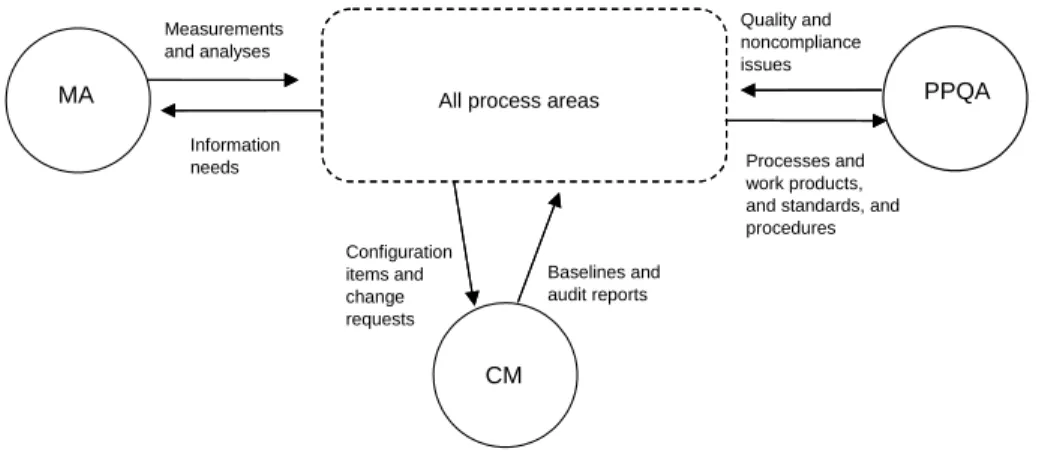
Measurements and analyses Information needs Configuration items and change requests Baselines and audit reports Processes and work products, and standards, and procedures Quality and noncompliance issues
MA = Measurement and Analysis CM = Configuration Management
PPQA = Process and Product Quality Assurance
Figure 4.6: Basic Support Process. The Configuration Management process area supports all process areas by establishing and maintaining the integrity of work products using configuration
identification, configuration control, configuration status accounting, and configuration audits.
2.1 Overview of ITIL
As Shirley Lacy (ITIL V3 author) wrote in a CM Journal article:
ITIL® has long been recognised as the de facto industry standard for IT Service Management and the adoption of ITIL has been growing rapidly across the world. IT Service Management (ITSM) derives enormous benefits from a best practice approach. Change management and configuration management are core practices at the heart of ITIL and ISO/IEC 20000, the auditing standard that is aligned with ITIL. ISO/IEC 20000 requires a service provider to deliver managed services of an acceptable quality for its customers. Many organizations across the world have achieved certification against ISO/IEC 20000.
ITIL V2 came out in 2000/2001, was subsequently “refreshed” and the resulting ITIL V3 published in 2007.
Many organisations or groups who develop software consider themselves outside the scope of ITIL – considering it something that is only relevant to IT Operations and Support groups. This was perhaps understandable with ITIL V2, and yet I believe it is no longer the case with ITIL V3. Sharon Taylor, ITIL's chief architect, summarises the aims of Service Design in the foreword to that volume:
"In the past, the IT world has been viewed in two parts - the development world and the operational world. A lack of synergy between these worlds often produces a serious side effect - the business objectives are not met."
In ITIL V2, the term CMDB was often misunderstood – its definition: “A database that contains all relevant details of each CI and details of the important relationships between CIs”. This lead many people to think of it as a single database in which everything should be stored that related to Configuration Items (CIs).
It was never the intention of the ITIL authors that the CMDB should be defined as a single physical thing – it is a logical concept that is implemented via a number of physical systems (that in many cases already existed) that could be termed “CMDBs”. Perforce naturally fits as one of these CMDBs.
ITIL v3 defines the CMS (Configuration Management System) as “A set of tools and databases that are used to manage an IT Service Provider's Configuration data. The CMS also includes information about Incidents, Problems, Known Errors, Changes and Releases; …”
There is an obvious role here for organisations to use Perforce to support service management as well as their software development activities by being part of the CMS.
2.2 Configuration Management Principles – Nothing New Under the Sun!
Good configuration management principles have not changed with these frameworks and standards – they just help people to understand where it fits in. It has been said of ITIL that it is “documented common sense!”However, it can sometimes be a case of changing slightly how you document your processes and procedures in order to ensure that appropriate boxes are ticked. For example if you are looking to have an official SCAMPI appraisal it is beneficial to map particular processes and procedures in your documentation to the particular CMMI general and specific goals and practices such as:
SG 1 Establish Baselines
SP 1.1 Identify Configuration Items
SP 1.2 Establish a Configuration Management System SP 1.3 Create or Release Baselines
SG 2 Track and Control Changes SP 2.1 Track Change Requests SP 2.2 Control Configuration Items SG 3 Establish Integrity
SP 3.1 Establish Configuration Management Records SP 3.2 Perform Configuration Audits
3 Key Problem Areas for Configuration Management
Many organisations using Perforce have sound configuration management processes and procedures already in place, particularly in the software development phase. The tool is after all very capable!
But the tool alone is never the answer to all problems, and an oft repeated mantra is: People, Processes and Tools (in that order).
In my experience, areas that many organisations have issues with include:
The organisation-wide configuration management structure – ensuring the appropriate roles and responsibilities are defined and documented, and then are implemented in reality (with appropriate authority and funding)
Management of documents (ranging from naming standards for different document types, to consistent organisation-wide definitions of Configuration Items)
Management of interfaces (both internal and external to the organisation)
The processes of Service Transition (Release), and the related system documentation which enable support and future enhancements.
Making traceability easy and transparent – from requirements and changes to defects and code, through to release status. If this is easy and transparent it makes day-to-day work more effective and efficient and avoids large amounts of unnecessary rework.
I will address some particular approaches to these issues using a case study.
3.1 Configuration Management Roles and Responsibilities
It is vital to address this through an organisation wide configuration management plan. This needs management backing to ensure that it is appropriately funded and that roles and responsibilities are delegated throughout the organisation, e.g. to development projects and programmes.
While this may appear to be overly bureaucratic, it does not need to be. For example, a high level CM Plan may identify:
Branching patterns in use, and for each type of branch, the policies associated
Associated repository structures
Thus a CM Plan for a project may only need to be a page or two, to identify:
The relevant patterns from the high level document (by reference)
The actual repository paths that will be used
The primary person fulfilling the CM role within the project
A configuration management role needs to be identified for most parts of the organisation – this does not need to be a full time person.
3.2 Document Management
It is very common to find documents stored on file shares, with inconsistent naming, inconsistent versions, poorly managed status (which version is live? Which is in review?)
Documents are also often emailed around which can make this problem much worse.
With a Perforce repository it is easy to ensure that the master version of anything is known – it is the one in the repository! (Though of course you need an appropriate branching pattern).
By providing a P4Web interface to your repository, you can also provide canonical URLs to documents – no need to attach to an email, or save on a file share – simply email the link to the URL and allow the document to be directly opened from the repository. By keeping the version name out of the document name, the URL remains valid.
Perforce themselves implement this with the links to documentation on their web site, for example the Command Reference Manual:
http://www.perforce.com/perforce/doc.092/manuals/cmdref/index.html may also be referred to (if you always want the latest one):
http://www.perforce.com/perforce/doc.current/manuals/cmdref/index.html
In addition, read-only browsing does not necessarily consume a Perforce license (although updating does require a license).
P4OFC can provide keywords within the documents that are automatically updated to make it easier to track versions. The ability to quickly and easily diff versions is also very useful for Word documents.
3.3 Centralised Information Management
Technology such as a Wiki provides a simple and yet very effective method of storing information with versioning and history.
Links to documents and other information can be easily updated and maintained.
Full featured document management systems can also be beneficial, providing workflow, and full content searching, as well as versioning. You need to be careful though, as I have seen more than a few end up as unloved “shelf ware”.
3.4 Interface Management
This covers the documentation of both internal and external interfaces.
In some respects, external interfaces are easier to manage as they are more obvious. And yet there is often not much control over them, and the relationship/contract with the third party does not necessarily specify appropriate levels of change control.
A key problem with interfaces is identifying who is responsible for documenting and maintaining the documentation for that interface – multiple owners means no owners.
3.5 Release Management (Service Transition)
With ITIL V3, the Service Transition book is the one which covers Configuration Management. The importance of the transition into service is both in the software that is being released (and potentially hardware etc), but also the resulting updates to documentation etc to allow that software to be maintained and enhanced in the future.
This topic is addressed in the case study.
3.6 Improving Traceability
Ease of linkage between requirements, changes and defects and the resulting code changes and their release.
For Perforce shops, the use of Jobs and P4DTG based interfaces helps significantly. The use of URLs to link to other systems is important (it would be nice to have better support from P4V for this – hint, hint!).
With good automated traceability, audits can be completed in hours rather than days, should they occur.
4 Case Study
4.1 Background
The client organisation was in the financial sector, and systems involved ranged from external websites to batch interfaces to third parties and in house back-end processing.
The problems around configuration management rose to prominence as a result of some high profile service issues. Root cause analysis showed some of these to be due to weak or inconsistent configuration management practices across the estate. Some initial investigative work turned up a variety of issues and in the end we were authorised to complete a short improvement programme (a few months) to produce both a set of configuration management process collateral and a detailed approach to improving individual projects and processes
Other initiatives under way at the same time included implementations of CMMI and ITIL, so that all our process documentation had to satisfy the relevant requirements to satisfy future audits. The whole estate comprised hundreds of people across both development projects and ongoing service support.
4.2 Initial Approach
Our initial approach was to run workshops and use some structured interviewing for different project teams. We had management backing for this, which is vital, and were also careful not to take an adversarial, fault finding approach.
4.3 Summary of Findings
Running workshops requires some specific skills in terms of both planning and setting the agenda, and in the dynamics of involving those present in an inclusive and constructive way. We found:
A variety of technologies including mainframes, a couple of more esoteric boxes, various UNIX boxes and PCs. Languages involved included Cobol, JCL, Java, C++ and Visual Basic, as well as some 4GLs and less common technologies.
Configuration management tools already in use included: a mainframe tool, Perforce, PVCS, SCCS and Visual SourceSafe. A couple of teams were using no tool at all and just “locked down” directory structures.
Some pockets of good configuration management practice and tool usage, particularly in teams on the mainframe or using Perforce, although there were still inconsistencies in approach across different teams.
Problems particularly at handover points between teams. As is often the case, the management and control of interfaces were typically not good.
Another common feature - poor control of documents across the estate (typically a rather large file share with variations of a supposedly standard directory structure across different projects). Strategies for both naming and versioning of documents were inconsistent.
Multiple tools in use for defect tracking and change control (any number of systems greater than one is a cause for concern!).
Unnecessary duplication of documents, information and processes which did not add value.
A mindset of project development without considering the service viewpoint – covered in more detail below.
4.4 Project Development vs. Service Mindset
The organisation had some good processes and practices in place for managing the live services, including management of incidents.
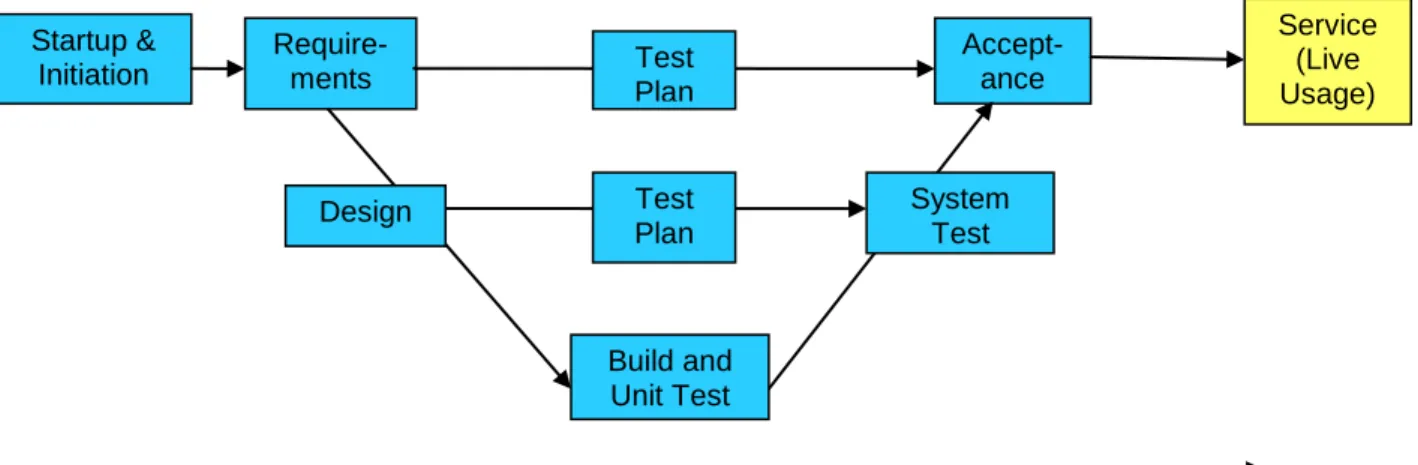
The release management team who controlled and acted as a gateway into live service were experienced and did an excellent job, but were hampered by what they were given to release. The lifecycle used was a very standard V model as shown below.
Figure 1 – The Development Lifecycle from a Project mindset. From the project mindset, the important thing is to manage the project through its various stages in a standard V model, get it through acceptance and into service. Then you can move on to the next project!
Startup & Initiation Require-ments Accept- ance Test Plan Design Build and Unit Test System Test Test Plan
The Development Lifecycle
ServiceService (Live Usage) Project
Project A Dev Systems Integration and Test Acceptance Live
App X & App Y
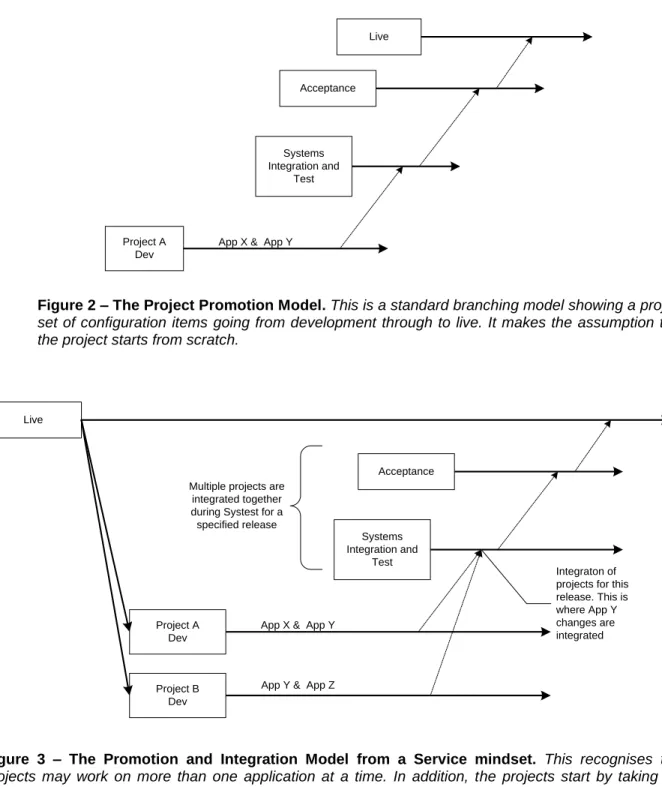
Figure 2 – The Project Promotion Model. This is a standard branching model showing a project set of configuration items going from development through to live. It makes the assumption that the project starts from scratch.
Project A Dev Systems Integration and Test Acceptance Live Integraton of projects for this release. This is where App Y changes are integrated Multiple projects are
integrated together during Systest for a specified release
Project B Dev
App X & App Y
App Y & App Z
Figure 3 – The Promotion and Integration Model from a Service mindset. This recognises that
projects may work on more than one application at a time. In addition, the projects start by taking the latest version of those applications from the current live system and by delivering back a changed version of those applications to live (as part of a specified release). With multiple projects active concurrently, you need to integrate and test the projects together, and if necessary merge changes together (in this case to the shared application).
From a service viewpoint, projects need to deliver an application together with associated collateral for ongoing maintenance throughout its life (a project with a 1-2 year development life often had a subsequent in-service life of 5-7 years). This needs to include documentation of the design, its interfaces and its tests sufficient to help someone who needs to change the application in future.
One of the problems was the lack of systems documentation which lead to much reinventing of the wheel by new project teams and the operational support teams. It also made impact assessments much more difficult and they were dependant on individual knowledge, or expensive reengineering, with all the associated risks. The system level documentation is often poor, and this can’t be fixed instantly – it is too large a job. Instead, a piecemeal approach can be taken with new projects being asked to deliver updated or just skeleton systems documentation as part of their releases. In some cases, it may be worth initiating a project to generate the missing documentation – the return on investment can be significant.
It is very important to have a service or systems mindset where the service is the ultimate owner of configuration items and projects deliver new versions of those items back to live service.
4.5 Introduce Central Configuration Management Team
It is very important to have a central configuration management team with responsibility for the processes and procedures, and to provide help and ongoing support for the teams.
In some organisations this can be seen as overhead, and there may be funding issues for this team. Be that as it may, it is vital to recognise the importance of this function. In our experience it is cheaper to have the central function and avoid the overhead of duplicating configuration management activities unnecessarily within the project teams - we have seen too many rather content-free, copy-and-paste project configuration management plans over the years!
It is not usually difficult to develop the business case for funding of an appropriately sized central team.
4.6 Policy, Process and Procedures
Fitting in with CMMI terminology and documentation set, we produced:
Configuration Management Policy – a couple of pages with high level statements for
the whole organisation, e.g.
o The Configuration Management Group has ultimate authority across the organisation for the Configuration Management process.
o The organisation will adopt a consistent, comprehensive policy and set of process assets for Configuration Management. This is mandated and monitored across all service lines, projects and programmes.
o The scope is all services, applications, projects and programme deliverables, development, test, production and disaster recovery environments.
o Every service line, project and programme will have a mandated Configuration Management role.
Configuration Management Process – a document with process diagrams, explaining
configuration management in very standard ways, but adapted to local terminology where appropriate. E.g.
1 : Configuration Management Process C o n fi g u ra ti o n M a n a g e m e n t M a n a g e r R o le S e n io r R e s p o n s ib le M a n a g e r C M G ro u p 1. Create/ Update Master CFMG Plan and CFGM Project Plan 11. Perform Configuration Identification 14. Perform Configuration Verification and Audit Activities Yes 3 Manage, monitor and control implementation of Master CFGM Plan and Process
13. Perform Configuration Status Accounting
And Reporting 4. Provide budget
and resources for CFGM Start 7 Plan and manage CFGM resources, activities, risks and issues 2. Review and approve and CFGM Plan and CCMT resources No 5. Plan and arrange a CFGM Review 12. Perform / oversee Configuration Control activities Central? 8 Create / Update Local CFGM Plan
10 Manage, monitor and control implementation of CFGM Plan
Closure? Finish Yes No 6. Identify, agree and implement quick wins/ improvements 9 Establish CMS
Figure 4 – The Configuration Management Process. This diagram was explained with associated
notes in a 12 page document defining process steps, roles and responsibilities, as well as overall inputs and outputs.
Organisation Configuration Management Plan – this is the current plan and identifies
the document hierarchy, roles and responsibilities and activities, including baselines and overview of tools in use.
Project and System Configuration Management Plans – these fit in with the
organisation wide plan and look to detail specifics but avoid unnecessary duplication.
Configuration Management Strategy – this is the strategy for typically the next 12-18
months identifying the phased approach to improving things.
Document Naming Standard – these are often already in place, but in any case are vital
to ensure unique identifiers and the ability to easily find out the existence of a particular document and the currently issued version.
Several other master lists were produced to ensure that there was a single authoritative definition of:
Systems/applications (hundreds!), including definitive list of IDs for use by other documents to ensure consistent and clear naming
Interfaces, both internal (between systems and applications) and external (with third parties). It is vital for each interface to be clearly specified and to have clear ownership.
Configuration Item Types – the obvious ones such as code modules, but you need to be
clear and consistent about all CIs. For example we have seen requirements documents coming in several different guises which creates unnecessary confusion.
In addition, various procedures were written or enhanced, containing detailed steps for:
Use of configuration management tools
Administration
Baselining
Document management
4.7 Standardise Your Tools
The number of configuration management tools in use did not help and was part of the recommendations for improvement going forward.
Interestingly the most important tool to standardise on is the tool used for defect tracking or change request tracking. As soon as you have more than one of these, and thus no globally unique standard identifier, life becomes significantly more difficult. Keeping a consistent view of the whole estate requires copying and pasting between tools with all the likelihood of inconsistencies and errors that this brings.
Of course there are many factors behind the selection of defect tracking or change control or helpdesk tools, and corporate standards, licensing costs and the state of current relationships with vendors all play a part.
Consolidation has obvious expenses in terms of new licenses being required, as well as training and support for migrations, but the benefits are likely to be significant.
Perforce has excellent characteristics due to:
Being, fast, robust, reliable and scalable
Capable of supporting a single repository for most sizes of organisation around the world – a single source of truth
Excellent integration options via command line scripting, APIs, pre-existing integrations etc (P4DTG, P4OFC)
Good platform support
4.8 Communication and Socialising Improvements
As part and parcel of the whole process, communicating both the importance of the issues and also what is happening to all of the project teams is an important part of the whole process.
Regular communications about what is going on and why it is happening. Make sure that management is communicating their backing for it, and explaining why – if a business critical service fails because of a configuration issue, make sure people know about it!
Is there some feeling of “here we go again – another management initiative that is flavour-of-the-month and will not make a real difference to my day-to-day job”? If so, then plan to address that – show the management buy in, and show that resources are being provided where necessary – don’t just add to the actions that people have to do to perform their jobs.
Involve people in the implementation. Provide support and help from the centre but realise that most of the work is done by the teams on the coal face.
5 Conclusion
Software development organisations may have excellent configuration management practices and processes. If they are using Perforce then they certainly have a very capable tool for their CMS (configuration management system).
And yet configuration management is an organisation-wide activity, and it takes continued work and effort to ensure that it is being addressed appropriately throughout the organisation.
Pay attention to the following if you are looking to CMMI and/or ITIL:
A hierarchy of configuration management plans, from the organisation wide level to each project, which is clear on roles and responsibilities, and for which there is appropriate management support (and funding)
The management of documents (including naming standards and definitions of Configuration Items and “master lists”)
Management of interfaces (both internal and external to the organisation)
The Release (Service Transition) process and the related system documentation which enable support and future enhancements.
Making traceability easy and transparent
6 Acknowledgements
The team for the case study was lead by Shirley Lacy of ConnectSphere who has a wealth of experience of setting up and improving configuration management in large organisations. As an author of the ITIL Refresh (v3) Service Transition book, she has been able to feed her experience in to a key definition of industry best practice.