Advanced HTML
Announcements
Advanced HTML
◦
Tables
◦
CSS (Cascading Style Sheets)
◦
Forms
◦
Javascript
Break
Exam Results
HTML Portfolio Assignment
Lab Time to complete projects
HTML stands for Hypertext Markup Language
HTML pages provide the majority of the
content on the World Wide Web
HTML commands are referred to as tags
Tags usually come in pairs: <b>bold</b>
Unpaired tags look like this: <hr />
<html>
<!-- TL home page December 29, 2008 -->
<head>
<title>My Home Page</title>
</head>
<body>
<h1>Tom's Home Page</h1>
<hr />
<font face="Arial" color="blue">
My favorite color is blue!
</font>
</body>
</html>
HTML Document Basics
Text in the Title tag displays here
HTML Document Basics
HTML Format Tag
Browser Displays
Basic structure allows
for many features:
◦
<i>Italic</i>
◦
<b>Bold</b>
◦
<u>Underline</u>
◦
<ul></ul>
◦
<ol></ol>
◦
<img />
◦
<a></a>
Italic
Bold
Underline
• Cat • Dog 1. Cat 2. Dog
These tags work brilliantly on simple pages
but...
Formatting problems
◦
Not enough formatting control with simple tags
◦
Formatting tags are often clunky
◦
This makes maintaining large Websites difficult
Basic HTML is not robust
◦
HTML pages are static, a.k.a. boring
◦
Simple HTML pages cannot leverage databases
<html>
<!-- TL home page December 29, 2008 -->
<head>
<title>My Home Page</title>
</head>
<body>
<h1>Tom's Home Page</h1>
<hr />
<font face="Arial" color="blue">
My favorite color is blue!
</font>
</body>
</html>
Advanced techniques in HTML remedy such
problems
◦
Tables
provide a graphical way to format data
◦
Cascading Style Sheets (CSS)
allow for
advanced easily-maintainable formatting
◦
Forms
allow HTML to accept data from a user
◦
Javascript
allows for procedural logic to handle:
advanced conditional formatting
input validation
dynamic processing of Web pages
Presenting data on the Web is useful
Tables provide the simplest and most
powerful way to present data on the Web
HTML Tables offer an excellent range of
capabilities with a few simple tags
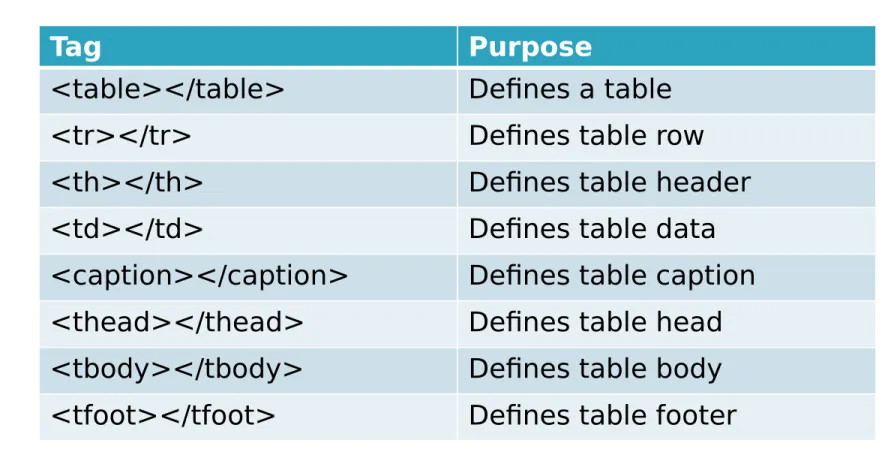
Tag Purpose
<table></table> Defines a table <tr></tr> Defines table row <th></th> Defines table header <td></td> Defines table data <caption></caption> Defines table caption <thead></thead> Defines table head <tbody></tbody> Defines table body <tfoot></tfoot> Defines table footer
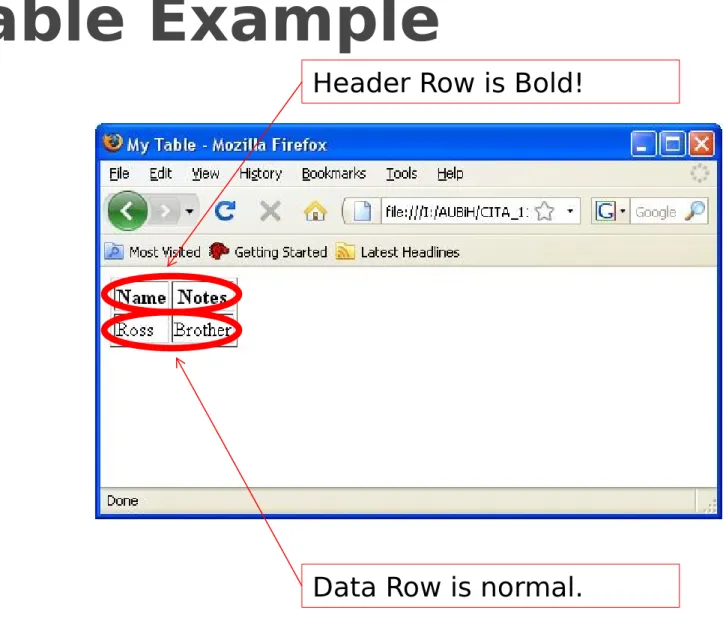
Table Example
Header Row is Bold!
Tables can be nested
Tables can be used for formatting
◦
Only do this if absolutely necessary
◦
Working with complex and nested tables is a mess
Tables should be used to present data
We have other options for complex
formatting
Cascading Style Sheets provide a facility for
formatting Web pages
CSS saves a great deal of work
Multiple styles will cascade into one
◦
Browser default
◦
External style sheets
◦
Internal style sheets
◦
Inline style sheets
Cascading Style Sheets
(CSS)
<html>
<!-- TL home page December 29, 2008 --> <head>
<title>My Home Page</title> </head>
<body>
<h1>Tom's Home Page</h1> <hr />
</body> </html>
<font face="Arial" color="blue">
My favorite color is blue! </font>
<p style="font-family: Arial; color: Blue"> My favorite color is blue!
Cascading Style Sheets
(CSS)
<html>
</body> </html>
<font face="Arial" color="blue">
My favorite color is blue! </font>
<p>My favorite color is blue!</p> <head>
<title>My Home Page</title> <style type="text/css">
p{font-family: Arial; color: Blue} </style>
</head>
<body>
<h1>Tom's Home Page</h1> <hr />
<head>
<title>My Home Page</title> </head>
Cascading Style Sheets
(CSS)
Cascading Style Sheets
(CSS)
<html>
</body> </html>
<font face="Arial" color="blue">
My favorite color is blue! </font>
<p>My favorite color is blue!</p> <head>
<title>My Home Page</title> <style type="text/css">
p{font-family: Arial; color: Blue} </style>
</head>
<body>
<h1>Tom's Home Page</h1> <hr />
<head>
<title>My Home Page</title> </head>
Cascading Style Sheets
(CSS)
Cascading Style Sheets
(CSS)
<html>
</body> </html>
<font face="Arial" color="blue">
My favorite color is blue! </font>
<p>My favorite color is blue!</p> <head>
<title>My Home Page</title>
<link rel="stylesheet" type="text/css" href="mystyle.css" />
</head>
<body>
<h1>Tom's Home Page</h1> <hr />
<head>
<title>My Home Page</title> </head>
Cascading Style Sheets
(CSS)
/* CSS Comment */
p{font-family: Arial; color: Blue}
There are many, many CSS commands
If you have a formatting question, the
answer almost always involves CSS
For a detailed list of commands, techniques,
and tips consult the following site:
http://www.w3schools.com/css/default.asp
Accept information from users
Update databases from a Website
HTML Forms make these goals possible
Forms are created with HTML tags
<html> <head> <title>My Form</title> </head> <body> <h1>Feedback Form</h1> <hr /> <form method="post" action="mailto:[email protected]"> Name: <input type="text" name="Name"><br />
Comments: <input type="text" name="Comment"><br /> <input type="submit" value="Send Comments"> </form>
</body> </html>
Use the GET method for queries
Use the POST method for database
manipulation
Action will usually point to a server-side
script written in a language like PHP or PERL
The server-side script will handle the data
and perform the required operations
For simple email routing, use a free service
like http://www.response-o-matic.com/
Javascript is a client-side scripting language
Adds logic capabilities to Web pages
The most prevalent programming language
on the planet
Excellent starting point for those interested
in programming
Javascript
<html> </body> </html> <p> Hello World! </p> <script type="text/javascript"> document.write("Hello World!"); </script> <body><h1>Tom's Home Page</h1> <hr />
<head>
<html>
<body>
<script type="text/javascript">
var browser=navigator.appName;
var b_version=navigator.appVersion;
var version=parseFloat(b_version);
document.write("Browser name: " + browser);
document.write("<br />");
document.write("Browser version: " + version);
</script>
</body>
</html>
Javascript
Javascript
Javascript
if (document.images) {
image1off = new Image();
image1off.src = 'images/transparent.gif';
image1on = new Image();
image1on.src = 'images/fib_thinker.jpg';
...
function change(image,ext) {
if (document.images)
document.images[image].src = eval(image +
ext + ".src");
}
//-->
Web sites have inspired a great number of
technologies and techniques
Keep up with developments in technology
New trends develop all of the time
The better you can use these technologies
the more likely you will be to leverage the
Web to meet your goals