Volume 63, 2019, Pages 72–79
Proceedings of 32nd International Conference on Computer Applications in Industry and Engineering
Intercross: a Breeding Application for High-throughput
Phenotyping
Chaney Courtney, Mitchell Neilsen
Department of Computer Science Kansas State University
Manhattan, KS, USA
Abstract
Plant scientists around the world have expert-specified systems for dealing with sample breeding. The ability to track parents and their future progeny should be an intuitive and easy task for these systems. Surprisingly, breeders have a handful of various techniques that have little to no centralized protocol. This paper focuses on a novel implementation by Kansas State University’s Cyber Physical Systems lab, the Android application, In-tercross. Intercross is the newest addition to the PhenoApps organization’s set of open source applications. This new application is a generic cross tracking system; however, because there are various methodologies for breeding this task is not trivial. This paper will expand on the non-trivial nature of crossing samples and why this system is needed. Previous systems that were used to track crosses are either outdated, do not exist, or are inefficient.
Keywords: Android, phenotypes, high-throughput, progeny, Cartesian product, threshing
1
Introduction
Classical approaches to systematic breeding and phenotype data acquisition have started to depopularize with the introduction of high-throughput mobile phenotyping applications [1, 2,
Intercross is essentially a genealogy tracker, where users can name the parents of a generated cross. Take this example where a breeder has two types of wheat A and B. The user will input the names of the parents and then the name of the cross, this relation will then be submitted into a local database for tracking. As the process continues, users can walk through the various parents and children to view their history and offspring. When the user inputs A for female, B for male, C for cross and clicks the submit button, this entry is submitted into the database. There are different conventions for naming parents and crosses that will be discussed throughout this paper, some of which utilize barcode scanning or automatic id generation. Breeding is a specified task for each crop; therefore, some features of Intercross may not be used by all breeders. Breed tracking is non-trivial as different plants have different requirements; a simple example being the need to track females before males, or the idea that bananas are self-fruitful. Features that will be discussed within this paper are cross block management, pollen management, automatic identifier generation, defining ZPL labels, breeding event tracking, and finally wish list tracking.
2
Background
The PhenoApps organization solely develops for the Android market. The Android Play Store is a public and free service that anyone can use with an Android phone. Android’s open source nature, developer friendly ecosystem, and cheap devices, create a suitable development environment for targeting researchers throughout the world. Intercross uses the state-of-the-art Google Jetpack libraries for its architecture, utilizing LiveData and the Room persistence database [9]. Intercross uses four main tables in its database to track all information. The tables include: a main cross table that has male, female parent data and new cross event identifiers in a single row, a settings table that persists user settings and ID patterns, a parent table which simply stores parents that have been imported, and finally a wishlist table that tracks events that should be completed s.a crossing, threshing and harvesting. The jetpack architecture allows developers to define models, views and fragments that essentially reflect an MVC architecture. One difference being the ability to define shared view models, which is a way to share data between fragments of an application. For example, the barcode scanner is a separate fragment than the main fragment which displays crossing events. When the barcode scanner fragment is showing and the user scans an ID, a shared view model is used to save the last scanned ID. When the user transitions back to the events crossing page, the shared data from the barcode fragment can be used.
Because the act of creating a cross is non-trivial, Intercross has various ways to accept data. Intercross has three main categories that define a suitable cross that correspond to a given pollination type. When a male and female is present, the cross is bi-parental. If there is only one parent, the cross is considered self-pollinated; otherwise, the cross is open-pollinated. Other than the three main pollination types, the act of making crosses can vary between research facilities. Some researchers require that female parents of a cross be recorded before males or have other workflow specific requirements.
2.1
Workflow
necessarily the male plant. In these situations the male seed comes from a bulk of different male plants, and the breeder cares more about the female being tracked. A certain feature in Intercross, Pollen manager, can create a hash array list of male id keys that relate to a set of male ids. This feature will be later discussed in the pollen manager section and allows the ability to associate a set of ids to one id. Some breeders have no use of male parents at all. For these breeders, there is a setting to disable male id, which will be saved as ’blank’ in their database. Breeders do have a specification for different types of parental pairs. These classes are open-pollinated, bi-parental, and self-pollinated. These pollination types define how the plant was bred, for example a plant that requires a male and a female is labeled as bi-parental. Open-pollinated plants have a female but no unique male id. Finally, self-pollinated is a plant where the male and female ids are equal.
Users of Intercross can easily visualize the pollination type of their crosses within the app. Other than specific breeder tasks, there will always be parental data entry and cross naming throughout the workflow. A daily-first-step for breeders is to check whats called a cross block manager, which is a matrix populated by the Cartesian product of the sets of males and fe-males. A certain coordinate in the cross block represents the physical location of the plants to be crossed in a greenhouse. Classically, breeders have used paper logs or excel spreadsheets to track how many crosses have been made of certain parental combinations. Intercross has developed a simple and intuitive visualization for managing cross blocks which will be discussed in a further section. During the crossing workflow, users have the options of manually inputting data or scanning via the mobile phones camera. Typically, parental barcodes must be printed before any crosses can be made, that way their barcodes can be printed in bulk and scanned when they are to be crossed. Barcode printing and scanning will be covered in the later sections. Once breeders have scanned their daily crosses, they can export a cross block summary which is a checkpoint for the days work. Users can then import this checkpoint to visualize their cross block summary and continue breeding for that next day. A similar, daily-management feature of Intercross is the wish list manager. This manager can delegate work by creating a list of males and females that should be crossed. Users that oversee breeding processes can create multiple wish lists to parallelize work for their breeders. This way each breeder has a guided day of work, meaning they will know exactly which plants must be crossed for that day.
3
Barcoding
or create custom labels. Intercross uses the Zebra SDK [7] which allows users to import their own .ZPL (Zebra Printing Language) for specifying a label format. Intercross has a unique, continuous-crossing mode that allows breeder workers to easily and quickly scan data from barcodes utilizing the following algorithm:
v a l c a l l b a c k = o b j e c t : B a r c o d e C a l l b a c k {
o v e r r i d e f u n b a r c o d e R e s u l t ( r e s u l t : S t r i n g ) { when ( mode ) {
” s i n g l e ” −> {
l a s t S c a n = r e s u l t popBackStack ( ) }
” s e a r c h ” −> n a v i g a t e ( r e s u l t ) ” c o n t i n u o u s ” −> {
l a s t S c a n = r e s u l t h a n d l e r . p o s t D e l a y e d ({
b a r c o d e S c a n n e r . d e c o d e S i n g l e ( c a l l b a c k ) }, 2 0 0 0 )
} } } }
b a r c o d e S c a n n e r . d e c o d e S i n g l e ( c a l l b a c k )
The above algorithm describes the three different scanning modes available in Intercross. First of all the single scanning mode simply uses the shared view model to send data back to the events fragment. The method ’popBackstack()’ is an android navigation function that returns the user to the previous fragment (saved within a stack). The search mode will simply navigate to a fragment which contains more information about that resulting ID. Finally, the continuous fragment will loop through scans by saving the last scanned ID, and calling the scanner to decode again. Because this fragment uses a shared view model with the main events fragment, the continuous mode can submit data to the database as it scans data. In the main fragment, as scans are accepted, it will check if the input is valid with the settings and default requirements and submit the cross to the database.
4
Identifiers
Breeders around the world have no generalized pattern for crop naming conventions. Although it is not uncommon for groups to create internal patterns; therefore, Intercross has an accu-mulation of different naming functions. This section will describe two of the naming functions in detail. Intercross by default has the ability to manually name samples with any Unicode characters.
4.1
Universally Unique Identifiers
mCross . t e x t = UUID . randomUUID ( ) . t o S t r i n g ( )
In the code above, the view for user-input cross IDs is being set by generating a random UUID. When breeders don’t need a certain naming convention for their crosses, this is a good replacement which will speed up their workflow.
4.2
Pattern Creation
Another naming convention option is the ability to create patterns. Intercross supports a subset of regular expressions, where the user chooses a prefix, and suffix string along with a middle number with optional padding. Pattern creation is a setting within Intercross that will dynamically visualize the pattern as the user inputs these values. For example if the users were to choose their prefix as ”Inter”, their suffix as ”Cross”, their middle number as 108, and their padding as three, the generated pattern would be ”Inter108Cross”. If the padding was set to four, it would be ”Inter0108Cross”. As users generate crosses the middle number is used as the unique identifier and is incremented, similar to automatic int content values in SQL databases. Continuing the example, once two crosses are made there will be two entries in the database, F1, M1, ”Inter108Cross”, and F2, M2, ”Inter109Cross”. While the user interface will already have a populated cross entry which will be ”Inter110Cross”.
mCross . t e x t = ” $ p r e f i x ${num . t o S t r i n g ( ) . p a d S t a r t ( pad , ’ 0 ’ )}$ s u f f i x ”
Pattern creation is an optional setting within Intercross. If this setting is true, whether the user is using a barcode scanner or manual input, there will only be two required scans (unless blank male is set as well) one for the male and one for the female.
5
Cross Block Manager
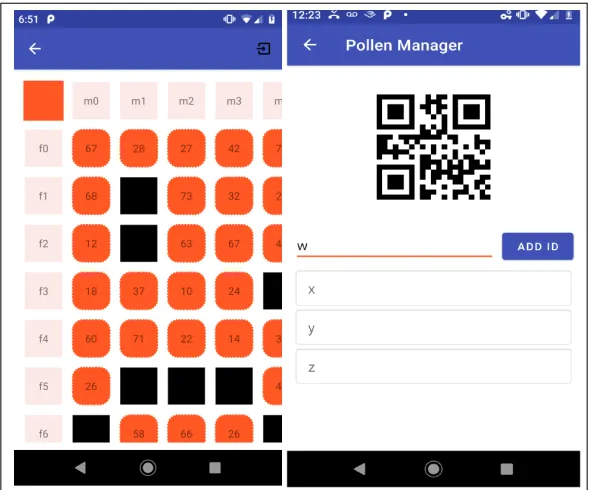
With a greenhouse full of plants to be crossed, users need an easy way to manage which samples should be crossed in a given day. A simple, tournament style, matrix is created where the rows are females and the columns are males. The user provides Intercross with a comma separated sequence of male and female names. Intercross then creates a Cartesian plot of the names and accesses the local database. To fill the matrix, the database will query which males and females have been crossed already, and how many times. Each cell in the matrix will be color-coded which is dependent on a given cross value. If a male and female have passed the max-cross value then the cell will be colored in red, otherwise the cell will be blank. This creates a visualization for the breeders to easily tell which samples should be crossed for that day.
6
Wish List
Figure 1: Cross block visualization on the left and pollen manager on the right within Intercross.
7
Pollen Manager
Most breeders will always have a male and female when making crosses. In some scenarios the information of the male is not as important as the female. For this situation, breeders typically create a bag of bulk-males. When it comes time to breed the females, a random male is chosen from the bulk and is mated with the female. For this reason, breeders need a way to print a label for a set of males, which would be attached to the bulk-bag. The breeders would then simply scan the female barcode on the female flower, and then scan the barcode on the bulk male bag. The pollen manager activity of Intercross creates these bulk barcodes by allowing the user to enter an array of male ids. The barcode is dynamically generated and visualized as the user adds IDs. These male IDs are tracked in a wish list table to preserve which males are bulked together.
8
Related Work
Figure 2: A picture of CIPCross
9
Conclusion
With mobile devices becoming increasingly affordable there is an opportunity to transfer work-loads from antiquated devices. PhenoApps aims at making breeding a simple task by introduc-ing the app, Intercross. The features and ideologies discussed within this paper describe the every day tasks and problems that breeders are faced with. Intercross is currently in beta and is the only Android application on the market that handles these tasks in cross tracking. Future developments include the improvement of progeny visualization. Being the first of its kind, Intercross is setting the stage for ease-of-use cross tracking. As Intercross gains more users and traction, more features and abilities will be implemented that cohere to daily breeder tasks. PhenoApps’ overarching goal is to help breeders and plant scientists around the world build tools to replace hefty-workloads and older methodologies with new technology. Intercross is one exceeding example that fills that gap of breeders trying to cross samples in the field and in the lab. By replacing older technologies and opening up the breeding environment to Android devices, Intercross is setting a new standard for high-throughput data acquisition.
10
Acknowledgements
This material is based upon work supported by the National Science Foundation (NSF) under NSF-BREAD Grant No. 1543958. Any opinions, findings, and conclusions or recommendations expressed in this material are those of the author(s) and do not necessarily reflect the views of the National Science Foundation.
References
[1] PhenoApps Organization Webpage http://phenoapps.org/
[2] T.W. Rife and J. A. Poland,“Field Book: An open-source application for field data collection on Android”. In Crop Science 54, 1624-1627, 2014. DOI: 10.2135/cropsci2013.08.0579.
[3] M.L. Neilsen, S.D. Gangadhara, T. Rife, ”Extending watershed segmentation algorithms for high throughput phenotyping”. in Proceedings of the 29th International Conference on Computer Appli-cations in Industry and Engineering, Denver, CO, Sept. 26-28, 2016.
[4] Chaney Courtney (2017)Open source application development for phenotypical data acquisition,
Kansas State University, Manhattan, KS, USA
[5] PhenoApps Github Hackathon Repository https://github.com/trife/Hackathon [6] Verify Github Repository https://github.com/PhenoApps/Verify
[7] Zebra Android SDK https://www.zebra.com/us/en/products/software/scanning-systems/scanner-drivers-and-utilities/scanner-sdk-for-android.html