46
An Exploratory Study of Video Integration Methods Available in Learning Platforms
Dr. Angela M. Mattia
Assistant Professor
Decision Sciences & Information Management
Jacksonville University
2800 University Blvd N
Jacksonville
FL 32211
Abstract
Many video distribution channels exit, some platformsespecially designed for educators. Videos continue to impact how we learn in new and exciting ways. This article specifically explores the different video integration methods available in online video platforms using a video integration approach. A comparison of four commonly used platforms capable of video distribution is given. The platform comparison is informational as well as a comparison of the methods on “How-To” integrate video. It can be used to understand some platform options and their video integration methods. An example of the visual outcome of the video integration methods is presented and analyzed. The result is the identification of thirteen video integration methods mapped to the major action required to implement it. In addition, the author summarizes the key points that were observed during the implementation of each video integration method.
Keywords: Video, Integration, Platform, YouTube, Learning Platforms
1.
Introduction
Video in education used to mean showing a movie in class or maybe even having a team of people record your class lecture so students could see it later. Today it means a lot more. Should you take a YouTube video or any useful educational video and create a customized lesson or project demonstration around the video? Before you decide let’s consider some statistics provided by Katie Lepi (2014) on how video impacts education:
Video is becoming a preferred channel of communication
Internet video accounts for 40% of all internet traffic in 2012
By 2016, it is expected that number will jump to 62%
Video helps students become actively engaged in their learning
Video helps maximize school resources
It increases engagement and excitement among students
Video can help facilitate collaboration
Video is appropriate for various learning styles
It helps improve learning outcomes
68% of teachers believe that video content helps stimulate discussions
66% believe it helps increase student motivation
55% believe that it helps teachers be more creative
62% believe that it helps teachers be more effective
91% of UMASS students felt that using lecture capture helped them learn course material
© Center for Promoting Ideas, USA www.ijbhtnet.com
Video is becoming a preferred channel of communication and that internet video accounts for 40% of all internet traffic in 2012 (Lepi, 2014). Specific to higher education, 80% of faculty report some form of class use of online video. Indeed, out of all the social media types’ faculty use online video the most (Burke & Snyder, 2008; Moran, Seaman, & Tinti-Kane). This suggests that video has potential beyond the basic function of just watching a video and even beyond the basic use of social media. Indeed, you have technological platforms available that allow faculty to customize lessons or project demonstrations around any video, but what if you want to integrate video into other online platforms?
2.Online Video Platforms
A technological platform is an underlying computer system on which application programs (i.e. video playing software)can playback video. At a more sophisticated level a platform is the technological underpinnings on which other technologies or processes are built. Internet videos are defined as any type of video that can be accessed over the internet, therefore they are stored in the cloud and accessed from a public or private online video platform (OVP). An OVP enables computer users to upload and store video content on the Internet. An educational solution also needs to be able to customize lessons or project demonstrations around any video. An educational OVP provides tools that allow you to upload, host, encode, customize, manage, play, distribute, link, download, publish and measure online video content for both on-demand and live delivery (Reportstack, 2014). When we think about OVP, YouTube is one of the first to come to mind due to its popularity (Topps, Helmer, & Ellaway, 2013), cost and built in functionalities.
2.1 YouTube was founded in February 2005, “YouTube allows billions of people to discover, watch and share originally-created videos. YouTube provides a forum for people to connect, inform, and inspire others across the globe and acts as a distribution platform for original content creators and advertisers large and small” ("About YouTube," 2014). YouTube is one of the most popular distribution platforms available. It is a technological platform with an underlying computer system on which application programs (i.e. video playing software) cans playback video. If you create a YouTube channel, you can upload, host, encode, customize, manage, play, distribute, link, download, publish and measure online video content for both on-demand and live delivery. In a 2013 study on accessing videos to teach clinical procedures from a project website, the authors assumed that the videos would be widely used as supplemental educational materials. The authors summarized the results in the following way “The project Web site attracted little traffic, alternatives were considered, and YouTube was selected for exploration as a publication channel. YouTube was found to provide many advantages over self-publication, particularly in terms of technical simplification, increased audience, discoverability, and analytics. In contrast to the transitory interest seen in most YouTube content, the channel has seen sustained popularity. YouTube’s broadcast model diffused aspects of the relationship between educators and their learners, thereby limiting its use for more focused activities, such as continuing medical education” (Topps et al., 2013).
3.Comparing and Integrating Platforms
YouTube is the platform that will be used to upload, host, encode, customize, manage, play, distribute, link, download, publish and measure online video content for both on-demand and live delivery of educational materials. At a more sophisticated level we will compare and analyze three other platforms that can be easily integrated with YouTube. This is important because it allows other technologies or processes to be built to enhance the success of using videos for educational purposes.
48
The second type of TED-Ed lesson can be created by any website visitor, and involves adding questions, discussion topics and other supplementary materials to any educational video on YouTube. Both types of TED-Ed lessons are used regularly -- in classrooms and homes -- to introduce new topics to learners in an exciting, curiosity-inspiring ways.” ("About TED-Ed," 2014)
3.2 Google Sites is an easy way to make information accessible on the internet. You can upload, host, manage, play, distribute, link, download, publish and measure online video content for on-demand delivery. “People can work together on a Site to add file attachments, information from other Google applications (like Google Docs, Google Calendar, YouTube and Picasa), and new free-form content. Creating a site together is as easy as editing a document, and you always control who has access, whether it's just yourself, your team, or your whole organization. You can even publish Sites to the world. The Google Sites web application is accessible from any internet connected computer.” ("Welcome to Google Sites ", 2014)
3.3 Blackboard is a learning management system, and has been a leader, in the eLearning tool industry (Platforms, 2013). It is widely used in higher education. It enables faculty to engage students by reaching them on devices. They can connect more effectively using features like announcements that keep students informed, download digital content and use discussion boards that allow collaboration("Blackboard LearnTM Release 9.1," 2014). The Blackboard Learning platform supports video and can be used as a platform for video distribution. You can upload, host, manage, play, distribute, link, download, publish and measure online video content for on-demand delivery.
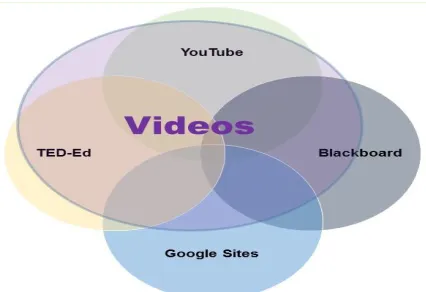
Figure 1: A VideoIntegrationApproach to Learning Platforms
© Center for Promoting Ideas, USA www.ijbhtnet.com
Table 1: Level of Difficultly for Video Integration Methods
Easy Integration Medium Higher Integration Complexity
Use Single Platform to Upload Videos(YouTube & Blackboard)
Embed video withMashUps (Blackboard & Google Sites)
(iFrame) using the HTML control (Google Site & Blackboard)
Create a URL link
(Blackboard & Google Sites)
Record from Webcam (Video Everywhere) (Blackboard)
Record & Embed Webcam Capture and Live Events (YouTube)
Insert a Video from your Google Drive (Google Site)
Use "Embed" gadget (Google Site)
Flip This Lesson (TED-Ed)
It is important to note that many other video platforms exist, but only a small sample of well-known platforms was selected for the comparison and analysis due to the exploratory nature of this study.
4.Methodology
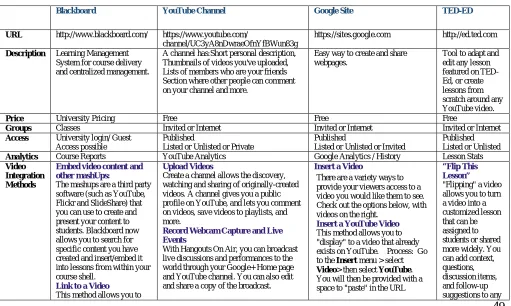
A categorical analysis of the integration possibilities for video is used to compare four OVP that can be used for educational video creation and distribution. First, we classify and map the list of important elements that make up the categories. The format of heuristics is used to investigate and visualize how the elements translate into specifications and methods. In this study, this analysis technique helps clarify the educational uses of the platforms and the results visualize the outcome.
Elements of the Categorical Analysis:
The URL indicates where information was gathered and where more information can be retrieved.
The description indicates briefly the main reason for the platform.
The price indicates whether it is free or has a cost.
Groups indicates the ability to manage who accesses the platform.
Analytics indicates the tools necessary to retrieve statistics and/or see meaningful patterns in data.
VideoIntegration Methods identifies the video integration opportunities available in each platform and a brief idea on how-to complete the process.
Each category consists of typical elements that are used to evaluate a software platform (see Table 2). The video integration method is the main element explored in this study.
Table 2: Video Integration Platform Comparison
Blackboard YouTube Channel Google Site TED-ED
URL http://www.blackboard.com/ https://www.youtube.com/
channel/UC3yA8nDwraeOfnYfBWun83g
https://sites.google.com http://ed.ted.com
Description Learning Management System for course delivery and centralized management.
A channel has:Short personal description, Thumbnails of videos you've uploaded, Lists of members who are your friends Section where other people can comment on your channel and more.
Easy way to create and share webpages.
Tool to adapt and edit any lesson featured on TED-Ed, or create lessons from scratch around any YouTube video.
Price University Pricing Free Free Free
Groups Classes Invited or Internet Invited or Internet Invited or Internet
Access University login/ Guest Access possible
Published
Listed or Unlisted or Private
Published
Listed or Unlisted or Invited
Published Listed or Unlisted
Analytics Course Reports YouTube Analytics Google Analytics / History Lesson Stats
Video Integration Methods
Embed video content and other mashUps:
The mashups are a third party software (such as YouTube, Flickr and SlideShare) that you can use to create and
Upload Videos
Create a channel allows the discovery, watching and sharing of originally-created videos. A channel gives you a public profile on YouTube, and lets you comment on videos, save videos to playlists, and
Insert a Video
There are a variety ways to provide your viewers access to a video you would like them to see. Check out the options below, with videos on the right.
“Flip This Lesson”
50
Sources: Blackboard and Google Websites
website. You could simply copy and paste the URL on the page you are designing, or type in a description or key
works and use the Link
button above and paste in the URL to the site of interest.
Insert an entire web page (iFrame) using the HTML control
Record from Webcam (Video Everywhere) is a feature n Blackboard. An icon called Record from Webcam is in the content editor that controls your webcam. When activated, users can record video and upload it directly to YouTube. The feature provides the ability for faculty and students to: Record a video on the fly using a webcam and have it seamlessly embedded in course materials, interactions, and feedback through the content editor.
Reuse previously
recorded videos by choosing from one’s own library of videos.
provided at the actual location of the video. When done, simply
click Save.
Insert a Video from your Google Drive
Upload videos directly to your Google Drive and share these videos as you would any Doc, Spreadsheet, or Presentation. To begin, Go to your Google Drive and upload a video (see the upload icon next to the Create button). To insert in a Google site first make sure that you have set the visibility of your video to
either Public on the Web or
Anyone With The Link. Now, go to the page on your site you wish to insert the video. Click Edit page
> go to the Insert menu >
select Drive > then select Video.
Select the video you wish to insert.
Link to a Video
This method allows you to "point" to a video on another website. You could simply copy and paste the URL on the page you are designing, or type in a description
or key works and use the Link
button above and paste in the URL to the site of interest.
Using "Embed" gadget
You can also insert videos that have an "embedding" code by
using a gadget called Embed
Gadget. Go to the Insert menu > go all the way to the bottom and
select More Gadgets> selected
Featured> then search for Embed Gadget. This gadget will give you the opportunity to insert an embed code and adjust the size of the video frame.
Insert an entire web page (iFrame)
You found a video, but it's not on YouTube nor does it have an embedding code. Use a gadget (iFrame) that will allow you to insert anything that has a URL. That means you can insert the actual web page into one of your
web pages. Go to the Insert menu
> go all the way to the bottom and
select More
Gadgets >selected Featured >
then search for iFrame.
© Center for Promoting Ideas, USA www.ijbhtnet.com
Results
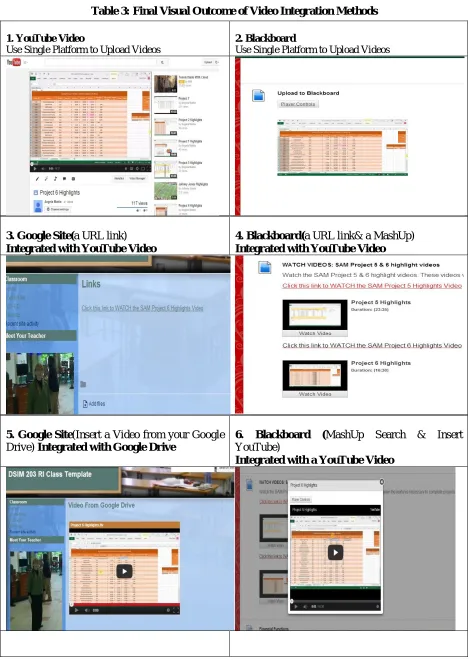
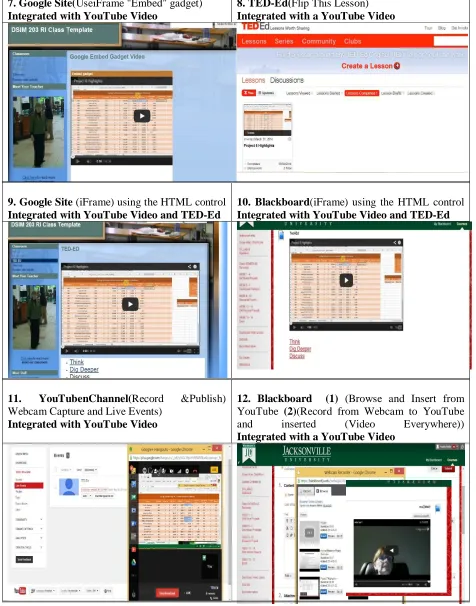
Table 3: Final Visual Outcome of Video Integration Methods
1. YouTube Video
Use Single Platform to Upload Videos
2. Blackboard
Use Single Platform to Upload Videos
3. Google Site(a URL link)
Integrated with YouTube Video
4. Blackboard(a URL link& a MashUp)
Integrated with YouTube Video
5. Google Site(Insert a Video from your Google Drive) Integrated with Google Drive
6. Blackboard (MashUp Search & Insert YouTube)
52
7. Google Site(UseiFrame "Embed" gadget)
Integrated with YouTube Video
8. TED-Ed(Flip This Lesson)
Integrated with a YouTube Video
9. Google Site (iFrame) using the HTML control
Integrated with YouTube Video and TED-Ed
10. Blackboard(iFrame) using the HTML control
Integrated with YouTube Video and TED-Ed
11. YouTubenChannel(Record &Publish) Webcam Capture and Live Events)
Integrated with YouTube Video
12. Blackboard (1) (Browse and Insert from YouTube (2)(Record from Webcam to YouTube
and inserted (Video Everywhere))
Integrated with a YouTube Video
© Center for Promoting Ideas, USA www.ijbhtnet.com
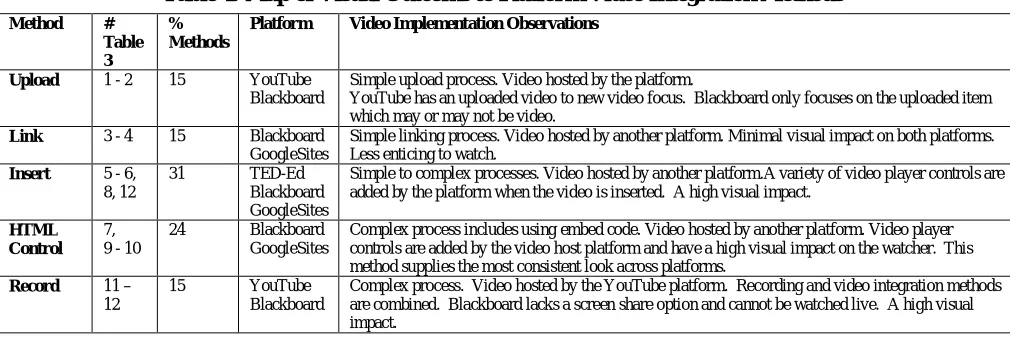
Table 4: Map of Visual Outcome to Platform Video Integration Methods
Method # Table 3
% Methods
Platform Video Implementation Observations
Upload 1 - 2 15 YouTube Blackboard
Simple upload process. Video hosted by the platform.
YouTube has an uploaded video to new video focus. Blackboard only focuses on the uploaded item which may or may not be video.
Link 3 - 4 15 Blackboard GoogleSites
Simple linking process. Video hosted by another platform. Minimal visual impact on both platforms. Less enticing to watch.
Insert 5 - 6, 8, 12
31 TED-Ed
Blackboard GoogleSites
Simple to complex processes. Video hosted by another platform.A variety of video player controls are added by the platform when the video is inserted. A high visual impact.
HTML Control
7, 9 - 10
24 Blackboard
GoogleSites
Complex process includes using embed code. Video hosted by another platform. Video player controls are added by the video host platform and have a high visual impact on the watcher. This method supplies the most consistent look across platforms.
Record 11 – 12
15 YouTube
Blackboard
Complex process. Video hosted by the YouTube platform. Recording and video integration methods are combined. Blackboard lacks a screen share option and cannot be watched live. A high visual impact.
5. Discussion and Conclusion
The biggest challenge is that most educational OVP platforms do not have all the tools necessary or wanted for both educational purposes and managing online video. For example, video formats (e.g. .avi (Microsoft), .mov (Quicktime), .wmv (Windows), and .flv (Flash Video)) vary according to the program and operating system used and may not be compatible with the OVP that you are using. This would require that you convert the video to a different format. Customizing and editing videos require a different software programs most of the time. Video integration becomes a major challenge that faculty are not prepared to overcome (Reportstack, 2014).
Many video integration methods are available. For example, embedding HTML has numerous different methods depending on the platform. The results show that most the results are similar visually, so the complexity of having so many different methods to accomplish the same task is an unnecessary obstacle to overcome when using any of the HTML controls. The insert methods are associated with different video players and video storage options which increases the options for both. Increased complexity can cause increased confusion on all the options to consider.
Publishing video also requires that an understanding of how and why you should make videos public, unlisted and private. Measuring online video content is difficult to translate and correlate into positive learning outcomes. Live delivery has a whole different set of issues. What seems very simple can become very complicated and time consuming. All learning platforms are not created equal, so an integrated approach to learning platforms will allow the best features of each be exploited to its fullest so that you can upload, host, encode, customize, manage, play, distribute, link, download, publish and measure online video content for both on-demand and live delivery of a customized lesson or hands-on project demonstration.
References
About TED-Ed. (2014). Retrieved May 19, 2014, from http://ed.ted.com/about
About YouTube. (2014). Retrieved May 19, 2014, from http://www.youtube.com/yt/about/
Blackboard LearnTM Release 9.1. (2014). Retrieved May 21, 2014, from http://www.blackboard.com/Platforms/Learn/Overview.aspx
Burke, S. C., & Snyder, S. L. (2008). YouTube: An Innovative Learning Resource for College Health Education Courses. International
Electronic Journal of Health Education, 11, 39-46.
Lepi, K. (2014). Why You Should Use Video In Education. Edudemic. Retrieved May 12, 2014, from http://www.edudemic.com/use-video-education/