Vol.9 (2019) No. 3
ISSN: 2088-5334
A New Native Video Filtering based on OpenGL ES for Mobile
Platform
Sari Wijayanti
#, Burhan Alfironi Muktamar
#, Sunu Wibirama
+*, Agus Bejo
+#Department of Information System, Faculty of Engineering and Information Technology, Jenderal Achmad Yani University, Jl. Siliwangi,
Yogyakarta, 55294, Indonesia
+
Departement of Electrical Engineering and Information Technology, Faculty of Engineering, Gadjah Mada University, Jl. Grafika No. 2, Yogyakarta, 55281, Indonesia
E-mail: [email protected]
*
Intelligent Systems Research Group, DTETI Bld. Jalan Grafika 2 Yogyakarta 55281, Indonesia.
Abstract— In the last five years, there have been many Android applications implementing video filter or video effect as an excellent
feature. OpenCV is an open source computer vision library that can be simply and easily used for video filtering in Android application. However, using OpenCV library for video filtering commonly yields a bigger size of Android application. The concept of “Develop for Billion People” has enforced the developers to optimize the size of their applications to preserve resources and size of memory—as not all Android devices come with sufficiently large memory. On the other hand, OpenGL ES does not burden the filtering process because of its smaller size when it is implemented during the application development. In this research, we present a new native video processing technique using OpenGL ES. We implement the proposed method on a native video file without decreasing its quality before video filtering process. The experiments were conducted with five different mobile devices. We compared several metrics including: quality of the resulted video, file size of the apk, power consumption, and memory usage. Based on the experimental results, OpenGL ES produces smaller file size of apk (2 MB) compared with the produced file size of apk by OpenCV (20MB). The resulted file after video filtering possesses same properties as observed before video filtering. Additionally, OpenGL ES uses more efficient power with 0.1965 mAh, while OpenCV consumes 0.283 mAh. Finally, video filtering with OpenGL ES uses 29.3% lesser memory than video filtering with OpenCV. The proposed method is proven to be more appropriate with “Develop for Billion People” as it preserves more computational resources compared with the existing video filtering technique in Android.
Keywords— video processing; video filter; OpenCV; OpenGL ES.
I. INTRODUCTION
According to the statistics of Google Developer in 2017 [1], 85% out of all smartphone users in the world use the Android operating system. Google I/O 2018 conference [2] stated that the active users of Android smartphone had reached more two billion users. The concept of “Develop for Billion People” enforces the developers of Android applications to pay attention to some critical things such as internet connection, the local language, and apk size.
Android applications are commonly developed to support users’ activities in business, social media, and entertainment. Most of these activities are inevitably related to the use of visual media and video. One functionality from Android is its ability to implement both 2D and 3D effects on video contents, namely video filtering. This ability improves the quality of the video while encouraging the users to do
interactive video editing on a mobile platform. In the last five years, there have been various Android applications that implement video filter or video effect.
TABLE I
COMPARATIVE ANALYSIS OF THIS RESEARCH AND SEVERAL PRIOR WORKS IN NATIVE VIDEO FILTER
Author Year Aim of the Study Object of Study Studied Factor Library
This Research 2018 Video filter on video file with small size apk, less battery consumption, and less memory
consumption
Video file Efficiency, apk size, Quality OpenGL ES
Borg and Debono [6] 2016 Depth Image Based Rendering (DBIR) technique to generate a virtual view by utilizing the GPU of the mobile device
Camera setup video (Kendo, Ballons, and Champagne)
Bad boundary detection, forward warping and pixel shifting, color balancing, blending, and inpainting
OpenCV
Kamath et al. [7] 2016 Bitstream video watermarking
on Mobile Devices Mpeg videos Execute time, power consumption, and OpenCV
Venugopal et al. [8] 2015 Video watermarking for
Android Mobile Devices Video file Time taken, Energy consumed, pixel value
OpenCV, JavaCV, JavaCpp, FFmpeg Chaudhari and Patil
[9] 2015 Compariso of real-time video processing and object detection
between OpenCV and CamTest Video file Frame processing rate
OpenCV, FAST, CamTest
Saipullah et al. [10] 2012 Real-time video processing using native programming Video file Frame processing rate OpenCV
In 2012, Saipullah et al. [10] researched real-time video processing using native programming to provide a filtering effect on a video file. They implemented image processing methods to each frame of a video captured from a smartphone that was running on an Android platform. In their research, there was a comparative study of observing frame processing rate during the development of two applications—the first application was developed using native programming while the second was developed using Java programming. They found that out of the eight images processing methods, six methods that were executed using the native programming were faster than that of the Java programming with a total average ratio of 0.41.
In 2015, Chaudhari and Patil [9] compared real-time video processing and object detection between OpenCV and Cam Test. Real-time video processing was done by giving several effects on the video file (RGB, grayscale, threshold, mean, median, Gaussian, Laplacian, and Sobel). They measured Frame Processing Rate (FPR) between OpenCV and CamTest. Chaudhari and Patil also compared performance between object detection and several algorithms (e.g., FAST, SURF, SIFT, MSER, ORB, STAR, GFTT). Results from thevideo effects showed that OpenCV yielded more excellent performance compared with CamTest. The results from object detection showed that the FAST algorithm yielded the best performance compared with the other algorithms.
In 2015, Venugopal et al. [8] implemented OpenCV, OpenCpp, and FFmpeg to put a watermark on a video file. In their studies, watermarking was used for ownership and copied the right information by drawing a watermark on every frame after being extracted. From the experiments, they found that there were challenges faced on video watermarking such as Frame Extraction, Video Type and Efficiency Factors, Compression of Frame, Payload, SVD
watermarking, Size Difference in Frames and Difference in Pixel Value.
In 2016, Kamat et al. [7] also researched video watermarking by inserting a text into a video file. The experiment was carried out to analyze the execution time of the insertion and the extraction process of bitstream watermarking on the video. They found that the longer the inserted text, the longer time is taken for insertion dan extraction — the process equivalents to the needs of battery consumption.
In 2016, Borg and Debono [6] used the Depth-Image-Based Rendering (DIBR) technique to generate a virtual view by utilizing the Graphical Processing Unit (GPU) of the mobile device. Depth-Image-Based Rendering (DIBR) is a technique where a new view is synthesized based on the depth maps of the reference views. To handle video processing, they used OpenCV for Android and OpenCL for GPU programming framework. Based on their experiment, they found that the achieved maximum performance for a video with 1024 × 768 pixel resolution is 19.17 frames per second and the best Peak Signal-to-Noise Ratio (PSNR) value for the 1024 x 768-pixel resolution is 35.09 dB.
implemented during the application development. Furthermore, the video effect implemented by the previous researchers did not change their video file, but the only effect of real-time visualization when the video was played.
To fill this research gap, we present a novel native video processing technique using OpenGL ES. The effect of the proposed video processing technique is implemented on the video file without decreasing the quality of its original video file. Compared with previous approaches, we empirically demonstrate that our new approach is more compatible with the concept of “Develop for Billion People.”
II. MATERIAL AND METHOD A. Object of Experiment
We use two video files in our experiments. The detailed information of the two video files can be seen in Table 2.
TABLEII
DETAIL OF VIDEO FILE USED IN THIS RESEARCH
Description VIDEO 1 VIDEO 2
Extension .mp4 .mp4
Duration 10 seconds 60 seconds
Frame width 320 640
Frame height 176 360
Data rate 300 kbps 613 kbps
Bit rate video 622 kbps 678 kbps
Frame rate 25 fps 23 fps
Bit rate audio 321 kbps 65 kbps Channels 2 (stereo) 2 (stereo)
Sample rate 48 kHz 22 kHz
B. Android Platform
Android is an open source, Linux-based software stack created for a wide array of devices and form factors. Android consists of several components, as seen in Fig.1 [1]. Linux Kernel is the foundation of the Android platform. Using a Linux Kernel allows Android to take advantages of key security features and allows device manufacturers to develop hardware. The Hardware Abstraction Layer (HAL) provides a standard interface that exposes the capabilities of device hardware to the higher-level Java API Framework.
Android Runtime is written to run multiple virtual machines on low-memory devices by executing DEX files, a bytecode format designed especially for Android that is optimized for minimal memory footprint. Native C/C++ Libraries is a component that provides a library in C/C++, such as OpenGL ES that allows developers to use them on Android application development. Java API Framework is the entire feature-set of the Android OS written in the Java programming languages. System apps are a set of core applications for email, SMS Messaging, Calendar, and so forth [1]. In our research, the developed native video filtering technique uses OpenGL ES that is positioned on the component of Native C/C++ Libraries. Our approach aims to achieve faster-filtering performance as OpenGL ES gets direct support from the Graphics Processing Unit of the Android device [11]–[13].
Fig. 1 The Android software stack [16]
C. Native Video Filter OpenCV
In this research, we compared the implementation of video filter in two Android applications. The first application used OpenCV, while the second application used OpenGL ES. The flow process of the video filter with OpenCV is depicted in Fig. 2.
Fig. 2 Flow of video filtering using OpenCV
filter the extracted frame. The extracted process is simply implemented using pixel color manipulation. Finally, the Frame Recorder is used in the merging process into the video file. The filtering process is accommodated by the repeating process to check whether there is an available frame whose image is to be filtered. Not always that the extracted frame has its image to be filtered, when the extracted frame does not have image, it will be directly inserted into a frame recorder. After the repetition process has been done, the last step is doing flushing and releasing the Frame Grabber, the Frame Filter, and the Frame Recorder [3].
D. Native Video Filter OpenGL ES
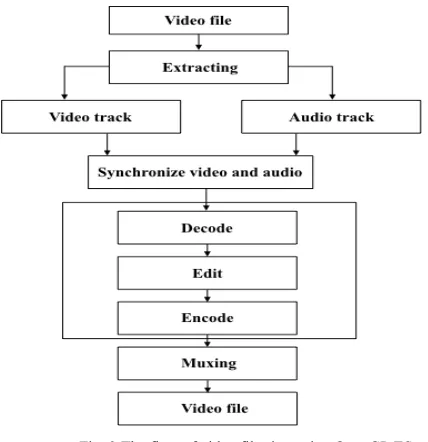
Native video filter with OpenGL ES is divided into five main steps, namely Extracting, Decoding, Editing, Encoding, and Mixing as seen in Fig. 3.
Fig. 3 The flow of video filtering using OpenGL ES
OpenGL ES is a subset of OpenGL, commonly used for the development of 3D graphics in digital media with a more traditional approach. Therefore, implementation of application development using OpenGL ES requires more complicated source code compared with implementation using OpenCV library that directly calls the provided API [14]. In this case, the extracting process decomposes a video
file to get the video track and audio track. Android provides API Media Extracting to conduct the extracting process.
Decoding is a step where a video track is divided into a sequence of image frames. Editing is a step of applying a filter on every video frame. Encoding is a step of reuniting the filtered frames. Processes of decoding, editing, and encoding are repeated on every frame. Android provides API MediaCodec and MediaFormat to handle the decoding and encoding process. In this application, the processes of editing or filtering seem more complicated compared with former video filtering implementation using OpenCV. In this case, we need to make a vertex buffer that is then manipulated with a vertex shader and a fragment shader as seen in Fig. 4.
Fig. 4 Flow of frame editing
OpenGL ES uses a programmable pipeline, as shown in Fig. 4 [15]. Input surface obtained from the result of the decoder with class MediaCodec will be prepared to be processed by the GPU on the Vertex Buffer Object form and to set the point vertex for editing. This process is calledprimitive processing. After processing vertex shader or setting the position of vertex point has been conducted, we perform rasterizer or pixel forming into video frames. After the pixel is formed, we do pixel coloring using fragment shader to the formed of point vertex by a vertex shader. Then, in the step of Color Buffer Blend, we conduct a process of color blending from the rest of the pixel. Therefore, frames from the input surface will be placed into buffer frames that will be encoded into the output surface later.
TABLEIII
SPECIFICATION OF DEVICE TESTING
No Device OS Chipset CPU GPU Memory
1 Samsung Galaxy
S5 Android 6.0 (Marshmallow) Qualcomm MSM8974AC Snapdragon 801 Quad-core 2.5 GHz Krait 400 Adreno 330 16 GB, 2 GB RAM 2 LG Nexus 5 Android 6.0
(Marshmallow) Qualcomm MSM8974 Snapdragon 800 Quad-core 2.3 GHz Krait 400 Adreno 330 16 GB, 2 GB RAM 3 Smartfren
Andromax Android 4.3 (Jelly Bean) Snapdragon Quad-Core 1.2GHz Processor Cortex A7 Adreno 302 4 GB, 2 GB RAM 4 Xiaomi Note 4X Android 7.0
(Nougat) Qualcomm MSM8953 Snapdragon 625 Octa-core 2.0 GHz Cortex-A53 Adreno 506 16 GB, 3 GB RAM 5 Asus Zenfone 2 Android 6.0
E. Design and procedures of the experiment
The experiment aimed to compare the resulted file size of apk, memory consumption, and battery consumption between the proposed algorithm (native video filtering using OpenGL ES) and the existing algorithm (video filtering using OpenCV). The experiment was implemented on two video files shown in Table 2. We experimented with five different devices, each of which had its specification, as shown in Table 3. We evaluated each video file with 30 iterations in each device. We then collected the best, the worst, and the average experimental results.
III.RESULTS AND DISCUSSION A. Video Filter Result
Native video filter with OpenGL ES on the Android platform was successfully implemented, and it produced results as seen in Fig. 5, and Fig. 6.
Fig. 5 The video before filtering shows the original color video
Fig. 6 The resulted in the video after diltering shows color blending effect
The implemented filter on the video file did not decrease the previous quality of the video before being filtered. The detailed information about the video file after the filtering process is shown in Table 4.
TABLEIV
DETAIL VIDEO RESULT
Description VIDEO 1 VIDEO 2
Extension .mp4 .mp4
Duration 10 seconds 60 seconds
Frame width 320 640
Frame height 176 360
Data rate 300 kbps 613 kbps
Bit rate video 622 kbps 678 kbps
Frame rate 25 fps 23 fps
Bit rate audio 321 kbps 65 kbps Channels 2 (stereo) 2 (stereo)
Sample rate 48 kHz 22 kHz
B. File size apk
As shown in Table 5, Android application with OpenCV library yielded a debug apk with the size of 63MB while Android application with OpenGL ES yielded a debug apk with the size of 4MB.
TABLEV
DETAIL VIDEO RESULT
The size of the apk can be optimized in several ways. In this case, the process removed unused resources. After this process was done, the apk split was also conducted for several architectures: armeabi, armeabi-v7a, arm64-v8a, mips, x86, x86_64, and arm64-v8a. They yielded a released apk size of 20 MB and 2MB for OpenCV and OpenGL ES, respectively. The size of the apk file resulted by OpenCV was larger because when we incorporated the OpenCV library, we ought to put all modules and components, although we only used particular modules and components. OpenGL ES produced smaller apk size because the process used only a subset of OpenGL ES depending on the required modules and components. On the other hand, practical implementation of video filter with OpenCV was easier than implementation with OpenGL as it required the programmer to shortly write computer code—given that the OpenCV library provided the rest of the required functions and classes. Compared with OpenCV, however, OpenGL ES is more suitable to the criteria of “Develop for Billion People.”
C. Power Consumption
After doing 30 times of experiments for every device on the video 1 and video 2, the results of the power consumption between the native video filter using OpenGL ES and OpenCV are shown in Table 6 and 7, respectively.
TABLEVI
POWER CONSUMPTION OF OPENGLES
Devices Best Worst Avg VIDEO 1 (mAh) Best Worst VIDEO 2 (mAh) Avg
Samsung Galaxy S5 0.044 0.094 0.064 0.289 1.05 0.718 LG Nexus 5 0.032 0.046 0.043 0.168 0.180 0.172 Smartfren Andromax 0.061 0.066 0.063 0.296 0.306 0.302 Xiaomi Note 4X 0.053 0.057 0.055 0.230 0.243 0.233 Asus Zenfone 2 0.053 0.057 0.054 0.256 0.265 0.261
TABLEVII
POWERCONSUMPTIONOFOPENCV
OpenCV OpenGL ES Debug apk size 63 MB 4 MB
Release apk size 20 MB 2 MB
Devices Best Worst VIDEO 1 (mAh) Avg Best Worst Avg VIDEO 2 (mAh)
Samsung Galaxy S5 0.044 0.075 0.061 0.494 0.841 0.679 LG Nexus 5 0.093 0.124 0.118 0.369 0.493 0.469
Smartfren
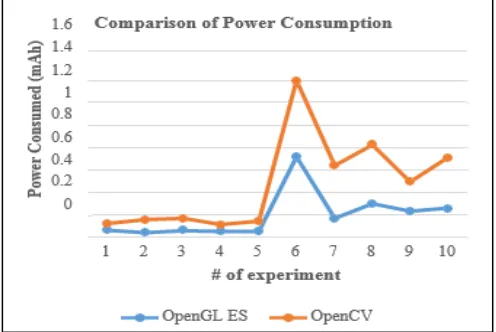
We show the best, the worst, and the average results. Fig.7 shows a comparison of the average power consumption between OpenCV and OpenGL ES during the first ten iterations.
Fig. 7 Comparison of average power consumption between native video filtering with OpenCV and OpenGL ES. OpenGL ES and OpenCV are denoted by the blue and orange line, respectively
Based on the experimental results, native video processing using OpenGL consumed less power than native video processing using OpenCV. Our experiment proved that computational resources could be reduced by implementing the proposed method. Additionally, we also proved that the proposed method was independent of devices, as the average power consumption could be reduced in all devices.
D. Memory usage
After 30 times of experiments on video 1 and video 2 in all devices, the results of memory usage between native filtering using OpenGL ES and OpenCV are shown in Table 8 and 9, respectively.
TABLEVIII
MEMORY USAGE OF OPENGL ES
TABLEIX
MEMORY USAGE OF OPENCV
We present the best, the worst, and the average results. Fig.8 shows the comparison of the average memory usage between OpenCV and OpenGL ES during the first ten
iterations. Based on our experimental results, OpenCV consumed more memory than OpenGL ES in the process of video filtering. This might result from larger library files of OpenCV. During the process, we ought to include all modules and components, despite only a few parts of those components that were used in the video filtering process.
Fig. 8 Comparison of average memory usage between native video filtering using OpenCV and OpenGL ES. OpenGL ES and OpenCV are denoted by the blue and orange line, respectively.
As seen in Fig. 8, the proposed method was able to reduce memory usage in each iteration, showing that the proposed method consistently using fewer resources compared with the traditional method based on OpenCV.
IV.CONCLUSIONS
Previous studies of native video processing on various mobile devices mainly implement OpenCV library. OpenCV library provides an easy native video filter implementation. However, the OpenCV library commonly produces a large apk file. In this case, native video filtering based on OpenCV should consider the availability of hard drive space in the mobile device. To tackle this problem, we propose a new native video filtering technique using OpenGL ES. By design, the proposed method requires more complicated implementation.
However, the resulted apk file is considerably smaller than the one resulted by OpenCV library. In this study, the size of the resulted apk file from native video filtering with OpenCV library was 20 MB, while the size of the resulted apk file from native video filtering with OpenGL ES was 2 MB. In management, power consumption and memory usage, OpenGL ES yielded better performance than OpenCV. The average power consumption needed by OpenGL ES during video filtering process was 0.1965 mAh, while OpenCV needed 0.283 mAh. The average memory usage of OpenGL ES was 54.026 MB, while the average memory usage of OpenCV was 76.472 MB. Our finding implies that the proposed native video filtering method using OpenGL ES is more relevant to the concept of “Develop for Billion People”—providing more efficient solution for development in various mobile devices.
REFERENCES
[1] Google Developers Guide. (2019) OpenGL ES. [Online]. Available: https://developer.android.com/guide/topics/graphics/opengl.
Devices VIDEO 1 (MB) VIDEO 2 (MB)
Best Worst Avg Best Worst Avg
Samsung Galaxy S5 45.5 69.3 58.55 57.2 77.3 74.83 LG Nexus 5 75.3 79.1 76.67 87 88 87.46 Smartfren Andromax 23.8 24.96 24.43 24.5 26 25.28 Xiaomi Note 4X 69.8 70.3 70.12 79.6 80.1 79.9 Asus Zenfone 2 20.6 21.6 21.14 21.2 22.5 21.88
Devices VIDEO 1 (MB) VIDEO 2 (MB)
Best Worst Avg Best Worst Avg
[2] B. van der Wielen. (2018) Insight into the 2.3 Billion Android Smartphones in Use around the World. [Online]. Available: https://newzoo.com/insights/articles/insights-into-the-2-3-billion- android-smartphones-in-use-around-the-world/.
[3] A. Kaehler and G. Bradski, Learning OpenCV 3: Computer Vision in C++ with the OpenCV Library, California, United States of America:
O'Reilly, 2017.
[4] B. Radovic, G. Miljkovic, B. Bogicevic, and V. Mihic, “Rendering of digital video content through OpenGL ES on Smart TV,” in 2013 21st Telecommunications Forum Telfor, TELFOR 2013 - Proceedings of Papers, 2013, pp. 709–712.
[5] E. Angel, “The Case for Teaching Computer Graphics with WebGL: A 25-Year Perspective,” IEEE Comput. Graph. Appl., vol. 37, no. 2,
pp. 106–112, 2017.
[6] M. Borg and C. J. Debono, “Fast High Definition Video Rendering on Mobile Devices,” in Proc. 18th Mediterr. Electrotech. Conf. MELECON 2016, 2016, pp. 18–20.
[7] V. P. S., S. Kamath, H. Sarojadevi, and N. N. Chiplunkar, “An Approach for Bitstream Video Watermarking on Mobile Device,” in
Proc. of. International conference on Signal Processing, Communication, Power and Embedded System (SCOPES), 2016, pp.
578–583.
[8] P. S. Venugopala, A. A. Nayak, H. Sarojadevi, and N. N. Chiplunkar, “Various challenges in video watermarking for Android mobile devices,” in Proc. - IEEE Int. Conf. Inf. Process. ICIP, 2015, pp.
248–253.
[9] S. B. Chaudhari and S. A. Patil, “Real Time Video Processing and Object Detection on Android Smartphone,” in Proc. of International Conference on Electrical, Electronics, Signals, Communication and Optimization (EESCO), 2015.
[10] K. M. bin Saipullah, A. Anuar, N. A. binti Ismail, and Y. Soo, “Real-Time Video Processing Using Native Programming on Android Platform,” in 2012 IEEE 8th Int. Colloq. Signal Process. its Appl.,
pp. 276–281, 2012.
[11] C. Wu, B. Yang, W. Zhu, and Y. Zhang, “Toward High Mobile GPU Performance Through Collaborative Workload Offloading,” IEEE Trans. Parallel Distrib. Syst., vol. 29, no. 2, pp. 435–449, 2018.
[12] J. Song, P. Wang, Q. Miao, R. Liu, and B. Huang, “The Reconnection of Contour Lines from Scanned Color Images of Topographical Maps Based on GPU Implementation,” IEEE J. Sel. Top. Appl. Earth Obs. Remote Sens., vol. 10, no. 2, pp. 400–408,
2017.
[13] Y. Shen, M. Yang, B. Wei, C. T. Chou, and W. Hu, “Learn to Recognise: Exploring Priors of Sparse Face Recognition on Smartphones,” IEEE Trans. Mob. Comput. vol. 16, no. 6, pp. 1705–
1717, 2017.
[14] Z. Zhang and C. Yin, “Research on video rendering on android,” in
Proc. of The 8th International Conference on Wireless Communications, Networking and Mobile Computing, 2012, pp. 1– 4.
[15] J. Luo, J. Chen, L. Han, and M. Li, “Video after-effect rendering based on pipelining principle,” in Proc. - 6th Int. Conf. Internet Comput. Sci. Eng. ICICSE 2012, 2012, pp. 102–106.
[16] Google Developers Guide. (2019) Platform Architecture. [Online]. Available: https://developer.android.com/guide/platform.
[17] S. Wibirama, H. A. Nugroho, and K. Hamamoto, "Evaluating 3D Gaze Tracking in Virtual Space: A Computer Graphics Approach,"