MATLAB Toolbox implementation for LDAP based
Server accessing
Prof Manav A. Thakur1 Mr. Avinash Surywanshi2
1.Dept of IT, Contact no.:+91 7304902905
SHIV SHAKTI
International Journal in Multidisciplinary and Academic Research (SSIJMAR)
Vol. 2, No. 3, May-June (ISSN 2278 – 5973)
Abstract
—
LDAP is a distributed directory service protocol, and is based on a client-server model and
runs over TCP/IP. It can be used to access standalone directory servers or X.500 directories.
The Lightweight Directory Access Protocol (LDAP) is being used for an increasing number
of directory applications. Applications include personnel databases for administration,
tracking schedules address translation databases for IP telephony, network databases for
storing network configuration information and service policy rules[1][2]. This work attempts
to build a matlab toolbox for accessing an LDAP server. We have tried to make use of JNDI
classes in Matlab and Apache DS has been used as an Active directory server.
Abstract—
LDAP is a distributed directory service protocol, and is based on a client-server model and runs over TCP/IP. It can be used to access standalone directory servers or X.500 directories. The Lightweight Directory Access Protocol (LDAP) is being used for an increasing number of directory applications. Applications include personnel databases for administration, tracking schedules address translation databases for IP telephony, network databases for storing network configuration information and service policy rules[1][2]. This work attempts to build a matlab toolbox for accessing an LDAP server. We have tried to make use of JNDI classes in Matlab and Apache DS has been used as an Active directory server.
Keywords— LDAP, Active Directory, Matlab,
Authentication, Tree Searching, Apache DS
I. INTRODUCTION
A directory service is a simplified database. Typically, it does not have the database mechanisms to support transactions. Directories allow both read and write operations, but are intended primarily for high-volume, efficient read operations by clients. LDAP is a distributed directory service protocol, and is based on a client-server model and runs over TCP/IP. It can be used to access standalone directory servers or X.500 directories. [3] LDAP defines a communication protocol. It means that the Lightweight Directory Access Protocol (LDAP) is an application protocol for accessing and maintaining distributed directory information services over an Internet Protocol (IP).
The Lightweight Directory Access Protocol (LDAP) is being used for an increasing number of directory applications. Applications include personnel databases for administration, tracking schedules address translation databases for IP telephony, network databases for storing network configuration information and service policy rules.
A. LDAP working
A client starts an LDAP session by connecting to an LDAP server, called a Directory System Agent (DSA), by default on TCP port 389. [3][4] The client then sends an operation request to the server,
and the server sends responses in return. With some exceptions, the client does not need to wait for a response before sending the next request, and the server may send the responses in any order. An application client program initiates an LDAP message by calling an LDAP API. But, an X.500 directory server does not understand LDAP messages. In fact, the LDAP client and X.500 server even use different communication protocols (TCP/IP vs. OSI). The LDAP client actually communicates with a gateway process (also called a proxy or front end) that translates and forwards requests to the X.500 directory server (see Figure 2). This gateway is known as an LDAP server. It services requests from the LDAP client. It does this by becoming a client of the X.500 server. The LDAP server must communicate using both TCP/IP and OSI. This way, clients can access the X.500 directory without dealing with the overhead and complexity which X.500 requires.
Structure of LDAP.
In LDAP, object classes are used to group related information.[5] Typically, an object class models some real-world object such as a person, printer, or network device. The definition of an LDAP object class includes the following pieces of information:
• An object identifier (OID) that uniquely identifies the class;
• A name that also uniquely identifies the class; • A set of mandatory attributes;
• A set of allowed attributes.
• top: - The top object class is an abstract class. All other object classes are subclasses of top. top has just one mandatory attribute: the object Class attribute.
• subschema: - The subschema object class is an auxiliary object class. It contains the schema (for example object classes, attribute types, matching rules, and so on) for the LDAP directory server.
• extensibleObject:- The extensibleObject object class is an auxiliary object class. It contains every attribute defined by a directory server’s schema
• replicaObject :- The replicaObject object class is an IBM-defined structural class that is used to represent a directory server replica. It contains attributes used to control directory server replication
• referral:- The referral object class is a structural object class that presents a referral directory entry. It contains a single attribute
• cacheObject :- The cache Object object class is an auxiliary object class that allows a time-to-live attribute, ttl, to be associated with a directory entry.
• container :- The container object class is a structural object class that can contain other objects. • linkedContainer:- The linkedContainer object class is an abstract object class with a DN-valued property pointing to another container to search if the desired object is not found in the current container. A component of a name is called a relative distinguished name (RDN).[7] An RDN represents a point within the namespace hierarchy. RDNs are separated by and concatenated using the comma. The order of RDNs in an LDAP name is the most specific RDN first followed by the less specific RDNs moving up the DIT hierarchy examples of valid distinguished names written in string form:
• o cn=Joe Q. Public, ou=Austin, o=IBM
This is a name containing three relative distinguished names (RDNs).
• ou=deptUVZS + cn=Joe Q. Public, ou=Austin, o=IBM
This name containing three RDNs in which the first RDN is multi-valued.
• cn=L. Eagle, o=Sue Grabbit and Runn, c=GBA
II. BASIC TOOLBOX IMPLEMENTATION
A. LDAP Query Structure
Query 1:
ldapsearch -h localhost -b
”dc=organization-name,dc=gr” ”uid=avakali” Query 2:
ldapsearch -h localhost -b
”ou=people,dc=organization-name,dc=gr” ”businesscategory=Assistant Professor”
The LDAP functional model includes the following operations in general.
* StartTLS - use the LDAPv3 Transport Layer Security (TLS) extension for a secure connection * Bind - authenticate and specify LDAP protocol version
* Search - search for and/or retrieve directory entries
* Compare - test if a named entry contains a given attribute value
* Add a new entry * Delete an entry * Modify an entry
* Abandon - abort a previous request
* Modify Distinguished Name (DN) - move or rename an entry
* Extended Operation - generic operation used to define other operations
* Unbind - close the connection
B. Methodology
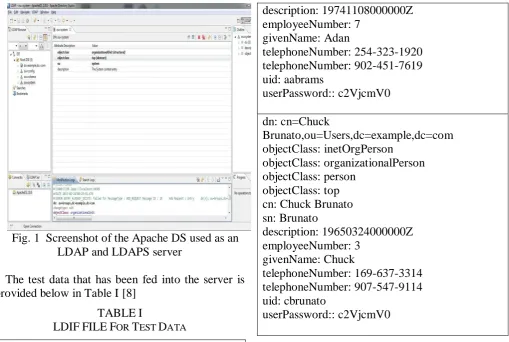
Fig. 1 Screenshot of the Apache DS used as an LDAP and LDAPS server
The test data that has been fed into the server is provided below in Table I [8]
TABLEI
LDIFFILEFOR TEST DATA
dn: dc=example,dc=com objectClass: domain objectClass: top dc: example
dn: ou=Users,dc=example,dc=com objectClass: organizationalUnit objectClass: top
ou: Users
dn: ou=Groups,dc=example,dc=com objectClass: organizationalUnit objectClass: top
ou: Groups
dn: cn=Adan
Abrams,ou=Users,dc=example,dc=com objectClass: inetOrgPerson
objectClass: organizationalPerson objectClass: person
objectClass: top cn: Adan Abrams sn: Abrams
description: 19741108000000Z employeeNumber: 7
givenName: Adan
telephoneNumber: 254-323-1920 telephoneNumber: 902-451-7619 uid: aabrams
userPassword:: c2VjcmV0
dn: cn=Chuck
Brunato,ou=Users,dc=example,dc=com objectClass: inetOrgPerson
objectClass: organizationalPerson objectClass: person
objectClass: top cn: Chuck Brunato sn: Brunato
description: 19650324000000Z employeeNumber: 3
givenName: Chuck
telephoneNumber: 169-637-3314 telephoneNumber: 907-547-9114 uid: cbrunato
userPassword:: c2VjcmV0
Based on the LDAP functional model, we propose to implement the following functions(Client end only)
1. LDAP_URL: A tool for generating LDAP based URL’s
2. LDAP_search: A tool for searching LDAP Directories
3. LDAP_LoginPassword: A tool for changing LDAP passwords
4. LDAP_modrdn : Tool to modify an entry's RDN using LDAP
5. LDAP_modify: Tool to modify or add entries using LDAP
6. LDAP_exop: a tool for performing well-known extended operations
7. LDAP_delete: Tool to delete an entry using LDAP
8. LDAP_compare: LDAP compare tool 9. common : Common routines for the ldap
client tools
The implementation has been achieved making use of the lesser known property of MATLAB to make use of JNDI classes (Java naming Directory Interface) of Java.
In the JNDI, authentication information is specified in environment properties. When you create an initial context by using the InitialDirContext(in the API reference documentation) class (or its superclass or subclass), we need to supply a set of environment properties, some of which might contain authentication information. We can use the following environment properties to specify the authentication information.
1. Context.SECURITY_AUTHENTICATION: ("java.naming.security.authentication"):
Specifies the authentication mechanism to use. For the Sun LDAP service provider, this can be one of the following strings: "none", "simple", sasl_mech, where sasl_mech is a space-separated list of SASL mechanism names.
2. Context.SECURITY_PRINCIPAL("java.namin g.security.principal"). Specifies the name of the user/program doing the authentication and depends on the value of the Context.SECURITY_AUTHENTICATION property.
3. Context.SECURITY_CREDENTIALS("java.na ming.security.credentials").Specifies the credentials of the user/program doing the authentication and depends on the value of the Context.SECURITY_AUTHENTICATION property.
When the initial context is created, the underlying LDAP service provider extracts the authentication information from these environment properties and uses the LDAP "bind" operation to pass them to the server. A sample script for the password tool has been provided below in fig 2
function [dctx, sc] =
ldap_LoginPassword(curUser, pwd)
env = java.util.Hashtable();
sp = 'com.sun.jndi.ldap.LdapCtxFactory';
env.put(javax.naming.Context.INITIAL_CONTE
XT_FACTORY, sp);
ldapUrl = 'ldap://company.com:389';
env.put(javax.naming.Context.PROVIDER_URL , ldapUrl);
env.put(javax.naming.Context.SECURITY_AUT HENTICATION, 'simple');
env.put(javax.naming.Context.SECURITY_PRI NCIPAL, ['CN=' curUser
',OU='upper(curUser(1))
',OU=Useraccounts,OU=Abt,DC=de,DC=compa ny,DC=com']);
env.put(javax.naming.Context.SECURITY_CRE DENTIALS, pwd);
dctx =
javax.naming.directory.InitialLdapContext(env, []);
sc = javax.naming.directory.SearchControls(); attributeFilter = {'department'};
sc.setReturningAttributes(attributeFilter);
sc.setSearchScope(javax.naming.directory.Search Controls.SUBTREE_SCOPE);
Fig. 2 Sample Authentication tool
The connection is done on the default port 10389 for LDAP and 10636 for LDAPS.
The sample search tool has been given in Fig 3
function result = getDepartment(user,dctx,sc) base = 'DC=de,DC=company,DC=com';
filter = sprintf('(| (cn=%s) (cn=%s))', lower(user), upper(user));
results = dctx.search(base, filter, sc); if results.hasMore();
result = results.next(); else
result = ''; end
dctx.close();
Fig. 3 Sample Search tool
CONCLUSION
based applications using MATLAB as an environment and making use of the rich toolboxes available in Matlab.
REFERENCES
[1] Yuming He; Jinhong Li; Hui Tang “Research
of Heterogeneous Authentication Information Synchronization Based on LDAP and Web Service.” International Symposium on Computational Intelligence and Design (ISCID), 2010,IEEE
[2] Tong Cui “LDAP Directory Template Model
on Multi-master Replication”. Page(s): 479 - 484 Services Computing Conference (APSCC), 2010 IEEE Asia-Pacific,
[3] Qadeer, M.A.; Salim, M.; Akhtar, M.S.
“Profile Management and Authentication Using LDAP“. Page(s): 247 - 251 ICCET '09. International Conference on Computer Engineering and Technology, 2009
[4] Salim, M.; Akhtar, M.S.; Qadeer, M.A. “Data Retrieval and Security Using Lightweight Directory Access Protocol” Page(s): 685 - 688
Second International Workshop on Knowledge Discovery and Data Mining, 2009. WKDD 2009.
[5] T Howes, M Smith, GS Good - 2003 “Understanding and deploying LDAP directory services” (2003)
[6] J Sermersheim “Lightweight directory access protocol (LDAP): The protocol “2006,
http://tools.ietf.org/html/rfc4511
[7] RJ Smith - US Patent 8,156,484, “LDAP server
performance object creation and use thereof.” 2012