Chapter 4
Learning objectives
• After this lecture, you will be able to:
– explain the purpose of software applications in
different categories;
– describe the features found in a variety of modern
applications software packages;
– identify some of the advantages and
disadvantages associated with a variety of
common applications;
– describe some of the ways in which applications
software supports the activities of a business
Management issues
• From a managerial perspective, this chapter
addresses the following areas:
– All major organisations make use of common
applications, such as word processing and database
software. An understanding of the factors involved with
selecting these applications is required by all
managers.
– An understanding of the range of software applications
available will help managers see potential applications
relevant to a given organisation or industry.
– An understanding of recent developments in the
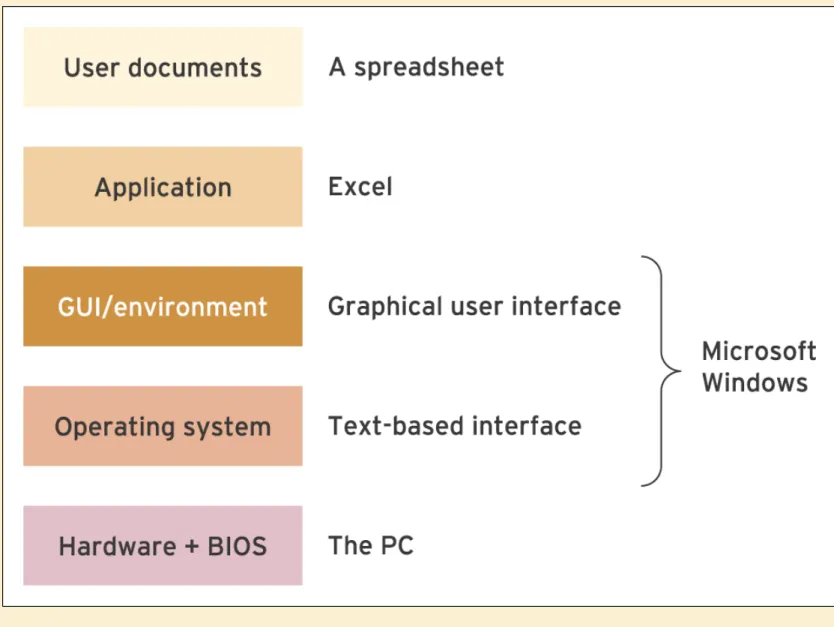
Figure 4.2 Diagram showing the relationships between the different types of software
•
Software
: A series of detailed instructions that
control the operation of a computer system.
Software exists as programs that are developed
by computer programmers.
•
Systems software
: This form of software
manages and controls the operation of the
computer system as it performs tasks on behalf of
the user.
Systems software
• Operating system (OS): Software that interacts with the hardware of the computer in order to manage and direct the computer’s resources.
• Command line interpreter (CLI): Passes instructions from a user to a computer program as instructions from a user in the form of brief statements entered via the keyboard.
• Graphical user interface (GUI): Provides a means for a user to control a computer program using a mouse to issue
instructions using menus and icons.
• WIMP: WIMP (windows, icons, mouse and pull-down menus) is often used to describe a GUI environment.
• Network operating system (NOS): This describes the
Applications software
•
Applications software
: A set of programs that enable
users to perform specific information-processing activities
that may be general-purpose or application-specific.
•
General Purpose applications:
This is also known as
productivity software
and
describes a category of
computer software that aims to support users in
performing a variety of common tasks. (e.g. word
processor, spreadsheet, database).
•
Application-specific software:
This is intended to serve
a specific purpose, for example software used in the
Spreadsheet applications
•
Modelling
: Modelling involves creating a
numerical representation of an
existing
situation
or set of circumstances, whilst simulation involves
predicting
new situations or circumstances.
•
What if? analysis
: This describes the ability to
see the predicted effect of a change made to a
numerical model.
•
Goal seeking
: In a spreadsheet, goal seeking
describes a way of automatically changing the
values in a formula until a desired result is
Databases
•
Database
:
A collection of related information
Database – advantages
• Multi-user access – allowing different people in the business access
to the same data simultaneously such as a manager and another member of staff accessing a single customer’s data;
• Distributed access – users in different departments of the business
can readily access data;
• Speed – for accessing large volumes of information, such as the
customers of a bank, only databases are designed to produce reports or access the information rapidly about a single customer;
• Data quality – sophisticated validation checks can be performed
when data are entered to ensure their integrity;
• Security – access to different types of data can readily be limited to
different members of staff. In a car dealership database, for example, the manager of a single branch could be restricted to sales data for their branch;
• Space efficiency – by splitting up a database into different tables
Database types
• Flat file database: A self-contained database that only
contains one type of record – or table – and cannot access data held in other database files.
• Free-form database: Allows users to store information in the form of unstructured notes or passages of text. Information is organised and retrieved by using categories or key words.
• Hypertext database: Information is stored as series of objects that can consist of text, graphics, numerical data and
multimedia data. Objects are linked, allowing users to store disparate information in an organised manner.
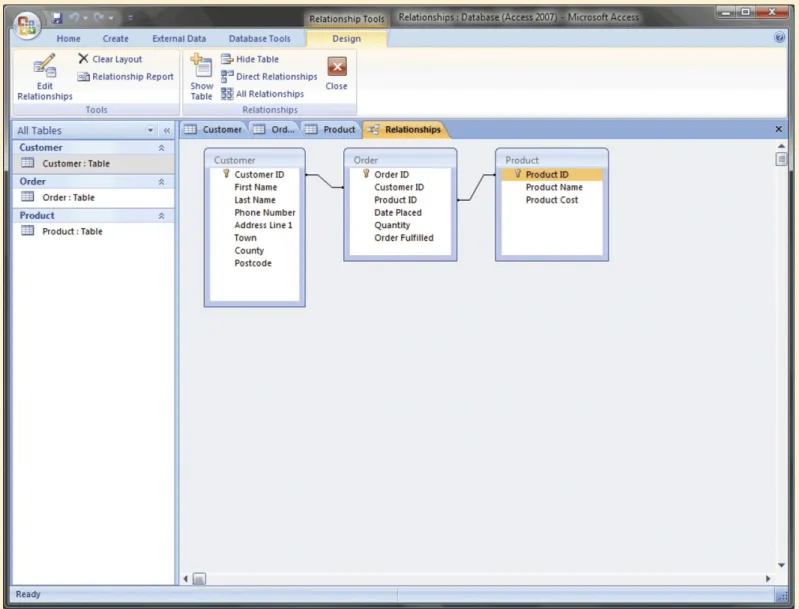
Figure 4.6 An example of how key fields are used to link information from different
database tables
Key database concepts
• Field: The data in an electronic database are organised by fields and records. A field is a single item of information, such as a name or a quantity.
• Record: In an electronic database, a record is a collection of related
fields. See Field.
• Table: In an electronic database, data are organised within structures known as tables. A table is a collection of many records.
• Relationship: In a relational database, data can be combined from several different sources by defining relationships between tables.
• Compound key: In a relational database, it is possible to retrieve data from several tables at once by using record keys in combination, often known as a compound key.
Database features
•
Update query
: An update query can be used to
change records, tables and reports held in a database
management system.
•
Structured query language (SQL)
: A form of
programming language that provides a standardised
method for retrieving information from databases.
•
Filter
: In a spreadsheet or database, a filter can be
Other database types
•
Object-oriented database
: The database is
made up of objects combining data structures
Data warehouses, data mining and analytics
• Data warehouses are large database systems containing detailed company data on sales transactions which are
analysed to assist in improving the marketing and financial performance of companies.
• Data mining of data warehouses is an attempt to identify a relationship between variables in order to assist decision making. It will involve statistical techniques such as
multiple linear regression where a number of variables are compared to identify patterns.
Internet concepts
• Internet: A global network system made up of many smaller systems.
• World Wide Web (WWW): Interlinked documents on the Internet made up of pages containing text, graphics and other elements. • Hypertext Markup Language (HTML): WWW pages are mainly
created by producing documents containing HTML commands that are special tags (or codes) to control how the WWW page will
appear when displayed in a web browser.
• Web browser program: Enables users to navigate through the information available and display any pages of interest.
• Hypertext: Hypertext is highlighted words or phrases that represent links to other documents activated by clicking the mouse.
E-mail issues
• Storage on servers
• Staff time-wasting
• SPAM
Creating web pages and applications
•
HTML (hypertext markup language)
: HTML is
the method used to create web pages and
documents. The HTML code used to construct
pages has codes or tags such as <TITLE> to
indicate to the browser what is displayed.
•
Java
: Java can be used to create small
HTML example
• <HTML> tag
Denotes an HTML document.
• <HEAD> tag
The header part of an HTML
document containing titles, meta tags and scripts.
• <TITLE> tag
The text that appears in the
browser title bar.
• <BODY> tag
The main part of an HTML
document containing content.
Web 2.0
• The term Web 2.0 describes a new generation of applications and services that allows Internet users to communicate, share information and do business in new ways.
• Some of the principles behind Web 2.0 have been associated with particular forms of technology, for example, Rich Internet Applications (RIAs). RIAs are web applications that combine enhanced user interfaces with the power and functionality of desktop programs.
• Web 2.0 emphasises what is sometimes called the social Internet, a range of applications that encourage greater
Software distribution models
• Alternative models of software distribution include open source and application service providers.
• Open Source is a generic term used to describe software that is supplied to users completely free of charge and without
restrictions limiting how it is used, modified or redistributed. In general, the source code for the program is freely available and users can modify it as they see fit.
• An application service provider (ASP) supplies software and services to a client organisation over a network, usually the Internet. Users access software and data via a web browser. This type of approach is often described as on-demand