BroadSoft Partner Configuration Guide
Microsoft Lync 2010 SIP Trunking
August 2012
Document Version 1.6
BroadWorks
®Guide
Copyright Notice
Copyright © 2011 BroadSoft, Inc. All rights reserved.
Any technical documentation that is made available by BroadSoft, Inc. is proprietary and confidential and is considered the copyrighted work of BroadSoft, Inc.
This publication is for distribution under BroadSoft non-disclosure agreement only. No part of this publication may be duplicated without the express written permission of BroadSoft, Inc. 9737 Washingtonian Boulevard, Gaithersburg, MD 20878.
BroadSoft reserves the right to make changes without prior notice.
Trademarks
BroadWorks® and BroadWorks Assistant–Enterprise™, BroadWorks Call Center™, BroadWorks Communicator™, BroadWorks Receptionist™, and BroadWorks Deployment Studio™ are trademarks of BroadSoft, Inc.
Microsoft, MSN, Windows, and the Windows logo are registered trademarks of Microsoft Corporation. Other product names mentioned in this document may be trademarks or registered trademarks of their respective companies and are hereby acknowledged. This document is printed in the United States of America.
Document Revision History
Version Reason for Change1.1 Introduced document for Microsoft Lync 2010 SIP Trunking with BroadWorks Release 17. 1.2 Edited and published document.
1.3 Added Section 5.6, Configure Global Trunk. This is mandatory for transfer cases interworking with BroadWorks.
1.4 Edited and published document. 1.5 Updated document with a know issue. 1.6 Edited changes and published document.
Table of Contents
1 Overview ...6
2 Interoperability Status ...7
2.1 Verified Versions ... 7
2.2 Interface Capabilities Supported ... 7
2.3 Known Issues ... 10
3 Solution Configuration ... 12
4 BroadWorks Configuration ... 13
4.1 BroadWorks: Microsoft Lync Trunking Device Configuration ... 13
4.1.1 BroadWorks: Create Microsoft Lync Trunking Device Profile Type ... 13
4.1.2 BroadWorks: Create Microsoft Lync Trunking Device Profile Instance ... 14
4.2 BroadWorks: User Settings ... 15
5 Microsoft Lync Server 2010 SIP Trunking configuration ... 16
5.1 Microsoft Lync Server 2010: Configure PSTN Gateway ... 16
5.2 Microsoft Lync Server 2010: Configure Mediation Server... 17
5.3 Microsoft Lync Server 2010: Topology Activation ... 17
5.4 Microsoft Lync Server 2010: Configure User ... 19
5.5 Microsoft Lync Server 2010: Configure Dial Plan ... 20
5.5.1 Microsoft Lync Server 2010: Configure International Dialing ... 21
5.5.2 Microsoft Lync Server 2010: Configure Local Operator Dialing ... 22
5.5.3 Microsoft Lync Server 2010: Configure 4-digit Extension Dialing ... 23
5.5.4 Microsoft Lync Server 2010: Configure Feature Access Code Dialing ... 24
5.6 Microsoft Lync Server 2010: Configure Global Trunk ... 24
Table of Figures
Figure 1 BroadSoft/Microsoft Lync Server 2010 SIP Trunking ... 12
Figure 2 BroadWorks Configuration - Create Microsoft Lync Trunking Device Profile Type ... 13
Figure 3 BroadWorks Configuration - Create Trunking Device Profile Instance ... 14
Figure 4 Microsoft Lync Server 2010 Configuration - Configure Mediation Server ... 16
Figure 5 Microsoft Lync Server 2010 Configuration - Configure Mediation Server ... 17
Figure 6 Microsoft Lync Server 2010 Configuration – Topology Activation ... 18
Figure 7 Microsoft Lync Server 2010 Configuration - Configure User ... 19
Figure 8 Microsoft Lync Server 2010 Configuration - Configure Voice Routing Dial Plan ... 20
Figure 9 Microsoft Lync Server 2010 Configuration - Configure International Dialing ... 21
Figure 10 Microsoft Lync Server 2010 Configuration - Configure Local Operator Dialing ... 22
Figure 11 Microsoft Lync Server 2010 Configuration - Configure 4-Digit Extension Dialing ... 23
Figure 12 Microsoft Lync Server 2010 Configuration – Configure Feature Access Code Dialing ... 24
1
Overview
This document describes the configuration procedures required for Microsoft Lync Server 2010 SIP Trunking configuration to be interoperable with BroadWorks.
The Microsoft Lync 2010 SIP Trunking solution is an enterprise telephony solution similar to an IP-PBX. This document provides the required configuration to integrate the
components for the SIP Trunking solution. Microsoft Lync 2010 and BroadWorks should already be installed and working independently before completing the integration steps documented here. The setup of each individual component is outside the scope of this document.
This guide describes the specific configuration items that are important for use with BroadWorks. It does not describe the purpose and use of all Microsoft Lync 2010 configuration items. For those details, see the Microsoft® Lync Server 2010 Enterprise
2
Interoperability Status
This section provides the known interoperability status of the Microsoft Lync Server 2010 SIP Trunking interface with BroadWorks. This includes the version(s) tested, capabilities supported and known issues.
Interoperability testing validates that the device interfaces properly with BroadWorks via the SIP interface. Qualitative aspects of the device or device capabilities not affecting the SIP interface such as display features, performance, and audio qualities are not covered by interoperability testing. Requests for information and/or issues regarding these aspects should be directed to Microsoft.
2.1
Verified Versions
The following table identifies the verified Microsoft Lync Server 2010 and BroadWorks versions and the month/year the testing occurred. If the device has undergone more than one test cycle, versions for each test cycle are listed, with the most recent listed first.
Compatible Versions in the following table identify specific versions which the partner has
identified as compatible and should interface properly with BroadWorks. Generally, maintenance releases of the validated version are considered compatible and may not be specifically listed here. Contact Microsoft for any questions concerning maintenance and compatible releases.
NOTE: Interoperability testing is normally performed with the latest generally available (GA)
device firmware/software and the latest GA BroadWorks release and service pack at the time the testing occurs. If there is a need to use a non-verified mix of BroadWorks and device software versions, customers can mitigate their risk by self-testing the combination using the BroadWorks
IP-PBX/PBX Trunking Interoperability Test Plan [6]. Verified Versions Table
Date (mm/yyyy)
BroadWorks Release
Microsoft Lync 2010 Verified Version
Microsoft Lync Server Compatible Versions 02/2011 Release 17.0 Mediation Server RTCC 4.0.0.0 None identified.
2.2
Interface Capabilities Supported
The Microsoft Lync SIP Trunking configuration has completed interoperability testing with BroadWorks using the BroadWorks IP-PBX/PBX Trunking Interoperability Test Plan [6]. The results are summarized in the following table.
The BroadWorks test plan is composed of packages, each covering distinct
interoperability areas, such as “Basic” call scenarios and “Redundancy” scenarios. Each package is composed of one or more test items which in turn are composed of one or more test cases. The test plan exercises the SIP interface between the device and BroadWorks with the intent to ensure interoperability sufficient to support the BroadWorks feature set.
The Supported column in the following table identifies the Microsoft Lync Server 2010’s support for each of the items covered in the test plan packages, with the following designations:
Yes Test item is supported. No Test item is not supported.
NA Test item is not applicable to the device type. NT Test item was not tested.
Caveats or clarifications are identified in the Comments column.
Note that DUT in the following table refers to the Device Under Test which in this case is the Microsoft Lync Server 2010.
BroadWorks IP-PBX/PBX Trunking Interoperability Test Plan Support Table
Test Plan Package Test Plan Package Items Supported Comments
Basic Call Origination Yes
Call Termination Yes
Session Audit Yes
Session Timer No
Ringback Yes
Forked Dialog Yes
Early UPDATE No
Early-Session No
181 Call Being Forwarded Yes
Dial Plan Yes
DTMF – Inband No
DTMF – RFC 2833 Yes
DTMF – DTMF Relay No
Codec Negotiation Yes EV 129362
Codec Renegotiation Yes EV 129363, EV 129364
SIP Connect Trunk Registration No
PBX Redirect No
Calling Line ID and Privacy No
E.164 Numbering Yes
BroadWorks Services Voice Message Deposit/Retrieval Yes Message Waiting Indicator No
Diversion Header No
History-Info Header Yes
Enterprise Trunking – OTG No Enterprise Trunking – DTG No
BroadWorks IP-PBX/PBX Trunking Interoperability Test Plan Support Table
Test Plan Package Test Plan Package Items Supported Comments Enterprise Trunking – TGRP No
Advice of Charge No
Meet-Me Conferencing NA
DUT Services – Call Control Services
Call Waiting Yes
Call Hold Yes
Call Transfer No EV 129366
Three-Way Call Yes
DUT Services – Registration and Authentication
Register Authentication No
Maximum Registration No
Minimum Registration No
Invite Authentication No Re-Invite/Update Authentication No
Refer Authentication No
Device Authenticating BroadWorks No
DUT Services – Fax G711 Fax Passthrough NA
G711 Fax Fallback NA
T38 Fax Messaging NA
SBC/ALG Register No
Outgoing Invite Yes
Incoming Invite Yes
TCP Register No
Outgoing Invite Yes
2.3
Known Issues
This section lists the known interoperability issues between BroadWorks and specific partner release(s). Issues identified during interoperability testing and known issues identified in the field are listed.
The following table provides a description of each issue and, where possible, identifies a workaround. The verified partner device versions are listed with an “X” indicating that the issue occurs in the specific release. The issues identified are device deficiencies or bugs, so typically not BroadWorks release dependent.
The Issue Number is a BroadSoft ExtraView partner issue number if the testing was
performed by BroadSoft. If the testing was performed by the partner or a third party, the partner may or may not supply a tracking number.
For more information on any issues related to the particular partner device release, see the partner release notes.
Issue Number Issue Description Partner Version
RT CC 4. 0. 0. 0
EV 129362 Basic Codec Negotiation:
DUT does not list all the available codecs that DUT supports when BroadWorks reINVITEs without SDP. Workaround: None.
X
EV 129363 Codec Renegotiation: Blind Transfer DUT does not list all the available codecs. “test37.pcap” shows that DUT does not list the aLaw which it supports when DUT responds the INVITE without SDP. However, when DUT originates a call, the INVITE that DUT sends lists all the supported codec, including aLaw.
Workaround: None.
X
EV 129364 Codec Renegotiation: Blind Transfer of Call on Hold.
DUT does not list all the codec it supports when DUT reINVITEs.
Workaround: None.
X
EV 129366 Transfer Using Refer Method
The “Replace, to-tag, and from-tag” are invalid (not known to BroadWorks) in the Refer-to header. This failure is also observed from any REFER based transfer.
Workaround: Disable REFER support on the Lync so that Lync uses re-INVITE for call transfer. See instructions in section 5.6 Microsoft Lync Server 2010: Configure Global Trunk.
Issue Number Issue Description Partner Version RT CC 4. 0. 0. 0
EV 169357 Microsoft Lync Call Park
Microsoft Lync Call Park utilizes two Hold re-INVITEs to park a call.
1)INVITE (a=inactive) sets the call to mute, in essence, while transferring the call to the Call park Service.
2)INVITE (a=sendonly) establishes the new ownership of the call (the call park service). The call is parked until another agent picks up the call.
BroadWorks always consumes the Hold INVITE when the call is already on hold. For an example, the above 2nd INVITE (a=sendonly) would be consumed by BroadWorks and not proxied to terminating side. As a result, Lync’s built-in Music on Hold (MoH) service won’t work – terminating user won’t hear the music while being on hold.
Workaround: Using BroadWorks MoH service.
3
Solution Configuration
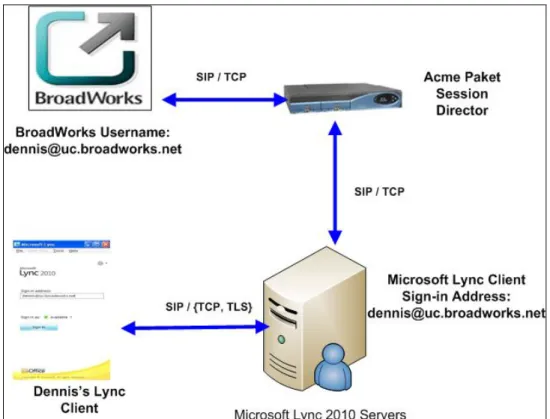
The diagram in Figure 1 provides a simplified example of a typical Microsoft Lync Server 2010 SIP Trunking deployment with BroadWorks.
The Microsoft Lync Client registers with the Lync Server. The Lync Server handles all the inbound and outbound calls for the Lync Clients, with an Acme Packet SBC performing NAT traversal and, optionally, TLS communicating with BroadWorks.
Microsoft Lync Server 2010 is identified as a BroadWorks PBX Classification Type E. Refer to the BroadWorks Business Trunking Configuration Guide[4] for PBX classification descriptions. Refer to the SIP Trunking configuration table in the Partner Configuration
Guide – Acme Packet Session Director[5] to determine how to configure Acme Packet for
this PBX classification type.
The following sections describe how to configure Lync Server 2010 SIP Trunking to support the configuration shown following.
4
BroadWorks Configuration
The BroadWorks configuration required for Microsoft Lync SIP Trunking is described in the following sections.
4.1
BroadWorks: Microsoft Lync Trunking Device Configuration
A new BroadWorks device profile type needs to be created for the Microsoft Lync Trunking. This section describes the required configuration for the device profile.
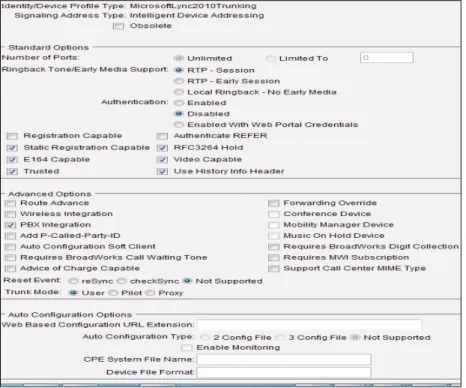
4.1.1 BroadWorks: Create Microsoft Lync Trunking Device Profile Type
Logged in as a system administrator, browse to Resources → Identity/Device Profile
Types and create a Microsoft Lync Trunking device profile type with settings as shown in
the following screen shot.
4.1.2 BroadWorks: Create Microsoft Lync Trunking Device Profile Instance
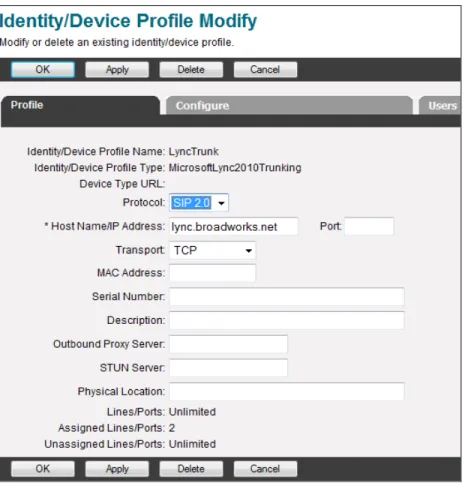
Create a Microsoft Lync Trunking device profile instance as shown in the following screen shot. The device profile instance can be created at the System, Service Provider, Enterprise, or Group level depending on the requirements for the deployment.
Figure 3 BroadWorks Configuration - Create Trunking Device Profile Instance Configure the device profile settings as follows:
Identity/Device Profile Name – Provide a name for the device profile instance. Identity/Device Profile Type – Select the Microsoft Lync Trunking device profile type
created in the previous section.
Host Name/IP Address – Supply the Lync Mediation Server component fully qualified domain name. If SBC is used between Lync and BroadWorks, supply a unique FQDN that resolves to the SBC address.
Transport – Select Transmission Control Protocol (TCP) if SBC is not in the solution; otherwise, select Unspecified.
4.2
BroadWorks: User Settings
For this solution, each Lync Client user is the BroadWorks Trunk user. It is assumed that the BroadWorks Trunk Group and Trunk users are already configured with device profile type, sampled in section 4.1 BroadWorks: Microsoft Lync Trunking Device Configuration. For details on BroadWorks Trunk configuration, see BroadWorks Business Trunking
5
Microsoft Lync Server 2010 SIP Trunking configuration
Microsoft Lync Server 2010 is configured through Microsoft Lync Server 2010 Control Panel. The following configuration example is based on an installation of Microsoft Lync Server 2010 Standard Edition with Mediation Server collocated on the Front End Server. The capabilities of Lync SIP Trunking have been verified for use with BroadWorks based on the settings described in the following section. For more information on the meaning, purpose, and applicability of the individual configuration items see the Microsoft® Lync
Server 2010 Enterprise Voice Deployment Guide [1] and the Microsoft® Lync Server 2010
Standard Edition Deployment Guide [2].
5.1
Microsoft Lync Server 2010: Configure PSTN Gateway
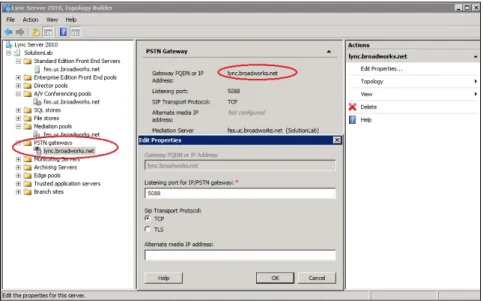
This section describes the required setting for Public Switched Telephone Network (PSTN) gateway as the next hop for the Microsoft Lync Mediation Server (MS). The PSTN Gateway must be first added to the deployment topology by using Lync Server 2010 Topology Builder.
Figure 4 Microsoft Lync Server 2010 Configuration - Configure Mediation Server
To add the PSTN gateway into the topology, bring up the Lync Server Topology Builder and create a new IP/PSTN gateway with the following settings.
Gateway FQDN or IP – Supply the IP address for the BroadWorks primary
Application Server. If SBC is used between Microsoft OCS and BroadWorks, supply the address of the SBC.
Listening port – Provide the BroadWorks primary Application Server SIP destination port. If SBC is used between Microsoft OCS and BroadWorks, provide the SBC port. SIP Transport Protocol – Use TCP If BroadWorks primary Application Server.
5.2
Microsoft Lync Server 2010: Configure Mediation Server
This section describes the required settings for the Microsoft Lync Mediation Server (MS). During installation of the MS, the server’s IP address and other initial configuration settings are applied. These settings are not described here.
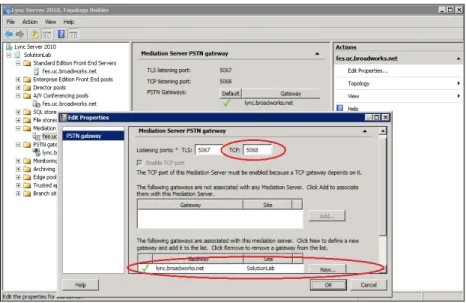
To enable Trunking, the MS must be first added to the topology by using Microsoft Lync 2010 Topology builder as shown in the following diagram. Additionally, PSTN Gateway must be already configured.
Figure 5 Microsoft Lync Server 2010 Configuration - Configure Mediation Server
To add the MS into the topology, bring up the Lync Server Topology Builder and create a new Mediation Server in the Mediation Server Pool with the following setting.
Listening Ports – Specify a TCP and or TLS port that MS gets for the PSTN incoming traffic.
Enable TC port – Check.
PSTN Gateway Association – PSTN gateway added from Section 5.1 Microsoft Lync Server 2010: Configure PSTN Gateway should be showing in the “Not
Associated with any Mediation Server” list for association. Select the PSTN gateway and associate with the MS.
5.3
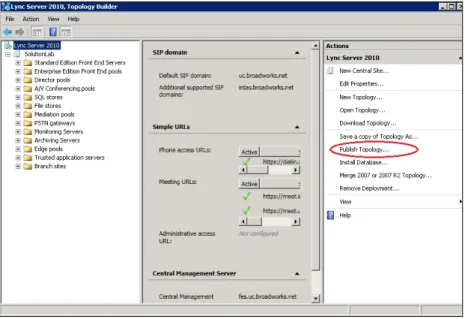
Microsoft Lync Server 2010: Topology Activation
Any change to the deployment topology requires a re-activation. This is achieved by issuing the “Publish” command from the Topology Builder as shown in the following figure.
5.4
Microsoft Lync Server 2010: Configure User
This section describes how to configure Lync users for Trunking. The Enterprise Voice feature must be enabled for each Lync user.
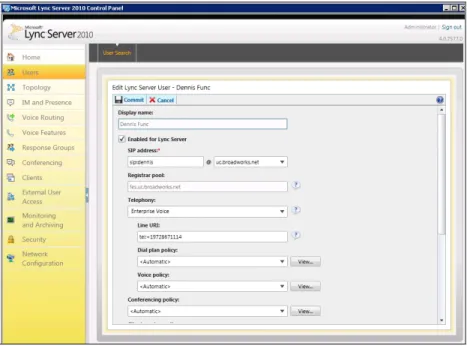
To configure a user for Enterprise Voice, bring up the Microsoft Lync Server 2010 Control Panel. Find and edit the target user with the following settings.
Figure 7 Microsoft Lync Server 2010 Configuration - Configure User Configure the following user settings:
Enabled for Lync Server: Checked.
SIP Address: This is the Lync user’s SIP address for Uniform Resource Identifier (URI) calling and only used inside Lync.
Telephony: Select “Enterprise Voice” SIP Trunking.
Line URI: The Line URI identifies the user’s E.164 telephone number. Supply the Line URI in TEL URI format as shown in Figure 7.
5.5
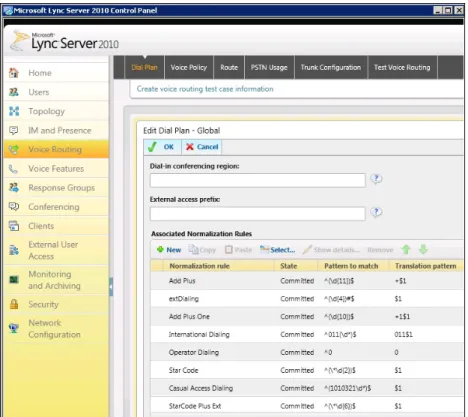
Microsoft Lync Server 2010: Configure Dial Plan
This section provides examples for the dial plan configuration. The configuration is optional and should be configured as needed for the deployment. The following screen shot shows an example of the Dial Plan with a few normalization rules configured.
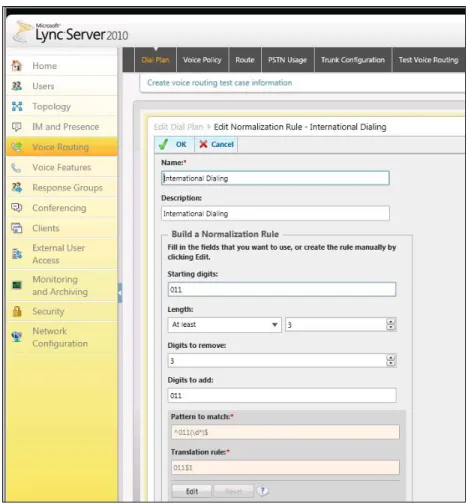
5.5.1 Microsoft Lync Server 2010: Configure International Dialing
The following screen shot provides a dial plan configuration example for North American international dialing.
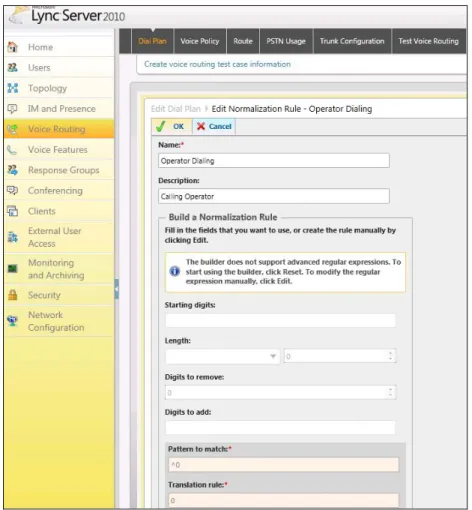
5.5.2 Microsoft Lync Server 2010: Configure Local Operator Dialing
The following screen shot provides a dial plan configuration example for North American local operator dialing.
5.5.3 Microsoft Lync Server 2010: Configure 4-digit Extension Dialing
The following screen shot provides a dial plan configuration example for 4-digit extension dialing.
5.5.4 Microsoft Lync Server 2010: Configure Feature Access Code Dialing
The following screen shot provides a dial plan configuration example for feature access code dialing.
Figure 12 Microsoft Lync Server 2010 Configuration – Configure Feature Access Code Dialing
5.6
Microsoft Lync Server 2010: Configure Global Trunk
Call transfers by Lync over the trunk interface fail if Lync is configured to use the REFER method for transfers. This is an issue identified during interoperability testing
(EV 129366). To avoid this issue, Lync must be configured to use re-INVITE for transfers over the trunk, rather than REFER. The following screen capture shows the required settings. Specifically, Enable media bypass and Enable refer support must be unchecked.
References
[1] Microsoft, Inc. 2010. Microsoft® Lync Server 2010 Enterprise Voice Deployment
Guide. Available from Microsoft at
[2] Microsoft, Inc. 2010. Microsoft® Lync Server 2010 Standard Edition Deployment
Guide. Available from Microsoft at
[3] Microsoft, Inc. Sept, 2010. Microsoft® Lync Server 2010 Planning Guide. Available
from Microsoft at
[4] BroadSoft, Inc. 2012. BroadWorks Business Trunking Configuration Guide, Release
18.0. Available from BroadSoft at
[5] BroadSoft, Inc. 2012. BroadSoft Partner Configuration Guide – Acme Packet
Session Director. Available from BroadSoft
[6] BroadSoft, Inc. 2012. BroadWorks IP-PBX/PBX Trunking Interoperability Test Plan,
Release 18.0. Available from BroadSoft at
[7] BroadSoft, Inc. 2012. BroadSoft Partner Configuration Guide – Acme Packet