Polycom® Video Collaboration
Architecture Overview
Introduction
This PolycomVideo Collaboration Architecture Overview is a starting point for decision makers
considering state of the art video conferencing solutions, and covers a wide variety of different concepts related to video communications and important guidelines for video-enabled network design. Use this
Overview in conjunction with other documentation available from Polycom to create a comprehensive plan for your enterprise video collaboration solution:
There are a wide-range of video conferencing solutions available in the marketplace today. To help you understand available options, this Overview provides a breakdown of the terminology, technology components, protocols, and deployment considerations needed to deploy a video collaboration solution. Polycom solutions are included when relevant, but additional vendor-neutral components are also discussed to provide a non-biased view of video collaboration topics which all vendors face.
Choosing the right solution for your needs can be difficult due to the large number of available options and technologies. Use this Overview to gain a solid, high-level understanding of the video conferencing-related topics and background which you need to consider and how a video solution will integrate with the features, functionality and 3rd party tools you have in place already.
Polycom Assured Design
Polycom Assured Design (PAD) is a new program designed to take the guesswork out of providing a best in class video solution; PAD provides a framework to guide your selection of products, versions and options that meet your video collaboration solutions needs.
Polycom Video Endpoints and Infrastructure
A quick guide to Polycom video endpoints and the Polycom® RealPresence Platform gives background information helpful to understand the different Polycom components that make up a state of the art video solution.
Key Video Collaboration Concepts and Terms
An introduction to the terminology and concepts used in video collaboration covers topics. Includes background information related to how captured video is packaged, compressed and delivered over the network. International Telecommunications Union (ITU) Coding Standards for video are explained, including H.263/H.264 protocols and how they relate to video conferencing.
Understand How Call Control and Media are Handled during
a Video Conference
What happens under the covers during a video conference? When you walk into a conference room and dial the number provided in the calendar invite, how does the technology process this request? This
section covers the infrastructure you need to make sure the call is successful and provides details on the various protocols used for call control and processing media flows between video devices across the network.
Sharing Content during a Video Conference
True collaboration in a video conference involves audio, video and high definition content sharing. Learn what you need to know to understand how content is shared during a conference.
Transcoding, and Why You Need It
Transcoding is a key element in providing a video collaboration solution capable of handling different endpoints with differing capabilities. Learn what transcoding is, where it takes place, and understand how disparate endpoints can successfully communicate.
Quality of Service (QoS) and Call Admission Control
Real-time video is sensitive to delay, loss and jitter. Video adoption within the enterprise is largely based on the perception of quality experienced during a video conference, so managing QoS is a key factor to successful video deployment. See how the Polycom® RealPresence® Platform provides QoS and manages access to the network for different users and endpoint devices.
Security
There are many considerations to address so that end-to-end security is provided for a video solution. For example, understanding how the RealPresence Platform integrates with Active Directory for
Authentication and providing Single SignOn (SSO). See how to address other important security considerations, include encrypting the signaling and media traffic during all phases of call control and media relay.
Deployment Scenarios
Deployment scenarios are based on a variety of factors -- the number and type of endpoints, network design, call control and more—and there is no one solution for a deployment scenario. There are different considerations to take into account as you roll out a video solution and you’ll need to consider the
following: that people can use their own devices or UC client, that your video solution is easy to use, that your solution integrates tightly with existing IT infrastructure including LDAP, email/calendar, and SNMP monitors.
Important Considerations for Video Design
Solutions
There are many different considerations to take into account before rolling out a video collaboration solution. The most important piece is to ensure that people can easily adopt and use the solution as part of their daily workflow. Often, this means the solution tightly integrates with existing IT infrastructure like
LDAP, Email, Calendar, SNMP and existing video equipment. Other considerations include the number and type of endpoints in place, network design, dial plan, mobility, security and more.
At Polycom, we recognize the importance of Unified Communications and Collaboration (UC&C) to the success of your business. We also recognize that distributed architectures, scale, redundancy, different protocols, multiple UC vendors, and a plethora of feature-rich user options can lead to complex video deployments.
The Polycom Assured Design Program
Polycom Assured Design, or PAD, is a program designed to take the guesswork out of designing, building, using and supporting your UC&C experience. Polycom has assembled a team of customer savvy experts, infrastructure and endpoint engineers and support teams to quantify the most common architectures and use models for our customers.
The Polycom team begins its assessment by understanding the customer's business, their physical locations and existing UC&C workflow to establish a bell curve of common use architectures and current users’ workflows.
Next, the Polycom team builds customer defined UC&C architectures using the customer’s workflows to create test criteria for both installation and end-user experience. And, the Polycom team spends time working with Polycom engineering teams to test and retest Polycom components and solutions exactly the way they will be deployed and used in a PAD architecture.
When all of the architectures are documented, all the test cases are documented, and all workflows are documented, the PAD team provides this information to Polycom partners and customers.
PAD teams provide the foundation for customer solution design, based on common use cases and current engineering system priorities. The teams incorporate a broad set of technologies, features and applications to address customer needs. Each crafted solution will be comprehensively tested and documented by Polycom engineers to ensure more reliable and predictable deployment and support, as well as greater certainty of a positive customer experience.
When the a customer implements a PAD architecture, they can do so with confidence and demonstrated evidence that their solution has been thoroughly tested and vetted by a global team of Polycom experts. To learn more, go to www.polycom.com/pad.
Polycom Video Endpoints and Infrastructure
Polycom has a full range of infrastructure and endpoints available to handle video collaboration needs from the desktop to the boardroom.
Polycom® RealPresence® Platform
Polycom is the global leader in standards-based unified communications (UC) solutions for telepresence, video, and voice, powered by the Polycom RealPresence Platform. The RealPresence Platform
interoperates with the broadest range of business, mobile, and social applications and devices. The Platform was designed with a singular vision – to defy distance and unleash the power of human collaboration.
The story behind Defy Distance
We live in a world filled with distance. Not just the miles that stretch between Meeting Room A and Conference Room B. But also the misunderstanding that lingers between hypothesis and proof. The time that passes between diagnosis and cure. And the revisions that multiply between major bug and “easy fix.”
In every type of industry, in every type of company, distance—in all its many manifestations—is the enemy. If a business is to move forward, this is the foe to be conquered.
At Polycom, eliminating the distance between problem and solution is our unified mission. Our single driving purpose. The very reason we exist.
Everything we do, from our high-definition conference phones to our state-of-the-art collaboration solutions, is designed to empower our customers to accomplish the one feat that changes everything: DEFY DISTANCE.
Deploy RealPresence Platforms via Hardware Appliance or Software
With the rise of the virtualized datacenter, Polycom has evolved the components of the RealPresence Platform to support virtual software deployment strategies increasing the flexibility, manageability, and efficiency of your video deployment. The RealPresence Platform can now be deployed as software, making video and voice collaboration simple and scalable in any environment.
For customers who have already invested in hardware components of the Polycom RealPresence Platform, the virtual editions offer an easy transition to software by working seamlessly with existing hardware infrastructure. This architecture eliminates collaboration silos caused by systems that don’t talk to each other, including support for emerging standards such as SVC. Virtual editions of the platform are standards-based and natively interoperable with UC solutions that already exist in a customer network, and also with third-party vendor solutions, giving customers the best investment protection in the industry.
Endpoint Connection process
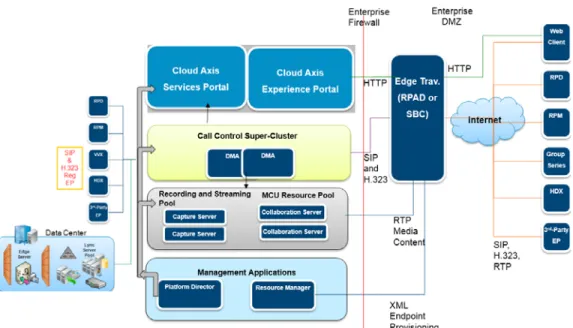
The diagram below presents a visual depiction of the RealPresence Platform as deployed in a customer environment. Starting from the left side of the diagram, the endpoints coming in from outside the firewall connect through the RealPresence Access Director or SBC. All internal and external endpoints are provisioned through the RealPresence Resource Manager allowing administrators to remotely manage, configure and update clients.
The RealPresence Distributed Media Application (DMA) handles all endpoint SIP and H.323 registrations along with any incoming call requests. The call requests are distributed amongst the group of MCUs in the resource pool. Video streaming and recording requests are also handled by the DMA which accesses the pool of available RealPresence Capture Server resources.
Each of the real presence platform components are provisioned using platform director as a sort of orchestration server to administering the environment. Platform director can be used from everything to installation licensing configuration and monitoring.
Diagram of Polycom Video Architecture
Components of Polycom Video Architecture
Module Component Description
Call Control RealPresence® DMA® Provides endpoint registration, call processing, and media resource management
Conferencing RealPresence® Collaboration Server
Provides audio and video conferencing resources Collaboration Edge RealPresence® Access
Director™
RealPresence® Cloud AXIS® Suite
Enables firewall traversal
Enables B2B/B2C collaboration via browser or standard based endpoints Management Applications RealPresence® Platform Director™ RealPresence® Resource Manager
Single glass management application Manages client and server application
Recording RealPresence®
Capture Server
Provides Recording, Playback and Streaming capabilities Endpoints RealPresence® Group
Series Polycom® HDX® Series Polycom® RealPresence® Desktop Polycom endpoints
Polycom®
RealPresence® Mobile Immersive
Polycom® RealPresence® Distributed Media Application™ (DMA®)
Polycom RealPresence Distributed Media Application is a mission critical application for unifying conferencing and collaboration networks, ensuring business continuity and maximizing UC investments and includes call control for SIP and H.323 devices (AVC and/or SVC). The highly resilient and scalable Polycom RealPresence DMA solution supports any size video network from small deployments of less than 100 devices to an unmatched scale of 25,000 concurrent calls and 75,000 registrations for the largest available networks.
The RealPresence DMA solution is engineered to provide intelligent load-balancing and redundant auto-failover, configured in geographically distributed super clusters, deliver unmatched resiliency. Utilizing intelligent algorithms, the powerful software inside the RealPresence DMA solution dynamically routes calls throughout the network based on priority, class of service, resource availability, network outage, and highly efficient load balancing and virtualization of bridging resources. Centralized reporting and
monitoring and native integration with Microsoft Active Directory® dramatically simplifies “meeting room” provisioning and slashes ongoing administration costs.
Benefits:
● Premier Scale—H.323 Gatekeeper/SIP Registrar for up to 75,000 devices & 64 bridges
● Exceptional Connectivity—SIP/H.323 Gateway (ex: connect UC/Voice users with HDX users)
● Unmatched Resiliency—Super cluster (up to 5 DMA nodes) and geographic redundancy
● Guaranteed class of service and experience (silver/gold/platinum)
● API Suite—Increase end user productivity and lower administration cost via API for conference monitoring, provisioning users and VMRs, resource reporting and billing
● Provide resource management, load balancing, scale and resiliency for up to 64 Collaboration Servers, Codian 4x00, MSE 8000 MCUs
● Native UC integration with Microsoft, IBM, Unify and Juniper
The diagram below depicts how the DMA Solution load balances between the different MCUs available, based on the incoming number of call requests and available resources on the backend.
Polycom® RealPresence® Collaboration Servers (RMX)
The Polycom RealPresence Collaboration Server (RMX) Conference Platform makes use of a multipoint control unit, or MCU, application to provide universal bridging capabilities for seamless connectivity regardless of bandwidth, device, or protocol. Polycom’s Real Presence Collaboration Server (RMX) allows organizations to unite teams over distance in any media from users in immersive Telepresence suites to remote audio callers. Across all bandwidths, devices and protocols, the RealPresence Collaboration Server RMX 4000 delivers high quality group communication for increased knowledge sharing and faster team decision making at large organizations.
For managing wide-scale conference deployments, the Polycom Distributed Media Application™ (DMA™) pairs with the RealPresence Collaboration Server RMX 4000/2000/1500 to deliver unmatched
redundancy, scale, flexibility, and control for conferencing.
When the RealPresence Collaboration Server is in place, high quality interactions are achieved via life-like video (up to 1080p), audio, and shared content. Conferences may be scheduled and closely managed with operator assistance or run entirely on demand. Virtual meeting rooms may be easily adjusted to fit unique personal or organizational requirements, and also provide on demand access for end users to bridge resources. Meeting participants may modify conference views while in session, maximizing their unique experience.
Benefits:
● Enabling network scale – Up to 360 resources per Chassis and support of up to 64 MCU’s with the Polycom DMA 7000
● Redundancy - Redundant power supplies, AC or DC power options & LAN Redundancy
● Audio Conferencing - The RMX can be used as an audio bridge which can support up 400 PSTN or 800 VoIP audio ports
● Multi-network - Supports IP, SIP, SVC, PSTN Voice and ISDN Video in the same chassis and on the same conference
● Multi-protocols – H.264 High Profile, Microsoft Real Time Video (RTV), Telepresence Interop Protocol (TIP)
● Gateway - No need for an additional Gateway device, use the RMX Meet me MCU or Dial through GW capabilities
● Telepresence – Supports the Polycom Telepresence solutions with Customizable Telepresence CP Layouts
● SVC Option – Scalable Video Codec is an option – Also supports AVC/SVC in mixed conferences
● Call at any data rate, any bandwidth with support for resolutions up to 1080p 60, fully transcoded
● Native integration with Microsoft Lync, IBM® Sametime®, Siemens OpenScape, Avaya Aura® solutions
The diagram below demonstrates the wide array of video endpoints and protocols that are supported on the RealPresence Collaboration Server.
Polycom® RealPresence® Resource Manager
Polycom’s RealPresence Resource Manager provides video resource management for enterprise and service provider networks. The Polycom® RealPresence® Resource Manager Software application monitors, manages and provisions thousands of video devices and provides directory, scheduling and reporting services. From this single, powerful management solution, organizations can manage video devices across a global network, including video-enabled tablets and smart phones, desktop systems, conference room systems, and immersive telepresence theatres. Any organization benefits from both improved costs savings from resource optimization and operational efficiencies with API based provisioning and multi-tenant functions. End user experience is enhanced, providing easy dialing with presence and familiar directories, and low maintenance with remote configuration and automatic software updates.
For large scale networks, RealPresence Resource Manager along with the Polycom® RealPresence® DMA® provides a scalable and highly reliable video management solution. Both are built on Linux operating system and incorporate database synchronization methods to reduce possible outage time.
RealPresence DMA provides super clustering for scale and resiliency for video call control and bridge virtualization while RealPresence Resource Manager focuses on the device monitoring, management, directories, and scheduling functions.
A key component of the Polycom RealPresence Platform, the RealPresence Resource Manager software is critical to effectively managing thousands of mobile, desktop, and group telepresence systems. Administrators can use it to centrally provision, monitor and manage the entire video collaboration network. Through dynamic provisioning, it automatically configures and maintains thousands of video clients at pre-determined software baselines. This eliminates having a variety of software releases in the field, fixing end-user configuration mismatches, being uncertain about the quality of video being provided, and other typical management issues.
Built-in reports, application dashboards, and drill-down tabs ensure you can instantly access troubleshooting and operational metrics are readily available.
Polycom® RealPresence® Access Director™ Software
Polycom® RealPresence® Firewall Traversal and Security solutions remove communication barriers to allow your teams to collaborate more effectively over video. These solutions provide a secure route for users to connect from virtually any location and device, providing support for business-to-business and intra-company collaboration. A software based edge server—RealPresence Access Director—securely routes communications, management and content through firewalls without requiring additional client hardware or software.
RealPresence Access Director provides:
• SIP/H.323 Combined Support: Single server application that combines the guest user and B2B calling scenarios with SIP and H.323 capabilities enabling a seamless video collaboration experience within and beyond the firewall
• Secure Collaboration from Anywhere: Collaborate over video while on-the-go, in the office or from home
• Reduce the Cost to Scale: Support up to a thousand simultaneous video calls securely without requiring additional client hardware or software
• Investment Protection – Now and for the Future: Leverage existing investments in UC products and IT infrastructure as you migrate towards a SIP based future
• Secure Scalability for Mobile Deployments: Easily, securely and reliably extend the use of video collaboration to your mobile workforce
As a key component of the RealPresence Platform, the RealPresence Access Director is tightly integrated with RealPresence Resource Manager to manage, monitor and control all the devices on your network and with the RealPresence DMA manages and distributes calls across the network. Together, these 3 solutions provide a scalable, secure and robust solution.
Polycom®RealPresence® Access Director™ workflow:
This diagram shows the different scenarios that are supported by the RPAD including B2B, B2C and remote workers.
Polycom® Real Presence
®CloudAXIS™
The Polycom® RealPresence® CloudAXIS™ Suite is a first-of-its-kind video collaboration and conferencing software solution that enables businesses to collaborate with other businesses – or individuals – easily and securely, independent of application, system, or device. It is a pure software extension of the Polycom RealPresence Platform for private and public cloud deployments enabling universal access to enterprise-grade video conferencing to any business (B2B) or consumer (B2C) at the highest quality, interoperability, reliability, and security.
• High-quality B2B and B2C video collaboration extends RealPresence Platform – the industry’s most interoperable, scalable, and secure UC platform
• Universal browser access enables users to host or join video conferencing meetings with mobile, desktop, room, and immersive theater participants with just a browser inside or outside the firewall
• Industry’s first global, presence-aware directory that integrates contacts from GoogleTalk™ and Facebook®
• Simple click-to-connect convenience invites anyone by sending a URL link in an IM, email, or calendar invitation
With a browser and web camera on a PC, a smartphone or tablet, RealPresence CloudAXIS Suite extends web video conferencing to anyone. It includes the industry’s first presence-aware global directory that integrates contacts from popular social applications such as Google Talk™, and Facebook® enabling you to invite contacts via IM into a secure impromptu video collaboration meeting that is Polycom
powered.
RealPresence CloudAXIS Suite lets you easily arrange scheduled meetings and automatically sends email and calendar invitations with the meeting details, including a web link for simple click-to-connect convenience.
Video Content Management
Polycom RealPresence Capture Server and RealPresence Media Manager provide a comprehensive solution for call/conference recording. This solution is capable of recording from CIF up to 1080 at multiple frame rates. The Polycom solution records both the people channel and content channels in full motion video (and not static jpeg slides). This can be unicast and/or multicast
Polycom® RealPresence® Capture Server
The Polycom® RealPresence® Capture Server enables anyone in your organization to use these devices to record and stream content from anywhere, at any time. They can turn training classes, team meetings, and desktop recordings into reusable video assets, ready for secure playback on telepresence and video conferencing systems, tablets and smartphones, or from a web browser. As a native part of the
RealPresence Platform, the Polycom RealPresence Capture Serveris a network-based appliance that provides centralized acquisition of video and content from H.323 and SIP video conferencing endpoints. This solution delivers 50% greater recording capacity than competitive video call recorders, recording up to 40 simultaneous video calls at once - in true HD quality. A high-capacity hardware RAID system provides excellent data-protection for the 2T of high-performance storage. The integrated web portal and HLS-compatible streaming server provide desktop and mobile users with access to live and on-demand video anywhere, anytime.
Polycom RealPresence Capture Server benefits:
•
Intelligent recording – Through customizable virtual recording rooms, administrators can set rules
and logic including conference layouts, resolutions, routing to external servers and CDNs to fully
automate recording
•
Open and interoperable – Natively integrate with RealPresence Video Solutions and RealPresence
Media Manager. Support interoperability with third-party conferencing systems and portals
•
Tightly integrated – Smooth efficient deployments, reduce time to operation, increase ROI
•
Leading edge technology – Keep up to date with the latest features and enhancements through your
support contract
•
Easy to use– Intuitive ad hoc recording and streaming from video conferencing endpoints and
bridges
•
Universal access– Live streams and video on-demand compatible with PC, MAC, iOS and Android
platforms
•
Highest performance at lowest cost– Support true HD video calls, and deliver 50% greater recording
capacity than competitive video conferencing recorders
•
Leading edge technology– Keep up to date with the latest features and enhancements through your
support contract
The diagram below shows the different protocols and endpoints that can be used to initiate video recording or steaming sessions. The Capture Server has a number of licensing options based on the size of the Enterprise.
Polycom® RealPresence® Media Manager
Polycom® RealPresence® Media Manager enterprise software helps organizations manage video assets at any stage of their life cycle using rules and logic. Easy-to-use tools help employees collect, transform, organize, protect and analyze their videos—plus access their video assets just as easily, live or on-demand, over any network, from any location or device. Collect content from any source regardless of source or format. Valuable video assets need to be automatically archived in a secure, centralized content repository that is organized intelligently and optimized for easy, fast delivery. The RealPresence Media Manager software automates the discovery and collection of new content as it’s created, and streamlines the mass import of video files from storage archives. Push-button workflows empower employees to upload their recordings, making it easy to publish content from mobile devices and familiar desktop tools, including Microsoft® Lync® and IBM® Sametime®
Benefits:
•
Scale without limits—starting from 500 users to a virtually unlimited number of concurrent users,
this solution can be sized to fit any organization.
•
Access content on-the go—Access content whenever you need it, wherever you are, on your
preferred mobile device, plus mobile recordings from the browser
•
Measure everything—with 40 easy to pull reports, you’ll fully understand how your video assets are
viewed
•
Eliminate silos—Make your video library searchable, viewable, and trackable inside your Microsoft
•
SharePoint 2010® or Blackboard Learn 9.1 environment
•
Use IT resources efficiently—Scalable live event webcasting, video on-demand pre-positioning,
multi-content delivery network distribution with Blue Coat, Cisco, Riverbed, and Windows Media
•
Integrate into any web application—A web-services API makes it possible for your organization to
customize and embed
•
Choose any delivery—from preconfigured turn-key appliance, software-only, or cloud deployment
options
•
Tightly integrated—smooth efficient deployments, reduce time to operation, and increase ROI
The screenshots below show how the Media Manager can be integrated into a Web Portal. For example, by clicking on the “Featured Content” link, you can bring up the recorded class lectures or training
modules.
Polycom® RealPresence® Content Sharing Suite
Polycom® RealPresence® video solutions directly integrate with Microsoft® Lync® 2013 and Lync® 2010 for optimized visual collaboration. As the need to collaborate increases and more people use video conferencing on demand as part of daily workflow, seamless visual collaboration solutions between different environments and devices becomes even more critical. The Polycom® RealPresence® Platform provides the necessary platform to ensure seamless enterprise video collaboration that scales to your needs.
As a key component of Polycom RealPresence Platform, the Polycom® RealPresence® Content Sharing Suite software offers industry-first content share interoperability between Lync clients and standards-based video solutions. RealPresence Content Sharing Suite allows Lync users to send as well as receive high resolution content for full meeting experience with other meeting participants. Polycom
RealPresence Content Sharing Suite removes the gap that exists today and provides uniform user experiences and ease of use that is essential for driving seamless video adoption among Microsoft Lync desktop users and video conference participants.
The RealPresence Content Sharing Suite is tightly integrated with the RealPresence Platform(Distributed Media Application, Collaboration Server, and Access Director), to enable scalable HD video collaboration that includes Lync desktop as well as standards-based video systems.
Benefits:
• Lync 2013 and Lync 2010 PC clients can enjoy the full meeting experience including voice, video, and high resolution content sharing on a Polycom hosted multipoint meeting
• The content is supported up to 720p resolution for effective content collaboration
• Lync users have access to content share in a familiar and intuitive user experience
• The Content Sharing Add-on does not affect native Lync-hosted collaboration workflow; it works transparently when Lync clients join Polycom RealPresence Collaboration Server meetings.
Application features
• Software application that enables content share between Microsoft® Lync® 2013 or Lync® 2010 PC client and the Polycom® RealPresence® Collaboration Server meeting participants
• Common content sharing experience across endpoints
• Single sign-on through Microsoft® Active Directory credential check
• Centralized provisioning of the client add-on
• High availability available through hot standby (activation required)
• BFCP (SIP-based content video) up to 720P HD 5FPS
• Web browser plug-in for PC to allow additional use cases, such as audio only participants to share contents
• Software packaged (OVF format) to run on VM Ware virtual machine environment
RP Content Sharing Suite Diagram:
Polycom® RealPresence® Platform Director™
Polycom RealPresence Platform Director is a software management solution that helps you easily license, deploy, configure, and monitor the RealPresence Platform. It provides robust management features and a single point of management with real time status displayed on thedashboard. Platform Director provides constant monitoring of video infrastructure with summaries and alarm correlation including application, CPU, memory and storage status.
The following graphic illustrates a deployment scenario in which an organization’s data centers are distributed globally. It shows an enterprise infrastructure with a vCenter that has been added as a
in the Platform Director configuration. Each zone contains at least one resource group that includes resources such as hosts, clusters, and storage locations. Instances are placed into service groups in Platform Director for easy monitoring by system administrators.
Using Platform Director, system administrators for this enterprise can create and manage a Platform infrastructure across the entire organization with full control over how and where instances are created.
RealPresence Platform Director in a typical network
Polycom RealPresence® Platform Analytics
Polycom RealPresence Analytics is an economical, cloud based service that helps you measure and analyze the ongoing performance of your video implementation. Utilization data offers quantifiable evidence of adoption across the enterprise, and reveals areas where you can build a stronger
collaboration culture with additional promotion, education or support. To realize these benefits and more, RealPresence Analytics allow you to:
● Automatically collect data from your Polycom infrastructure
● Track usage with automatically generated customized email reports
● Gauge the quality of your user experience by tracking metrics such as call success rate, mean call duration, negotiated audio and video codec, call rate, and the presence of call quality
● Spot and analyze trends—Identify patterns in usage, costs, and call quality over weeks, months, even years. View data grouped by: service level management, quality of experience, capacity planning, usage pattern analysis, usage accounting and cost allocation, troubleshooting and forensic analysis, and infrastructure details.
Polycom RealPresence Analytics is vital to helping you create a state of continuous adoption across your
enterprise.
Polycom RealPresence Analytics provides the data and analysis tools you need to:
•
Make better and more informed decisions
•
Drive down operational costs with a scalable, cloud-based service
•
Eliminate expensive home-grown reporting projects
•
Take control of service quality
•
Make adoption an ongoing initiative
•
Maximize your return on investment
For example, the graphs below clearly show the current performance levels and meeting counts as well
as other important metrics for the video collaboration system.
Video Endpoints
Polycom video collaboration endpoints range from new systems for rooms of all sizes, to sleek and powerful executive desktop systems, to enhanced software for PCs, laptops, tablets and smartphones, all with best-in-class user experiences. The new endpoints boast the Polycom UX™ (new user experience) which delivers the industry’s best video collaboration experience with more than 20 new user innovations and features. These features include a completely redesigned UI and the industry's most lifelike HD image quality (up to 1080p60 resolution), patent-pending Polycom SmartPairing™ technology and innovative only-from-Polycom video, content sharing, and audio features. The Polycom UX is designed to drive a superior experience and ease of use for users to increase adoption, while minimizing IT
management and support to keep IT costs down and usage up for better total cost of ownership (TCO). Polycom’s video endpoints include:
• Polycom® EagleEye™ Producer
• Packaged Solutions
• Mobile Video Collaboration Software
• Desktop Video Collaboration Software
• Immersive Telepresence
Polycom® RealPresence® Group Series
PolycomRealPresenceGroup Series provides enterprise-grade video, voice and collaboration
experiences with standards-based interoperability and deep integration with Microsoft Lync to ensure that the experience is a scalable and manageable part of the UC experience that users are already familiar with. PolycomRealPresenceGroup Series is an ideal fit for any type of collaborative environment, from huddle rooms to large classrooms and open workspaces. It’s important that the technology be right-sized for the environment in order to deliver the best possible experience for all users. Polycom’s range of cameras, accessories, and packaged solutions ensure that you can outfit any type of space at a price that fits your budget.
RealPresence Group Series Models
● RealPresence Group 300 delivers high quality video at a breakthrough price for smaller meeting rooms, huddle rooms, and offices.
● RealPresence Group 500 delivers powerful video collaboration performance for conference rooms and other meeting environments in a sleek design that is easy to configure and use.
● RealPresence Group 700 delivers extreme video collaboration performance and flexibility for board rooms, lecture halls, and other locations where only the best will do.
Polycom® EagleEye™ Producer
EagleEye Producer changes the face of video collaboration through automatic, intimate framing of meeting participants. Utilizing the latest in facial recognition, the system continually views the room and seamlessly commands the EagleEye Camera (sold separately) to appropriately frame the users with subtle pan, tilt, zoom technology. End users are delivered an unsurpassed experience that allows them to concentrate on the task at hand and not the technology.
• Ideal for small to medium-sized meeting rooms, giving users an affordable telepresence experience without manual intervention
• Automatically locates meeting participants and, through face-finding, accurately crops their images appropriately. Supports face-tracking up to 19.68 feet / 6 meters
• Interoperability with current investments in room systems and cameras can easily be upgraded in minutes with a single cable
• Makes training more engaging which translates into better retention of information The EagleEye Producer provides powerful analytics that can be used to measure the return on
investment of video collaboration. During each session, the system will produce data showing the number of participants in video collaboration sessions that can be used in calculating usage and ROI.
Packaged Solutions
Packaged solutions from Polycom are standalone units that allow you to easily bring room-based video conferencing to a variety of locations beyond the dedicated conference room. The solutions feature the latest in high-performance room video conferencing and are customizable to accommodate the needs of the meeting space.
Polycom RealPresence® Desktop for Windows and Apple® Mac OS X
Polycom RealPresence Desktop Solutions deliver easy-to-use HD video conferencing, voice, and content collaboration to individuals at all levels of the organization
● RealPresence Desktop is a powerful, enterprise-grade collaboration app that extends video
communications beyond the typical conference room setting to mobile professionals. RealPresence Desktop combines quality, power and ease-of-use with industry-leading interoperability, and security that is both cost effective, and highly scalable.
● When powered by the Polycom RealPresence Platform, customers can extend the value through an enterprise-class video software solution delivers the required app management, interoperability, scalability, resiliency, multi-point and lifelike quality that users and IT managers demand.
● Automatically compensate for poor lighting, background noise that degrades the quality of experience
● Easily connect to room-based systems, or individuals with a simple directory search and click
● Wirelessly share virtually anything from your computer to room systems through Polycom SmartPairing™ – no more clunky wires
Polycom RealPresence Mobile App for Android and Apple iOS
The Polycom RealPresence Mobile app for Android and Apple iOS provides powerful, enterprise-grade collaboration to meets the needs of organizations to extend video communications beyond the typical conference room to tablets and smartphones. When powered by the RealPresence Platform customers
benefit from app provisioning, redundancy, resiliency and reliability necessary for high-scale mobile deployments.
Innovation
Polycom SmartPairing technology wirelessly connects tablets to Polycom video collaboration systems, letting users control video meetings right from their personal device. Now, users can share content and white boards with full annotation capabilities on photos, spreadsheets, presentations and more stored locally or in the cloud. Start a video call while at your desk, walking across campus or even standing outside of a conference room waiting for the room to clear. As you enter the conference room,
SmartPairing technology automatically pairs your iPad with the Polycom video system and lets you easily transfer the call to the room-based system, turning the iPad into your personal meeting control device.
Telepresence
Polycom immersive telepresence solutions provide a natural, “across the table” experience. On-screen meeting participants are shown in true-to-life dimensions. Participants can speak with and read the body language of others—just as if all were in the same room. Uniquely designed and all-inclusive, every detail has been taken care of so you can focus on your meeting topics, not the technology. Extremely flexible, Polycom immersive telepresence solutions are also easy to use and scalable. With configurations for different space, capacity, and budgets, Polycom immersive telepresence solutions allow you to apply intimate, effective collaboration to a broad range of applications.
Polycom® RealPresence® Immersive Studio™
Polycom RealPresence Immersive Studio provides a specially designed environment where every detail is perfected to create a visual, audio, and collaboration experience that is so real, you forget about the technology and focus only on the objective and content of your meeting
● 18-foot media wall, with three 84-inch thin-bezel displays plus flexible content placement so everyone and everything can be seen clearly.
● The next evolution in immersive video experiences, with 1080p60 quality on next-generation 4k Ultra HD displays for stunning realism.
Key Video Collaboration Concepts and Terms
IP Audio and Video Solutions use common industry terms to describe a wide range. This section explains the terminology used by experts in the IP video industry to describe enterprise video solution concepts and vocabulary related to IP Audio and Video SolutionsVideoconferencing
Videoconferencing is the interactive transmission of audio, video, data and control between two or more sites, using digital transmission media. In order to provide a high level Quality of Experience (QoE), the media (Audio and Video) must be transmitted in real time.
Continuous Presence Conferencing
Continuous Presence (CP) Conferencing enables viewing flexibility by offering multiple viewing options and window layouts. CP Conferencing enables each participant to be viewed simultaneously where each connected endpoint can use the highest video, audio and data capabilities up to the maximum line rate set for the conference.
Voice Activated Switching
Voice activated switching is designed to use minimal MCU resources. With Voice-Activated Switching, your display will show the active speaker – if you are the active speaker, you will see the last speaker. The biggest drawback to voice-activated switching is the inability to see the reaction of the other people.
Lecture Mode
Lecture Mode enables all participants to view the lecturer in full screen while the conference lecturer sees all the other conference participants in the selected layout while they are speaking. When the number of sites/endpoints exceeds the number of video windows in the layout, switching between participants occur every 15 seconds. Automatic switching is suspended when one of the participants begins talking, and it is resumed automatically when the lecturer resumes talking.
Presentation Mode
Presentation mode is similar to Lecture mode except that the lecturer can change automatically. When the current speaker’s speech exceeds a predefined time i.e. 30 seconds, the conference layout automatically changes to full screen, displaying the current speaker as the conference lecturer to all
participants. During this time the speaker’s endpoint displays the previous conference layout. When another participant starts talking, the Presentation Mode is cancelled and the conference returns to its predefined video layout.
Content Sharing
Content sharing is a key component of effective video collaboration. Users on disparate devices need a high-resolution solution for sharing content –be it blueprints, PowerPoint presentations, whiteboard diagrams or any type of content that encourages collaboration across distance.
Video Frames
A video frame is an individual picture in a sequence of images. For example, a Flash or QuickTime movie you see on the Web may play 10 frames per second, creating the appearance of motion.
Correspondingly, frame rate is the number of times per second the image refreshes on the screen and affects how smoothly a video is displayed.
People in a video conference will have different frame rates based on which codec is being used or the network bandwidth available for a given endpoint connecting to a conference. For example, if you want executives to have full HD resolution conferences at 60 frames per second, then you need to ensure the endpoint being used supports 1080p 60 and that there is appropriate bandwidth for the call.
This frame rate image depicts the number of frames being captured and transmitted per second. As you can see, there is a significant difference in the size of the data between sending 7.5 FPS and sending 30 or 60 FPS.
Compression Techniques in IP Video Solutions
In the Frame Rate example above, the endpoint is sending and receiving 30 FPS with a resolution of 1080p. As you can see, there is significantly more data being sent when the frame rate is higher. Sending this much raw data would overwhelm all but the most resilient networks, resulting in a poor video
experience. To overcome this problem, new compression techniques were engineered that significantly reduce the size of the data before sending over the network. In general, there are two types of
compression techniques.
Lossless compression
Lossless compression reduces a file's size without any loss of quality. Lossless compression basically rewrites the data of the original file in a more efficient way. However, because no quality is lost, the resulting files are typically much larger than image and audio files compressed with lossy compression. For example, a file compressed using lossy compression may be one-tenth the size of the original, while lossless compression is unlikely to produce a file smaller than half of the original size.
Lossy compression
Lossy file compression results in lost data and quality when compared with the original version and is widely used for audio and video. The "lossyness" of an image may show up as jagged edges, pixelated areas or the reduction of the dynamic range for normal audio.
Because lossy compression removes data from the original files, the resulting data often takes up much less disk space than the original. For example, a compressed MP3 file may be one-tenth the size of the original audio file and may sound almost identical to everyone.
Most compression algorithms allow for various quality settings that determine how much reduction will take place. The quality determination generally involves a trade-off between quality and file size. A video stream that uses a higher compression algorithm will take up less space, but that video stream won’t look or sound as good as the original video stream.
Video Compression Formats, or Codecs
Video formats are commonly referred to as codecs and these two terms are interchangeable. Video formats are specifications that define how compression or encoding of video takes place using a given technique. Essentially, every standard such as H.263, H.264, VGA or VP9 employs a set of techniques to compress video frames with minimal fidelity loss.
H.264 is the de facto standard codec used by most vendors that provide enterprise-grade video solutions. IP video endpoints must negotiate and agree on the video format to be used during a call; this all
happens behind the scenes for each of the call participants and the result of the negotiation is based on which codecs a given video endpoint supports.
For example, the depiction of a generic codec operation shows an analog audio and video signal that gets converted to a digital signal (0s and 1s) before getting compressed. Then the signals are each sent over the wire and decoded again at the other endpoint. A videoconference codec (coder/decoder) is responsible for taking the audio and video signals as input and encoding them into a format suitable for transmission across the network.
At the far-end site, the codec is responsible for taking the signal from the network, decoding it and
converting the audio and video information back into a format suitable for playback to the audience. Since this is real-time communication, it is critical that the processing and transmission of the data doesn’t interfere with the perception of normal communication.
Main types of compressed video frames used in IP video solutions
Three main frame types are involved in IP video solutions:
I-frame is an Intra-coded picture - in effect a fully specified picture - like a conventional static image file. Because I-frames hold the full image they require more storage space than other types of frames, and have lower video compression rates that would transmit more data.
P-frame is a predicted picture that holds only the changes in the image from the previous frame. For example, in a scene where a car moves across a stationary background, only the car's movements need to be encoded. The encoder does not need to store the unchanging background pixels in the P-frame,
thus saving space. P-frames are also known as delta-frames. P-frames need less storage space and have higher video compression rates.
B-frame (”Bi-predictive picture”) saves even more space by using differences between the current frame and both the preceding and following frames to specify its content.
For example, here is a sequence of video frames, consisting of two keyframes (I-frames), one forward predicted frame (P-frame) and one bi-directional predicted frame (B-frame). As this illustration depicts, the P and B frames have very little data to compress since the image hasn’t changed.
Grouping Frames into manageable pieces, or macroblocks
Pictures (frames) are segmented into macroblocks, and individual prediction types can be selected on a macroblock basis rather making the same predictions for the entire picture. In order to apply this logic to compress a video image, the data must be broken down into smaller identifiable regions. From an overview perspective, these are the operations performed by the codec:
● An image is split into multiple groups of blocks
● Each group of blocks contain multiple macroblocks
● Each macroblock contains multiple blocks
● Each block contains multiple pixels
For audio and video file transmission, the data of the individual files is most commonly transmitted in units representing a macroblock of image.
Note the individual blocks in the following CIF image and how many parts of the video frames have very little to no change. For example, the train platform and the stationary train will be the same for each frame and so the codec applies one of the H.264 codec variations to strip this data, thus allowing parts of the image to be compressed file with no loss of fidelity.
Each macroblock is made up 256 pixels per microblock. Digital images are transmitted as a sequence of coded numbers representing the color information about individual spots, called pixels, on the image. As well as having a fixed number of horizontal lines (vertical resolution), the digital image also has a fixed number of pixels across each line (horizontal resolution).
Each pixel represents one measurement, or sample, of the video signal
Resolution format in IP video solutions
The resolution of the image is defined as the number of pixels across the screen by the number of lines on the screen. There are many standard resolutions; each resolution has an aspect ratio. Below is a list of some of the resolutions supported by H.264. Not all video codecs support all resolutions, which is part of the negotiation between endpoints.
● CIF — Common Intermediate Format
● QCIF — Quarter CIF
● 360p — 360 vertical, progressive scan
● 480p — 480 vertical, progressive scan
● 720p — 720 vertical, progressive scan
● 1080i — 1080 vertical, interlaced video
● 1080p — 1080 vertical, progressive scan
The following image presents a comparison of the digital video resolutions just mentioned.
ITU Video Coding Standards
There have been a number of progressively better coding standards created for video conferencing:
H.261 - Originally ratified in 1988. Only supports CIF and QCIF resolutions and defines image refresh rates of 7.5, 10, 15 and 30 frames per second (progressive)
H.263 + (Annexes) - Provides additional resolution support and additional frame-rate support
Resolutions over H.261 including: QQCIF, QCIF, CIF, 4CIF, 16CIF and Frame Rates of 1, 2, 3, 4, 5, 7.5, 10, 15, 30 frames per second.
H.264 + (Annexes) The latest coding and compression standard. Clearly provides better picture quality for a given data-rate compared to its predecessors, but at the cost of higher computing power needed for compression and decompression. Within the H.264 standard, there are multiple annexes that describe how each flavor of H.264 will function. Since the different annexes are such an important topic within video conferencing, we’ll explore the multiple annexes that describe the versions available with H.264.
H.265 The latest ratified video codec. Designed to provide HD quality video and audio using significantly less bandwidth, but again, at a cost of higher computing power for compressing and decompressing the data.
Understand the Annex Differences between H.264 Codecs
H.264 is the latest coding and compression standard, but within H.264, there are multiple annexes that describe how each flavor of H.264 will operate.
H.264 AVC was introduced in 2003 and is one of the most common formats for distributing high definition video. It is still used extensively within the industry, including Blu-ray discs, Adobe Flash and Microsoft Silverlight. Although a multipoint call might seem more complex, it actually isn’t; the near end sends a stream to the far end (in this case, a multipoint conference unit, or MCU). The MCU sends a single stream
to each endpoint, which is a composite image it creates from all the incoming streams, so technically there is still only one stream going to and from each endpoint.
H.264 High Profile is another annex that provides for high-quality videoconferences at reduced bandwidth over similar solutions based on the H.264 AVC base profile specification. The High Profile annex
essentially allows for 50% bandwidth savings without any loss in quality, but this comes at a higher price in terms of processing power required by the codec.
H.264 Scalable Video Coding (SVC) is the latest annex and works by arranging the data within the H.264 video bit-stream so that a lower quality (e.g. lower resolution, lower frame-rate, etc.) video stream can be extracted from the high quality original bit-stream by dropping packets. The SVC annex allows for an improved user experience tailored to the number of displayed participants and layouts for each endpoint.
Unlike H.264 AVC, which depends on using transcoding MCUs to support the encoding, decoding, and transcoding of video signals between video endpoints, SVC-based solutions delegate those transcoding tasks to the endpoints. Each SVC-capable video endpoint self-determines its capability to provide optimal quality video based on network conditions, processing capabilities, video policy, screen real-estate, number of participants, etc... Based on this calculation, the endpoint determines how many SVC video streams (base layer and enhancement layers of resolution) to requests.
The three streams – encoding, decoding and transcoding -- are all carrying different information. Each stream, called a layer, has scalable properties like the H264 AVC codec. The first layer provides temporal
scalability, similarly to what the H264 AVC codec provides, and controls transmission in frames per second.
The second layer provides spatial scalability, which enables lower quality pictures to predict what higher quality pictures would look like, controlling picture resolution such as SD and HD.
The third layer provides quality scalability, which means that the picture is created in different qualities. When we talk about picture quality as it relates to this third layer, we compare how alike the original image is to the image received. This comparison in the third layer isn't the same thing as the spatial capabilities predictive resolution in the second layer, but it's the controlling of the sample rate used in file transmission. A lower sample rate will use less bandwidth, but will be a lower quality at the far end. The more bandwidth allocated to file transmission, the better quality the image, and the more true to the original image the far end will see. The lower the quality here, the more we see of what we call noise (which is just unwanted data entering the stream), often adding imperfections to the picture.
For example, in the diagram below, the RealPresence mobile client (2) will transmit two resolutions; one that is suited for RealPresence Desktop client (3) and a second that is suited for two other endpoints: RealPresence Desktop client (4) and (1).
RealPresence Desktop client (1) transmits two resolutions; one that is suited for RealPresence Mobile client(2) and a second that is suited for RealPresence Desktop client (4).
The MCU determines which of the incoming resolutions to send to each endpoint. It does not perform any SVC encoding and decoding, or any transcoding of the video streams. The Collaboration
Server functions as the multipoint media relay to the endpoints. For voice activated selection of the video streams, the Collaboration Server determines which of the incoming bit streams to send to each endpoint.
Mixed AVC and SVC Conferencing
In a mixed AVC and SVC conference, AVC-based endpoints and SVC-enabled endpoints can be supported in the same conference. In a mixed AVC and SVC conference, SVC endpoints transmit multiple resolutions and temporal layers to the RealPresence Collaboration Server like the SVC-based conferences. AVC endpoints, for example, send only one AVC video stream to the Collaboration Server. AVC endpoints can send different video protocols, such as H.263, and H.264. The Collaboration Server relays SVC-encoded video bit streams to the SVC-enabled endpoints in the conference according to their request. This enables the video conference layouts to be automatically assembled by the endpoint. AVC endpoints connected to the conference send a single AVC video bit stream to the Collaboration Server, which is then transcoded to SVC video streams. SVC-enabled endpoints receive the AVC converted video bit streams through the Collaboration Server from the AVC endpoints as a single SVC video bit stream. Alternatively, AVC endpoints receive a single video bit stream with the defined video conference layout from the Collaboration Server.
The following diagram illustrates an example of a mixed CP and SVC conferencing mode:
In this example, an SVC endpoint (1) receives three video streams at different frame rates and
resolutions, and creates the conference layout with the received video streams. The video bit stream that the SVC endpoint receives from the AVC endpoint (3) is decoded in the Polycom RealPresence
Collaboration Server and then encoded into an SVC bit stream in the required resolution.
Alternatively, an AVC endpoint (4) sends a single resolution video stream to the Collaboration Server. The Collaboration Server first decodes the SVC bit streams and AVC bit streams, then the Collaboration Server composes the video layout for the AVC endpoint and sends a single resolution video stream with the video layout to the participant. In the displayed example, the Collaboration Server creates different video layouts for each AVC endpoint.
Other Codecs and Why You Should Care
The selection of a video codec often determines the underlying video architecture required to support an end-to-end videoconferencing application. For example, if the videoconferencing manufacturer you select uses a video codec that does not conform to the widely adopted ITU industry standards, you will have a videoconferencing environment that can’t communicate with other standards-based endpoints.
These “Island” solutions that include a video codec which doesn’t conform to industry standards typically require expensive gateways to support communications between standards-based and non-standards-based environments which the Island Solutions may use. Be sure that you understand whether your chosen solution will require transcoding gateways to achieve interoperability among the standards-based and non-standards based elements and that such a solution introduces extra latency for processing and adds significant capital cost to your project.
Polycom is the global leader in standards-based communications and our videoconferencing technology is developed on standards-based codec technology and best practices that have been developed by a broad community of industry experts.
Understanding how Call Control and Media is
Controlled during a Video Conference
The Polycom Video Architectural Overview thus far has covered some technology concepts and terminology around how video is captured, compressed and delivered over the network, and examined the many protocols that govern this behavior. Next, we need to cover another important aspect of videoconferencing: the concept of call control.
At a high level, what happens during a call? You dial a number and another conference room appears and you can see and talk to the participants on the far end. The procedures involved behind the scenes are call setup, including dialing, answering, negotiating bandwidth, negotiating encoding information and exchanging IP addresses and port information. The call control information is not included in the media stream, though, and voice and videoconferencing transmission over IP require conference management protocols.
Standards committees and vendors have come to agreements detailing exactly how each side in a call can communicate. The result is a set of high level interactions that comprise a call, as this illustration shows.
H.323 and SIP are the two different protocols that vendors use for Call Control. You should be aware that both H.323 and SIP protocols can be used to setup and control a video conference. The following
information briefly covers some of the differences in these two protocols.
H.323 was designed to send telephony and video over IP networks and is limited to multimedia
conferencing. Because the complexity of the system is constrained, H.323 attempts to clearly define the basic set of functionality which all devices must support. As a result, the H.323 standard incorporates multiple protocols, including Q.931 for signaling, H.245 for negotiation, and Registration Admission and Status (RAS) for session control.
Session Initiation Protocol (SIP) was designed to be a flexible component of the Internet architecture and loosely defines how two endpoints initiate, or setup, a session. The setup involves negotiation of the audio and video channels along with the best codec to use (highest common denominator). One novelty of SIP over H.323 was encoding the messages in ASCII text format that is easy for humans to read. For example, you can read the sample SIP Invite below and with a little background can read and understand this transaction. For example, Alice is inviting Bob to a video call using SIP. The SIP Invite contains an SDP message with connection details including IP Alice’s IP address (c=IN IP4 10.10.10.10) along with preferred audio/video codec. The line a=rtpmap:0 PCMU/8000 is an offer to use G.711 for audio and
a=rtpmap:4 H.264/32000 is an offer to use H.264 for video.
INVITE sip:[email protected] SIP/2.0
Via: SIP/2.0/UDP pc.atlanta.com;branch=z9hG4bKnashds8 To: Bob <[email protected]>
From: Alice <[email protected]>;tag=1928301774 Call-ID: a84b4c76e66710
CSeq: 314159 INVITE Max-Forwards: 70
Date: Thu, 21 Feb 2015 13:02:03 GMT Contact: <sip:[email protected]> Content-Type: application/sdp
Content-Length: 147 v=0
o=UserA 2890844526 2890844526 IN IP4 pad.com s=Session SDP
c=IN IP4 10.10.10.10
m=audio 49172 RTP/AVP 0 a=rtpmap:0 PCMU/8000 m=video 49173 RTP/AVP 0 a=rtpmap:4 H.264/32000
Call setup generally includes all the interactions that take place before the endpoint starts to stream video information. As the following H.323 high level diagram shows, call setup involves negotiating the audio and video protocol information and bit rate that each side needs to connect.
Here is a snippet of dialog using both H.323 and SIP during call setup. Notice that each protocol uses similar signaling messages to setup a call. Although the exact messages that are exchanged are different, the high level interactions are similar and result in a voice or video call being connected between two endpoints.
Whether your system uses the H.323 or SIP protocols, once call setup is complete the endpoint has the information needed to establish a send and receive audio and video data. Since video streaming involves Real-Time Communication, this introduces two additional protocols used to deliver the video data. Real Time Protocol (RTP) or Secure Real Time Protocol (SRTP) are exchanged between endpoints to deliver the audio and video data during the conference.
RTP Control Protocol (RTCP) is a sister protocol of RTP and provides constant feedback about the quality of service (QoS) for the media connection. QoS provides details on packet loss jitter and round-trip delay time. These statistics are sent out-of-band during an RTP session and are not part of the media stream.
Call Control is used to handle all aspects of the call that are not related directly to sending voice and video over RTP. SIP and H.323 are the two main Call Control protocols that most vendors support.
What about Sharing Content?
In a standard, interactive videoconference all participants would have the capability to transmit a single, primary video channel, sometimes called the PEOPLE video channel, along with a single audio channel. Most video vendors provide the use of a second, CONTENT video channel and this allows users to share applications and screens with others in the conference.
To enable sending of a secondary content channel, the endpoint must be in possession of an access token. Only the endpoint which has currently been granted the access token can send a second video stream. Management of this access token is determined by a control protocol and which protocol is used depends on whether the call was set up using SIP or H.323.
H.323 uses the H.239 protocol to manage the access token and transmission of Content. SIP, on the other hand, uses Binary Floor Control Protocol (BFCP) to manage the transmission of the additional media channels. With either protocol used, the result is that users within the conference have the ability to share HD quality content with no loss in fidelity of the people or audio channel.
Polycom provides full support for SIP RFC 4573 and ITU-t H.281 covering Far End Camera Control. Polycom enables participants to change their individual layouts using far end camera control, with or without fallback to touchtone commands for endpoints that do not support FECC.
The FECC conference option is enabled by default, allowing participants in the conference to control the zoom and PAN of other endpoints in the conference via the FECC channel. This can be enabled or disabled at the conference template level.
For endpoint security considerations, Polycom Group Series can disable FECC. Only IP participants can use FECC as it is not supported by the ISDN protocol. All media channels can be encrypted including FECC
Transcoding and Why You Need It
What happens when one endpoint uses H.323 and another endpoint uses SIP; can the two endpoints still communicate? Or what happens when an AVC and SVC endpoint are in the same conference?
Transcoding is the methodology used to code one file format to another and allows clients that use different protocols to communicate. Transcoding is another important function that customers need to understand in order to make proper decisions related to a video solution.
AVC to SVC transcoding
AVC to SVC transcoding allows participants who are only capable of sending an AVC stream to be in the same conference call with participants who use SVC. The video solution in place transcodes the AVC streams to SVC streams and vice versa so that both endpoints can effectively communicate during the call.
Content transcoding
Content transcoding allows mixed content protocols and resolutions to be supported in the same conference to gain compatibility with other legacy endpoints or applications. So, content transcoding means that users are no longer hampered by different protocols or different user experiences across devices.
For example, the RPP enables Microsoft Lync desktop, mobile, audio-only participants and video conference room systems to share high quality content from their own devices, no matter whether these endpoints use H.263, H.264, RTV (Microsoft Lync Protocol) or TIP (Cisco proprietary protocol). Polycom enables content sharing among disparate endpoints and across internal and external networks.
Content can be shared using two main methods: