Check Point protects every part of your network—perimeter, internal, Web— to keep your information resources safe, accessible, and easy to manage.
Delivering SSL VPN Remote Access
without Compromising Security
Executive summary ……… 3
Introduction ……… 4
The need for secure remote access ……… 4
Advantages of SSL VPN ……… 4
The challenges ……… 4
Check Point Connectra overview ……… 5
Core SSL VPN functionality ……… 5
User experience ……… 5
Support for multiple languages ……… 6
Remote access to email ……… 6
Webmail ……… 6
Outlook Web Access ……… 6
Web applications ……… 7
Citrix services ……… 8
File share access capabilities ……… 8
Single sign-on ……… 9
SSL Network Extender—network-level access to client/server applications … 10 SSL Network Extender Network Mode ……… 11
SSL Network Extender Application Mode ……… 11
Network Mode or Application Mode launched within Connectra ……… 12
On-demand applications ……… 12
End-to-end security solution ……… 12
Comprehensive endpoint security ……… 14
Spyware detection and policy compliance ……… 14
Ensures information confidentiality in unmanaged environments ………… 15
SmartDefense Services updates ……… 16
Authentication and authorization integration ……… 16
Authentication ……… 16
Authorization ……… 17
Integrated intrusion prevention ……… 17
Web Intelligence ……… 18
Application Intelligence ……… 19
Stateful Inspection ……… 19
Connectra deployment ……… 20
Performance and scalability ……… 20
ClusterXL—Connectra gateway clustering solution ……… 20
Load sharing ……… 21
High availability ……… 21
SSL hardware acceleration ……… 22
Flexible platform options ……… 22
Connectra appliance ……… 22
Connectra software ……… 22
Check Point: Bringing SSL VPN into a unified security architecture ……… 22
Executive summary
Today’s global and mobile business economy continuously require improvement in worker productivity and marketplace competitiveness through remote access of corporate resources from a diverse range of locations. SSL VPNs enable organizations to securely extend their enterprise networks to any authorized users by providing remote access connectivity to corporate information from any Internet-enabled location using a standard Web browser.
However, the SSL VPN productivity benefit of providing remote access from any endpoint device comes with security concerns. Extending remote access to locations and devices that corporate IT does not control exposes corporate resources to additional security risks. The combination of increasingly sophisticated enterprise hacker threats and growing workforce mobility make information and network security prominent issues for enterprises. A complete SSL VPN solution must entail comprehensive security measures addressing all points of vulnerability along the connectivity path from remote access endpoints to server infrastructure.
The Connectra solution integrates remote access connectivity and end-to-end, multilayer security technologies into a single platform. Connectra is a complete SSL VPN solution that provides SSL VPN access, comprehensive endpoint security, and integrated intrusion prevention in a single, unified solution. From the convenience of a Web browser, remote users can access a wide range of enterprise applications using Connectra, which helps ensure the confidentiality of remote access through a comprehensive set of endpoint security features and protects the overall integrity of the network through integrated intrusion prevention. As part of the Check Point unified security architecture, Connectra can be managed under a single management console for administering, monitoring, updating, and reporting of an organization’s security infrastructure. By combining SSL VPN connectivity and security in one solution, organizations can effectively deploy SSL VPNs while ensuring the confidentiality and integrity of information critical to business success.
Introduction
The need for secure remote access
The emerging trend of increasingly global enterprises is driving the need for secure remote access and the aggregate growth of SSL VPN. Today, global enterprises are characterized by multinational workforces and networks of partners and suppliers. Remote workers are increasing in number because of the global economic environment coupled with the efficiency and cost savings of enabling remote workforces. In order to maintain the productivity of today’s global workforces, users are required to remotely access more applications than ever. Of a typical organization’s employees, about 20 percent have some type of remote access. According to Infonetics, this average will increase to more than 50 percent as remote access solutions drive more companies to offer remote access to a broader set of employees. Remote workers use a broad range of devices and environments such as personal mobile devices, home PCs, and wireless hot spots. SSL VPNs provide a way to enable remote access using the browser as a client to access internal applications.
For an in-depth discussion of these topics, refer to the Check Point white paper titled Secure Remote Access for the Distributed Business.
Advantages of SSL VPN
There are two primary advantages of SSL VPN:
■ No software installation on the client side is required for remote access ■ Its Web-based interface is user friendly and familiar for non-technical users
These advantages reduce helpdesk calls for software and user interface issues. However, the compelling advantages of SSL VPNs are also their most significant challenges. For example, in traditional remote access IPSec VPNs, users access information with the VPN client software installed on their company PCs. Their computers and information are kept secure by the personal firewall and policy-verification software often installed with the VPN client. In contrast, due to the clientless nature of SSL VPNs, IT administrators do not know as much about any given endpoint as they would like, and a lack of bundled software leaves endpoints vulnerable.
The challenges
An SSL VPN can provide global enterprise network users with access to data and applications required to perform their jobs efficiently. However, there are various challenges in securing the enterprise’s network, data, or other proprietary information. With SSL VPNs, users can enter the corporate network from various unmanaged environments such as public Internet kiosks, business center PCs, or employee home PCs. Organizations face two fundamental challenges with SSL VPN deployment. One challenge is the potential for remote users to unwittingly access the network from unmanaged endpoints exposing the network to threats such as spyware, keystroke loggers, and Trojan horses. Second, when users are accessing internal applications over SSL VPN, applications have not gone through hardening or penetration testing that an application on the Internet has, thereby leaving internal applications vulnerable to attacks. Attacks such as SQL injection—to steal database information—or buffer overflow exploits can render servers defenseless.
Check Point Connectra overview
Check Point Connectra is a complete SSL VPN solution that combines SSL VPN connectivity, comprehensive endpoint security, and integrated intrusion prevention in a single, unified solution. By combining connectivity and security in one solution, organizations can deploy SSL VPNs safely to a diverse set of users. Connectra enables secure remote access to corporate applications, providing users with a single point of access to Web applications, email services, and file shares. In particular, Connectra functions as a clientless SSL VPN server that:
■ Delivers Web-based remote access for an extensive range of enterprise
applications
■ Protects information from spyware and other malware on remote endpoints ■ Ensures information confidentiality on unmanaged endpoints
■ Defends the integrity of internal infrastructure from worms and attacks ■ Leverages existing infrastructure—such as the Internet—to provide
cost-effective and flexible connectivity
■ Enables the management of SSL VPN remote access under a common
unified security architecture
Core SSL VPN functionality
SSL VPN remote access technology provides access to corporate resources from any Web browser. However, providing remote users access to the internal network affects the security and exposes an organization’s network to external threats. Therefore, it is crucial that a balance exist between connectivity and security. Connectra provides secure remote access to various corporate applications available on the corporate LAN, primarily Web applications, mail services, file shares, Citrix applications, and other network applications while delivering the key confidentiality and integrity protections that are critical to maintaining the security of these systems.
User experience
Remote users can log onto a Connectra gateway using any Web browser and type in the URL assigned by the administrator for the Connectra gateway. Remote users initiate HTTPS requests to the Connectra gateway and view the Connectra portal (subject to any endpoint security requirements, covered in the next section), upon which a login page is presented requiring the user to authenticate before being given access to the portal. Upon successful login to the Connectra gateway, users are presented with the Connectra portal, which has been configured by the system administrator. The Connectra portal provides links to access internal applications. The Connectra portal can be customized per user group providing organizations the flexibility to allow users access only to appropriate applications and view only the applications the administrator has authorized. Ultimately, what users can see and access is dictated by policy. The two primary variables deter-mining user access are group-based authorization as well as endpoint security. The group definition details the total possible resources users could access. Furthermore, access to individual resources is dictated by whether users pass the required checks defined in the protection level.
Support for multiple languages
Connectra provides a language pack that supports multiple languages including Traditional and Simplified Chinese, English, French, German, Italian, Japanese, and Spanish. Administrators can configure Connectra to a default language. Connectra can also dynamically present the portal to users based on the language specified in browser HTTP requests, and/or let each user choose his or her own language. In addition, information about user locale is preserved, as requests are proxied to internal servers. Therefore, in the event that the internal servers are configured to present localized information to users (i.e. the weather forecast), this configuration will remain effective even when the users access the servers via Connectra.
Remote access to email
WebmailConnectra provides a built-in Web-based email service enabling users to easily access their email accounts from any remote location. Webmail provides a simple way for remote users to access their email from any computer through a Web browser interface. Webmail gives users access to corporate mail servers via the Web browser without requiring the installation of special email or remote access software. In Webmail, Connectra communicates with an existing IMAP email server and builds a Web interface for the email server. Connectra uses the IMAP and SMTP protocols to access the mail server, allowing users to compose, send, and receive messages from the Connectra user portal.
Outlook Web Access
Connectra can enable access to Microsoft Outlook Web Access (OWA), delivering an experience and functionality that closely resembles Microsoft Outlook’s interface, but with the advantage of an added layer of security. Native SSL support in OWA does not provide the security that SSL VPNs offer, thus Gartner recommends using OWA through an SSL VPN gateway to ensure the privacy of OWA sessions1.
The Connectra Web portal allows remote users to view email, browse Web links, run client/server applications, and access Web applications and shared files from the convenience of a Web browser.
Connectra relays the session between the client and the OWA server allowing users to access Exchange data via an Internet browser. OWA has two
authentication schemes: the regular HTTP-based authentication (HBA), and form-based authentication (FBA). Connectra supports single sign-on (SSO) through HBA. Credentials are collected upon initial login so users authenticate only once when selecting applications later on during the session.
Web applications
Connectra provides a simple way for remote users to securely access Web applications such as an Intranet portal or a human resources Web application within the corporate network via a Web browser. Web applications can be
defined generally as a collection of URLs that can be accessed via a Web browser. Using a technology called link translation, Connectra dynamically rewrites all the URLs and links to internal resources that the user is allowed access to ensure that they are SSL encrypted and always point to the URL of the Connectra gateway. In Connectra’s link translation technology, Connectra relays all Web traffic, and the pages are opened from the context of a Connectra session. Once users log in to the Connectra portal, Connectra proxies all traffic accessed from internal or external destinations. When users click the link to a Web
application in the Connectra portal, Connectra relays this request and the URL is translated in the Connectra context, indicating that the HTTP connection is in the Connectra tunnel. Link translation technology allows Connectra to function as an HTTP reverse proxy by:
■ Converting all HTTP links to HTTPS links
■ Changing all hostnames appearing in the URL to Connectra’s hostname ■ Encoding any other information appearing in the original link in the
translated link
1“Use Best Practices to Secure External Outlook Web Access,” John Girard, Gartner Research, January 2005.
Connectra’s built-in Webmail enables remote users to easily access corporate email servers via a Web browser.
Link translation technology does not require a client or agent. All the technology required on the user side is natively included within the common browsers (Internet Explorer, Firefox, Safari, etc.). The link translation process is completely transparent and does not involve end users. Connectra functions as a reverse proxy for Web applications adding an extra layer of security that allows you to contain an attack against your Web servers. Authorized remote users thus gain instant, clientless access to internal Web applications allowing internal URLs to be accessed securely over the Internet. For example, http://www.checkpoint. com, is translated into:
https://<connectra ip>/Web/,CVPNHost=www.checkpoint.com, CVPNorg=full https://sslvpn.checkpoint.com/Web/,CVPNHost=www.checkpoint.
com,CVPNOrg=full Citrix services
Providing Citrix services in Connectra expands Citrix environments by enabling users to securely access their Citrix applications from any remote location while the organization enjoys all the added security features offered by Connectra. Connectra provides Citrix client connectivity to internal MetaFrame XP servers. In this type of deployment, Connectra functions as a Citrix Secure Gateway and implements its own internal Secure Ticketing Authority (STA) logic, thus separate STA servers are not required. Connectra proxies and rewrites HTTP traffic to the Citrix Web interface (nFuse) and forces Citrix clients to communicate over SSL through the Connectra gateway. Connectra essentially replaces the Citrix Secure Gateway (CSG) and STA Citrix components. However, it is also possible to install Connectra in a topology where STA and Citrix CSG servers are present. Citrix deployment in Connectra is seamless and does not require additional client installation beyond the native Citrix clients, nor does Connectra require additional privileges beyond those of the native Citrix clients. Citrix in Connectra provides a smooth integration, therefore no configuration changes are needed for the Citrix environment.
File share access capabilities
The ability to allow users to access files remotely is an essential element of many remote access solutions. Connectra allows remote users to connect to Windows file shares in an easy and intuitive manner. Users can view, upload, download, copy, move, and delete files as they normally do in their Windows environments. Connectra supports file shares using the CIFS and SMB protocols.
Connectra provides two forms of file-share views. One file share viewer option is the Connectra Web-based file viewer that can be accessed from any standard browser (HTML interface). Another option is the Windows File Explorer user interface that provides a distinguished Explorer-like interface for Windows file shares accessed through Internet Explorer (WebDav Interface).
Single sign-on
Connectra also supports single sign-on (SSO) for the following configurations: Web applications based on HTTP authentication browsed through Connectra’s portal, file shares browsed through Connectra’s portal, and Connectra’s Webmail. Connectra supports SSO by storing credentials on the gateway in a tree structure resembling the path structure of Web applications. Connectra’s SSO capabilities allow the credentials stored on the gateway to be collected during the initial login so that users are not reprompted for login information when selecting applications later on during their Connectra sessions.
The WebDav interface is another file share viewer option that provides a distinguished Explorer-like interface for Windows file shares.
Connectra provides an HTML interface as one file share viewer option that can be accessed from any standard Web browser.
SSL Network Extender—network-level access to
client/server applications
It is typical for users in an organization to require access to various client/server applications.In addition to the native browser-based access, Connectra provides native network-level access for client/server applications through SSL Network Extender™, the industry’s strongest agent for supporting client/server applications. An on-demand lightweight browser plugin, SSL Network Extender can tunnel any IP-based application including ICMP, TCP, and UDP over SSL, delivering greater freedom for organizations that provide access to enterprise applications while encrypting all traffic. It also offers connectivity features such as Office Mode, allowing administrators to assign a set of internal IP addresses for users using SSL.
The SSL Network Extender “thin” client makes it possible to access network applications via Connectra. SSL Network Extender is downloaded automatically from the Connectra portal to client machines, eliminating the need to deploy and configure client software on user PCs and laptops. SSL Network Extender tunnels application traffic using a secure, encrypted, and authenticated SSL tunnel to the Connectra gateway. If allowed to use such network applications, users can simply use their native applications (e.g. ftp.exe, telnet.exe) to access these internal applications from outside the organization. This traffic is secured through the same integrated stateful firewall as VPN-1® to ensure maximum security when accessing the network so that users only access what they are authorized to access. SSL Network Extender utilizes two different technologies that are referenced as SSL Network Extender “modes,” SSL Network Extender Network Mode and SSL Network Extender Application Mode. Connectra can test endpoint PCs and dynamically select the appropriate mode, or the administrator can configure them.
HTTP, POP3, SMTP, IMAP, CIFS/SMB
Connectra Web Portal
Connectra
SSL Network Extender
Remote User Organization
IP SSL
SSL
For network-level remote access, Connectra includes the SSL Network Extender browser plugin to allow SSL remote access for any IP-based application.
SSL Network Extender Network Mode
The SSL Network Extender Network Mode client is an on-demand ActiveX component or Java applet that is installed upon connecting to Connectra when users have administrator privileges on client machines. Admin rights are required only upon initial login—beyond that there is no limitation. In addition, Network Mode enables administrators to specifically assign private IP addresses for SSL Network Extender connections as well as pass internal DNS and WINS information. Network Mode enables remote access to native applications in the internal network, such as FTP, Telnet, and terminal services. Virtually any IP-based protocol can be tunneled through Network Mode. SSL Network Extender Application Mode
The SSL Network Extender Application Mode client is based on an ActiveX component or Java applet and a transparent proxy mechanism, which provides a very simple and lightweight solution for secure remote access to corporate resources through most TCP/IP applications including non-Web applications. Unlike Network Mode, Application Mode works directly with the application itself to tunnel application traffic. This is not a port forwarder, and as such, does not need to rewrite host files (requiring admin rights) or configure an application to point to a local address that are the impediments of port-forwarding technology.
The main advantage of Application Mode is its clientless nature, with
minimum intervention, requiring no administrator privileges on user machines, while simultaneously enabling users to access native clients locally as it transparently tunnels application traffic over the Web.
As a result of this trait, SSL Network Extender Application Mode is advantageous in the following cases:
■ For organizations that do not grant their users administrative privileges
on their computers and do not have the infrastructure in place to preinstall or deploy such clients to remote users
■ Situations where administrators have no control over the equipment of
end users and cannot require either having administrative privileges or the installation of certain products
■ Internet cafes/airport lounges/hotel business centers: A situation
where end users may require access to remote resources or corporate applications but do not use their own computers or resources and the users have no admin rights
By using Application Mode, users are not limited to special, Web-based applications and can use native clients from a broad range of supported applications functioning across complex network topologies without the issues attributed to firewall traversal, NAT, or proxy. No special configuration is needed on user machines to run native clients since SSL Network Extender transparently proxies the application data.
Network Mode or Application Mode launched within Connectra
When either the ActiveX component or Java applet is downloaded from the Connectra portal, it makes an automatic selection between SSL Network Extender Network Mode and Application Mode, based on the administrator settings and the user machines, installs the latest version, if needed, and then connects to the gateway. Users are then offered lists of links to authorized applications previously defined by the administrator.
Although there is a technical distinction between Network Mode where all network traffic is handled and Application Mode where only applications launched through SSL Network Extender are handled, the user experience is practically identical, thus unifying and simplifying it.
On-demand applications
In addition, Connectra supports the delivery of several on-demand applications such as RDP, SSH clients, Telnet, TN3270, TN5250, and more that are typical in many SSL VPN deployments. On-demand applications allow end users to securely use client/server applications without requiring a native client to be installed on their machines. On-demand applications are client applications that are located on the Connectra gateway. These applications are downloaded and launched on demand to user machines when users click a link in the Connectra portal. Connectra embeds thin, dedicated Java agents for the aforementioned on-demand applications, including FTP, Jabber, and Putty. The fact that these applets are embedded makes it easy to deploy access to applications that would otherwise require special client software. The applets are all lightweight and do not require administrator rights. Furthermore, Connectra includes an RDP Java agent that is downloaded dynamically as users try to access resources that are available via MS terminal services. This relieves customers from the need to deploy and/or train users to use RDP clients.
End-to-end security solution
One of the greatest challenges to deploying SSL VPN is managing risk in a diverse access environment that can directly affect the security of an organization’s infrastructure. Greater access and connectivity demands a higher level of security. In considering solutions to the secure remote access problem, a robust SSL VPN solution must offer solid end-to-end security components. A robust end-to-end solution should entail a variety of unique security features that protect access from end users all the way to the internal resources. Remote workers must be able to access information from a diverse set of locations, have integrated endpoint security controls to safeguard the confidentiality of information, and maintain system integrity against intrusion.
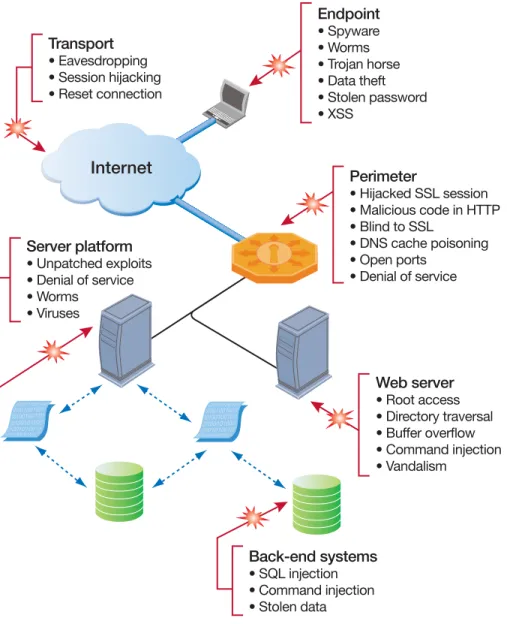
A full range of threats and vulnerabilities are associated with the different components that make up the SSL VPN remote access environment (see Figure 1). There are threats at each component and a complete SSL VPN solution must address the security at each of these components. All traffic should be inspected from endpoints all the way to the backend servers and applications. Check Point is widely recognized for its security innovations, and as such Connectra, utilizes these technologies to ensure that all aspects of security are properly addressed when offering remote access.
Connectra offers a full spectrum of unique security features that includes safeguards starting from the end users to the internal resources. Connectra provides a unified security architecture for various components that can identify and block malicious activity, send critical alerts, update security protections, and prevent attacks. It protects organizations from all known and most unknown network attacks. Connectra is a complete solution that provides SSL VPN remote access, comprehensive endpoint security, and integrated intrusion protection in a single, unified security product.
Figure 1: A full range of security threats exist at each component of the SSL VPN remote access environment leaving organizations vulnerable to various network attacks.
Endpoint • Spyware • Worms • Trojan horse • Data theft • Stolen password • XSS Perimeter • Hijacked SSL session • Malicious code in HTTP • Blind to SSL • DNS cache poisoning • Open ports • Denial of service Web server • Root access • Directory traversal • Buffer overflow • Command injection • Vandalism Server platform • Unpatched exploits • Denial of service • Worms • Viruses Transport • Eavesdropping • Session hijacking • Reset connection
Internet
Back-end systems • SQL injection • Command injection • Stolen dataWith all these features integrated into a single solution, Connectra delivers the strongest SSL VPN solution that businesses require—today. Connectra’s complete security features are unique in that they are fully integrated into the product and comprise the only solution package in the market that provides for real-time security updates, including endpoint security. This gives Connectra an advantage over competing solutions that often require a separate purchase of a third-party product, adding to the total cost of ownership.
Comprehensive endpoint security
Endpoint security is important to ensure that the endpoint device connecting users to an organization’s internal servers and network is secure. Connectra provides integrated endpoint security that can inspect endpoints through browsers. Integrated into Connectra, Integrity Clientless Security™ performs four main endpoint security functions:
■ Scans endpoints for spyware and malware
■ Looks for the presence of antivirus software on remote endpoints,
registries, and file entries and can enforce the use of Integrity endpoint security
■ Protects and encrypts all data passed to remote PC hard drives with Secure
Workspace, a secure virtual desktop
■ Updates endpoint security in real time through SmartDefense™ Services
Integration of Integrity Clientless Security into Connectra secures network resources from unmanaged and unsafe PCs connecting to enterprise resources. It enforces network security policy for SSL VPN connections, ensures session confidentiality, and keeps organizations secure. All endpoint security checks are fully configurable, allowing you to be as restrictive or nonrestrictive as you need for your own security policy.
Spyware detection and policy compliance
Prior to allowing end users to access the Connectra portal, an on-demand browser component is downloaded. This component then scans end-user machines for malware and for the presence of antivirus software or Integrity endpoint security clients through the remote users’ browsers. Connectra can enforce an access policy requiring installed and updated antivirus software and/or PC firewall, before granting users access. Out-of-compliance users are offered links to self-remediation resources such as DMZ servers or external locations where they can install required software and become compliant with enterprise access policy. Once in compliance, users are allowed to log in. By disabling spyware and enforcing baseline security requirements before granting SSL VPN access, Connectra stops identity and password theft and prevents data loss. The integration of Integrity Clientless Security into Connectra prevents users with potentially harmful software from accessing your network, while requiring that they conform to antivirus and the Integrity endpoint security client policies.
Integrated intrusion prevention
• Stateful firewall • Intrusion prevention • Application inspection • Malicious code protection • Buffer overflow protection • Data validation
SSL VPN connectivity
• Authentication integration and enforcement • Dynamic authorization based on policy • SSL encryption
• Secure Connectra Web portal • Monitoring
Comprehensive endpoint security
• Endpoint checking (antivirus, firewall, custom rules, etc.) • Spyware/malware detection
• Policy enforcement • Remediation • Desktop encryption • Session cache wiping • Application control
Internet
Centralized management
• Centralized configuration, policy making, and maintenance
• Centralized logging and reporting • Centralized security event management • Centralized real-time security updates
Ensures information confidentiality in unmanaged environments
A solution should be able to provide a way for users to access information securely on unmanaged PCs and should provide explicit controls that erase information on these computers when users complete their sessions. Secure Workspace in Connectra provides a completely secure environment by encrypting all session-specific data accumulated on the client side during browsing via the Connectra portal. During user sessions, all data is encrypted and is safeguarded by redirecting and caching the data in its own private cache, instead of saving the data in publicly available space. Secure Workspace provides a virtual workspace on the user’s regular desktop providing a secure environment in which only administrator-specified programs can run. In addition, Secure Workspace
Connectra is a complete Web security gateway that provides SSL VPN connectivity, comprehensive endpoint security, and integrated intrusion prevention in a single, unified solution.
monitors and controls applications so that data cannot leave the secure, encrypted workspace and that applications do not move information into an unencrypted area.As a result, malicious applications and viruses on the regular desktop are unable to affect the virtual desktop. Furthermore, after user sessions expire or terminate, Secure Workspace cleans out its cache by clearing temporary files, cookies, browser credentials, and other remnants of the user sessions, eliminating the possibility that organization information will be left on remote endpoints when users log out and leave their PCs.
SmartDefense Services updates
New risks for today’s IT departments are constantly emerging. To help defenses stay continuously ahead of today’s constantly evolving threat landscape, SmartDefense™ Services provide ongoing and real-time updates and
configuration advisories for defenses and security policies. With this capability, the Connectra Web Security Gateway stays up-to-date with the latest endpoint security and intrusion prevention protections without complicated software updates. To view the latest SmartDefense Services updates for Connectra, refer to
http://www.checkpoint.com/defense/advisories/public/updates/index.html.
Authentication and authorization integration
Strict authentication is crucial to ensuring that only the right people gain access to the corporate network. In this vein, the Connectra strategy for identity and access management is a threefold authentication and authorization regime. First, remote users must prove their identities. Second, authenticated users can only access applications if they belong to the appropriate user groups and satisfy the access requirements of the application (as specified by the application protection level). And finally, users can only access authorized applications if they are accessing the information that meets the requirements of the endpoint security policy. This strategy can easily be implemented with the simple-to-install and manage Connectra solution, whether it is centrally managed or standalone, deployed in a network DMZ, or put into production on a trusted LAN. Connectra can also work within an existing infrastructure. For deployments with an existing authentication database, Connectra can be configured to integrate with LDAP, RADIUS, or SecurID/ACE authentication servers. In addition, Connectra includes an internal database for organizations without an existing authentication database.
The Connectra Web-based administration portal allows managers and
administrators to define and manage access policies, user and group mappings to external directories, and network resources. In the administration portal, the administrator can easily define resource-driven security policies (called protection levels), thereby controlling access down to the user and resource levels.
Authentication
Remote users can authenticate through the Connectra internal database or via:
■ Lightweight Directory Access Protocol (LDAP) servers ■ Remote Authentication Dial-in User Service (RADIUS) ■ OPSEC-certified partners—i.e., RSA SecurID
To be allowed access through the Connectra portal, users must be recognized and approved through an authentication process. When remote users initiate HTTPS requests to the Connectra gateway, it uses the specific client used for authentication (LDAP, RADIUS, or SecurID/ACE) to verify remote user identities with the specific server used for authentication. LDAP or RADIUS groups are mapped to the user’s groups as defined on Connectra.
Authorization
Once users are authenticated, they must be authorized to access the application and use the available functionality (for example, Webmail). This authorization is based on the user groups to which they belong and the access requirements of the application. The user groups can be defined internally on the Connectra database or externally on LDAP or RADIUS servers. Connectra enforces an access control policy for each group. To access the application, individual users must also satisfy the access requirements of the applications, as defined by the protection level. Classifying internal applications according to “protection level” is one way of securing applications. For example, a Web application for ordering office supplies is less sensitive than an application that controls money transfer. All remote users can be given access to the office-supplies application, identifying themselves with a username and password. However, the money-transfer
application may be restricted to an exclusive group of remote users and require them to authenticate using certificates. In this way, the level of security
surrounding an application is based on the application’s protection level. Once users are authenticated, Connectra allows the users to access the
appropriate internal network resources for those users. Authorization is performed by enforcing an access control policy. Access control policies are applied to groups, not individual users. During the authentication process, the remote users are associated with one or more groups. Once remote users are authenticated, they can access only the applications that have been authorized for their groups. Connectra checks every request to an internal server for authorization. This means that users must access Web and file applications from their browsers exactly as they are defined in the administrator portal, including specific directory or share restrictions. In other words, for access to be granted, Connectra checks for:
■ Access rights—do the remote users belong to a group that is allowed to
access the application?
■ Security requirements—do the remote users meet the security restrictions
as expressed by the application’s protection level?
Connectra comes with three predefined protection levels: standard, high, and advanced. Each protection level can be defined with several endpoint variables including username/password, SecurID, or client certificate that the administrator can configure.
Integrated intrusion prevention
Equally important as endpoint security is guarding the integrity of information systems from malicious activity that can be injected in the network from remote access points. An integrated intrusion prevention system must ensure that malicious software or malicious attacks cannot be injected from remote endpoints through the application layer or any network-level tunneling. It must also be able to receive real-time security updates regarding the latest threats and the newest protections against those threats.
To help protect the integrity of systems connected via SSL VPN, Connectra provides an integrated intrusion prevention solution using Check Point technologies—Web Intelligence™, Application Intelligence™, and Stateful Inspection. Connectra’s integrated intrusion prevention solution includes inspecting all traffic that passes through the Connectra Web Portal (proxy traffic) as well as SSL Network Extender (network tunneling). With Web Intelligence, Application Intelligence, and Stateful Inspection, Connectra is equipped with leading intrusion detection and blocking capabilities. This prevents network- and application-level attacks from using an SSL VPN gateway to get into a network. Connectra’s integrated intrusion prevention system protects the Connectra gateway as well as the applications that are behind it. Incidents of SQL injection and directory traversal concerns are rapidly progressing. The integrated application security will make it much less likely that an employee or extranet partner can use these types of exploits to access confidential information. To be successful, SSL VPN gateways must unify connectivity with security in a single solution. Check Point is the only vendor, to date, to have integrated a robust Web application firewall and preemptive malicious code protection capabilities into its SSL VPN gateway. This protects the Connectra gateway and the applications served by Connectra from malicious attacks. Furthermore, Check Point intrusion prevention includes SmartDefense™ Service capabilities, so that protections for these protocols can be dynamically updated. Connectra features such integration in its default configuration without any additional costs. Thus, Connectra offers considerably more value than competing products, which would require security-conscious customers to deploy expensive IPSec and wide-area file services (WAFS) to protect their SSL VPN environments.
Web Intelligence
Web Intelligence technology enables customers to configure, enforce, and update attack protections for Web servers and applications. Web Intelligence protections are designed specifically for Web-based attacks and complement the network- and application-level protections offered by SmartDefense. Web Intelligence protects against a range of known attacks, varying from attacks on Web servers to databases used by Web applications. For example, crucial services like HTTP (TCP port 80) and HTTPS (TCP port 443) have become primary targets of sophisticated schemes to manipulate applications. Some of the most serious threats in today’s Internet environment come from attacks that attempt to exploit known application vulnerabilities such as:
■ Directory traversal ■ SQL injection ■ Command injection ■ Cross-site scripting ■ Buffer overflow
Protections from Web Intelligence are applied to all Web traffic requests (HTTP and HTTPS). These protections are applied to Web applications accessed through the Connectra portal, as well as the portal itself. Some of the Web Intelligence protections are also applied to Web traffic generated by the SSL Network Extender client.
Web Intelligence provides proactive attack protections that ensure correct interaction between clients and Web servers, restrict hackers from executing irrelevant system commands, and inspect traffic passing to Web servers to ensure that they do not contain malicious code. Web Intelligence utilizes a number of advanced defenses including Check Point Malicious Code Protector technology, designed to detect malicious code attacks targeting applications with buffer overflow vulnerabilities. Malicious Code Protector heuristically identifies buffer overflow attacks, heap overflows, and other malicious executable code attacks that target Web servers and other applications. Web Intelligence offers another strong layer of protection on top of Check Point’s Application Intelligence technology. Malicious Code Protector functions by scanning generic buffers (usually text strings such as URLs or HTML form fields), and attempting to identify valid assembly code in them using heuristics. Any valid assembly code found is assumed malicious. Special assembly operations such as address identification routines, encryption routines, loops, and NOP slides are given a higher “weight” since they are usually required elements for exploiting buffer overflow vulnerability. For more information, refer to Check Point Web Intelligence and Malicious Code Protector white papers.
Application Intelligence
As previously mentioned, most SSL VPNs are providing full tunnel-based access via browser plugins. In this environment, network-borne attacks (such as worms) pose a new threat and are the primary reason why Connectra applies Application Intelligence to network traffic in SSL Network Extender. Hackers today do more than look for exposed vulnerabilities in the network and transport layers. Today, hackers actively attack the application level. Some of the most serious threats in today’s Internet environment come from attacks that attempt to exploit known application vulnerabilities. Application Intelligence technology provides attack safeguards and attack-blocking tools to protect user data. Application Intelligence prevents and blocks attacks using mechanisms such as:
■ Verifying compliance to standards
■ Validating expected usage of protocols (Protocol Anomaly Detection) ■ Limiting application ability to carry malicious data
■ Controlling application-layer operations
These mechanisms aid proper usage of Internet applications such as DNS, FTP, and SNMP and prevent application-level attacks. Application Intelligence defenses are supported by SmartDefense Services, which provide ongoing updates to keep defenses current against constantly changing threats and vulnerabilities. For more information, refer to the Application Intelligence white paper.
Stateful Inspection
Stateful Inspection was invented and patented by Check Point and is the industry standard for enterprise-class network security solutions. Stateful Inspection provides accurate and highly efficient traffic inspection with full application-layer awareness for the highest level of security. Because Connectra’s core architecture is based on components of the VPN-1 line of security gateways with integrated FireWall-1® technology, it includes all those firewall capabilities.
With Stateful Inspection, packets are intercepted at the network layer for best performance (as in packet filters), but then data derived from all communication layers is accessed and analyzed for improved security (compared to Layers 4-7 in application-layer gateways). Stateful Inspection then introduces a higher level of security by incorporating communication- and application-derived state and context information, which is stored and updated dynamically. This provides cumulative data against which subsequent communication attempts can be evaluated. It also delivers the ability to create virtual session information for tracking connectionless protocols (for example, RPC- and UDP-based applications), something no other firewall technology can accomplish. For more information, refer to Check Point’s Stateful Inspection tech note.
Connectra deployment
Performance and scalability
SSL VPNs are business-critical devices for an organization, and a failure of the connection can result in immediate loss of active connections in and out of the organization. Many of these connections may be mission critical and losing them will result in loss of critical data. The Connectra SSL VPN solution can accommodate the remote access needs of large enterprises through its ClusterXL® load sharing and high availability clustering solution that distributes network traffic between Connectra gateways and hardware acceleration to offload encryption from Connectra.
ClusterXL—Connectra gateway clustering solution
The ClusterXL technology in Connectra provides transparent failover in the event of gateway failure, zero downtime for mission-critical environments, and enhanced throughput. To the outside world, ClusterXL makes a Connectra cluster appear as a single logical entity, even when it is composed of multiple Connectra gateways. It enables the distribution of traffic between multiple, redundant gateways so that computing capacity can be combined to increase total throughput. In the event that any individual gateway becomes unreachable, all connections are redirected without interruption to a backup. ClusterXL maintains all connections during failover, and if a primary gateway is unavailable, all sessions continue without interruption. There is no need to reconnect and reauthenticate, nor will users notice that an alternate gateway has taken over.
ClusterXL is a proven technology for stateful high availability (HA) and load sharing (LS) that is also used by VPN-1 in thousands of mission-critical networks worldwide. In HA configurations, only one member of a cluster is active at any given time, while in LS configuration, ClusterXL for Connectra supports up to five cluster members, with near-linear performance improvement as members are added to the cluster. Connectra’s HA/LS implementation is unique in that the management of the cluster itself becomes highly available when either HA or LS is used. In both HA and LS configuration, ClusterXL is stateful. This results in a “hot” failover capability, so that if a Connectra cluster member goes down, all the user connections are seamlessly handed over to other cluster members, with little or no effect on end user experience. In addition, the management component is itself synchronized across the cluster and is thus highly available, making any member of a Connectra cluster hot swappable.
Integrating ClusterXL technology into Connectra provides:
■ Transparent failover in case of gateway failure ■ Zero downtime for mission-critical environments ■ Enhanced throughput
Load sharing
For significant escalated performance and transparent failover, Connectra offers an LS gateway cluster in which all the gateways in the cluster are active. In addition, if an individual Connectra gateway in the ClusterXL cluster fails, transparent failover occurs to the remaining functional gateways in the cluster, and all connections are shared between the remaining gateways without interruption. In LS mode, a single cluster member, referred to as the pivot, is associated with the cluster’s virtual IP addresses and thus is the only member to receive packets sent to the cluster. The pivot is then responsible for propagating the packets to other cluster members, creating a load-sharing mechanism. Distribution is performed by applying a decision function on each packet. When a failover event occurs in a non-pivot member, the connections it has handled are redistributed between active cluster members, providing HA capabilities. When the pivot member encounters a problem, a regular failover event occurs, and another member assumes the role of the new pivot.
High availability
In an HA ClusterXL configuration, only one gateway is active. In the event that the active cluster fails, all the connections will be redirected to a designated backup without interruption. In an HA cluster, each gateway is given a priority. The gateway with the highest priority serves as the gateway in normal circumstances. If the highest priority gateway fails, control is passed to the next highest priority, and so on. To achieve this purpose, HA mode designates one of the cluster members as the active gateway, while the rest of the members are kept in a standby mode. The cluster’s virtual IP addresses are associated with the physical network interfaces of the active gateway (by matching the virtual IP address with the unique MAC address of the appropriate interface). Thus, all traffic directed at the cluster is actually routed (and filtered) by the active member.
The HA ClusterXL configuration ensures fail-safe connectivity for organizations. This means that the cluster can provide services even when it encounters a problem, which on a standalone module would have resulted in a complete loss of connectivity. Combined with state synchronization, HA maintains connections through failover events in a user-transparent manner, thus allowing a flawless connectivity experience. Therefore, HA provides a backup mechanism, which organizations can use to reduce the risk of unexpected downtime, especially in a mission-critical environment.
SSL hardware acceleration
A hardware-based SSL acceleration card is available in Connectra, dramatically improving the SSL VPN performance of the Connectra gateway. The Connectra Acceleration Card™ speeds up the SSL/TLS public key exchange and reduces CPU utilization by redirecting CPU-intensive calculations to dedicated hardware. Cryptographic functions are offloaded to and accelerated by the card, resulting in SSL performance improvements and freeing Connectra to use processing resources for other functions. The Connectra Acceleration Card is available from Check Point as an option for software or appliance deployments.
Flexible platform options
Connectra provides a wide range of deployment options for your organization through its availability as a turnkey appliance or as software for open servers. The deployment flexibility of Connectra provides the most cost-effective way to deliver performance at every price level for any size organization.
Connectra appliance
When the appliance option is chosen, Connectra includes preinstalled Connectra software on dedicated Check Point or OPSEC-certified hardware. Connectra allows multiple platforms to match your organization’s deployment requirements. Connectra software
Connectra is also available as a software solution for open servers. Connectra software installs SecurePlatform™, a hardened operating system, and Connectra software in less than 30 minutes. You can use Connectra software to evaluate and try all the features of Connectra on an open server. Based on the same SecurePlatform OS that VPN-1 runs on, it supports a wide range of hardware options and is very easy to configure. Connectra software allows you to evaluate Connectra in your specific environment, and at the end of the evaluation period, you have the option to purchase a license and turn the evaluation server into a production SSL VPN.
For hardware or appliance information, please visit the Platform Selection Guide: http://www.checkpoint.com/products/choice/platforms.html.
Check Point: Bringing SSL VPN into a unified
security architecture
Today, organizations face a wide array of specialized security solutions deployed across their IT infrastructures. Taken individually, these products are designed to secure enterprises in one of four major areas: the network perimeter, the network core, the Web, or the endpoints. At face value, the products work—firewalls stop threats at the perimeter, antivirus stops threats on endpoints, SSL VPNs enable clientless remote access, and so on. In terms of remote access, a company can have separate systems for IPSec VPNs, site-to-site VPNs, and SSL VPNs. Collectively, however, this piecemeal approach to network security always seems to be one-step behind.
Why? To begin with, few of these products—especially those from different vendors—can communicate with each other to prepare for the latest threat. Second, each security product requires different management interfaces to define and manage security policies, complicating a process that should be easy given
what is at stake. Next, as the network perimeter continues to expand, enterprises must allow secure access for new constituents, using a range of devices such as PDAs and laptops that might not have appropriate endpoint security precautions. With so many users accessing the corporate network from so many different spots, there is simply no way to make sure everyone is secured.
The Check Point security platform approach enables enterprises of all sizes and organization structures to reduce the cost and complexity of security and ensure that their security systems easily can be extended to adapt to new and evolving threats. The NGX platform is a major upgrade to the core technology underlying Check Point’s market-leading VPN, firewall, and management solutions. It delivers new features and extended functionality to more than 20 Check Point products, including Connectra, VPN-1 Power, VPN-1 UTM, Integrity, Eventia Reporter™, InterSpect™, and SmartCenter™, to name a few.
The NGX platform delivers unified enforcement and management across the four most critical layers of network security: the network perimeter, the network core, the Web, and the endpoints. This enables customers to manage their entire remote access infrastructure from PDAs to desktops from a single platform. This unified approach offers several distinct advantages over point solutions:
■ Increased security consistency by leveraging common security safeguards
across the organization
■ Reduced operational expenses by unifying the management of a
multilayered security infrastructure
■ Enhanced visibility by centralizing audit reports on network, security, and
user activity
■ Improved protection against complex threats by central analysis of events
across the entire security architecture
For more information on the Check Point unified security architecture, see http://www.checkpoint.com/ngx.
Conclusion
As today’s businesses grow more global and mobile, SSL VPNs for remote access solution provides substantial benefits in productivity and convenience. Yet anywhere, anytime access can greatly increase a corporate network’s vulnerability to a range of security threats. While many SSL VPN offerings claim a complete and secure remote access solution, Connectra is the only SSL VPN solution that delivers Web connectivity with unmatched security in a comprehensive solution. Connectra delivers SSL VPN remote access for an extensive range of enterprise applications, protects corporate information from malicious spyware on remote endpoints, ensures information confidentiality on unmanaged endpoints, and defends the integrity of internal infrastructure from worms and attacks. Connectra is a complete SSL VPN solution that unifies SSL VPN access with the industry’s most comprehensive endpoint security and integrated intrusion prevention in a single solution.
perimeter, internal, Web, and endpoint security solutions that protect business communications and resources for corporate networks and applications, remote employees, branch offices and partner extranets. The company’s ZoneAlarm Internet Security Suite and additional consumer security solutions are among the highest rated in the industry today, proactively protecting millions of people from hackers, spyware, viruses and identity theft. Extending the power of the Check Point solution is its Open Platform for Security (OPSEC), the industry’s framework and alliance for integration and interoperability with “best-of-breed” solutions from hundreds of leading companies. Check Point solutions are sold, integrated and serviced by a network of thousands of Check Point partners around the world and its customers include 100 percent of Fortune 100 companies and tens of thousands of businesses and organizations of all sizes.
CHECK POINT OFFICES Worldwide Headquarters
3A Jabotinsky Street, 24th Floor Ramat Gan 52520, Israel Tel: 972-3-753 4555 Fax: 972-3-575 9256 e-mail: [email protected] U.S. Headquarters 800 Bridge Parkway Redwood City, CA 94065 Tel: 800-429-4391 ; 650-628-2000 Fax: 650-654-4233 URL: http://www.checkpoint.com
©2003–2006 Check Point Software Technologies Ltd. All rights reserved. Check Point, AlertAdvisor, Application Intelligence, Check Point Express, Check Point Express CI, the Check Point logo, ClusterXL, ConnectControl, Connectra, Connectra Accelerator Card, Cooperative Enforcement, Cooperative Security Alliance, CoSa, DefenseNet, Eventia, Eventia Analyzer, Eventia Reporter, Eventia Suite, FireWall-1, FireWall-1 GX, FireWall-1 SecureServer, FloodGate-1, Hacker ID, IMsecure, INSPECT, INSPECT XL, Integrity, Integrity Clientless Security, Integrity SecureClient, InterSpect, IQ Engine, MailSafe, NG, NGX, Open Security Extension, OPSEC, OSFirewall, Policy Lifecycle Management, Provider-1, Safe@Home, Safe@Office, SecureClient, SecureClient Mobile, SecureKnowledge, SecurePlatform, SecurePlatform Pro, SecuRemote, SecureServer, SecureUpdate, SecureXL, SecureXL Turbocard, SiteManager-1, SmartCenter, SmartCenter Express, SmartCenter Power, SmartCenter Pro, SmartCenter UTM, SmartConsole, SmartDashboard, SmartDefense, SmartDefense Advisor, Smarter Security, SmartLSM, SmartMap, SmartPortal, SmartUpdate, SmartView, SmartView Monitor, SmartView Reporter, SmartView Status, SmartViewTracker, SofaWare, SSL Network Extender, Stateful Clustering, TrueVector, Turbocard, UAM, UserAuthority, User-to-Address Mapping, VPN-1, VPN-1 Accelerator Card, VPN-1 Edge, VPN-1 Express, VPN-1 Express CI, VPN-1 Power, VPN-1 Power VSX, VPN-1 Pro, VPN-1 SecureClient, VPN-1 SecuRemote, VPN-1 SecureServer, VPN-1 UTM, VPN-1 UTM Edge, VPN-1 VSX, Web Intelligence, ZoneAlarm, ZoneAlarm Anti-Spyware, ZoneAlarm Antivirus, ZoneAlarm Internet Security Suite, ZoneAlarm Pro, ZoneAlarm Secure Wireless Router, Zone Labs, and the Zone Labs logo are trademarks or registered trademarks of Check Point Software Technologies Ltd. or its affiliates. All other product names mentioned herein are trademarks or registered trademarks of their respective owners. The products described in this document are protected by U.S. Patent No. 5,606,668, 5,835,726, 6,496,935, 6,873,988, and 6,850,943 and may be protected by other U.S. Patents, foreign patents, or pending applications.