Intelligent Network Services for
Medium-sized Companies and Large Enterprises
CISCO INTEGRATED SERVICES ROUTER
2
Integrated network services with
Cisco Integrated Services routers 3
Cisco Integrated Services routers for small
to medium companies 5
Teleworker solution with the Cisco 800 series
and IP Communicator 5
Cisco Integrated Services routers for
connecting branch offices 6
Intelligent services in the Cisco routers
• Security 9
• IP telephony 10
• VPN 12
• Standardized management 13
Cisco routers overview 14
Cisco Integrated Services routers offer a wide range of intelligent services that provide much more than a simple data link between company headquar-ters, branch offices and the Internet. Medium-sized companies and branch offices of large enterprises use an increasing number of applications to com-municate with partner companies, mobile staff and other stand alone offices.
This level of communication calls for a more stringent network requirements profile with regard to security, performance, scalability, and availability.
Our goal is to deliver all mission-critical applications plus the same level of performance and security to all users across the network – from company headquarters through branch offices and home offices to mobile staff.
Network-based applications for medium-sized and large-scale enterprises have become both complex and extensive. Older (legacy) programs operate simultaneously with modern client/server software and new web applications. The entire spectrum of communications, from data (e-mail and Internet) to voice (IP telephony) and video (e-learning and e-conferencing) also runs via the network. On top of this, security and administration tools demand bandwidth and computing power. Add to this the need to link branch offices, partner companies and staff via WAN or VPN connections for communication with headquarters.
The network product manufacturers and application vendors involved are as varied as the products themselves. Integrating products from different manufacturers is a complex process; management and administration are time-consuming.
Problems and friction losses related to compatibility, functional interoperability and integrated management of products from different manufacturers frequently occur when implementing network extensions in order to incorporate additional IT security features, new services, and features (such as unified messaging or IP telephony). Operating two separate networks (data and telephone networks) calls for at least two vendors and support organizations, which generates higher costs and places a greater burden on support services. If these networks also house single products from differ-ent providers, the time and expense incurred by installation, configuration and main-tenance can rise at an exponential rate. And should an additional service or new tech-nology also need to be included (such as extended virus protection), the extent of the problem will grow still further.
INTEGRATED NETWORK SERVICES WITH
CISCO INTEGRATED SERVICES ROUTERS
4
A reduction of network products from various manufacturers serves to reduce management and operative complexity and helps to reduce both ongoing and future costs. The progressive integration of services (including firewall, VPN, intrusion pre-vention and telephony) in a device such as one of the new Cisco routers ensures stan-dardized management of all functions from a single point. And don’t underestimate the fact that a single manufacturer or partner will be a reliable and competent source of updates and extensions. IT administrators save time and expense by managing a single Cisco router for all services.
New services and functions mean that a router must be capable of handling growing demands. And that is precisely the strength of the new Cisco 1800, 2800 and 3800 Integrated Services router series: enhanced performance to handle increasing data transmission rates while continuing to provide all router services (including VPN encryption, firewalling, unified messaging, and IP telephony) to the highest standards. Medium-sized businesses and branch offices can thus enjoy security of investment for years to come.
Internet
WAN
PSTN
IP IP IP
Fax
Cisco 2801
Catalyst 3560 Switch
+ CallManager
Express + IOS Firewall + VPN + VoiceMail
Cisco 7905G Cisco 7960G IP Phone
Figure 1
Multivendor network
Internet
WAN
PSTN
PBXRouter Vendor 2
Firewall Vendor 3
Switch Vendor 4 Vendor 1
Fax Telephon
Figure 2
Integrated Services router network from Cisco
Cisco Integrated Services routers for small to medium companies
Companies can connect to the Internet using a Cisco Integrated Services router which supports all communication standards including ISDN, ADSL, SHDSL, Cable, Frame Relay, ATM, and Ethernet. The implementation of a firewall to prevent unauthorized access from the Internet to your private network is imperative. Cisco IOS router soft-ware enables this without installing additional hardsoft-ware. A local-area network (LAN) is set up to connect workstations with the router and servers. Cisco Catalyst switches provide a next-generation solution for this purpose. Intelligent switching does more than transporting data from A to B. Data can also be assigned quality ratings and, with the help of Quality of Service (QoS), preferential treatment. In this way, switch-ing modules can be integrated directly in the routers. Usswitch-ing Power over Ethernet (PoE), the Cisco Catalyst switches also provide power for equipment such as WLAN access points, IP telephones or monitoring cameras.
Supplying all functions for setting up an IP telephone network, Cisco CallManager Express is the ideal solution for telephony in small to medium companies using up to 240 telephones. The advantage of this solution is that the PBX operates in the router itself and can be configured and managed from a web browser using a graphical user interface. And the fact that the only hardware required is an Ethernet Category 5 data cable helps to reduce the cost of new installations and office expansions in particular. The router thus becomes the primary PBX in your company. It also connects you to the public network via Basic Rate Interfaces (BRI) or Primary Rate Interfaces (PRI) – see also figure 2. As an option voicemail and unified messaging functions can be integrated in the router via a network module or an advanced integrated module running Cisco Unity Express.
Teleworker solution with the Cisco 800 series, IP Communicator and VPN (max. 10 sites)
The following scenario demonstrates how the Integrated Services router network for small to medium sized networks can be expanded to include home workstations to enable data access and corporate communication for teleworkers. Teleworkers can access the same applications and services as if they were connected to the internal
Cisco 831 Cisco 837 data voice IPsec tunnel Cisco 831
Cisco IP Communicator
IP IP IP
Fax
Cisco 2801
Catalyst 3560 Switch
+ CallManager
Express + IOS Firewall + VPN + VoiceMail Cisco 7905G Cisco 7960G IP Phone
PSTN
public switched telephon networkInternet
WAN/VPN
Figure 3Home workstation scenario – all work-places can be equipped with Cisco IP Communicator software. In this way the home PC can be used as an IP phone without the need of a seperate phone line.
6
company network. The home workstation is connected to the Internet via ADSL using a Cisco 831 or Cisco 837 router. A VPN connection is set up between the company headquarters and the Cisco 831/837 router. As with all Cisco routers, an integrated firewall on the Cisco 831/837 protects teleworkers against Internet hackers. Therefore, it is not necessary to install a separate firewall on each home PC. Instead of phoning via the public network (as was previously the case), the teleworker now communicates via ADSL line using the Cisco IP Communicator. In the case of an ADSL fixed-rate connection, for example, this would incur no additional phone charges. In this network scenario, up to 10 home workstations are supported for telephony with the Cisco CallManager Express. Cisco’s IOS V3PN (integrated in the routers) controls prioritization between data and voice packages over a single line. The Cisco 831/837 router for home offices can be managed from company headquarters.
Cisco Integrated Services routers for connecting branch offices
The modularity of the Cisco Integrated Services routers enables linking branch offices to company headquarters with a range of different WAN interface cards. The Cisco 1760, 1800, 2600XM, 2800, 3700 and 3800 series routers can be expanded using additional interface cards. The hardware architecture of the new Cisco 1800, 2800, 3800 Integrated Services routers was designed in such a way as to ensure that all services – such as encryption, telephony, firewalls, and packet transport – could be provided simultaneously and to the same high level of performance. Confidential data are transmitted between a branch office and company headquarters via VPN (virtual
Headquarters 240 User
Internet
WAN/VPN
+ CallManager Express + IOS Firewall + IDS + VPN + NAC + VoiceMail + automated attendant Cisco 3845 Fax Catalyst 4500 SwitchIP IP IP
Fax
Cisco 2801
Catalyst 2950T-24 Switch
+ CallManager
Express + IOS Firewall + VPN + VoiceMail
Cisco 7905G Cisco 7960G IP Phone
IP IP IP
Fax
Cisco 2851
Catalyst 3560 Switch
+ CallManager
Express + IOS Firewall + VPN + VoiceMail
Cisco 7905G Cisco 7960G
IP IP IP
Cisco 7905G Cisco 7960G IP Phone
PSTN
Branch office B 24 User Branch office A 72 User
Figure 4
Scenario describing branch office link with Integrated Services router. VPN connections for exchanging data, voice and video are set up via the Internet.
private network) which protects transmissions from external unauthorized access. The VPN also enables you to transport convergent data, i.e. video and voice, with higher priority.
Cisco offers a number of options for setting up VPNs. A dedicated software solution is available (Cisco VPN Client), for example, mobile workers seeking to connect to a branch office or company headquarters. The Cisco VPN-capable routers are ideally suited for branch offices and smaller setups.
The CallManager Express (Cisco 1760, 2600XM, 2800, 3700 and 3800 series) is deployed for telephony in branch offices or standalone offices. This removes the need to purchase, configure and manage a separate PBX in a branch office. CallManager Express enables telephony management and administration from company headquar-ters, thus reducing ongoing operating costs.
The high purchase costs of PBX systems also no longer apply since CallManager Express operates as a service in the Cisco router.
The Cisco 3845 router permits simultaneous operation of up to 240 telephones.
Cisco Integrated Services routers overview
The table on page 14 shows new features contained in the Cisco 1800, 2800, and 3800 router series.
Cisco 2801
New Cisco 1800, 2800, 3800 Integrated Services router series (left to right)
High security levels, effortless communication and simple management – all thanks to Cisco Integrated Services routers. Here is a description of the full range of functions available:
Enhanced security with Cisco routers
There are enough products on the market that promise to make your life easier. Numerous manufacturers offer stand alone solutions for each security problem. Yet by installing several different products from different providers, both in your company headquarters and in branch offices, you may improve your security but you’re also likely to lose your overview. Where do attacks take place? Which attacks should be reported to the administrator? What measures must be implemented immediately? It makes sense to receive security solutions from a single source, from a single provider, possibly even from a single product. This allows universal security policies to be defined with fewer complications, thus significantly easing the daily workload of administrators – be it during installation, maintenance, troubleshooting or installing new applications. Cisco’s Integrated Services routers bring together Internet access, dynamic routing functions, firewall, intrusion detection, VPN operation, encryption, comprehensive QoS, as well as secure transfer of voice and video.
Cisco IOS Firewall Feature Set– This software integrates a stateful inspection firewall in the router that also monitors data traffic at application level. The applications monitored by Context-Based Access Control (CBAC) include both TCP and UDP applications, HTTP (Java blocking), SMTP, FTP, TFTP as well as multimedia such as SIP, SCCP (Skinny), H.323, RTSP, RealAudio and other voice/video applications.
Intrusion detection– Cisco IDS identifies more than one hundred of the most infamous methods of attack. It does this using signatures that analyze data flow for patterns and is able to detect attack attempts at an early stage. If suspicious activities are identified, Cisco IDS blocks the attack before it reaches the network and sends an alarm message to the management console.
Data encryption– Employing either software or dedicated hardware modules, Cisco routers encrypt VPN communication using the 56-bit Data Encryption Standard (DES), 128-bit Triple DES (3DES) or 256-bit Advanced Encryption Standard (AES). Encryption is also possible via an X.509 Public Key Infrastructure (PKI).
Network Admission Control (NAC)– Based on the Cisco Trust Agent (CTA) software which is installed on desktop systems and on servers, information on security compli-ance and operating system versions is collated from the desktop or server. CTA can report information that is supplied by antivirus software from vendors such as Trend Micro and forwarded to Cisco network components which then assess whether or not network access should be permitted.
INTELLIGENT SERVICES IN
THE CISCO ROUTERS
URL filtering– URL filters can be employed should a company want to prevent staff from accessing websites not related to their job descriptions. This ensures that network resources and bandwidth are not squandered on unnecessary surfing. Using an URL database of more than 20 million addresses subdivided into 60 categories administrators can prevent staff from accessing inappropriate web content.
Telephony with Cisco routers
Voice communication using IP networks (Voice over IP) is becoming the medium of choice for a growing number of companies. More than two million users already enjoy the benefits of Cisco IP phones worldwide. IP telephony has established itself as a practical and cost-effective solution – particularly for companies operating with branch offices or subsidiaries. As well as lowering the cost of internal calls, i.e. between headquarters and branch offices, the maintenance and management of only a single communication network – rather than two networks – also reduces outlay and ongoing costs. Scalability in a more simple way, i.e. uncomplicated addition of new phone users and PC workstations, is another key argument in favour of IP telephony.
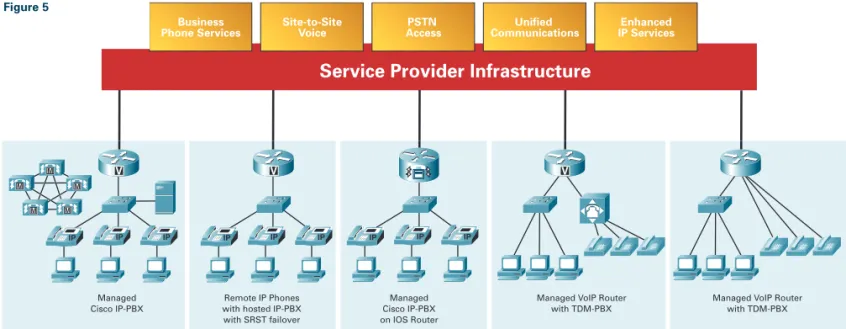
Figure 5 describes the implementation of a Cisco Integrated Services router in a customer location and at a service provider. The Cisco router provides the following range of functions:
• independent IP telephone network with unlimited number of users via Cisco CallManager
• independent IP telephone network with up to 240 users via Cisco CallManager Express
• IP telephone network hosted by service provider
• independent telephone network with conventional PBX linked to a Cisco router
• independent telephone network with analog devices linked directly to Cisco router As part of the Integrated Services router, the Cisco CallManager Express and Cisco Unity Express vastly simplify the process of setting up a convergent network for companies and branch offices. All you need is the following:
10
Remote IP Phones with hosted IP-PBX with SRST failover
IP IP IP Managed Cisco IP-PBX IP IP IP
Managed VoIP Router with TDM-PBX Managed
Cisco IP-PBX on IOS Router
IP
IP IP
Managed VoIP Router with TDM-PBX IAD IAD M M M M M
V V V IADIAD
Service Provider Infrastructure
PSTN
Access CommunicationsUnified IP ServicesEnhanced Site-to-Site
Voice Business
Phone Services Figure 5
Cisco access router – The Cisco 1760 and the 2600XM, 2800, 3700 and 3800 series models are fully equipped for IP telephony. Excellent quality-of-service functions prioritize voice and data traffic, monitor bandwidth in the network and ensure optimum voice quality.
Cisco IP telephones– Cisco offers a broad selection of different IP telephones: from simple devices without a display (such as the Cisco 7905G IP telephone, which covers all basic functions), through the Cisco 7970G (managing multiple lines and equipped with an coloured XML-controlled display) to the wireless Cisco 7920G IP phone.
Public phone line– A phone line must be available to connect the Cisco router to the public phone network (PSTN) via BRI or PRI. Cisco CallManager Express sets up functions typical for PBX systems on the Cisco router platform.
Cisco Unity Express– Installed via module in the router, the Cisco Unity Express is used for voicemail applications and automatic call forwarding. Delivers a range of voicemail functions and automatic forwarding of incoming calls.
Less work and lower costs.Instead of running two separate networks (PBX and data network), the Integrated Services router routes telephone and data traffic over a single infrastructure. This eliminates the cost of maintaining the TC network and servicing support contracts, and reduces administration and configuration expenses.
Reduced relocation costs– Users can change desks within the company simply by plugging in their Cisco IP telephone. They then receive their user-specific profile and telephone number. Cisco CallManager Express automatically recognizes the user and updates the database accordingly. And that’s it – without any IT support.
Reduced total cost of network ownership– The combination of voice and data in a single IP network simplifies network architecture and administration – and all support is now provided by a single source.
Cisco IP Phones: 7902G, 7905G, 7912G, 7940G, 7960G with 7914 Expansion Module, the 7970G, and the Cisco Wireless IP Phone 7920
Rapid connections– This all-inclusive solution can standardise, simplify and acceler-ate voice and data connections from subsidiaries and branch offices. Script generation options in Cisco CallManager Express facilitate the simultaneous administration of multiple satellite offices and, at the same time, speed up installation.
Increased productivity – In a survey of 100 companies using IP telephony, almost half of those interviewed confirmed an increase in productivity of branch office staff within the first six months.
Virtual private networks with Cisco routers
VPNs can be implemented both for connecting two locations and for linking individual workstations. The advantages offered by VPNs in comparison to Frame Relay or ATM connections are:
• lower line costs
• greater geographical availability or coverage
• more simple connection of individual workstations, for example, for teleworkers or mobile staff
• more secure data transfer with automatic encryption • uncomplicated and rapid scalability
• better utilization of available bandwidths • lower hardware costs
• more flexible and simple configuration of additional or new connections • IT service outsourcing using the Internet Service Provider´s managed services Cisco offers a range of options for setting up VPNs. This includes a software-based solution for mobile staff, for example. For smaller installations such as small branch offices Cisco offers VPN-compliant routers and switches that support not only dynamic routing but also QoS and IP multicast data traffic. For larger installations, on the other hand, Cisco offers special VPN equipment such as VPN concentrators.
The VPN functions Easy VPN and Dynamic Multipoint VPN are new from Cisco. Using Easy VPN in combination with the Cisco Unity Client protocol can reduce configuration expenses for VPN connections. Remote-installation routers inherit their configuration from a central VPN 3000 concentrator which operates as an IPsec server. Dynamic Multipoint VPN (DMVPN) can be used to configure multiple VPN connections without the central router having to save individual configuration data for all connected routers.
Standardized management with Cisco Integrated Services routers
Cisco Security Device Manager (SDM) for graphic configuration
SDM is available for all access routers from the Cisco 800 series to the Cisco 3800 series and offers branch offices and stand alone offices in particular a browser-based graphic tool for secure router configuration. SDM supports LAN/WAN, firewall and VPN configurations based on the Cisco IOS software. SDM also provides security audit functions which are used to check router configuration and suggests ways to improve the level of protection in accordance with the recommendations of ICSA Labs. SDM enables users to employ all security features offered by the Cisco access router in a simple and cost-effective manner and configures the router without extended external support.
Cisco Security Device Manager (SDM) allows the administraton of most of the Cisco applications including VPN, security, etc. within one graphical user interface.
CISCO ROUTERS OVERVIEW
Product Name Modular Slots LAN (fixed) WAN
Slots for WIC Slots for NM AIM Modules Ethernet Fast Ethernet Token Ring ISDN ADSL serial
SOHO 91 4
SOHO 96 4 1 1
Cisco 801 1 1
Cisco 803 4 1
Cisco 805 1 1
Cisco 831 4
Cisco 836 4 1 1
Cisco 1712 1 5 1
Cisco 1721 2 1 1 2 2 4
Cisco 1751 3 1 1 2 2 4
Cisco 1760 4 1 1 2 2 4
Cisco 2610XM/11XM 2 1 1 1 2 10 2 12
Cisco 2612 2 1 1 1 1 10 2 12
Cisco 2620XM/21XM 2 1 1 1 2 10 2 12
Cisco 2650XM/51XM 2 1 1 1 2 10 2 12
Cisco 2691 3 1 2 2 12 3 14
Cisco 3725 3 2 2 2 19 7 24
Cisco 3745 3 4 2 2 35 11 38
Product Name On-board On-board On-board Optional Slots for Slots for
Hardware DSP Slots Ethernet Power Interface Network
Encryption Ports over Cards Modules
Ethernet
Cisco 1841 14 Mb/s - 2 FE - 2 HWIC/VWIC/ –
WIC (data only)
Cisco 2801 14 Mb/s 2 2 FE 120 W 2 HWIC/VWIC/ –
WIC/VIC 1 VWIC/WIC/VIC 1 VWIC/VIC (voice only)
Cisco 2811 20 Mb/s 2 2 FE 160 W 4 HWIC 1 NME
Cisco 2821 30 Mb/s 3 2 GE (10/100/1000) 240 W 4 HWIC 1 NME
1 EVM
Cisco 2851 50 Mb/s 3 2 GE (10/100/1000) 360 W 4 HWIC 1 NMED
1 EVM
Cisco 3825 80 Mb/s 4 2 GE (10/100/1000) + 1 SFP 360 W 4 HWIC 1 NME/EVM
1 NMED/EVM
Cisco 3845 100 Mb/s 4 2 GE (10/100/1000) + 1 SFP 360 W 4 HWIC 4 NME/EVM
General router overview, interfaces selection, number of ports for WAN, LAN, security, voice etc.dul
14
NEW: Cisco 2801, 2811, 2821, 2851 NEW: Cisco 1841
Ethernet Integrated Services CallManager Cisco
ETTx IDS Firewall VPN Express Unity
1 ■
■
■ ■
■ ■
■ ■
1 ■ ■
■ ■
1 ■ ■ ■
2 ■ ■ ■
2 ■ ■ ■
2 ■ ■ ■ max. Tel. 24
4 ■ ■ ■ max. Tel. 24 ■
4 ■ ■ ■
4 ■ ■ ■ max. Tel. 36 ■
4 ■ ■ ■ max. Tel. 48 ■
4 ■ ■ ■ max. Tel. 48 ■
11 ■ ■ ■ max. Tel. 72 ■
19 ■ ■ ■ max. Tel. 120 ■
Slots for Integrated Services
Advanced IDS Firewall VPN CallManager Cisco
Integration Express Unity
Modules
1 AIM ■ ■ ■ no no
2 AIM ■ ■ ■ max. Tel. 24 ■
2 AIM ■ ■ ■ max. Tel. 36 ■
2 AIM ■ ■ ■ max. Tel. 48 ■
2 AIM ■ ■ ■ max. Tel. 96 ■
2 AIM ■ ■ ■ max. Tel. 168 ■
2 AIM ■ ■ ■ max. Tel. 240 ■
Cisco 2651 and 2691 Cisco 2600XM Serie Cisco 1760
Cisco 3725
Cisco 3745 Cisco 831
Cisco SOHO 91
NEW: Cisco 3845
UK Headquarters Cisco Systems 10 New Square Park Bedfont Lakes Feltham Middlesex TW14 8HA
Tel: +44 (0)20 8824 1000 Sales: 00800 99990522
London (City) Cisco Systems International Financial Centre
12th Floor Tower 42 Old Broad Street London EC2 1HQ
Tel: +44 (0)20 7496 3700 Sales: 00800 99990522
Manchester Cisco Systems Crescent House Towers Business Park Wilmslow Road Didsbury Manchester M20 2JE
Tel: +44 (0)161 249 5700 Sales: 00800 99990522
Ireland Cisco Systems
Eastpoint Business Park, Dublin 3
Leinster Ireland
Tel: +353 (1)819 2700 Sales: 00800 99990522
Scotland (Bellshill) Cisco Systems Bothwell House Pochard Way
Strathclyde Business Park Bellshill
ML4 3HB
Tel: +44 (0)1698 847 000 Sales: 00800 99990522
09/04
Copyright © 2004 Cisco Systems, Inc. All rights reserved. Cisco, Cisco Systems, and the Cisco Systems logo are registered trademarks or trademarks of Cisco Systems, Inc. and/or its affiliates in the United States and certain other countries. All other trademarks mentioned in this document are the property of their respective owners. The use of the word partner does not imply a partnership relationship between Cisco and any other company.