2
Contents
Chapter 1 - Solution Overview
. . . .
4
Chapter 2 - AlvariSTAR Platform
. . . .
6
2.1 AlvariSTAR System Architecture
. . . .
7
Chapter 3 - AlvariSTAR Functionality
. . . .
8
3.1 Fault Management
. . . .
9
3.1.1 Event Monitor and Event History
. . . .
10
3.1.2 Event Template Manager
. . . .
11
3.1.3 Event View and Event Filter Managers
. . . .
11
3.2 Configuration Management
. . . .
12
3.2.1 Equipment Manager
. . . .
12
3.2.1.1 Device Configuration Manager
. . . .
13
3.2.1.1.1 Multiple Devices Configuration
. . . .
13
3.2.1.2 Location Manager
. . . .
13
3.2.1.3 Contact Manager
. . . .
14
3.2.1.4 Backup File Manager
. . . .
14
3.3 Performance Management
. . . .
15
3.4 Security Management
. . . .
16
3.4.1 User & User Group Manager
. . . .
16
3.4.2 Functional Permissions Manager
. . . .
16
3.5 System Utilities
. . . .
17
3.5.1 Synchronization Processes
. . . .
17
3.5.1.1 Network Discovery
. . . .
17
3.5.1.2 Device Synchronization
. . . .
18
3.5.1.3 Network Scan Task
. . . .
18
3.5.1.4 Single Range Scan Task
. . . .
18
3.5.2 Software Upgrade Task
. . . .
19
3.5.3 Configuration Backup Task
. . . .
19
3.5.4 Task Manager
. . . .
19
3.5.5 Database Aging Task
. . . .
20
3.5.6 Performance Collection Task
. . . .
20
3.5.7 License Manager
. . . .
20
3.5.8 User Monitor
. . . .
20
3.5.9 Audit Logs
. . . .
20
3.6 Northbound Interfaces
. . . .
21
3.6.1 Northbound Manager for Fault
. . . .
21
3.6.2 Northbound Manager for Performance
. . . .
21
3.6.3 Northbound Manager for Configuration
. . . .
21
3.7 AlvariCRAFT™
. . . .
22
4
Chapter 1 - Solution Overview
Alvarion's 4Motion™ Mobile WiMAX™ solution provides broad network management offerings for low-sized, midrange and large scale WiMAX™ network deployments. AlvariSTAR® is a comprehensive carrier-class element management system (EMS) that is part of Alvarion’s 4Motion WiMAX solution, managing all mandatory radio access network (RAN) components including the base stations and ASN gateways. AlvariSTAR was designed for today’s most advanced network operation centers (NOC). It provides a complete set of functionalities, TMN-compliant, including network monitoring and configuration and service provisioning capabilities, required to effectively manage WiMAX networks at the same time, while keeping resources and expenses at a minimum level. The AlvariSTAR platform is a robust and scalable network management system, supporting low to high scale network deployments.
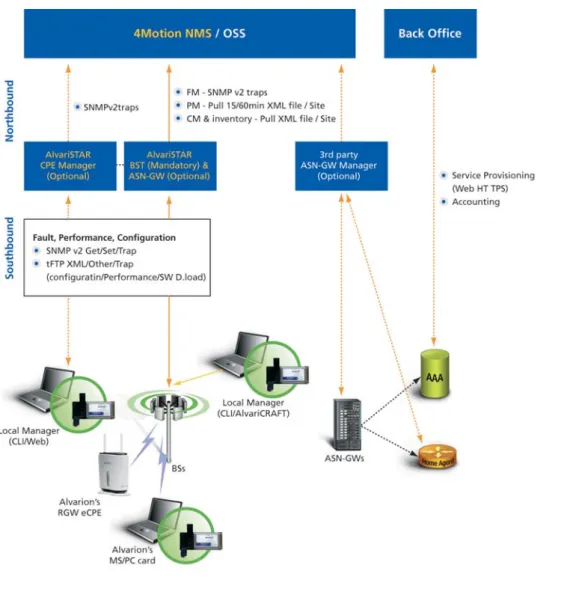
Figure 1: 4Motion Management Solution Diagram
The solution offers a wide variety of sub-systems that are the building blocks for a tailored and customized management system. Some of the sub-systems are mandatory and some optional depending on the solution chosen. The entire solution is comprised of the following sub-systems:
CPE Manager:
an element management system responsible for monitoring and provisioning customer premises equipment, mainly for fixed applications. It enables remote provisioning services including software upgrades, configuration settings, alarm monitoring, licenses grant and real-time measurement monitoring.BTS and ASN-GW Manager:
an element management system responsible for configuring, monitoring and supervising base stations, including co-located integrated ASN-GW.3rd Party ASN-GW Manager: an element management system responsible for configuring and monitoring external ASN-GW.
4Motion NMS or OSS:
an optional offer by Alvarion of an end-to-end WiMAX NMS and/or integrated to an existing operator's OSS that provides centralized network views and full FCAPS functionality for all installed network components.Back office:
a back office system that provides billing, accounting and provisioning functionalities. The back office system is capable of updating the AAA servers and instructing it for updated service policing.AlvariSTAR provides comprehensive fault, configuration, performance, and security management functionalities in compliance with EML layer as follows:
Fault Management
Real-time alarm and event reporting, event reduplication and clearing, alarm sorting and filtering, alarm status management, event logging, historical event queries, and color coding according to severity.
Configuration Management
Network element discovery and scheduled periodical updates, hierarchical location management, single and multiple unit and board configuration, software upgrade, service provisioning, logical and geographical topology views, and inventory management.
Performance Monitoring
Monitoring of over-the-air traffic load, wireless link performance, and quality of service statistics to identify problems and bottlenecks as well as optimize resource usage.
Security Management
Users and user-group management, functional permissions and passwords for multi-level authorization, and access protection.
6
Chapter 2 - AlvariSTAR Platform
The AlvariSTAR management system architecture was designed as a multi-tier and layered system, mainly for functionality encapsulations and system scalability. The platform is comprised of the following server side building blocks:
Application Server
Coordinates and synchronize between all system components, and provides communication media to the system with managed sub-systems and network devices. Highly-scalable remote method invocation (RMI) protocols were introduced with the application server, ensuring simple and reliable communication between the system elements.
Mediation Agent
Resident agent that runs continuously in the background providing services for communicating with external systems and devices using various protocols. The mediation server includes a mediation mapper and XML parser for the management information bases (MIBs) of Alvarion devices.
Data Repository
Persistent storage that holds network and business objects such as devices, device configuration, links, sectors, cells, locations, alarms and events, performance data, and system logs. This enables the storage and retrieval of data required by users. The database server works both with a small-scale and built-in My-SQL database and Oracle database for midsized to large deployments.
Client side:
Desktop Clients
Thick client application with rich graphical user interface allowing the user to access the AlvariSTAR permitted management and information screens.
2.1 AlvariSTAR System Architecture
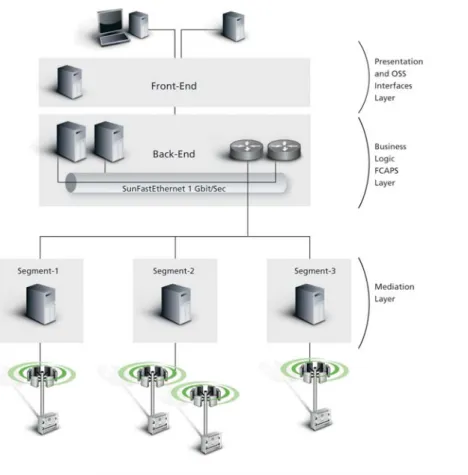
AlvariSTAR components are designed to support a variety of system architectures, from a minimal all-in-one system with all compall-in-onents on the same computer, through entry-level systems with several remote clients, to a fully distributed system.
The suggested configurations allow for maximum flexibility, and enable easy adjustments throughout the system life cycle, supporting a pay-as-you-grow strategy for system expansion.
4Motion’s next generation robust and scalable platform is designed to introduce a pure multi-tier layered and distributed architecture with the upcoming product release.
The proposed distributed architecture is to support monitoring and controlling of a significant growth of network size that is constipating in additional equipments to monitor and supervise.
Figure 2: AlvariSTAR fully distributed system architecture
8
Chapter 3 - AlvariSTAR Functionality
The AlvariSTAR element management system provides core functionality, namely fault, configuration, performance and security and system functionality namely scheduling, northbound managers, network locators and viewers and software upgrade utilities. Additionally, the EMS provides integrity, watchdog and aging mechanisms to sustain a stabilized system.
3.1 Fault Management
The event services feature includes efficient tools for managing alarms that are generated in the system. Information about each alarm is readily displayed, helping operators to diagnose and fix system failures. The tools enable the acknowledgement, clearing or forwarding of open alarms. Filters can be applied to display specific alarms or specific information about each alarm according to need.
Event services also enable connection to other management systems as well as the forwarding of traps, applying of templates to automate the processing of alarms, and triggering of external scripts.
10
3.1.1 Event Monitor and Event History
The event monitor module displays real-time updates of new events entering the system or alarms created at the window’s launch time, and are color-coded according to the alarm/event severity.
The event history module displays a list of all closed events and alarms that occurred in the system based on time of occurrence and other filtering criteria including summary information for un-cleared alarms. The two modules include numerous options and features that support effective and efficient management of system faults:
Display and acknowledge alarm information – receive alarm details and apply the following operations: acknowledge or un-acknowledge alarms, add notes to alarms, and view associated managed object details.
Customize views – create new columns, insert/remove columns, move/resize columns, sort by columns, and save/edit/delete/open customized views.
Offer color coding according to alarm severity (e.g. critical, major, minor, warning, indeterminate, informational).
Create/edit/delete and view filters by managed objects, locations, events, and alarm severities. Manage event process flow via templates for event logging, alarm display and email sending. Define alarm thresholds for event correlation, advisory message text and event forwarding.
As alarms are detected, they are propagated in real time to the network-element presentation applications. Geographical and logical topology icons, as well as the equipment manager, are highlighted with the corresponding alarm severity, enabling straightforward and direct visualization of equipment malfunction and allow direct access to the alarm window.
The Filtering feature ensures that the inspector receives only the most relevant information including suppression of selected duplicate alarms, correlation of alarms and suppression of symptomatic alarms. Correlated faults can be forwarded to higher-level management systems as SNMP traps, while off-site NOC personnel can be automatically notified of alarms by email.
The event monitor and event history modules enable switching between alarm and event viewing modes. The alarm mode displays events for which a fault condition exists (i.e. open alarms), while the event mode displays all events that were not excluded by a defined filter (i.e. open, cleared, suppressed and informational).
3.1.2 Event Template Manager
The event template manager determines how to processes different types of messages sent by managed network objects. The system’s messages (events) typically indicate a change in the operational status of the object such as device failure or system reset.
Event templates were created to match each event with specific actions including the triggering of user-defined scripts. The default template manager includes generic system templates as well as device-family-specific templates.
3.1.3 Event View and Event Filter Managers
The displayed event/alarm view includes valuable information about each record. The event viewer and filter manager enable the creation, editing and deletion of views and filters. The view manager enables defining which attributes will be shown and the order in which they will be displayed. The event filter manager enables the defining of those attributes to be used as selection criteria. A wide range of attributes including event ID, event time, event type, severity, managed object information, and status are available.
12
3.2 Configuration Management
3.2.1 Equipment Manager
The equipment manager provides views of devices according to multiple filtering criteria, as well as general information such as device ID, name, type, location, and IP address on each of the displayed devices. The manager enables single or multiple device selection for configuration, access to the topology view, and the opening of a telnet cut-through session to a selected device.
In addition, it enables managing of the general SNMP parameters of a selected device, as well as defining or updating the location and contact associated with devices.
3.2.1.1 Device Configuration Manager
The device configuration manager provides organized views that display status details, enabling the configuration of all operational and network service related parameters of the managed devices including the Device Shelf, ASNGW, BSs, ODUs, Antennas, etc.
3.2.1.1.1 Multiple Devices Configuration
The multiple-device configuration task enables simultaneous configuration of multiple devices using SNMP. The system identifies specific device properties such as type, model, hardware, and software version, and sends the applicable parameters to each device. Detailed reports provide process progress and completion status information, enabling quick understanding of potential problem identification and repeated configuration cycles in the event of failed configuration changes.
3.2.1.2 Location Manager
The location manager enables the association of devices or groups of devices with locations in order to efficiently manage the network and effectively utilize its topology maps. The manager facilitates quick detection of managed objects according to location, and enables rapid drill-down capability to view specific equipment components.
Locations can be specified hierarchically using multiple levels such as country > region > city > neighborhood > building > floor. Locations can be associated with appropriate images that are displayed as background
14
3.2.1.3 Contact Manager
Contact manager provides an additional attribute for identifying and categorizing devices. The contact manager enables the creation and management of contacts. Each contact can be associated with additional information such as first, middle and last name, company details, address, email, and various phone, pager, mobile phone and fax numbers at work, home and other locations. Each device can be associated with a contact record to efficiently maintain and manage the network.
3.2.1.4 Backup File Manager
Backup configuration files include complete configuration details for the entire device. Through upload/ download of selected configuration files, it is possible to restore a certain configuration or duplicate the configuration details of one device to others, thereby simplifying the configuration process for new sites or certain sets of parameters significantly.
Backup configuration files from selected devices can be uploaded to the database using the configuration backup task, which is accessible through the task manager.
The backup file manager enables the management of configuration files in the AlvariSTAR file storage. It also allows activation of the restore configuration task, which in turn, enables the downloading of a selected backup configuration file to one or more sites, including the source device.
3.3 Performance Management
Performance collection and monitoring is one of the most important capabilities in the 4Motion EMS solution. The performance management module was designed to fulfill the need of NOC inspectors and engineering specialists in order to monitor, find-tune and optimize the performance of the entire system. 4Motion provides two main usages for the performance module: First, real-time monitoring on specific KPIs and measurements in order to cope with system malfunction. Secondly, an historical monitoring that compares current system behavior against historical data with the capability to foresee performance degradation trends.
Real-time performance monitoring:
With real-time monitoring, a graphical display of user selected counters is continually presented on the screen as a graph or list, allowing the inspector to evaluate accurate and real-time measurements and values. The data that was monitored during the real-time session is not saved in the system. The real-time monitoring is using the SNMP protocol for the fetching of the required data.
Historical performance monitoring:
A continuous performance collection task is collecting all the counters and measurement files that reside on the base stations, via remote access method, on a periodical time intervals defined by the user. The file collection process can be applied on multiple base stations and devices, simultaneously. Once collected, the files are stored in the database and can be accessed via the report generator. A
various set of report types, lists, comparison reports and trend reports can be easily defined by the user.
The XML files include hundreds of measurement counters that incorporate 15-minutes aggregated values, starting from a round hour, every 15 minutes.
16
3.4 Security Management
AlvariSTAR users are organized into user groups, and each group is assigned a certain permission level. Every function within the AlvariSTAR maintains a corresponding permission. To access a function, a user must belong to a group that was assigned permission rights for that function. AlvariSTAR administrators can organize users on the basis of their access requirements and enforce security accordingly. It is important to note that if a user does not have permission to access an area, the section will not appear in the menu at all.
The following sections describe AlvariSTAR‘s security functionality.
3.4.1 User & User Group Manager
The user manager provides a view of existing users, and enables the administrator to edit user details, create or delete users, associate users with user groups, set passwords, and define expiration policy. The user group manager provides a view of existing user groups, enabling the administrator to edit user group details and create or delete user groups.
3.4.2 Functional Permissions Manager
The functional permissions manager enables associating functions with individual users or user groups. Permissions are granted per function by creating a list of the groups and/or individuals authorized to perform each function. Functional permissions can be further refined by defining the actions (e.g. read, write, execute, delete, add) that each group or single user can perform when carrying out the function.
3.4.3 Application Security Policy Manager
The application security policy manager enables specifying security policies governing users’ login and password as follows:
Login Policy: Defines issues associated with login such as the time an account can remain inactive, the length an open session can remain inactive, the permitted number of failed login attempts, and the lockout period once a user has exceeded the allowed number of failed login attempts.
Password Policy: Defines whether, and for how long, users can use the same password, when an old password can be re-used, and when they receive a warning that the current password is near its Password Constraints: Defines how passwords can be constructed including constraints regarding
3.5 System Utilities
3.5.1 Synchronization Processes
3.5.1.1 Network Discovery
Network discovery is a process by which AlvariSTAR™ searches for and identifies
Alvarion’s licensed devices in a network. Once an Alvarion device has been identified,
information is retrieved from, and a database object is created for it. This enables
AlvariSTAR™ to communicate with and manage the device. Discovery can be
performed interactively, or set up and scheduled in advance using the network
scan task for automatic periodical executions to track newly added devices.
Discovery is based on searching for devices that meet criteria such as IP address
range, device ID and unique or global SNMP communities. The process includes
18
3.5.1.2 Device Synchronization
The device synchronization process updates the management database with
the most recent events and configuration information either after a new
device is discovered, or following a communication failure between the device
and AlvariSTAR™.
3.5.1.3 Network Scan Task
The network scan task scans the entire network for new devices. The scope of the
scanned network is defined in the managed network window, and the network scan
task is used for activating the scan, viewing results or modifying SNMP scanning
parameters.
3.5.1.4 Single Range Scan Task
The single range scan task scans a single range of IP addresses for new and
modified devices.
3.5.2 Software Upgrade Task
Upgrading an entire network with an updated software version is of great importance
to operators, since they are often justifiably concerned over potential hazards
that can accompany the upgrade process. These risks include loss of service for
unexpected periods of time and a huge staff workload that leads to increased
expenses.
The software upgrade task alleviates the need for manually loading and activating
newly embedded software to network elements by enabling the downloading and
activation of an updated software version to numerous devices simultaneously.
The network administrator maintains total flexibility and convenience in selecting
the devices that require upgrading. This can be achieved by simply selecting an
entire region or a specific cell or sector.
The software upgrade task accompanies the software upgrade process with detailed
reports enabling the operator to monitor the progress and outcome of the software
download operation. It allows for flexible scheduling of the software upgrade
operation by moving the service disruption period to off-peak service hours. As
a result, the software upgrade process becomes a well-controlled, simple task for
managing and performing, with minimal effect on service.
Software upgrading is performed by loading the requested software files to the
shadow memory of devices using TFTP, and activating the new software version
at the desired time, according to a predetermined process. It is possible to define
any number of software upgrade tasks that will be executed independently of one
another.
3.5.3 Configuration Backup Task
Backup configuration files include complete configuration details for the entire
device. The configuration backup task enables the uploading of backup configuration
files from selected devices to the disk. The backup configuration files can be restored
to the source device using the restore configuration task, which is accessible
through the backup file manager.
The tasks that can be managed through the task manager include:
3.5.4 Task Manager
20
viewing of reports on completed and aborted tasks.
Tasks can be scheduled to run once, or at predefined recurrence intervals. Examples
of non-recurring tasks include software upgrade and configuration file download;
examples of recurring tasks include network scan and historical performance
collection.
3.5.5 Database Aging Task
The database aging task automates database management tasks for the managing
of event and audit log records. It enables defining the retention time and maximum
number of event/audit logs, and determining whether to archive or permanently
delete records when the retention interval deadline is reached.
3.5.6 Performance Collection Task
The performance collection task collects performance data at defined intervals
from specific equipment. The collected data is stored in the database as well as in
files under directories in the disk. Any file may be exported to another application
for further analysis.
3.5.7 License Manager
The license manager displays information about valid licenses for managing Alvarion
devices. Each license enables the managing of a certain number of devices. For
each device type, it displays the number of available licenses and current number
of managed devices (used licenses). When considering expansion plans, the number
of licensed devices compared with the number of managed devices of each type
indicates whether there is a need for an updated license to support a larger number
of particular devices. The license manager also enables the addition and activation
of a new license to support additional devices.
3.5.8 User Monitor
The user monitor window displays information about currently logged-in users,
and enables sending messages to a logged-in user. Users with administrator rights
can terminate the application of other users.
3.5.9 Audit Logs
AlvariSTAR™ provides a logging service that records messages to the database
when pre-specified system events occur. These messages can include event date
and time, event type, error messages, and other important information according
to the recorded event. The audit log manager enables viewing recorded events and
exporting the logged data to an external file.
3.6 Northbound Interfaces
AlvariSTAR™ provides connectivity to already existing OSS management systems
or to AlvariSTAR Pro™, an end-to-end WiMAX network management system that is
also part of 4Motion management solution. This northbound connectivity enables
system events, alarms, performance related data and configuration status to be
presented on a centralized management system. This interface forwards the entire
data, as is, with no manipulations of traps, files and protocols.
3.6.1 Northbound Manager for Fault
The northbound manager provides an interface for connecting to other management
systems and effectively forwarding SNMP traps. AlvariSTAR™ supports forwarding
system and network events to northbound managers, according to flexible criteria.
Filters can be defined and associated with different northbound managers in order
to control which events are sent to various managers.
3.6.2 Northbound Manager for Performance
The northbound manager effectively prepares performance related XML files that
are ready to be pulled by other management system or OSS system. The OSS or
NMS pulls the files, on a periodic time cycles, from the local EMS file system,
into the OSS's remote server using the File Transfer Protocol. When successfully
transferred, the OSS pulling process should remove the files from the EMS local
directory in order to avoid re-pulling of already transferred files.
22
3.7 AlvariCRAFT™
AlvariCRAFT is a Simple Network Management Protocol (SNMP) application designed for the online management of BreezeMAX™ cell site components. This utility simplifies the installation and maintenance of small deployments by easily enabling setting changes or firmware upgrade for one cell site at a time.
AlvariCRAFT allows for the accessing of a wide array of monitoring and configuration
options including:
Selected unit configuration modification. Local service profile verification and modification. Local service provisioning.
Firmware upgrade for the NPU and AUs. Online performance data monitoring. Export of configuration details to a CSV file. Telnet cut-through support.
Appendix A - Abbreviations and Acronyms
The following abbreviations and acronyms are used throughout this document:
ASN
Access Service NetworkASN-GW
Access Service Network GatewayAU
Access UnitAVU
Air Ventilation UnitBS
Base StationEMS
Element Management SystemNMS
Network Management SystemNPU
Network Processing UnitODU
Outdoor UnitOSS
Operation Support SystemPIU
Power Interface UnitSales Contacts
Australia Email: [email protected] Brazil Email: [email protected] Canada Email: [email protected] China Email: [email protected] Czech Republic Email: [email protected] France Email: [email protected] Germany Email: [email protected] Hong Kong Email: [email protected] Italy Email: [email protected] Ireland Email: [email protected] Japan Email: [email protected] Latin America Email: [email protected] Mexico Email: [email protected] Nigeria Email: [email protected]© Copyright 2008 Alvarion Ltd. All rights reserved. Alvarion® and all names, product and service names referenced here in are either registered trademarks, trademarks, tradenames or service marks of Alvarion Ltd. All other names are or may be the trademarks of their respective owners. The content herein is subject to change without further notice.
www.alvarion.com Philippines Email: [email protected] Poland Email: [email protected] Romania Email: [email protected] Russia Email: [email protected] Singapore Email: [email protected] South Africa Email: [email protected] Spain Email: [email protected] U.K. Email: [email protected] Uruguay Email: [email protected] For the latest contact information in your area, please visit:
www.alvarion.com/company/locations 214 8 9 4 r e v. a