Log Analysis Software Architecture
Contents
1 Introduction 1
2 Definitions 2
3 Software goals 2
4 Requirements 2
4.1 User interaction . . . 3
4.2 Log file reading . . . 3
4.3 Computation and statistics . . . 3
5 Software architecture 3 5.1 User interface . . . 3
5.2 Log reading daemon . . . 4
5.3 Log database server . . . 5
5.4 Project Interface . . . 6
6 Implementation 6 6.1 User interface . . . 6
6.2 Log reading daemon . . . 7
6.3 Log database server . . . 9
7 Extensions 9
1
Introduction
This document describes — for didactical purposes — the software architecture of a log scanning software to be used on a web server.
Some firms currently handle project management in an innovative way, letting teams interact freely with each other whilst trying to induce different teams and people to converge towards the ultimate
project goal. In this “liberal” framework, a continual assessment of team activity is paramount. This can be obtained by performing an analysis of the amount of read and write access of each team to the various project documents. Read and write document access is stored in the log files of the web server managing the project database.
Such firms therefore require a software package which reads the webserver log files and displays the relevant statistical analyses in visual form on a web interface.
This report is organized as follows. In Section 2 we give some introductory syntactical definitions. In Section 3 we explain the main goals of the software from the user point of view. In Section 4 we list the software requirements. In Section 5 we described the software architecture. In Section 6 we give details on the implementation and APIs. In Section 7 we discuss some possible extensions.
2
Definitions
An actor is a person taking part in a project. Atribeis a group of actors. A documentis an electronic document uploaded to a central database via a web interface. Documents are grouped according to their semantical value according to a pre-defined map which varies from project to project. There are therefore varioussemantical zones(or simplyzones) in each project: a zone can be seen as a semantically related group of documents.
A visual mapof document accesses concerning a set of tribes T and a set of zones Z is a bipartite graphBTZ = (T, Z, E) with edges weighted by a functionw:E→Nwhere an edgee={t, z}exists if the
tribethas accessed documents in the zonez, andw(e) is the number of accesses. There may be different visual maps for read or write accesses, and a union of the two is also envisaged.
Atimespanis a time interval ¯τ = [s, e] wheresis the starting time and eis the ending time. Visual maps clearly depend on a given timespan, and may therefore be denoted as BZ
T(τ). For each edgee∈E
we can draw the coordinate time graph of w(e) changing in function of time (denoted as we(τ) in this
case).
3
Software goals
The log scanning software overall user goals are:
1. given a tribet and a timespan ¯τ, display a per-tribe visual mapBZ
{t}(¯τ);
2. given a zonez and a timespan ¯τ, display a per-zone visual map BT{z}(¯τ);
3. given a timespan ¯τ, display a global visual mapBZ T(¯τ);
4. given a timespan ¯τ and an edgee={t, z}in BZ
T(¯τ), display a time graph ofw(e).
The per-tribe and per-zone visual maps can be extended to the per-tribe-pair, per-tribe-triplet, per-zone-pair, per-zone-triplet cases.
4
Requirements
The technical requirements of the software can be subdivided into three main groups: (a) user interaction, (b) log file reading, (c) computation and statistics.
4.1
User interaction
All user interaction (input and output) occurs via a web interface. This will:
1. configure the desired visual map (or time graph) according to user specification (input action); 2. delegate the necessary computation to an external agent (a log database server) and obtain the
results (process action);
3. present the visual map or time graph in a suitable graphical format (output action).
4.2
Log file reading
Log file data will be gathered at pre-definite time intervals by a daemon, parsed according to the log file format, and stored in a database. The daemon will:
1. find the latest entries added the log files since last access (input action); 2. parse them according to the log file format (process action);
3. write them to suitable database tables (output action).
4.3
Computation and statistics
Actually counting the relevant numbers and types of accesses will be carried out by a database engine. This will receive a query, perform it, and output the desired results.
5
Software architecture
According to the above requirements, the overall software architecture is based on three main modules: 1. user interface;
2. log reading daemon; 3. log database server;
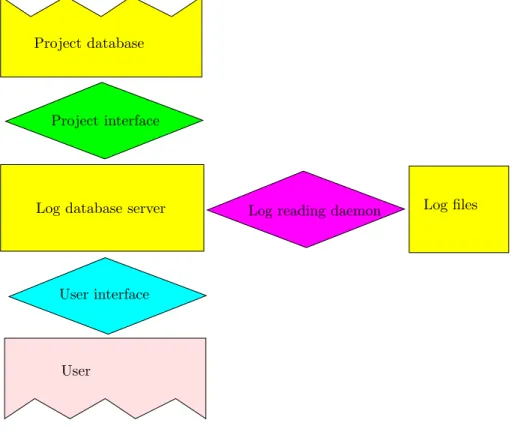
plus an optional added project interface module to configure project-specific data into the log analysis database. The overall software architecture is depicted in Fig. 1.
Project-specific data are: (a) a set of tribes (possibly with hierarchical/functional relationships ex-pressed via a set of edges in the graph induced by the tribes); (b) a set of zones (possibly with semantic relationships expressed via a set of edges in the graph induced by the zones); (c) a document-to-zone map (here we refer to the documents listed in the project webserver log files); (d) an IP-to-tribe map (where IP is the IP address requesting documents from the project webserver log files).
5.1
User interface
PSfrag replacements
Project database
Project interface
Log database server Log reading daemon
User
User interface
Log files
Figure 1: The overall software architecture.
1. configure its runtime parameters: project name, DB server information access, XSL specification for statistics visualization output;
2. get project-specific (list of tribes, list of zones) information from the log database server 3. ask the user the desired type of statistic (per-tribe, per-zone, global, time-graph);
4. ask the user the necessary input data (timespan, tribe(s), zone(s), tribe-zone pair), presenting lists of tribes, zones and pairs to choose from;
5. form the database query according according to user specification; 6. perform the database query;
7. gather output statistics;
8. form an XML representation of the statistics visualization 9. produce an output (HTML, other publishing formats).
Should any action fail in the events sequence, the correct error recovering procedure is simply to abort the sequence, display an error, and return to Step 2.
5.2
Log reading daemon
The log reading daemon simply waits in the background and every so often reads the tail of the log files, parses it, and records the data in the log database server. It needs to perform the following actions (in the given order):
1. configure its runtime parameters: project name, DB server information access, log file format specification, uniform resource identifiers (URIs) of log files, update information file name;
2. read log file sizes when last accessed from the update information file; then, for each log file listed:
3. get tail of log file;
4. parse records according to log file format, to extract: (i) requesting IP address, (ii) requested document URL, (iii) access date/time, (iv) success/failure, (v) access type (read/write);
5. store those data to the log database server.
Care must be taken to read a whole number of records in Step 3, as the “tail” of a file is defined on the amount of bytes last read. This depends on the operating system, so it cannot be enforced a priori. One possible way around is to count the bytes used during data parsing, and add those bytes the file size stored in the update information file.
Should any action fail in the events sequence, the correct error recovering procedure is to abort the daemon and notify a system administrator immediately.
5.3
Log database server
The log database server is going to perform the necessary computation on the (stored) relevant informa-tion. It needs to store the following information:
1. project-specific information:
• tribes table: tribe name, associated IP address pool
• zones table: zone name, associated directory name in web site map • actors/tribes incidence information (optional)
• documents/zones incidence information (optional)
• hierarchical/functional tribes/actors relationthips (optional) • semantic zones relationships (optional);
2. log information table: • requesting IP address • tribe name
• requested document URL • zone name
• access date/time
• type of access (read/write).
Note that the zone name can be inferred by the directory name of the document URL (contained in the zones table), and the tribe name can be inferred by the IP address according to the tribes table.
5.4
Project Interface
This module is optional in the sense that a prototype may well work without it. Its main function is to load incidence information of document URLs with zones and IP addresses with tribes on the database server. This can be carried out either as a web interface drawing input from the user or as an executable program configured through a text file. In both cases, this interface should hook into the project-specific database to build the document-to-zone and IP-to-tribe tables.
6
Implementation
The user interface and log reading daemon expose a C-like API. API entries are listed in the following format:
ReturnTypeFunctionName(inInputArgument, . . . ,outOutputArgument, . . . )
In this document, all functions return an integer error status (this can be changed to using exceptions where applicable). TheTimeSpantype is simply a pair of date/time records (starting and ending times).
6.1
User interface
The user interface is going to be coded in PHP. It is going to make use of several primitive PHP API subsets: text file handling, abstract DB connection and query, XML/XSL, vector image creation.
• ErrorStatusReadConfiguration(inString FileName,outDBConnectionData theDB,outString XSLVisualSpecFileName)
It opens a text configuration file namedFileName; reads the following information: name of the project, DB server name, DB user name, DB password, DB database name, XSL visual specification file name; finally, it closes the configuration file.
• ErrorStatusGetTribesList(outList TribesList) Queries the DB engine to obtain the zones list. • ErrorStatusGetZonesList(outList ZonesList)
Queries the DB engine to obtain the zones list.
• ErrorStatusGetUserSpecifications(outint StatisticsType,outString[3] SelectedTribes, outString[3] SelectedZones,outTimeSpan theTimeSpan,outint AccessType)
Gets the user specifications for the desired statistics from a web form. TheStatisticsType will denote per-tribe, per-zone, global or time-graph. If per-tribe is selected,SelectedTribescontains up to three names of meaningful tribes. If per-zone is selected,SelectedZonescontains up to three names of meaningful zones. If time-graph is selected,SelectedTribes[0]andSelectedZones[0] will contain the relevant tribe-zone pair. In all cases, AccessType will denote read access, write access or both.
• ErrorStatusGetByTribeStatistics(inString[3] SelectedTribes,inTimeSpan theTimeSpan, inAccessType,inDBConnectionData theDB,outMaphhTribe,Zonei,doublei Statistics) Forms the SQL query to count how many accesses occurred during the specified timespan from the selected tribes to each zone; performs the query; organizes the data in the specified output map. • ErrorStatusGetByZoneStatistics(inString[3] SelectedZones,inTimeSpan theTimeSpan,
inAccessType,inDBConnectionData theDB,outMaphhTribe,Zonei,doublei Statistics) Forms the SQL query to count how many accesses occurred during the specified timespan from each tribe to the selected zones; performs the query; organizes the data in the specified output map.
• ErrorStatusGetGlobalStatistics(inTimeSpan theTimeSpan,inAccessType,inDBConnectionData theDB,outMaphhTribe,Zonei,doublei Statistics)
Forms the SQL query to count how many accesses occurred during the specified timespan from each tribe to each zone; performs the query; organizes the data in the specified output map.
• ErrorStatusGetTimeGraphStatistics(inString Tribe,inString Zone,inTimeSpan theTimeSpan, inAccessType,inDBConnectionData theDB,outMaphDateTime,doublei Statistics)
Forms the SQL query to track the access ofTribetowardsZone versus time; performs the query; organizes the data in the specified output map.
• ErrorStatusPublishIncidenceStatistics(inMaphhTribe,Zonei,doublei Statistics,inString XSLVisualSpecFileName,outTextBuffer XMLStatistics)
Transforms the incidenceStatistics map into XML format; uses the PHP PNG vector graphics API subset to produce a JPEG image of the desired graph (in full colours); reads the specified XSL visual specification file to produce an HTML output (which also displays the GIF/JPEG image directly on the screen).
• ErrorStatusPublishTimeGraphStatistics(inMaphDateTime,doublei Statistics,inString XSLVisualSpecFileName,outTextBuffer XMLStatistics)
Transforms the time-graphStatisticsmap into XML format; uses the PHP PNG vector graphics API subset to produce a PNG image of the desired graph (in full colours); transforms this to GIF or JPEG format; reads the specified XSL visual specification file to produce an HTML output (which also displays the GIF/JPEG image directly on the screen).
Note to implementors: some of the above functions are extensive pieces of coding. They should be implemented by breaking them up into smaller (protected) functions.
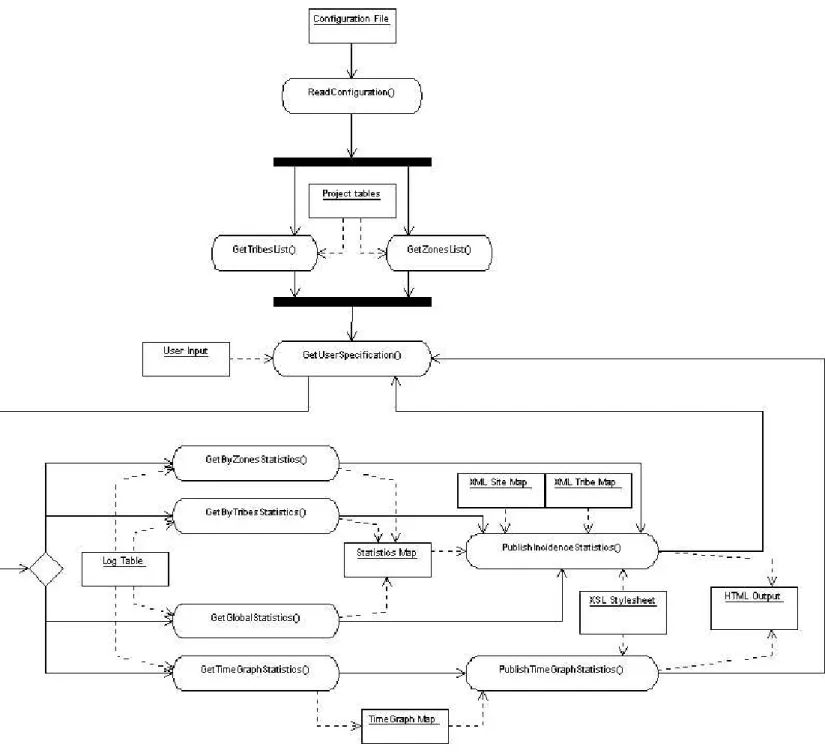
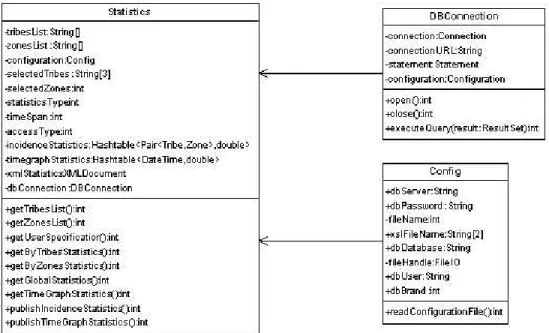
The activity diagram for the user interface is given in Fig. 2. The class diagram is given in Fig. 3. Note to implementors: this class diagram is intended to give a semantic grouping of the required data and methods. PHP is not necessarily best used in object-oriented mode. Should the choice fall on a procedural PHP development, the class diagram should just be used for clarification and as general guidance.
6.2
Log reading daemon
The log file daemon is going to be coded in Java and will use the following primitive JAVA API subsets: process/timer handling, text file handling, abstract DB connection and query, and possibly an advanced (s)FTP API to retrieve log file tails.
• ErrorStatusReadConfiguration(inString FileName,outDBConnectionData theDB,outint LogFileFormat, outString[] LogURI,outString UpdateInfoFileName)
Opens a text configuration file named FileName; reads the following information: name of the project, DB server name, DB user name, DB password, DB database name, log file format, uni-form resource identifiers (URIs) of log files, update inuni-formation file name; finally, it closes the configuration file.
• ErrorStatusReadUpdateInfo(inString UpdateInfoFileName,inString[] LogURI,outlong[] LogSize)
Opens the update information file; reads a “file read up to size” for each given log file URI; closes the file.
• ErrorStatusSaveUpdateInfo(inString UpdateInfoFileName,inString[] LogURI,inlong[] LogSize)
Figure 2: The UML activity diagram for the user interface.
• ErrorStatusReadLogFileTail(inString LogURI,inlong LogSize,outTextBuffer theTail) Uses a network or filesystem transfer method to retrieve the last (filesize(LogURI)−LogSize) bytes of the log fileLogURI.
• ErrorStatusParseLogData (inTextBuffer theTail,inint LogSize,inint LogFileFormat, outDBTable UpdatedLogData,outUpdatedLogSize)
iden-Figure 3: The UML class diagram for the user interface.
tify the relevant fields and organize them into a memory representation of a DB tableUpdatedLogData; furthermore, it must return the exact number of bytes used during the parsing, add them to the LogSizeand put the result intoUpdatedLogSize. The format of the DB table is as in Section 5.3, Step 2 (the tribe and zone name fields are left blank).
• ErrorStatusSaveLogData(inDBTable UpdatedLogData,inDBConnectionData theDB) Connects to the log database server; finds the tribe corresponding to each IP address in the DB table; finds the zone corresponding to each document URL in the DB table; completes the table; saves the latest log data in the log database server, adding them to the relevant table.
Notes to implementors. (a) Some of the above functions are extensive pieces of coding. They should be implemented by breaking them up into smaller (protected) functions. (b) The mainfunction of this program should take a number of secondssas argument, and configure and start a timer calling the log reading procedure everysseconds.
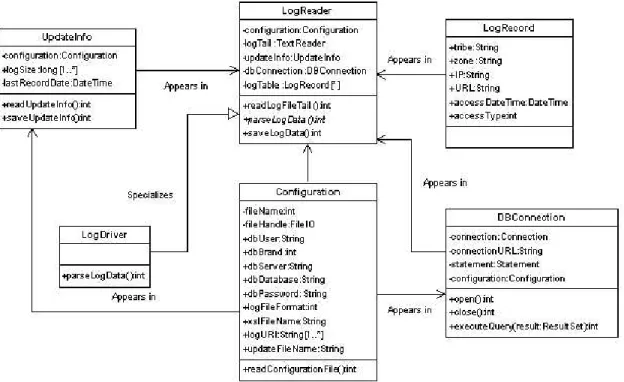
The activity diagram for the log reading daemon is given in Fig. 4, and the class diagram in Fig. 5.
6.3
Log database server
The database server of choice is MySQL (www.mysql.com), but this can be changed as desired with any other internet-enabled DB engine accepting SQL queries and exporting data through the normal standardized APIs.
7
Extensions
It is currently very difficult to obtain more fine-grained information than tribes access to documents, because: (i) the log files index entries according to the requesting IP address; (ii) the IP addresses are
Figure 4: The UML activity diagram for the log reading daemon.
Figure 5: The UML class diagram for the log reading daemon.
do not have access to the DHCP server log files. Should the latter become available, it would in theory be possible to associate each IP and timespan to a MAC address, which uniquely identifies a network interface on a personal computer, and hence to obtain the actor identifiers. The whole software could then be extended to deal with actors as well as tribes.