Managing Spreadsheets: Reducing Risk
and Gaining Confidence
White Paper
Incisive Software Corporation 300 Santana Row, Suite 200 San Jose, CA 95128
- 2 -
E
XECUTIVE
S
UMMARY
Spreadsheets are essential tools for enterprises. Other financial and business intelligence applications have emerged over the years, but the spreadsheet remains the fundamental tool for financial reporting and analysis and for sharing numerical or tabular data.
Spreadsheet applications have grown more powerful, and spreadsheets themselves have grown bigger and more complex, making it more difficult for spreadsheet users and internal auditors to identity risks and errors in spreadsheet data and formulas. If uncorrected, these risks and errors could lead to strategic missteps, erroneous financial reporting, regulatory fines, and other costly outcomes.
To reduce risks and errors while keeping spreadsheet users productive, enterprises need a spreadsheet risk management solution that is:
Comprehensive
Fast
Accurate
Scalable
Easy to use
Easy to learn
Supportive of best practices
Incisive Software has developed a spreadsheet analysis and management solution that meets all these requirements.
The Incisive solution enables enterprises to discover and catalog spreadsheets and spreadsheet risks, to check spreadsheets and identify the source of risk and errors, and to audit spreadsheets comprehensively and collaboratively. Incisive’s unique, patent-pending “heat map” overlay high-lights areas of concern in spreadsheets without altering spreadsheet content or formatting direct-ly. Using the Incisive solution, spreadsheet users can work quickly and productively, assessing risks and making corrections, confident that the integrity of spreadsheet data has been preserved. Using the Incisive solution, enterprises can be confident that spreadsheets—still the fundamental tool for numerical analysis—are accurate and compliant, providing a solid evidentiary foundation for strategic decisions and business operations.
Managing Spreadsheets: Reducing Risk and Gaining Confidence
- 3 -
S
PREADSHEETS
:
P
OWERFUL
,
E
SSENTIAL
,
AND
R
ISKY
Spreadsheets are essential tools for enterprises. Other financial and business intelligence applications have emerged over the years, but the spreadsheet remains the fundamental tool for financial reporting and analysis and for sharing numerical or tabular data. In organizations of all kinds and sizes, critical data—including financial data for operations, strategy, and reporting—is collected, analyzed, and modeled in spreadsheets.
A good indication of the staying power of spreadsheets is the fact so many cloud solutions— whether designed for email list management, network monitoring, Big Data modeling, or some other function—enable users to download data in Excel or in a more rudimentary spreadsheet format, comma-separated-values. Cloud vendors understand that even in the age of elastic computing and software-defined networking, a spreadsheet remains the preferred format for inspecting, analyzing, and sharing data.
Recognizing unrelenting market demand, spreadsheet application developers have not been idle. Spreadsheet applications are becoming more powerful. They import data from more types of information sources than their predecessors did, and introduce collaboration features to make it easier for spreadsheet users to share files with colleagues.
Enterprises are taking advantage of new features and access to more data (as part of the Big Data boom1) to make bigger, more complex spreadsheets. These spreadsheets provide the evidentiary foundation for critical business decisions and for the accurate reporting of financial results.
HEADLINE-WORTHY SPREADSHEET ERRORS
However, along with the sophistication of spreadsheets comes complexity, and complexity can make spreadsheet errors and risks more difficult to find. When undiscovered and uncorrected, spreadsheet errors can be costly.
In 2003, Fannie Mae needed to adopt a new accounting standard for recognizing the value of the mortgages. To implement the new standard, Fannie Mae relied on internal accounting systems along with spreadsheets that made additional calculations. Unfortunately, one of those
spreadsheets contained an error, resulting in a $1.2 billion variance in the financial results that
1
According to some estimates, the volume of business data worldwide doubles every 1.2 years.
http://wikibon.org/blog/big-data-statistics/
About 1.3 billion people use Microsoft Office, and a large number of those people are using Microsoft Excel.1
The latest version of Microsoft Excel supports 1,048,576 rows and 16,384 columns.
Fannie Mae reported in its 10-Q. After discovering the error and announcing the correction, Fannie Mae saw its stock price drop $2.25. In addition to the loss of market confidence, Fannie Mae had to put in the additional work to correct the report filed with the SEC.2
Barclays learned the hard way that hidden columns in spreadsheets are hidden only from view; their data and its implications remain intact. In 2008, Barclays bought Lehman Brothers
investment and banking and trading business and thought it had cherry-picked just the good assets. As it turned out, when a spreadsheet was reformatted and converted to PDF by two junior lawyers with minimal Excel skills, a “hidden” column became visible. This hidden column
represented $30M of the not-so-good assets that Barclays did not want. After years of litigation, a judge ruled that the error was not fraud and the deal was legal.
Unfortunately, the errors that affected Fannie Mae and Barclays are all too common. In a recent survey of finance users in SMBs and enterprises, Ventana Research found that:
• 45% of finance users in enterprises grapple with the problem of multiple, inconsistent spreadsheets.
• 35% of survey respondents said they were aware of data errors in the spreadsheets used for the organization's most important processes.
Spreadsheets might be increasingly powerful, but they remain error-prone and risky. Finance users struggle to ensure that the data they are working with is consistent and accurate. Until spreadsheets can be more easily managed and more assuredly trusted, organizations risk misstating results, incurring fines and penalties, and making critical and costly decisions based on bad or incomplete data.
R
EQUIREMENTS FOR
R
EDUCING
R
ISKS AND
I
NCREASING
A
CCURACY
If an enterprise wants to minimize the chance of costly errors in spreadsheets, it needs to implement a systematic, cross-departmental solution for spreadsheet analysis.
Here are the requirements for implementing such a solution:
• Completeness
Enterprises need a way of automatically discovering and cataloging all spreadsheets, so that no relevant collection or analysis of data is excluded from error-checking and analysis.
• Speed
Enterprises need to be able to check spreadsheets, even 100 MB spreadsheets, quickly. Manual inspection often takes days or weeks.
2
Managing Spreadsheets: Reducing Risk and Gaining Confidence
- 5 -
• Accuracy
Error-checking should automatically uncover risks and errors and improve the accuracy of spreadsheets.
• Scalability
Analysis tools that might work on a few 10 MB spreadsheets might become impractical when there are 25 spreadsheets averaging 100 MB each. At many large enterprises, the core business may be managed through tens of spreadsheets averaging 80-100 MB each. The solution should be able to accommodate this much data or more.
• Ease of use
Once risks are identified, correcting them should be fast and easy. Finance users should not have to switch back and forth between reports and spreadsheets or databases and spreadsheets in order to assess errors and apply corrections. They should be able to assess risks and make changes directly in the spreadsheet itself.
• Rapid training
Intuitive design and helpful documentation should make it easy for audit teams and finance departments to adopt a spreadsheet risk management solution. By reducing training requirements, the risk management solution boosts spreadsheet users’ productivity.
• Support for best practices
Spreadsheet analysis and risk notification should support industry and organizational best practices for developing and maintaining spreadsheets. For example, if a spreadsheet risk analysis application flags errors by reformatting spreadsheet cells, it might create confusion in organizations that use formatting such as color-coding to identify different types of cells, such as input cells. Risk analysis should highlight risks without altering or overwriting spreadsheet contents.
T
HE
I
NCISIVE
S
OLUTION FOR
S
PREADSHEET
R
ISK
M
ANAGEMENT
Incisive Software has developed a spreadsheet analysis and management
solu-tion that meets enterprise requirements for spreadsheet risk management,
anal-ysis and control. Building on patent-pending technology and more than 100 man
years’ of research at Oregon State University, the Incisive solution is a flexible,
scalable solution built on three specialized applications:
Concourse – an application that provides enterprise-level flexibility and
visibility to manage and control spreadsheet risk, usage and collaboration
across the organization
Locator – an application for discovering and cataloging spreadsheets
Xcellerator – an application for finding potential risk in spreadsheets, and
offering recommendations to mitigate risks
C
ONCOURSEConcourse provides enterprise-level flexibility and visibility to manage and control
spreadsheet risk, usage and collaboration across the organization. The
applica-tion offers a collaboraapplica-tion and control environment for all users involved in the
creation, maintenance, and auditing of critical spreadsheets. Concourse’s focus
on collaboration between spreadsheet users and audit and risk teams makes it
easy for managers to encourage cooperation and productivity without applying
excessive demands.
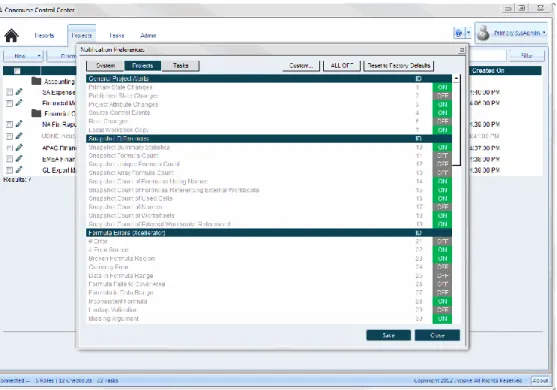
Figure 1: Concourse facilitates collaboration among spreadsheet users, including internal audit teams. In the window shown above, a user selects which notifications to receive about spreadsheet status throughout the organization.
Managing Spreadsheets: Reducing Risk and Gaining Confidence
- 7 -
L
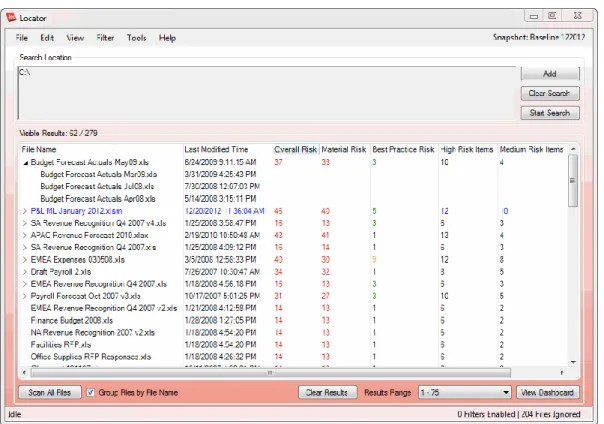
OCATORFast, accurate spreadsheet discovery and risk assessment, giving enterprises
confidence that they can find and manage all critical spreadsheets.
X
CELLERATORXcellerator provides powerful investigative features for discovering and
as-sessing even subtle areas of risk in spreadsheets. Xcellerator’s sophisticated
log-ic is completely independent of Mlog-icrosoft Offlog-ice Excel and delivers higher-level
functionality and unprecedented accuracy. Unlike other spreadsheet
error-detection applications, Xcellerator appears united with Excel to the user while
al-ways maintaining the integrity of Excel and Excel spreadsheets. Xcellerator
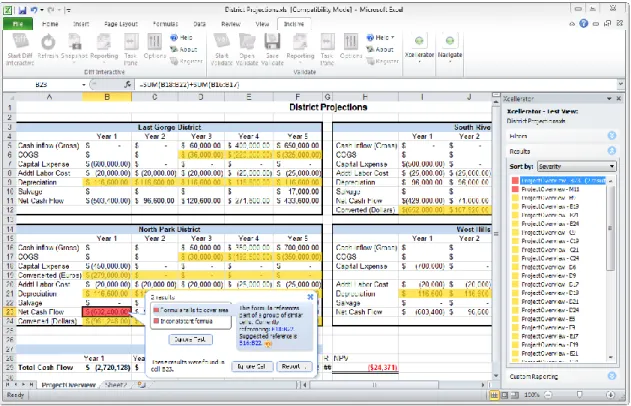
fea-tures patent-pending “heat map” overlay technology that flags errors without
jeopardizing the integrity of the spreadsheet and its formatting.
Figure 3: Xcellerator flags potential risks in spreadsheets without altering the content or formatting of spreadsheets themselves.