CRICKET CLUB
_______________
A Thesis Presented to the
Faculty of
San Diego State University
_______________
In Partial Fulfillment
of the Requirements for the Degree Master of Science in Computer Science _______________ by Gaurav Sharma Summer 2012
Copyright © 2012 by
Gaurav Sharma All Rights Reserved
DEDICATION
I dedicate this thesis work to my parents, sister and friends. This could not have been possible without them.
ABSTRACT OF THE THESIS
Web Application Development for San Diego Cricket Club by
Gaurav Sharma
Master of Science in Computer Science San Diego State University, 2012
In this thesis, a web application is developed for the San Diego Cricket Club (SDCC) which shall help in promoting interest about cricket as a sport in San Diego, as well as serve the Club. SDCC is a place for a cricket enthusiast, either a beginner or a professional, to interact and share knowledge about cricket. This web application uses a web-based system to let prospective members get information about the Club and interact with each other via a fully functional blog. The blog is an integrated feature of this web application along with other features such as photo/video gallery, event calendar, polls, RSS feeds and all the news about current happenings in the field of cricket.
New users can join this Club by filling out an application and submitting it online. Once a member is approved, he or she can start interacting with other members via the blog. The blog feature includes up to date announcements/information about the Club, interesting happenings around San Diego concerning cricket. This blog will have user generated content which will be moderated by the administrator of the website/blog.
TABLE OF CONTENTS
PAGE
ABSTRACT ...v
LIST OF TABLES ... viii
LIST OF FIGURES ... ix
ACKNOWLEDGEMENTS ... xi
CHAPTER 1 INTRODUCTION ...1
1.1 Background ...1
1.2 Web Application Development ...3
1.3 Scope of the Project ...4
1.4 Outline...5
2 TECHNOLOGY, TOOLS & PROGRAMMING LANGUAGES USED ...6
2.1 Client Side Scripting ...6
2.2 Server Side Scripting ...6
2.3 JavaScript ...6
2.4 PHP ...7
2.5 MySQL ...8
2.6 HostGator Linux Server ...8
2.7 FileZilla ...9
2.8 Microsoft WebMatrix ...9
2.9 WordPress: A Web Based Content Management System ...11
2.10 phpMyAdmin ...13
3 SYSTEM REQUIREMENTS AND ANALYSIS ...15
3.1 Research about Various Cricket Club Websites ...15
3.2 Functional Requirements ...15
3.3 Non Functional Requirements ...17
3.4 Performance Requirements ...18
3.6 Extensibility and Maintainability Requirements ...19
3.7 Feasibility Study ...19
3.8 Operational Feasibility ...19
3.9 Technical Feasibility ...20
3.10 Economical Feasibility ...20
4 SYSTEM ARCHITECTURE AND DESIGN ...21
4.1 System Architecture ...21 4.2 Database Design ...22 4.3 Plugins...26 4.4 File Structure ...26 4.4.1 index.php ... 27 4.4.2 header.php ... 28 4.4.3 footer.php ... 28 4.4.4 style.css ... 28 4.4.5 page.php ... 29 4.4.6 sidebar.php ... 30 4.4.7 single.php ... 30 4.4.8 comments.php ... 30 5 SYSTEM IMPLEMENTATION ...31
5.1 Main Web Application Implementation ...31
5.2 The Header ...32
5.3 The Tab Menu Structure and Page Creation ...33
5.4 The Home Page ...35
5.5 The Application Page ...37
5.6 Blogs ...39
5.7 Plugin Implementation ...43
6 FUTURE ENHANCEMENTS ...46
7 CONCLUSION AND OBSTACLES ...47
LIST OF TABLES
PAGE Table 4.1 Database Table for blog.sandiegocricketclub.org ...24 Table 4.2 Main Web Application Database ...26
LIST OF FIGURES
PAGE
Figure 1.1. Wickets. ...2
Figure 1.2. Baseball bat vs. cricket bat. ...2
Figure 1.3. Cricket ball vs. baseball. ...3
Figure 2.1. MySQL command line interface. ...9
Figure 2.2. HostGator Cpanel. ...10
Figure 2.3. FileZilla tool. ...11
Figure 2.4. Microsoft WebMatrix IDE. ...12
Figure 2.5. WordPress web content management system...13
Figure 2.6. phpMyAdmin. ...14
Figure 3.1. Web application main page. ...16
Figure 3.2. Tab structure on main page. ...16
Figure 3.3. Blog main page. ...17
Figure 3.4. Contact us page...18
Figure 4.1. Content management system. ...22
Figure 4.2. blog.sandiegocricketclub.org website database design. ...23
Figure 4.3. sandiegocricketclub.org main website database design. ...25
Figure 4.4. Plugin structure. ...27
Figure 4.5. Web application and blog folder structure. ...28
Figure 4.6. Theme structure of the website. ...29
Figure 5.1. Website header. ...32
Figure 5.2. Header dashboard configuration. ...32
Figure 5.3. Tab menu structure. ...33
Figure 5.4. Page creation. ...34
Figure 5.5. HTML page. ...35
Figure 5.6. Application page. ...38
Figure 5.7. Blog dashboard. ...42
Figure 5.9. Plugin dashboard. ...44 Figure 5.10. Main web application plugin dashboard. ...44
ACKNOWLEDGEMENTS
I would like to take this opportunity to sincerely thank Dr. Carl Eckberg and
Dr. Gangaram Singh for giving me this opportunity to work on this project and providing me the support. I would also like to thank Professor William Root for providing valuable
CHAPTER 1
INTRODUCTION
This chapter gives an outlook about the project and its features. Web application has become a necessity of any organization which has a number of members associated with it, along with new members interested in joining it. The Internet is the best way to introduce the organization and provide current and future information to its members. A web presence is also necessary to define the legitimacy of an organization.
1.1
B
ACKGROUNDCricket is a sport widely played by countries like the West Indies, India, Australia, England, New Zealand, South Africa, Zimbabwe, Sri Lanka, Pakistan and Bangladesh. Cricket is a two teams sport involving 11 players each. Although the game play and rules are very different, the basic concept of cricket is similar to that of baseball. Teams bat in
successive innings and attempt to score runs, while the opposing team fields and attempts to bring an end to the batting team's innings [1]. After each team has batted an equal number of innings, the team with the most runs wins [2]. A cricket field is a roughly elliptical field of flat grass, ranging in size from about 90 to 150 meters (100-160 yards) across, bounded by a fence. In the center of the field, and usually aligned along the long axis of the ellipse, is the pitch, a carefully prepared rectangle of closely mowed and rolled grass over hard packed earth [2]. It is marked with white lines, called creases.
The equipment used to play cricket is a bat, a ball, wickets and bails. Wickets as shown in Figure 1.1 are made up of wooden stumps (three on each side) that are 28 inches tall. The stumps are placed along the batting crease with equal distances between each stump. They are positioned so that they are nine inches wide. Two wooden bails are placed on top of the stumps.
A cricket bat and a ball look very similar to a baseball bat and a ball. A cricket bat is flat on one side and humped on the other for strength. Bat is traditionally made
Figure 1.1. Wickets.
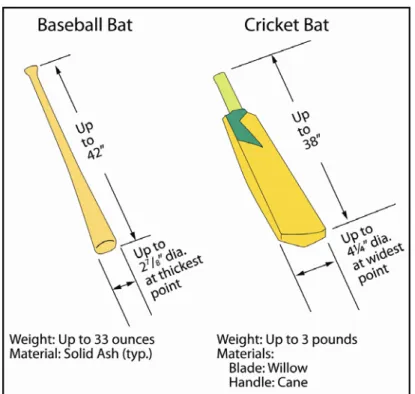
bat is usually covered with a rubber grip. Generally length of the bat is no more than 38 inches and the width no more than 4.25 inches. Bats weight range from 2 lb 7 oz to 3 lb. While a baseball bat is a smooth wooden or metal club. It is no more than 2.75 inches in diameter at the thickest part and no more than 42 inches long. It typically weighs no more than 33 ounces. Figure 1.2 compares a baseball bat and a cricket bat.
Cricket ball is made from a core of cork, which is layered with tightly wound string, and covered by a leather case with a slightly raised sewn seam. The ball weighs between 5.5 and 5.75 ounces and measure between 8 13/16 and 9 inches in circumference. While a baseball features a rubber or cork center, wrapped in yarn and covered in leather. It is 9 to 91⁄4 inches in circumference. A major league baseball weighs between 5 and 51⁄4 ounces. Figure 1.3 compares a baseball ball and a cricket ball.
Figure 1.3. Cricket ball vs. baseball.
As of now cricket is a less popular game in the United States of America. There are some clubs which comprise of people who have a passion for cricket. Some of these clubs play professional cricket (by having intra state or county matches) while other clubs play in a small group and are also a place for social get together. San Diego Cricket Club or SDCC is a club which plays cricket professionally and acts as a place where enthusiast along with their families get together. SDCC currently has a simple web application [3] which displays information and redirects to different websites for content display and data storage. SDCC needed an interactive web application which should have updated information, dedicated storage for information about the club and its members, with fully functional blogs along with administrator generated Polls, Event Calendar and Contact Us options. The requirement for managing the content efficiently, fast and in an organized way was paramount.
1.2
W
EBA
PPLICATIOND
EVELOPMENTThe current website of SDCC was limited to information display and was difficult to update for recent or upcoming events. It also lacked the capability of interaction between
club members. The application developed would provide a significant improvement from the current system by providing easy access to updated information from anywhere and anytime along with interactions of current members via a blog with the help of a content management system. The Web application developed in this project has blogging functionality where prospective members can sign up for blogs and after the website administrator’s approval they can start interacting (by posting new blog entries or posting comments to the existing one) via the blog. This leads to information exchange about the Club and knowledge of interesting happening about the world of cricket. The main reason for creating blogs is to have a location where weekly or bi-weekly information can be updated, and is shared by club members or anyone interested. So blogs become a place where it’s not limited to SDCC’s happenings but also happenings about the world of cricket.
Weekly or biweekly activities include cricket games and other social happening in the Club. Club activities, include after a cricket game, the captain of the team posting a match report of the game which consists of overall game analysis. This is very important for all the team members to read and comment about it. Current method used to share this information is by sending group emails and then replying to these emails for comments. So it would be great if everything is organized in one place. Similarly this can be achieved in various other activities of the club such as social get together.
1.3
S
COPE OF THEP
ROJECTFeatures available to user and administrator after developing this web application are: 1. Home or a Main Page about San Diego Cricket Club.
2. Membership information and application page. 3. SDCC Youth Academy and training information. 4. A fully functional Blog.
5. Web administrator controlled Poll page.
6. Web administrator controlled Event Calendar Information page. 7. Web administrator controlled Photo and Video Gallery.
8. SDCC Team information page. 9. Payment and Dues page for the club.
11.Member Login page. 12.Management information. 13.Contact Us form.
14.Cricket News feed on blog page.
1.4
O
UTLINEThis thesis report is further divided into different chapters that explain the technologies, project flow and functionality as follows:
Chapter 2 introduces and explains different technologies used to build and deploy this project. The goal of this chapter is to give a brief explanation of why these
technologies were used.
Chapter 3 provides a complete requirement analysis. All the requirements and how they are implemented in the website are discussed in detail.
Chapter 4 gives in depth knowledge of system architecture and design. Chapter 5 sheds light on the implementation details.
CHAPTER 2
TECHNOLOGY, TOOLS & PROGRAMMING
LANGUAGES USED
2.1
C
LIENTS
IDES
CRIPTINGClient side scripting [4] refers to a class of programs that are executed on a user’s web browser. This type of scripting enables web pages to display dynamic content depending upon the user input. Various client side scripts are embedded within HTML documents which are reference by the document that uses it. Upon request, necessary files are sent to the user’s computer by the web server on which they are located. Documents as requested are displayed upon execution of the script by the web browser. Client side scripts have access to the information and function available on the user’s browser. Client side scripts must be programmed in the languages that are supported by popular browsers. Various client side scripting languages are JavaScript and VB Script. Java Script is used in this project and is described in Section 2.3.
2.2
S
ERVERS
IDES
CRIPTINGServer side scripting [5] is a web server technology, which is used to generate
dynamic web pages when the scripts are executed on the host server. With the help of server side scripting, we can customize the response based on the user's requirements. Server side scripting can be performed by C, Perl and Shell Scripts using Common Gateway Interface (CGI). Server side scripts are executed by the user’s web browser when users request a document. Users are unable to see these scripts when a document is generated from the client side. In this project PHP is widely used and is described in Section 2.4.
2.3
J
AVAS
CRIPTIn this project JavaScript is used, which is a client side script on the internet and is supported by all popular web browsers such as Internet Explorer, Chrome and Firefox. JavaScript was developed [6] by Netscape in the year 1995 for validating HTML forms and providing more interactive web content. With JavaScript dynamic website can be developed
with an enhanced user interface. JavaScript is open source and can be embedded within a HTML page and provide cross browser support. There are various advantages of JavaScript such as it is object based. JavaScript objects are associative arrays which are augmented with prototypes. JavaScript has a small number of built-in objects such as Function and Date. Another advantage of JavaScript is that it includes an eval function that can execute
statements provided as strings at run-time. JavaScript uses prototypes instead of classes for inheritance. Other miscellaneous benefits of JavaScript include Run-Time Environment. JavaScript typically relies on a run-time environment (e.g. in a web browser) to provide objects and methods by which scripts can interact with the outside world. Variadic Functions, Array and Object Literals and Regular Expressions benefits make JavaScript a best fit for client side scripting. One of the most important feature of JavaScript is validations.
JavaScript can be used to validate data in HTML forms before sending off the content to a server. Form data that can be validated by JavaScript include has the user left any required field as empty, valid date, has the user entered text in a numeric field and if the email format is correct. In this project JavaScript validation are used and is described in more detail in Section 5.5.
2.4
PHP
This project is developed in PHP [7]. PHP is open source and stands for PHP:
Hypertext Preprocessor. PHP is used extensively for server side scripting and is best for web development. Easy connection to MySQL databases is a highlight of PHP that leads to creating dynamic web sites. PHP code is embedded into the HTML page and interpreted by a web server with a PHP processor to generate a web page document. Some features of PHP include its compatibility with most operating systems, support for most web servers and choice of procedure programming or object – oriented programming. This project uses PHP to write dynamically generated web pages for blogs, event calendar and polls. PHP can also be used from command line interface or in standalone graphical applications. PHP can be deployed almost on any servers and operating systems and is robust. When a user visits a PHP web page, the web server processes the PHP code, then analyzes the part needed to display to the visitors and hide file processing and then translates PHP into HTML thus
sending the webpage to web browser. PHP highlights also include faster processing, higher security, more efficient memory allocation and extensive documentation.
2.5
M
YSQL
Structured Query Language is abbreviated as MySQL [8], which is a relational database management system used to store data. MySQL is the most popular open source database used for building web applications and is also available for free. MySQL is in demand because of its fast performance, high reliability and ease of use. MySQL is able to store large amount of data, works with a broad range of compilers, and supports many scripting languages and various platforms. MySQL has a large set of functions and supports several different client programs and libraries, administrative tools, and application
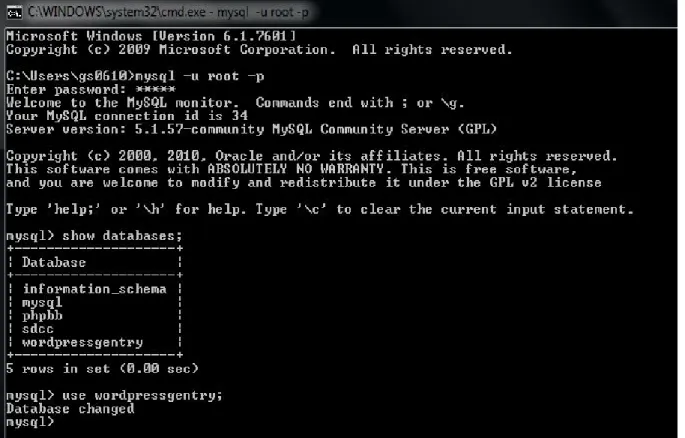
programming interfaces. MySQL is also a standard interactive programming language for getting information from a database. It is very good in organizing and managing large amounts of data. It also allows making queries about the information in the database along with data selection, insertion and updating. This project uses MySQL in storing information from the main website as well as from blog. MySQL can be installed by downloading standalone installer from MySQL website [8]. Figure 2.1 shows command line usage of MySQL. The following command is used to login to MySQL monitor locally C :> mysql –u root –p. In order to pull up information about the database various commands are used such as show databases and use “database” where “database” is the database name.
2.6
H
OSTG
ATORL
INUXS
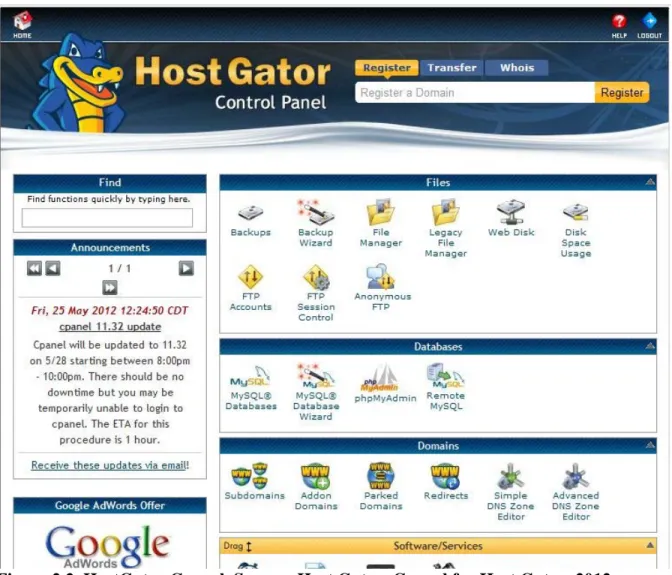
ERVERHostGator [9] Linux server has been used to host this web application. HostGator provides various paid hosting plans with different domain and hosting related services. For this project due to the amount of information and data, unlimited disk space and bandwidth hosting plan is chosen. Host Gator provides a tool called Cpanel (Figure 2.2 [10]) which include features such as managing files, database, email accounts and external tools to integrate with a web application. HostGator provides database management through PhpMyAdmin [11]. phpMyAdmin is a third party tool which has an interface with MySQL database. HostGator web server is preinstalled with basic needs of this project such as PHP and MySQL. Thus HostGator was considered as best choice of server for the deployment of this project.
Figure 2.1. MySQL command line interface.
2.7
F
ILEZ
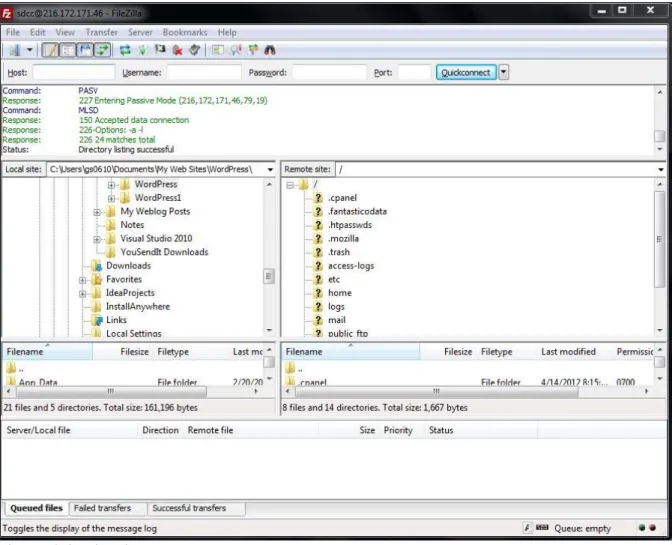
ILLAFor the deployment of this project on HostGator, the FileZilla [12] (Figure 2.3) tool is used. FileZilla is an open source file transfer protocol (FTP) tool. Development of this web application was done locally. In order to host the web application all the files created during development have to be transferred to the host server. FileZilla is an excellent freeware tool with which transfer of files can be achieved. FileZilla displays directory structure of both local and host server. It also has a drag and drop functionality to transfer files. While file transfer is in progress all the information related to the transfer, such as speed, queued files, number of files transferred and failed transfer are displayed. Another interesting feature of this tool is it displays the permissions values set for individual files.
2.8
M
ICROSOFTW
EBM
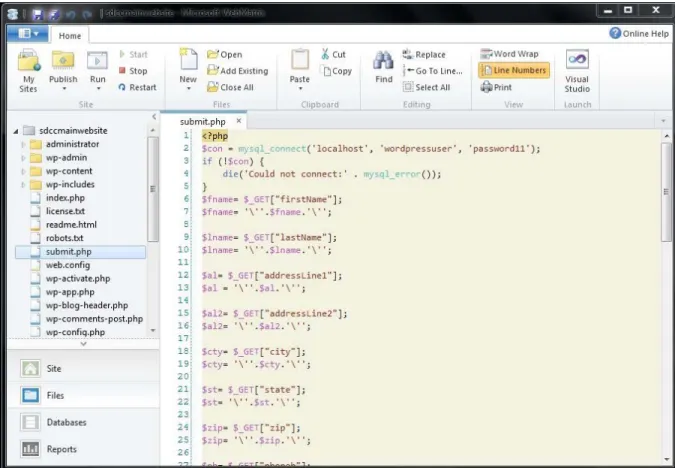
ATRIXFor this project Microsoft WebMatrix [13] (Figure 2.4) is used as an integrated
development environment (IDE). Microsoft WebMatrix is an open source tool that provides a complete platform for web application development. It provides complete control of web
Figure 2.2. HostGator Cpanel. Source: Host Gator. Cpanel for Host Gator, 2012. http://support.hostgator.com/articles/how-to-log-into-cpanel, accessed June 2012. development from start to finish along with quick editing and debugging. It can be easily set up on the local PC just like any other programs by downloading the installer form Microsoft WebMatrix website [13]. Simple configuration to set up development environment is an added advantage. WebMatrix provides a gallery of open source web development tools. Developer can choose any tool from the pool and can start developing. This project was developed by using open source content management system; WordPress [14]. After simple one click Installation of WordPress on Microsoft WebMatrix, PHP and MySQL development environment was automatically created by Microsoft WebMatrix. Simple user inputs
regarding location of the project, database creation, username and password were the only inputs required to complete development environment.
Figure 2.3. FileZilla tool.
2.9
W
ORDP
RESS:
A
W
EBB
ASEDC
ONTENTM
ANAGEMENTS
YSTEMThis project is developed using WordPress [14], a web content management system (CMS). A CMS is an application that can be used for storing, creating, organizing,
publishing, processing and powering workflow in a collaborative environment [15]. With this kind of system individuals can manage their own website by changing content, themes, look and feel and behavior of the pages.
The main functions of a CMS are [16, 17]: Authorizes user roles for authoring process.
Allows multiple users to contribute and share data. Enables storing and retrieving data easily.
Figure 2.4. Microsoft WebMatrix IDE.
Makes report writing and communication between users easier. Eases site navigation.
Maintains costs for the website.
Reduces turnaround time for new pages/posts.
Four main components of CMS functionality are content creation, management, publishing and presentation.
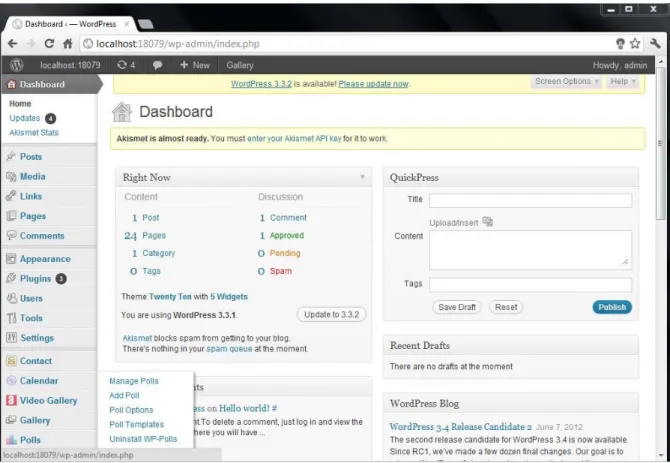
Figure 2.5 describes a typical WordPress dashboard page from where functionality of the website can be controlled. CMS enables web administrators to control their website from anywhere. It can be run on a computer which contains any web browser such as Internet explorer, Firefox or Google Chrome.
WordPress is free CMS software that utilizes a template processor for creation of online websites that are easy to browse and maintain [17, 18]. WordPress was released in 2003 by Matt Mullenweg and Mike Little. Its predecessor b2/cafelog, more commonly known as b2 or cafelog, was written in PHP and MySQL. WordPress 3.3.1 utilizes a web
Figure 2.5. WordPress web content management system.
template system which allows the users to change or re-arrange the widgets without making any change to the PHP or MySQL coding of these pages [18]. Its availability as a free software application, ease of use for beginners, and presence of wide array of themes made the choice easy. The ability to run on Windows, Linux or MacOS makes it favorable as a web-designing tool. With the help of Microsoft WebMatrix incorporated with WordPress the flexibility of developing feature rich website is achieved. WordPress offers an inbuilt option of an editor that could be used to develop or modify the content of web application, but with the help of Microsoft WebMatrix, PHP files of WordPress can be modified to even greater extent to create desirable web application.
2.10
PHPM
YA
DMINphpMyAdmin [11] is a web based open source tool to control administration of MySQL database. It is a tool popular with most web servers including HostGator.
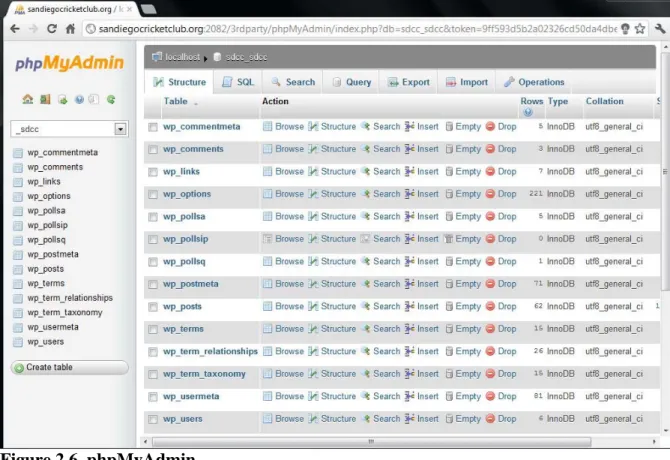
Figure 2.6 displays phpMyAdmin database management page. Most frequently used operations like managing databases, tables, fields, relations, indexes and user’s permissions
Figure 2.6. phpMyAdmin.
are supported by the user interface. phpMyAdmin also provide the ability to directly execute any SQL statement. Other features of phpMyAdmin include import and export of data from CSV, SQL, XML, PDF, ISO/IEC 26300 - Open Document Text and
Spreadsheet, Word, LATEX and others formats [11]. phpMyAdmin can create complex queries using Query-by-example (QBE).
CHAPTER 3
SYSTEM REQUIREMENTS AND ANALYSIS
This chapter includes functional and non-functional requirements of this project to study major components of an application.
3.1
R
ESEARCH ABOUTV
ARIOUSC
RICKETC
LUBW
EBSITESDeveloping a web application for SDCC, which can be updated with latest
information easily and quickly along with fully functional blogs, was the basic need for this project. For updating information about the Club on the main website, the web administrator should be able to do so by navigating through simple interface, while for posting opinions on the blogs, a user should be presented with a familiar easy-to-use interface. While researching through clubs websites, different kind of blog functionality and their presentation was
observed. Opinions organized in different categories were an interesting feature.
After this analysis, requirements to create a web application and a blog with easy content management, moderation of the comments and keeping off spam was needed. From a user perspective, blogs with quick and easy sign in process and features like search, easy to navigate through the information posted and updates of recent activities were required.
3.2
F
UNCTIONALR
EQUIREMENTSA functional requirement defines what a website and its component are and what these components are supposed to accomplish. The following functional requirements were gathered and there inputs, behavior and output are discussed below.
1. Website shall have an address that can easily be remembered. The name
www.sandiegocricketclub.org is registered with the host server. User input is just to type the complete website address and processing is done by host server in displaying landing page of the website. Figure 3.1 describes the main page of the web
application created.
2. On the Main Page of the Website, information related to the content should be
displayed in an organized format. Main Page required logo of San Diego Cricket Club on the mast of the website. Under the main header several tabs such as Home,
Figure 3.1. Web application main page.
Membership, SDCC Youth Academy, Blog, Polls, Events, Gallery, Teams, Payments and Dues, About Us and Contact Us are provided for easy navigation.
A user input is either by clicking on the tabs or hovering on the tab for dropdown menu and then selecting the tab. Figure 3.2 describe the tab structure on the Main Page.
Figure 3.2. Tab structure on main page.
Depending upon the content of the information some of these tabs have a dropdown menu. Membership has three dropdown tabs Member Login, Membership Information and Application for Membership. SDCC Youth Academy has four dropdown options. Polls have one dropdown tab Archived Polls. Gallery has two dropdown menus Photo and Video, which users can access by selecting their choice of photos and videos. Team tab has two options
SDCC-1 and SDCC-2. Payments and Dues have a dropdown menu option of receipt at DropBox [19].
About Us consists of five dropdown tabs Management, SCCA [20], History,
Constitution and Philosophy of the Club. SCCA is a link of a different website that provides information about SCCA Home and Events does not have any dropdown tabs. Event Tab displays Event Calendar that displays information about the upcoming events. Blogs (Figure 3.3) tab redirects the user to a different page while latest blog posts tab is a really simple syndication (RSS) [21] feed of blogs latest posts that provides recent links to the posts which are posted on the blog. Feedburner [22] is used to link the recent post activity of the blog to the main web application.
Figure 3.3. Blog main page.
3. Contact Us tab (Figure 3.4) takes the user to a page which have a form to contact administrator of the website.
3.3
N
ONF
UNCTIONALR
EQUIREMENTSThe non-functional requirements are listed in this section to identify the major operations of the system [23]. There are various types of non-functional requirements like
Figure 3.4. Contact us page.
performance, security, reliability, maintainability, extensibility, feasibility, economical, operational, technical which are listed in this section and they are often called qualities.
3.4
P
ERFORMANCER
EQUIREMENTSsandiegocricketclub.org should be the site providing information to cricket enthusiast and Club members. The main reason for creating this website is to keep in touch with Club activities and the cricket world. Users can get updated and consistent information through this website.
3.5
S
ECURITYR
EQUIREMENTSSecurity and administration is always a concern. All information on the main website and blogs is secured. Only website administrator has access to the dashboard for both blogs
and main website to control the features. This project uses WordPress as backend, which have various layers of security and along with PHP, security requirements have been taken care of.
3.6
E
XTENSIBILITY ANDM
AINTAINABILITYR
EQUIREMENTSThere is one standard template used for one look and feel throughout the site. The website can be expanded to accommodate many further modules without making any changes to any existing modules. The web application is created in such a way that the administrator can easily maintain both at a server and client sides.
3.7
F
EASIBILITYS
TUDYAn important outcome of the preliminary investigation is to determine the feasibility of the project. The main aim of the feasibility study activity is to determine whether it would be financially and technically feasible to develop a project. The feasibility study activity involves the analysis of the problem and collection of all relevant information relating to the product such as the different data items which would be input to the system, the processing required to be carried out on these data, the output required to be produced by the system as well as the various constraints on the behavior of the system. During feasibility study most of the high level architectural design decisions are made.
3.8
O
PERATIONALF
EASIBILITYThe proposed project is beneficial only if it is turned into information systems that will meet the organization’s operating requirements. This test of feasibility asks if the system will work when it is developed and installed. A factor considered for operational feasibility is that the proposed project be beneficial to users because it offers greater support to potential members and pin regards to interface friendliness, easy access and easy in understanding the flow of the system. This project meets operational feasibility as it has information that is being continuously updated. Current requirement of SDCC is to have a website where
information can be updated and accessed. At present this web application is deployed on host server and is working as per set requirements.
3.9
T
ECHNICALF
EASIBILITYTechnical feasibility involves the software and hardware requirements to develop this website. Hardware is not an issue as it runs on any computer which is connected to the Internet. The proposed technology has to meet all software requirements, by considering factors like, the browser support for PHP along with basic web technologies. This web application uses WordPress as CMS which is based on PHP and other applications are also developed using PHP or HTML. All the requirements are successfully meet with open source technologies.
3.10
E
CONOMICALF
EASIBILITYSuitable budget, financial benefits, investment vs. profit are big factors for
economical feasibility. This web application only needs an administrator who can control both main application and blogs. Thus any extra man-power to maintain the site is not required. Also as this project was developed using open source technology no additional funding is needed for technology. So, this project is perfectly economically feasible.
CHAPTER 4
SYSTEM ARCHITECTURE AND DESIGN
This section lists the system architecture, database design and behavior of the system.
4.1
S
YSTEMA
RCHITECTUREWhen a user requests a page, using web browser and Internet, the request is received by web server (HostGator). The web server hosts and handles the request for the website. The server prepares to send a requested page to the user using the Internet. As this process undergoes three layer of interaction, this web application can be considered as Three-Tiered Web Application, which is made of:
1. The First Tier: Content management system pages created in PHP which are rendered by the browser.
2. The Middle Tier: Application engine, to generate pages dynamically using web technology (e.g., PHP)
3. The Third Tier: Database, allows to store data for the web application. The system can manage application content data by interacting with the database using MySQL. When a user requests a page from the server, the server runs a server side PHP preprocessor to execute and process the requested page and generate the output that the browser will recognize. PHP preprocessor generated output is substituted by the web server and in place of PHP script and is forwarded to the web browser where it is displayed to the user. The page which is displayed to the user is in HTML, CSS, and JavaScript. The web browser interprets the page content from top to bottom as it goes along. HTML contains content information, order of content and format of the content of that particular page. The CSS shows content properties, such as how the information looks. The Java Script includes the user action based on events [24].
Figure 4.1 describes the case of a website based on content management system. In the diagram above, the Admin Dashboard (see Figure 2.5) is a place where all the features of the web application are controlled. The web administrator edits contents in the dashboard. These contents can be from plugins, which are enhancements for the web application and themes which is a look and feel of the website. These modifications are stored in the
Figure 4.1. Content management system.
database. Now frontend comes into the picture which combines the changes and after syncing them with the database, web pages to the user are displayed.
4.2
D
ATABASED
ESIGNFor this application to work, MySQL database has been installed and configured to store all site’s content. Core files don’t actually store the contents of web application; they just drive the web application, provide the functions necessary to access content from the database and display it appropriately.
Database is very important. If database is lost, then whole web application is lost. Thus backup of the database is paramount. HostGator web host backs up database regularly along with all the web application file [25].
In the design phase, all the requirements were analyzed and based upon the requirements database was designed to store all the information for the web application. There are two databases for this web application ‘wordpressgentry’ and ‘sdcc’.
wordpressgentry database stores all the information about the main website
(i.e., sandiegocricketclub.org) while sdcc database stores all the information about the blogs (i.e., sub domain blog.sandiegocricketclub.org.).
Figure 4.2 [26] describes the database structure for blog.sandiegocricketclub.org. There are a total of eleven tables.
Figure 4.2. blog.sandiegocricketclub.org website database design.
Table 4.1 describes the content of the tables for blog.sandiegocricketclub.org. On the blog’s various activities are occurring such as new post creation and new reply or comments to a existing. All this information is being stored in different tables.wp_posts,which is an important table as it stores the blog data. Pages and navigation menu items are also stored in
Table 4.1 Database Table for blog.sandiegocricketclub.org
Table Name Description
wp_commentmeta Each comment features information called the meta data and it is stored in the wp_commentmeta. wp_comments The comments within blog are stored in the
wp_comments table.
wp_links The wp_links holds information related to the links entered into the Links feature of blog.
wp_options The Options set under the Administration >Settings panel are stored in the wp_options table.
wp_postmeta Each post features information called the meta data and it is stored in the wp_postmeta. Some plugins may add their own information to this table.
wp_posts The core of the blog data is the posts. It is stored in the wp_posts table. Also Pages and navigation menu items are stored in this table.
wp_terms The categories for both posts and links and the tags for posts are found within the wp_terms table.
wp_term_relationships Posts are associated with categories and tags from the wp_terms table and this association is maintained in the wp_term_relationships table. The association of links to their respective categories is also kept in this table.
wp_term_taxonomy This table describes the taxonomy (category, link, or tag) for the entries in the wp_terms table.
wp_usermeta Each user features information called the meta data and it is stored in wp_usermeta.
wp_users The list of users is maintained in table wp_users.
this table. wp_term table handles the category, link or tag created for each .wp_users maintains the list of users registered with blog as per their role. Figure 4.3 displays the database tables that are used for the main website. All the different features on the main website such as Membership Application, Polls, Archived Polls, Event Calendar, Photos, Videos and Contact Us data is stored in different database tables.
Table 4.2 describes the database tables which are designated for the current features of the main web application.
Figure 4.3. sandiegocricketclub.org main website database design.
Table 4.2 Main Web Application Database
Table Name Description
wordpressgentry.applicationform Membership Application
wordpressgentry.pollsq Polls
wordpressgentry.pollsa Archived Polls
wordpressgentry.wp_calendar Event Calendar
wordpressgentry.wp_nng_gallery Photos wordpressgentry.wp_hdflvvideoshare_med2play Videos
wordpressgentry.wp_formbuilder_fields Contact Us
4.3
P
LUGINSWordPress content management system provides a powerful tool called Plugins. Plugins are open source and acts as tool to extend the functionality of WordPress. Plugins exploit features of WordPress such as the flexibility and minimize code bloat. Plugins can be created or there are various open source plugins which offer custom functions and features so that web administrators can use them in their web site for specific needs. Plugins are
composed of PHP scripts which offer new additions to the web application.
Figure 4.4 describes the plugin structure when added to this content management system. Plugins positions itself on the top of the web application core files and feature file. So Plugins are installed after the web application main layer as well as required features have been set up. And if there is need of more features, Plugins sit on top of the web application to make it more complete. Plugins are also easy to use. Web administrator can install them from the dashboard. After installation they need to be activated. Once activated, Plugin are ready for use by the web administrator as well as by the users of the web application.
Implementation of plugins is described in Section 5.7.
4.4
F
ILES
TRUCTUREWhen the user’s address www.sandiegocricketclub.org through their web browser, the home page of the website displays on their screen. The home page includes a standard template which consists of header, footer and configuration pages which loads the content page selected by user. When the user selects membership page, gallery, photos, videos on the
Figure 4.4. Plugin structure.
website all these modules are retrieved from the content stored on the server. All this is executed by the files which comprise in this web application.
This web application has core files which achieve the process of displaying web pages. This web application is based on WordPress source code. Figure 4.5 describes all the files present for main website and sub domain. This structure contains many folders, sub-folders, and files (often with a “wp-” prefix).
Figure 4.5 describes the file and folder structure. These files are on the back end and can be controlled via the dashboard or by Microsoft WebMatrix. Only the web administrator has access to these files. The Dashboard panel can also be accessed online through a web browser by typing www.sandiegocricketclub.org/wp-admin in the web browser. When this page is accessed the login screen is presented, after entering administrator’s login credentials, the dashboard administration screen will be presented. At this location the web administrator can create new content and manage all aspects of web application.
On the frontend all the features are firstly created and published. Core files then access the database to collect the content information created so that it can displayed. The frontend then brings everything together and displays content according to the template files.
Template files are displayed in Figure 4.6 and are described in the following sections.
4.4.1 index.php
The index file controls what the homepage of the web application looks like. By default it is a loop that queries and then displays the front page. For this web application a customized front page is created.
Figure 4.5. Web application and blog folder structure.
4.4.2 header.php
header.php is a global file that displays headers and navigation.
4.4.3 footer.php
footers.php contains instructions for global footer and it closes HTML tags.
4.4.4 style.css
style.css is the main CSS style sheet for this web application.Presentation of both web applications is controlled via CSS files. CSS files are stored at the following location
“public_html/wp-content/themes/twentyten/style.css” for the main web application while for blog it’s stored at “public_html/blog/wp-content/themes/twentyeleven/style.css.” It contains
Figure 4.6. Theme structure of the website.
all the styling and color scheme of this web application. Even though both files have the same name they control presentation of application separately. Modifying a CSS file as per need gives unlimited choice of creating different layout.
4.4.5 page.php
page.php controls what a pages looks like. This file enables the elimination of sidebars or other elements, adds other unique elements for pages alone. Different individual pages are created for this web application. To create a page template, simply copy page.php,
rename it to whatever is required and select it via dashboard. For the blogs, three different files play an important role as described.
4.4.6 sidebar.php
Sidebar display is controlled in this file. Multiple sidebars can be set up in functions.php, and contents of sidebar widgets are set up from the Administration Panel.
4.4.7 single.php
The display of individual posts in the blog is accomplished by single.php. It contains a loop that queries just one post and displays it.
4.4.8 comments.php
This controls the output of comments.CHAPTER 5
SYSTEM IMPLEMENTATION
Chapter 5 describes implementation of all the modules for sandiegocricketclub.org and blog.sandiegocricketclub.org. As described in Chapter 4 this project consist of two different websites (blog.sandiegocricketclub.org and sandiegocricketclub.org).
blog.sandiegocricketclub.org acts as a sub domain to sandiegocricketclub.org. So the file structure (as mentioned in Chapter 4) for both the website is same. It’s only the layout that is different for both the website. Based upon the requirements and research done two different layouts were developed. One major difference which differentiates both the websites is the right sidebar. In the blog application, presence of a right sidebar acts as a useful tool, as it helps the user to easily navigate between the posts. The sidebar is not present on the main web application. So there are two templates that are designed for both the main website and the sub domain. These two different templates give one layout theme throughout both the website. On the main website there are independent HTML pages which are created for specific tabs. Before discussing the implementation, it is important to note that as described in Chapter 4 the dashboard is accessed with administrator privileges first. In order to access the dashboard via a web browser the following address is typed in the browser
www.sandiegocricketclub.org/wp-admin for the main application. When this page is accessed, the login screen is presented after entering administrator’s login credentials. The dashboard administration screen will be presented. For blogs the administrator has to sign in via sign-in tab on the right side bar using the administrator credentials.
5.1
M
AINW
EBA
PPLICATIONI
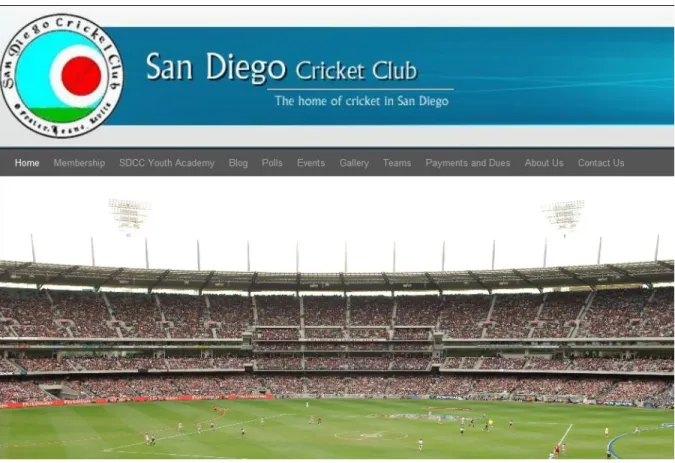
MPLEMENTATION Figure 5.1 shows the default page when a user addresseswww.sandiegocricketclub.org. On this page the header remains static while there are pictures which are fading at interval of four seconds. On this page various tabs are also displayed.
Figure 5.1. Website header.
5.2
T
HEH
EADERFigure 5.1 describes the header of the main as well as the blog website. This is static (i.e., it doesn’t change whether a user is on the main page, blog page or on any other page). To achieve this jpeg image, the header is first uploaded in the following directory
public_html/wp-content/themes/twentyten with help of FileZilla.
After this, the image path is set as static with the help of the dashboard. The dashboard is accessed and on the left side under the appearance tab, the theme is selected. Under the theme the image loaded with the help of FileZilla. Figure 5.2 describes the process of setting the image as static for the header of the website.
Figure 5.2. Header dashboard configuration.
In order to set the same header on blog.sandiegocricketclub.org, the process described above is repeated. Below the header there is a Tab menu structure and fading of picture. The tab structure is explained in detail in Section 5.3.
5.3
T
HET
ABM
ENUS
TRUCTURE ANDP
AGEC
REATION In this section, the implementation of the Tab menu structure (as described in Figure 3.2) is explained. WordPress has a powerful functionality in creating Tab Menu structure. Simply select Menu on the same page as described in Figure 5.2. Under Menu, select Header Menu (on the left side) and start naming all the tabs which are present below Header Structure. All tabs created are further linked to different pages.Behavior such as selection and hovering on the Menu Tabs is controlled by customizing the tabs. For example, if a user hovers and selects tabs such as Membership, SDCC Youth Academy, Polls, and Events the webpage doesn’t link to different page, but if user selects tab such as Home or Member Login it instantly redirects to a different page. This feature is customized. In order to customize the tabs, consider Figure 5.3, In Custom Links Box, under URL, put # in the box and label it with a name (e.g., Membership), then the webpage doesn’t redirect to a different page. But if under the URL Section a path is given to either a new website (ex. http://www.sccacricket.org/, in SCCA Tab under About Us tab) or an intra website page, then a page will be redirected accordingly.
Figure 5.3. Tab menu structure.
There are two different ways to create a page. Either use the inbuilt functionality of WordPress or create a separate PHP page and link them to the pages created by WordPress.
To create a page using WordPress, access the dashboard as described in Figure 5.2 and select the pages (on the left bar ) option. On this page, select Add New button and this gives options with title name for this page (which will help us in future for linking
customized pages). After entering the title for a page, go to the right sidebar and there is a Page attribute box refer to Figure 5.4.
Figure 5.4. Page creation.
This box is very important as it handles the Template or the customized page for the link. If not linking a customized page to WordPress created page always type in HTML code in the work area for the desired content and hit the Publish button. To easily understand this, refer to Figure 5.5.
One important thing to note is that the work area or the white space where HTML Code can be embedded can also be used to link the Plugins. This is a very interesting feature as it can increase the functionality of the website. How to link Plugin into a page is described in the Section 5.7.
Figure 5.5. HTML page.
So the tabs such as SDCC Youth Academy, Training, Teams, Payments and Dues, About Us History, Constitution, Philosophy and Management are pages in PHP which are created using WordPress Page feature as described above. At present all the content is coded in HTML in the white space as mentioned above. For example Figure 5.4 explains the history page under About Us tab as created by using the functionality of Page feature of WordPress. After typing in HTML Code, Hit Publish and the page will be created.HTML and other technologies can be used to obtain the desired look and feel by following the procedure as discussed in Section 5.4.
5.4
T
HEH
OMEP
AGEBelow the Tab structure there are 5 pictures which are sliding at interval of every four seconds. This is achieved by creating a separate HTML page called cover page and then linking it with a Home Tab. Linking of this page is achieved by selecting cover_page.php in the template dropdown menu inside page attribute box as explained in Section 5.3.
In order to create a home page, a customized HTML Page is first embedded in PHP file which this is achieved by following code:
<?php
/*
Template Name: Cover Page
*/ get_header(); ?> <html> <head> ‐‐‐‐‐‐‐‐‐‐‐‐ </body> </html> <?php get_footer(); ?>
In the code, location of picture plays an important role. Location
“image4.src=http://localhost:/wp-content/uploads/2012/03/4.JPG” describes the location of a photo on the server. This location needs to be updated depending upon the server
configuration. If a directory structure in a server is accessed by typing local host, then only give port number, otherwise configuration as per server requirement should be followed.
After uploading pictures to the host server, the following lines of code in JavaScript achieve the sliding function of 5 pictures at interval of every 4 seconds in a sequential way.
<script type="text/javascript">
<!‐‐
var image1=new Image()
image1.src="http://localhost:/wp‐content/uploads/2012/03/1.JPG"
var image2=new Image()
image2.src="http://localhost:/wp‐content/uploads/2012/03/2.JPG"
var image3=new Image()
image3.src="http://localhost:/wp‐content/uploads/2012/03/3.JPG"
var image4=new Image()
image4.src="http://localhost:/wp‐content/uploads/2012/03/4.JPG"
var image5=new Image()
image5.src="http://localhost:/wp‐content/uploads/2012/03/5.JPG"
//‐‐>
</script>
</head>
<body>
<img src="1.JPG" name="slide" width="975" height="475" />
<script>
<!‐‐
//variable that will increment through the images
var step=1
function slideit(){
if (!document.images) return document.images.slide.src=eval("image"+step+".src") if (step<5) step++ else step=1
//call function "slideit()" every 4 seconds
setTimeout("slideit()",4000)
}
slideit()
All the above code is then closed in HTML tags and PHP. This code is present in cover_page.php file which is present at location public_html/wp-content/themes.
5.5
T
HEA
PPLICATIONP
AGEThe Membership Application Page (Figure 5.6) is also a customized HTML page embedded in PHP. The Membership Application Page is created so those users who are interested in joining San Diego Cricket Club can fill out the form and submit it online for review from the web administrator. The Application page is a HTML page which is taking inputs from the user and as per requirement this input is getting saved in a local database. All the inputs are in HTML page form and MySQL is being used to first connect to the database (wordpressgentry database in this case) and then save data in the database. Various Input columns comprise of First Name, Last Name, Address, City, State, Phone, Email, Date of Birth,Initials,Today’s Date and other text data regarding players profile is being saved in the database. Validations have also been included in this HTML Form which checks if the user has filled in all the required fields. If the user submitting the form has not filled all or any required columns, he/she is instructed to do so by displaying instruction “This field is required” as seen in Figure 5.6. The user then selects the submit button. This saves all the data in the database and the user is redirected to a confirmation page which displays to the user that the application form has been submitted successfully.
For the application form a HTML Form is created and embedded in PHP Code. This file is named as application_page.php and is present at the following location
/home/sdcc/public_html/wp-content/themes/twentyten/application_page.php.Javascript validations are achieved by using the following code which resides in the same file application_page.php.
Figure 5.6. Application page.
<script src="http://code.jquery.com/jquery‐latest.js"></script> <script type="text/javascript" src="http://jzaefferer.github.com/jquery‐ validation/jquery.validate.js"></script> <script type="text/javascript"> $(document).ready(function() { $("#submit1").validate(); });
After successful creation of HTML form, the database connection is established. This is done with the help of PHP by following line of code:
<?php
$con = mysql_connect('localhost', 'dbusername', 'dbpassword');
if (!$con) {
die('Could not connect:' . mysql_error());
Line 2 of above mentioned code creates a connection with the database by using mysql_connect .localhost points to the location while dbusername and dbpassword are the database administrator username and password. Line 3 creates a case where there is a
database connection failure. After successful connection of the database the following line of code helps in connecting with the database sdcc_wordpressgentry:
mysql_select_db("sdcc_wordpressgentry", $con);
Values from HTML Form are fetched using following
$fname= $_GET["firstName"];
$fname= '\''.$fname.'\'';
All the data are inserted into MySQL database using the following command: $sql="INSERT INTO sdcc_wordpressgentry.applicationform
(firstname, lastname, addressline1, addressline2, city, state,
zip, phoneh, phonec, email, countryofbirth, dateofbirth,
refferedtosdcc, cricketcareer, bowlingstyle, battingstyle,
initials, date)
VALUES ($fname,$fname, $al , $al2,$cty, $st, $zip , $ph , $pc ,
$eml, $cob, $dob , $rts , $tao, $tat, $tap , $in, $dt )";
After the successful connection and insertion of values, records of values are updated and database connection is closed using following lines of code:
/**echo "1 record added";**/
mysql_close($con);
For redirection to the other page this line of code is used:
header ('Location: http://sandiegocricketclub.org/application-complete-confirmation');
All the above code is present in the file submit.php which can be found at location: /home/sdcc/public_html/submit.php.
After this, a new customized HTML page is created which acts as an application complete confirmation page. This is a basic HTML page and the code is present in the file:
application_completeconfirmation.php located at /home/sdcc/public_html/wp-content/themes/twentyten/application_completeconfirmation.php.
5.6
B
LOGSBlogs is a different web application which can be accessed either by selecting Blog tab on the main web application or by directly typing the following address
“blog.sandiegocricketclub.org” in a web browser. So blogs on host server acts as a sub domain for main web application. On blogs a user can sign up, and after getting permission
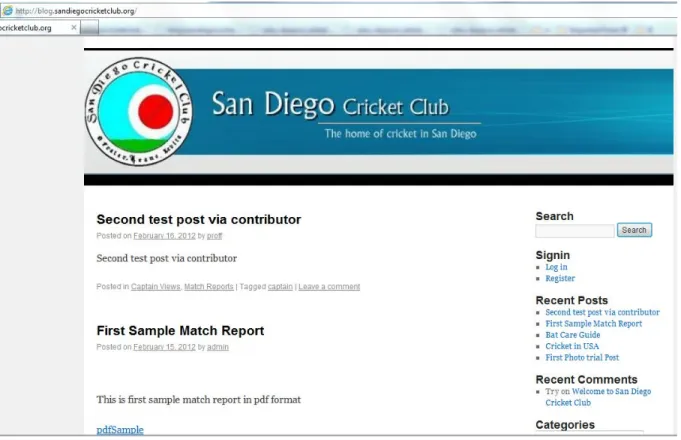
from moderator he/she can start posting new posts or commenting on the existing posts. Although blogs and main web application are based on the same content management system, for blogs the default layout structure of WordPress is used. During research for blog it was found that most of the blogging website use similar structure of presentation for post. Hence the layout or posts on the left side while quick links or widgets on the right sidebar were selected. New posts created display at the top of all the posts. Figure 3.3 displays blogs for the web application. Layout of the blog consists of the same header which is displayed on the front page of the main web application while posts are displayed just below the header on the left side. Under each post title, the date and user name of the user who created the posts are displayed. Below each posts the category in which the posts is categorized, any words which are tagged and leave a comment is displayed. On the right sidebar various quick links or widgets are displayed. These links help users to navigate through posts quickly and in an ordered way. Quick links such as Search Tab, Sign In, Recent Posts and Recent Comments, Categories, Hot Topics and Really Simple Syndication (RSS) Feed of SCCA News is displayed. Search tab helps the user to search for content by using keyword. With sign-in, user can sign in for blogs or can register for the blog. Recent Posts and Recent Comments are updated as per the new posting and comment created by the user. A category is a tool which categorizes the posts (i.e., while creating a post if administrator or the user wishes to
categorize posts into a specific category or in a new category this tool helps). After a post has been categorized, the user can easily select a category from the dropdown menu and access all the posts which fall under a specific category. Hot Topics is a tagging feature. If a word or a phrase is used a couple of times in various posts, then the most discussed word will be displayed in large font in the area of Hot Topics.
A blog administrator can manage and allow access to functions such as writing and editing posts, creating categories, moderating comments, managing plugins, and managing other users. The tool that gives the blog owner this control is the ability to assign a role to a user. A role defines the set of tasks a user is allowed to perform. There are five pre-defined roles: Administrator, Editor, Author, Contributor and Subscriber. Each role is allowed to perform a set of tasks called capabilities.
Administrator: An administrator has absolute ownership of the blog. The Administrator has complete power over posts/pages, comments, settings, theme
choice, import, users including deleting the entire blog. It’s recommended to have only one administrator per blog.
Editor: An Editor can view, edit, publish, and delete any posts/pages, moderate comments, manage categories, tags and links and upload files/images on a post. http://en.support.wordpress.com/user-roles/ - toc
Author: An Author can edit, publish and delete posts, as well as upload files and images. http://en.support.wordpress.com/user-roles/ - toc
Contributor: A Contributor can edit posts but cannot publish them. When a
Contributor creates a post, it will be first submitted to an administrator for review. Once this post is approved by an Administrator it is published on the blog. The Contributor cannot edit this post. Also the contributor does not have the ability to upload files and images.
Subscriber: A Subscriber can only manage his/her profile in the blog.
Implementation of the blog is similar to the main web application, but the dashboard that controls the blog is separate (i.e., to control blogs the web administrator has to login with administrator credentials by signing in just like any other user instead of using /wp-admin in front of the url). After logging in with the administrator credentials, the dashboard for blogs is presented to the administrator. Figure 5.7 displays the dashboard for the blog
administrator.
The dashboard for the blog is very similar in functionality to the dashboard of the main application. The blog administrator can assign user role (editor, author, contributor and subscriber) or can modify or grant permission to a new user to use the blog. This all can be done by selecting users tab present on the left side of the dashboard. Posts tab help the administrator to manage posts as created by different users. The Administrator can edit all the posts or can categorize them as per need. With Media tab all the media such as pdf documents which is posted along with the posts can be edited. The Comments tab is an important tool as it displays all the comments posted for all the posts in detailed format. In case of spamming, bulk delete feature of Comments tool is very helpful. Appearance tab can be used to control any look and feel of the blog. Under Appearance, Widget tab enables the Administrator to add more functionality in the blog. All the features present on the right sidebar as explained previously are present under the Widget tab. For future enhancement purposes this tab is useful as more widgets can be added to the right sidebar by using this functionality. Setting tab can be used by moderator for various configuration related to date and time format, number of posts or comments to display on the blog.
Figure 5.7. Blog dashboard.
When a user who has been approved by the administrator logs in, the usual blog window is displayed along with a toolbar on top of the header is also displayed. This tool bar enables the user to create new post by clicking “+New” button on the toolbar. When the user clicks on the “+New” button, the page is redirected to the dashboard, as per the user role, different features are available. Figure 5.8 depicts the dashboard as displayed to a user who has author privileges for the blog.
It can be observed in Figure 5.8 that when a user with privileges as author is logged in, then limited functionality is displayed. Only few tabs as compared to the administrator are present on the left side. Also Figure 5.8 describes a scenario where a user is in the process of creating a new post. There is a title box where the title for the blog is typed and in the white space details for the blog can be typed. Along with details if a user wishes to embed media such as pdf document, photo, upload or link to a video in the posting that can be achieved by using the toolbar provided. After all the details have been typed the user can either preview the post or can directly publish the post so that it is displayed on the blog page.
Figure 5.8. User dashboard.
5.7
P
LUGINI
MPLEMENTATIONAs described in Section 4.4, Plugins help in making this web application more functional. Plugins are easy to implement and once implemented they can be used instantly. The only thing is to search for required plugin and verify the compatibility with current CMS version. In this section how to install plugin and various plugins used in this web application are explained.
Installing a plugin is very simple. Only the web administrator has the privileges to install a plugin. After the web administrator has logged in to the dashboard, the Plugin tab on the left side of the dashboard is selected. This presents the plugin window as described in Figure 5.9.
The Plugin dashboard window has various options for the web administrator to select the right plugin as per need. Search tab can be used to perform a search for plugins related to the plugin requirement while upload feature is used to install a plugin that is present locally on the drive in zip file format. In order to install a plugin, simply browse to the plugin zip file and select Install. Once a plugin is installed, it is listed in the plugin window. Below every plugin install there are buttons to either activate/deactivate or edit it. After installation, plugin needs to be activated to use.
Figure 5.9. Plugin dashboard.
For the main web application, plugins have been used to enhance the functionality of the website. Figure 5.10 describe the plugins used for the main web application.
Figure 5.10. Main web application plugin dashboard.
Calendar.php is a plugin that is used to display calendar on the event page. First the calendar.php file is unzipped on the plugin dashboard page and then to attach it to a certain page a shortcode is used. A shortcode is a set of functions for creating macro codes to be used in post content. To display the calendar on the event page, shortcode {CALENDAR} is typed in the white space as described in Section 5.3. When the Event page is published a calendar is displayed. At present only the web administrator can create a new event and post
it on calendar. To do this, the web administrator has to click on Calendar on the left side of the dashboard, where a user friendly screen is displayed which has all the options to manage the Calendar.
On very similar grounds, Photo and Video under, the Gallery tab has been
implemented. For Photo, plugin nggallery.php is installed and a shortcode [nggallery id=2] is used on the Photo page. For Video, pluginhdflvvideoshare.php is installed and a shortcode [hdvideo id=3 playlistid=2 width=400 height=400] is used on Video Page. On the dashboard both photo and video gallery tabs are present so that the web administrator can easily add or delete contents of photos and videos.
For Polls wp-polls.php plugin is installed and a shortcode [poll id="5"] for the Poll page and [page_polls] for archived polls have been used on Polls and Archived polls page is used.