S O Y O U H A V E V O I P ,
N O W W H A T ? V I D E O
-E N A B L I N G Y O U R I P
N E T W O R K
TABLE OF CONTENTS
Executive Summary 3
Leveraging Your IP Network With Video 3
So You Have VoIP - Now What? 4
Video: A Key Component 4
Measuring the Economic & Productivity Gains 5
New Way Of Communicating: Anywhere, Anytime 6
Increased Interaction, Time to Decision and Productivity 7
Not Your Father’s Video Technology 8
Increased Functionality: Changing the Face of Communication 8
Focus On The Future: SIP 9
Case Study: Perot Systems 9
Conclusion 11
TA B L E O F C O N T E N T S
EXECUTIVE SUMMARY
IT executives no longer need to justify their use of Voice over IP—the technology works, it saves companies money, and it enables communication across global boundaries. Better still, technologies that leverage an IP network address some of the biggest business challenges facing companies today: the need to support remote, geographically dispersed employees and allow them to function as a single, collaborative team; to shorten decision cycles and production times; to seize new business opportunities and reap competitive advantage by providing faster, more efficient customer and partner interactions; and to lower operational costs while increasing worker productivity.
This is the new face of corporate communications. As companies grow more global, and workers more virtual, employees must be able to communicate with co-workers, partners, customers and suppliers anytime, anywhere. At the same time, companies continue to look for ways to drive down the costs of such communications, especially as they span geographical boundaries. And travel is becoming more expensive along three axes: hard-dollar costs; soft-hard-dollar costs (increased security measures, stress, the desire to spend more time with family) that negatively impact employee productivity; and opportunity costs, when employees can’t meet with key customers or partners and lose the chance to close new deals.
Clearly, giving knowledge workers the best tools to do their jobs is a strategic advantage in today’s increasingly virtual workplace. Now, the benefits companies are seeing from their VoIP deployments are spurring a new round of questions: IT and line-of-business executives are asking what they can do next to leverage their IP networks. Video is often the answer.
Video conferencing delivers “anytime, anywhere” communications that help companies cut travel costs, shorten product development times, speed decision-making processes, and boost employee productivity. Video over IP does all that, but at a fraction of the cost of traditional video conferencing, and with better management and integration, too. Companies that deploy only voice over IP aren’t maximizing their network investment. Once they’ve deployed VoIP, they’ve done all the heavy lifting—and incurred the main network-related costs. Adding on video is simple, delivers numerous productivity benefits, and shortens ROI for that initial IP investment.
LEVERAGING YOUR IP NETWORK WITH VIDEO
IT managers no longer have to defend their deployment of IP networks; if anything, they have to defend the decision not to deploy voice over IP, at least in so-called Greenfield environments. Furthermore, IP deployments are clearly moving beyond pilot projects and small departmental deployments to enterprise-wide roll-outs.
The majority of PBX lines shipped in 2007 will be pure IP or converged (Frost & Sullivan estimates the number to be 88%). Most of the major PBX vendors have announced that they will no longer sell TDM-based systems. As businesses become increasingly aware of the benefits of IP telephony beyond cost savings, prices of IP-based solutions become more competitive, security and reliability improve and legacy infrastructure becomes amortized, IP telephony will gradually become the primary choice for new investment.
So You Have VoIP—Now What?
For all its benefits, deploying an IP network is not negligible—staff time and hard-dollar costs add up fast. Companies can spend as much as $1000 per employee on their VoIP networks, including hardware and implementation costs. The initial motivator for deploying an IP network is usually to save money on telephone costs (not just the calls, but also support for the infrastructure, moves-add-and-changes, and so on). Typically, most IT managers initially deploy voice on their IP networks, in a move that can take anywhere from several months to several years.
But the network itself can then be leveraged to lower the cost of other applications that run on top of it, as well as improve the quality of the communications experience. When they’re done with an enterprise-wide VoIP roll-out, for many IT executives the logical next step is to investigate other technologies that can benefit from the IP network. Video conferencing is the answer, delivering immediate and measurable economic and productivity gains.
Video: A Key Component
Running video conferencing over an IP network can have multiple benefits: Video over IP costs significantly less than its traditional counterpart (usually ISDN); IP better supports unified communications applications, which typically include a video component; and IP offers significant management and performance benefits.
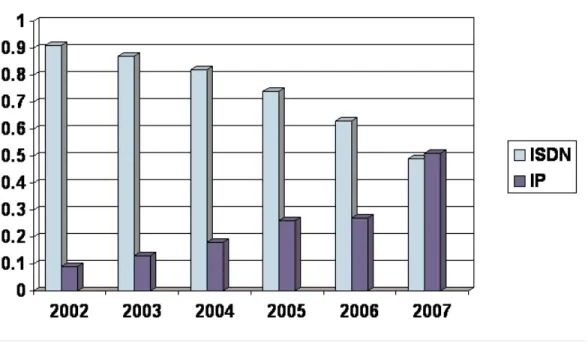
While many companies continue to run video conferencing in a mixed environment, more that a quarter of all video conferences ran on an IP network in 2006; we expect that number to grow to more than 50% in 2007. (Please see Figure 1.)
Figure 1: Videoconferencing Services Market: Percent of Video Calls by Network Type (U.S.), 2002-2007
Measuring the Economic & Productivity Gains
Voice over IP can deliver significant savings in telephony costs, but not without an initial capital investment; that’s a fixed cost that often delivers a return on investment in years, not months. By running other applications on top of the network, companies can
significantly shorten the ROI cycle.
Video over IP can save companies substantial sums, because with video over IP, there are no per-minute charges for a video conference. Once a company has invested in the network and the necessary video hardware and management software, day-to-day usage is effectively free. And since companies that have deployed voice over IP have already made the network investment, adding video is a simple add–on with low incremental costs for maintenance, network management and performance.
Video conferencing of any kind has a very favorable ROI, often measured in one-to-two years, depending on the size and geographic diversity of the company. Those measures are typically based on the number and cost of in-person meetings that are replaced by video conferences, although productivity, opportunity, business continuity and environmental costs can also be factored in. An initial ROI calculation can be made simply by evaluating the savings in travel costs that result from replacing live, in-person meetings with video conferences.
If companies typically spend $1,000 or more per employee on travel-related costs (including transportation, hotel and meals), the savings add up quickly. Frost & Sullivan’s
research shows that in the United States, the typical cost of a group video conferencing system ranges from $5,000 to $10,000 and averages $6,000. Infrastructure aside, companies that replace a single in-person meeting among a dozen disparately located employees can see payback almost immediately. Video over IP can improve on those positive ROI calculations even more; on an IP network, the ongoing costs of running a video conference are minimal, limited to maintenance and technical support; once ROI for the initial deployment has been met, any additional conferences are essentially free. Maintenance and technical support can be minimized by implementing appropriate management and scheduling tools.
In addition to the lower costs of running video over IP, companies can factor in the increased usage video over IP generates. Because there’s no incremental cost involved in running a video conference over IP, employees and their managers are much more likely to use the technology. As usage goes up, payback times go down, boosting ROI.
Another advantage of running voice over IP is the increased control IT gets over network management and performance. The same benefits apply to video conferencing, where one of the biggest complaints has long been the fact that video requires significant time and energy investment on the part of IT. With its lower setup, configuration and resource requirements, as well as lower maintenance costs, video over IP makes IT’s job easier, and video conferencing deployments much more successful and easily scalable. The technology also allows administrators to remotely manage video conferencing from anywhere, anytime, increasing reliability and performance, thus driving widespread adoption. And it can significantly reduce the cost and time spent on training IT staffers and end users. Best of all, perhaps, it frees up IT staffers to work on other strategic initiatives.
What’s more, IP networks can be easier to benchmark, before and after the installation of video conferencing. That’s important for performance, especially as more users start to take advantage of the technology. As a result, the technology will run better—and that, in turn, will lead to even more usage. Better data and usage information also makes
measuring ROI much simpler.
NEW WAY OF COMMUNICATING: ANYWHERE, ANTIME
Unified communications are also driving the deployment of IP networks, which are ideal for supporting integrated communications applications. And because the tools include PC-based video, their adoption is driving desktop video conferencing . Integrating visual communication with existing networks and desktop tools increases familiarity and ease of use, further driving collaboration, productivity and ROI. That has a trickle-down effect, spurring companies to deploy more robust video systems on a group or team basis, for situations that require a higher-quality video experience. Those systems, too, are increasingly being run over IP networks, for cost savings and performance benefits. In effect, these factors are driving video throughout the entire organization.
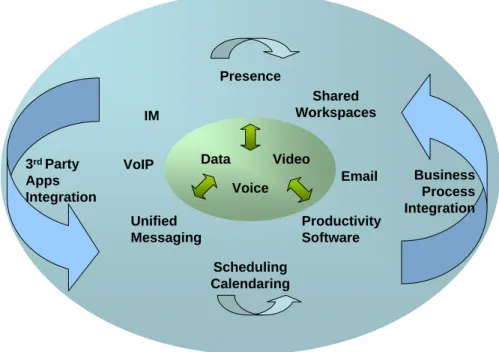
IT managers shouldn’t think of voice, video, IM and presence as applications silos. Rather, a long-term communications strategy should build towards integrating all communications and collaboration tools. IP networks support such integration, thereby increasing the benefits of running video and other collaboration tools over IP.
Figure 2: The Unified Conferencing and Collaboration Paradigm “Click to Collaborate”
Increased Interaction, Time to Decision and Productivity
Employees are increasingly asked to collaborate more, while also driving down costs and boosting productivity. They’re also required to shorten the decision-making process and shrink sales and production cycles. All those mandates require tools that don’t just support agility, but actually drive it.
Video conferencing helps companies turn on a dime in an increasingly complex and global world, by enabling face-to-face meetings without travel. That ensures people can work together in real time, without missing out on the benefits such “in-person” meetings can deliver: the ability to read facial expressions and body language, to truly understand what’s be said and, just as importantly, what’s being heard. Human beings are social animals, and research shows we have evolved to place enormous value and meaning in social cues; video conferencing supports such interactions, easily and cost effectively. Not only are employees equipped with video technology more productive than they would be if they had to travel to attend a face-to-face meeting, they’re more likely to participate in face-to-face meetings when they otherwise would not (and instead would
Data Voice
Video 3rd Party
Apps Integration
Business Process Integration IM
Presence
Unified Messaging VoIP
Scheduling Calendaring
Shared Workspaces
Email Productivity Software
rely on an audio call or e-mail exchange). That results in far greater productivity,
shortening cycle times and decision making across the board, and in unexpected places. As a result, video conferencing can change business processes for good.
Not Your Father’s Video Technology
Video conferencing can benefit many organizations in many situations, but it hasn’t always been up to the technical and usability challenge. Images have been grainy, sound quality poor. And because the systems have not always been easy to operate, end users were often left confused by the technology; as a result, they were reluctant to take advantage of video conferencing, even when it was offered to them. Concerns about charge-backs for the often high cost of the technology didn’t help.
Today’s video conferencing technology is different, offering extremely good picture and sound quality, even more so from high-definition systems that quite literally change the viewer’s experience at any bandwidth. And the technology is so simple to use, end users can launch video calls or conferences on their own, on the fly, making it much more likely they’ll take advantage of the tools more often, thereby reaping more cost-savings and performance gains.
Increased Functionality: Changing the Face of Communications
Traditional video conferencing followed a point-to-point, many-to-many model: Several people in a conference room in one location interacting with several people in a
conference room in another location. Today’s video technology enables different modes of communication, including many-to-one, one-to-many, and one-to-one interactions. That lets employees leverage the benefits of video in new and productive ways, mapping them to their specific business and communications needs, and to support different business processes using the technology.
Video conferencing today allows for multipoint conferences that incorporate more than two sites in a single event, as well as the ability to record content for future playback, Web collaboration and presentation sharing, and firewall traversal backed by strong security. Those features and others make it especially easy for employees to reliably and intimately interact with one another—as well as with partners, suppliers and customers— regardless of where they’re located (or whether they’re even on the same network). Furthermore, video over IP helps support these new video interactions by making it easy and cost effective for employees to launch video conferences from anywhere, with no help from IT and no worries about ongoing, per-minute charges. Integrating video into other communications and collaboration tools also makes it more likely that employees will turn to video conferencing on a regular basis, seamlessly and effectively making it a part of their day-to-day jobs. As a result, video conferencing becomes part of business
processes; employees are better able to collaborate in a variety of settings; decisions are made more quickly; and cycle times shrink.
FOCUS ON THE FUTURE: SIP
SIP (Session Initiation Protocol) is the defacto standard for unified communications, with the goal of letting companies realize out-of-the box integration and interoperability among various collaborative communications applications. In spite of the availability of multiple SIP versions and at least a few proprietary hooks in most SIP-based products, SIP is becoming the default protocol of most new communications products because of its flexibility for new application creation. SIP is also driving vendors to provide greater value to business customers by offering an application development environment and tools that enable businesses to customize applications and to develop their own applications that integrate with the vendors’ platforms.
Consider the progression of video technology. With ISDN, users called a physical line. Participants and the device had to be physically located at a certain place. IP lets users call the device, which can move from place to place as needed—as can the users
themselves. SIP makes the experience even more personal, introducing true mobility and ubiquity. One identity travels with the user and seamlessly connects to the appropriate communication tool, whether it be a video endpoint, PC or mobile device. This enables true unified communications.
SIP is also optimized for IP, making SIP-based solutions especially attractive to IT managers looking for ways to leverage the company’s IP network. IT executives should require that unified collaboration applications be able to work with one another seamlessly and securely, within diverse IT environments—and they should look for products that embrace SIP and the resultant integration.
Indeed, video over IP is just the beginning. SIP opens up the possibilities for integration and interoperability, in ways many customers are only starting to think about. Deploying video over IP today is a way to protect your investment against future developments, ensuring you’ll be able to take advantage of new, SIP-based capabilities as they’re developed.
CASE STUDY: PEROT SYSTEMS
Perot Systems, an outsourcing and consulting company with 60 offices worldwide and almost 30,000 global employees, uses video conferencing to drive communications and collaboration among its employees, partners and customers. The company is effectively a “follow-the-sun service center,” and that 24-by-7 operation requires round-the-clock global communication. What’s more, the company outsources much of its own software development to partners around the world, including India, China and Romania, and keeping those developers connected to one another as well as project managers in other
locales is a critical business driver. Both factors were huge drivers for the company’s use of video over IP.
Like many companies, Perot Systems had tried to use video conferencing in the early 1990s, but executives were so unhappy with the results, the company “got rid of every single video conferencing system we had,” says Dan Gleason, senior video conferencing engineer. “It was such a hassle, we always had to have IT on stand-by, conferences were often dropped, and the CEO finally said, ‘lose it all,’ so we did.”
But in 2003, Gleason convinced the new CEO to take a fresh look at video—this time, running it over IP. He got the go-ahead to buy a single system for use with offices Perot Systems had recently acquired, and which came with their own video conferencing equipment. Almost immediately, the systems were in constant use, and Gleason began adding two or three new endpoints a month. Today, the company has multiple room-based and PC-based video conferencing systems in place, all networked on a single back-end that supports simplified dialing to and from anywhere in the world.
Gleason chose video over IP primarily to reduce costs and ease management headaches. In fact, Perot Systems ran video over IP before it ran voice over IP. The VoIP
implementation took three years to implement; Gleason says he was able to run video over IP literally overnight, simply by taking advantage of his existing data network. “It was easier than installing a PC,” he says of the technology deployment. “It’s totally plug-and-play.”
Now, Perot Systems is reaping the benefits of the technology in several ways: enhancing employee productivity; travel-related hard- and soft-dollar costs; and the benefit of seeing meeting participants. “Face-to-face let’s you know if you’re clicking or not,” says Gleason, “and that’s so critical to successful communication. With audio conferencing alone, we were seeing 40% information retention; with video, that increases to 85%.”
All of which is well and good, but the company is also seeing real hard-dollar gains: At least two departments have saved more than $1 million in travel costs over the past 18 months by replacing in-person meetings with video conferences.
For anyone starting down the path of video over IP, Gleason does have some advice: • Early planning is key, especially for multiple locations that are going to be tied
together—get dedicated internet bandwidth.
• Secure, standards-based firewall traversal and scalable dialing plans are key for medium to large installations. Small companies starting with one or two endpoints may want to consider installing video conferencing appliances on an open Internet address for the first one or two systems. There are no worries about viruses, and that way it’s totally extensible for use with partners and
• As far as end-users go, overcoming the fear factor is key—get people past using it the first time and they’ll be hooked. Train three to four people in small seminars and show them how to use everything to maximum effect. Once they’ve seen a demo call and play with the technology, they’ll be good to go. Finally, Gleason says there is one drawback to the company’s video conferencing implementation: “Everyone who’s gotten used to video conferencing wants to use it all the time, but now demand is so high they can’t book the rooms.” To help solve that problem, Gleason hopes to extend desktop video to 70% of PC users by the end of 2007, then integrate the systems so anyone can conference with anyone else, regardless of time, technology or location.
CONCLUSION
Multi-modal communications are becoming the norm, as unified communications are bring together a variety of synchronous and asynchronous applications, including voice, video, instant messaging, e-mail, and web collaboration. The goal is to connect employees, partners and customers, wherever they are, and whenever they need to, seamlessly and on a single platform. It’s critical for companies to think holistically and plan for a broad, integrated communications infrastructure that incorporates a variety of technologies, including voice, video, web collaboration and presence information. Companies must prepare now for the future of ubiquitous communications, in which users have a common, reliable interface for all their collaborative needs.
As they continue to deploy IP networks throughout their organizations, companies should leverage the technology in new and effective ways and take further advantage of the investments they’ve already made. Deploying video over IP will enable them to realize significant savings around video conferencing, leading to significant performance and bottom-line gains. IP networks enable unification, at the desktop and beyond, allowing companies to integrate PC-based video with room-based and telepresence systems, as well as video with other forms of communication, including voice and presence. That, in turn, increases use and productivity, and therefore, ROI. IT managers should select vendors that can offer an open, integrated solution to support a complete
877.GoFrost [email protected] http://www.frost.com Silicon Valley
2400 Geng Road, Suite 201 Palo Alto, CA 94303 Tel 650.475.4500 Fax 650.475.1570
San Antonio
7550 West Interstate 10, Suite 400, San Antonio, Texas 78229-5616 Tel 210.348.1000 Fax 210.348.1003
London
4, Grosvenor Gardens, London SWIW ODH,UK Tel 44(0)20 7730 3438 Fax 44(0)20 7730 3343 C O N T A C T
U S
ABOUT FROST & SULLIVAN
Based in Palo Alto, California, Frost & Sullivan is a global leader in strategic growth consulting. This white paper is part of Frost & Sullivan’s ongoing strategic research into the Information Technology industries. Frost & Sullivan regularly publishes strategic analyses of the major markets for products that encompass storage, management, and security of data. Frost & Sullivan also provides custom growth consulting to a variety of national and international companies.
The information presented in this publication is based on research and interviews conducted solely by Frost & Sullivan and therefore is subject to fluctuation. Frost & Sullivan takes no responsibility for any incorrect information supplied to us by manufacturers or end users. This publication may not be downloaded, displayed, printed, or reproduced other than for non-commercial individual reference or private use within your organization, and thereafter it may not be recopied, reproduced or otherwise redistributed. All copyright and other proprietary notices must be retained. No license to publish, communicate, modify, commercialize or alter this document is granted. For reproduction or use of this publication beyond this limited license, permission must be sought from the publisher.
For information regarding permission, write:
Palo Alto New York San Antonio Toronto Buenos Aires Sao Paulo London Oxford Frankfurt Paris Israel Beijing Chennai Kuala Lumpur Mumbai Shanghai Singapore