1. Introduction ... 1
1.1. Introduction ... 1
1.2. Purpose of this Document ... 1
1.3. Target Audience ... 1
1.4. Prerequisites for the Project Management of CQ5 ... 1
2. Getting Started ... 2
2.1. Before Project Kick-off ... 2
2.2. Building up your knowledge of Communiqué ... 2
3. Concept and Planning ... 4
3.1. Content and Applications - New or Migrate? ... 4
3.2. Setting Target Metrics ... 4
3.2.1. Everything rests on your Project Design ... 5
3.2.2. Infrastructure ... 5
3.2.3. Performance ... 6
3.2.4. Concurrency ... 8
3.2.5. Capacity and Volume ... 8
3.2.6. Other metrics ... 9
3.3. Acceptance Tests ... 9
3.4. Organizing your Project ... 9
3.5. Project Phases ... 11
3.6. Estimating Time and Effort ... 12
4. Technical Specification and Design ... 14
5. During Development and Testing ... 15
6. During Deployment and Training ... 16
7. Reference Architecture ... 17
8. Checklists ... 18
9. Overview of potential tools ... 22
A. Examples of Task Breakdown ... 23
A.1. Planning Tasks throughout the Project ... 23
B. Examples of Project Documentation ... 28
B.1. Costs Analysis ... 28
B.2. Status Reporting ... 29
C. Copyright, Licenses and Formatting Conventions ... 31
1.1 Introduction
The product has been completely redesigned from Communiqué 4, allowing Day to use new architecture and technologies, thus increasing functionality while reducing complexity.
New installations and migration of existing installations are always implemented as projects. These are usually undertaken between the customer and a partner (either Day itself or a certified partner of Day).
1.2 Purpose of this Document
To help ensure the smooth implementation of your CQ5 project by: • providing information, recommendations and checklists
• highlighting issues
specifically related to WCM projects, and CQ5 in particular.
This document will only deal with the concepts and principles involved, technical details for implementation are covered in the appropriate guides.
Note
This document is not intended as a comprehensive description of generic Project Management principles.
1.3 Target Audience
• Project Manager• Technical Manager
1.4 Prerequisites for the Project Management of CQ5
You are required to have a suitable level of experience of Project Management before embarking on running a CQ5 project.
2.1 Before Project Kick-off
Before the project is officially started certain fundamentals should be defined and met: Business Rationale
The fundamental reasons and justification for undertaking the project need to be clearly defined and agreed to by all key business players. By involving prime players (including prospective authors) at the very start of the project, you increase your chances of getting their commitment to the project.
Budget
Budget must be committed to the project - at least sufficient to complete the Concept phase, a feasibility study and/or pilot project.
Scope and Schedule
A basic scope, and rough schedule should be made available to define what is required, and within which time frame. If it helps clarify the situation, you can also define what lies outside the scope.
Project Model
You will need to select the model you want to use during implementation.
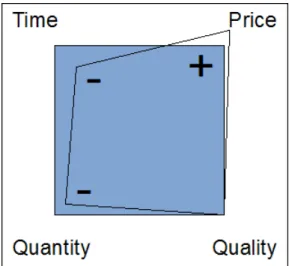
The model you select will often depend on the restrictions you are operating under e.g. fixed budget, fixed timeline, quantity of content, quality required. Dependent on the level of experience of the customer, a prototype or pilot project might be advisable or use of the agile development cycle.
As always, adjusting any of the factors will impact the others. For example reducing the time, but requiring the same level of quality will probably increase the price while reducing the quantity of content you can cater for.
Figure 2.1. Four Factors
2.2 Building up your knowledge of Communiqué
To help you implement the project successfully, you should ensure that you are fully prepared with the required knowledge. In particular:
CQ5 Architecture
See the CQ5 WCM Architect Guide to introduce yourself to the architecture and basic principles of CQ5.
CQ5 on Rails
See the CQ on Rails Guide for recommendations and “Best Practices”. Project Management
There are many resources available about Project Management (in books, courses and on the Internet).
You can also refer to the other CQ5 documents: • CQ5 WCM Developer's Guide
• CQ5 WCM Glossary
• CQ5 WCM How To - A Collection • CQ5 WCM User Guide
• CQ5 WCM System Administrator Guide
This document is not intended as an instruction manual on how to run your project, but to share Day's experience and provide input on the cornerstones, key issues and potential risks of a CQ5 project. The major phases are covered, together with checklists and examples of possible task-breakdown.
Once the concept phase has been authorized you can analysis the fundamental issues for the prospective project:
3.1 Content and Applications - New or Migrate?
You will also need to make decisions on two fundamental issues: Content Input - Import or Migrate?A major consideration is whether you want to:
• Migrate the content of an existing installation. See Migrating to CQ5 for more information. • Generate new content; either by importing from a prepared file (e.g. XML), or inputting all
content with CQ.
Applications - Migrate, Refactor or Embed?
As with content, you will need to decide how to handle existing applications. Here you can either:
• Migrate them to the new installation. See Migrating to CQ5 for more information. • Refactor them, by rewriting them completely.
• Embed them by running CQ4 within CQ5.
3.2 Setting Target Metrics
Metrics are used to define quantitative measurements for the quality of your website - they are basically a definition of the performance goals that you want to achieve.
Many metrics can be defined, but often cover your goals for performance and concurrency. In particular, factors which can be difficult to quantify, and are often prone to emotional assessment: • “our website is much too slow today” - when does slow qualify?
• “everything grinds to a halt when my colleague logs in” - how many concurrent users can the system support?
• “when I search, the system grinds to a halt” - which sort of search requests are impacting the system?
• “it takes ages to download the file” - what are acceptable download times (under normal network conditions)?
Target Metrics are defined at the start of a project to:
• indicate the expected dimensions of the website you will offer • indicate the minimum quality which you want to achieve • define how these factors will actually be measured
During development of the project they can be updated and tuned as appropriate. After the project has been successfully implemented, they can be used to help you control your installation and monitor / maintain the required levels of service for ongoing operation.
• if set too high they may be completely unattainable • if set too low fluctuations may not be highlighted
• to ensure that they can be repeatedly and consistently measured • to provide a balance across the different factors being measured
• certain metrics will relate to a test environment, but some should reflect real-life scenarios as they must be measurable, and reproducible, on your production website
• prioritize the metrics according to their significance to the website • limit the metrics to a set that can be realistically monitored
When used properly these metrics can provide a useful tool; when used irresponsibly they can be a time-wasting distraction. As always, you need to understand what you are measuring, how you are measuring it and why.
Important
This section will deal with the basic principles and issues to be considered. Each installation is different, so the actual values to be measured will differ.
3.2.1 Everything rests on your Project Design
All metrics to be measured will, in some way, be affected by the design of your project. Conversely, many issues will be best solved by design changes.
Therefore, you should define your target metrics before your design has been finally decided. This allows you to optimize your design based on these factors. Once your project has been developed, it will be difficult to make any changes to the basic design principles.
When you create the structure for the website, follow the recommended structure for CQ5 websites. Make sure you understand the following issues and/or principles:
• How to structure website content. • How templates and components work. • How caching works.
• The impacts of personalized content. • How the search function works.
• How you can use CSS and related technologies to create compact, non-redundant HTML code. If you feel that your design does not follow the guidelines, or if you are unsure about some of the implications, clarify these issues before you start either the programming phase or filling in the content.
3.2.2 Infrastructure
To define or assess the infrastructure it will help to define target values such as: • visitors/day; both average and peak
• hits/day; both average and peak
• volume of web-content
Depending on your situation, and the strategic significance of the website this will help you to assess, or choose, your infrastructure:
• number of servers
• number of CQ5 instances (author and publish)
3.2.3 Performance
There are several performance factors which can be evaluated: • response times for individual pages, taking into account:
• response times on an author environment • response times on the publish environment • response times for search requests
Note
This section can be read in conjunction with How to Monitor Performance, which expands the technical details of actually measuring the performance.
3.2.3.1 Response times for individual pages
A key issue is the time your website takes to respond to visitor requests.
Although this value will vary for each request, an average target value can be defined. Once this value is proven to be both achievable and maintainable, it can be used to monitor the performance of the website and indicate the development of potential problems
3.2.3.1.1 Differing targets on author and publish environments
The response times you will be aiming for will be different on the author and publish environments, reflecting the target audience:
Author Environment
This environment is used by authors entering, and updating content, so it must:
• cater for a small number of users who generate a high number of requests when updating content pages and the individual elements on those pages
• be as fast as possible to maximize their productivity for getting your content onto your website
Publish Environment
This environment contains content which you make available to your users: • speed is still vital, but is often slower than an author environment
• additional performance enhancing mechanisms are often applied: • the content is cached
• load-balancing is applied
3.2.3.1.2 Setting target response times
This is often a matter of experience: • past experience on your website • experience with CQ5
• recognizing complex pages which have above average response times (these should be individually optimized if possible)
However, (under controlled circumstances - see Note) the following guidelines can be applied: • 70% of the requests for pages should respond in less than 100ms.
• 25% of the requests for pages should respond in less than 100ms-300ms. • 4% of the requests for pages should respond in less than 300ms-500ms. • 1% of the requests for pages should respond in less than 500ms-1000ms. • No pages should respond slower than 1 second.
Note
The above numbers assume the following conditions:
• measured on publish (no authoring environment and/or CFC overhead) • measured on the server (no network overhead)
• not cached (no CQ-output cache, no Dispatcher cache)
• only for complex items with many dependencies (HTML, JS, PDF, ...) • no other load on the system
3.2.3.1.3 Monitoring response times with the CQ5 request.log
A good starting point for performance analysis is the request log. Amongst other information, you can use this to see the response times of individual requests. See How to Monitor Performance for more details.
3.2.3.1.4 Monitoring response times with HTML comments
HTML comments can be used to include response time information within the source of each page:
</body> </html>
Page took 58 milliseconds to be rendered by the server -->
3.2.3.2 Response times for search requests
Search requests can have a significant impact on your website, in terms of both the: Response time of the actual search
A fast search function is a quality goal for your website Impact on general performance
As a search function must scan (potentially large) sections of the content, or a specially extracted index, this can impact the performance of the entire system if not optimized
3.2.3.2.1 Setting targets for search requests Again it is a matter of experience depending on: • experience of CQ5
• an assessment of how often search will be used in comparison to other goals • your persistence manager
• your search index
• the complexity of your search function; a basic search function which only allows 1 search term to be input will be quicker than an advanced search allowing the user to build up complex search statements using AND / OR / NOT.
3.2.3.2.2 Monitoring search response times with the CQ5 request.log
Again the request.log can be used to monitor the response times for search requests; see How to Monitor Performance for more details.
3.2.3.2.3 Programmed mechanisms for measuring search response times
To customize the information you collect about search requests, and their performance, it is recommended to include information collection in your project source code; see How To Monitor Performance for more details.
This should be planned and integrated from the very start of your project.
3.2.4 Concurrency
Your website will be made available to a number of users. Often more than you used when testing, but also fluctuating and difficult to predict. Your website will need to be designed for an average number of concurrent users who can work without noticing a negative performance impact.
3.2.4.1 Concurrency on author and publish environments
Targets for the number of concurrent users, are dependent on the environment type: Author Environment
Usually the number of concurrent users can be accurately estimated. You will know how many authors you have in total, though (probably) not all will be active at the same time.
Publish Environment
This is more difficult to predict, so you must select a target value. Again this should be based on experience of your current website together with realistic expectations of your new website. Special events (e.g. when you publish new, very popular content) may exceed expectations - or even capabilities (as sometimes reported in the press when tickets for certain events are made available for sale).
Again the request.log can be used to make concurrency tests; see How To Monitor Performance for more details.
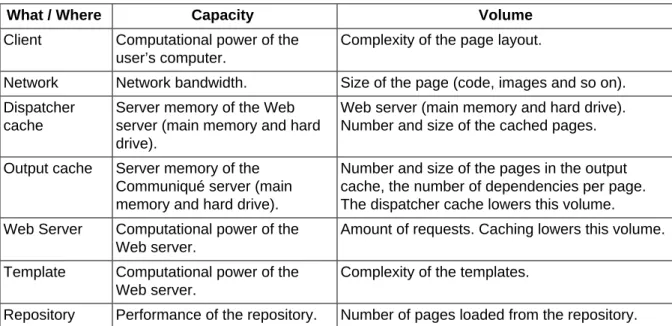
3.2.5 Capacity and Volume
Volume
the amount of output that is processed and delivered by the system. Capacity
the system’s ability to deliver the volume.
At each step, capacity and volume are measured differently, as shown in Table 3.1, “Capacity and Volume”. For best performance, make sure that the capacity matches the volume at each step, and that both capacity and volume are shared across all steps. For example, you may be able to compute the navigation on the client computer, or put it in the cache, instead of computing it on the server for every request.
Table 3.1. Capacity and Volume
What / Where Capacity Volume
Client Computational power of the user’s computer.
Complexity of the page layout.
Network Network bandwidth. Size of the page (code, images and so on). Dispatcher
cache
Server memory of the Web server (main memory and hard drive).
Web server (main memory and hard drive). Number and size of the cached pages. Output cache Server memory of the
Communiqué server (main memory and hard drive).
Number and size of the pages in the output cache, the number of dependencies per page. The dispatcher cache lowers this volume. Web Server Computational power of the
Web server.
Amount of requests. Caching lowers this volume. Template Computational power of the
Web server.
Complexity of the templates.
Repository Performance of the repository. Number of pages loaded from the repository.
3.2.6 Other metrics
The preceding sections detail the main metrics to be defined.
Depending on your specific requirements it might be useful for you to define additional metrics, either in isolation, or taking the above classifications into account.
However, it is preferable to have a small set of accurate, core metrics that function easily and reliably, rather than try to measure and define every aspect of your website. By its sheer nature, your website will start to change and evolve as soon as it is handed over to your users.
3.3 Acceptance Tests
• Project fulfills the customer's requirements. • Customer accepts the project.
The earlier you plan and design your acceptance tests, the easier the final deployment will be. They should be defined together with the customer and your Quality Assurance team.
Although you might not be able to define all details at the very start of the project, initial definitions should be discussed and agreed on. The acceptance tests will probably be based on fundamental requirements (functional and performance) of the system.
3.4 Organizing your Project
Roles
These should be clearly defined and made known to everyone involved in the project. In addition, it is advisable to highlight:
• Decision Makers • Points of Contact Responsibilities
For each role a clear definition of the responsibilities related to your project helps prevent confusion.
Involvement
By involving interested parties as soon as possible you can encourage them to become stakeholders in the project, thus increasing their commitment to its success.
On the customer side this includes the authors - who will have to work with the system on a day to day basis.
Within your own project team this will also include the people responsible for quality assurance. The more they understand the customer's requirements the better they can plan the tests. Paths of Communication
Although these should not be formalized excessively, specific definitions should ensure that the key people are always informed and therefore kept up-to-date. Specific attention should be made to communication with external parties.
Processes
The processes to be defined will depend upon your individual project. Again try to keep these simple, with consideration for:
• Defining processes (and paths of communication) for interacting with any third-parties; e.g. design agencies and third-party software suppliers amongst others.
• Often the customer will have their own Project Management and Reporting procedures and tools.
Tracking Tools
There are many tools available for tracking information on bugs, tasks, and other aspects of your project - see Chapter 9, Overview of potential tools for more details.
The key point to note here is to keep only one copy of the information and share the
information (and therefore access to the tool being used). This will ease maintenance and help prevent discrepancies.
Scope
Clearly define what is to be covered by the project at various levels:
• the individual releases (if an iterative release process is used, and regardless of whether they are delivered to customers or your internal test team).
• the CQ5 project.
• the entire project; including any third-party software, their impact on testing, organizational issues and many others.
For certain aspects it can also be useful to state what is not within the scope of the project. This can help prevent confusion and incorrect assumptions, though it should be limited to essential issues.
Reporting
Terminology
Define any abbreviations and/or customer-specific terminology to be used. Assumptions
Define any assumptions being made.
This information can be defined within a Project Handbook; the use of a Wiki can also help ensure that ongoing changes are handled efficiently.
Wherever these are defined, the key factors are that: • Information is defined and maintained
• Information is clearly communicated to all of the relevant people involved. Although standard Project Management practice, it cannot be repeated often enough that clear role definition and good communication can make, or break, a project.
• Only one version is kept of any information being tracked; e.g. bug tracking, issue tracking, etc.
3.5 Project Phases
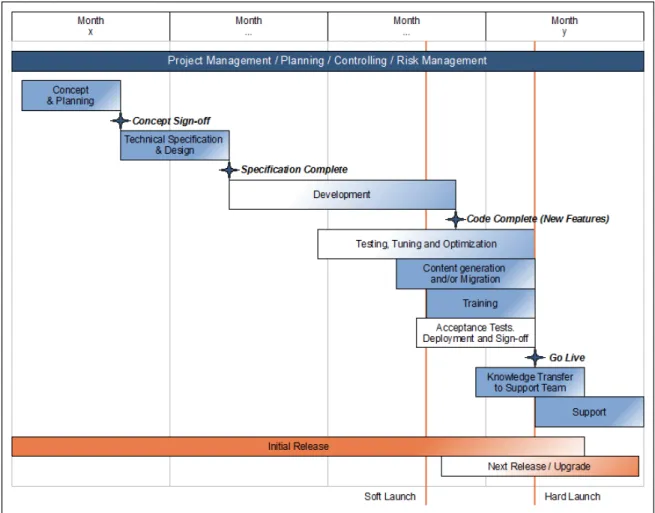
The following diagram offers an example overview of milestones and phases involved when implementing a CQ5 project. The actual model you select to work with will depend on factors such as the project concept, budget and timelines amongst others.
Note
The time scales are theoretical.
Important
Split the project-launch into Soft Launch (reduced availability) and Hard Launch (full availability) to allow for tuning, optimization and user training under realistic conditions on the production environment.
For each phase of the project: • Concept and Planning • Development
• Testing
• Content generation and/or migration • Training
• Knowledge Transfer to support team • Deployment
• Acceptance tests and sign-off • Post-deployment
• Project Management
you need to assess the possible tasks, then list those actually needed for your project. This list can then be used within your project plan or as a detailed checklist when monitoring progress.
See Appendix A, Examples of Task Breakdown for examples of possible tasks which you may need to perform (or assess) during the life-cycle of your project. These tables are meant as quick-reference and to act as a springboard, they do not (cannot) offer a completely comprehensive list of all possible tasks. Your list of actual tasks will vary with each project.
3.6 Estimating Time and Effort
Dependent on your resulting task list you can then make initial estimates of time and effort for (high-level) task definitions. These should include an indication of who (customer or partner) will do what and when.
The following list shows standard approximations and inter-relationships of effort involved, and therefore costs:
Table 3.2. Estimating Time and Effort
Phase Effort
Development A rough estimation of 2 - 4 hours for each component node will cover all development requirements.
Note: These can only be used for initial estimates. An experienced CQ5 developer must make the detailed analysis.
Developer Testing 15% of Development Follow-up 10% of Development Documentation 15% of Development JavaDoc
Documentation
Phase Effort Bug-fixing 15% of Development
Project Management 20% of project costs for ongoing Project Management and Governance Detailed planning can then relate available or required resources to deadlines and costs.
Once the project has been formally initialized the analysis phases can start.
Investing sufficient time and effort in the design of your project can prevent unwelcome surprises later. Complete your design before starting development as the design can affect the performance of your entire website.
Often various studies, of ever-increasing detail, are performed to define and refine issues such as the:
Use Cases
The customer should define their requirements as Use Cases. These define required functionality in terms of the interaction between “Actors” (roles which initiate certain actions) and the system.
These will then be used for further analysis, and for testing, in particular acceptance testing. Functional Requirement Specifications
All functional requirements must be analyzed. Detailed Requirement Specifications
A detailed analysis of all requirements should be made and clearly documented. Design Proposal
The design of your project should be defined. Performance requirements will influence this. Review of Target Metrics
The metrics must be referred to when developing the design. The design must either meet the target metrics, or justify any compatibilities in preparation for a review.
Budget
A budget proposal must be drawn up covering all aspects from third-party software to development resources.
Planning Requirements
Not only must the budget be assigned all other aspects must be considered; in particular you must ensure that the specific resources you require are available as and when you need them. Commitment
Ensure that your development team commit to the functional and performance requirements with regard to the timelines being imposed.
Project Plan
This should be drawn up and circulated to all people involved in the project. It must also be also be maintained and updated as changes occur.
These are then reviewed, often resulting in a further Go or No-Go decision for implementation of the project.
As always the basic rules of Project Management apply, though various issues can be noted: Tracking Bugs and Issues
There are many tools available for tracking issues (see Chapter 9, Overview of potential
tools), be they bugs, features or organizational issues. Whichever you select it is strongly recommended that:
• Your tools are accessible to all (relevant) project members; share the information between partner and customer to prevent creating multiple copies of what is basically the same information.
• You should try to “keep it simple”; maintain all the information that you need, but keep classification simple (and central) to minimize the maintenance.
Testing Phases
Testing is crucial to the smooth deployment of a project, so start testing as soon as possible. This can occur at various levels (developer, a separate test team and/or customer staff). It is not compulsory for customers to perform testing, but it helps increase their awareness and acceptance of the project. An added advantage is that users often define the requirements in terms of past experiences, giving them experience of an interim release helps ensure they gain hands-on experience of the new project.
Performance Testing
Performance is a key aspect of any WCM installation as it can affect the entire user experience.
The target metrics defined at project begin must be tested. For further details on testing performance see:
• How To Monitor Performance
• How To test performance on the Publish instance Testing Results
Any testing team should be allowed to remain neutral and deliver the testing results. It is the responsibility of the Project Manager to assess any implications of the results and decide on appropriate action.
Configuration Management
In addition to the actual project installation, configuration of both CQ5 and possibly system software will be necessary. Any such changes should be tracked, and documented in sufficient detail to ensure you are fully prepared for testing and deployment.
Again the basic rules of Project Management apply, though here too various issues can be noted: Installation and Configuration
Installation of CQ5 is extremely straightforward. The configuration management you maintained during development is used to ensure that the configuration is equally stable. Content Generation and/or Migration
At this point you will need to start filling your new CQ5 installation with content - be that new content input by specialized staff, content imported from predefined files, or content migrated from an existing system.
User Training
The period between the Soft and Hard Launches (see Figure 3.1, “Example of Milestones and Phases”) gives you an ideal opportunity to train your users on the publish environment. Knowledge Transfer to Support Staff
In addition to User Training, Knowledge Transfer sessions should be used to train your support staff.
Plan sufficient time and resources for knowledge transfer and handover to the support team; this is crucial to ensuring long-term support and therefore user satisfaction.
Performance Tuning and Optimization
As mentioned previously, performance is a key aspect of any WCM installation as it can affect the entire user experience.
During the period between Soft and Hard launches you should monitor and analyze the performance to tune and optimize as much as possible. This process will have to be continued during normal use of CQ, but these initial stages are the most crucial.
For further details on testing performance see: • How To Monitor Performance
• How To test performance on the Publish instance Acceptance Testing and Sign-off
At some point during deployment you will want the customer to confirm that the system
functionality and performance has been officially accepted. This usually includes specific tests -which should have been clearly defined and agreed upon at the beginning of the project.
The reference architecture is given to provide a template solution for the CQ5 architecture. The reference architecture addresses problems commonly encountered for enterprise systems including scaling, reliability and security.
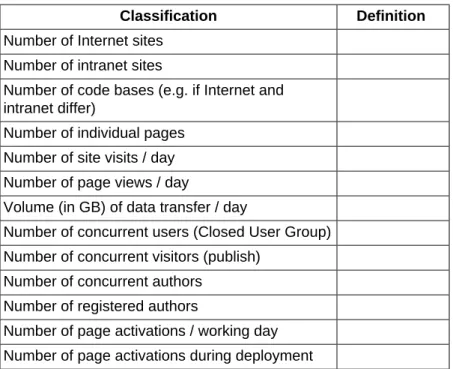
The following site metrics should be defined:
Table 7.1. Reference Architecture - Site Metrics
Classification Definition Number of Internet sites
Number of intranet sites
Number of code bases (e.g. if Internet and intranet differ)
Number of individual pages Number of site visits / day Number of page views / day
Volume (in GB) of data transfer / day
Number of concurrent users (Closed User Group) Number of concurrent visitors (publish)
Number of concurrent authors Number of registered authors
Number of page activations / working day Number of page activations during deployment
The following lists highlight some specific high-level points; they are not meant to be exhaustive but aim to give some pointers and provide a basis for your own checklists. These checklists deal with WCM issues, and should be considered together with your own standard Project Management checklists. Individual guides also provide more detailed checklists for the specific areas.
The task lists in Appendix A, Examples of Task Breakdown also form a reminder list for task breakdown.
Warning
Two major risks are simply those of insufficient controlling and poor communication.
Table 8.1. Project Management and Team Roles
Check Response Action Owner Due Date Who is the Project Manager?
Who is prime contact on the customer side? Who is the Lead Technical Expert?
Who are the other team members?
Are all the above roles clear to all team members? Have responsibilities been clearly defined for partner and customer?
Have all resources been reserved (and confirmed) for the whole duration of the project?
Have known absences been incorporated in the planning schedule? Where necessary have replacements (also allowing for handover effort) been planned?
Are there any special requirements for your development team? e.g. on-site presence?
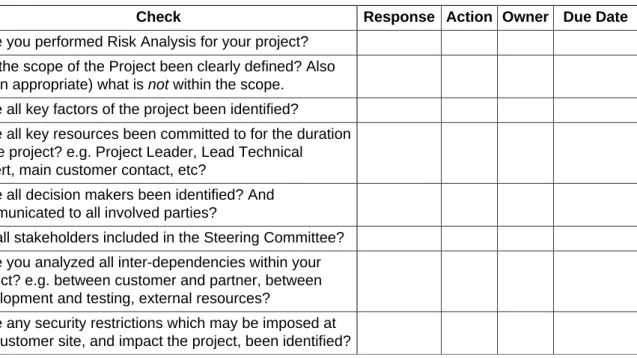
Table 8.2. Risk Management
Check Response Action Owner Due Date Have you performed Risk Analysis for your project?
Has the scope of the Project been clearly defined? Also (when appropriate) what is not within the scope.
Have all key factors of the project been identified?
Have all key resources been committed to for the duration of the project? e.g. Project Leader, Lead Technical Expert, main customer contact, etc?
Have all decision makers been identified? And communicated to all involved parties?
Are all stakeholders included in the Steering Committee? Have you analyzed all inter-dependencies within your project? e.g. between customer and partner, between development and testing, external resources?
Have any security restrictions which may be imposed at the customer site, and impact the project, been identified?
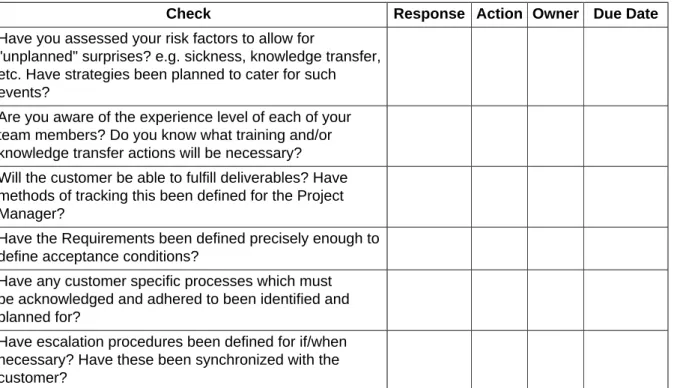
Check Response Action Owner Due Date Have you assessed your risk factors to allow for
"unplanned" surprises? e.g. sickness, knowledge transfer, etc. Have strategies been planned to cater for such events?
Are you aware of the experience level of each of your team members? Do you know what training and/or knowledge transfer actions will be necessary? Will the customer be able to fulfill deliverables? Have methods of tracking this been defined for the Project Manager?
Have the Requirements been defined precisely enough to define acceptance conditions?
Have any customer specific processes which must be acknowledged and adhered to been identified and planned for?
Have escalation procedures been defined for if/when necessary? Have these been synchronized with the customer?
Table 8.3. Requirement Specification
Check Response Action Owner Due Date Have the functional and non-functional requirements
been clearly specified? Is there a method for monitoring progress and status; e.g. signed-off, final, work-in-progress, etc.
Have development committed to the requirements (as being achievable)? Including performance goals? Has the priority of each requirement been defined? Have the requirements for project sign-off and acceptance been defined?
Have the Performance Goals been defined for both the Publish and Author instances?
Have the Project Goals been clearly communicated to all team members? Are measures to make ongoing checks that everyone remains focused on the same goals? Will this be a new installation or a migration project? Are the implications understood and planned for?
How will any requirements not (yet) in the Product be catered for?
Table 8.4. Communication and Reporting
Check Response Action Owner Due Date Is it clear to everyone that the Project Manager is the
main point of contact? Has acknowledgment of this been received?
Is there a formal Project Plan? Has it been shared with all team members and any other relevant parties?
Check Response Action Owner Due Date Has a method for maintaining and communicating the
“State of the Project” been agreed on?
Have the Project Goals been clearly communicated to all team members? Are measures to make ongoing checks that everyone remains focused on the same goals? Can customer processes be catered for?
Is the customer contacted at regular intervals?
Table 8.5. Release Planning
Check Response Action Owner Due Date Has a release schedule been planned for the project?
Has the product release plan been reviewed in relation to the project? i.e. Have you assessed when/whether missing functionality will be integrated in the product? Has the involvement of QA and the customer test team been incorporated in the release plan?
Has the schedule, and impact, of Product releases (CQ, CRX, CQDAM) and/or hotfixes been checked?
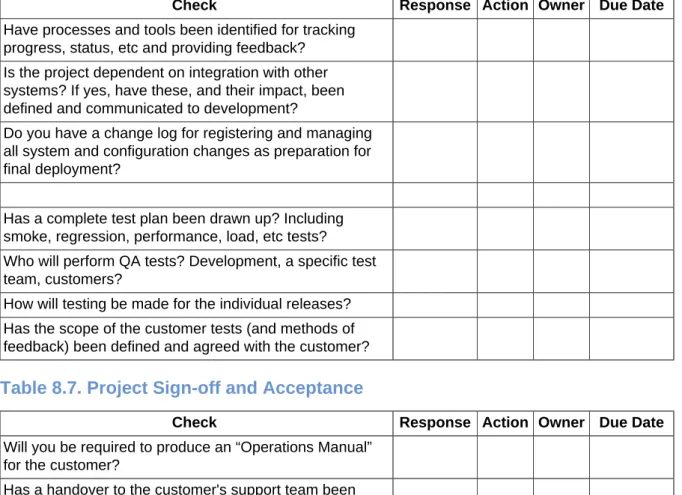
Table 8.6. Development and Testing
Check Response Action Owner Due Date Have processes and tools been identified for tracking
progress, status, etc and providing feedback? Is the project dependent on integration with other systems? If yes, have these, and their impact, been defined and communicated to development?
Do you have a change log for registering and managing all system and configuration changes as preparation for final deployment?
Has a complete test plan been drawn up? Including smoke, regression, performance, load, etc tests? Who will perform QA tests? Development, a specific test team, customers?
How will testing be made for the individual releases? Has the scope of the customer tests (and methods of feedback) been defined and agreed with the customer?
Table 8.7. Project Sign-off and Acceptance
Check Response Action Owner Due Date Will you be required to produce an “Operations Manual”
for the customer?
Has a handover to the customer's support team been planned?
Have all customer specific aspects been clearly documented for the authors?
Check Response Action Owner Due Date Explain how th QA process integrates with the acceptance
process.
Have clearly defined acceptance tests been agreed on and officially acknowledged by all parties?
Has the customer identified people (and processes) responsible for project sign-off and acceptance?
Table 8.8. Awareness of Objectives
Check Response Action Owner Due Date Is it clear that a major objective is to have a satisfied
customer?
Can the side-effects of increasing the experience of team members be maximized?
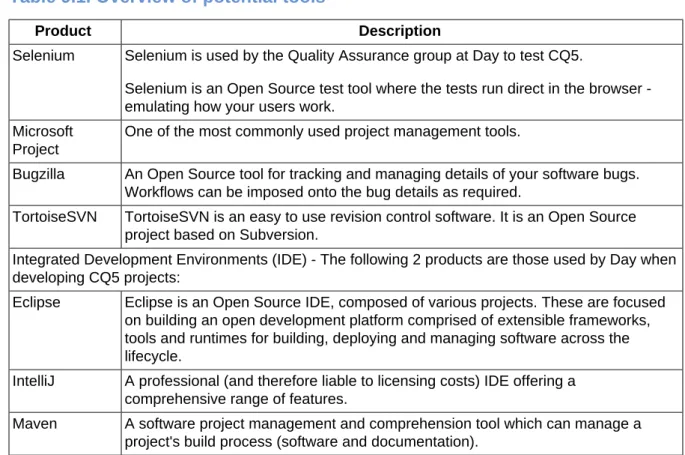
The following list is provided to inform you of tools used at Day. It is intended as an introduction, not an extensive recommendation list, and should certainly not deter you from using any other tools which you prefer.
Table 9.1. Overview of potential tools
Product Description
Selenium Selenium is used by the Quality Assurance group at Day to test CQ5.
Selenium is an Open Source test tool where the tests run direct in the browser -emulating how your users work.
Microsoft Project
One of the most commonly used project management tools.
Bugzilla An Open Source tool for tracking and managing details of your software bugs. Workflows can be imposed onto the bug details as required.
TortoiseSVN TortoiseSVN is an easy to use revision control software. It is an Open Source project based on Subversion.
Integrated Development Environments (IDE) - The following 2 products are those used by Day when developing CQ5 projects:
Eclipse Eclipse is an Open Source IDE, composed of various projects. These are focused on building an open development platform comprised of extensible frameworks, tools and runtimes for building, deploying and managing software across the lifecycle.
IntelliJ A professional (and therefore liable to licensing costs) IDE offering a comprehensive range of features.
Maven A software project management and comprehension tool which can manage a project's build process (software and documentation).
Breakdown
A.1 Planning Tasks throughout the Project
The following tables show possible tasks within a CQ5 project. For each phase, the main actions are listed; within these possible tasks and/or issues to be considered. These lists are meant as quick-reference, they do not (cannot) offer a 100% comprehensive list of all possible tasks, but are meant to act as a springboard. The list of tasks will vary with each project.
You can make your initial estimates of time and effort for (high-level) task definitions; these should include an indication of to who (customer or partner) will do what and when.
Detailed planning can then relate available or required resources to deadlines and costs.
Note
Certain of the comment fields show the example proportions used to calculate effort when there is a direct relationship between tasks.
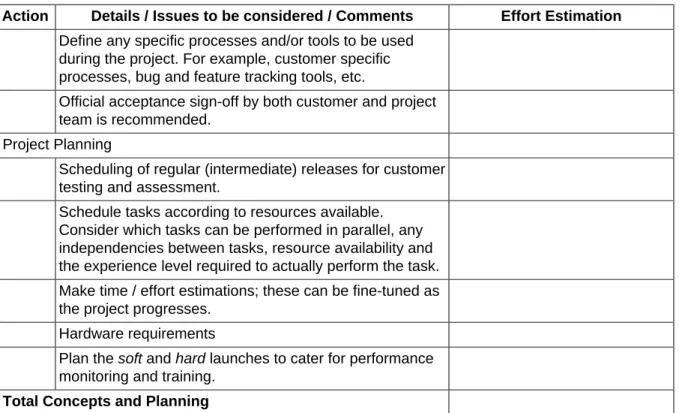
Table A.1. Examples of Task breakdown - Concept and Planning
Action Details / Issues to be considered / Comments Effort Estimation Kick-off Workshop
Project Concept
Ensure that the Corporate Identity is available and clearly defined.
Architecture Concepts (Hardware / Software / System configuration)
Required system availability Clusters
Disaster recovery Centralized data storage
Classification of data, and any access requirements Integration in a secure server landscape
Target Metrics (e.g. visitors, hits, data volume, etc) LDAP failover
Buffer to cover growth forecast Organizational responsibilities Platform / Browser requirements CRX Connectors
Feasibility Analysis
If necessary and requested by the customer, a feasibility study and/or prototype can be made.
Project Handbook (with specification)
Clearly define the role of anyone involved in the project; including steering committees, project teams, development teams, support contact, etc.
Action Details / Issues to be considered / Comments Effort Estimation Define any specific processes and/or tools to be used
during the project. For example, customer specific processes, bug and feature tracking tools, etc.
Official acceptance sign-off by both customer and project team is recommended.
Project Planning
Scheduling of regular (intermediate) releases for customer testing and assessment.
Schedule tasks according to resources available. Consider which tasks can be performed in parallel, any independencies between tasks, resource availability and the experience level required to actually perform the task. Make time / effort estimations; these can be fine-tuned as the project progresses.
Hardware requirements
Plan the soft and hard launches to cater for performance monitoring and training.
Total Concepts and Planning
Table A.2. Examples of Task breakdown - Technical Specification and
Design
Action Details / Issues to be considered / Comments Effort Estimation Detailed Requirement Specification
Help the customer define their requirements in the form of Use cases.
Define any conventions used; e.g. naming, structure, programming guidelines.
Define any exclusions being made.
Define the detailed requirement and functional specifications, covering all aspects of the project (including other tasks listed in this table) and clearly highlighting what has been requested, and what will be delivered.
Official acceptance sign-off by both customer and project team is recommended for this document / document set. Total Technical Specification and Design
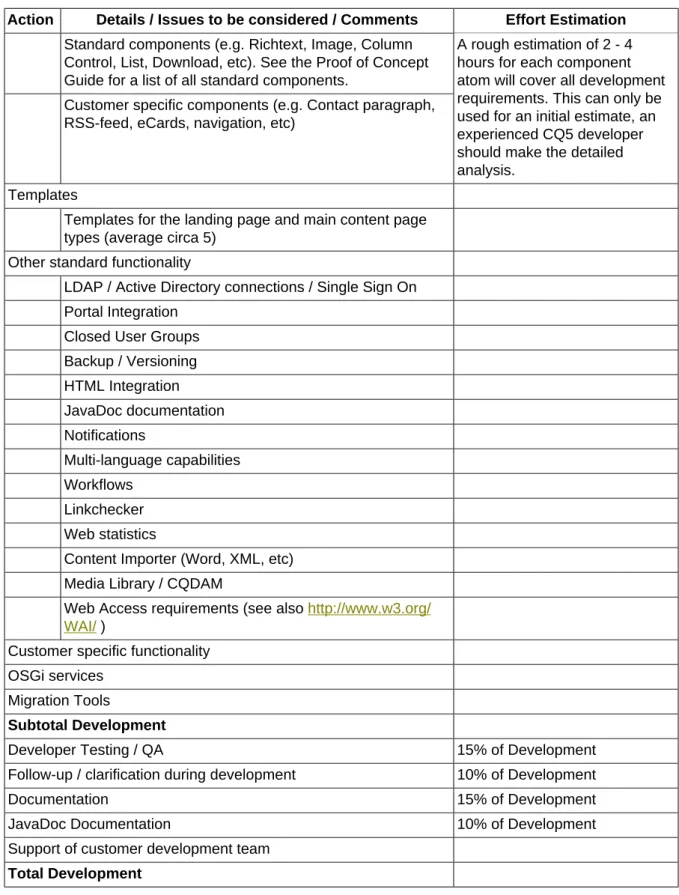
Table A.3. Examples of Task breakdown - Development
Action Details / Issues to be considered / Comments Effort Estimation Globals
Setup of the Global Framework and Development Environment
Design parameters and settings
Structural preparation (location of components, templates, etc)
Action Details / Issues to be considered / Comments Effort Estimation Standard components (e.g. Richtext, Image, Column
Control, List, Download, etc). See the Proof of Concept Guide for a list of all standard components.
Customer specific components (e.g. Contact paragraph, RSS-feed, eCards, navigation, etc)
A rough estimation of 2 - 4 hours for each component atom will cover all development requirements. This can only be used for an initial estimate, an experienced CQ5 developer should make the detailed analysis.
Templates
Templates for the landing page and main content page types (average circa 5)
Other standard functionality
LDAP / Active Directory connections / Single Sign On Portal Integration
Closed User Groups Backup / Versioning HTML Integration JavaDoc documentation Notifications Multi-language capabilities Workflows Linkchecker Web statistics
Content Importer (Word, XML, etc) Media Library / CQDAM
Web Access requirements (see also http://www.w3.org/ WAI/ )
Customer specific functionality OSGi services
Migration Tools
Subtotal Development
Developer Testing / QA 15% of Development
Follow-up / clarification during development 10% of Development
Documentation 15% of Development
JavaDoc Documentation 10% of Development
Support of customer development team Total Development
Table A.4. Examples of Task breakdown - Testing
Action Details / Issues to be considered / Comments Effort Estimation Functional Testing (customer)
A Test Plan should be documented detailing test cases, each scenario, expected and achieved results.
Action Details / Issues to be considered / Comments Effort Estimation Initial performance tests can be made on the test
environment. These must be repeated during deployment, then integrated into ongoing monitoring processes.
Bug-fixing 15% of Development
Total Testing
Table A.5. Examples of Task breakdown - Content Generation and/or
Migration
Action Details / Issues to be considered / Comments Effort Estimation Analysis
Preparation and Tests
See Table A.7, “Examples of Task breakdown - Post-deployment” Total Content Migration
Table A.6. Examples of Task breakdown - Deployment
Action Details / Issues to be considered / Comments Effort Estimation Installation - Development Environment
Installation - Development Tools Installation - Test Environment Installation - Production Environment Installation - Web-server / Dispatcher Configuration (with initial Monitoring)
System parameters User authorization Total Deployment
Table A.7. Examples of Task breakdown - Post-deployment
Action Details / Issues to be considered / Comments Effort Estimation Performance Tuning
(Basic) Performance testing, analysis and tuning Content Population / Migration
Automatic content load (e.g. from Word into CQ5) See Table A.5, “Examples of Task breakdown - Content Generation and/or Migration”
Launch Support
Assistance during launch period, and at the switch-over Total Post-Deployment
Table A.8. Examples of Task breakdown - Training
Action Details / Issues to be considered / Comments Effort Estimation Preparation of training material
Action Details / Issues to be considered / Comments Effort Estimation Total Training
Table A.9. Examples of Task breakdown - Acceptance Tests and Sign-off
Action Details / Issues to be considered / Comments Effort Estimation Define (and agree) on acceptance test cases
Define when / how often the acceptance tests will occur; for example, on a regular basis, for each milestone, or only at project end?
Define exactly what constitutes success and failure for each individual test case.
Perform the Acceptance Tests
Total Acceptance Tests and Sign-off
Table A.10. Examples of Task breakdown - Project Management
Action Details / Issues to be considered / Comments Effort Estimation Ongoing Project Management and Governance 20% of project costs
Communication and Meetings
Regular Project Reporting and status reports Controlling - time and budget
Legal
Ensure that all legal definitions have been clearly communicated and acknowledged by the respective party. These may cover liability issues through to access requirements for disabled visitors.
License acquirement Risk Management Change Management
Handover to Maintenance Mode Total Project Management
After each individual category has been analyzed you can formulate the final summary:
Table A.11. Examples of Task breakdown - Summary
Action Details / Issues to be considered / Comments Effort Estimation Subtotal
...Any customer specific costs or discounts... Total
VAT TOTAL
Documentation
The following sections give examples and/or templates of the main document used during the project lifecycle.
B.1 Costs Analysis
The following shows an example breakdown of a Costs Analysis:
Note
B.2 Status Reporting
The following shows an example Project Status Report:
Note
Formatting Conventions
For all copyright statements and license agreements see Copyright, Licenses and Disclaimers.
C.1 Formatting Conventions
The following tables detail formatting conventions used within this guide:
Table C.1. Formatting Conventions - Text
Style Description Example
Cross-reference Cross-reference to external documents. See the Microsoft Manual of Style for Technical Publications.
GUI Item User interface items. Click Save.
Keyboard shortcut Keyboard shortcuts. Press Ctrl+A.
Mouse Button Mouse buttons. Secondary-mouse button
(usually the right-mouse button).
Link Link to anchor-points within the current document and/or external sources.
http://www.day.com
Code Example of programming code. if (weather == sunny) smile;
User Input Example of text, or commands, that you type.
ls *.xml
<Variable User Input>
Example of variable text - you type the actual value needed.
ls <cq-installation-dir>
[Optional Parameter]
An optional parameter. ls [<option>] [<filename>]
Computer Output Logging and error messages. ls: cannot access
error.log:
Table C.2. Formatting Conventions - Actions
When you see this... It means do this... Ctrl+A Hold down the Ctrl key, then press the A key.
Right-click Press the right-mouse button (or the left-mouse button if your mouse has been configured for left-handed use).
Drag Hold down the left mouse button while moving the item, then release the mouse button at the new location (or the right mouse button if your mouse has been configured for left-handed use).