Symantec™ Enterprise
Security Manager Baseline
Policy Manual for CIS
Benchmark
For Windows Server 2008 (Domain
Member Servers and Domain
Symantec™ Enterprise
Security Manager Baseline
Policy Manual for Windows
Server 2008 (Domain
Member Servers and
Domain Controllers)
This document includes the following topics: ■ Introducing the policy
■ Installing the policy
■ Policy modules for Domain Member Servers ■ Policy modules for Domain Controllers
Introducing the policy
The Symantec Enterprise Security Manager (ESM) Baseline Policy for the Center for Internet Security (CIS) Benchmark for Windows Server 2008 assesses a host's compliance with the benchmark's recommendations. This release of the policy was built based on the CIS benchmark version 1.0.0 for Windows Server 2008 Domain Member Servers and Windows Server 2008 Domain Controllers.
This release of the policy is based on the following CIS documents: ■ Version 1.0.0 of the Windows Server 2008 Member Servers ■ Version 1.0.0 of the Windows Server 2008 Domain Controllers
This policy can be installed on Symantec ESM 6.5.3 and later managers running Security Update 39 or later.
This policy can be installed on the following operating systems: ■ Microsoft Windows Server 2008 (Domain Member Servers) ■ Microsoft Windows Server 2008 (Domain Controllers)
For information on the Center for Internet Security benchmarks, visit the following URL:
http://www.cisecurity.org.
Installing the policy
Before you install the policy, you must decide on the Symantec ESM Managers that you want to install the policy. Since policies run on Managers, you do not require to install policies on agents. You must install the policy on Symantec ESM 6.5.3 or later with Security Update 39 or later.
Obtaining and Installing the policy with LiveUpdate
You can install the LiveUpdate feature in the following ways: ■ By using the LiveUpdate feature on the Symantec ESM console ■ By using files from a Product disc or from the InternetTo install the policy using LiveUpdate
1
Connect the Symantec ESM Enterprise Console to managers where you want to install the policy.2
Click the LiveUpdate icon to start the LiveUpdate wizard.3
In the wizard, ensure that Symantec LiveUpdate (Internet) is selected, and then click Next.4
In the Welcome to LiveUpdate dialog box, click Next.5
In the Available Updates panel, do one of the following: ■ To install all checked products and components, click Next. ■ To omit a product from the update, uncheck it, and then click Next.Domain Controllers)
■ To omit a product component, expand the product node, uncheck the component that you want to omit, and then click Next.
6
In the Thank you panel, click Finish.7
In the list of managers panel, ensure that all the managers that you want to update are checked, and then click Next.8
In the Updating Managers panel, click OK.9
In the Update Complete panel, click Finish.If you cannot use LiveUpdate to install the policy directly from a Symantec server, you can install the policy manually, using files from a Product disc or the Internet.
Note:To avoid conflicts with updates that are performed by standard LiveUpdate installations, copy or extract the files into the LiveUpdate folder, which is usually Program Files/Symantec/LiveUpdate.
To install the policy from a Product disc or from the Internet
1
Connect the Symantec ESM Enterprise Console to managers that you want to update.2
From the Symantec Security Response Web site, download the executable files for Microsoft Windows Server 2008. You can go to the following link http://securityresponse.symantec.com3
On a computer running Windows XP/Server 2003 that has network access to the manager, run the executable that you downloaded from the Symantec Security Response Web site.4
Click Next to close the Welcome dialog box.5
In the License Agreement dialog box, if you agree to the terms of the agreement, click Yes.6
In the Question panel, click Yes to continue installation of the best practice policy.7
In the ESM Manager Information panel, type the requested manager information, and then click Next.If the manager’s modules have not been upgraded to Security Update 36 or later, the installation program returns an error message and stops the installation. Upgrade the manager to Security Update 36 or later, and then rerun the installation program.
8
Click Finish.5 Symantec™ Enterprise Security Manager Baseline Policy Manual for Windows Server 2008 (Domain Member Servers and
Domain Controllers)
Policy modules for Domain Member Servers
The CIS Benchmark for Windows policy include the modules that ensure compliance with the CIS benchmark. Each module lists the enabled checks with the standards that they address, the associated name lists, and the templates. As specific values are not required everywhere, default values and templates are provided. Moreover, a few benchmark requirements depend on the local policy decisions and hence you must set the checks that associates with such
requirements. Although, the policy appears as read only, you can however copy and rename the policy depending on the requirements of your corporate security policy.
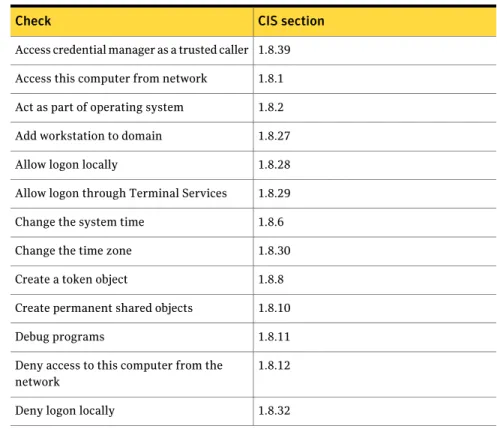
Account Integrity
The Account Integrity module reports the user rights assignments of your computer.
Table 1-1gives a list of the checks and their CIS sections.
Table 1-1 Checks and CIS sections
CIS section Check
1.8.39 Access credential manager as a trusted caller
1.8.1 Access this computer from network
1.8.2 Act as part of operating system
1.8.27 Add workstation to domain
1.8.28 Allow logon locally
1.8.29 Allow logon through Terminal Services
1.8.6 Change the system time
1.8.30 Change the time zone
1.8.8 Create a token object
1.8.10 Create permanent shared objects
1.8.11 Debug programs
1.8.12 Deny access to this computer from the
network
1.8.32 Deny logon locally
Domain Controllers)
Table 1-1 Checks and CIS sections (continued)
CIS section Check
1.8.33 Deny logon through Terminal Services
1.8.13 Enable computer and user accounts to be
trusted for delegation
1.8.15 Impersonate a client from authentication
1.8.17 Load and unload device drivers
1.8.36 Log on as batch job
1.8.22 Profile single process
1.8.23 Profile system performance
1.8.24 Remove computer from docking station
1.8.25 Replace a process level token
1.8.37 Restore files and directories
1.8.26 Shut down the system
1.8.40 Synchronize directory service data
1.8.38 Take ownership of files or other objects
Active Directory
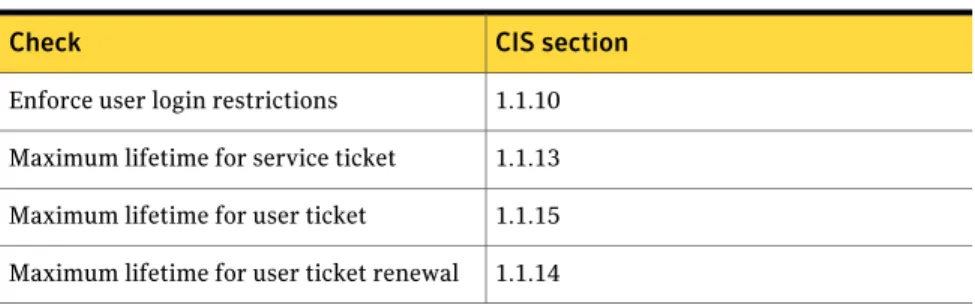
The Active Directory module for Windows Server 2008 reports on the security options.
Table 1-2gives a list of the checks and their CIS sections.
Table 1-2 Checks and CIS sections
CIS section Check
1.1.10 Enforce user login restrictions
1.1.13 Maximum lifetime for service ticket
1.1.15 Maximum lifetime for user ticket
1.1.14 Maximum lifetime for user ticket renewal
7 Symantec™ Enterprise Security Manager Baseline Policy Manual for Windows Server 2008 (Domain Member Servers and
Domain Controllers)
Table 1-2 Checks and CIS sections (continued)
CIS section Check
1.1.12 Maximum tolerance for computer clock
synchronization
1.2.10, 1.2.11, 1.7.1, 1.7.2, 1.7.3, 1.7.4, 1.7.5, 1.7.6, 1.7.7, 1.7.8, 1.7.9, 1.9.1, 1.9.3, 1.9.4, 1.9.5, 1.9.6, 1.9.7, 1.9.8, 19.9, 1.9.12, 1.9.13, 1.9.14, 1.9.15, 1.9.16, 1.9.17, 1.9.18, 1.9.20, 1.9.21, 1.9.22, 1.9.23, 1.9.24, 1.9.25, 1.9.26, 1.9.27, 1.9.28, 1.9.30, 1.9.31, 1.9.32, 1.9.33, 1.9.34, 1.9.35, 1.9.36, 1.9.37, 1.9.38, 1.9.39, 1.9.40, 1.9.43, 1.9.44, 1.9.45, 1.9.46, 1.9.47, 1.9.48, 1.9.49, 1.9.50, 1.9.52, 1.9.53, 1.9.54, 1.9.55, 1.9.56, 1.9.57, 1.9.59 , 1.9.60, 1.9.61, 1.9.63, 1.9.64, 1.9.65, 1.9.66, 1.9.67, 1.9.68, 1.9.69, 1.9.70, 1.9.71, 1.9.72
Security options
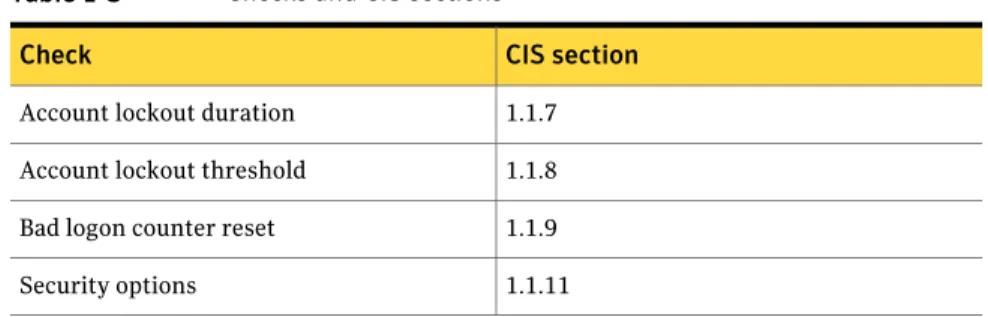
Login Parameters
The Login Parameters module reports accounts, resources, and settings that are inconsistent with proper authorized usage.
Table 1-3gives a list of the checks and their CIS sections.
Table 1-3 Checks and CIS sections
CIS section Check
1.1.7 Account lockout duration
1.1.8 Account lockout threshold
1.1.9 Bad logon counter reset
1.1.11 Security options
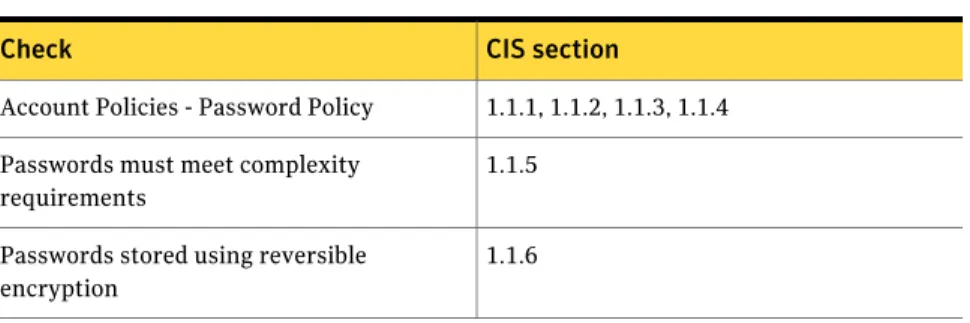
Password Strength
The Password Strength module examines the system parameters that control a password construction, change, age, expiration, and storage.
Table 1-4gives a list of the checks and their CIS sections.
Domain Controllers)
Table 1-4 Checks and CIS sections
CIS section Check
1.1.1, 1.1.2, 1.1.3, 1.1.4 Account Policies - Password Policy
1.1.5 Passwords must meet complexity
requirements
1.1.6 Passwords stored using reversible
encryption
Registry
The Registry module reports violations of the registry key settings that are specified in the template files.
Table 1-5gives a list of the checks and their CIS sections.
Table 1-5 Checks and CIS sections
CIS section Check
1.5.1, 1.5.2, 1.5.5, 1.5.8, 1.5.9, 1.5.10, 1.5.11, 1.5.12, 1.5.13, 1.5.14, 1.5.15, 1.5.16, 1.5.17, 1.5.18, 1.5.19, 1.5.20, 1.5.21, 1.6.1, 1.6.2, 1.6.3, 1.10.1, 1.10.2, 1.10.4, 1.11.1, 1.11.2, 1.11.3, 1.11.4, 1.11.5, 1.11.6, 1.12.1, 1.12.2, 1.12.8, 1.12.9, 1.12.10, 1.12.11
Key and value existence
System Auditing
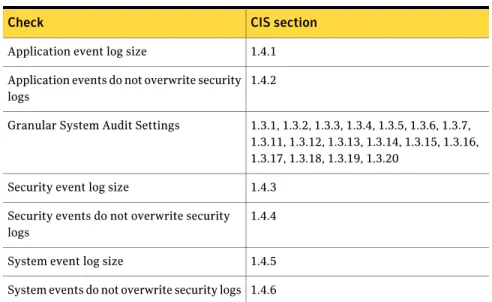
The System Auditing module reports the security events that are audited for failure or success and the status of the log file when it is full.
Table 1-6gives a list of the checks and their CIS sections.
Table 1-6 Checks and CIS sections
CIS section Check
1.4.1 Application event log size
1.4.2 Application events do not overwrite security logs
9 Symantec™ Enterprise Security Manager Baseline Policy Manual for Windows Server 2008 (Domain Member Servers and
Domain Controllers)
Table 1-6 Checks and CIS sections (continued)
CIS section Check
1.3.1, 1.3.2, 1.3.3, 1.3.4, 1.3.5, 1.3.6, 1.3.7, 1.3.11, 1.3.12, 1.3.13, 1.3.14, 1.3.15, 1.3.16, 1.3.17, 1.3.18, 1.3.19, 1.3.20
Granular System Audit Settings
1.4.3 Security event log size
1.4.4 Security events do not overwrite security logs
1.4.5 System event log size
1.4.6 System events do not overwrite security logs
Policy modules for Domain Controllers
The CIS Benchmark for Windows policy include the modules that ensure compliance with the CIS benchmark. Each module lists the enabled checks with the standards that they address, the associated name lists, and the templates. As specific values are not required everywhere, default values and templates are provided. Moreover, a few benchmark requirements depend on the local policy decisions and hence you must set the checks that associates with such
requirements. Although the policy appears as read only, you can however copy and rename the policy depending on the requirements of your corporate security policy.
Account Integrity
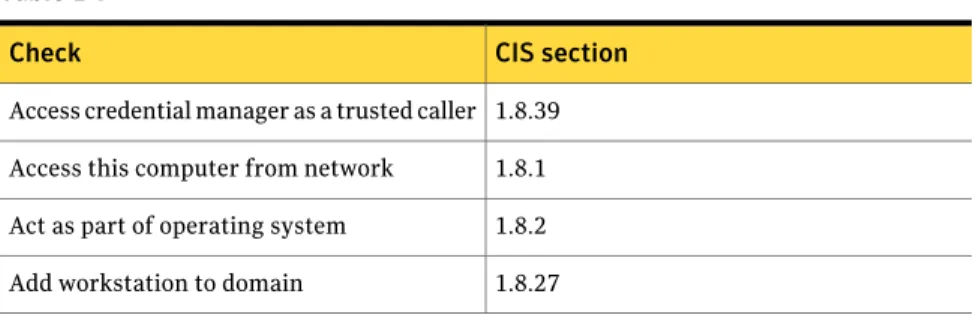
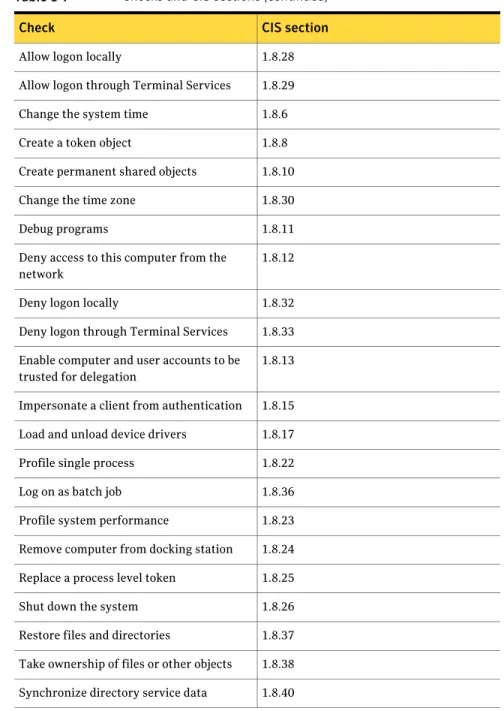
The Account Integrity module reports the user rights assignments of your computer.
Table 1-7gives a list of the checks and their CIS sections.
Table 1-7 Checks and CIS sections
CIS section Check
1.8.39 Access credential manager as a trusted caller
1.8.1 Access this computer from network
1.8.2 Act as part of operating system
1.8.27 Add workstation to domain
Domain Controllers)
Table 1-7 Checks and CIS sections (continued)
CIS section Check
1.8.28 Allow logon locally
1.8.29 Allow logon through Terminal Services
1.8.6 Change the system time
1.8.8 Create a token object
1.8.10 Create permanent shared objects
1.8.30 Change the time zone
1.8.11 Debug programs
1.8.12 Deny access to this computer from the
network
1.8.32 Deny logon locally
1.8.33 Deny logon through Terminal Services
1.8.13 Enable computer and user accounts to be
trusted for delegation
1.8.15 Impersonate a client from authentication
1.8.17 Load and unload device drivers
1.8.22 Profile single process
1.8.36 Log on as batch job
1.8.23 Profile system performance
1.8.24 Remove computer from docking station
1.8.25 Replace a process level token
1.8.26 Shut down the system
1.8.37 Restore files and directories
1.8.38 Take ownership of files or other objects
1.8.40 Synchronize directory service data
11 Symantec™ Enterprise Security Manager Baseline Policy Manual for Windows Server 2008 (Domain Member Servers and
Domain Controllers)
Active Directory
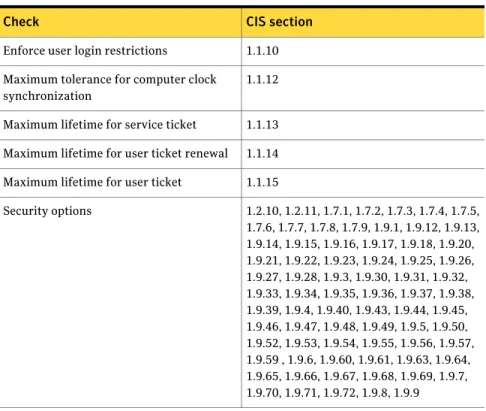
The Active Directory module for Windows Server 2008 reports on the security options.
Table 1-8gives a list of the checks and their CIS sections.
Table 1-8 Checks and CIS sections
CIS section Check
1.1.10 Enforce user login restrictions
1.1.12 Maximum tolerance for computer clock
synchronization
1.1.13 Maximum lifetime for service ticket
1.1.14 Maximum lifetime for user ticket renewal
1.1.15 Maximum lifetime for user ticket
1.2.10, 1.2.11, 1.7.1, 1.7.2, 1.7.3, 1.7.4, 1.7.5, 1.7.6, 1.7.7, 1.7.8, 1.7.9, 1.9.1, 1.9.12, 1.9.13, 1.9.14, 1.9.15, 1.9.16, 1.9.17, 1.9.18, 1.9.20, 1.9.21, 1.9.22, 1.9.23, 1.9.24, 1.9.25, 1.9.26, 1.9.27, 1.9.28, 1.9.3, 1.9.30, 1.9.31, 1.9.32, 1.9.33, 1.9.34, 1.9.35, 1.9.36, 1.9.37, 1.9.38, 1.9.39, 1.9.4, 1.9.40, 1.9.43, 1.9.44, 1.9.45, 1.9.46, 1.9.47, 1.9.48, 1.9.49, 1.9.5, 1.9.50, 1.9.52, 1.9.53, 1.9.54, 1.9.55, 1.9.56, 1.9.57, 1.9.59 , 1.9.6, 1.9.60, 1.9.61, 1.9.63, 1.9.64, 1.9.65, 1.9.66, 1.9.67, 1.9.68, 1.9.69, 1.9.7, 1.9.70, 1.9.71, 1.9.72, 1.9.8, 1.9.9 Security options
Login Parameters
The Login Parameters module reports accounts, resources, and settings that are inconsistent with proper authorized usage.
Table 1-9gives a list of the checks and their CIS sections.
Table 1-9 Checks and CIS sections
CIS section Check
1.1.7 Account lockout duration
1.1.8 Account lockout threshhold
Domain Controllers)
Table 1-9 Checks and CIS sections (continued)
CIS section Check
1.1.9 Bad logon counter reset
1.1.11 Security options
Password Strength
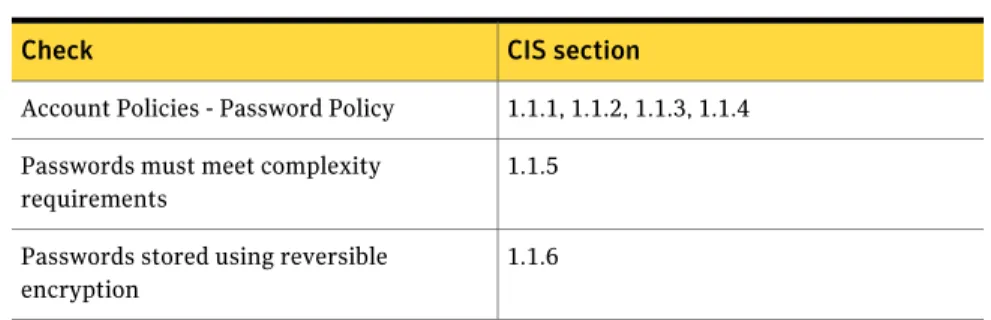
The Password Strength module examines the system parameters that control a password construction, change, age, expiration, and storage.
Table 1-10gives a list of the checks and their CIS sections.
Table 1-10 Checks and CIS sections
CIS section Check
1.1.1, 1.1.2, 1.1.3, 1.1.4 Account Policies - Password Policy
1.1.5 Passwords must meet complexity
requirements
1.1.6 Passwords stored using reversible
encryption
Registry
The Registry module reports violations of the registry key settings that are specified in the template files and the changed key values.
Table 1-11gives a list of the checks and their CIS sections.
Table 1-11 Checks and CIS sections
CIS section Check
1.5.1, 1.5.2, 1.5.5, 1.5.8, 1.5.9, 1.5.10, 1.5.11, 1.5.12, 1.5.13, 1.5.14, 1.5.15, 1.5.16, 1.5.17, 1.5.18, 1.5.19, 1.5.20, 1.5.21, 1.6.1, 1.6.2, 1.6.3, 1.10.1, 1.10.2, 1.10.4, 1.11.1, 1.11.2, 1.11.3, 1.11.4, 1.11.5, 1.11.6, 1.12.1, 1.12.2, 1.12.8, 1.12.9, 1.12.10, 1.12.11
Key and value existence
13 Symantec™ Enterprise Security Manager Baseline Policy Manual for Windows Server 2008 (Domain Member Servers and
Domain Controllers)
System Auditing
The System Auditing module reports the security events that are audited for failure or success and the status of the log file when it is full.
Table 1-12gives a list of the checks and their CIS sections.
Table 1-12 Checks and CIS sections
CIS section Check
1.4.1 Application event log size
1.4.2 Application events do not overwrite security logs
1.3.1, 1.3.2, 1.3.3, 1.3.4, 1.3.5, 1.3.6, 1.3.7, 1.3.11, 1.3.12, 1.3.13, 1.3.14, 1.3.15, 1.3.16, 1.3.17, 1.3.18, 1.3.19, 1.3.20
Granular System Audit Settings
1.4.3 Security event log size
1.4.4 Security events do not overwrite security logs
1.4.5 System event log size
1.4.6 System events do not overwrite security logs
Domain Controllers)